The decisive difference between the Dell XPS 16 and the Dell Inspiron 14 Plus comes down to raw workstation compute versus flexible 2-in-1 mobility. The XPS 16 is an uncompromising 16.3-inch creator powerhouse packing dedicated NVIDIA RTX graphics, a stunning 4K OLED panel, and 32GB of memory, while the Inspiron 14 Plus focuses on hybrid agility with a 360-degree convertible hinge, a portable 14-inch footprint, and dedicated AI engine processing.
Choose the XPS 16 if you demand heavy-duty rendering performance, expanded display real estate, and professional graphics acceleration for creative studio tasks. Pick the Inspiron 14 Plus if you need a versatile laptop-tablet hybrid for meetings, digital note-taking, and efficient daily multitasking on the move.


Dell XPS 16 vs Inspiron 14 Plus at a Glance
| Feature | Dell XPS 16 | Dell Inspiron 14 Plus |
|---|---|---|
| Screen Size and Panel | 16.3-inch OLED Touchscreen (120Hz) | 14-inch WUXGA Touchscreen (300 nits) |
| Native Resolution | 3840 x 2400 pixels (4K) | 1920 x 1200 pixels |
| Processor | Intel Core Ultra 9-285H (16 cores, up to 5.4GHz) | AMD Ryzen AI 7 350 (8 cores, up to 5.0 GHz) |
| Graphics Hardware | NVIDIA GeForce RTX 5060 (8GB GDDR7) + Integrated | AMD Radeon Graphics (Integrated) |
| AI Acceleration (NPU) | Integrated Intel NPU (The listing does not specify TOPS) | Dedicated AMD Ryzen AI NPU (Up to 50 TOPS) |
| System Memory | 32GB LPDDR5X | 16GB DDR5 |
| Internal Storage | 1TB PCIe NVMe SSD | 1TB SSD (Resealed upgrade) |
| Form Factor | Standard Clamshell | Convertible 2-in-1 (360° Hinge) |
| Battery and Charging | 6-cell 99Whr Battery, 130W Type-C Adapter | The listing does not specify battery capacity |
| Physical Dimensions | 14.15″L x 9.5″W x 0.75″Th | 12.36″L x 8.9″W x 0.65″Th |
| Operating System | Windows 11 Pro | Windows 11 Home |
| Best For | High-Performance Creative Workstations | Mobile Productivity and Convertible Flexibility |
Processing Performance and AI Acceleration
Under the hood, these two laptops target fundamentally different computing workloads. The Dell XPS 16 is engineered around high-throughput number crunching, featuring a 15th Generation Intel Core Ultra 9-285H processor. This CPU features 16 cores (including 6 performance cores), 16 threads, a 24MB cache, and boost frequencies climbing up to 5.4GHz. Paired with 32GB of high-speed onboard LPDDR5X memory, the system is built to maintain intense parallel computation, large data compilation, and sustained software execution without hitting system bottlenecks.
In contrast, the Dell Inspiron 14 Plus is powered by an AMD Ryzen AI 7 350 processor featuring 8 cores and boost clocks reaching up to 5.0 GHz. Where the Inspiron sets itself apart is its dedicated neural processing unit capable of delivering up to 50 TOPS of local AI performance. Operating under Microsoft Copilot+ PC guidelines, this specialized engine processes on-device AI tasks, background studio effects, and intelligent workflow automation without bogging down general compute cycles. When comparing modern mobile silicon architectures, as explored in our dell xps 14 vs inspiron 14 plus breakdown, an NPU-centric chip delivers superior efficiency during background automation tasks compared to brute-force CPU threads.
However, pure computational horsepower clearly tilts toward the Intel-equipped machine. While the Inspiron 14 Plus excels at low-power machine-learning tasks with its 50 TOPS NPU and 16GB DDR5 memory, the XPS 16 boasts twice the memory capacity alongside double the physical core count. For sustained simulation workloads, massive Excel sheets, and complex programming environments, the XPS 16 provides substantially more headroom before thermal or architectural limits emerge.
Edge: Dell XPS 16 provides double the processor cores and twice the memory capacity for demanding technical tasks.
Graphics Capability and Visual Rendering
The gap between these machines widens dramatically when examining visual processing. The Dell XPS 16 houses a dual-graphics setup led by the dedicated NVIDIA GeForce RTX 5060 graphics processor backed by 8GB of next-generation GDDR7 video memory. Dedicated GPUs provide their own localized memory pipelines and specialized compute cores, allowing software like Blender, Premiere Pro, and Unreal Engine to offload heavy rendering tasks entirely away from system RAM.
The Dell Inspiron 14 Plus relies on integrated AMD Radeon Graphics using shared system DDR5 memory. While modern integrated Radeon hardware is perfectly capable of streaming 4K video, outputting to high-resolution external monitors, and tackling everyday visual work, it lacks the hardware-accelerated ray tracing, tensor cores, and dedicated VRAM bandwidth needed for serious creative production. Buyers weighing 14-inch convenience against full-sized graphics solutions often note similar trade-offs in the dell inspiron 14 plus vs hp omen 16 comparison, where shared graphics memory throttles demanding timelines.
When asking whether to pick the dell xps 16 or inspiron 14 plus for video editing, the answer rests squarely on timeline complexity. Multi-stream 4K footage, color grading nodes, and 3D effects quickly saturate the Inspiron’s integrated chip, leading to dropped frames during playback. The dell xps 16 rtx 5060 specs guarantee hardware-accelerated video encoding and smooth playback on complex timelines, making it the clear workstation pick for any visual discipline.
Edge: Dell XPS 16 dominates graphics performance thanks to its dedicated NVIDIA RTX 5060 GPU with 8GB GDDR7 VRAM.
Display Quality and Visual Workspace
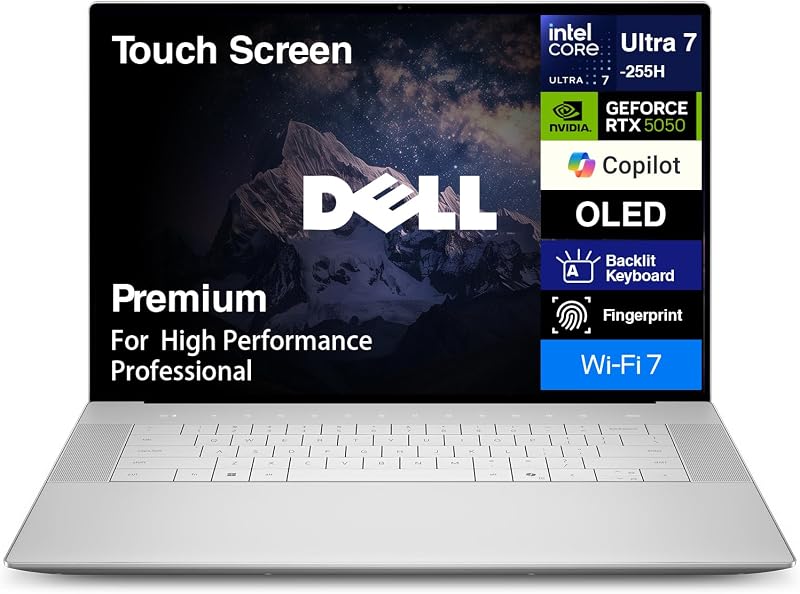
Screen real estate and visual fidelity dictate how comfortably you can work throughout an entire day. The Dell XPS 16 is equipped with an expansive 16.3-inch OLED touchscreen boasting a 4K resolution of 3840 x 2400 pixels and a fluid 120Hz refresh rate. Because OLED technology illuminates each pixel individually, the panel achieves infinite contrast ratios, deep black levels, and vivid color reproduction that make visual evaluation effortless. In any thorough dell xps 16 review, this high-refresh panel stands out as one of the most immersive displays available on a modern workstation.
On the other hand, the Dell Inspiron 14 Plus features a 14-inch WUXGA display with a resolution of 1920 x 1200 pixels, narrow borders, and a 300-nit brightness rating. While 1920 x 1200 in a 16:10 aspect ratio provides crisp text scaling for document review, web browsing, and administrative workflows, it covers significantly less visual canvas than the 4K panel on the XPS. A 14-inch form factor also restricts your ability to view split-screen windows comfortably without zooming out, an ergonomics factor highlighted in our dell xps 15 vs inspiron 14 plus analysis.
The differences go beyond panel size: the 120Hz refresh rate on the dell xps 16 oled display makes system navigation, scrolling, and touch interaction look markedly smoother than standard 60Hz screens. The Inspiron’s 300-nit panel remains functional for indoor lighting, but the XPS 16 provides the pinpoint color precision and ultra-sharp pixel density demanded by graphic artists, photographers, and video editors.
Edge: Dell XPS 16 wins decisively with its larger 16.3-inch 4K OLED touchscreen and fluid 120Hz refresh rate.
Form Factor, Ergonomics, and Portability
Chassis design represents the central functional divergence between these two machines. The Dell Inspiron 14 Plus is built with a flexible 360-degree hinge that instantly transforms the machine from a conventional clamshell into a tent display, presentation stand, or flat tablet. Measuring 12.36 inches long, 8.9 inches wide, and just 0.65 inches thick, this convertible slip easily into commuter backpacks and cramped lecture hall desks. For users who value interactive touch engagement and casual stylus-driven operation, this versatility adds immediate practical utility.
Conversely, the Dell XPS 16 adheres to a traditional high-performance clamshell design. With physical dimensions of 14.15 inches by 9.5 inches and a thickness of 0.75 inches, it commands a noticeable presence on any work surface. Dell built this machine from premium platinum materials, integrating advanced internal cooling to manage the heat generated by the high-wattage Intel Core Ultra 9 processor and NVIDIA GPU. That rigid, expansive chassis creates a rock-solid desktop replacement platform, but it sacrifices quick adaptability in dynamic environments.
When deciding between the dell xps 16 or inspiron 14 plus for college, mobility frequently carries more weight than peak graphics speed. Walking across campus, using tablet mode for reading digital textbooks, or sketching diagrams during a lecture is far more practical on the Inspiron 14 Plus. Similar functional contrasts surface when comparing hybrid convertibles against traditional builds, such as in the dell inspiron 14 plus vs hp spectre x360 14 review. For mobility-first scenarios, the Inspiron holds a major ergonomic advantage.
Edge: Dell Inspiron 14 Plus takes the mobility lead with its thinner profile and versatile 360-degree 2-in-1 hinge.
Connectivity, Ports, and Peripheral Support
Connectivity options determine how easily you can plug in external storage, secondary displays, and desktop accessories without reaching for an array of external dongles. The Dell XPS 16 prioritizes high-bandwidth, modern connection standards. It features three Thunderbolt 4 ports, a full-sized SD card reader, and a 3.5mm headphone/microphone audio jack. The presence of Thunderbolt 4 allows bidirectional 40Gbps data transfers, high-speed external GPU connectivity, and direct high-resolution video outputs, while the dedicated SD card reader eliminates extra adapters for digital photographers.
The Dell Inspiron 14 Plus takes a hybrid approach to its port layout, incorporating both modern and legacy inputs. It includes a USB-C port, a legacy USB-A port for older thumb drives and peripherals, and a dedicated HDMI port. The listing notes that the Inspiron supports up to three external displays simultaneously across its HDMI and USB-C outputs. For standard office or classroom setups where legacy conference room projectors and standard USB peripherals are common, the Inspiron allows direct plug-and-play simplicity.
For wireless data transfers, both laptops are up to date, incorporating cutting-edge Wi-Fi 7 (802.11be) and Bluetooth connectivity. Evaluating this port distribution mirrors the trade-offs found in our dell xps 13 vs inspiron 14 plus comparison: the XPS offers superior maximum bandwidth and video transfer speeds via Thunderbolt 4, while the Inspiron eliminates the need for legacy adapters by including native HDMI and USB-A.
Edge: Tie. The XPS 16 delivers superior throughput with three Thunderbolt 4 ports and an SD slot, while the Inspiron 14 Plus offers convenient native HDMI and USB-A connectivity.
Power Delivery and Battery Capacity
High-end components demand substantial electrical support, and battery specifications dictate how long each machine can operate away from a wall outlet. The Dell XPS 16 houses a massive 6-cell 99Whr battery, which is practically the legal limit for air travel. To keep this high-capacity cell topped off and provide sufficient juice to both the Intel Core Ultra 9 processor and dedicated RTX 5060 GPU under full load, Dell packages the laptop with a 130W Type-C power supply. However, powering a 16.3-inch 4K OLED display at 120Hz consumes power at a rapid clip.
For the Dell Inspiron 14 Plus, the Amazon listing does not specify the exact watt-hour battery capacity or the wattage rating of its charger. Nonetheless, the hardware profile tells a distinct story regarding power consumption. The Inspiron relies on an 8-core AMD Ryzen AI processor with integrated Radeon graphics and an energy-efficient 14-inch WUXGA display operating at 300 nits. Without the electrical overhead of a dedicated graphics chip and a dense 4K panel, its components draw dramatically fewer watts under standard workloads.
Even though the XPS 16 packs a cavernous 99Whr battery, much of that energy is allocated to running its high-wattage silicon and ultra-bright pixels. Buyers who require verified, manufacturer-rated battery specs will appreciate the clear 99Whr listing on the XPS 16, but its 130W adapter confirms its identity as a workstation tethered closely to its charger during sustained creative rendering.
Edge: Dell XPS 16 provides verified details with a massive 99Whr battery and high-output 130W charging support.
Pros and Cons
Dell XPS 16
Pros
- GeForce RTX 5060 8GB GDDR7 dedicated graphics
- 3-inch 4K OLED 120Hz touchscreen
- 16-core Intel Core Ultra 9 processor
- Massive 99Whr battery capacity
- Three high-speed Thunderbolt 4 ports
Cons
- Larger and heavier clamshell chassis
- Higher power consumption during workloads
- Lacks legacy USB-A and HDMI ports
Dell Inspiron 14 Plus

Pros
- Versatile 360-degree convertible 2-in-1 hinge
- AMD Ryzen AI NPU delivering 50 TOPS
- Compact and highly portable 14-inch footprint
- Native HDMI and legacy USB-A ports
Cons
- Integrated graphics with shared memory
- Lower resolution 1920×1200 300-nit panel
- Third-party resealed packaging for SSD upgrade
View Dell Inspiron 14 Plus on Amazon
Who Should Buy Each One
Choose the Dell XPS 16 If
- You edit high-resolution 4K video, create 3D animation, or require NVIDIA Studio acceleration via the dedicated RTX 5060 GPU.
- You demand color-accurate visual rendering and expansive screen workspace on a 16.3-inch 4K OLED 120Hz display.
- You run demanding compilation environments or multi-layered simulations that require 32GB of RAM and a 16-core Intel Core Ultra 9 processor.
- You use fast external storage drives and professional SD media cards that capitalize on Thunderbolt 4 and high-speed card readers.
Choose the Dell Inspiron 14 Plus If
- You need a versatile 2-in-1 convertible that seamlessly switches between a standard laptop, a media stand, and a touch tablet.
- You prioritize compact portability for easy commuting, library study sessions, and frequent travel.
- You want on-device AI efficiency powered by AMD Ryzen AI with Copilot+ and a 50 TOPS neural processing unit.
- You prefer native plug-and-play connections for USB-A flash drives and HDMI monitors without carrying extra adapters.
Final Verdict
This dell xps 16 vs inspiron 14 plus comparison clearly demonstrates how divergent two laptops from the same manufacturer can be. The Dell XPS 16 is an uncompromising, desktop-grade mobile workstation. By combining a 16-core Intel Core Ultra 9 processor, 32GB of LPDDR5X RAM, an NVIDIA GeForce RTX 5060 GPU with 8GB GDDR7 memory, and a jaw-dropping 16.3-inch 4K OLED 120Hz touchscreen, it stands as an elite system for professional creators and power users who refuse to compromise on visual precision and rendering throughput.
Conversely, anyone wondering is dell inspiron 14 plus worth it will find their answer in its adaptable design and balanced mobile performance. While it lacks dedicated graphics and high-end 4K fidelity, its flexible 360-degree convertible hinge, compact 14-inch footprint, legacy port array, and AMD Ryzen AI processor with 50 TOPS NPU make it an outstanding daily companion for students, mobile workers, and general productivity users. If heavy 3D production or video timelines define your day, invest in the XPS 16; for versatile everyday agility, the Inspiron 14 Plus delivers exactly what you need.
FAQ
Can the Dell Inspiron 14 Plus handle 4K video editing?
The Dell Inspiron 14 Plus can handle basic, light 4K video playback and simple timeline trimming through its AMD Ryzen AI 7 350 processor. However, because it relies on integrated AMD Radeon graphics with shared memory rather than a dedicated GPU, complex multi-stream editing, color grading, and heavy 3D visual effects will encounter significant slowdowns and extended render times.
Is the Dell XPS 16 suitable for college students?
The Dell XPS 16 is an exceptional laptop for college students enrolled in engineering, computer science, architecture, or film production programs that mandate high CPU core counts and dedicated graphics acceleration. For general humanities or business majors, however, its 16.3-inch chassis and 0.75-inch thickness may prove unnecessarily heavy and bulky for small lecture hall desks.
What does the resealed notice on the Dell Inspiron 14 Plus listing mean?
The Amazon listing specifies that the Inspiron 14 Plus has been opened and resealed by the seller (ISTComputers) to upgrade the solid-state drive to a 1TB SSD. The listing notes that Dell’s original one-year hardware warranty remains intact on the remaining factory components.
Does the Dell XPS 16 come with Windows 11 Pro?
Yes, the Dell XPS 16 configuration featured in this comparison comes preinstalled with Windows 11 Pro 64-bit, providing advanced enterprise security features such as BitLocker encryption and remote desktop capabilities out of the box. The Inspiron 14 Plus ships with Windows 11 Home.
Can both laptops output to multiple external monitors?
Yes, both systems support multi-monitor desktop configurations. The Inspiron 14 Plus specifically supports up to three external monitors simultaneously using its native HDMI and USB-C ports. The Dell XPS 16 achieves multi-display configurations through its three high-bandwidth Thunderbolt 4 ports, which support native DisplayPort video streams.
How do the touchscreens differ between these two laptops?
While both computers feature responsive touchscreens, their display technologies are fundamentally different. The XPS 16 features a 16.3-inch 4K OLED panel with 3840 x 2400 resolution and a 120Hz refresh rate in a fixed clamshell form factor. The Inspiron 14 Plus features a 14-inch 1920 x 1200 panel at 300 nits mounted on a 360-degree hinge, allowing it to be used as a flat slate tablet or tented media display.