The primary division deciding the choice between the Dell XPS 14 and the Dell XPS 16 is dedicated graphical horsepower versus everyday travel mobility. The larger chassis incorporates a discrete NVIDIA graphics processor built for heavy rendering workloads, while the compact model relies on integrated graphics inside an agile, highly portable frame.
Choose the Dell XPS 14 if you need a lightweight machine for commuting, business travel, and versatile everyday productivity. Choose the Dell XPS 16 if your creative projects require workstation-grade dedicated GPU acceleration, an expansive 4K workspace, and maximum power delivery.


Dell XPS 14 vs Dell XPS 16 at a Glance
| Feature | Dell XPS 14 | Dell XPS 16 |
|---|---|---|
| Display Size and Type | 14.5-inch Touch 3.2K OLED | 16.3-inch Touch 4K OLED |
| Screen Resolution | 3.2K (Listing does not specify pixel count) | 3840 x 2400 pixels (4K) |
| Refresh Rate | 48-120Hz variable refresh rate | 120Hz refresh rate |
| Processor | Intel Core Ultra 7 255H | Intel Core Ultra 9-285H (16 cores, up to 5.4GHz) |
| Graphics Hardware | Integrated Intel Arc Graphics (Shared) | NVIDIA GeForce RTX 5060 (8GB GDDR7) + Integrated |
| Memory | 32GB Memory | 32GB LPDDR5X |
| Storage | 1000 GB (1TB) SSD | 1TB PCIe NVMe SSD |
| Chassis Dimensions | 8.5″L x 12.6″W x 0.71″Th | 14.15″L x 9.5″W x 0.75″Th |
| Weight | 3.8 pounds | Not listed |
| Operating System | Windows 11 Home | Windows 11 Pro |
| Battery and Power Supply | 240V AC rated (Capacity not listed) | 6-cell 99Whr battery, 130W power supply |
| Best For | Mobile productivity, business, and travel | Demanding visual creation, 3D rendering, and heavy studio workloads |
Graphics and Processing Performance
Compute and graphics hardware define how efficiently a laptop processes complex creative projects. In this Dell XPS 14 vs 16 graphics performance matchup, the internal configurations target entirely different workloads. The XPS 14 relies on the Intel Core Ultra 7 255H processor with integrated Intel Arc graphics utilizing shared memory. This configuration easily accommodates high-resolution photo editing, multitasking across dense spreadsheets, and day-to-day productivity. When evaluating the dell xps 14 vs 15, users often observe that integrated architecture prioritizes heat suppression and thin chassis profiles over sheer graphical throughput.
In contrast, the XPS 16 functions as a true creative workstation. It houses the 15th Gen Intel Core Ultra 9-285H processor with 16 cores, 16 threads, 6 performance cores, and a boost clock up to 5.4GHz. More importantly, it pairs that CPU with a dedicated NVIDIA GeForce RTX 5060 graphics processor featuring 8GB of dedicated GDDR7 video memory alongside its dual integrated graphics setup. When asking whether to buy the Dell XPS 14 or 16 for video editing, the discrete RTX 5060 on the 16-inch model provides hardware-accelerated video encoding, rapid 3D timeline rendering, and stability in GPU-bound tasks like color grading. The XPS 14 must share system RAM between the CPU and the Intel Arc coprocessor, limiting raw rendering capability during intense computational loads.
Buyers looking at raw compute ceilings will find the XPS 16 operating in a separate performance tier. The dedicated GDDR7 memory pipeline ensures graphical assets, textures, and timelines load without siphoning general system memory away from ongoing processes. While the XPS 14 handles mainstream creative tools with its Intel AI engine, prolonged high-intensity jobs finish substantially faster on the larger machine.
Edge: Dell XPS 16 delivers decisively superior compute and rendering capabilities via its dedicated NVIDIA GeForce RTX 5060 GPU with 8GB of GDDR7 memory.
Display Size, Resolution, and Workspace
Screen real estate and clarity dictate how comfortably you can manage intricate timelines, code repositories, and simultaneous windows. A thorough Dell XPS 14 vs 16 display comparison reveals distinct visual approaches tailored for different workstation environments. The XPS 14 features a 14.5-inch 3.2K OLED touchscreen. It includes a variable refresh rate ranging from 48Hz to 120Hz. This dynamic refresh capability delivers fluid cursor and window movement when active, but slows down automatically on static text or web pages to preserve energy. The 14.5-inch panel provides high pixel density, though split-screen productivity requires tight window scaling.
The XPS 16 upgrades the visual workspace to a 16.3-inch 4K OLED touchscreen boasting a native 3840 x 2400 resolution at 120Hz. That massive 16:10 resolution offers immense workspace area, allowing video creators to view full-resolution 4K video clips natively while leaving ample space for effect controls, project bins, and timeline tracks. Comparing the panel footprint against older mid-tier laptops like in our dell xps 15 vs 16 analysis highlights how the broader 16.3-inch canvas reduces horizontal scrolling and window cycling during intensive editing sessions.
While both screens provide vibrant OLED contrast and responsive touch input, the extra 1.8 inches of diagonal display space on the XPS 16 radically alters everyday multitasking. The XPS 14 is compact and visually sharp for single-window dominance, but the XPS 16 provides the canvas space necessary to replace an external monitor when working away from a desk.
Edge: Dell XPS 16 wins for visual professionals due to its expansive 16.3-inch canvas and native 3840 x 2400 4K resolution.
Chassis Dimensions, Form Factor, and Portability
Portability depends on overall volume, footprint, and how easily a chassis slides into standard commuter gear. In any practical Dell XPS 14 review, physical mobility ranks as the standout advantage. The XPS 14 measures 8.5 inches long, 12.6 inches wide, and 0.71 inches thick, weighing in at a manageable 3.8 pounds. Dell constructs this chassis using machined aluminum and Gorilla Glass 3, ensuring rigidity without excessive bulk. The product listing also designates its form factor as convertible, making it nimble enough for tight airline tray tables, lecture hall desks, and constant travel.
The XPS 16 expands physical dimensions across every axis to accommodate its larger screen and heavy-duty cooling architecture. Its chassis measures 14.15 inches long, 9.5 inches wide, and 0.75 inches thick, designated as a standard clamshell form factor. While the listing does not specify the exact weight of the XPS 16, a chassis measuring over 14 inches wide requires dedicated space in a larger commuter backpack. When comparing smaller portable machines in comparisons like the dell xps 14 vs hp spectre x360 14, the physical overhead of a 16-inch chassis becomes an obvious trade-off.
Carrying the XPS 14 daily feels effortless compared to packing the substantial frame of the XPS 16. If your daily routine involves moving between meeting rooms, client locations, and coffee shops, the 3.8-pound XPS 14 offers an undeniably superior form factor for mobile use.
Edge: Dell XPS 14 takes this category with its compact 3.8-pound frame and streamlined 8.5-by-12.6-inch footprint.
Battery Capacity and Power Delivery
Power specifications determine how long a laptop sustains high-performance productivity away from mains electricity. In evaluating Dell XPS 14 vs 16 battery life expectations, the technical data shows two completely different hardware strategies. The XPS 16 integrates a massive 6-cell 99Whr battery pack, positioned right at the legal limit for commercial air travel. Dell supports this high-capacity pack with an included 130W power supply utilizing Type-C power-in. This substantial wattage is essential to drive the 16-core Intel Core Ultra 9 processor and discrete RTX 5060 GPU under peak rendering loads.
The XPS 14 listing does not specify its exact battery watt-hour capacity, noting only a standard 240V AC rating. However, the machine leverages architectural power advantages through its integrated Intel Arc configuration and variable refresh display. By dynamically downshifting its display from 120Hz to 48Hz on static images, the XPS 14 actively curtails unnecessary battery drain. As explored in our dell xps 13 vs 16 guide, powering an integrated GPU and smaller 14.5-inch panel generally pulls far fewer watts during routine office tasks than feeding a high-wattage dedicated graphics processor and a power-hungry 4K OLED matrix.
Nonetheless, from a pure hardware specification standpoint, the XPS 16 provides verified capacity with its colossal 99Whr battery and high-wattage 130W delivery system. It is purpose-built to deliver sustained power for intense rendering, even if running demanding 4K creative software inevitably consumes that reserve quickly.
Edge: Dell XPS 16 holds the structural advantage with its verified 99Whr battery pack and robust 130W charging support.
Connectivity, Ports, and Peripheral Expansion
Professional workflows demand flexible connectivity to offload media, connect multiple external monitors, and interface with high-speed peripherals. The XPS 16 listing documents an extensive peripheral suite designed for studio workflows. It provides three Thunderbolt 4 ports with dedicated video output support, an SD card reader, and a headphone/microphone combo jack. For wireless connectivity, the XPS 16 comes equipped with bleeding-edge Wi-Fi 7 (802.11be) and Bluetooth 5.4. This allows high-throughput wireless data transfers and multi-monitor desktop docking through universal Thunderbolt cables.
The XPS 14 listing provides more modest connectivity specifications. It lists a memory card slot, HD audio jack, backlit keyboard, and fingerprint reader, but does not detail the exact count or generation of its USB or Thunderbolt ports, nor does it specify its wireless standards. In everyday creative use, having an integrated SD card reader on both devices facilitates media imports from cameras, but the verified presence of three Thunderbolt 4 interfaces on the XPS 16 ensures reliable expansion for high-speed external storage drives and multiple external displays.
Creative professionals who frequently offload high-bitrate footage or require multi-display setups will appreciate the clearly defined I/O capabilities of the 16-inch model. When comparing compact options as we do in the dell xps 14 vs inspiron 14 plus overview, defined high-speed bus architectures are vital for heavy productivity pipelines.
Edge: Dell XPS 16 wins on connectivity with three verified Thunderbolt 4 ports, an SD card reader, and modern Wi-Fi 7 support.
Operating System and Professional Productivity
Software environments and system integration directly affect commercial usability, security, and developer convenience. When choosing the Dell XPS 14 or 16 for programming, the factory-installed operating system introduces a key functional divergence. The XPS 14 ships with Windows 11 Home. It features dedicated Windows Copilot integration alongside the Intel Core Ultra Series 2 AI engine, streamlining everyday drafting, basic automation, and general office productivity. For business or development tasks requiring local container management, however, Windows 11 Home lacks native enterprise virtualization tools out of the box.
The XPS 16 arrives pre-configured with Windows 11 Pro (64-bit). This operating system layer includes enterprise-grade management features, advanced BitLocker drive encryption, and native support for Client Hyper-V and Windows Sandbox. Software engineers running Docker containers, virtual machines, or dense development stacks can immediately leverage Windows 11 Pro without upgrading their license. Furthermore, the XPS 16 features an internal cooling architecture specifically engineered to sustain long compilation cycles and multi-threaded simulations without aggressive thermal throttling.
Both laptops include biometric fingerprint readers for swift, secure logins, as well as integrated front webcams for video conferences. However, the combination of Windows 11 Pro, an Intel Core Ultra 9 processor with 16 threads, and 32GB of high-speed LPDDR5X RAM makes the XPS 16 an inherently more versatile machine for advanced technical professionals.
Edge: Dell XPS 16 takes the category by providing Windows 11 Pro pre-installed alongside superior multi-threaded computational resources.
Pros and Cons
Dell XPS 14

Pros
- Lightweight 3.8-pound portable chassis
- Variable 48-120Hz refresh rate display
- Sharp 14.5-inch 3.2K OLED touchscreen
- Machined aluminum and Gorilla Glass 3 construction
Cons
- Integrated Intel Arc graphics with shared memory
- Pre-installed with Windows 11 Home
- Battery capacity not listed
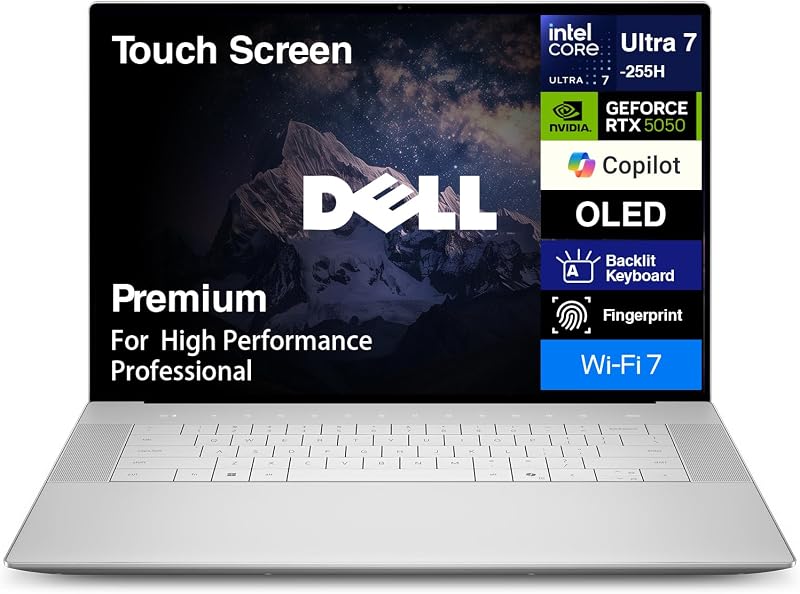
Dell XPS 16
Pros
- Dedicated NVIDIA GeForce RTX 5060 8GB GDDR7 GPU
- 3-inch 4K OLED 3840×2400 touchscreen
- Massive 6-cell 99Whr battery with 130W adapter
- Three high-speed Thunderbolt 4 ports
- Pre-installed with Windows 11 Pro
Cons
- Larger 14.15-inch chassis footprint
- Total weight not listed in specifications
Who Should Buy Each One
Choose the Dell XPS 14 If
- You need a lightweight 3.8-pound machine with a slim 8.5-by-12.6-inch profile for frequent commuting and travel.
- Your visual tasks are satisfied by a 14.5-inch 3.2K OLED touch display with energy-saving 48-120Hz variable refresh rates.
- You do not require discrete NVIDIA graphics, relying instead on efficient integrated Intel Arc graphics for general productivity and media playback.
- You want built-in Windows Copilot AI acceleration housed inside a modern machined aluminum and Gorilla Glass 3 enclosure.
Choose the Dell XPS 16 If
- You edit high-bitrate 4K video, render 3D scenes, or run GPU-intensive software requiring a discrete NVIDIA GeForce RTX 5060 with 8GB GDDR7 memory.
- You need a massive 16.3-inch 4K OLED touchscreen (3840 x 2400) to view detailed project timelines without scaling down your workspace.
- Your software workflow relies on Windows 11 Pro for containerization, virtualization, or enterprise security management.
- You require robust expansion options including three Thunderbolt 4 ports, an SD card reader, Wi-Fi 7, and a large 99Whr battery.
Final Verdict
When asking is Dell XPS 16 worth it, the answer depends entirely on whether your workload utilizes dedicated graphics hardware and extra display area. The Dell XPS 16 stands out as a genuine desktop replacement, pairing an Intel Core Ultra 9-285H processor with a dedicated NVIDIA GeForce RTX 5060 GPU and an expansive 16.3-inch 4K OLED canvas. Backed by three Thunderbolt 4 connections, Windows 11 Pro, and a 99Whr battery pack, it offers the horsepower required by serious digital creators, video editors, and technical power users who cannot compromise on rendering performance.
On the other hand, the Dell XPS 14 is the clear champion for professionals who value portability over workstation muscle. Weighing only 3.8 pounds with a compact 14.5-inch 3.2K OLED display and efficient integrated Intel Arc graphics, it handles daily business, programming, and entertainment effortlessly without burdening your commute. Unless your daily routine demands intensive 3D rendering or dedicated video acceleration, the agile XPS 14 delivers the ideal balance of elegance and everyday capability.
FAQ
Which laptop is better: Dell XPS 14 or 16 for video editing?
The Dell XPS 16 is significantly better suited for video editing. It includes a dedicated NVIDIA GeForce RTX 5060 graphics card with 8GB of GDDR7 memory and an expansive 16.3-inch 4K OLED display (3840 x 2400). The Dell XPS 14 features integrated Intel Arc graphics with shared memory, which can handle light video cuts but lacks the dedicated hardware acceleration needed for multi-stream 4K editing and heavy effects rendering.
Can the Dell XPS 14 handle modern gaming or heavy 3D modeling?
The Dell XPS 14 relies on integrated Intel Arc graphics and shared system RAM. While it can run casual games, light indie titles, and basic 3D CAD modeling, it does not have the discrete VRAM or graphics processing architecture required for demanding AAA gaming or complex 3D scene rendering. The Dell XPS 16, equipped with an RTX 5060 GPU, is far better equipped for those tasks.
What is the main difference between the displays on the XPS 14 and XPS 16?
The Dell XPS 14 features a 14.5-inch 3.2K OLED touch display with a variable refresh rate of 48Hz to 120Hz, which saves battery power when displaying static content. The Dell XPS 16 features a larger 16.3-inch 4K OLED touch display with a fixed 120Hz refresh rate and a native resolution of 3840 x 2400 pixels, offering more screen real estate and higher visual resolution for multi-window workflows.
Is the Dell XPS 16 worth it for everyday productivity?
If your daily work consists primarily of web browsing, document drafting, email, and media playback, the Dell XPS 16 provides more power and bulk than necessary. The compact 3.8-pound Dell XPS 14 is generally more comfortable for general use. The XPS 16 is best suited for users who actively utilize its dedicated RTX 5060 graphics, 4K screen real estate, and multi-threaded Core Ultra 9 processor.
How do the ports differ between the Dell XPS 16 vs 14?
The Dell XPS 16 includes three high-speed Thunderbolt 4 ports, an SD card reader, and a headphone/microphone combo jack, alongside Wi-Fi 7 and Bluetooth 5.4. The Dell XPS 14 listing specifies an integrated memory card slot and HD audio jack, but does not detail the exact count of USB or Thunderbolt interfaces, giving the XPS 16 a clearer edge for high-speed docking and peripheral connectivity.
Which laptop is better: Dell XPS 14 or 16 for programming?
Both models feature 32GB of RAM and 1TB SSD storage, making either capable of managing code compilation. However, the Dell XPS 16 comes pre-installed with Windows 11 Pro, which includes built-in virtualization tools like Hyper-V and Sandbox. The XPS 16 also provides 16 CPU cores on its Intel Core Ultra 9 processor, making it superior for heavy containerized workflows and large codebases.
What materials are used in the Dell XPS 14 chassis?
The Dell XPS 14 is constructed using machined aluminum and Gorilla Glass 3. This combination provides a rigid, premium finish while keeping the laptop at an easily portable weight of 3.8 pounds and a thickness of 0.71 inches.