The choice between the Dell XPS 13 and the Dell XPS 16 comes down to whether you prioritize featherweight portability and ARM-based efficiency or desktop-grade processing with dedicated graphics and an expansive screen.
Choose the Dell XPS 13 if you need an ultra-compact traveling machine for mobile productivity, or select the Dell XPS 16 if your workflow requires dedicated graphics rendering and an expansive 4K workspace.


Dell XPS 13 vs Dell XPS 16 at a Glance
| Feature | Dell XPS 13 | Dell XPS 16 |
|---|---|---|
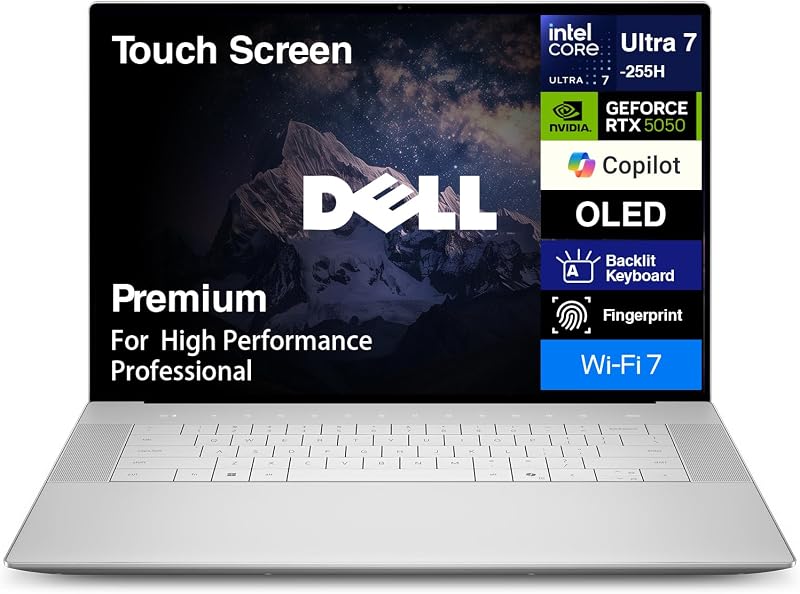
| Processor | Snapdragon X Elite X1E-80-100 (12 cores, up to 4.0GHz, 45 TOPS NPU) | Intel Core Ultra 9-285H (16 cores, 16 threads, up to 5.4GHz) |
| Graphics | Qualcomm Adreno Graphics (Integrated) | NVIDIA GeForce RTX 5060 (8GB GDDR7 Dedicated) |
| Display Size & Type | 13.4-inch LED InfinityEdge Non-Touch | 16.3-inch OLED Touchscreen |
| Screen Resolution | 2.8K (2880 x 1800 pixels) | 4K (3840 x 2400 pixels) |
| Memory | 32GB LPDDR5X (8448MT/s) | 32GB LPDDR5X |
| Storage | 1TB PCIe NVMe SSD | 1TB PCIe NVMe SSD |
| Dimensions | 11.62″ L x 7.84″ W x 0.6″ H | 14.15″ L x 9.5″ W x 0.75″ H |
| Weight | 2.6 pounds | Not listed |
| Battery & Power | Not listed capacity (USB-C Power Delivery) | 6-cell 99Whr battery (130W Power Adapter) |
| Ports | 2x USB4 Type-C (DisplayPort, Power Delivery) | 3x Thunderbolt 4, SD card reader, 3.5mm audio jack |
| Best For | Frequent travelers, business commuters, and mobile productivity | Creative professionals, 3D artists, and power users |
Graphics and Compute Architecture
The processing architecture marks the fundamental divergence when evaluating the Dell XPS 13 Snapdragon vs XPS 16 Intel hardware. The Dell XPS 13 relies on the Qualcomm Snapdragon X Elite X1E-80-100, an ARM-based chip featuring 12 cores, a dual-core boost reaching 4.0GHz, and a dedicated Neural Processing Unit delivering 45 TOPS. This silicon is tuned for modern AI workflows, fluid multitasking, video conferencing, and low-thermal operation. Graphics handling falls entirely to the integrated Qualcomm Adreno GPU, which is built to drive sharp desktop resolutions, video playback, and general business tasks without placing heavy thermal demands on the compact aluminum frame.
The Dell XPS 16 takes a completely different path with an x86 Intel Core Ultra 9-285H processor boasting 16 cores, 16 threads, 6 performance cores, a 24MB cache, and clock speeds up to 5.4GHz. Dell pairs this computing engine with dual graphics hardware, combining integrated graphics with an NVIDIA GeForce RTX 5060 discrete laptop GPU packed with 8GB of GDDR7 memory. If you are comparing mid-sized performance profiles like the dell xps 14 vs 16, this 16-inch configuration represents the upper boundary of computing throughput in the XPS lineup, giving you the dedicated video memory required for hardware-accelerated 3D modeling, visual effects, and intense rendering tasks.
In practice, the Dell XPS 13 vs 16 performance difference reflects two distinct computing philosophies. The XPS 13 excels at responsive productivity, local AI acceleration via its 45 TOPS NPU, and background task management without generating intense heat. The XPS 16 supplies sustained brute-force compute power and dedicated graphics horsepower. Trying to run heavy 3D production rendering on the XPS 13 Adreno GPU will result in severe limitations, whereas the XPS 16 handles complex graphics pipelines with dedicated GDDR7 bandwidth.
Edge: Dell XPS 16 for its 16-core Intel Core Ultra 9 processor and discrete GeForce RTX 5060 graphics with dedicated GDDR7 memory.
Display Quality and Screen Real Estate
Your interaction with any laptop centers on the display panel, and the visual experience between these two machines diverges significantly in panel technology, touch capability, and usable area. The XPS 13 features a 13.4-inch non-touch LED display with a 2880 x 1800 resolution, a dynamic 30 to 120Hz refresh rate, 500 nits of brightness, and an anti-glare coating. The compact InfinityEdge design yields a sharp pixel density in a form factor that fits onto the smallest workspace, maintaining smooth visual transitions through its variable high-refresh panel.
The XPS 16 increases visual fidelity by integrating a 16.3-inch OLED touchscreen panel running at a native 4K resolution of 3840 x 2400 pixels with a 120Hz refresh rate. OLED panels provide per-pixel illumination, allowing true absolute blacks, infinite contrast ratios, and vibrant color reproduction that standard LED screens cannot match. For creators contemplating the Dell XPS 13 or 16 for photo editing, the OLED panel on the XPS 16 provides an expansive canvas with 4K clarity, letting you manipulate high-resolution images and detailed timeline interfaces without constantly panning across your workspace.
The practical trade-off centers on display function and physical size. The XPS 13 non-touch screen reduces reflections through its anti-glare finish and conserves energy with its smaller footprint and standard LED backlighting. The XPS 16 adds touch interaction and superior OLED image depth, but driving a 4K touch surface draws noticeably more energy. Those assessing older workstation alternatives such as the dell xps 15 vs 16 will recognize that the modern 16.3-inch 4K OLED configuration sets an exceptionally high visual standard for color-critical work.
Edge: Dell XPS 16 for its larger 16.3-inch 4K OLED touchscreen, superior black levels, and extra workspace.
Portability, Dimensions, and Traveling Comfort
Portability is the defining selling point of the XPS 13, establishing it as an ideal travel machine. Measuring 11.62 inches long, 7.84 inches wide, and just 0.6 inches thick, the XPS 13 weighs an ultra-light 2.6 pounds. Built with a CNC-machined aluminum chassis in Platinum, it slips into small messenger bags, backpacks, and airline seatback pockets without adding noticeable heft. For students evaluating the Dell XPS 13 or 16 for college, the 2.6-pound chassis makes navigating lecture halls, libraries, and campus commutes effortless.
The XPS 16 expands physical dimensions across every axis to accommodate its larger screen, high-output cooling architecture, and dedicated GPU. Its Platinum aluminum chassis measures 14.15 inches long, 9.5 inches wide, and 0.75 inches thick. While the listing does not specify the exact total weight of this XPS 16 model, its 16.3-inch footprint and standard form factor require a full-sized laptop bag and substantial desk space. The machine is engineered to serve primarily as an anchored workstation that you can transport when necessary, rather than an ultra-mobile notebook designed for continuous on-the-go typing.
Deciding between these dimensions comes down to how frequently you work outside of a fixed desk environment. The XPS 13 provides an uncompromised mobile form factor that fits comfortably on airplane tray tables, crowded coffee shop counters, and lap desks. The XPS 16 demands dedicated space, making spontaneous mobile work far more cumbersome. Readers who want an intermediate balance often compare smaller chassis options like the dell xps 13 vs 14, but between these two specific machines, the 13-inch model is the undisputed leader in mobility.
Edge: Dell XPS 13 for its ultra-portable 2.6-pound frame and ultra-thin 0.6-inch profile.
Battery Capacity and Power Management
Power engineering is another area where hardware philosophies split, directly shaping expectations around Dell XPS 13 vs 16 battery life. The XPS 13 pairs its energy-efficient Snapdragon X Elite processor with high-speed LPDDR5X memory running at 8448MT/s. While the listing does not specify the exact milliamp-hour or watt-hour capacity for the XPS 13 battery, the ARM architecture allows for low standby draw and prolonged endurance during continuous web browsing, video streaming, and office application use, all powered via standard USB-C Power Delivery.
The XPS 16 adopts a high-capacity power subsystem built to sustain its power-hungry components. Dell equips the laptop with a large 6-cell 99Whr battery, which sits right at the upper threshold permitted on commercial airline flights. To keep the Intel Core Ultra 9 chip and RTX 5060 GPU supplied with electricity, the XPS 16 relies on a heavy-duty 130W power adapter over Type-C. This large battery is necessary because driving a 16.3-inch 4K OLED panel, 16 CPU cores, and an 8GB GDDR7 discrete graphics board creates significant power draw under load.
The contrast in power management impacts how you carry these machines. The XPS 13 operates with minimal energy overhead, allowing users to move through an entire workday of meetings or classes without tethering themselves to an outlet. The XPS 16 packs a massive 99Whr battery, but its 4K OLED touchscreen and discrete graphics consume power rapidly when pushed with rendering or processing workloads. The 130W power brick is also considerably larger and heavier to carry than a standard low-wattage travel charger.
Edge: Dell XPS 13 for its energy-sipping ARM processor architecture and lightweight charging requirements.
Port Selection and Peripheral Connectivity
Expansion capabilities and physical connectivity can significantly influence your daily routine, determining whether you need to pack external multi-port adapters. The XPS 13 simplifies physical I/O down to the bare minimum, offering just two USB4 40Gbps USB-C ports that support DisplayPort video output and Power Delivery. While these ports deliver fast transfer rates and universal docking support, connecting traditional USB-A accessories, memory cards, or wired audio requires separate dongles.
The XPS 16 expands peripheral support with a richer interface array. The chassis includes three Thunderbolt 4 ports, an SD card reader, and a dedicated 3.5mm headphone/microphone combo jack. Photographers and videographers benefit directly from the integrated SD card reader, which allows fast media ingestion in the field without carrying separate card readers. The triple Thunderbolt 4 ports also provide versatile bandwidth for connecting external displays, fast storage drives, and docking stations simultaneously.
Wireless standards are matched evenly across both models, as both feature the latest Wi-Fi 7 (802.11be) and Bluetooth 5.4 wireless radios for fast throughput and stable peripheral connections. However, the presence of an integrated SD card slot, an analog audio jack, and a third high-speed data port on the XPS 16 gives it an advantage for creative professionals who use varied physical hardware. If you frequently weigh port layouts against previous generations, examining the dell xps 13 vs 15 shows how Dell has transitioned its larger chassis to modern Thunderbolt setups while keeping legacy ports to a functional minimum.
Edge: Dell XPS 16 for its three Thunderbolt 4 ports, built-in SD card reader, and analog audio jack.
Built-in Input Devices and User Authentication
The interaction hardware built into the chassis shapes the user experience during long typing and productivity sessions. The XPS 13 includes a 1080p FHD RGB camera alongside a dual-array microphone system and HD audio, providing crisp video capture and voice pickup for remote business meetings. Biometric login and system navigation are integrated into its compact deck, though the minimalist footprint means the keyboard and palm rest areas are scaled tightly to fit the 11.62-inch chassis width.
The XPS 16 uses its wider deck to provide a backlit standard keyboard flanked by expanded palm rest space. For biometric security, the XPS 16 features an integrated fingerprint reader alongside its built-in webcam, giving users instant, password-free sign-in through Windows 11 Pro. The expansive deck makes typing more comfortable for users with larger hands, reducing wrist fatigue during extended writing, programming, or audio mixing sessions.
Both machines feature premium input construction, but the tactile environment differs based on available space. The XPS 13 delivers a compact, highly responsive typing experience tailored for cramped spaces like tray tables, while the XPS 16 offers a full-scale workstation surface. Exploring comparisons such as the dell xps 13 vs inspiron 14 plus reveals that compact XPS decks remain among the sleekest in the industry, yet the extra physical room on the XPS 16 provides an unconstrained ergonomic base.
Edge: Dell XPS 16 for its integrated fingerprint reader and larger typing surface.
Pros and Cons
Dell XPS 13

Pros
- Ultra-lightweight 2.6-pound aluminum chassis
- Snapdragon X Elite with 45 TOPS NPU
- Smooth 2.8K 120Hz InfinityEdge display
- Fast 8448MT/s LPDDR5X memory
- Modern Wi-Fi 7 and Bluetooth 5.4
Cons
- Only two USB4 Type-C ports
- Integrated graphics only
- No built-in SD card reader
Dell XPS 16
Pros
- NVIDIA GeForce RTX 5060 8GB GDDR7
- Stunning 16.3-inch 4K OLED touchscreen
- 16-core Intel Core Ultra 9-285H
- Large 6-cell 99Whr battery
- Built-in SD card reader and headphone jack
Cons
- Significantly larger chassis footprint
- Higher power draw with 130W adapter
- Weight not listed
Who Should Buy Each One
Choose the Dell XPS 13 If
- You travel frequently and want an ultra-portable 2.6-pound laptop that takes up negligible bag space.
- Your typical workload centers on office software, cloud applications, video meetings, and web browsing.
- You want the power efficiency of the Snapdragon X Elite processor with its integrated 45 TOPS NPU.
- You prefer a 2.8K anti-glare screen that minimizes reflections in bright, changing lighting conditions.
Choose the Dell XPS 16 If
- You need the dedicated 3D rendering and compute performance of an NVIDIA GeForce RTX 5060 GPU with 8GB GDDR7 memory.
- You work in color-critical photography or video production and need a 16.3-inch 4K OLED touchscreen.
- You require integrated legacy media support, including an onboard SD card slot and 3.5mm audio jack.
- You run heavy computational tasks that take full advantage of a 16-core Intel Core Ultra 9-285H processor.
Final Verdict
For the vast majority of mobile professionals, students, and frequent business commuters, the Dell XPS 13 is the practical winner. Its 2.6-pound weight, 0.6-inch thickness, and power-efficient Snapdragon X Elite processor make it an outstanding daily laptop. It handles document drafting, intensive web multitasking, video communication, and AI tasks effortlessly, while its sharp 2.8K 120Hz display delivers exceptional clarity without burdening your shoulder during travel.
The Dell XPS 16 is the clear victor when your daily work requires dedicated graphics muscle, expansive screen real estate, and professional media connectivity. With an Intel Core Ultra 9 processor, discrete GeForce RTX 5060 GPU, a 16.3-inch 4K OLED touchscreen, and a 99Whr battery, it functions as a mobile creative studio. When asking is Dell XPS 16 worth it, the answer is yes for video editors, 3D designers, and technical professionals who need workstation-class performance and are happy to trade travel portability for computing power.
FAQ
Is the Dell XPS 13 or 16 better for college?
The Dell XPS 13 is better suited for college students because its 2.6-pound chassis and compact 13.4-inch footprint make it far easier to carry between lectures, study halls, and dorms. Unless you are enrolled in specialized engineering, 3D animation, or video editing programs that require discrete NVIDIA graphics, the XPS 13 provides all the computing power and convenience needed for coursework.
Dell XPS 13 or 16 for photo editing: which display is better?
The Dell XPS 16 is superior for photo editing due to its 16.3-inch 4K OLED touchscreen. The OLED technology delivers true blacks and high contrast, while the 3840 x 2400 resolution offers a significantly larger workspace for viewing fine image details. The XPS 13 features a sharp 2.8K panel, but its smaller 13.4-inch size and non-OLED display are less suited for intensive color grading and photo correction.
What is the main Dell XPS 13 Snapdragon vs XPS 16 Intel performance difference?
The performance difference lies in processor architecture and graphics capability. The XPS 13 uses an ARM-based Snapdragon X Elite chip with integrated Adreno graphics and a 45 TOPS NPU, prioritizing efficiency, silent operation, and AI features. The XPS 16 uses an x86 Intel Core Ultra 9-285H processor paired with a discrete NVIDIA GeForce RTX 5060 GPU, providing vastly higher performance for heavy 3D rendering, video encoding, and GPU-accelerated computing.
How does the Dell XPS 13 vs 16 battery life compare?
The XPS 13 delivers longer endurance during general productivity tasks like document editing and web browsing due to its efficient ARM processor architecture. Although the XPS 16 includes a massive 99Whr battery, driving a 16.3-inch 4K OLED touch panel alongside a 16-core Intel CPU and discrete RTX graphics consumes power quickly under heavy workloads.
Does the Dell XPS 13 have an SD card slot?
No, the Dell XPS 13 does not feature an SD card slot; its physical ports are limited to two USB4 Type-C connections. In contrast, the Dell XPS 16 includes a built-in SD card reader, making it much more convenient for photographers and videographers who regularly transfer media from cameras.
Does the Dell XPS 16 support touch input?
Yes, the Dell XPS 16 comes equipped with a 16.3-inch 4K OLED touchscreen. The Dell XPS 13 model compared here features a non-touch 2.8K InfinityEdge screen.