The decisive difference between these two memory kits comes down to physical clearance versus aesthetic illumination: the Corsair module integrates a tall, panoramic ten-zone light bar that demands vertical room, while the G.Skill stick uses a low-profile, non-RGB heatspreader designed to slide underneath bulky dual-tower CPU air coolers.
Builders putting together an open, panoramic chassis with liquid cooling and custom lighting should buy the Corsair Vengeance DDR5 6000 CL30, whereas anyone assembling a space-constrained air-cooled build on an AMD platform should select the G.Skill Flare X5 DDR5 6000.


Corsair Vengeance DDR5 6000 CL30 vs G.Skill Flare X5 DDR5 6000 at a Glance
| Attribute | Corsair Vengeance DDR5 6000 CL30 | G.Skill Flare X5 DDR5 6000 |
|---|---|---|
| Form Factor & Pin Count | 288-Pin Desktop DIMM | 288-Pin Desktop U-DIMM |
| Rated Transfer Speed | 6000 MHz | 6000 MT/s |
| Tested CAS Latency | CL30 | CL30 |
| Extended Memory Timings | 30-36-36-76 | 30-38-38-96 |
| Tested Operating Voltage | 1.40 Volts | 1.35 Volts |
| Illumination & Design | Dynamic Ten-Zone Panoramic RGB | Non-RGB Matte Black Heatspreader |
| Supported Overclock Profiles | AMD EXPO & Intel XMP | AMD EXPO & JEDEC Default |
| Software Integration | CORSAIR iCUE Supported | Not listed |
| Module Kit Capacity | 32GB (2x16GB) | 32GB (2x16GB) |
| Best For | Tempered glass builds prioritizing RGB | Air-cooled and compact AM5 builds |
Cooler Clearance and Physical Dimensions
Memory heatspreader height is often the deciding physical parameter when assembling a desktop system. Large dual-tower heatsinks frequently extend their cooling fins and front intake fans directly over the motherboard DIMM slots. In this environment, a memory module with excessive vertical height forces the user to either raise the front fan awkwardly toward the side panel or ditch the dual-fan air cooling setup entirely. Assessing Corsair Vengeance vs Flare X5 cooler clearance reveals fundamentally opposed engineering philosophies.
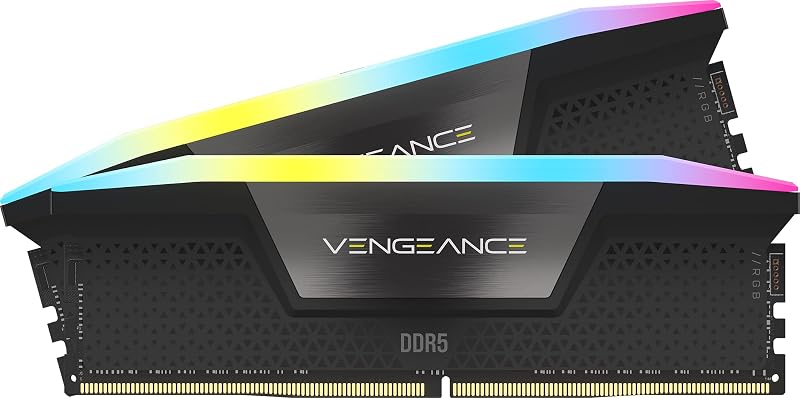
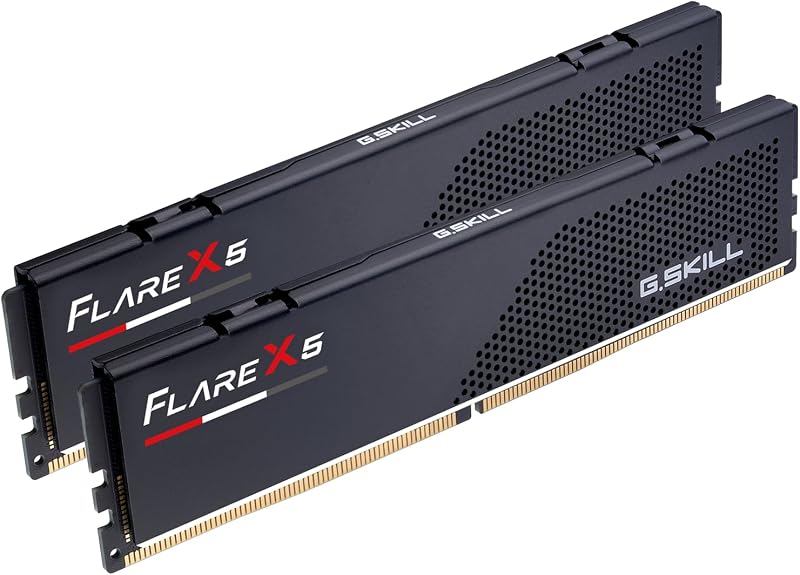
The G.Skill kit uses a low-profile heatsink finished in matte black aluminum, stripping away all decorative diffusers and light pipes to keep the module height minimal. This low-profile form factor ensures unhindered clearance under even the most demanding dual-tower air coolers. In contrast, the Corsair module is crowned with an expansive ten-zone panoramic light bar. This structure elevates the stick significantly higher than a standard baseline DIMM, transforming the memory into a prominent visual showcase that is far better paired with an all-in-one liquid cooler. If you are examining form factors across brands, exploring corsair dominator titanium ddr5 vs g.skill flare x5 ddr5 6000 shows a similar divide between premium tall heatspreaders and low-profile practicality.
Choosing the taller Corsair module requires you to check your chassis width and CPU cooler fan clips, as an overhang can restrict fan mounting. The low-profile G.Skill DIMM guarantees drop-in compatibility across nearly every desktop case and cooler combination. When building in a compact micro-ATX or Mini-ITX case, that vertical clearance makes the assembly process straightforward and headache-free.
Edge: G.Skill Flare X5 DDR5 6000 due to its ultra-compact, low-profile heatspreader that guarantees clearance beneath massive dual-tower air coolers.
Primary Timings and Subtiming Performance
Memory latency dictates how quickly the system memory responds to requests from the CPU memory controller. While both kits operate at an identical base CAS latency of 30 at their rated 6000 MT/s speed, a closer inspection of Corsair Vengeance vs G.Skill Flare X5 subtimings reveals meaningful separation in the extended timing profile. When optimizing memory performance, lower subtimings translate directly into reduced wait states between row access and bank precharge operations.
The Corsair Vengeance DDR5 6000 CL30 is programmed from the factory with timings of 30-36-36-76. In comparison, the G.Skill Flare X5 DDR5 6000 lists factory timings of 30-38-38-96. This difference means Corsair provides noticeably tighter tRCD (RAS to CAS Delay), tRP (Row Precharge Delay), and tRAS (Row Active Time). For users researching cl30 vs cl36 ddr5, the impact of tight primary numbers is well understood, but the secondary values between 36 and 38 cycles also reduce cumulative latency under sustained memory-intensive tasks.
In high-refresh-rate gaming scenarios where CPU draw calls are the bottleneck, tighter secondary timings can edge out minor gains in minimum frame rates. Flare X5 relies on slightly looser primary subtimings to prioritize plug-and-play profile stability across a broad spectrum of silicon bins. Corsair leverages tightly screened high-frequency memory chips to guarantee stability at 30-36-36-76, granting it a technical edge in memory responsiveness.
Edge: Corsair Vengeance DDR5 6000 CL30 because of its tighter factory secondary timings of 30-36-36-76 compared to 30-38-38-96.
Operating Voltage and Thermal Overhead
Voltage parameters directly influence the thermal profile and long-term operating conditions of high-speed DDR5 modules. DDR5 architecture moves the Power Management Integrated Circuit (PMIC) directly onto the memory module itself rather than leaving it on the motherboard. Because the PMIC and memory chips share the same substrate under the heatspreader, higher operational voltage translates to increased localized heat dissipation.
The G.Skill module achieves its rated 6000 MT/s frequency at a conservative 1.35 volts. Corsair pushes its module to 1.40 volts to sustain its tighter 30-36-36-76 profile. That 0.05-volt variance may seem modest on paper, but within a crowded memory slot array with reduced airflow, 1.40 volts generates measurable additional heat. Those curious about alternative non-RGB kits can compare this design in our corsair vengeance ddr5 6000 cl30 vs g.skill ripjaws s5 ddr5 breakdown.
Because the G.Skill kit runs at a lower 1.35V profile, it requires less airflow across its heatspreader to maintain stable operating temperatures during extended compute workloads. Corsair compensates for its 1.40V demand by integrating onboard voltage regulation that can be actively monitored through software, but builders prioritizing lower thermal output and power efficiency will appreciate the leaner footprint of the G.Skill specification.
Edge: G.Skill Flare X5 DDR5 6000 for running at a lower 1.35 volts, producing less thermal output compared to the 1.40 volts required by the Corsair kit.
Aesthetic Illumination and Software Ecosystem
Visual integration inside modern desktop enclosures is often just as significant as raw performance. A system built inside a chassis with tinted tempered glass panels naturally benefits from coordinated interior illumination, while a closed-panel workstation demands zero distracting LED components. The styling philosophies between these two manufacturers could not be more divergent.
Corsair equips its memory with dynamic ten-zone RGB lighting, housing ten individually addressable, ultra-bright LEDs beneath a continuous panoramic light bar. This setup enables seamless color sweeps and gradient effects across each DIMM slot. Management is handled via the CORSAIR iCUE software suite, which allows lighting synchronization with coolers, case fans, and peripherals, as well as real-time frequency monitoring. Builders comparing lighted alternatives often weigh corsair vengeance ddr5 6000 cl30 vs g.skill trident z5 rgb ddr5 6000 for similar visual capability.
The G.Skill Flare X5 series deliberately excludes all LED illumination. Its exterior consists entirely of a stealthy matte black aluminum casing punctuated by subtle geometric perforations. There is no accompanying software package to install, no background services consuming system resources, and no cable synchronization needed. If you want a blackout system, G.Skill fits instantly, but if your setup relies on vibrant interior lighting, Corsair stands alone in this matchup.
Edge: Corsair Vengeance DDR5 6000 CL30 thanks to its ten-zone panoramic RGB light bar and comprehensive CORSAIR iCUE ecosystem control.
Platform Compatibility and Overclocking Profiles
Memory kit configuration profiles dictate how easily a user can achieve the advertised 6000 MT/s speeds upon initial system boot. Unconfigured DDR5 defaults to basic JEDEC standards, meaning the memory requires an automated one-click overclocking profile inside the motherboard BIOS to run at its advertised frequency and latency. Understanding the transition from earlier memory standards is helpful, as detailed in our guide to ddr4 vs ddr5 technologies.
The G.Skill memory kit is tailored around AMD ecosystems, officially validated for AMD X870, X670, B850, B840, B650, and A620 platforms. It features an AMD EXPO profile alongside standard JEDEC defaults. G.Skill provides extensive qualified vendor list validation specifically for modern AMD chipsets. This dedicated validation ensures seamless stability when deciding between Corsair Vengeance or Flare X5 for AM5 motherboards.
Corsair matches this versatility by providing AMD EXPO compatibility while also incorporating Intel XMP 3.0 profile support and optimization for Intel DDR5 motherboards. Through CORSAIR iCUE, users can even manage onboard voltage regulation and profile settings directly. The dual-profile orientation of the Corsair module grants it superior versatility if you ever decide to migrate your memory kit between AMD and Intel hardware builds.
Edge: Corsair Vengeance DDR5 6000 CL30 due to its dual compatibility with both AMD EXPO and Intel XMP profiles.
Pros and Cons
Corsair Vengeance DDR5 6000 CL30
Pros
- Dynamic ten-zone panoramic RGB lighting
- Tighter factory subtimings of 30-36-36-76
- Supports both AMD EXPO and Intel XMP
- Onboard voltage regulation via CORSAIR iCUE
- Tightly screened high-frequency memory chips
Cons
- Taller light bar reduces cooler clearance
- Requires higher 1.40V operating voltage
View Corsair Vengeance DDR5 6000 CL30 on Amazon
G.Skill Flare X5 DDR5 6000
Pros
- Low-profile heatsink fits large air coolers
- Operates at lower 1.35V tested voltage
- Dedicated validation across AMD AM5 chipsets
- Clean stealth matte black aesthetic
Cons
- Looser 30-38-38-96 extended subtimings
- Lacks RGB lighting and light bar
View G.Skill Flare X5 DDR5 6000 on Amazon
Who Should Buy Each One
Choose the Corsair Vengeance DDR5 6000 CL30 If
- You are building in a showcase glass chassis and want customizable ten-zone panoramic RGB lighting managed through CORSAIR iCUE.
- You use an all-in-one liquid cooler or a custom water loop where memory module height does not conflict with a heatsink.
- You want the tighter factory secondary timings of 30-36-36-76 for marginal processing latency gains.
- You require cross-platform support that includes both AMD EXPO and Intel XMP profile validation.
Choose the G.Skill Flare X5 DDR5 6000 If
- You are installing a massive dual-tower air cooler and must have low-profile DIMMs to prevent fan overhang issues.
- You are building a dedicated AMD AM5 system across the A620, B650, B850, X670, or X870 motherboard lines.
- You prefer a discreet, non-RGB matte black aesthetic with no required lighting software running in the background.
- You prefer a kit that operates at a lower 1.35V profile to reduce power draw and memory heat generation.
Final Verdict
For the majority of builders constructing an open, modern desktop featuring panoramic tempered glass and liquid cooling, the Corsair Vengeance DDR5 6000 CL30 emerges as the overall winner. Its combination of tightly binned 30-36-36-76 timings, comprehensive iCUE software control, dynamic ten-zone illumination, and dual AMD EXPO plus Intel XMP support gives it superior visual presentation and performance tuning headroom.
The G.Skill Flare X5 DDR5 6000 takes the crown whenever system space, cooler clearance, and straightforward AMD compatibility take priority. If you rely on a large dual-tower air cooler, prefer an understated blackout aesthetic, or want a reliable 1.35V AMD EXPO profile for a Ryzen 7000 or newer gaming system without worrying about DIMM clearance, the Flare X5 is the sensible and practical hardware choice.
FAQ
Can I run G.Skill Flare X5 DDR5 6000 on an Intel motherboard?
The G.Skill Flare X5 is validated and marketed primarily for AMD platforms, featuring AMD EXPO overclock profiles for chipsets like B650 and X670. While some Intel motherboards can read EXPO profiles, the product data explicitly lists AMD platforms and does not certify Intel XMP support.
Does Corsair Vengeance DDR5 6000 CL30 work with AMD EXPO?
Yes. The Corsair Vengeance kit lists full AMD EXPO compatibility alongside Intel XMP support, allowing you to load automated one-click overclock profiles on compatible AM5 motherboards directly inside the BIOS.
Will the Corsair Vengeance RGB fit under a dual-fan CPU air cooler?
Because the Corsair module features a panoramic ten-zone RGB light bar, it stands significantly taller than bare memory sticks. Under wide dual-tower air coolers, you will likely need to adjust the front fan upward or remove it entirely to accommodate the module height.
Why does the Corsair kit require 1.40V while the G.Skill kit uses 1.35V?
Corsair programs this kit with tighter subtimings (30-36-36-76 compared to G.Skill’s 30-38-38-96). Achieving stability at lower subtimings at 6000 MT/s typically requires additional voltage, which Corsair provides via its 1.40V specification.
Is G.Skill Flare X5 DDR5 6000 worth it for a pure gaming rig?
Yes. When running on modern AMD desktop processors, DDR5 at 6000 MT/s with CL30 latency hits the ideal performance sweet spot for memory controllers. The Flare X5 delivers this speed without requiring bulky heatsinks or extra software.
Do these kits run at 6000 MT/s right out of the box?
No desktop DDR5 kit runs at high overclocked speeds automatically. Both kits require the user to enter the motherboard BIOS upon initial assembly and enable either the AMD EXPO or Intel XMP profile to achieve their rated 6000 MT/s operation.
Can I control the lighting on Corsair Vengeance without installing iCUE?
While the modules may display default lighting behaviors when powered on, custom lighting patterns, individual LED zone addressing, onboard voltage regulation, and profile tuning require the installation of the CORSAIR iCUE software.