When selecting high-speed system memory for a modern desktop platform, the fundamental choice comes down to prioritizing low-latency performance with dynamic illumination or choosing low-profile physical compatibility with lower operating voltage. Choosing between the Corsair Vengeance DDR5 6000 CL30 and the G.Skill Ripjaws S5 DDR5 highlights this direct trade-off between showcase enthusiast hardware and understated, compact engineering.
Choose the Corsair Vengeance DDR5 6000 CL30 if you want tight CL30 timings, onboard voltage control, and panoramic ten-zone RGB lighting for an illuminated desktop build. Choose the G.Skill Ripjaws S5 DDR5 if you need a non-RGB matte black module operating at 1.35V that fits cleanly beneath bulky dual-tower CPU air coolers.


Corsair Vengeance DDR5 6000 CL30 vs G.Skill Ripjaws S5 DDR5 at a Glance
| Feature | Corsair Vengeance DDR5 6000 CL30 | G.Skill Ripjaws S5 DDR5 |
|---|---|---|
| Memory Generation | DDR5 | DDR5 |
| Memory Speed / Transfer Rate | 6000 MHz | 6000 MT/s |
| CAS Latency and Timings | CL30 (30-36-36-76) | CL36 (36-36-36-96) |
| Operating Voltage | 1.40V | 1.35V |
| Lighting Configuration | Dynamic ten-zone panoramic RGB | Non-RGB |
| Heatspreader Color | Gray | Matte Black |
| Overclocking Profile Support | AMD EXPO and Intel XMP | Intel XMP 3.0 and AMD EXPO |
| Voltage and Profile Management | Onboard regulation via CORSAIR iCUE | Standard motherboard BIOS control |
| Kit Capacity and Configuration | 32GB (2x16GB) | 32GB (2x16GB) |
| Pin Count and Form Factor | 288-pin DIMM | 288-pin UDIMM |
| Best For | Enthusiast gaming builds seeking lower latency | Compact or air-cooled setups needing cooler clearance |
Memory Timings and CAS Latency Performance
Column Address Strobe latency, commonly known as CAS Latency or CL, measures the number of clock cycles required for a memory module to access a specific column of data and deliver it to the processor. When both memory kits run at an identical speed of 6000 MT/s (or 6000 MHz), the module with the lower cycle count accesses stored data faster. The Vengeance achieves a tested primary latency of CL30-36-36-76, whereas the Ripjaws S5 operates at CL36-36-36-96. This delta of six clock cycles on the primary timing gives the Corsair kit a tangible advantage in raw response times.
In high-refresh desktop gaming and latency-sensitive CPU tasks, exploring cl30 vs cl36 ddr5 benchmarks proves that tighter primary and secondary timings directly benefit minimum one-percent frame times. The Vengeance kit delivers a notably tighter tRAS value of 76 compared to 96 on the G.Skill kit. In any direct corsair vengeance cl30 vs ripjaws s5 cl36 matchup, these tighter timings ensure that the processor spends less time waiting for memory cycles to complete, resulting in smoother frame pacing during volatile gaming moments.
While the Ripjaws S5 handles daily computing, content generation, and multi-core productivity tasks with full 6000 MT/s data bandwidth, its looser CL36 rating introduces additional cycle delays before data transmission begins. For gamers pushing competitive framerates at 1080p or 1440p, starting with tight factory-screened CL30 timings delivers optimal system responsiveness without requiring manual secondary timing adjustments in the BIOS.
Edge: Corsair Vengeance DDR5 6000 CL30 because its tighter CL30-36-36-76 timings deliver lower first-word latency and faster cycle response than the CL36 profile.
Heatsink Form Factor and Cooler Clearance
Physical memory dimensions dictate whether desktop modules will assemble without mechanical obstruction alongside large CPU heatsinks. Many high-performance dual-tower air coolers extend directly over the primary motherboard memory slots, requiring modules that maintain a low vertical profile. In assessing g skill ripjaws s5 clearance vs corsair vengeance, the physical structure of the heatspreader represents the most critical installation variable.
The Ripjaws S5 is designed specifically as a low-profile desktop solution, clad in an understated matte black aluminum heatspreader without decorative top fins or light bars. The kit has a total item weight of 120 grams. Although the listing does not specify exact vertical height in millimeters, the streamlined U-DIMM design allows the Ripjaws S5 to fit underneath large CPU air cooler fans without forcing users to offset their front fan upward against case side panels.
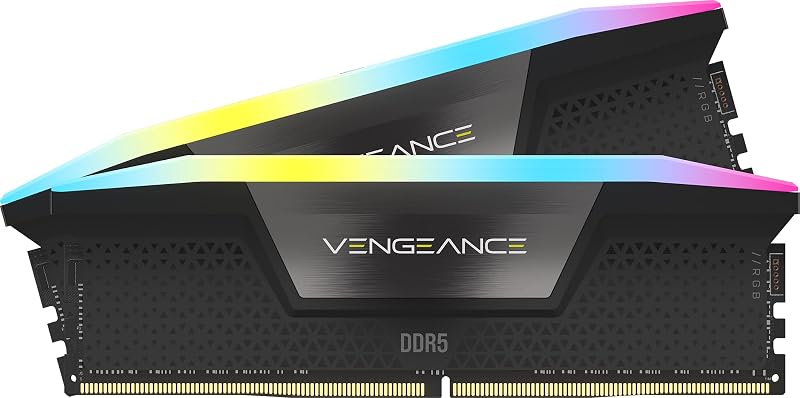
Conversely, the Vengeance module features a pronounced panoramic light bar along the entire top edge of its gray heatspreader to diffuse its ten-zone illumination. While this creates vivid system lighting, the additional height above the PCB increases the likelihood of physical interference with bulky dual-fan air heatsinks or top-mounted liquid radiators in compact enclosures. As discussed in our analysis of ddr4 vs ddr5 transitions, physical packaging remains a primary factor when planning modern case layouts.
Edge: G.Skill Ripjaws S5 DDR5 because its minimalist, low-profile heatspreader avoids physical interference with large CPU air coolers and compact chassis frames.
Operating Voltage and Power Characteristics
Operating voltage determines the electrical energy supplied to memory chips and their onboard power management hardware. Higher operating voltage is frequently required by memory manufacturers to stabilize tighter primary timings at elevated frequencies, but it inevitably produces additional heat that must be dissipated inside the computer chassis. The Vengeance requires an operating voltage of 1.40 volts to sustain its rated 6000 MHz CL30 configuration.
In contrast, the Ripjaws S5 achieves its 6000 MT/s transfer rate using an operating voltage of 1.35 volts. Operating at 1.35V reduces total power draw and limits heat generation, which is beneficial for systems operating in dense enclosures with limited internal airflow. For builders asking is g.skill ripjaws s5 ddr5 worth it for 24/7 workstations, the lower voltage thermal profile provides reliable long-term stability without subjecting the memory controller to higher electrical loads.
To help manage its 1.40V profile, Corsair equips the Vengeance with onboard voltage regulation that users can fine-tune directly through CORSAIR iCUE software. This provides deeper software-level oversight than traditional motherboard-only control. However, when evaluating corsair vengeance ddr5 6000mhz cl30 expo vs ripjaws s5 from a power efficiency standpoint, the G.Skill kit delivers rated frequency using less electrical power, similar to characteristics seen in our g.skill ripjaws s5 ddr5 vs kingston fury beast ddr5 breakdown.
Edge: G.Skill Ripjaws S5 DDR5 because it maintains its rated 6000 MT/s speed at 1.35V, generating less thermal output than Corsair’s 1.40V requirement.
Lighting Aesthetics and Software Ecosystem
Visual styling separates functional workstation memory from premium showcase hardware. The Vengeance incorporates dynamic ten-zone RGB lighting, featuring ten individually addressable, ultra-bright LEDs per module. These diodes are encased beneath a panoramic light bar that projects wide, consistent illumination visible from virtually any viewing angle through tempered glass chassis panels.
Beyond static colors, Corsair integrates these modules into its proprietary CORSAIR iCUE software ecosystem. Users can design multi-layer lighting profiles synchronized across compatible system components, monitor real-time operating frequencies, and track onboard voltage. Similar to the visual upgrade path explored in our corsair vengeance rgb pro ddr4 vs g.skill ripjaws v ddr4 3600 comparison, Corsair prioritizes customizable lighting integration that stands out in any thorough corsair vengeance ddr5 6000 cl30 review.
The Ripjaws S5 adopts the opposite design philosophy by omitting LED lighting entirely. Its matte black aluminum heatspreader blends invisibly into dark motherboard trays, appealing to users who prefer a clean, zero-distraction look. Omitting illumination also means builders do not need to install or run background software utilities within their operating system just to manage their memory modules, preserving pure CPU resources for background workloads.
Edge: Corsair Vengeance DDR5 6000 CL30 because it provides dynamic ten-zone addressable illumination and rich software customization that the unlit Ripjaws S5 lacks.
Overclocking Profiles and Platform Compatibility
Achieving rated frequencies on modern DDR5 desktop memory requires applying pre-configured overclocking profiles in the motherboard BIOS. Without enabling these profiles, both kits will automatically initialize at baseline JEDEC default speeds. In evaluating g.skill ripjaws s5 ddr5 vs corsair vengeance ddr5 6000 cl30 compatibility, both manufacturers supply broad platform support covering Intel and AMD systems.
G.Skill explicitly details platform validation for the Ripjaws S5 across a wide array of desktop hardware, listing compatibility for Intel Z890, Z790, Z690, B860, B760, and B660 chipsets, as well as AMD X870, X670, B850, B840, B650, and A620 platforms. It features dual profile support containing both Intel XMP 3.0 and AMD EXPO settings. G.Skill specifically instructs builders not to mix separate memory kits, as these 32GB (2x16GB) packages are factory-matched to guarantee signal integrity as a pair.
Corsair also provides dual-profile convenience, specifying AMD EXPO compatibility alongside optimization for peak performance on the latest Intel DDR5 motherboards. Corsair utilizes a custom PCB designed to preserve high signal quality at 6000 MHz. When deciding between corsair vengeance or g.skill ripjaws s5 for gaming, running at 6000 MT/s provides an optimal operating point for memory controllers without the instability concerns covered in our 6000mhz vs 6400mhz ddr5 guide.
Edge: Tie because both kits incorporate dual Intel XMP and AMD EXPO profile support validated across modern Intel and AMD motherboard chipsets.
Pros and Cons
Corsair Vengeance DDR5 6000 CL30
Pros
- Tighter CL30-36-36-76 primary timings
- Ten-zone panoramic addressable RGB lighting
- Onboard voltage regulation via iCUE software
- Dual AMD EXPO and Intel XMP support
Cons
- Higher 1.40V operating voltage requirement
- Taller light bar risks air cooler interference
View Corsair Vengeance DDR5 6000 CL30 on Amazon
G.Skill Ripjaws S5 DDR5

Pros
- Low-profile heatspreader clears large CPU coolers
- Lower 1.35V operating voltage
- Dual Intel XMP 3.0 and AMD EXPO profiles
- No background lighting software needed
Cons
- Looser CL36-36-36-96 primary timings
- No RGB lighting for showcase builds
View G.Skill Ripjaws S5 DDR5 on Amazon
Who Should Buy Each One
Choose the Corsair Vengeance DDR5 6000 CL30 If
- You want tight CL30-36-36-76 timings for superior memory responsiveness and smoother gaming framerates.
- You are building an illuminated desktop PC and want ten-zone addressable RGB lighting with a panoramic light bar.
- You use an all-in-one liquid cooler or have an open chassis area above your motherboard memory slots.
- You prefer monitoring memory metrics and onboard voltage regulation directly through CORSAIR iCUE software.
Choose the G.Skill Ripjaws S5 DDR5 If
- You use a bulky dual-tower CPU air cooler that hangs directly over your motherboard memory slots.
- You want a clean matte black aesthetic without LEDs, light bars, or background lighting software.
- You want 6000 MT/s memory speeds operating at a lower 1.35V profile to minimize thermal output.
- You need dual XMP 3.0 and EXPO profile support across verified Intel and AMD motherboard platforms.
Final Verdict
For most desktop gamers and PC enthusiasts, the Corsair Vengeance DDR5 6000 CL30 represents the superior choice. Its tighter CL30-36-36-76 primary timings provide a measurable reduction in cycle latency compared to standard CL36 memory kits, yielding better responsiveness during high-refresh gaming. Enhanced by ten-zone dynamic panoramic RGB illumination and onboard voltage regulation via iCUE, the Vengeance delivers the performance and visual customization expected in modern desktop rigs.
However, the G.Skill Ripjaws S5 DDR5 is the smarter option for compact desktop builds and systems utilizing large CPU air coolers. Its low-profile matte black heatspreader eliminates the mechanical interference risks posed by tall RGB light bars, while its 1.35V operating profile reduces electrical demand and heat generation. If clearance, power efficiency, and understated styling outweigh RGB lighting and tighter timings, the Ripjaws S5 is an exceptionally practical DDR5 memory kit.
FAQ
What is the real-world difference between DDR5 6000 CL30 and CL36?
At an identical frequency of 6000 MT/s, the CL30 specification takes fewer clock cycles to respond to processor read commands than CL36. This lower latency primarily benefits gaming frame-rate consistency, reducing stutters and improving minimum one-percent lows during CPU-bound gaming scenarios.
Will both kits work with both Intel and AMD motherboards?
Yes. The G.Skill Ripjaws S5 includes certified Intel XMP 3.0 and AMD EXPO profiles out of the box, with explicit validation for Intel 600- through 800-series and AMD 600- through 800-series chipsets. The Corsair Vengeance also includes AMD EXPO compatibility alongside Intel XMP optimization.
Will the Corsair Vengeance light bar fit underneath large CPU air coolers?
The Corsair Vengeance features a tall panoramic RGB light bar that may physically obstruct the fan or heatsink fins on large dual-tower air coolers. If you are using a large air cooler, you may need to raise the front cooler fan or consider a low-profile module like the Ripjaws S5.
Why does the Corsair kit require 1.40V while the G.Skill kit uses 1.35V?
Tighter primary timings like CL30-36-36-76 require additional electrical voltage to maintain stability at 6000 MHz. Corsair utilizes 1.40 volts to achieve these aggressive timings, whereas G.Skill operates its looser CL36-36-36-96 timings at a cooler 1.35 volts.
Does the G.Skill Ripjaws S5 require software to control its settings?
No. The Ripjaws S5 features no RGB illumination and does not require any desktop software. You simply select the Intel XMP 3.0 or AMD EXPO profile in your motherboard BIOS, and the memory automatically configures its speed, timings, and voltage.
Can I combine two separate 32GB kits to make a 64GB configuration?
G.Skill explicitly warns against mixing separate memory kits, even of the identical model number. High-speed DDR5 memory is factory-tested and matched as a single package; combining two distinct kits can lead to system instability or failure to boot at rated speeds.