When deciding between 6000MHz DDR5 and 6400MHz DDR5, the defining distinction comes down to whether your machine benefits more from tight CAS latency timings on a dedicated desktop platform or higher raw memory bandwidth packaged into a high-density, low-voltage mobile form factor. While desktop enthusiasts gravitate toward modules tuned for aggressive latency curves, laptop power users and workstation operators often prioritize raw megatransfers per second running under strict standardized profiles.
Builders assembling high-performance desktop rigs or seeking optimal gaming responsiveness should select 6000MHz DDR5 for its low CL30 timings and AMD EXPO compatibility, whereas mobile workstation users and laptop upgraders should choose 6400MHz DDR5 to maximize raw throughput within strict low-voltage JEDEC standards.

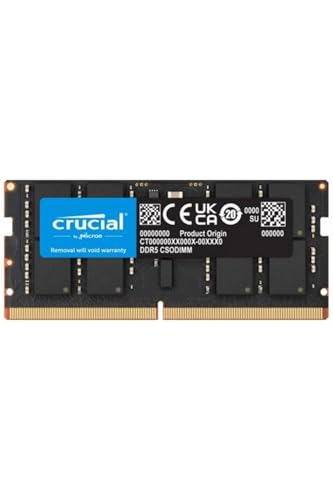

6000MHz DDR5 vs 6400MHz DDR5 at a Glance
| Feature | 6000MHz DDR5 | 6400MHz DDR5 |
|---|---|---|
| Primary CAS Latency | CL30 (Tested 30-40-40-76) | CL52 |
| Data Transfer Rate | 6000 MT/s (6000 Mbps) | 6400 MT/s (6400 Mbps) |
| Operating Voltage | 1.35V | 1.1V (JEDEC standard) |
| Form Factor | 288-Pin UDIMM Desktop | 260-Pin / 262-Pin CSODIMM / SODIMM Laptop |
| Overclocking Profiles | Intel XMP 3.0 & AMD EXPO Supported | Standard JEDEC (No overclock profile required) |
| Thermal & Power Architecture | Onboard PMIC with thermal management | Standard JEDEC low-power 1.1V PMIC |
| Target Platform | Desktop PCs & Custom Motherboards | Laptops, Notebooks & All-in-One (AIO) Systems |
| Downclocking Behavior | Runs at base SPD without profile applied | Downclocks to 5600MHz if mixed with unclocked SODIMMs |
| Best For | Low-latency desktop gaming and AMD AM5 tuning | High-bandwidth mobile workstations and laptop expansion |
CAS Latency and Real-World Response Times
Evaluating memory speed requires calculating true latency rather than focusing strictly on megatransfers per second. True latency measures the actual delay in nanoseconds before the memory module begins delivering requested data to the processor. You calculate this by dividing the CAS latency rating by the effective frequency and multiplying by two thousand. When you compare a 6000MHz kit rated at CL30 against a 6400MHz module running at CL52, the real-world latency mathematical formula demonstrates an enormous response advantage for the lower-frequency module. A 6000MHz CL30 module initiates data access in exactly 10.0 nanoseconds, while a 6400MHz CL52 module requires 16.25 nanoseconds. This sharp variance shows why looking exclusively at frequency numbers gives an incomplete picture of operational responsiveness.
In latency-sensitive applications such as first-person shooters, competitive esports titles, and complex physics engines, this 6.25-nanosecond difference exerts a noticeable impact on frame pacing and minimum frame rates. A comprehensive corsair vengeance ddr5 6000 cl30 vs g.skill ripjaws s5 ddr5 analysis confirms that when memory access involves random read-and-write cycles rather than long sequential data streams, low absolute latency prevents the central processor from stalling while waiting for cache fills. When readers consult a Patriot Viper Venom DDR5 RAM 32GB (2X16GB) 6000MHz CL30 Desktop Memory listing, they find factory-tested timings of 30-40-40-76, ensuring exceptionally tight timing registers across every individual memory bank.
By comparison, typical 6400MHz options in mobile form factors-such as the Samsung 16GB (1x16GB) DDR5 6400MHz PC5-51200 CSODIMM Clocked SODIMM 1Rx8 Single Rank CL52 1.1V 262-Pin Non ECC Unbuffered Laptop Notebook RAM Memory M435R2GA3PB1-CCP-rely on JEDEC standard specifications with CL52 latency. This conservative timing structure ensures system stability across compact laptops without thermal throttling, but it sacrifices quick turnaround on initial cycle accesses. For desktop tasks that demand prompt responsiveness above all else, the tight latency profile of 6000MHz CL30 delivers superior immediate response compared to the looser cycle counts of JEDEC 6400MHz CL52.
Edge: 6000MHz DDR5, because its 10.0-nanosecond access latency significantly outperforms the 16.25-nanosecond turnaround of CL52 alternatives.
Raw Memory Bandwidth and Data Transfer Rates
While access latency dictates the speed of initial data retrieval, memory bandwidth defines the maximum volume of sustained data that can stream through the bus per second. This attribute is where the 6400MHz specification pulls ahead. Running at 6400 megatransfers per second yields a theoretical bandwidth peak of 51.2 gigabytes per second across a single 64-bit memory channel, translating to 102.4 gigabytes per second in a typical dual-channel environment. In contrast, 6000MHz memory provides 48.0 gigabytes per second per channel, or 96.0 gigabytes per second in dual-channel operation. This represents an approximate 6.7 percent advantage in pure theoretical pipeline throughput for 6400MHz configurations.
In workloads that stream massive, contiguous chunks of data without frequent random branch interruptions, higher raw transfer rates provide genuine advantages. Tasks such as rendering large 4K video streams, processing large uncompressed texture packs, compiling deep software repositories, and running scientific simulation matrices rely heavily on moving voluminous arrays through memory buses. High-bandwidth performance gains align with patterns observed in our kingston fury renegade ddr5 vs teamgroup t-force delta rgb ddr5 review, where high data transfer rates reduce bottlenecks during linear data consumption. Furthermore, systems relying on integrated graphics architectures draw their frame buffers directly from shared system RAM, making higher transfer speeds especially valuable for graphical throughput.
The Crucial NTB 32GB 6400MHz Ddr5 Csodımm Ct32g64c52cs5 Laptop RAM Memory provides a full 6400 MT/s data rate specifically geared toward laptop platforms that handle compute-heavy production chores. When processing large data sets sequentially, the DDR5 6000 vs 6400 speed difference provides a steady flow of raw bits that offsets the slower turnaround on initial clock cycles. If your daily workflow is dominated by massive uninterrupted data ingestion rather than erratic computational spikes, higher transfer velocity delivers tangible operational benefits.
Edge: 6400MHz DDR5, because it delivers an additional 6.4 gigabytes per second of raw dual-channel theoretical bandwidth over 6000MHz memory.
Platform Integration and Form Factor Constraints
The practical viability of choosing 6000MHz or 6400MHz often hinges entirely on the physical form factor of the computer you are assembling or upgrading. Desktop components and mobile hardware adhere to completely distinct physical standards that do not interchange. The Patriot Viper Venom 6000MHz module utilizes a 288-pin unbuffered DIMM (UDIMM) layout engineered specifically for standard ATX, Micro-ATX, and Mini-ITX desktop motherboards. These full-sized modules measure longer, feature substantial integrated heatspreaders, and slot into vertical or horizontal desktop clips with generous surrounding clearance for airflow.
Conversely, 6400MHz options in this class frequently arrive in compact form factors engineered for mobile envelopes. The Crucial CT32G64C52CS5 and the Samsung M435R2GA3PB1-CCP employ the CSODIMM (Clocked Small Outline Dual In-Line Memory Module) form factor, utilizing 260-pin and 262-pin configurations tailored for notebooks, mobile workstations, and all-in-one desktop computers. CSODIMMs incorporate a client clock driver (CKD) chip directly on the miniature circuit board, regenerating the clock signal locally to preserve signal integrity across compact high-frequency motherboard traces. This structural distinction mirrors the form factor separation highlighted in our g.skill ripjaws s5 ddr5 vs crucial pro ddr5 comparison guide.
Upgraders must also consider module interoperability when handling mobile CSODIMM kits. Samsung documentation specifically highlights that clocked CSODIMM modules installed in laptops are backwards compatible with standard unclocked DDR5 SODIMM sockets, but mixing a 6400MHz CSODIMM with an unclocked module will cause the entire memory array to downclock to 5600MHz to preserve system stability. Desktop UDIMMs do not experience this particular SODIMM hybrid downclocking issue, though they require matching memory pairs within desktop slots to sustain dual-channel transfer speeds. Because each speed standard caters to entirely non-overlapping hardware ecosystems, compatibility dictates selection.
Edge: Tie, because desktop 288-pin UDIMMs and mobile 260/262-pin CSODIMMs serve entirely different physical motherboard ecosystems with zero cross-compatibility.
Memory Controller Tuning and AMD Ryzen Compatibility
Memory frequency does not exist in isolation; it depends directly on how the processor memory controller interfaces with the system bus. On modern AMD AM5 desktop platforms powering Ryzen processors, the memory controller operates in an internal 1:1 ratio with the memory clock (UCLK:MCLK) up to 6000MHz. Operating at this synchronicity avoids latency-inducing divider penalties. When running a 6000MHz kit like the Patriot Viper Venom, the memory controller operates in perfect lockstep at 3000MHz, generating optimal responsiveness across the processor Infinity Fabric and execution cores.
When selecting 6000MHz or 6400MHz DDR5 for AMD platforms, running speeds above 6000MHz frequently forces the memory controller into an asynchronous 1:2 mode (UCLK = MCLK / 2) unless the user manually alters internal bus voltages and controller parameters. Running at 1:2 halves the internal controller frequency, adding a latency penalty of approximately two to three nanoseconds that completely negates minor bandwidth gains. As explored during our kingston fury beast ddr5 vs crucial pro ddr5 evaluation, balancing controller dividers against raw frequency is mandatory for maximizing system stability and operational throughput.
Intel desktop platforms handle 6400MHz and higher frequencies more flexibly through automatic Gear 2 controller dividers, but in the laptop market where 6400MHz CSODIMMs are prevalent, users lack deep BIOS controls to tweak memory controller ratios. The Samsung and Crucial 6400MHz modules run on fixed JEDEC baseline timings that allow newer laptop processors to access higher bandwidth without requiring manual EXPO or XMP profile intervention. For desktop users looking for guaranteed plug-and-play synchronization with minimal controller strain, 6000MHz remains the definitive sweet spot for enthusiast platforms.
Edge: 6000MHz DDR5, because it preserves native 1:1 memory controller synchronization on AMD AM5 desktop platforms without requiring manual divider overrides.
Operating Voltage and Thermal Characteristics
Power delivery and thermal efficiency mark another substantial divergence between these memory specifications. High-performance low-latency desktop modules achieve their tight timings by drawing increased electrical current. The Patriot Viper Venom 6000MHz CL30 module operates at a tested voltage of 1.35 volts, representing an elevated power requirement compared to DDR5 standard baseline specifications. To manage the thermal output generated by 1.35V operation, Patriot integrates an onboard power management integrated circuit (PMIC) coupled with dedicated aluminum heatshields and onboard thermal management technology to disperse concentrated heat build-up away from sensitive memory dies.
In contrast, 6400MHz CSODIMMs such as the Samsung M435R2GA3PB1-CCP adhere strictly to the JEDEC standard operating voltage of 1.1 volts. Maintaining an operating target of 1.1V allows mobile memory to draw substantially less power, preserving battery life and minimizing heat generation inside tightly packed laptop chassis. Because laptop enclosures lack the cooling fans, spacious case ventilation, and chunky aluminum fin stacks found in desktop chassis, keeping memory voltage at 1.1V is essential to prevent thermal throttling under continuous multi-core processing loads.
Our comparative analysis in the kingston fury beast ddr5 vs teamgroup t-force delta rgb ddr5 breakdown emphasizes how power regulation and voltage levels directly dictate thermal dissipation in enclosed spaces. Operating at 1.35V in a desktop environment is trivial thanks to case intake fans, but utilizing elevated voltages in a laptop would cause excessive thermal buildup. For ultra-efficient operation that preserves battery capacity and maintains cool operation without requiring auxiliary heatsinks, the standard 1.1V power consumption profile of 6400MHz JEDEC memory delivers clear thermodynamic efficiency.
Edge: 6400MHz DDR5, because it delivers high-frequency throughput at a low 1.1V JEDEC voltage without generating excessive heat inside compact chassis.
Pros and Cons
6000MHz DDR5

Pros
- Ultra-low 10.0ns real-world latency
- Factory-tested tight 30-40-40-76 timings
- Supports Intel XMP 3.0 and AMD EXPO
- Maintains native 1:1 memory controller synchronization
- Integrated thermal management and protective heatsinks
Cons
- Requires elevated 1.35V desktop operating voltage
- Incompatible with laptop and compact SODIMM slots
- Lower raw peak theoretical bandwidth than 6400MHz
View Patriot Viper Venom DDR5 RAM 32GB on Amazon
6400MHz DDR5

Pros
- Higher 6400 MT/s data transfer rate
- Standard low-power 1.1V JEDEC operating voltage
- Plug-and-play operation without firmware overclocking profiles
- Engineered for high-density laptops and mobile workstations
- Onboard clock driver chip enhances signal integrity
Cons
- Substantially slower 16.25ns real-world CAS latency
- Downclocks to 5600MHz if mixed with unclocked SODIMMs
- Looser CL52 timings reduce responsiveness in competitive gaming
View Crucial NTB 32GB 6400MHz Ddr5 Csodımm on Amazon
Who Should Buy Each One
Choose the 6000MHz DDR5 If
- You are assembling a custom desktop gaming PC with a dedicated graphics card and demand minimum input delay with maximum 1% low frame rate consistency.
- You are building an AMD AM5 desktop system and want native 1:1 UCLK:MCLK memory controller synchronization without manual voltage tuning.
- You plan to use Intel XMP 3.0 or AMD EXPO one-click firmware overclocking profiles inside a full-sized ATX or Mini-ITX motherboard.
- Your desktop enclosure provides sufficient internal airflow to accommodate modules running at 1.35V with integrated thermal heatspreaders.
Choose the 6400MHz DDR5 If
- You are upgrading an all-in-one desktop, modern notebook, or mobile workstation equipped with 260-pin or 262-pin CSODIMM slots.
- Your primary workflows involve heavy multi-threaded sequential tasks like video transcoding, file compression, or compiling massive datasets.
- You need plug-and-play high-frequency performance at standard JEDEC 1.1V power without navigating BIOS overclocking menus.
- Your computer relies on integrated graphics that share system memory and benefit directly from expanded raw data transmission bandwidth.
Final Verdict
For most personal computer builders and gaming enthusiasts, 6000MHz DDR5 with tight CL30 timings stands out as the optimal choice. The combination of a 10.0-nanosecond access latency, proven stability across Intel XMP 3.0 and AMD EXPO profiles, and native 1:1 synchronization with AMD Ryzen memory controllers ensures superior responsiveness across everyday computing, modern gaming titles, and interactive multitasking. Even though it runs at a slightly lower peak transfer rate and draws 1.35V of power, its tight subtimings yield tangible responsiveness gains that raw megatransfers cannot replicate on standard desktop architectures.
However, 6400MHz DDR5 remains the superior solution for mobile power users, laptop creators, and workstation operators running portable or all-in-one hardware. Delivering 51.2 gigabytes per second of raw throughput per channel while remaining locked at a power-efficient 1.1V JEDEC profile, 6400MHz CSODIMMs provide massive memory bandwidth without overwhelming laptop cooling solutions or consuming unnecessary battery reserves. If your platform accepts high-speed mobile modules and your computing demands revolve around large sustained file operations or shared integrated GPU buffers, 6400MHz DDR5 provides the ideal blend of high-speed throughput and thermodynamic efficiency.
FAQ
Is 6000MHz or 6400MHz DDR5 better for gaming?
For PC gaming, 6000MHz DDR5 with CL30 timings is generally superior to 6400MHz running looser JEDEC timings such as CL52. Gaming engines rely on rapid random memory accesses, meaning that a 10.0-nanosecond access time produces smoother frametimes and higher minimum frame rates than a higher-frequency module with a 16.25-nanosecond response profile.
What is the real latency difference between 6000MHz CL30 and 6400MHz CL52?
The true latency difference is 6.25 nanoseconds in favor of the 6000MHz CL30 module. True latency is calculated by dividing CAS latency by memory frequency and multiplying by 2000. Under this formula, 6000MHz CL30 achieves an initial access time of 10.0 nanoseconds, while 6400MHz CL52 requires 16.25 nanoseconds before data transmission commences.
Can I install a 6400MHz CSODIMM in a standard desktop PC motherboard?
No, standard desktop PC motherboards utilize 288-pin full-sized UDIMM memory slots, whereas 6400MHz CSODIMM modules utilize compact 260-pin or 262-pin connections designed exclusively for laptops, mobile workstations, and select compact all-in-one computers. The physical dimensions and pin layouts are entirely incompatible.
Why does AMD Ryzen perform so well with 6000MHz DDR5?
AMD Ryzen processors on the AM5 platform feature an internal memory controller designed to run synchronously in a 1:1 ratio with memory frequency up to 6000MHz. Operating at 6000MHz matches internal controller clocks at 3000MHz without triggering an internal 1:2 divider penalty, preserving optimal processor-to-memory communication speed.
What happens if I mix 6400MHz CSODIMM with standard 5600MHz SODIMM memory?
According to manufacturer technical specifications, mixing a 6400MHz clocked CSODIMM with an unclocked DDR5 SODIMM module will cause the entire memory subsystem to automatically downclock to 5600MHz. The motherboard enforces this downclock to maintain baseline signal integrity and prevent timing synchronization errors between mismatched clock architectures.
Does 6400MHz DDR5 require enabling XMP or EXPO overclocking profiles?
Not always. While high-performance desktop memory requires activating Intel XMP 3.0 or AMD EXPO firmware profiles to jump from baseline speeds to overclocked ratings, many mobile 6400MHz CSODIMM modules operate directly on standard JEDEC baseline profiles at 1.1V, running at 6400MHz automatically upon system boot without user configuration.


