The core difference deciding between these two professional 27-inch displays comes down to workstation infrastructure versus macOS creative integration: the Dell U2723QE prioritizes visual depth with a 2000:1 contrast ratio and comprehensive single-cable docking via 90W USB-C and RJ-45 Ethernet, while the BenQ PD2725U delivers high-speed 40 Gb/s Thunderbolt 3 daisy chaining, dedicated Hotkey Puck G2 control, and streamlined Display P3 color synchronization.
Choose the Dell display if you need an all-in-one productivity hub with deep black levels, wired networking, and high laptop charging capacity, or select the BenQ monitor if you operate a multi-screen Mac setup requiring factory-calibrated color accuracy, dual-monitor daisy chaining, and rapid hardware input switching.


Dell U2723QE vs BenQ PD2725U at a Glance
| Feature | Dell U2723QE | BenQ PD2725U |
|---|---|---|
| Screen Size and Resolution | 27 inches, 3840 x 2160 (4K UHD) | 27 inches, 3840 x 2160 (4K UHD) |
| Panel Type and Coating | LCD, Anti-glare 3H Hard Coating (Matte) | IPS, Matte |
| Static Contrast Ratio | 2000:1 | 1200:1 |
| Peak Brightness | 400 Nits (VESA DisplayHDR 400) | 250 Nits |
| Color Gamut and Calibration | Color Gamut 100 | 100% sRGB/Rec.709, 95% P3, Delta E <= 3, Pantone Validated |
| Primary Connectivity | USB-C 3.2 Gen 2 (DP 1.4 Alt Mode) | Thunderbolt 3 (40 Gb/s) |
| Power Delivery to Host | Up to 90W | 65W |
| Wired Network Port | RJ-45 LAN Ethernet | Not listed |
| Daisy Chaining Support | DisplayPort 1.4 output | Thunderbolt 3 daisy chain |
| Ergonomic Adjustments | Not listed | Height, tilt, swivel, pivot |
| Power Consumption | 90 watts | 37 watts |
| Best For | Productivity docking and contrast-rich office work | Creative studio workflows and dual-display Mac setups |
Panel Contrast and Visual Depth
Static contrast defines how well an LCD screen separates dark shadow details from highlights. The BenQ PD2725U features a 1200:1 contrast ratio on its 27-inch IPS panel, which sits slightly above standard desktop IPS levels but retains the typical slight gray lift in pitch-black viewing conditions. In an office setting under balanced light, this contrast level produces clean graphics, readable typography, and stable color gradients across its 178-degree viewing angles.
The Dell UltraSharp U2723QE shifts visual performance significantly by delivering a 2000:1 static contrast ratio. In any head-to-head evaluation, the Dell U2723QE contrast ratio allows dark elements, detailed line work, and deep shadows to stay distinctly separated without washing into surrounding highlights. This extra depth is paired with a 400 Nit brightness rating and VESA DisplayHDR 400 certification, compared to the 250 nits specified for the BenQ. For users comparing modern designer panels, such as reading a dell u2723qe vs samsung viewfinity s9 analysis, luminance and contrast dictate how well visual media pops in brightly lit rooms.
While both monitors render sharp 4K UHD 3840 x 2160 native resolution with a 0.16 mm pixel pitch (Dell listing specifies 0.1554 mm with 163.18 PPI), the Dell offers noticeably more dynamic punch. If your daily work involves dark UI palettes, night video editing, or detailed image mastering where shadow rendering is paramount, the higher contrast panel on the Dell provides a visible visual advantage.
Edge: Dell U2723QE delivers double the contrast ratio alongside 400 nits of peak brightness for superior dark-room depth and ambient light visibility.
Color Accuracy and Mac Workflow Integration
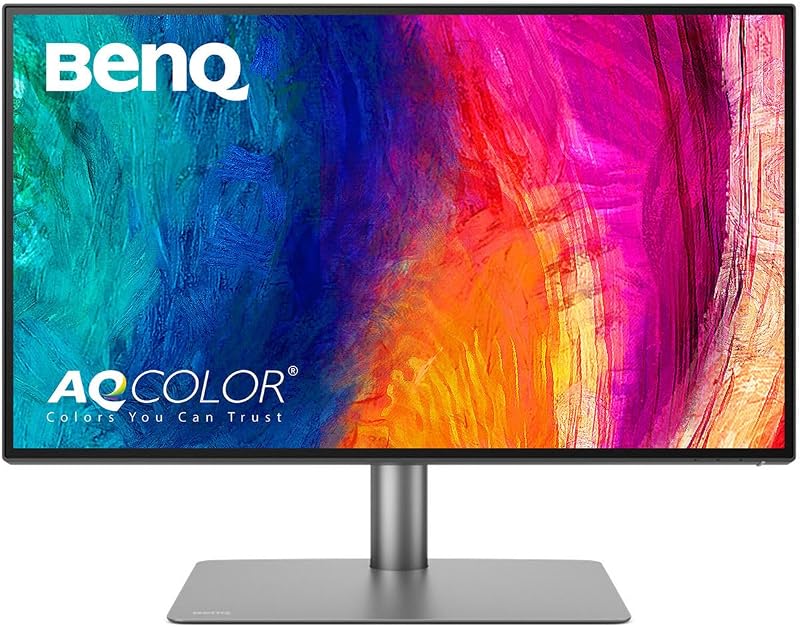
Color fidelity is essential for professional design work, and the BenQ PD2725U was engineered specifically with creative studio demands in mind. The BenQ listing outlines comprehensive out-of-the-box color standards: 100% sRGB, 100% Rec.709, and 95% P3 color gamut coverage. It arrives factory-calibrated with an accuracy rating of Delta E less than or equal to 3, AQCOLOR technology for panel uniformity, and official Pantone validation to ensure print-ready physical reproduction.
Software and hardware harmony is where the BenQ excels when evaluating whether to buy the Dell U2723QE or BenQ PD2725U for Mac users. Through BenQ Display Pilot software, the BenQ ICCsync feature matches ICC profiles to Display P3 promptly within one second, bridging the color rendering gap between a connected MacBook screen and the external monitor. Those considering studio setups often look at comparisons like the benq pd2725u vs apple studio display to see how third-party monitors handle native Apple color spaces; here, BenQ PD2725U Display P3 accuracy simplifies complex color management without requiring tedious manual adjustment in operating system settings.
The Dell U2723QE lists a Color Gamut rating of 100 and relies on standard matte anti-glare 3H hard coating to preserve clarity across 178-degree horizontal and vertical viewing angles. However, Dell does not document factory Delta E guarantees or specialized macOS ICC profile synchronization tools in its official listing. For strict print design, commercial video delivery, and studio graphic work, BenQ offers far more verified color credentials directly from the factory floor.
Edge: BenQ PD2725U provides factory-calibrated Delta E <= 3 accuracy, 95% P3 coverage, Pantone validation, and automated ICCsync for Mac workflows.
Docking Capabilities and Port Connectivity
The connectivity architecture of these monitors reveals completely different engineering priorities. The Dell U2723QE USB-C hub monitor functions as a comprehensive desktop port replicator designed to replace standalone corporate docking stations. It includes an upstream USB-C 3.2 Gen 2 port supporting DisplayPort 1.4 Alt Mode and up to 90W of power delivery, easily handling high-draw mobile workstations over a single cord. Crucially, the Dell integrates an RJ-45 LAN Ethernet port, giving connected laptops instant gigabit-speed wired local network connectivity without requiring external USB dongles.
Beyond host power, the Dell features an auxiliary USB-C 3.2 Gen 2 downstream port providing up to 15W of charging, another USB-C 3.2 Gen 2 upstream port, an audio line-out jack, and a massive array of five USB 3.2 Gen 2 downstream Type-A ports, one of which supports Battery Charging 1.2. Users weighing options in a dell u2723qe vs apple studio display matchup often highlight this exhaustive hub layout because it transforms the monitor into a complete nerve center for wired mice, keyboards, external flash drives, and high-speed data accessories.
The BenQ PD2725U addresses peripheral expansion through a different angle, utilizing Thunderbolt 3 technology with two dedicated ports alongside two HDMI inputs, a DisplayPort input, a 3-port USB hub, an audio headphone output, and an integrated KVM switch. BenQ includes a unique physical Hotkey Puck G2, allowing users to switch color modes, adjust brightness, or toggle display inputs via a tactile desktop dial rather than reaching behind the bezel. However, its host power delivery maxes out at 65W, and it lacks built-in RJ-45 Ethernet connectivity. For power users seeking maximum peripheral ports and direct Ethernet networking, Dell provides a more capable single-cable docking station.
Edge: Dell U2723QE wins for desktop docking with 90W host charging, integrated RJ-45 Ethernet, and a five-port USB 3.2 Gen 2 hub.
Multi-Monitor Workflows and Daisy Chaining
Expanding your workspace across multiple 4K displays requires significant data throughput, and this is where interface specifications create major workflow divisions. The BenQ PD2725U Thunderbolt 3 daisy chain configuration leverages 40 Gb/s interface bandwidth, enabling users to daisy-chain dual 4K monitors directly from a single host output port. For creative professionals working on modern laptops with limited external display ports, routing video, data, and audio through a continuous Thunderbolt 3 chain avoids clutter and preserves scarce machine ports.
The Dell U2723QE also supports multi-monitor expansion by featuring a dedicated DisplayPort 1.4 output jack. This output enables DisplayPort Multi-Stream Transport (MST) chaining across compatible Windows machines. Users who explore ultrawide configurations or dual-panel setups, such as those covered in our dell u3423we vs benq pd2725u analysis, know that DisplayPort MST functions reliably on PC hardware. However, standard macOS does not natively support DisplayPort MST daisy chaining, making the BenQ Thunderbolt 3 pipeline vastly superior for Mac-centric dual-monitor desks.
If you plan to run two 4K displays alongside external high-speed storage drives, the 40 Gb/s throughput of Thunderbolt 3 on the BenQ handles high bandwidth tasks effortlessly. The Dell DisplayPort out configuration is dependable for standard PC office environments, but it cannot match the raw speed or platform versatility of BenQ’s Thunderbolt 3 link.
Edge: BenQ PD2725U dominates dual-monitor configurations with native 40 Gb/s Thunderbolt 3 daisy chaining compatible with both Mac and Windows systems.
Ergonomics, Controls, and Desktop Footprint
Physical adjustability and desk footprint impact daily comfort, particularly during long editing or coding sessions. The BenQ PD2725U listing details an ergonomic stand that supports full mechanical adjustability: height adjustment, tilt, swivel, and 90-degree pivot into portrait orientation. Furthermore, BenQ includes the external Hotkey Puck G2 controller, which rests on the desk and lets you cycle through color spaces, switch between dual video sources, or adjust visual parameters without touching the screen.
The physical footprint of the BenQ measures 10.8 inches deep, 24.2 inches wide, and 17.7 inches high, with a total product weight of 18.3 pounds. Its power consumption is rated at a modest 37 watts during typical operation. These physical specs make it a sturdy, versatile anchor for dynamic design studios where shifting between landscape editing and portrait layout inspection is a routine requirement.
The Dell UltraSharp U2723QE weighs 14.6 pounds, shaving nearly four pounds off the BenQ desktop load, while occupying dimensions of 15.2 inches deep, 24.1 inches wide, and 7.3 inches high. The listing highlights an anti-glare matte panel with a 3H hard coating to mitigate office lighting glare. It does specify a higher maximum power consumption rating of 90 watts, driven by its 90W USB-C hub capabilities and 400-nit backlight. While both monitors provide professional finishes, the BenQ stand flexibilities and desktop Hotkey Puck controller provide superior daily operational ergonomics.
Edge: BenQ PD2725U offers full height, tilt, swivel, and pivot adjustments alongside the desktop Hotkey Puck G2 control dial.
Pros and Cons
Dell U2723QE

Pros
- 2000:1 high static contrast ratio
- 400 nits brightness with DisplayHDR 400
- Integrated RJ-45 Ethernet docking port
- Up to 90W host power delivery
- Extensive 5-port USB 3.2 hub
Cons
- Lacks Thunderbolt 3 connectivity
- No dedicated desktop controller puck
- Higher 90W power consumption rating
BenQ PD2725U
Pros
- 40 Gb/s Thunderbolt 3 daisy chaining
- Factory-calibrated 95% P3 with Pantone validation
- One-second ICCsync color profile matching
- External Hotkey Puck G2 controller
- Full tilt, swivel, pivot, height stand
Cons
- Lower 1200:1 static contrast ratio
- Modest 250 nits peak brightness
- Host power delivery capped at 65W
Who Should Buy Each One
Choose the Dell U2723QE If
- You need an all-in-one USB-C hub monitor with wired RJ-45 LAN Ethernet and 90W laptop power delivery.
- You prioritize deep black levels and superior contrast with a 2000:1 static ratio for mixed office and desktop tasks.
- You work in a bright workspace that benefits from 400 nits of peak brightness and VESA DisplayHDR 400 support.
- You primarily run a PC workstation and want numerous high-speed downstream USB 3.2 Gen 2 ports for accessories.
Choose the BenQ PD2725U If
- You edit on a Mac and want one-second Display P3 color space synchronization via BenQ ICCsync.
- You plan to daisy chain dual 4K monitors using 40 Gb/s Thunderbolt 3 connectivity over a single machine cable.
- You need factory-verified color accuracy with Delta E <= 3, 95% P3 coverage, and official Pantone validation.
- You prefer physical desktop controls like the Hotkey Puck G2 to switch inputs, KVM sources, and color profiles quickly.
Final Verdict
For general productivity, coding, data analysis, and all-around office work, the Dell U2723QE is the superior standalone monitor. Its 2000:1 contrast ratio delivers noticeably deeper blacks and sharper visual separation than conventional displays, while its 400 nits of brightness handle ambient office lighting with ease. When you factor in the integrated 90W power delivery, built-in RJ-45 gigabit network port, and expansive USB-C hub, it eliminates the need for expensive external docks on both Windows and Mac workstations. Anyone researching a comprehensive lg 34wn80c vs dell u2723qe upgrade will find the Dell docking architecture tough to beat.
However, when choosing between the Dell U2723QE or BenQ PD2725U for graphic design, print layout, and video editing, the BenQ PD2725U justifies its place on the creative desk. Its factory-calibrated 95% P3 color gamut, Delta E <= 3 precision, Pantone validation, and automated ICCsync provide predictable color standards that the Dell listing does not guarantee. Add in 40 Gb/s Thunderbolt 3 dual-screen daisy chaining and the Hotkey Puck G2, and the BenQ stands out as the ultimate multi-display hub for Apple creative workflows.
FAQ
Dell U2723QE or BenQ PD2725U for Mac users?
The BenQ PD2725U provides a smoother native macOS experience thanks to Thunderbolt 3 connectivity, dual-monitor daisy chaining support, and the BenQ ICCsync tool that matches Display P3 color profiles in one second via Display Pilot. The Dell U2723QE connects fine over USB-C and charges laptops at up to 90W, but it lacks Thunderbolt 3 speeds and macOS daisy chaining support.
Dell U2723QE or BenQ PD2725U for graphic design workflows?
The BenQ PD2725U is better suited for color-critical graphic design. It includes factory calibration with Delta E <= 3 accuracy, 95% P3 and 100% sRGB/Rec.709 coverage, AQCOLOR panel uniformity, and Pantone validation. While the Dell U2723QE features higher contrast, its listing does not guarantee factory Delta E tolerances or Pantone certification.
Is BenQ PD2725U worth it for dual monitor setups?
Yes, the BenQ PD2725U is exceptionally well-suited for dual displays because its 40 Gb/s Thunderbolt 3 architecture allows you to daisy-chain two 4K monitors directly from a single port on your computer, minimizing desk cable clutter and keeping computer ports free.
What makes the Dell U2723QE USB-C hub monitor unique?
The Dell U2723QE acts as a true desktop docking station. It features an integrated RJ-45 LAN port for wired Ethernet connections, delivers up to 90W of laptop charging over USB-C, and provides an extensive array of five downstream USB 3.2 Gen 2 ports for connecting external drives and peripherals.
Does the BenQ PD2725U support fast color profile switching?
Yes, the BenQ PD2725U features the BenQ Hotkey Puck G2, an external desktop controller dial that lets you toggle between color spaces, change inputs, or adjust screen settings instantly without reaching for on-screen display buttons.
Can both monitors display 4K resolution at 60Hz?
Both displays feature a native 4K UHD resolution of 3840 x 2160 pixels at a standard 60 Hz refresh rate, using 16:9 aspect ratios and matte anti-glare screen coatings for sharp visual text and graphics.


