The core difference between the BenQ PD2725U and the Apple Studio Display comes down to display resolution and workstation versatility. The Studio Display provides a razor-sharp 5K canvas with 218 pixels per inch, exceptional 600-nit brightness, and a built-in audiovisual suite tailored specifically for macOS, whereas the PD2725U offers a 4K UHD workspace backed by comprehensive port connectivity, a built-in KVM switch, and complete ergonomic adjustability out of the box.
Choose the BenQ PD2725U if you run a multi-device setup that requires legacy DisplayPort or HDMI connections and need a fully adjustable stand without purchasing extra mounting gear. Choose the Apple Studio Display if you want optimal native macOS interface scaling, high screen luminance, and an integrated high-end webcam and speaker system built into your monitor.


BenQ PD2725U vs Apple Studio Display at a Glance
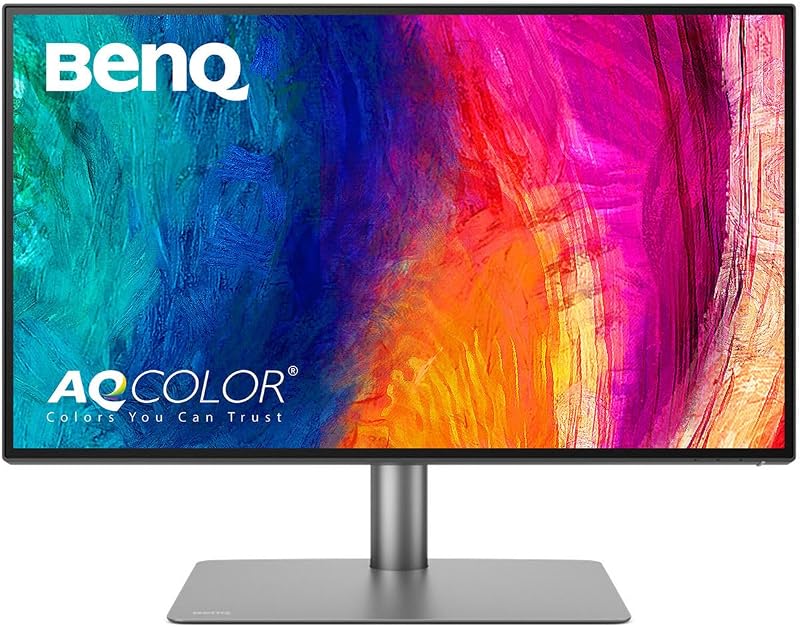
| Attribute | BenQ PD2725U | Apple Studio Display |
|---|---|---|
| Screen Size | 27 inches | 27 inches |
| Native Resolution | 3840 x 2160 (4K UHD) | 5120 x 2880 (5K Retina) |
| Pixel Density | 0.16 mm pixel pitch | 218 pixels per inch |
| Peak Brightness | 250 nits | 600 nits |
| Screen Finish | Matte | Glossy (anti-reflective coating) |
| Color Gamut Support | 100% sRGB, 100% Rec.709, 95% P3 | P3 wide color (1 billion colors) |
| Color Accuracy Rating | DeltaE <= 3, Pantone Validated | The listing does not specify DeltaE |
| Input Ports | 2x Thunderbolt 3, 2x HDMI, 1x DisplayPort, 3x USB Hub | 2x Thunderbolt 5, 2x USB-C |
| Integrated AV | Headphone jack (no camera or mic listed) | 12MP Center Stage camera, 6 speakers, 3-mic array |
| Stand Adjustments | Height, tilt, swivel, pivot | Tilt-adjustable (height stand sold separately) |
| Best For | Multi-computer desks needing flexible inputs and ergonomics | Dedicated Mac setups prioritizing 5K sharpness and integrated AV |
Resolution, Panel Sharpness, and macOS Scaling
When comparing a BenQ 4K vs Apple 5K monitor on a 27-inch diagonal, pixel density is the single biggest factor governing text sharpness and desktop workspace clarity. The Studio Display packs 5120 x 2880 pixels, delivering 14.7 million pixels at 218 pixels per inch. In contrast, the PD2725U features a 3840 x 2160 panel with a 0.16 mm pixel pitch. While 4K is plenty sharp for general computing, macOS renders its graphical user interface with integer pixel doubling designed around 218 PPI displays. On the Studio Display, macOS displays an effective 2560 x 1440 workspace rendered cleanly at 2x Retina resolution without requiring software interpolation.
For shoppers evaluating BenQ PD2725U vs Studio Display scaling, the difference in everyday rendering is immediately noticeable. On the PD2725U, running macOS at native 2x scaling produces an effective workspace of 1920 x 1080, which leaves windows and toolbars feeling oversized on a 27-inch screen. To achieve a comfortable 1440p working area on the 4K panel, macOS must render an intermediate canvas and scale it non-integer, which can cause micro-blurring on fine UI typography and consume background graphics processing. Similar scaling considerations appear when evaluating the dell u2723qe vs apple studio display, where native 5K panels hold an undeniable clarity advantage for macOS menu bars, vector lines, and microscopic typography.
If your daily workflow involves intense timeline editing in Final Cut Pro, reviewing fine line art, or reading source code for eight hours a day, the 5K density of the Studio Display provides noticeably cleaner edge definition. The PD2725U still outputs crisp 4K imagery, but it cannot match the sheer visual sharpness of 14.7 million pixels.
Edge: Apple Studio Display. Its 5120 x 2880 resolution hits the 218 PPI sweet spot for native macOS pixel-doubled scaling, providing sharper text and vector clarity than any 27-inch 4K screen.
Display Brightness, Contrast, and Screen Finishes
Luminance and surface treatments dictate how effectively a monitor combats ambient office lighting. Examining Apple Studio Display brightness vs BenQ PD2725U reveals a substantial performance gap on paper. The Studio Display generates 600 nits of brightness, making it capable of overpowering bright overhead studio lights or sunlight streaming through nearby windows. The PD2725U tops out at 250 nits. In controlled, dimly lit creative suites, 250 nits is adequate for standard color proofing, but it struggles to produce punchy visuals in brightly illuminated open-concept workspaces.
The screen coatings also take contrasting approaches to glare handling. BenQ equips the PD2725U with a matte screen finish that diffuses incoming ambient light across the panel surface, preventing distracting specular reflections from lamps and windows. Apple equips the Studio Display with standard glossy glass treated with an anti-reflective coating, with an optional nano-texture glass available for scattering light. Glossy coatings preserve maximum contrast perception and black depth, whereas matte finishes can introduce a slight haze under harsh lighting. Creative pros weighing panel finishes often compare these characteristics against competitors like the samsung viewfinity s9 vs apple studio display, where high luminance balances reflective tendencies.
Contrast performance on the PD2725U is rated at 1200:1, slightly higher than standard 1000:1 IPS panels, ensuring distinct shadow separation in dark photographic regions. The listing for the Studio Display does not specify its static contrast ratio. Nevertheless, the Studio Display’s massive 600-nit luminance ceiling gives it greater dynamic visual punch across varying daylight conditions.
Edge: Apple Studio Display. With 600 nits of peak brightness compared to the 250 nits of the BenQ, the Studio Display easily maintains visibility in daylight-flooded rooms.
Port Selection, Multi-Device Switching, and Hub Connectivity
Connectivity is where the PD2725U decisively pulls ahead for versatile desktop environments. Any thorough BenQ PD2725U review highlights its status as an all-in-one hardware docking hub. The monitor features two Thunderbolt 3 ports with 65W power delivery and 40 Gb/s bandwidth, allowing dual 4K daisy chaining from a single cable. Alongside Thunderbolt, BenQ includes two HDMI ports, a dedicated DisplayPort, and an integrated three-port USB hub. It also includes an integrated KVM switch and BenQ’s Hotkey Puck G2, allowing you to control two separate computers with a single mouse and keyboard while quickly toggling video inputs with a tactile physical dial.
The Studio Display takes a radically minimalist approach focused entirely on modern USB-C and Thunderbolt standards. It features two high-bandwidth Thunderbolt 5 ports capable of daisy-chaining up to four displays and fast-charging Mac laptops, alongside two downstream USB-C ports for peripherals or charging accessories. However, it lacks standard video inputs entirely. There is no HDMI port for a gaming console or secondary PC, no DisplayPort, and no integrated KVM logic to manage two host systems simultaneously. When comparing workstation monitors like the dell u2723qe vs benq pd2725u, dedicated physical ports remain essential for multi-platform desks.
If your daily workflow requires switching between a work-issued Mac laptop and a personal Windows desktop tower, the PD2725U handles the transition seamlessly through its onboard KVM and diverse video ports. The Studio Display requires external adapters, capture devices, or software-based switching tools to accommodate non-USB-C hardware.
Edge: BenQ PD2725U. Offering two HDMI ports, DisplayPort, two Thunderbolt 3 ports with 65W power delivery, a USB hub, and an onboard KVM switch, it accommodates multi-device setups far better than Apple’s USB-C-only chassis.
Color Precision, Gamut Support, and Creative Workflow Tools
Color fidelity is paramount for digital designers, videographers, and retouchers deciding on the BenQ PD2725U or Apple Studio Display for photo editing. The PD2725U is built specifically for color-critical production pipelines. BenQ delivers the monitor factory-calibrated with 100% sRGB and 100% Rec.709 coverage, along with 95% P3 wide color. It guarantees a DeltaE of 3 or better, backed by official Pantone validation and BenQ’s AQCOLOR technology. Furthermore, the monitor includes BenQ ICCsync, which integrates directly with the BenQ Display Pilot software to automatically match and synchronize ICC profiles to the Display P3 color space within a single second.
The Studio Display is equally renowned for color fidelity within the Apple ecosystem, delivering P3 wide color coverage with support for 1 billion colors. Because Apple engineers the display panel in tandem with macOS, colors out of the box match Apple laptop screens and iPad displays with exceptional consistency. However, the listing does not specify an exact factory DeltaE certification figure or Rec.709 coverage percentage. For broader studio comparisons, such as the samsung viewfinity s9 vs benq pd2725u, explicit factory verification documents are heavily favored by technical print operators.
BenQ PD2725U color accuracy provides seasoned print and video professionals with tangible verification metrics, Rec.709 broadcast compliance, and instant software-driven ICC profile switching. While the Studio Display looks stunning for general content consumption and web-based photo work, BenQ offers more granular broadcast color support and dedicated calibration utilities.
Edge: BenQ PD2725U. Factory-certified DeltaE of 3 or less, Pantone validation, 100% Rec.709 support, and one-second ICCsync profile switching give the BenQ a slight advantage for strict cross-platform color management.
Stand Ergonomics and Physical Adjustability
Ergonomics play a direct role in posture, comfort, and physical workspace efficiency over long creative sessions. The PD2725U features a fully articulated, heavy-duty ergonomic stand right in the box. The BenQ mechanism allows users to adjust panel height, tilt forward and backward, swivel left and right, and pivot 90 degrees into a vertical portrait orientation. Vertical rotation is invaluable for coders, web designers reviewing long mobile pages, and print editors laying out vertical editorial spreads.
The Studio Display, as configured in this standard listing, includes only a tilt-adjustable stand. While the aluminum hinge movement is smooth, the included base provides zero height adjustment, zero horizontal swivel, and zero vertical pivot. According to the product listing, a tilt- and height-adjustable stand or a VESA mount adapter are separate hardware configurations sold separately. If the standard display height does not match your eye level, you are forced to place books or a third-party riser underneath the aluminum base.
For users who value physical workplace customization without purchasing separate monitor arms or proprietary mounting upgrades, the PD2725U is complete and ready out of the box. Its footprint measures 10.8 inches deep by 24.2 inches wide by 17.7 inches high with a total item weight of 18.3 pounds, compared to Apple’s 25-pound assembly.
Edge: BenQ PD2725U. The included stand delivers full height, tilt, swivel, and 90-degree pivot adjustability, whereas the Studio Display requires purchasing a separate stand configuration just to alter height.
Integrated Communications and Audio Hardware
A major focus of any comprehensive Apple Studio Display review is how thoroughly it cleans up physical desktop clutter by integrating video conferencing hardware. Apple packs a 12MP Center Stage camera featuring Desk View directly into the top bezel. Center Stage automatically pans and crops to keep you centered as you move around your office, while Desk View displays an overhead representation of your physical workspace. The display also houses a studio-quality three-microphone array that isolates voice pickup and reduces ambient noise, alongside a six-speaker sound system with four force-cancelling woofers and two high-performance tweeters delivering Spatial Audio.
The PD2725U includes no onboard webcam, no microphone array, and relies on an integrated headphone jack for audio output. Creators using the BenQ must mount a third-party webcam on the top bezel, occupy a USB port with an external desktop microphone, and route sound through external desktop speakers or headphones. While this gives users freedom of component choice, it adds cable clutter and desk footprint.
For remote workers wondering is Apple Studio Display worth it, the audiovisual hardware is often the deciding factor. It completely replaces three separate desktop accessories with studio-grade hardware managed natively by macOS control center sliders. High-end multi-purpose workspaces often debate standalone hardware versus built-in AV, a topic frequently explored in comparisons like the samsung odyssey g9 49 vs apple studio display.
Edge: Apple Studio Display. Its built-in 12MP Center Stage camera, three-mic array, and six-speaker Spatial Audio system deliver an unmatched integrated conferencing experience that the BenQ cannot match without external accessories.
Pros and Cons
BenQ PD2725U
Pros
- Full height, tilt, swivel, and pivot stand
- Multiple ports including HDMI, DisplayPort, and Thunderbolt 3
- Built-in KVM switch and Hotkey Puck G2
- Factory-calibrated with Pantone validation and DeltaE 3
Cons
- Lower 250-nit brightness rating
- No integrated webcam or microphone hardware
- Lower 4K resolution at 163 PPI
Apple Studio Display

Pros
- Ultra-sharp 5K Retina panel at 218 PPI
- High 600-nit peak brightness
- Built-in 12MP Center Stage camera and Desk View
- Six-speaker sound system with Spatial Audio
Cons
- Stand lacks height adjustment out of the box
- No HDMI or DisplayPort connections
- Lacks integrated KVM switch for multiple PCs
View Apple Studio Display on Amazon
Who Should Buy Each One
Choose the BenQ PD2725U If
- You manage a multi-computer workspace and need an onboard KVM switch with HDMI and DisplayPort inputs.
- You require comprehensive stand adjustments, including height, swivel, tilt, and vertical pivot, out of the box.
- You work in print production, photography, or broadcast video requiring Pantone validation and 100% Rec.709 support.
- You prefer a matte anti-glare screen surface to eliminate distracting reflections in challenging lighting.
Choose the Apple Studio Display If
- You work entirely on Mac hardware and demand native 5K Retina scaling at 218 pixels per inch.
- You want a powerful 600-nit panel that provides bright, vivid visuals in naturally lit rooms.
- You want an all-in-one setup with an integrated 12MP Center Stage camera, studio-quality microphones, and six speakers.
- You utilize high-speed Thunderbolt 5 accessories and require laptop fast-charging capabilities.
Final Verdict
The Apple Studio Display remains the benchmark display choice for dedicated Mac users who prioritize optical fidelity and a clean, cable-free workspace. Its 5120 x 2880 resolution provides the exact 218 PPI pixel density required for flawless macOS interface rendering, leaving 4K displays behind in font clarity and vector precision. Combined with a 600-nit luminance ceiling, dual Thunderbolt 5 connectivity, and class-leading integrated speakers, microphones, and Center Stage camera, the Studio Display delivers an unrivaled all-in-one macOS workstation experience.
However, the BenQ PD2725U is the far more practical choice for multi-platform professionals and ergonomic power users. With its dual HDMI ports, DisplayPort, Thunderbolt 3 daisy-chaining, onboard KVM switch, and complete height, tilt, swivel, and portrait adjustability, the BenQ adapts to complex multi-device desks that the Apple monitor cannot accommodate without expensive external hubs. If your daily routine involves switching between a Mac and a PC or rotating your screen for vertical layouts, the PD2725U provides unmatched utility and color-certified reliability.
FAQ
Does macOS scale properly on the BenQ PD2725U 4K panel?
macOS runs smoothly on the PD2725U, but it does not hit the native 2x integer Retina scaling that a 27-inch 5K screen achieves. To get an optimal workspace equivalent to 2560 x 1440, macOS uses fractional scaling. This looks sharp for general productivity, but fine typography and hairline vectors are noticeably softer compared to the 218 PPI native rendering of the Studio Display.
Can the BenQ PD2725U charge a MacBook Pro while connected?
Yes. The PD2725U features a Thunderbolt 3 connection that provides up to 65W of power delivery to connected laptops. This is sufficient to power and charge smaller MacBooks, though larger machines under heavy processing loads will charge faster with the Studio Display’s fast-charge capable Thunderbolt 5 port.
Can you adjust the height of the Apple Studio Display without buying extra accessories?
No. The standard Apple Studio Display comes equipped only with a tilt-adjustable stand. The product listing specifies that the tilt- and height-adjustable stand and the VESA mount adapter are separate hardware configurations sold separately.
Does the Apple Studio Display work with Windows PCs over HDMI?
The Studio Display does not feature an HDMI port, carrying only Thunderbolt 5 and USB-C connections. To connect a standard PC without Thunderbolt or DisplayPort-over-USB-C output, you must use specialized bidirectional adapter cables, and features like Center Stage and firmware updates remain restricted to macOS.
Which monitor is better for color-critical photo editing?
Both displays offer outstanding color rendition, but they cater to different workflows. The Studio Display delivers 1 billion colors and wide P3 coverage perfectly tuned to Apple devices. The PD2725U provides factory-certified DeltaE of 3 or less, Pantone validation, 100% sRGB/Rec.709 coverage, and BenQ ICCsync software for exact profile matching, making it superior for multi-platform print and broadcast mastering.
How does daisy-chaining capability differ between both displays?
The PD2725U features Thunderbolt 3 connectivity with 40 Gb/s bandwidth that supports daisy-chaining up to dual 4K monitors. The Studio Display features next-generation Thunderbolt 5 ports capable of daisy-chaining up to four displays when connected to compatible host systems.


