The deciding difference between DisplayPort 2.1 and HDMI 2.1 comes down to raw transmission bandwidth versus home entertainment ecosystem compatibility. DisplayPort 2.1 establishes a massively higher throughput ceiling of up to 80Gbps to drive bleeding-edge desktop gaming monitors at ultra-high refresh rates, whereas HDMI 2.1 caps transmission at 48Gbps but includes dedicated enhanced Audio Return Channel (eARC) hardware compatibility for consumer televisions, audio-video receivers, and gaming consoles.
Choose DisplayPort 2.1 if you are building an enthusiast PC desktop setup engineered to push competitive refresh rates without color degradation. Choose HDMI 2.1 if you need a versatile, long-distance connection that integrates with 4K televisions, surround sound soundbars, and current-generation gaming consoles.
![Cable Matters [VESA Certified] 54Gbps DisplayPort 2.1 Cable, 9.8ft / 3m](https://m.media-amazon.com/images/I/41q6ttDyNTL._SL500_.jpg "Cable Matters [VESA Certified] 54Gbps DisplayPort 2.1 Cable, 9.8ft / 3m")
![Cable Matters [VESA Certified] 80Gbps DisplayPort 2.1 Cable, 6.6ft / 2m](https://m.media-amazon.com/images/I/41jZywVptuL._SL500_.jpg "Cable Matters [VESA Certified] 80Gbps DisplayPort 2.1 Cable, 6.6ft / 2m")

DisplayPort 2.1 vs HDMI 2.1 at a Glance
| Feature | DisplayPort 2.1 | HDMI 2.1 |
|---|---|---|
| Maximum Raw Bandwidth | Up to 80Gbps (DP80) or 54Gbps (DP54) | Up to 48Gbps (FRL) |
| Transmission Modes | UHBR 20, UHBR 13.5, UHBR 10 | Fixed Rate Link (FRL), TMDS |
| Peak Resolution Support | 16K at 60Hz, 8K at 240Hz (with DSC) | 8K at 60Hz, 4K at 120Hz |
| Maximum Refresh Rate at 4K | Up to 960Hz or 4K 240Hz (with DSC) | Up to 1440p at 240Hz, 4K at 120Hz |
| Connector Pin Count | 20 pins | 24 pins |
| Physical Retention | Mechanical locking latch | Friction fit |
| Audio Return Channel | Not supported (surround passthrough only) | eARC (supports 7.1 and 32-channel audio) |
| Active Long-Range Support | Short passive copper runs (1m to 3m certified) | Active optical cables up to 30ft and beyond |
| Variable Refresh Rate | FreeSync, G-Sync compatible | HDMI Forum VRR, FreeSync, G-Sync |
| Best For | Extreme-refresh competitive PC gaming | Living room home theaters and consoles |
Maximum Bandwidth and Data Throughput
Bandwidth governs the absolute volume of uncompressed visual and auditory information a digital interface can transmit every second. When comparing displayport 2.1 bandwidth vs hdmi 2.1, the difference in maximum transmission ceilings defines what each interface can deliver without compromise. DisplayPort 2.1 redefines high-end data throughput by splitting its standard into certified Ultra-High Bit Rate tiers, most notably DP54 running at 54Gbps via UHBR 13.5 and DP80 reaching an astonishing 80Gbps across four lanes using UHBR 20 transmission. The Cable Matters 80Gbps DisplayPort 2.1 Cable exemplifies this ceiling, enabling 80,000 megabytes per second of raw data flow directly from compatible graphics hardware.
HDMI 2.1 relies on Fixed Rate Link (FRL) technology to reach a statutory limit of 48Gbps across four lanes operating at 12Gbps each. While 48Gbps represents a massive leap over legacy HDMI specifications, it remains notably narrower than both the DP54 and DP80 certifications. In a practical hdmi 2.1 review scenario, driving an uncompressed 4K video feed at 10-bit or 12-bit color depth begins to saturate that 48Gbps pipe once refresh rates surpass standard thresholds, requiring the connection to invoke Display Stream Compression (DSC 1.2a) earlier in the resolution curve. When evaluating the modern graphics market across comparisons like the amd rx 6750 xt vs amd asrock radeon rx 7700 xt, understanding interface limits becomes vital for pairing cables with actual display output capabilities.
The practical consequence of this bandwidth gulf is that DisplayPort 2.1 has sufficient overhead to drive multi-monitor arrays, extreme resolutions, and ultra-deep color depths simultaneously without encountering bottlenecking. HDMI 2.1 provides substantial throughput for consumer content, but DisplayPort 2.1 offers pure head-room for future computing demands. For shoppers asking is displayport 2.1 better than hdmi 2.1 in raw transfer capacity, the numbers confirm a substantial advantage for the DisplayPort standard.
Edge: DisplayPort 2.1 provides significantly higher raw data throughput, reaching up to 80Gbps compared to the 48Gbps ceiling of HDMI 2.1.
Resolution Capabilities and Refresh Rates
Resolution and frame frequency work together to deliver fluidity in motion and pristine image clarity. Evaluating displayport 2.1 vs hdmi 2.1 refresh rate metrics illustrates why competitive gamers gravitate toward specific standards. Through the application of Display Stream Compression (DSC), DisplayPort 2.1 can project stunning 16K resolution at 60Hz or 8K resolution at a blisteringly fast 240Hz. Even more relevant to current competitive players, cables like the Cable Matters 54Gbps DisplayPort 2.1 Cable support 4K resolution at 500Hz or 480Hz, and the DP80 specification can achieve up to 4K at 960Hz with compression enabled.
HDMI 2.1 delivers robust performance that perfectly matches modern consumer display panels, maxing out at 8K resolution at 60Hz, 4K at 120Hz, and 1440p at 240Hz under standard implementations. For fast-paced shooters and esport titles displayed on premier monitors such as those examined in our lg 27gs95qe vs asus rog swift pg27aqdm comparison, HDMI 2.1 has the muscle to saturate standard 1440p high-refresh targets. However, as 4K monitors transition past 144Hz toward 240Hz and beyond, HDMI 2.1 must rely aggressively on DSC to fit within its 48Gbps pipeline, whereas DisplayPort 2.1 handles ultra-fast 4K gaming with far greater headroom.
When choosing displayport 2.1 or hdmi 2.1 for gaming, your target display hardware decides the winner. If your monitor operates at 4K 120Hz or 1440p 240Hz, HDMI 2.1 handles the workload without friction. If you plan to run competitive esports monitors capable of 360Hz, 480Hz, or 500Hz at higher resolutions, DisplayPort 2.1 is engineered specifically to prevent the interface from capping frame rates. In any thorough displayport 2.1 review, refresh rate elasticity remains its standout technical triumph.
Edge: DisplayPort 2.1 wins decisively on refresh rates, supporting up to 4K 960Hz and 8K 240Hz compared to HDMI 2.1 topping out at 4K 120Hz and 8K 60Hz on standard profiles.
Audio Standards and Home Theater Integration
Video cables do not operate in a vacuum; audio handling is a foundational buying criterion for anyone configuring a full media or gaming environment. DisplayPort 2.1 includes integrated multi-channel digital audio support capable of transmitting surround sound audio formats directly to monitors equipped with integrated speakers or desktop headphone jacks. It reliably delivers clean multi-channel sound to a PC desktop workstation, but it is fundamentally engineered as a one-directional output pipeline from host device to visual monitor.
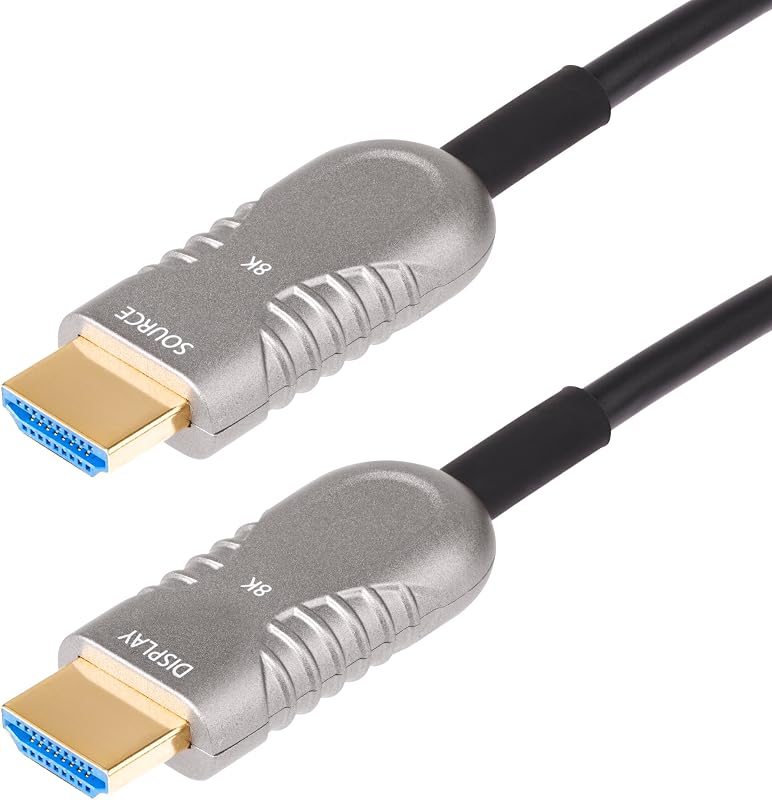
HDMI 2.1 takes an entirely different architectural approach by incorporating enhanced Audio Return Channel (eARC) hardware technology. As seen in the specifications for the StarTech 30ft Active HDMI 2.1 Cable, HDMI 2.1 cables support complex 7.1 surround sound and up to 32 discrete audio channels. Crucially, eARC creates a bi-directional audio pathway: a smart television can receive high-bandwidth video from an external player or console, process the audio signal, and route uncompressed object-based audio back down the exact same cable to an AV receiver or premium soundbar system.
For gamers using advanced audio gear like those highlighted in the hyperx cloud alpha wireless vs astro a50 x breakdown, desktop DACs and wireless base stations often interact with HDMI switching ecosystems. DisplayPort cannot route audio back to an amplifier via an existing display line; it requires separate routing. HDMI 2.1 serves as the universal spine of home theater acoustics, making it an indispensable interface for integrated media consoles and living room entertainment setups.
Edge: HDMI 2.1 wins for audio and home theater integration thanks to built-in eARC support and bi-directional 32-channel surround sound routing.
Physical Connector Design and Cable Retention
A digital connection requires physical stability to prevent signal drops, handshake failures, and port degradation. The physical hardware design of DisplayPort 2.1 cables incorporates a 20-pin configuration featuring a mechanical locking latch. When inserted into a desktop graphics card or gaming display, the latches snap into corresponding internal recesses on the female port. Removing the cable requires pressing a tactile release button on the connector housing. Both the Cable Matters DP54 and DP80 variants include gold-plated connectors paired with this locking latch mechanism, guaranteeing that monitor arm adjustments, cable routing tension, or vibrations do not pull the plug out of the socket.
HDMI 2.1 employs a 19-pin physical interface enclosed within a 24-pin structural connector profile that relies entirely on friction retention. While gold-plated HDMI connectors like those found on the StarTech cable are rigorously tested beyond 10,000 insertion cycles, they lack a mechanical lock. Over time, heavy cable weights, tight bends behind slim wall-mounted displays, or articulating television brackets can cause the friction fit to back out slightly, resulting in intermittent black screens or total loss of handshake.
The friction fit of HDMI offers one advantage: if someone trips over the cable, it pulls straight out rather than snapping the internal port off the circuit board. However, for stationary desktop installations and articulating monitor arms, the positive latching action of DisplayPort 2.1 provides superior physical peace of mind. In evaluating dp 2.1 vs hdmi 2.1 hardware construction, DisplayPort’s latching standard remains the benchmark for secure desktop computing.
Edge: DisplayPort 2.1 takes the edge with its mechanical locking latch that prevents accidental disconnects during desk movement and monitor adjustment.
Transmission Distance and Signal Integrity
High-frequency digital signals degrade rapidly across distance due to electromagnetic interference (EMI) and copper attenuation. DisplayPort 2.1 operates at ultra-high frequencies (UHBR 13.5 and UHBR 20) that demand extreme physical precision. As a result, certified passive DisplayPort 2.1 cables are strictly constrained in length. The Cable Matters DP80 cable measures 3.3 feet (1 meter), while the DP54 cable extends to 9.8 feet (3 meters). Attempting to run unassisted passive DisplayPort 2.1 connections across greater distances introduces signal degradation, bit errors, and dropped frames, which confines DisplayPort 2.1 primarily to desktop-adjacent setups.
HDMI 2.1 demonstrates immense versatility across long-distance installations through the implementation of active optical technology. The StarTech active HDMI 2.1 cable measures 30 feet (9.1 meters) in length and utilizes a hybrid Active Optical Cable (AOC) construction. By converting high-bandwidth video signals into optical pulses transmitted over fiber optic strands, the cable bypasses the attenuation limits of conventional copper while shielding against EMI. The low-bandwidth control signals, such as EDID and eARC, are preserved across shielded copper conductors inside the same jacket.
Furthermore, commercial HDMI installations often demand structural safety considerations. The StarTech cable features a CMP plenum rating, qualifying it for installation within air-handling plenums, ceilings, and in-wall conduits in commercial buildings and residential home theaters. Its optical fiber core is reinforced with Aramid strands to endure over 6,000 bending cycles. DisplayPort 2.1 does not offer widespread, certified active optical solutions for long building runs, giving HDMI 2.1 unmatched utility over medium and long distances.
Edge: HDMI 2.1 easily wins on transmission distance, successfully maintaining 48Gbps fidelity over 30-foot hybrid optical cables suitable for in-wall and plenum routing.
Ecosystem Compatibility and Hardware Adoption
A high-performance cable is only as useful as the hardware ports supporting it on either end. When analyzing hdmi 2.1 vs dp 2.1 for pc setups, graphics card and monitor adoption rates heavily influence real-world usability. HDMI 2.1 has achieved virtually universal adoption across modern entertainment hardware. It is the standard interface on current-generation gaming consoles like the PlayStation 5 and Xbox Series X, virtually all mid-to-high-end 4K and 8K televisions, audio soundbars, and dedicated AV receivers. Graphics card lineups from recent generations also feature HDMI 2.1 ports alongside traditional DisplayPort outputs.
DisplayPort 2.1, despite its technical brilliance, is currently confined to a specialized niche within the PC hardware ecosystem. While next-generation workstation displays and enthusiast PC gaming monitors are rolling out DP 2.1 ports, adoption across consumer televisions is nonexistent. When considering graphics card configurations such as the nvidia rtx 3060 vs intel arc b580 or modern alternatives like the amd rx 9060 xt vs intel arc a750, users must check their specific card generation to see whether it supports full UHBR DisplayPort 2.1 or is limited to older DisplayPort 1.4a outputs.
For shoppers asking is hdmi 2.1 worth it, the answer is an emphatic yes due to its broad interoperability. A single HDMI 2.1 cable can effortlessly bounce between a living room OLED television, a high-end desktop monitor, and a home gaming console. DisplayPort 2.1 remains a dedicated, purpose-built protocol for desktop PC monitors and specialized graphics cards, limiting its practicality outside of personal computing.
Edge: HDMI 2.1 wins on ecosystem adoption, offering universal compatibility across gaming consoles, televisions, AV receivers, and PC graphics cards.
Pros and Cons
DisplayPort 2.1
![Cable Matters [VESA Certified] 54Gbps DisplayPort](https://m.media-amazon.com/images/I/71GVZEUF9TL._AC_SL800_.jpg)
Pros
- Massive 80Gbps maximum bandwidth
- Supports up to 4K 960Hz with DSC
- Mechanical locking latch prevents disconnects
- Certified VESA DP54 and DP80 standards
Cons
- High-speed passive cables limited to short lengths
- Zero adoption on consumer televisions
- No eARC home theater audio return
View Cable Matters [VESA Certified] 54Gbps DisplayPort on Amazon
HDMI 2.1
Pros
- Universal compatibility with TVs and consoles
- Full eARC support for 32 audio channels
- Available in 30ft plenum-rated active optical runs
- Robust 48Gbps bandwidth for 4K 120Hz
Cons
- Lower 48Gbps ceiling than DisplayPort 2.1
- Friction fit connector lacks locking latch
- Cannot match extreme 4K 240Hz+ uncompressed refresh rates
View StarTech 30ft Active HDMI 2.1 Cable on Amazon
Who Should Buy Each One
Choose DisplayPort 2.1 If
- You own an ultra-high refresh rate monitor capable of 240Hz, 360Hz, or higher at 1440p or 4K resolutions.
- You want the maximum raw transmission bandwidth possible, scaling up to 80Gbps on certified DP80 hardware.
- You demand a physical locking latch on your cable to eliminate disconnects on moving monitor desk arms.
- Your visual setup runs exclusively on a modern desktop PC tower with dedicated DisplayPort 2.1 graphics card outputs.
Choose HDMI 2.1 If
- You connect gaming consoles, streaming hardware, or media boxes directly to a modern 4K or 8K television.
- You need eARC compatibility to send uncompressed 7.1 or 32-channel surround sound back to an AV receiver or soundbar.
- Your cable run exceeds 10 feet, requiring an active optical hybrid cable that can safely route through walls or ceiling plenums.
- You want a single, versatile standard that works seamlessly across living room home theaters and desktop PC setups.
Final Verdict
DisplayPort 2.1 is the undisputed performance champion for cutting-edge desktop PC gaming. By providing up to 80Gbps of raw bandwidth via DP80 certification, support for staggering 4K refresh rates up to 960Hz with DSC, and a rugged mechanical locking latch, it represents the absolute pinnacle of visual data delivery. If you are an enthusiast PC player investing in top-tier monitor technology and a compatible graphics card, DisplayPort 2.1 eliminates the bandwidth bottlenecks that hold back extreme frame rates.
For almost everyone else, HDMI 2.1 remains the more practical, versatile, and complete standard. While capped at 48Gbps, HDMI 2.1 delivers all the speed required for 4K 120Hz gaming, features unmatched ecosystem integration across consoles and televisions, and uniquely supports eARC for multi-channel home theater sound. Add in the availability of 30-foot plenum-rated active optical cables from manufacturers like StarTech, and HDMI 2.1 wins as the ultimate living room and cross-platform connection.
FAQ
Can I plug a DisplayPort 2.1 cable into an older DisplayPort 1.4 monitor?
Yes. DisplayPort 2.1 cables are fully backward compatible with DisplayPort 2.0, 1.4, and 1.2 ports. The cable will establish a stable handshake at the maximum speed supported by your older display or source device.
Does DisplayPort 2.1 support FreeSync and G-Sync?
Yes. Certified DisplayPort 2.1 cables fully support both AMD FreeSync and NVIDIA G-Sync variable refresh rate technologies to deliver tear-free gaming performance across supported graphics cards and monitors.
Why are 80Gbps DisplayPort 2.1 cables so short?
The UHBR 20 transmission mode pushes high-frequency electrical signals that attenuate rapidly over standard copper wiring. To ensure error-free transmission and earn VESA DP80 certification, passive copper cables are limited to shorter runs, typically around 3.3 feet (1 meter).
Can HDMI 2.1 cables carry power to external devices?
HDMI 2.1 carries a low-voltage 5-volt direct current power line to power internal circuitry in active cables and negotiate display identification (EDID), but it is not designed to supply operational power to external monitors or peripheral devices.
Is HDMI 2.1 or DisplayPort 2.1 better for a PlayStation 5 or Xbox Series X?
HDMI 2.1 is the correct choice. Current home gaming consoles feature native HDMI 2.1 output ports designed to communicate with modern 4K 120Hz televisions and do not include DisplayPort output ports.
Does HDMI 2.1 support Dolby Vision and HDR10+?
Yes. The HDMI 2.1 specification supports Dynamic HDR formats, including Dynamic HDR10+ and Dolby Vision, allowing 10-bit and 12-bit color data to be adjusted on a frame-by-frame basis for optimal dynamic range.


