The single deciding factor between these two mechanical boards comes down to structure and mobility: the Ducky One 3 delivers a traditional, rock-solid full-size layout built exclusively for stationary desktop stability, while the Akko 5075B Plus delivers a flexible 75-percent gasket-mounted platform engineered around multi-device wireless versatility.
Choose the Ducky One 3 if your priority is maximum data-entry efficiency, a permanent cable setup, and a full 108-key footprint featuring tactile or clicky switches. Choose the Akko 5075B Plus if you want a compact desk aesthetic, modern gasket-damped typing flex, a physical volume knob, and seamless switching across Bluetooth, 2.4GHz wireless, and USB-C.

Ducky One 3 vs Akko 5075B Plus at a Glance
| Feature | Ducky One 3 | Akko 5075B Plus |
|---|---|---|
| Form Factor & Key Count | Full-Size (108 Keys) | 75% Compact (84 Keys) |
| Mounting Style | QUACK Mechanics Integrated Tray Mount | Gasket Mount |
| Connectivity | Detachable Braided USB-C (Wired Only) | Tri-Mode (Bluetooth 5.0, 2.4GHz Wireless, USB-C) |
| Battery Capacity | None (USB bus-powered) | 3000mAh Rechargeable |
| Switch Sockets | Dual-Layer Kailh Yellow Hot-Swap Sockets | 5-Pin Hot-Swappable Sockets |
| Stock Switches | Cherry MX Blue (Clicky) | Akko V3 Creamy Yellow Pro (Linear) |
| Sound Dampening | Silicone Plate Dampener & EVA Foam Case Dampener | Silicone Plate Foam, Case Foam & IXPE Switch Pad |
| Keycap Profile & Material | Seamless Double-Shot PBT | ASA Profile Double-Shot PBT |
| Dedicated Media Controls | Hotkeys and Media Secondary Functions | Multi-Media Rotary Encoder Knob |
| Backlighting | Not Listed / Non-Backlit | Per-Key RGB with Side-LED Light Strips |
| Best For | Heavy Data Entry & Stationary Desktop Workstations | Compact Ergonomics & Multi-Device Wireless Setups |
Mounting Style and Typing Ergonomics
The internal architecture of a keyboard directly determines how your fingers feel after hours of continuous input. The Akko 5075B Plus gasket mount design stands in sharp contrast to traditional rigid mounting. By suspending the plate within the case using gasket dampeners rather than screwing it rigidly into the outer tray, the 5075B Plus absorbs the downward shock of aggressive keystrokes. This creates a softer, subtly cushioned bottom-out experience that reduces repetitive finger strain during long writing sessions or marathons. Shoppers exploring custom-feel compacts often compare this mounting execution to premium boards like the gmmk pro vs akko 5075b plus, noting how gasket isolation changes the spring-back dynamics of each switch.
In contrast, the Ducky One 3 leans on the company’s proprietary QUACK Mechanics philosophy, focusing on structural rigidity, balance, and firm feedback. Rather than introducing bounce, Ducky isolates vibration by locking the plate into a multi-layered case backed by precision silicone molds. When evaluating the Ducky One 3 or Akko 5075B Plus for typing, the Ducky board provides an uncompromising, stiff platform where key travel bottoms out firmly and predictably. For users who prefer crisp feedback without lateral give-especially when pounding keys during heavy numerical entry-the One 3 maintains zero flex across its broad metal and plastic chassis.
The ergonomic profile also diverges based on physical incline adjustments. The Ducky One 3 includes 3-level adjustable feet, giving typists three distinct tilt angles to align with their desk height or forearm position. The Akko chassis stands at a fixed profile height of 1.65 inches with sculpted ASA profile keycaps, which rely on their spherical, medium-height curves to keep fingers centered. If you rely on physical chassis adjustment to achieve wrist comfort, Ducky gives you direct control over typing angles, but if you demand a soft landing on every stroke, the gasket build of the Akko is the superior mechanical cushion.
Edge: Akko 5075B Plus for its softer gasket suspension that relieves bottom-out finger fatigue.
Connectivity, Portability, and Multi-Device Workflow
Connectivity determines whether your keyboard remains anchored to a single desk or moves fluidly across your daily computing hardware. The Akko 5075B Plus wireless connectivity suite transforms how you interact with multiple workstations. Equipped with Bluetooth 5.0, a dedicated low-latency 2.4GHz USB receiver, and a detachable Type-C interface, the 5075B Plus can link to phones, tablets, and desktop towers simultaneously. Its internal 3000mAh battery allows you to move the board untethered from a standing desk to an office couch, matching the versatile design priorities highlighted in modern compact evaluations like the akko 5075b plus vs nuphy air75 v2 comparison.
The Ducky One 3 takes a strictly traditional route, omitting wireless radios entirely. It operates purely over a wired connection using an included detachable braided USB Type-C cable. For fixed battlestations where the keyboard never leaves a single desk mat, this hardwired design eliminates charging routines, battery degradation over years of operation, and wireless interference. However, it completely locks the board to a single machine at a time, forcing you to manually unplug and swap the cable if you work between a desktop computer and a work laptop.
Desk management highlights another stark contrast. The One 3 requires continuous routing of a braided cable across your desk, whereas the Akko 5075B Plus keeps the desktop clean and clutter-free over 2.4GHz. The inclusion of a 3000mAh battery on the 5075B Plus does introduce power management into your routine-especially when running dynamic lighting effects-but the ability to toggle between paired devices with a quick keystroke gives Akko an enormous advantage for modern hybrid setups.
Edge: Akko 5075B Plus for its tri-mode wireless flexibility, 3000mAh battery, and seamless multi-device switching.
Form Factor, Layout, and Desk Real Estate
Form factor represents the most visually obvious split between these two peripherals. The Ducky One 3 is a comprehensive 108-key full-size mechanical keyboard. It incorporates the complete alpha cluster, dedicated function keys, full arrow cluster, navigational block, and an independent numerical keypad with additional macro keys above the numpad. For accountants, data analysts, spreadsheet power users, and anyone executing constant numerical input, losing a physical numpad is an immediate deal-breaker. The trade-off is its sprawling desk footprint, which leaves minimal clearance for wide mouse swings during low-DPI gaming.
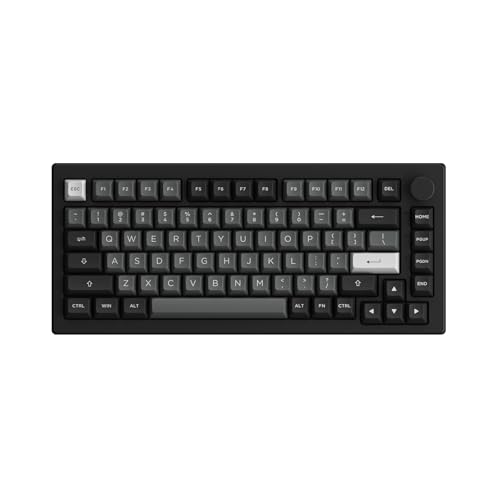
The Akko 5075B Plus adopts an 84-key, 75-percent footprint measuring roughly 13.19 inches long by 5.75 inches wide. This condensed layout eliminates the entire tenkey number pad while merging the navigation keys into a tight vertical column beside the Enter and Backspace keys. Shoppers weighing compact desk layouts often study comparisons like the akko 5075b plus vs epomaker th80 v2 to decide whether a compressed right-side layout accommodates their editing workflow. By shedding the numpad, the 5075B Plus frees up valuable real estate, bringing your mouse arm closer to your natural shoulder width to reduce shoulder abduction.
Beyond the reduced footprint, the Akko 5075B Plus integrates a hardware multi-media rotary encoder knob on the upper-right corner. This knob offers instant physical volume control and mute functionality without navigating software layers or holding down function combinations. The Ducky One 3 provides traditional secondary hotkeys and media keys integrated into the function row, but lacks the tactile convenience of a dedicated rotating dial. For pure efficiency in high-volume bookkeeping, Ducky’s full layout reigns supreme, but for everyday gaming and media consumption, the compact 75-percent format with a rotary knob offers superior desk balance.
Edge: Tie. Ducky One 3 wins for uninterrupted number-pad productivity; Akko 5075B Plus wins for desk ergonomics and dedicated rotary media control.
Acoustic Tuning and Internal Sound Dampening
Unwanted keyboard ping, hollow case resonance, and rattling stabilizers will ruin an otherwise premium typing session. The Ducky One 3 sound dampening system forms a major pillar of its QUACK Mechanics construction. Ducky packs the One 3 with a dual-layer acoustic treatment consisting of a precision-molded silicone plate dampener positioned between the plate and PCB, paired with an EVA foam dampener nestled into the lower case cavity. Combined with factory-lubricated Ducky V2 stabilizers, the board effectively eliminates ping from its metal switch plate, yielding a substantial, solid sound profile that avoids the hollow clatter common to older plastic tray keyboards.
The Akko 5075B Plus counters with a three-stage acoustic management system specifically tuned for the modern mechanical enthusiast market. Inside the 5075B Plus chassis, Akko incorporates high-density silicone plate foam, a molded case foam insert, and an IXPE switch pad positioned directly on top of the PCB. The inclusion of this IXPE switch pad fundamentally alters the acoustic signature of the switches, accentuating the crisp, concentrated tap of bottoming out while filtering out high-frequency plastic clicks. This multi-layer dampening package creates what enthusiasts describe as a creamy, concentrated acoustic pop, matching the sound profiles seen in premium custom comparisons such as the gmmk 3 vs akko 5075b plus.
When listening to both boards in a quiet workspace, the acoustic tone varies significantly based on stock switch pairings. The Ducky One 3 unit features clicky Cherry MX Blue switches, meaning the internal silicone and EVA foam serve to absorb case echo while allowing the loud, metallic snap of the internal switch click-leaf to ring out clearly. The Akko 5075B Plus, running linear V3 Creamy Yellow Pro switches against an IXPE pad and gasket mounts, delivers an inherently quieter, deeper, and more muted auditory experience. For open offices or shared spaces, Akko’s foam configuration creates a much friendlier sound profile.
Edge: Akko 5075B Plus for its comprehensive triple-layer dampening system including an IXPE switch pad.
Switches, Hot-Swap Flexibility, and Keycaps
Underneath the keycaps, both manufacturers embrace user serviceability, but they configure their stock builds for entirely different switch preferences. The Ducky One 3 hot swap functionality is driven by Kailh yellow hot-swap sockets embedded into a dual-layer PCB. Kailh sockets are industry standards known for high mechanical endurance and snug pin grip. This specific One 3 Matcha model arrives loaded with authentic Cherry MX Blue mechanical switches. Cherry Blues deliver a distinct tactile bump accompanied by a sharp audible click upon actuation. For typists who demand unmistakable physical confirmation of every keypress, Cherry Blues remain an iconic standard, though their heavy click makes them polarizing for communal environments.
The Akko 5075B Plus ships with Akko’s proprietary V3 Creamy Yellow Pro mechanical switches. These are smooth linear switches featuring an unhindered vertical travel from top to bottom with no tactile interruption or click. For gaming, linear switches are widely favored because they facilitate rapid double-tapping and smooth keystrokes without tactile resistance. The 5075B Plus incorporates 5-pin hot-swappable sockets on its PCB, making it universally compatible with almost any aftermarket 3-pin or 5-pin switch from Cherry, Gateron, Kailh, or specialty boutique manufacturers. When evaluating whether the board is a sound hardware investment, these 5-pin sockets ensure seamless upgrades down the line.
Both keyboards excel in keycap quality, utilizing thick PBT plastic with double-shot molding, meaning the legends are formed from a second layer of plastic that will never wear off or develop a greasy shine. However, the profiles differ: Ducky uses standard-height double-shot keycaps with seamless legends, providing a familiar sculpted typing angle. Akko employs its proprietary ASA profile keycaps, which feature spherical, dished tops and a slightly taller stature than standard OEM profiles. Ducky’s Kailh yellow sockets provide legendary durability, but Akko’s combination of smooth factory-lubed linear switches and 5-pin versatility provides greater out-of-the-box appeal for gaming enthusiasts.
Edge: Akko 5075B Plus for its smooth linear V3 Creamy Yellow Pro switches and broad 5-pin universal switch support.
Lighting, Software Customization, and Onboard Control
Visual presentation and customization software dictate how easily each keyboard adapts to custom macro bindings and battlestation themes. The Akko 5075B Plus features comprehensive RGB lighting, offering per-key backlighting alongside integrated side-rail light strips that cast ambient illumination across your desk surface. Through the dedicated Akko Cloud Driver, users can adjust dynamic lighting animations, customize color palettes, and re-map key assignments across layers. The software also lets you program complex macros, which are stored internally for fast execution during productivity or gaming routines. Users exploring enthusiast aesthetics often weigh this vivid illumination against retro-themed competitors like the akko 5075b plus vs 8bitdo retro mechanical.
The Ducky One 3 Matcha edition highlighted here prioritizes an understated physical aesthetic over glowing light displays. This specific model features no backlighting, leaning entirely on the contrasting sage green, off-white, and dark green hues of its three-layer case and PBT keycap set. Instead of relying on a mandatory software suite, Ducky emphasizes onboard hardware programming. The One 3 features an improved macro layout and N-key rollover configured directly via physical key combinations on the board itself, saving profiles directly to the keyboard’s internal memory without requiring background software installations on Windows.
Your preference between these two approaches depends on how you configure your peripherals. Gamers and creators who love dark rooms and synched RGB effects will find the One 3 Matcha uninspiring in the dark, whereas the Akko 5075B Plus lights up both keys and desk surfaces. Conversely, users who use corporate-managed computers where installing third-party driver software is prohibited by IT security policies will appreciate Ducky’s complete independence from desktop apps.
Edge: Akko 5075B Plus for full per-key RGB backlighting and visual side-accent strips.
Pros and Cons
Ducky One 3

Pros
- Full 108-key layout with dedicated number pad
- Exclusive Kailh yellow hot-swap sockets
- Dual-layer silicone and EVA dampening
- Sturdy PBT double-shot seamless keycaps
- Rock-solid low-latency wired USB-C connection
Cons
- No wireless connectivity options
- Lacks per-key backlighting on this model
- Substantial desk footprint
Akko 5075B Plus

Pros
- Versatile multi-device tri-mode wireless
- Cushioned gasket mount typing structure
- Integrated multi-media rotary knob
- Dynamic per-key and side-rail RGB
- Multi-layer foam with IXPE switch pad
Cons
- Missing dedicated numpad and navigation cluster
- Requires battery recharging over time
- Software customization requires desktop utility
View Akko 5075B Plus on Amazon
Who Should Buy Each One
Choose the Ducky One 3 If
- You manage high-volume data entry, accounting sheets, or spreadsheet databases that demand a dedicated 10-key numeric keypad.
- You work exclusively at a stationary desk and prefer the zero-maintenance reliability of a permanent wired USB-C connection without battery upkeep.
- You love the crisp, tactile, and audible click feedback provided by genuine Cherry MX Blue mechanical switches.
- You prefer configuring macros directly through onboard hardware shortcuts rather than running background driver software on your operating system.
Choose the Akko 5075B Plus If
- You need a mobile, multi-device keyboard that toggles seamlessly between Bluetooth, 2.4GHz wireless dongles, and wired USB-C modes.
- You want a cushioned, low-fatigue typing sensation provided by a suspended internal gasket mount.
- You require a compact 75-percent desk footprint that frees up substantial mouse-swiping area for competitive gaming.
- You appreciate dedicated hardware media controls via an integrated rotary volume knob alongside vibrant per-key RGB lighting.
Final Verdict
The Akko 5075B Plus is the winning pick for most modern keyboard enthusiasts, remote professionals, and gamers. By integrating a flexible gasket-mounted chassis, multi-layer acoustic foam with an IXPE pad, universal 5-pin hot-swap sockets, and a dedicated multi-media rotary knob, it offers a remarkably modern typing experience. Add in its tri-mode wireless connectivity powered by a 3000mAh battery, and the 5075B Plus easily adapts to multi-screen setups, laptop docking stations, and uncluttered desktop spaces.
The Ducky One 3 remains the superior instrument for fixed office desks, professional bookkeeping, and typists who refuse to compromise on a full-size layout. With its rock-solid QUACK Mechanics dampening, heavy-duty Kailh yellow hot-swap sockets, seamless double-shot PBT keycaps, and zero-latency wired connection, the One 3 provides an unshakeable platform built for decades of typing. If your daily workflow centers on the numeric keypad and clicky switch tactile precision, the Ducky One 3 is an exceptional desktop investment; for everything else, the Akko 5075B Plus is the more versatile, feature-rich keyboard.
FAQ
Is the Akko 5075B Plus compatible with Mac and Windows?
Yes, the Akko 5075B Plus operates across Windows, tablets, and other operating systems over its Bluetooth 5.0, 2.4GHz wireless, and USB-C connections, with dedicated software functionality supported through the Akko Cloud Driver.
Can you swap the switches on the Ducky One 3 without soldering?
Yes, the Ducky One 3 features a hot-swappable dual-layer PCB equipped with custom Kailh yellow sockets, allowing you to pull out switches using an included switch puller and press in new compatible mechanical switches without soldering.
Does the Akko 5075B Plus have hot-swappable sockets?
Yes, the Akko 5075B Plus comes built with universal 5-pin hot-swappable sockets, meaning you can easily swap out the stock V3 Creamy Yellow Pro linear switches for any standard 3-pin or 5-pin mechanical switch.
Is the Ducky One 3 available with wireless connectivity?
No, this model of the Ducky One 3 is strictly a wired keyboard powered through a detachable braided USB Type-C cable, which draws continuous power directly from your computer without an internal battery.
What does the rotary knob on the Akko 5075B Plus do?
The rotary encoder knob located on the top-right corner of the Akko 5075B Plus serves as a multi-media controller that adjusts master audio volume when turned clockwise or counterclockwise, and mutes or unmutes system sound when pressed down.
Are both keyboards water-resistant?
No, neither the Ducky One 3 nor the Akko 5075B Plus features water resistance ratings according to their product specifications, so caution should always be taken with beverages near your desk.



