The decisive difference between the HP Spectre x360 14 and the HP Envy x360 15 comes down to portability and display resolution versus screen size. The Spectre x360 14 is a 2.9-pound convertible built around a high-resolution 2.8K OLED 120Hz display for mobile use, while the Envy x360 15 is a 4-pound machine that provides a larger 15-inch Full HD workspace intended for stationary desk productivity.
Mobile professionals, frequent commuters, and creative workers should select the Spectre x360 14 for its lightweight design and sharp visuals. Users who primarily keep their machine stationed at a desk and want a larger traditional touchscreen for multi-window office work should choose the Envy x360 15.

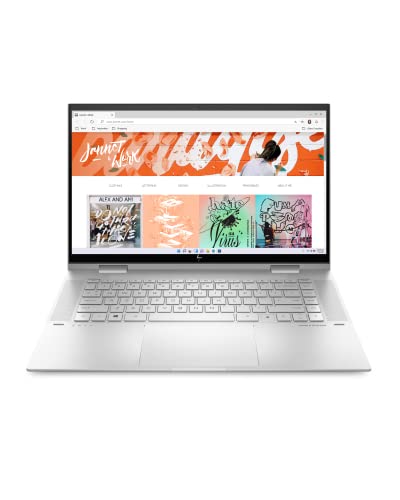
HP Spectre x360 14 vs HP Envy x360 15 at a Glance
| Attribute | HP Spectre x360 14 | HP Envy x360 15 |
|---|---|---|
| Screen Size and Resolution | 14.0-inch 2.8K (2880×1800) OLED Touchscreen | 15.0-inch FHD (1920×1080) Touchscreen |
| Display Refresh Rate | 120Hz | Not listed |
| Processor | Intel Core Ultra 7-256V (8 Cores, up to 4.8 GHz) | Intel Core i7-1260P (12th Gen Intel Core) |
| Graphics | Intel Arc Integrated Graphics | Intel Iris Xe Graphics |
| System Memory | 16GB LPDDR5X Onboard RAM | 16GB RAM |
| Storage Drive | 1TB PCIe NVMe SSD | 1TB SSD |
| Device Weight | 2.9 pounds | 4.0 pounds |
| Chassis Dimensions | 12.4 x 8.5 x 0.75 inches | Not listed |
| Battery and Charging | 4-Cell 64 WHr Battery, 65W Type-C PSU | HP Fast Charge (0 to 50% in ~30 min), 45V |
| Wireless Connectivity | Wi-Fi 7 (802.11be), Bluetooth 5.4 | Bluetooth (Wi-Fi standard not listed) |
| Ports and Expansion | 2 Thunderbolt 4, USB 3.2 Type-C, Headphone Jack | HDMI, USB, Audio (specific port versions not listed) |
| Best For | Travel, mobile productivity, and creative tasks | Stationary desk setups and spreadsheet multi-tasking |
Display Quality and Visual Precision
Display quality is the most immediately noticeable technical difference between these two convertible laptops. The Spectre x360 14 features a 14.0-inch 2.8K OLED touchscreen with a native resolution of 2880×1800 pixels and a fluid 120Hz refresh rate. In practical use, this pixel density translates into razor-sharp text rendering, crisp UI elements, and deep contrast levels with perfect black levels characteristic of organic light-emitting diode panels. The 16:10 aspect ratio provides added vertical workspace, allowing you to read documents, edit digital photos, and browse web pages with less repetitive scrolling. The 120Hz refresh rate also ensures that pen input and window animations feel immediate and natural, which buyers frequently note when reading a comprehensive HP Spectre x360 14 review.
By comparison, the Envy x360 15 features an edge-to-edge 15-inch Full HD touchscreen panel. While a Full HD resolution across a 15-inch diagonal offers ample physical space for laying out side-by-side browser windows, it features a lower pixel density than the compact 14-inch OLED display. Fine details in digital art, high-resolution photography, and small spreadsheet fonts will appear softer on the Envy than on the high-density panel. The listing does not specify an elevated refresh rate for the Envy x360 15, meaning it operates at standard display timing. Readers researching the dell xps 14 vs hp spectre x360 14 often prioritize screen clarity in the same way when evaluating premium ultraportables.
The visual trade-off here is straightforward: the Envy x360 15 offers more diagonal physical surface area, but the HP Spectre x360 14 OLED screen delivers drastically higher resolution, richer black levels, and a smoother 120Hz refresh rate. For users who edit photos, stream high-bitrate media, or read text for multiple hours each day, the extra sharpness of the 2.8K OLED screen significantly reduces visual fatigue compared to a standard 1080p panel stretched across fifteen inches.
Edge: HP Spectre x360 14 due to its sharp 2.8K OLED resolution, superior black levels, and fluid 120Hz refresh rate.
Portability, Weight, and 2-in-1 Ergonomics
Convertible laptops rely heavily on ergonomic physical design because their 360-degree hinges invite you to hold and operate them away from a desk. The Spectre x360 14 weighs in at just 2.9 pounds and measures 12.4 x 8.5 x 0.75 inches. This compact, sub-three-pound form factor allows you to easily slide the laptop into a slim commuter backpack or tote bag. More importantly, when folded into tablet or tent mode, 2.9 pounds is light enough to support comfortably in one hand or rest against your forearm while writing notes with a stylus or reviewing a document during a meeting.
The Envy x360 15 weighs 4.0 pounds, making it over an entire pound heavier than its 14-inch counterpart. While the listing does not detail its exact outer dimensions, housing a 15-inch screen naturally creates a significantly wider and deeper aluminum chassis. When examining the Spectre x360 14 vs Envy x360 15 weight difference, that single pound transforms the daily experience of the convertible form factor. Holding a 4-pound laptop in one arm as a handheld tablet quickly induces wrist strain, which makes the Envy much better suited for resting on a desk in standard laptop mode, or propping it up in tent mode for media playback.
Shoppers comparing the dell xps 15 vs hp spectre x360 14 frequently encounter this exact dilemma between 15-inch screen space and 14-inch mobility. If your daily routine involves walking across campus, working from airline tray tables, or using tablet mode on the couch, the lighter Spectre x360 14 is far more practical. The Envy x360 15 provides a sturdy aluminum construction, but its physical bulk limits how often you will genuinely want to use it as a handheld convertible device.
Edge: HP Spectre x360 14 because its 2.9-pound chassis is substantially easier to carry and comfortable to use in handheld tablet mode.
Processing Architecture and Computing Performance
Under the hood, these two machines feature completely different generations of Intel mobile processing technology. The Spectre x360 14 is powered by the 15th Generation Intel Core Ultra 7-256V processor. This processor operates with an 8-core, 8-thread configuration featuring 4 dedicated Performance cores, a base clock of 2.20 GHz, a maximum boost frequency up to 4.8 GHz, and 12MB of cache. It is paired with modern 16GB onboard LPDDR5X RAM and integrated Intel Arc graphics. This newer microarchitecture focuses heavily on balancing high burst speeds with low power consumption, making it well-suited for demanding productivity, photo editing, and concurrent multi-tasking without generating excessive heat.
The Envy x360 15 runs on a 12th Generation Intel Core i7-1260P processor paired with 16GB of system RAM and Intel Iris Xe graphics. While the Core i7-1260P provides dynamic performance distribution across its performance and efficiency cores to handle routine office workloads and web browsing, it belongs to an older processing architecture than the Core Ultra platform. The Intel Iris Xe graphics engine handles basic media playback and day-to-day display tasks reliably, but it does not match the graphical capabilities of the newer Intel Arc architecture found in the Spectre. Those reviewing the hp spectre x360 14 vs omen 16 will note that modern integrated Arc silicon narrows the gap for light creative rendering tasks far better than legacy Iris Xe silicon.
For demanding computing sessions, the Spectre x360 14 holds a distinct architectural advantage. Its LPDDR5X memory architecture offers faster data throughput compared to the DDR4 memory specification noted in the Envy listing, ensuring quicker asset loading in productivity tools. Both machines include a 1TB solid-state drive for responsive application boot times and ample document storage. However, when answering whether the HP Spectre x360 14 or Envy x360 15 for work provides better future-proofing, the Spectre’s 15th Gen Ultra 7 processor and Intel Arc graphics offer a noticeable performance and efficiency lead.
Edge: HP Spectre x360 14 for its modern Intel Core Ultra 7 architecture, faster LPDDR5X memory, and upgraded Intel Arc graphics.
Battery Specifications and Charging Convenience
Battery capabilities dictate how reliably a 2-in-1 convertible functions when working away from power outlets. The Spectre x360 14 is equipped with a 4-cell 64 WHr battery and includes a 65W power supply unit that charges via a standard Type-C power input port. A 64 WHr capacity inside a compact 14-inch laptop provides substantial reserve energy. However, users evaluating HP Spectre x360 14 battery life must account for the power draw of the 2.8K OLED panel and its 120Hz refresh rate, both of which consume more power than a conventional 60Hz 1080p display when running high-brightness media.
The Envy x360 15 listing does not specify its exact battery watt-hour capacity, but it lists an operating voltage of 45 volts and specifically highlights HP Fast Charge technology. According to the manufacturer specifications, HP Fast Charge can restore approximately 0 to 50% battery capacity in roughly 30 minutes. This rapid replenishment feature is particularly advantageous for busy users who work between fixed desks or classrooms and only have brief windows to plug into an outlet. Anyone looking at a practical HP Envy x360 15 review will appreciate that quick top-up functionality can offset the lack of detailed watt-hour documentation in the listing.
When weighing the power systems of these two convertibles, each presents a distinct benefit. The Spectre x360 14 offers a defined 64 WHr battery paired with modern energy-efficient Intel Ultra 7 silicon and universal 65W USB Type-C charging flexibility, as noted in comparisons like the dell inspiron 14 plus vs hp spectre x360 14. Meanwhile, the Envy x360 15 gives you the convenience of rapid recovery through HP Fast Charge. Because the Envy’s battery capacity remains unlisted, users seeking documented endurance specs will find the Spectre more transparent.
Edge: HP Spectre x360 14 due to its verified 64 WHr battery capacity, universal 65W Type-C charging, and efficient processor architecture.
Connectivity, Ports, and Peripheral Ecosystem
Peripheral connectivity determines how easily your laptop integrates into an existing office or home workstation. The Spectre x360 14 is engineered with high-bandwidth interfaces, including two Thunderbolt 4 ports, a USB 3.2 Type-C port, and a headphone/microphone combo jack. It supports external video output via DisplayPort over Type-C and HDMI 2.1 protocols. To expand its utility out of the box, this specific listing bundle includes an authorized Dockztorm portable USB data hub that supports data rates up to 5Gbps. On the wireless side, the Spectre incorporates cutting-edge Wi-Fi 7 (802.11be) and Bluetooth 5.4, providing the latest standards for high-speed network connectivity and stable wireless peripheral pairing.
The Envy x360 15 takes a more traditional approach to physical interfaces. While the listing does not enumerate the exact count or revision of every socket, it explicitly confirms compatibility with HDMI, USB, and Bluetooth connections, allowing direct plug-in capability for external displays, mice, keyboards, storage drives, and printers. This legacy support allows users to plug in standard HDMI monitors or standard USB cables without necessarily searching for a dongle. In comparisons such as the dell inspiron 14 plus vs hp envy x360 15, built-in legacy connections remain a frequent point of convenience for standard desk accessories.
However, the Spectre x360 14 wins the connectivity comparison on speed and flexibility. Thunderbolt 4 ports provide up to 40Gbps of bidirectional bandwidth, enabling multi-monitor daisy chaining, external high-speed drive arrays, and single-cable docking solutions that supply both display output and charging power. When combined with modern Wi-Fi 7 wireless hardware and the bundled Dockztorm hub for legacy USB accessories, the Spectre offers an advanced and flexible I/O layout.
Edge: HP Spectre x360 14 for its dual Thunderbolt 4 ports, advanced Wi-Fi 7 connectivity, and bundled Dockztorm expansion hub.
Pros and Cons
HP Spectre x360 14

Pros
- Vibrant 2.8K 120Hz OLED touchscreen
- Lightweight 2.9-pound portable chassis
- Modern Intel Core Ultra 7 processor
- Dual high-speed Thunderbolt 4 ports
- Fast Wi-Fi 7 and Bluetooth 5.4
Cons
- Smaller 14-inch screen area
- Higher battery drain from 120Hz OLED
View HP Spectre x360 14 on Amazon
HP Envy x360 15

Pros
- Expansive 15-inch edge-to-edge touchscreen
- HP Fast Charge reaches 50% in 30 minutes
- Built-in HDMI and standard USB compatibility
- Durable natural silver aluminum build
Cons
- Heavier 4.0-pound chassis limits tablet use
- Lower resolution Full HD display panel
- Older 12th Gen Intel Core processor
View HP Envy x360 15 on Amazon
Who Should Buy Each One
Choose the HP Spectre x360 14 If
- You travel frequently or commute daily and require a lightweight 2.9-pound convertible laptop that fits easily into any bag.
- You want a superior visual experience with a high-resolution 2.8K OLED touchscreen and a smooth 120Hz refresh rate.
- You regularly use tablet mode for digital handwriting, sketching, or handheld reading where a heavier chassis causes physical fatigue.
- You need high-bandwidth connectivity, including dual Thunderbolt 4 ports and the newest Wi-Fi 7 wireless protocol.
Choose the HP Envy x360 15 If
- You intend to keep your laptop parked primarily on a home or office desk and prefer an expansive 15-inch display for side-by-side windows.
- You value rapid top-ups using HP Fast Charge to recover up to 50% battery capacity in approximately 30 minutes.
- You prefer direct connectivity with external displays and peripherals through standard HDMI and USB interfaces.
- You want a durable aluminum 2-in-1 convertible with integrated HP software utilities like HP BIOS Protection and Audio Switch.
Final Verdict
For most shoppers evaluating the HP Envy x360 15 vs Spectre x360 14, the HP Spectre x360 14 is the superior 2-in-1 convertible. It delivers meaningful advantages across almost every key buying criterion: a significantly lighter 2.9-pound frame, an exceptional 2.8K OLED display with a 120Hz refresh rate, modern Intel Core Ultra 7 architecture, and dual Thunderbolt 4 connections. Whether you need a laptop for travel, professional creative projects, or comfortable handheld note-taking, the Spectre provides a refined and modern computing experience that makes full use of the convertible form factor.
The HP Envy x360 15 remains a practical option if your workflow is mostly stationary and you value screen size above all else. If you rarely take your computer off your desk and want a 15-inch touchscreen that makes multi-tasking and spreadsheet viewing comfortable without an external monitor, the Envy x360 15 serves that need well. However, because its 4.0-pound weight makes handheld tablet use awkward, buyers who genuinely want a versatile 2-in-1 device will find the Spectre x360 14 far more satisfying to own and operate.
FAQ
Is the HP Spectre x360 14 worth it compared to the Envy x360 15?
Yes, the Spectre x360 14 is well worth choosing if you value display quality, processing speed, and portability. Its 2.8K 120Hz OLED screen offers significantly better visual fidelity than the standard FHD panel on the Envy, and its 2.9-pound weight makes it vastly more practical to handle as a convertible tablet.
Which laptop is better: the HP Spectre x360 14 or Envy x360 15 for college?
The Spectre x360 14 is the better choice for college students. Carrying a 2.9-pound laptop across campus is far easier than transporting a 4.0-pound 15-inch device, and the compact footprint fits much better on small lecture hall desks.
Can you use both of these laptops as handheld tablets?
Both models feature 360-degree hinges that allow the screen to fold completely flat against the base. However, the Spectre x360 14 weighs only 2.9 pounds, making it comfortable to hold in one arm, while the 4-pound Envy x360 15 is too heavy for extended handheld tablet use and is better rested on a table.
What are the graphics differences between Intel Arc and Intel Iris Xe on these models?
The Spectre x360 14 includes newer integrated Intel Arc graphics, which offer improved graphics rendering, smoother multimedia playback, and better performance in creative applications compared to the older Intel Iris Xe graphics found in the Envy x360 15.
How fast does the HP Envy x360 15 recharge?
The Envy x360 15 features HP Fast Charge technology, which according to the product specifications can charge the battery from 0 to 50% in approximately 30 minutes when connected to its power adapter.
Does the HP Spectre x360 14 include extra accessories?
Yes, the Spectre x360 14 listing includes an authorized Dockztorm portable USB data hub supporting data transfer rates up to 5Gbps, which allows you to connect standard USB accessories directly to the laptop.
Is the HP Envy x360 15 worth it for stationary office work?
Yes, if you keep your laptop on a desk and want a larger 15-inch touchscreen for spreadsheets and multi-window office work without connecting an external monitor, the Envy x360 15 is a functional, durable choice.


