The fundamental distinction between these two custom keyboards centers on internal case engineering and desk footprint: the Keychron Q1 features a heavy CNC-machined aluminum body with an acoustic double-gasket mount in a 75 percent layout, while the Keychron K Pro V2 focuses on an ultra-compact 65 percent tray-style profile equipped with an internal acoustic silicone pad for space-conscious typing.
Typists and desktop enthusiasts who prioritize an immovable metal chassis, flexible gasket acoustics, and dedicated function keys should choose the Keychron Q1, whereas users needing maximum mouse clearance, lightweight portability, and out-of-the-box double-shot PBT keycaps should select the Keychron K Pro V2.
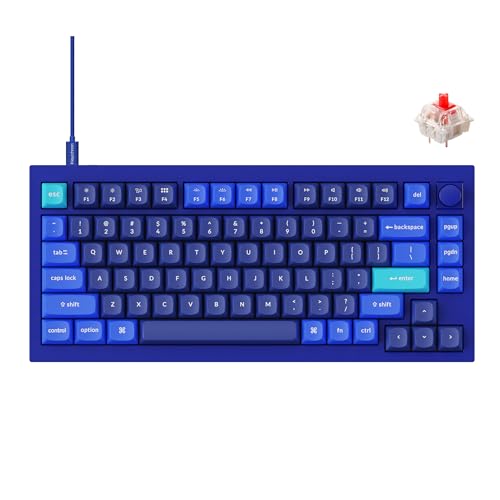

Keychron Q1 vs Keychron K Pro V2 at a Glance
| Feature | Keychron Q1 | Keychron K Pro V2 |
|---|---|---|
| Form Factor | 75% compact | 65% ultra-compact |
| Total Key Count | 84 keys | 65 keys |
| Case Material | Full aluminum CNC machined body | Not listed (ABS / composite body) |
| Internal Mounting and Damping | Double-gasket design with silicone case pads | Acoustic silicone pad |
| Pre-Installed Switches | Pre-lubed Gateron G Pro Red (Linear) | Pre-lubed K Pro Brown (Tactile) |
| Keycap Material | Not listed | Double-shot PBT non-shine-through |
| Firmware and Programming | QMK and VIA open-source firmware | QMK and Keychron Launcher web app |
| Hot-Swappable Sockets | Yes (3-pin and 5-pin MX compatible) | Yes (3-pin and 5-pin MX compatible) |
| Stabilizer Compatibility | Screw-in, supports Cherry and Durock | Not listed |
| Backlighting | RGB backlit | South-facing RGB backlight |
| Connectivity | Wired USB-C | Wired USB |
| Best For | Premium desk setups and gasket acoustics | Compact workspaces and tactile typing |
Case Construction and Mounting Architecture
The structural foundation of a custom mechanical keyboard dictates how it resonates, how stiff each keystroke feels, and how firmly the chassis remains anchored to your desk surface. In any detailed Keychron Q1 review, the defining engineering highlight is the solid CNC-machined aluminum body paired with a sophisticated double-gasket structure. Keychron integrated silicone pads directly between the upper and lower aluminum shells in addition to the gaskets along the switch plate. This acoustic layout isolates keystroke vibrations, eliminating hollow metal pinging and delivering a cushioned, flexible bottom-out that mitigates joint fatigue during marathon typing sessions.
By contrast, the Keychron V2 review reveals a more traditional tray-style construction centered around structural rigidity and compact mass. Rather than floating the plate on silicone gaskets, the K Pro V2 utilizes an integrated acoustic silicone pad positioned inside the chassis to absorb excess vibrations and dampen hollow switch echoes. While the acoustic pad successfully tempers sharp sound frequencies from the switches, the bottom-out remains substantially stiffer than what you experience on a floating gasket board. For builders exploring comparative form factors across product lines, examining the keychron q3 vs k pro v2 illustrates a similar acoustic divide between solid metal gasket designs and compact tray-damped alternatives.
This difference in mounting approach substantially alters daily desk performance. The Q1 double gasket vs V2 tray mount comparison highlights two distinct typing feels: the Q1 yields under moderate finger pressure to create a soft, bouncy cadence, whereas the K Pro V2 provides a firm, unyielding platform where switch actuation stops abruptly against the reinforced plate structure. Furthermore, the Q1 supports third-party screw-in stabilizers like Cherry or Durock directly on its internal assembly, allowing keyboard modders to eliminate stabilizer rattle at the component level.
Edge: Keychron Q1, because its full CNC aluminum body and double-gasket silicone dampening deliver superior acoustic resonance reduction and flexible typing comfort.
Layout Efficiency and Key Count
Layout geometry dictates workflow speed and muscle memory. The Keychron Q1 75 percent vs V2 65 percent distinction represents one of the most critical functional trade-offs an enthusiast must weigh. The Q1 incorporates an 84-key arrangement, preserving a full top row of dedicated function keys (F1 through F12) along with independent arrow keys and a vertical navigation column. This configuration allows software developers, spreadsheet power users, and system administrators to trigger secondary commands without pressing complex modifier layers. It delivers full desktop utility while trimming roughly 25 percent of the width found on a standard full-size keyboard.
The K Pro V2 strips the layout down further to an ultra-compact 65-key footprint. By eliminating the physical function row, the keyboard brings the number keys directly to the top edge of the board. Accessing media controls, brightness toggles, and function commands requires holding down an Fn modifier key. While this demands a short learning curve for users who rely on instant single-tap shortcuts, the reduced footprint dramatically improves ergonomics by bringing your mouse closer to your center typing position. Typists comparing different numerical layouts like the keychron v3 vs k pro v2 will find that 65 percent layouts prioritize minimalism over dedicated physical switches.
Choosing between these two designs depends entirely on whether your daily application workflow requires rapid function row access. If your creative or technical work involves frequent debug shortcuts, macro mapping, or desktop switching, the 84-key layout on the Q1 prevents interruption. If your desktop space is tightly constrained or you favor clean symmetry with unobstructed mouse travel, the 65-key K Pro V2 offers complete typing capability without extraneous physical keys.
Edge: Keychron Q1, as its 84-key design preserves the dedicated function row without substantially expanding desk footprint.
Switch Performance and Typing Feel
Switch selection determines tactile feedback, bottom-out impact, and typing acoustics. The standard configuration of the Q1 features pre-lubed Gateron G Pro Red mechanical switches. These linear switches feature a smooth, uninterrupted downward stroke rated for up to 50 million keystrokes. Paired with the Q1 double gasket suspension, the Gateron Reds produce a muted, quiet typing experience characterized by smooth travel and minimal friction. The absence of a tactile bump makes continuous typing fluid, though typists with heavy keystrokes may experience occasional accidental key presses until muscle memory adapts.
The K Pro V2 takes an alternative path by coming pre-installed with pre-lubed K Pro Brown switches. As tactile switches, the K Pro Browns feature a subtle physical bump right around the actuation point. This tactile resistance lets you feel the exact moment the keystroke registers without requiring you to bottom the key out completely against the internal plate. For professional writing, data entry, and everyday office correspondence, tactile feedback provides reassurance that reduces repetitive typos. Those researching the keychron k10 pro vs k pro v2 will note that pre-lubed brown switches offer an approachable balance for office productivity.
Both keyboards feature hot-swappable circuit boards that accommodate virtually all 3-pin and 5-pin MX-style mechanical switches without soldering. However, evaluating the Keychron Q1 or Keychron K Pro V2 for typing reveals an underlying difference in switch stability: the Q1 allows builders to install premium aftermarket screw-in stabilizers to tune spacebars and modifier keys, whereas the K Pro V2 relies on pre-installed factory components. Both deliver smooth pre-lubed action, but the K Pro V2 offers immediate tactile confirmation right out of the box.
Edge: Tie, because the Q1 provides smoother linear action with high modding ceiling, while the K Pro V2 provides responsive tactile feedback out of the box.
Keycaps and Lighting Implementation
Keycap construction and backlighting orientation heavily influence long-term durability and aesthetic customization. The Keychron K Pro V2 review data highlights the inclusion of premium double-shot PBT keycaps. PBT is renowned in mechanical keyboard circles for its resistance to skin oils, friction wear, and surface shine. The double-shot molding process fuses two distinct layers of plastic together, ensuring the keycap legends never fade or wear off over time. Furthermore, the V2 uses south-facing RGB lighting. South-facing LEDs shine directly toward the user, preventing physical interference with popular Cherry-profile aftermarket keycap sets and delivering brighter illumination at normal sitting angles.
The Q1 listing specifies an integrated RGB backlight system with ambidextrous ergonomic styling, but the factory specifications do not detail the exact keycap material or profile for this specific Dark Blue reference. While the vibrant RGB backlighting on the Q1 supports numerous customizable lighting patterns through its firmware, users prioritizing long-lasting PBT materials out of the box will appreciate the definitive inclusion of double-shot PBT on the V2. Modders seeking inspiration across compact boards like the keychron k6 vs k10 pro frequently seek south-facing orientations specifically to maximize keycap compatibility.
For customizers who plan to swap keycap sets immediately, south-facing switches on the K Pro V2 ensure seamless fitment with thick enthusiast-grade keycaps without catching on the switch housing. The Q1 provides comprehensive RGB lighting effects that bounce well off its metallic switch plate, but the K Pro V2 holds a measurable advantage in factory keycap resilience and south-facing lighting geometry.
Edge: Keychron K Pro V2, thanks to factory-installed double-shot PBT keycaps and south-facing RGB LEDs that prevent keycap interference.
Gaming Responsiveness and Workspace Ergonomics
When selecting the Keychron Q1 or Keychron K Pro V2 for gaming, input reliability, switch actuation speed, and mouse clearance take center stage. Both keyboards utilize direct corded USB connections, eliminating wireless latency, packet loss, and battery degradation mid-match. The Q1 connects via a detachable USB-C interface, ensuring consistent electrical throughput whether hooked to a gaming PC, laptop, or gaming console. Its Gateron G Pro Red linear switches are naturally suited to competitive gaming, where the lack of a tactile reset bump allows for faster double-taps and rapid directional inputs in first-person shooters.
The K Pro V2 counters with dramatic physical space savings. In fast-paced gaming environments, low-sensitivity mouse aiming requires broad horizontal sweeps across the desk mat. The ultra-compact 65 percent width of the K Pro V2 frees up several inches of prime desk surface compared to 75 percent or tenkeyless boards. This allows gamers to position their hands at a natural shoulder-width angle, improving posture and preventing mouse collisions against the side of the keyboard casing. Although the pre-lubed K Pro Brown switches require a slight tactile push past the actuation bump, the hot-swap sockets mean you can easily drop linear switches into the primary WASD clusters if desired.
The deciding ergonomic factor comes down to weight and desk stability versus portability. The Q1 is built from dense CNC aluminum, meaning it will never slide across your desk pad during frantic gaming inputs. The K Pro V2, while lighter, offers superior mouse freedom and a modern compact aesthetic that fits neatly into competitive setups.
Edge: Keychron K Pro V2, because its ultra-compact 65 percent footprint delivers critical mouse clearance for low-sensitivity gaming.
Firmware Programmability and Operating System Support
A major strength of both mechanical boards is complete hardware-level customization via open-source firmware. The Q1 features native QMK and VIA compatibility. Through VIA, you can remap every single key, configure multi-action macros, create layered navigation controls, and tweak RGB backlight patterns in real time without flashing new code or installing intrusive background software. The Q1 stores all profiles directly on its onboard memory, meaning your custom key assignments persist whether plugged into Windows, macOS, Linux, or a gaming console.
The K Pro V2 matches this high standard while streamlining accessibility through QMK and the Keychron Launcher web application. Rather than downloading external desktop tools, K Pro V2 users can configure their layout directly within an open web browser. The board also includes dedicated hardware toggles for macOS and Windows, accompanied by extra OS-specific keycaps to ensure effortless transitions between Apple and PC hardware. Whether configuring system-level commands or designing custom hotkey clusters, both boards offer limitless keymapping flexibility.
Because both units execute deep QMK-based custom mapping across all major desktop operating systems without requiring proprietary background software suites, neither side concessions ground in firmware capabilities. Key mapping, macro generation, and layer shifting perform identically at the hardware controller level.
Edge: Tie, as both keyboards feature complete QMK customization, multi-OS support, and on-the-fly remapping tools.
Pros and Cons
Keychron Q1

Pros
- Full CNC machined aluminum body
- Flexible double-gasket acoustic mounting
- Dedicated 75% function key row
- Supports third-party screw-in stabilizers
Cons
- Heavier and less portable
- Takes up more desk space
Keychron K Pro V2

Pros
- Ultra-compact 65% desk-saving footprint
- Durable double-shot PBT keycaps
- South-facing RGB prevents keycap interference
- Responsive pre-lubed tactile switches
Cons
- Lacks dedicated physical function row
- Stiffer tray-style bottom-out feel
View Keychron K Pro V2 on Amazon
Who Should Buy Each One
Choose the Keychron Q1 If
- You demand a heavy, premium full aluminum CNC body that remains completely stationary on your desk.
- You prefer a cushioned, acoustic double-gasket typing feel that eliminates case resonance and softens bottom-out impact.
- You rely heavily on a physical row of dedicated F1-F12 function keys for daily productivity and development work.
- You plan to install third-party screw-in stabilizers from brands like Cherry or Durock for customized acoustic tuning.
Choose the Keychron K Pro V2 If
- You want an ultra-compact 65 percent layout that opens up broad horizontal desk space for sweeping mouse movements.
- You prefer the responsive feedback of pre-lubed tactile switches over linear switches for accurate typing.
- You want durable, non-shine-through double-shot PBT keycaps installed straight out of the box.
- You plan to use custom Cherry-profile keycaps and require south-facing RGB backlighting to prevent switch housing interference.
Final Verdict
For most mechanical keyboard enthusiasts and daily typists, the Keychron Q1 is the superior long-term hardware investment. Its dense CNC-machined aluminum casing, sophisticated double-gasket dampening design, and support for third-party screw-in stabilizers elevate it into an entirely different class of structural quality. The presence of a dedicated 75 percent function row preserves complete desktop productivity without requiring complex key combinations, while the pre-lubed Gateron G Pro Red linear switches glide effortlessly inside an acoustically muted, resonance-free case.
However, the Keychron K Pro V2 remains the smarter option when workspace efficiency, desk real estate, or portable ergonomics drive your purchase decision. By trimming the chassis down to an ultra-compact 65-key footprint, the K Pro V2 delivers tremendous mouse clearance while offering tactile K Pro Brown switches, durable double-shot PBT keycaps, and south-facing RGB lighting straight out of the box. If you want maximum typing luxury and acoustic damping, secure the Q1; if you need a tight, tactile board that preserves your desktop space, choose the K Pro V2.
FAQ
Is Keychron K Pro V2 worth it compared to the Keychron Q1?
Yes, the K Pro V2 is well worth it if your priority is saving desk space, maximizing mouse clearance, or securing double-shot PBT keycaps out of the box. While the Q1 provides higher-end materials like full CNC aluminum and double-gasket mounting, the K Pro V2 delivers identical QMK programming flexibility and hot-swappable switch functionality in a lighter, more compact 65 percent form factor.
Can you hot-swap switches on both keyboards without soldering?
Yes, both keyboards feature hot-swappable switch sockets integrated directly onto the PCB. You can quickly pull out and swap any standard 3-pin or 5-pin MX-style mechanical switches from manufacturers like Gateron, Cherry, or Kailh without touching a soldering iron.
What is the typing difference between the Keychron Q1 double gasket vs V2 tray mount?
The Q1 double gasket design suspends the switch plate on flexible gaskets and adds silicone pads between the top and bottom aluminum frames, yielding a softer, bouncy keystroke that absorbs vibration and case ping. The K Pro V2 utilizes an internal acoustic silicone pad to dampen sound, but its internal tray architecture produces a firmer, more rigid bottom-out feel when pressing keys down.
Do both keyboards work on Mac, Windows, and Linux?
Yes, both models feature full cross-platform compatibility across macOS, Windows, and Linux. The K Pro V2 includes a physical hardware system switch and additional operating system keycaps, while both keyboards support QMK/VIA firmware to remap specific platform modifiers and layout commands directly into onboard memory.
What is the practical difference in the Keychron Q1 75 percent vs V2 65 percent layout?
The 75 percent layout on the Q1 features 84 keys, which includes a dedicated top row for function keys (F1-F12) alongside arrow keys and navigation buttons. The 65 percent layout on the K Pro V2 contains only 65 keys, eliminating the dedicated function row entirely to minimize case length and requiring users to hold down an Fn modifier key to trigger function shortcuts.
Can I use third-party stabilizers on the Keychron Q1?
Yes, the Q1 explicitly supports third-party screw-in stabilizers, including popular enthusiast brands such as Cherry and Durock. This allows users to easily upgrade or tune the large modifier keys (like the spacebar, enter, and shift keys) to eliminate rattle and customize typing sound.