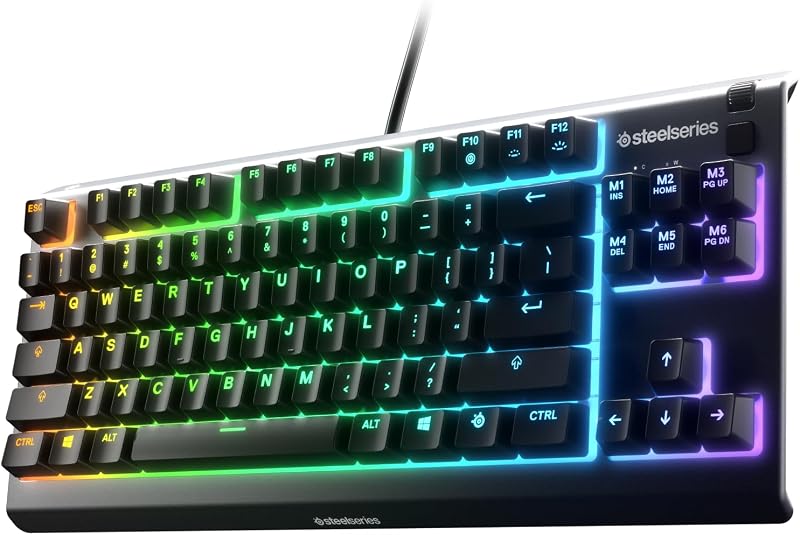
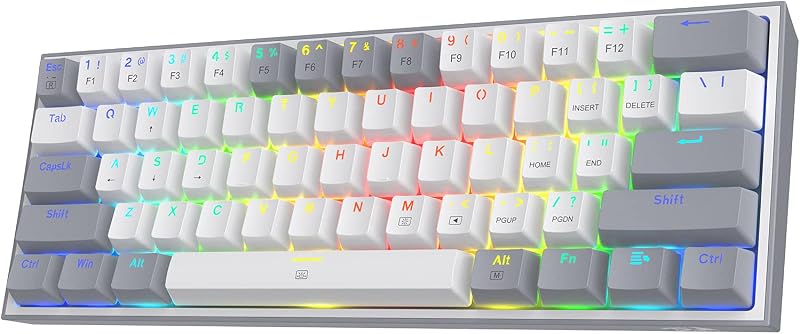
The single deciding factor between these two keyboards comes down to internal switch technology and connection flexibility: the Keychron Q3 employs Hall Effect magnetic switches with rapid-trigger actuation and tri-mode wireless connectivity inside a heavy all-aluminum tenkeyless frame, while the Keychron K Pro V2 uses traditional tactile mechanical switches in a wired-only, compact 65% layout designed for streamlined desktop typing.
Gamers and tech enthusiasts seeking dynamic analog control, ultra-fast key resets, and multi-device wireless pairing should choose the Q3. Dedicated typists and programmers who want a space-saving, dependable mechanical deck with standard tactile feedback should select the K Pro V2.


Keychron Q3 vs Keychron K Pro V2 at a Glance
| Feature | Keychron Q3 | Keychron K Pro V2 |
|---|---|---|
| Form Factor | 80% Tenkeyless (TKL) | 65% Ultra-Compact |
| Key Count | 87 Keys | 65 Keys |
| Switch Type | Gateron 2.0 Magnetic (Hall Effect) | Keychron K Pro Brown (Tactile Mechanical) |
| Hot-Swappable | Yes (Magnetic switch PCB) | Yes (3-pin and 5-pin MX-style) |
| Actuation Customization | Rapid Trigger, Analog Mode, Snap Action, 4 Actions per Key | Fixed mechanical actuation (2.0 mm travel point) |
| Connectivity | 2.4 GHz Wireless, Bluetooth 5.2, USB-C Wired | USB Wired |
| Case Material | All-Aluminum Body | ABS Plastic Enclosure (Non-Transparent) |
| Internal Acoustics | Double-Gasket Design, Multi-Layer Acoustic Foams | Acoustic Silicone Pad |
| Keycaps | PBT Keycaps (Mac and Windows included) | Double-shot PBT Keycaps (Mac and Windows included) |
| Software Configurator | Keychron Launcher (Web-Based), QMK | Keychron Launcher (Web-Based), QMK/VIA |
| Best For | Competitive Gaming, Analog Simulation, Wireless Flexibility | Space-Conscious Desk Setups, Dedicated Typists, Office Use |
Switch Technology and Actuation Performance
The primary operational difference between the two keyboards lies inside the switch sockets. The Q3 features Gateron double-rail Hall Effect magnetic sensors rather than traditional copper leaf contacts. Instead of relying on a physical metal leaf closing a circuit at a fixed distance, Keychron Q3 magnetic switches measure the proximity of a tiny magnet embedded in the stem. This enables Keychron Q3 rapid trigger switches to register keypresses the instant they start descending and disengage immediately when upward motion begins, eliminating physical reset delay entirely. Users can also configure analog depth modes to mimic vehicle pedals or assign up to four distinct in-game commands to a single keystroke depending on press depth.
In contrast, the K Pro V2 utilizes standard physical switches. The installed Keychron V2 K Pro Brown switch relies on a physical actuation point and a tactile leaf mechanism that provides subtle physical resistance right before the key registers. Typists often prefer this tactile bump because it gives confirmation without bottoming out, leading to fewer unintended typos during long writing sessions. Those researching a keychron q1 vs k pro v2 comparison will recognize this classic mechanical behavior, which values deliberate, consistent keystroke feedback over dynamic travel adjustments.
Choosing between them is a matter of dynamic response versus tactile assurance. When weighing the Keychron Q3 or Keychron K Pro V2 for gaming, the Hall Effect platform offers a measurable responsiveness advantage in titles that require fast counter-strafing, rapid double-tapping, and continuous direction changes. For everyday text entry, however, the tactile snap of the mechanical browns delivers a recognizable rhythm that magnetic linear switches cannot reproduce without digital actuation profiling.
Edge: Keychron Q3 for its adjustable actuation depth, instant rapid-trigger resets, and analog operational modes.
Form Factor, Layout, and Desk Space Efficiency
Desk layout determines hand placement, mouse clearance, and everyday navigation efficiency. The Keychron Q3 uses an 80% Tenkeyless (TKL) footprint containing 87 keys. This layout preserves the entire dedicated function row along the top, an independent navigational cluster including Insert, Delete, Home, End, Page Up, Page Down, and separate arrow keys. Having direct access to these dedicated keys reduces the need for layer switching, which benefits developers, data workers, and gamers who rely on dedicated bindings outside the primary alphanumeric grid.
The Keychron K Pro V2 opts for a condensed 65% ultra-compact form factor containing 65 keys. By omitting the dedicated function row and condensing the navigation cluster into a vertical right-hand column alongside dedicated arrow keys, the K Pro V2 drastically frees up mouse surface area. This ultra-compact frame keeps the mouse closer to the keyboard center, promoting an ergonomic arm alignment that reduces shoulder strain during extended desk sessions. Readers exploring our keychron v3 vs k pro v2 analysis will recognize how this compact footprint appeals to minimalists who want essential navigation keys without desktop clutter.
The trade-off hinges on convenience versus desk real estate. The Q3 makes zero compromises on standalone utility keys, but its broad frame occupies significant desk surface. The K Pro V2 requires frequent use of Fn key combinations to access function commands (F1 through F12) and system controls, but its slender profile maximizes space on smaller desks and fits easily into laptop bags.
Edge: Keychron K Pro V2 for users needing maximum mouse room, though Keychron Q3 wins for those who depend on a dedicated function row.
Connectivity and Multi-Device Flexibility
Connectivity defines where and how each keyboard operates across multiple systems. The Keychron Q3 is built around a versatile tri-mode platform. It supports high-speed 2.4 GHz wireless connection with a 1000 Hz polling rate for latency-free gaming, alongside Bluetooth 5.2 that pairs with up to three distinct devices such as tablets, phones, or auxiliary laptops. When stationary or recharging, users can switch directly to a low-friction USB-C wired connection via a hardware toggle on the back rim. This multi-device architecture lets a single board control an entire multi-screen productivity station.
Conversely, the Keychron K Pro V2 is an exclusively wired peripheral. It connects directly via a detachable USB cable to a desktop, laptop, or tablet. While wired connectivity guarantees uninterrupted power without the degradation or maintenance demands of an internal rechargeable battery, it limits mobility. You cannot detach the K Pro V2 to type from across the room or quickly switch between an office desktop and a mobile device with a key shortcut, as outlined in our keychron k10 pro vs k pro v2 workspace breakdown.
For clean, wire-free desk setups or environments requiring fast toggling between personal and work computers, the Q3 is far more capable. The K Pro V2 remains an unyielding plug-and-play solution that never experiences signal interference or battery exhaustion, but it lacks the freedom of modern multi-host wireless protocols.
Edge: Keychron Q3 for offering low-latency 2.4 GHz wireless, Bluetooth 5.2 multi-device memory, and wired modes.
Chassis Build Quality and Internal Sound Dampening
A keyboard’s chassis materials heavily influence structural stability, desk retention, and sound signature. The Keychron Q3 uses an all-aluminum body paired with an aluminum switch plate. Keychron engineers this deck with a double-gasket mounting design, suspending the internal plate between silicone dampers to reduce bottom-out harshness and eliminate high-frequency ping. Multi-layer acoustic foams sit inside the cavity to absorb unwanted hollow reverberation, producing a deeper, muted acoustic profile when the magnetic switches bottom out.
The Keychron K Pro V2 takes an approach tailored for lightweight practicality, using an ABS enclosure in a solid Carbon Black non-transparent styling. To combat internal case reverberation, Keychron includes an internal acoustic silicone pad beneath the circuit board. Combined with premium non-shine-through double-shot PBT keycaps, the K Pro V2 produces a solid, clean mechanical click-clack that resists surface skin oils and finger polish. Similar acoustic principles are highlighted in the keychron k2 vs k10 pro build evaluation, demonstrating how internal dampening transforms non-metal enclosures.
The experiential difference is immediate upon handling. The Q3 feels exceptionally planted; its hefty aluminum construction prevents sliding during aggressive gaming sessions, though it makes the keyboard uncomfortably heavy to transport. The K Pro V2 is significantly lighter and easier to reposition, yet it lacks the premium heft and refined vibration dampening provided by the Q3 aluminum double-gasket assembly.
Edge: Keychron Q3 for its rigid all-aluminum frame, double-gasket mounting, and multi-layer internal sound foam.
Software Configuration and Firmware Programmability
Both models benefit from open-source firmware foundations, but their software configurators serve different functional needs. The Keychron Q3 connects directly to the Keychron Launcher web configurator through any standard browser. Because it hosts magnetic switches, the software interface unlocks granular analog adjustments: users can define exact per-key actuation depths from shallow triggers to deep presses, activate Snap Action for fast directional reversals, and configure two-stage reset behaviors. All of these features run through web-based firmware without needing background client software running on the operating system.
The Keychron K Pro V2 also utilizes the Keychron Launcher web interface alongside native QMK and VIA programmability. Because the K Pro V2 employs standard physical switches, its software controls focus strictly on logical keystroke remapping, multi-layer macro construction, rotary or shortcut assignments, and lighting effects. Typists looking to evaluate if the hardware is Keychron K Pro V2 worth it will find its QMK architecture exceptionally flexible for modifying layout layers, allowing every key on the 65% frame to execute alternate characters when shifted.
Both boards support macOS and Windows operating systems right out of the box with physical hardware switches and alternate keycaps included in the packaging. However, the software on the Q3 gives access to physical hardware attributes like magnetic sensor calibration and continuous depth monitoring that standard mechanical firmware on the K Pro V2 cannot offer.
Edge: Keychron Q3 for advanced actuation point tuning, multi-action travel mapping, and analog gaming tweaks.
Pros and Cons
Keychron Q3

Pros
- Rapid trigger magnetic switches
- Tri-mode 2.4GHz and Bluetooth wireless
- Heavy all-aluminum double-gasket chassis
- Analog depth and multi-action mapping
- Dedicated function and navigation rows
Cons
- Much heavier desk footprint
- Incompatible with standard MX switches
Keychron K Pro V2

Pros
- Ultra-compact 65% space-saving layout
- Universal 3-pin and 5-pin MX hot-swap
- Pre-lubed tactile K Pro Brown switches
- Durable double-shot PBT keycaps
- Zero battery degradation over time
Cons
- Strictly wired USB connection
- Lacks dynamic rapid-trigger actuation
- No dedicated function key row
View Keychron K Pro V2 on Amazon
Who Should Buy Each One
Choose the Keychron Q3 If
- You play competitive first-person shooters or racing games that benefit from rapid trigger resets and analog depth movement.
- You prefer a wireless setup that connects seamlessly over 2.4 GHz wireless, Bluetooth 5.2, or wired connections.
- You need dedicated navigation keys and a standard function row without relying on secondary layer shortcuts.
- You want a heavy, rock-solid all-aluminum keyboard frame with double-gasket acoustic mounting.
Choose the Keychron K Pro V2 If
- You want to maximize mouse movement area on a compact or crowded workspace.
- You prefer the unmistakable physical feedback and tactile bump of traditional mechanical brown switches.
- You need a dependable, lightweight keyboard that runs exclusively through a direct USB connection without battery upkeep.
- You want hot-swappable freedom across the massive market of standard 3-pin and 5-pin MX-style mechanical switches.
Final Verdict
When reviewing the Keychron K Pro V2 vs Keychron Q3, the Q3 is the superior keyboard for enthusiasts who want cutting-edge input performance and build quality. Its all-aluminum double-gasket construction, tri-mode wireless flexibility, and Gateron Hall Effect switches with rapid-trigger actuation make it an extraordinary tool for competitive gaming and heavy multi-system workflows. Any comprehensive Keychron Q3 review must emphasize how magnetic switch technology fundamentally alters key response times, setting a new benchmark for reaction-critical applications.
The Keychron K Pro V2 remains an exceptional choice for typists, writers, and programmers who prioritize space efficiency and classic mechanical feedback. When choosing the Keychron Q3 or Keychron K Pro V2 for typing, the K Pro V2 delivers an uncluttered desk layout, factory-lubricated tactile switches, and complete QMK layer customization in a straightforward wired format. A thorough Keychron K Pro V2 review confirms that if you do not need wireless mobility or analog gaming switches, its compact 65% design provides pure typing utility without unnecessary complexity.
FAQ
Can you change switches on both keyboards?
Yes, both models feature hot-swappable switch sockets, but they are compatible with different switch technologies. The Keychron Q3 is designed for magnetic Hall Effect switches such as the Gateron 2.0 magnetic switch line, meaning standard pin-based mechanical switches cannot be used. The Keychron K Pro V2 uses universal mechanical hot-swap sockets that accept standard 3-pin and 5-pin MX-style mechanical switches from various manufacturers without soldering.
How do Keychron Q3 rapid trigger switches improve gaming?
Traditional mechanical switches require a key stem to rise past a fixed physical reset point before you can register another press. The rapid-trigger technology in the Q3 dynamically resets the switch the moment it detects upward motion, even by fractions of a millimeter. This allows players to counter-strafe, stutter-step, and spam commands significantly faster with less finger fatigue.
Does the Keychron K Pro V2 work with Mac and Linux?
Yes, the Keychron K Pro V2 provides full support for macOS, Windows, and Linux operating systems. The keyboard features an onboard system toggle switch to instantly remap the layout between Windows and Mac formats, and Keychron includes alternate OS-specific double-shot PBT keycaps in the box. Linux users can fully program their layout layers and shortcuts using the browser-based Keychron Launcher web tool.
What is the difference in connectivity between the two models?
The Keychron Q3 is a tri-mode keyboard that supports lag-free 2.4 GHz wireless with a 1000 Hz polling rate, Bluetooth 5.2 for pairing across three devices, and a standard wired USB-C connection. The Keychron K Pro V2 is strictly a wired peripheral that connects to host devices using a standard USB interface.
Is Keychron K Pro V2 worth it for competitive gaming?
The Keychron K Pro V2 is fully capable of gaming due to its responsive QMK firmware and compact footprint that leaves plenty of room for wide mouse swipes. However, it lacks the adjustable actuation depths, rapid-trigger resets, and analog control modes found on the Q3, which offer tangible competitive advantages in high-speed tactical shooters.
Do you need installed software to program these keyboards?
No, neither keyboard requires proprietary desktop software to run in the background. Both the Keychron Q3 and Keychron K Pro V2 can be customized using the Keychron Launcher web configurator via a Chromium-based browser. All key remaps, macros, and actuation settings are saved directly to the keyboard onboard memory.