Choosing between the Lenovo ThinkPad T14s and the Lenovo Legion 5i comes down to a direct choice between ultra-portable enterprise productivity and heavy-duty graphics performance. While one machine trims every unnecessary ounce to serve travelling professionals, the other invests its volume into high-wattage gaming silicone and advanced cooling.
Business travelers, consultants, and corporate administrators needing a lightweight 2.8-pound chassis with robust security should select the ThinkPad T14s. Students, 3D creators, and dedicated gamers who want the raw computational speed of an RTX 5070 graphics processor should opt for the Legion 5i.


Lenovo ThinkPad T14s vs Legion 5i at a Glance
| Feature | Lenovo ThinkPad T14s | Lenovo Legion 5i |
|---|---|---|
| Processor | AMD Ryzen AI 7 PRO 350 | Intel Core i7-14700HX |
| Graphics Coprocessor | AMD Radeon 860M (Integrated) | NVIDIA GeForce RTX 5070 (8 GB GDDR7) |
| Neural Processing Unit (NPU) | 50 TOPS NPU (Copilot+ PC) | Not listed |
| Memory | 16GB 7500MHz LPDDR5X | 16 GB Memory |
| Storage Capacity | 512GB PCIe NVMe SSD | 1 TB SSD |
| Display Panel | 14″ WUXGA (1920×1200) IPS, 400 nits, 45% NTSC | 15″ 2.5K WQXGA PureSight OLED, 165Hz |
| Operating System | Windows 11 Pro | Windows 11 Home |
| Weight | 2.8 pounds | 4.4 pounds |
| Dimensions | 12.35″ x 8.64″ x 0.65″ | 13.58″ x 10.05″ x 0.85″ |
| Wireless Connectivity | Wi-Fi 7, Bluetooth 5.4 | Wi-Fi (Version not listed) |
| Best For | Business travel, productivity, and IT deployment | AAA gaming, digital rendering, and multimedia coursework |
Graphics Capabilities and Gaming Horsepower
The graphics architecture establishes the most dramatic divide in this comparison. The Lenovo Legion 5i integrates a dedicated NVIDIA GeForce RTX 5070 graphics card equipped with 8 GB of high-speed GDDR7 video memory. Powered by the modern NVIDIA Blackwell architecture, this discrete card handles demanding render passes, hardware-accelerated ray tracing, and high-frame-rate titles. Readers studying our lenovo thinkpad x1 carbon gen 12 vs legion 5i breakdown will recognize how dedicated GPUs alter thermal demands and output capabilities. The Legion 5i also features Lenovo AI Engine+ managed via Legion Space to optimize frame rates in top AAA releases, backed by an included 3 months of PC Game Pass.
The Lenovo ThinkPad T14s approaches graphics from an efficiency-first perspective using integrated AMD Radeon 860M silicon with shared system memory. This integrated coprocessor comfortably manages multi-monitor business workspaces, 4K video playback, and basic design tasks, but it lacks the parallel execution units necessary for high-end rendering. When analyzing the RTX 5070 vs Radeon 860M matchup, the physical hardware separates light office rendering from heavy 3D rendering. The ThinkPad platform prioritizes minimal power draw over polygon rendering speeds, avoiding the bulk and power demands of a discrete GPU board.
Buyers focused on Lenovo Legion 5i gaming performance will find the hardware capable of delivering fluid frame rates on high visual presets. The ThinkPad T14s remains confined to lightweight casual games or cloud streaming services. Attempting modern high-fidelity gaming on the integrated Radeon 860M results in compromised resolutions and dropped frames, making the Legion 5i the sole option for graphics-heavy workloads.
Edge: Lenovo Legion 5i, thanks to its dedicated NVIDIA GeForce RTX 5070 GPU with 8 GB of GDDR7 memory.
Weight, Dimensions, and Everyday Portability
Mobile professionals judge hardware by how easily it slips into a briefcase and endures all-day transit. The Lenovo ThinkPad T14s measures 12.35 inches long, 8.64 inches wide, and just 0.65 inches thick, weighing in at an ultra-light 2.8 pounds. This trim footprint makes it an effortless companion for airport security lines, cramped coach tray tables, and cross-campus meetings. For additional perspective on compact business machines, see our lenovo thinkpad x1 carbon gen 12 vs t14s analysis. The ThinkPad T14s fits seamlessly inside thin sleeves without creating neck or shoulder strain over long commutes.
The Lenovo Legion 5i adopts a larger footprint to house its performance components and robust cooling setup. Its chassis measures 13.58 inches long, 10.05 inches wide, and 0.85 inches thick, with a total weight of 4.4 pounds. While the manufacturer designed this generation to be 13% thinner and lighter than previous chassis iterations, the Lenovo ThinkPad T14s vs Legion 5i weight gap remains considerable at 1.6 pounds. Carrying the Legion 5i around all day in a backpack requires dedicated space and physical commitment, especially when packing along its charging brick.
If daily mobility between remote worksites and meeting rooms dictates your workflow, the ThinkPad T14s provides an unmatched advantage. The Legion 5i functions reasonably well as a portable desktop replacement between dorm rooms and computer labs, but its extra bulk makes it less suited for continuous handheld transit or cramped travel conditions.
Edge: Lenovo ThinkPad T14s, saving 1.6 pounds of carry weight and maintaining a significantly thinner chassis.
Processing Architecture and On-Device AI
Both manufacturers deploy capable modern processors, but each vendor targets fundamentally different workload philosophies. The ThinkPad T14s incorporates an AMD Ryzen AI 7 PRO 350 processor engineered for enterprise-grade multitasking and local artificial intelligence. Certified as a Copilot+ PC, the T14s features a dedicated 50 TOPS Neural Processing Unit (NPU). This specialized silicon offloads background AI tasks, Windows Studio camera enhancements, and real-time processing from the main compute cores, conserving energy while keeping administrative multitasking snappy.
The Legion 5i runs on an Intel Core i7-14700HX processor utilizing an optimized hybrid architecture. HX-class processors are designed to sustain high clock frequencies under sustained CPU-heavy loads such as video transcoding, code compilation, and gaming physics engines. The processor works in tandem with Lenovo AI Engine+ to dynamically assign power limits between the CPU and GPU. Shoppers who compare high-output laptops in our lenovo thinkpad t14s vs legion pro 7i overview will recognize how Intel HX silicon favors total throughput over thermal minimalism.
For buyers evaluating the ThinkPad T14s or Legion 5i for programming, development style dictates the winner. Local software builds relying on high core counts and raw thermal throughput run faster on the Legion’s i7-14700HX. However, enterprise engineers deploying code within cloud containers or testing local AI models will appreciate the dedicated 50 TOPS NPU and 7500MHz LPDDR5X memory inside the ThinkPad T14s.
Edge: Lenovo Legion 5i for raw multi-threaded CPU throughput, while the ThinkPad T14s holds the advantage for energy-efficient NPU-based AI tasks.
Display Clarity, Color Accuracy, and Refresh Rates
Display technology represents another clear separation between these two machines. The Legion 5i carries a 15-inch 2.5K WQXGA PureSight OLED display featuring a fluid 165Hz refresh rate. The OLED panel produces true black levels, exceptional contrast, and precise color reproduction, serving creators who color-grade media as effectively as gamers tracking fast motion. The 165Hz refresh rate ensures that cursor tracking, animations, and gameplay render without distracting motion blur or tearing.
The ThinkPad T14s opts for a utility-focused 14-inch WUXGA display with a 1920×1200 resolution and a 16:10 aspect ratio. The IPS screen provides a comfortable 400 nits of brightness and an anti-glare matte coating that eliminates reflections under harsh office fluorescent tubes or outdoor window lighting. However, the panel covers only 45% of the NTSC color gamut and operates at a standard 60Hz. While ideal for reading spreadsheets, editing code, and drafting documents, it lacks the deep color saturation required for high-end graphic design or cinematic immersion.
If your work involves photo editing, video grading, or gaming, the Legion 5i provides a superior visual experience through its high-resolution OLED panel. The ThinkPad screen is tuned strictly for text legibility, battery conservation, and matte reflection control in enterprise office spaces. Readers seeking premium visual panels in thin profiles can examine our lenovo thinkpad t14s vs yoga 9i comparison for alternate configurations.
Edge: Lenovo Legion 5i, offering a 2.5K PureSight OLED panel with deep contrast and a 165Hz refresh rate.
Battery Charging and Thermal Management
Thermal design directly determines how these machines run under sustained pressure. The Legion 5i implements the Legion Coldfront: Hyper cooling system, utilizing turbo-charged stealth fans, heavy copper heat pipes, and aluminum heat sinks. This hardware keeps the Intel HX processor and RTX 5070 graphics cool during demanding sessions. For rapid turnaround between classes or flights, the Legion 5i features fast-charging technology capable of boosting the battery from 0 to 70% in under 30 minutes via USB Type-C.
The ThinkPad T14s operates within a far leaner power envelope. Because its AMD Ryzen AI 7 PRO 350 and integrated Radeon 860M draw substantially less wattage than discrete gaming components, the system operates with quiet thermal manners. In any discussion of ThinkPad T14s vs Legion 5i battery life, the T14s holds an inherent operational advantage during basic tasks. Its efficient integrated platform avoids the aggressive battery consumption that gaming components encounter when running off internal power.
Users who plan to work away from wall outlets will appreciate the ThinkPad’s efficient baseline consumption. While the Legion 5i counters with remarkable fast-charge capabilities that restore significant charge in 30 minutes, its total off-plug endurance is naturally constrained by its high-voltage hardware and vibrant OLED panel.
Edge: Lenovo ThinkPad T14s for off-plug office endurance; Lenovo Legion 5i for fast-charging replenishment.
Connectivity, Security, and Operating Environment
Connectivity and administrative controls illustrate the distinct corporate and personal orientations of these machines. The ThinkPad T14s ships from the factory with Windows 11 Pro, providing BitLocker encryption, Remote Desktop capabilities, and enterprise management tools out of the box. Its physical interface includes two Thunderbolt 4 ports, two USB-A ports, an HDMI 2.1 port, and a 3.5mm audio combo jack. It also supports cutting-edge Wi-Fi 7 and Bluetooth 5.4 wireless standards, a built-in fingerprint reader, and a 5MP infrared webcam equipped with Windows Hello facial recognition.
The Legion 5i ships with Windows 11 Home, focusing on gaming and creator software integration rather than enterprise domain management. Its peripheral layout provides essential connectivity, including HDMI video output, USB Type-C charging, and Wi-Fi, alongside Nahimic by SteelSeries 3D audio powered by four internal speakers. Input is handled through a Legion TrueStrike keyboard showcasing 24-zone RGB lighting via Lenovo Spectrum. Those considering alternate portable gaming layouts may also review our lenovo thinkpad t14s vs legion slim 5 guide.
For corporate environments requiring IT provisioning, remote administration, and advanced biometric sign-in, the ThinkPad T14s is fully equipped. The Legion 5i delivers an immersive audiovisual experience tailored to entertainment, featuring multi-speaker surround audio and customizable RGB illumination, but it omits native enterprise management software.
Edge: Lenovo ThinkPad T14s, featuring Windows 11 Pro, dual Thunderbolt 4 ports, Wi-Fi 7, and biometrics.
Pros and Cons
Lenovo ThinkPad T14s
Pros
- Ultra-lightweight 2.8-pound chassis
- Dedicated 50 TOPS NPU for AI acceleration
- Cutting-edge Wi-Fi 7 wireless connectivity
- Sharp 5MP infrared webcam
- Enterprise-grade Windows 11 Pro operating system
Cons
- Integrated graphics limits gaming and 3D rendering
- Smaller 512GB internal SSD storage
- Basic 45% NTSC color gamut display
View Lenovo ThinkPad T14s on Amazon
Lenovo Legion 5i
Pros
- Powerful dedicated NVIDIA GeForce RTX 5070 graphics
- Vibrant 2.5K 165Hz PureSight OLED display
- High-performance Intel Core i7-14700HX processor
- Spacious 1TB solid-state storage
Cons
- Noticeably heavier 4.4-pound weight
- Thicker 0.85-inch gaming chassis
- Ships with consumer Windows 11 Home edition
View Lenovo Legion 5i on Amazon
Who Should Buy Each One
Choose the Lenovo ThinkPad T14s If

- You travel frequently and need a featherweight 2.8-pound laptop that fits easily in briefcases.
- Your employer requires Windows 11 Pro features like BitLocker device encryption and remote domain access.
- You conduct extensive video conferencing and need a sharp 5MP IR camera with Windows Hello.
- You want local AI acceleration powered by an energy-efficient 50 TOPS Copilot+ NPU.
Choose the Lenovo Legion 5i If
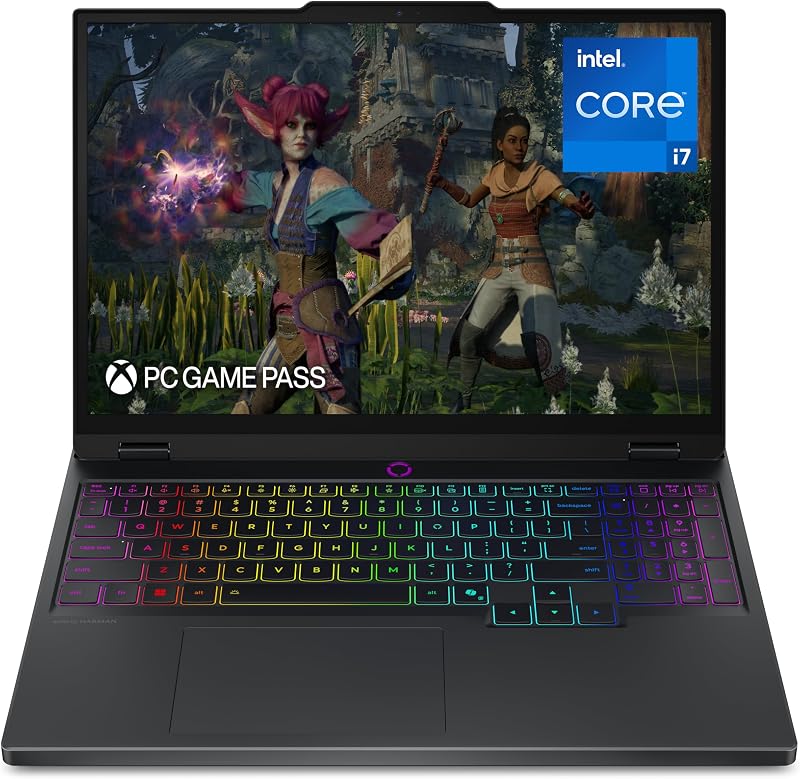
- You run modern AAA video games or heavy 3D rendering software that requires an RTX 5070 GPU.
- You demand an ultra-sharp 15-inch 2.5K OLED display with a 165Hz refresh rate for fluid visuals.
- You require 1 TB of onboard solid-state storage out of the box for large game libraries and media caches.
- You want high-speed charging that restores 70% of battery capacity in under 30 minutes via USB Type-C.
Final Verdict
For the vast majority of enterprise professionals, consultants, and remote knowledge workers, the Lenovo ThinkPad T14s is the smarter daily machine. At only 2.8 pounds, it provides exceptional mobility, enterprise-grade data protection via Windows 11 Pro, cutting-edge Wi-Fi 7 networking, and a 50 TOPS NPU tailored for modern AI tasks. Its matte 400-nit screen and efficient AMD architecture allow you to work comfortably throughout business trips without hunting for power outlets.
However, the Lenovo Legion 5i clearly wins whenever dedicated graphic horsepower and multimedia fidelity take priority. Its combination of an Intel Core i7-14700HX processor, an NVIDIA GeForce RTX 5070 GPU, a 1 TB SSD, and a 165Hz 2.5K PureSight OLED screen transforms it into an exceptional entertainment and content creation hub. If your computing routine centers on high-frame-rate gaming, 3D development, or color-accurate creative work, the Legion 5i easily justifies its heavier 4.4-pound frame.
FAQ
Is Lenovo Legion 5i worth it for non-gamers?
The Legion 5i offers tremendous value for non-gamers who specialize in digital rendering, engineering CAD, or video production. Its NVIDIA GeForce RTX 5070 graphics and vibrant 2.5K OLED display accelerate visual workflows that standard business laptops cannot handle. However, buyers who only draft documents, browse the web, and attend virtual meetings should avoid its 4.4-pound carrying weight.
Should students choose the ThinkPad T14s or Legion 5i for college?
Deciding between the ThinkPad T14s or Legion 5i for college depends on your field of study. Liberal arts, business, and computer science students who walk across campus daily will appreciate the 2.8-pound ThinkPad T14s and its durable chassis. Engineering, game design, and digital arts majors who need dedicated GPU rendering-and want to game in their dorms-will benefit more from the Legion 5i.
How does the RTX 5070 compare to the Radeon 860M?
The NVIDIA GeForce RTX 5070 is a discrete graphics card equipped with 8 GB of dedicated GDDR7 memory, built specifically for AAA gaming and intensive 3D applications. The AMD Radeon 860M is an integrated graphics processor that shares system memory with the CPU. While the Radeon 860M easily drives basic productivity tasks and multi-monitor setups, it cannot match the raw rendering power of the RTX 5070.
Can the ThinkPad T14s drive multiple external monitors?
Yes. The Lenovo ThinkPad T14s features two Thunderbolt 4 ports and an HDMI 2.1 connection. According to the manufacturer listing, these interfaces allow the laptop to drive up to three external 4K monitors at 60Hz simultaneously without requiring an external docking station.
How fast does the Legion 5i charge when low on power?
The Legion 5i features rapid-charging technology over USB Type-C that can replenish the battery from 0% up to 70% in under 30 minutes, allowing users to quickly top off their power between lectures or work sessions.
Does the ThinkPad T14s have biometric login support?
Yes. The ThinkPad T14s includes both an integrated fingerprint reader and a 5MP infrared webcam compatible with Windows Hello, enabling secure facial recognition and fingerprint authentication under Windows 11 Pro.