The defining split between the Lenovo ThinkPad X1 Carbon Gen 12 and the Lenovo Legion 5i comes down to dedicated graphical horsepower versus extreme travel mobility. While the ThinkPad X1 Carbon Gen 12 packs an efficient Intel Core Ultra 7 processor and enterprise durability into a 2.4-pound ultraportable chassis, the Legion 5i focuses entirely on raw output with an Intel Core i7-14700HX chip, a high-refresh OLED panel, and dedicated NVIDIA GeForce RTX 5070 graphics.
Choose the Lenovo ThinkPad X1 Carbon Gen 12 if you are an executive, consultant, or business professional who demands featherlight weight, all-day transportability, and rigorous security features. Choose the Lenovo Legion 5i if your routine revolves around high-frame-rate gaming, 3D rendering, or intensive media creation that requires a dedicated GPU and a rapid 165Hz display.


Lenovo ThinkPad X1 Carbon Gen 12 vs Legion 5i at a Glance
| Feature | Lenovo ThinkPad X1 Carbon Gen 12 | Lenovo Legion 5i |
|---|---|---|
| Processor | Intel Core Ultra 7 165U vPro (12 cores, up to 4.90 GHz) | Intel Core i7-14700HX (hybrid architecture) |
| Graphics | Integrated Intel Graphics | NVIDIA GeForce RTX 5070 (8 GB GDDR7) |
| System Memory | 32 GB LPDDR5X-6400MHz | 16 GB Memory |
| Storage | 1 TB PCIe Gen4 Performance SSD | 1 TB SSD |
| Display | 14-inch WUXGA (1920 x 1200) IPS Touch, 60Hz, 400 nits | 15-inch 2.5K WQXGA PureSight OLED, 165Hz |
| Weight | 2.4 pounds | 4.4 pounds |
| Operating System | Windows 11 Pro | Windows 11 Home |
| Dimensions | Ultra-portable form factor (specific measurements not listed) | 13.58″ L x 10.05″ W x 0.85″ Th |
| Chassis Materials | Recycled carbon fiber, magnesium, aluminum | Eclipse Black casing (13% thinner and lighter design) |
| Best For | Mobile business professionals and enterprise travel | Gamers, 3D creators, and power-focused university students |
Graphics and Processing Performance
Computing architecture highlights the foundational divergence between these two machines. The ThinkPad X1 Carbon Gen 12 operates on Intel’s Meteor Lake platform, utilizing an Intel Core Ultra 7 165U vPro processor equipped with 12 cores (2 Performance, 8 Efficient, and 2 Low Power Efficient cores) spanning 14 threads with clock speeds reaching up to 4.90 GHz. This configuration integrates an Intel AI Boost neural processing unit designed to handle background productivity tasks, security routines, and modern system operations while consuming minimal wattage. Paired with 32 GB of high-speed LPDDR5X-6400MHz memory, it excels at massive spreadsheet manipulation, multi-tab browsing, and sustained enterprise multitasking without generating disruptive fan noise. Shoppers evaluating corporate ultrabooks often weigh this against the lenovo thinkpad x1 carbon gen 12 vs t14s to determine how much thin-and-light power they truly require.
The Legion 5i, by contrast, prioritizes raw throughput over energy conservation. Driven by an enthusiast-tier Intel Core i7-14700HX processor built with high-power hybrid architecture, the Legion processes sustained compute-heavy workloads such as game physics, code compilation, and video encoding with ease. Graphics capability separates the machines even further. The ThinkPad relies on Integrated Intel Graphics utilizing shared system memory, making it suitable for video calls, UI navigation, and basic media streaming. The Legion 5i incorporates a dedicated NVIDIA GeForce RTX 5070 graphics card equipped with 8 GB of cutting-edge GDDR7 VRAM. Powered by NVIDIA’s Blackwell architecture and bolstered by the Lenovo AI Engine+, the Legion provides the hardware acceleration necessary for high frame rates in modern AAA games, rapid 3D render times, and intensive AI-assisted creative workloads.
When assessing whether to choose the ThinkPad X1 Carbon Gen 12 or Legion 5i for gaming, the outcome is unequivocal. The integrated graphics on the ThinkPad cannot compete with the dedicated RTX 5070, which is built specifically for rendering complex 3D environments and driving high-resolution gaming sessions. Those who want to see how Lenovo balances gaming silicon against higher-tier desktop replacements can look at comparisons like the lenovo thinkpad t14s vs legion pro 7i. The ThinkPad provides ample processor power for productivity, but users seeking true visual rendering performance will find that the Legion 5i operates in an entirely different performance tier.
Edge: Lenovo Legion 5i because its Intel Core i7-14700HX processor and dedicated NVIDIA GeForce RTX 5070 graphics deliver vastly superior processing and gaming muscle.
Portability and Form Factor
Portability dictates the physical ownership experience of a laptop, and this is where the ThinkPad asserts absolute dominance. The ThinkPad X1 Carbon Gen 12 weighs an astonishingly light 2.4 pounds. Lenovo constructed this chassis from a combination of recycled carbon fiber, magnesium, and aluminum, achieving an ultralight footprint that slips into briefcases, messenger bags, and backpacks almost unnoticed. Engineered to survive the rigors of frequent business travel, the X1 Carbon Gen 12 passes MIL-STD 810H environmental tests to withstand vibration, drops, shock, and extreme operating temperatures. Its slightly smaller Gen 12 form factor and thinner bezels ensure maximum screen real estate within a minimal desktop footprint.
In contrast, the Lenovo Legion 5i weight comparison highlights its identity as a full-sized performance rig. Weighing 4.4 pounds with external dimensions of 13.58 inches in length, 10.05 inches in width, and 0.85 inches in thickness, it demands substantially more physical commitment. While Lenovo engineered this iteration of the Legion 5i to be 13 percent thinner and lighter than previous generations for university students moving between dorms and classrooms, it remains nearly double the weight of the X1 Carbon. Carrying the Legion 5i across airports or walking through a corporate campus all day introduces noticeable strain compared to the featherweight ThinkPad.
Ergonomics on the move also diverge significantly. The ThinkPad X1 Carbon Gen 12 includes bio-based packaging components like bamboo and sugarcane and integrates recycled materials throughout the top cover, bottom plate, keyboard assembly, and battery frame. Its lightweight nature makes one-handed handling effortless during meetings or presentations. The Legion 5i requires a structured laptop bag and more desk surface area, representing a stationary anchor rather than an agile companion. Buyers tracking ultralight form factors against larger gaming models often study guides like the lenovo thinkpad t14s vs legion slim 5 to pinpoint their exact weight tolerance.
Edge: Lenovo ThinkPad X1 Carbon Gen 12 because its 2.4-pound carbon-fiber chassis and MIL-STD 810H durability make it vastly easier to travel with.
Display Quality and Visual Experience
Visual presentation is an area where both laptops excel, but they cater to drastically different operational requirements. The ThinkPad X1 Carbon Gen 12 features a 14-inch WUXGA display running at a 1920 x 1200 resolution. This panel utilizes an IPS screen with an anti-glare finish, an expansive 16:10 aspect ratio, 100% sRGB color gamut coverage, and a peak brightness of 400 nits. It is built specifically for prolonged reading, editing documents, and office productivity under overhead fluorescent lighting. The low-power 60Hz panel minimizes battery drain, while the integrated touch functionality adds intuitive on-screen navigation during collaborative sessions or rapid document scrolling.
The Legion 5i takes a completely different path, mounting a 15-inch 2.5K WQXGA PureSight OLED display. OLED technology allows for individual pixel illumination, producing infinite contrast ratios, pitch blacks, and vibrant color accuracy that far outclasses standard IPS panels. Furthermore, the Legion 5i boasts a rapid 165Hz refresh rate paired with low response times and dynamic AI-driven adjustments. This makes animations exceptionally smooth, eliminates motion blur during fast-paced competitive gaming, and renders fluid timeline playback for video creators. Gamers and visual artists will find the visual fidelity of this OLED panel striking compared to a standard business-grade screen.
The practical trade-off centers on display utility. The anti-glare matte coating on the ThinkPad diffuses reflections effectively, preventing eye fatigue in sunlit boardrooms or near office windows. The Legion’s PureSight OLED screen delivers cinema-grade richness, sharp 2.5K clarity, and ultra-fluid refresh rates, making it an incredible canvas for both gaming and creative color grading. However, its high refresh rate and vibrant pixel density place higher demands on system power. For readers exploring how business displays stack up against creative hardware, reading a comparison like the lenovo thinkpad x1 carbon gen 12 vs yoga 9i provides valuable context on display technologies across Lenovo lines.
Edge: Lenovo Legion 5i because its 15-inch 2.5K PureSight OLED screen with a 165Hz refresh rate delivers unmatched color richness and motion fluidity.
Thermal Management, Battery, and Charging
Sustaining high-end processing requires smart power distribution and thermal engineering. The ThinkPad X1 Carbon Gen 12 is equipped with an integrated 57Wh lithium-polymer battery designed in tandem with Intel’s low-power Meteor Lake processor architecture. The inclusion of dedicated Low Power Efficient (LPE) cores allows the ThinkPad X1 Carbon Gen 12 battery life to stretch across full workdays during standard office tasks, video calls, and web browsing. Because it lacks a power-hungry dedicated GPU, the X1 Carbon generates modest heat under standard productivity loads, allowing its internal fans to remain quiet and unobtrusive in shared workspaces.
The Legion 5i handles significantly higher thermal and electrical loads. Housing an Intel HX-series processor and an NVIDIA RTX 5070 graphics card demands extensive thermal mitigation. Lenovo deployed the Legion Coldfront: Hyper cooling system, which pairs turbo-charged stealth fans with heavy-duty copper heat pipes and aluminum heat sinks. This design directs cool air directly across primary processing components while venting thermal exhaust away from user contact surfaces. While it operates with impressive quietness for a high-output gaming machine, the system naturally draws more power from the wall and runs warmer under full computational loads than an ultrabook.
To offset the elevated consumption of its gaming internals, the Legion 5i features rapid charging technology capable of boosting the internal battery from zero to 70 percent in under 30 minutes via USB Type-C. This rapid replenish rate is invaluable for university students or creators who need quick power between sessions. Nevertheless, the physical limits of high-wattage components mean that users looking for unplugged endurance during long commutes or off-grid meetings will experience far greater reliability from the ThinkPad’s efficient 57Wh architecture.
Edge: Lenovo ThinkPad X1 Carbon Gen 12 because its low-power processor architecture and 57Wh battery prioritize unplugged business endurance over heavy power draw.
Keyboard, Audio, and Daily Usability
Input ergonomics and peripheral support define how these machines feel during extensive daily use. The ThinkPad brand has long set the gold standard for laptop keyboards, and the Gen 12 refines this heritage. It features backlit keys with specialized tactile bumps integrated into specific keys, allowing touch typists to orient their fingers without looking down. Below the keys sits an enlarged 120mm glass touchpad-an upgrade from the previous 110mm version-flanked by the iconic physical TrackPoint buttons at the top. For virtual meetings, the ThinkPad incorporates a 1080p Full HD IR+RGB camera equipped with a physical privacy shutter, a dual-microphone array, and stereo speakers. Biometric security is bolstered by an integrated fingerprint recognition sensor, all running under an enterprise-ready Windows 11 Pro installation.
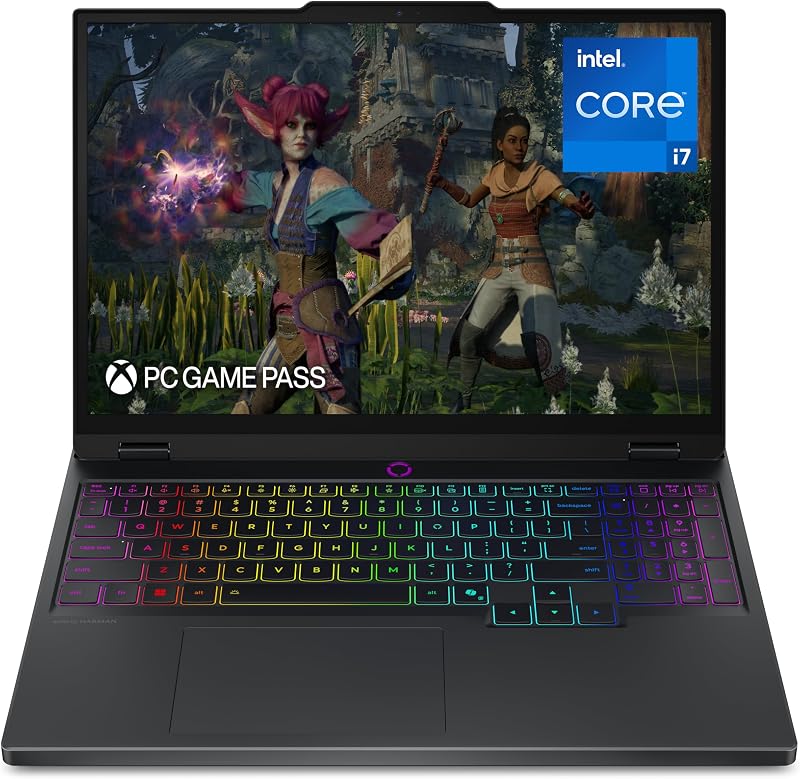
The Legion 5i caters directly to gamers with the Legion TrueStrike keyboard. Featuring 24-zone RGB backlighting managed through Lenovo Spectrum software, it offers deep key travel, lightning-fast actuation, and anti-ghosting optimization for high-stress gaming moments. For acoustic delivery, the Legion 5i uses a four-speaker sound system tuned with Nahimic by SteelSeries 3D audio, producing spatial immersion, directional cues for gaming, and punchy audio output that surpasses the ThinkPad’s standard stereo arrangement. However, the Legion 5i runs Windows 11 Home, lacking the advanced management, BitLocker enterprise controls, and domain networking capabilities baked into Windows 11 Pro.
Connectivity on the ThinkPad is tailored for modern docking and professional travel, incorporating two USB-C/Thunderbolt 4 ports, two USB-A 3.2 ports, an HDMI port, and Wi-Fi 6E AX211 wireless. The Legion 5i provides strong desktop-replacement utility, offering HDMI, USB Type-C with fast charging, traditional USB ports, and support for external gaming displays, mice, and keyboards. Determining whether the ThinkPad X1 Carbon Gen 12 or Legion 5i for work fits your routine often hinges on software and conferencing: the ThinkPad is a turnkey enterprise tool with vPro security, while the Legion is an entertainment powerhouse. Readers comparing enterprise laptops to larger platforms can review the lenovo thinkpad x1 carbon gen 12 vs legion pro 7i for additional context on input layouts and enterprise readiness.
Edge: Lenovo ThinkPad X1 Carbon Gen 12 because of its class-leading tactile keyboard, physical TrackPoint buttons, Windows 11 Pro security, and FHD IR webcam.
Memory and Storage Capabilities
Memory configuration plays a vital role in long-term multitasking and heavy computational workloads. The ThinkPad X1 Carbon Gen 12 arrives equipped with a generous 32 GB of LPDDR5X-6400MHz RAM. While this memory is soldered directly to the motherboard to maintain the chassis’s razor-thin profile, the 32 GB allocation provides ample overhead for memory-heavy business applications, virtual machines, running local productivity models via Intel AI Boost, and keeping hundreds of browser tabs active concurrently without encountering paging bottlenecks. For mass storage, it houses a 1 TB M.2 2280 PCIe Gen4 Performance TLC Opal SSD, ensuring high read/write speeds and hardware-level Opal data encryption for sensitive corporate documents.
The Legion 5i in this comparison features 16 GB of memory paired with a 1 TB SSD. While 16 GB is sufficient for contemporary gaming titles and standard academic tasks, users operating high-resolution video timelines or handling heavy rendering datasets may find themselves utilizing a higher percentage of available system RAM. However, the Legion 5i benefits from an expansive 8 GB of dedicated GDDR7 video memory on the RTX 5070 graphics card. This means high-resolution textures, rendering buffers, and gaming assets do not infringe upon system memory, unlike the ThinkPad, which must share its 32 GB system memory pool with the integrated graphics processor.
The fundamental trade-off lies between total system multitasking capacity and graphics-specific memory allocation. The ThinkPad gives corporate power users double the general RAM headroom (32 GB vs 16 GB) with fast 6400MHz speeds and Opal hardware storage security straight from the factory. The Legion 5i balances its 16 GB system memory with 8 GB of blazing-fast GDDR7 dedicated VRAM, ensuring optimal allocation for 3D graphics rendering. Those evaluating these structural differences alongside alternative models often cross-reference the lenovo thinkpad t14s vs legion 5i to understand how different chassis designs accommodate memory requirements.
Edge: Lenovo ThinkPad X1 Carbon Gen 12 because its 32 GB of high-speed 6400MHz system RAM and Opal-encrypted Gen4 SSD provide superior overhead for heavy productivity multitasking.
Pros and Cons
Lenovo ThinkPad X1 Carbon Gen 12

Pros
- Ultralight 2.4-pound chassis
- Generous 32 GB 6400MHz RAM
- Durable MIL-STD 810H construction
- Class-leading tactile keyboard with bumps
- Windows 11 Pro with vPro security
Cons
- Integrated graphics limit gaming performance
- Soldered system memory cannot be upgraded
- Display refresh rate capped at 60Hz
View Lenovo ThinkPad X1 Carbon Gen 12 on Amazon
Lenovo Legion 5i
Pros
- NVIDIA RTX 5070 dedicated graphics
- 15-inch 165Hz PureSight OLED screen
- Intel Core i7-14700HX hybrid processor
- Fast charging to 70% in under 30 minutes
- Includes 3 months of PC Game Pass
Cons
- Heavier 4.4-pound total weight
- Ships with Windows 11 Home
- Shorter battery life under full load
View Lenovo Legion 5i on Amazon
Who Should Buy Each One
Choose the Lenovo ThinkPad X1 Carbon Gen 12 If
- You travel frequently and demand a 2.4-pound ultralight chassis built with carbon fiber, magnesium, and MIL-STD 810H durability.
- Your daily workflow requires enterprise-level management, featuring Windows 11 Pro, Intel vPro processor architecture, and Opal hardware-encrypted SSD storage.
- You prioritize typing comfort, utilizing class-leading key switches with tactile bumps, physical TrackPoint buttons, and an expanded 120mm glass touchpad.
- You need all-day battery efficiency from a 57Wh battery and a low-power 400-nit anti-glare touch display for extended off-grid work.
Choose the Lenovo Legion 5i If
- You want to play high-end modern games using an NVIDIA GeForce RTX 5070 GPU with 8 GB of dedicated GDDR7 memory and 3 months of included PC Game Pass.
- You require a vibrant 15-inch 2.5K WQXGA PureSight OLED display featuring a fluid 165Hz refresh rate for gaming and color-critical creation.
- You run compute-heavy tasks that leverage the multi-threaded power of an Intel Core i7-14700HX processor and Legion Coldfront: Hyper cooling.
- You need rapid-charging battery capabilities that can restore the machine from zero to 70 percent in under 30 minutes via USB Type-C.
Final Verdict
When reviewing the Lenovo ThinkPad X1 Carbon Gen 12 vs Legion 5i specs and day-to-day capabilities, your decision pivots on the boundary between business travel agility and stationary processing power. The ThinkPad X1 Carbon Gen 12 remains the gold standard for executive mobility. Weighing only 2.4 pounds and featuring an Intel Core Ultra 7 165U vPro processor, 32 GB of RAM, a 400-nit anti-glare touch panel, and Windows 11 Pro, it is purpose-built to deliver quiet, efficient, and exceptionally durable performance for users on the move.
On the other hand, anyone asking is Lenovo Legion 5i worth it will find their answer in its raw hardware specifications. With its Intel Core i7-14700HX processor, dedicated NVIDIA GeForce RTX 5070 graphics card, 165Hz PureSight OLED screen, and immersive four-speaker audio system, the Legion 5i is an exceptional tool for gamers, 3D artists, and creators. If your laptop rarely leaves a desk or your primary use case involves gaming and rendering, the Legion 5i is the clear winner; but if you need a dependable, lightweight powerhouse to accompany you across flights, boardrooms, and commutes, the ThinkPad X1 Carbon Gen 12 is the ultimate choice.
FAQ
Can the Lenovo ThinkPad X1 Carbon Gen 12 run modern PC games?
The ThinkPad X1 Carbon Gen 12 features Integrated Intel Graphics with shared memory, which is designed for standard business operations, media playback, and basic display outputs. While it can handle lightweight or casual titles at modest settings, it does not have the dedicated GPU hardware required to smoothly run demanding modern AAA games.
Does the Lenovo Legion 5i have a touchscreen?
No, the listing for the Lenovo Legion 5i specifies a 15-inch 2.5K WQXGA PureSight OLED display with a 165Hz refresh rate, but it does not include touch functionality. If you need an intuitive touch-enabled screen, the ThinkPad X1 Carbon Gen 12 provides a 14-inch WUXGA touch panel.
How do the webcams compare on these two laptops?
The ThinkPad X1 Carbon Gen 12 includes a 1080p Full HD IR+RGB camera equipped with a physical privacy shutter and biometric facial recognition support alongside a dual-microphone array. The Legion 5i listing specifies a front-facing camera, but it lacks the enterprise-focused dual IR sensor array highlighted on the ThinkPad.
Can the Legion 5i charge over USB-C?
Yes, the Lenovo Legion 5i supports fast charging via USB Type-C, capable of taking the system battery from zero to 70 percent capacity in under 30 minutes, allowing users to rapidly top off power between classes or work sessions.
Which operating system comes pre-installed on each model?
The ThinkPad X1 Carbon Gen 12 ships with Windows 11 Pro, providing advanced enterprise device encryption, remote desktop hosting, and domain management. The Legion 5i arrives with Windows 11 Home, which is tailored for everyday consumer, academic, and gaming environments.
Does the ThinkPad X1 Carbon Gen 12 have upgradeable memory?
No, the 32 GB of LPDDR5X-6400MHz RAM in the ThinkPad X1 Carbon Gen 12 is soldered to the motherboard to maintain its 2.4-pound ultraportable chassis. However, 32 GB offers substantial memory headroom for virtually all standard enterprise, multitasking, and productivity requirements.