The single deciding factor between the TeamGroup MP44 and the Lexar NM790 is thermal clearance: the MP44 uses an ultra-slim graphene label designed to slide into space-constrained laptops and underneath motherboard armor, while the NM790 features a pre-installed aluminum heatsink engineered to slot immediately into PlayStation 5 consoles and unshielded desktop bays.
Choose the TeamGroup MP44 if you need maximum 4TB storage density that fits easily inside thin notebooks or beneath pre-existing motherboard heatsinks. Choose the Lexar NM790 if you want an out-of-the-box, heatsink-equipped Gen4 drive ready for instant PlayStation 5 or desktop gaming expansion without buying extra cooling accessories.


TeamGroup MP44 vs Lexar NM790 at a Glance
| Feature | TeamGroup MP44 | Lexar NM790 |
|---|---|---|
| Interface | PCIe Gen4 x4 with NVMe | PCIe Gen4 x4 with NVMe |
| Form Factor | M.2 2280 | M.2 2280 |
| Digital Storage Capacity | 4 TB | 2 TB (2000 GB) |
| Maximum Read Speed | Up to 7400 MB/s | Up to 7400 MB/s |
| Maximum Write Speed | Up to 7000 MB/s | Up to 6500 MB/s |
| Included Cooling Solution | Heat-dissipating graphene label | Integrated rigid heatsink |
| Cache Architecture | Dynamic SLC Cache | Dynamic SLC Cache, HMB 3.0 |
| Stated Endurance | Not listed | 1500 TBW |
| Device Compatibility | Desktop, Laptop, PS5 | Desktop, Laptop, PS5 |
| Best For | Laptops and motherboards with heatsinks | PlayStation 5 and unshielded desktop slots |
Thermal Dissipation and Form Factor Clearance
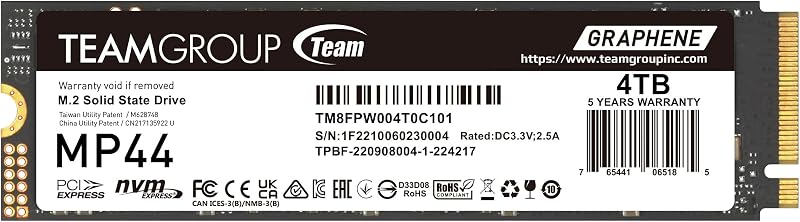
High-performance PCIe 4.0 drives generate substantial thermal output during continuous file operations, making thermal dissipation a critical consideration. The MP44 approaches cooling with an ultra-thin, heat-dissipating graphene label. TEAMGROUP highlights this graphene material as an optimal enhancement for motherboards that already provide built-in metal heatsinks. Because the graphene film adds virtually zero thickness, it transfers heat directly upward into motherboard heat spreaders without requiring removal or causing uneven surface contact. This low-profile design also permits installation inside slim laptops where clearance is restricted to millimeters. Builders who reviewed tight notebook installations in our kingston kc3000 vs teamgroup mp44 evaluation recognize the importance of minimal profile height for portable chassis.
The Lexar NM790 takes the opposite hardware route by incorporating a factory-installed, rigid aluminum heatsink. Lexar designed this heatsink specifically to keep the drive running cool during sustained gaming sessions, preserving peak data transfer rates and maintaining hardware efficiency. For desktop users whose motherboards lack built-in M.2 cooling plates, or for builders who prefer not to handle thermal pads and separate mounting brackets, this all-in-one setup provides ready-to-run passive cooling. The trade-off is physical bulk: the pre-attached heatsink raises the drive profile significantly, preventing installation inside standard ultra-thin laptop bays.
When evaluating the TeamGroup MP44 vs Lexar NM790 heatsink design, the right choice depends on your target installation slot. The MP44 offers universal mechanical clearance across laptops and armored motherboards, whereas the NM790 eliminates the need to source an aftermarket cooler for open desktop boards and console bays.
Edge: TeamGroup MP44 for universal installation clearance across slim laptops and heatsink-equipped motherboards.
Sequential Read and Write Performance
Sequential throughput measures how rapidly an internal SSD streams large files, installs expansive operating system updates, and moves high-resolution assets. Both solid state drives leverage the PCIe Gen4 x4 NVMe interface, achieving identical peak sequential read ratings of up to 7400 MB/s. Reaching 7400 MB/s places both drives at the practical limit of PCIe 4.0 bandwidth, ensuring responsive system boot sequences and smooth asset streaming during demanding PC sessions.
The operational divide shows up in continuous write performance. According to manufacturer specifications, the TeamGroup MP44 achieves sequential write speeds up to 7000 MB/s supported by dynamic SLC cache technology. Meanwhile, the Lexar NM790 reaches maximum sequential write speeds of 6500 MB/s. While a 500 MB/s difference remains subtle during routine productivity tasks, sustained operations like transferring massive 4K raw video folders or moving extensive game libraries give the MP44 an edge in throughput. As observed when analyzing a kingston fury renegade ssd vs lexar nm790 match-up, sustained write limits define how quickly huge write queues clear.
Both models maximize Gen4 read performance, but the MP44 takes the lead in theoretical write throughput. In a direct TeamGroup MP44 vs Lexar NM790 speed evaluation, the MP44 delivers higher ceiling write performance for heavy content management workflows.
Edge: TeamGroup MP44 due to its higher rated 7000 MB/s write ceiling compared to the 6500 MB/s specification of the NM790.
Storage Density and Endurance Ratings
Storage capacity demands continue to escalate as contemporary game installations and multimedia projects grow larger. The TeamGroup MP44 examined here provides a massive 4 TB capacity on a single M.2 2280 module. Having 4 TB of high-speed NVMe storage on one physical drive is a major benefit for compact mini-ITX systems, gaming laptops, or secondary slots where physical expansion ports are limited. Our kingston fury renegade ssd vs teamgroup mp44 breakdown highlights how high-density single drives eliminate the inconvenience of managing partitioned volumes across multiple drives.
The Lexar NM790 configuration evaluated here supplies 2 TB (2000 GB) of storage space, which accommodates dozens of large game installs or substantial creative libraries. Where Lexar distinguishes its specification sheet is in transparent endurance reporting: the listing explicitly rates the 2TB drive for 1500 TBW (terabytes written). This figure provides clear guidance regarding the total write cycles the NAND flash is engineered to survive over its lifespan. In contrast, TEAMGROUP includes patented SSD monitoring tools for tracking operational status and drive health, but the product listing does not specify a numerical TBW rating.
Users who prioritize raw storage volume benefit from twice the storage capacity on the 4 TB MP44. Conversely, builders seeking an explicitly stated manufacturer endurance rating gain verifiable 1500 TBW documentation with the 2 TB NM790.
Edge: TeamGroup MP44 for providing double the storage volume with its 4 TB configuration.
Power Consumption and Memory Architecture
Internal controller design and memory architecture determine how effectively an SSD processes command queues while managing electrical draw and heat output. The Lexar NM790 incorporates Host Memory Buffer (HMB) 3.0 technology alongside Dynamic SLC Cache. By utilizing HMB 3.0, the NM790 harnesses a small portion of host system RAM to manage address tables rather than drawing continuous power from a dedicated onboard DRAM chip. Lexar notes that this setup consumes up to 40% less power than DRAM-enabled PCIe Gen4 drives, maintaining lower operating temperatures and easing electrical demands inside compact enclosures, an architectural benefit detailed in our kingston kc3000 vs lexar nm790 overview.
The TeamGroup MP44 also employs SLC caching to keep burst data operations rapid and responsive. To assist users in tracking drive condition, TEAMGROUP provides patented SSD monitoring mechanisms that supervise drive performance and health metrics. However, the MP44 product listing does not state specific HMB revision details or report an exact percentage reduction in power draw.
For systems that prioritize minimal power draw and thermal efficiency, Lexar’s published 40% power reduction and HMB 3.0 implementation provide an advantageous, well-documented approach to modern Gen4 storage management.
Edge: Lexar NM790 for its explicit HMB 3.0 implementation and documented 40% reduction in power consumption.
PlayStation 5 and Gaming Console Compatibility
Expanding the storage on a PlayStation 5 requires adhering strictly to Sony’s operational and physical guidelines. Sony specifies a PCIe Gen4 x4 M.2 NVMe SSD with minimum sequential read speeds of 5500 MB/s and a mandatory thermal cooling solution. Both the MP44 and NM790 exceed this read speed requirement easily by delivering up to 7400 MB/s, ensuring quick level streaming and seamless asset loading. System builders pairing rapid SSD throughput with high-frequency memory, as explored in our crucial pro ddr5 vs teamgroup t-force delta rgb ddr5 comparison, understand how eliminating data bottlenecks transforms gaming responsiveness.
The decisive factor for console owners is physical heatsink installation. The Lexar NM790 comes factory-fitted with an aluminum heatsink sized specifically to meet the dimensions of the PS5 expansion cavity. Upgrading the console requires only sliding the NM790 into the slot, securing the mounting screw, and replacing the expansion cover. In contrast, while the TeamGroup MP44 lists compatibility with the PS5 console, it comes equipped only with its heat-dissipating graphene label. Because the console expansion bay is an enclosed space with limited airflow, console users must decide whether to run the graphene label alone or purchase an aftermarket heatsink to ensure adequate long-term cooling.
When deciding between the TeamGroup MP44 or Lexar NM790 for PS5 systems, the NM790 is clearly the more convenient, complete option. While the MP44 functions in gaming rigs with native motherboard shields, the NM790 provides zero-hassle console expansion straight out of the box.
Edge: Lexar NM790 for offering a factory-assembled heatsink that fits directly inside the PlayStation 5 bay without extra hardware.
Pros and Cons
TeamGroup MP44
Pros
- Massive 4TB storage capacity
- Blazing 7400 MB/s sequential read speed
- Fast 7000 MB/s sequential write performance
- Ultra-thin graphene heat-dissipating label
- Patented SSD health monitoring software
Cons
- Lacks pre-installed rigid heatsink
- Endurance TBW not listed in specifications
Lexar NM790

Pros
- Factory-integrated heatsink ready for PS5
- Fast 7400 MB/s read and 6500 MB/s write
- Up to 40% reduced power consumption
- Host Memory Buffer 3.0 technology
- Explicit 1500 TBW endurance rating
Cons
- Integrated heatsink prevents slim laptop installation
- Smaller 2TB capacity than the MP44
Who Should Buy Each One
Choose the TeamGroup MP44 If
- You need a massive 4 TB capacity to consolidate game libraries and media files onto a single M.2 drive.
- You are upgrading a slim gaming laptop where an integrated aluminum heatsink cannot physically fit.
- Your desktop motherboard already includes integrated metal heat shields engineered to mount directly over bare or graphene-labeled drives.
- You want higher maximum sequential write performance reaching up to 7000 MB/s.
Choose the Lexar NM790 If
- You want an immediate, hassle-free storage upgrade for the PlayStation 5 without sourcing a separate heatsink.
- Your desktop motherboard has open M.2 slots that lack built-in metal cooling covers.
- You value power-efficient HMB 3.0 architecture that cuts power consumption by up to 40% compared to DRAM-enabled Gen4 drives.
- You prefer a drive with an explicitly documented 1500 TBW endurance rating.
Final Verdict
For console owners and desktop builders looking for a ready-to-run drive, the Lexar NM790 is the overall winning recommendation. Its pre-fitted aluminum heatsink eliminates the need to source, measure, or attach separate cooling gear, making it an ideal drop-in option for the Sony PlayStation 5 and unshielded desktop motherboards. Combined with 7400 MB/s read speeds, power-saving HMB 3.0 technology, up to 40% lower power consumption, and a stated 1500 TBW endurance ceiling, the NM790 delivers an efficient, balanced package for gaming and everyday computing.
The TeamGroup MP44 wins whenever physical clearance and massive storage density are the top priorities. Its ultra-thin graphene label slides effortlessly into compact laptop slots and sits neatly beneath motherboards equipped with their own integrated heat shields. Backed by 4 TB of storage and an elevated 7000 MB/s sequential write rating, the MP44 remains the superior choice for high-density systems and notebook upgrades.
FAQ
Is TeamGroup MP44 worth it for high-capacity PC gaming?
The TeamGroup MP44 is well worth considering for PC gaming if your motherboard already features integrated metal heatsinks or if you are upgrading a gaming notebook. With a generous 4 TB capacity, up to 7400 MB/s read speeds, and 7000 MB/s write speeds, it provides expansive room for large modern game libraries without taking up more than one M.2 slot.
Is Lexar NM790 worth it for expanding PlayStation 5 storage?
The Lexar NM790 is an exceptional option for expanding PlayStation 5 storage because it comes with an integrated aluminum heatsink that fits inside the console bay. Delivering 7400 MB/s read speeds, it comfortably surpasses Sony’s recommended 5500 MB/s threshold, enabling fast installation without needing aftermarket cooling hardware.
Can the Lexar NM790 with heatsink fit into a standard laptop?
The Lexar NM790 version equipped with a factory heatsink will not fit inside most standard or slim laptops. The added thickness of the aluminum cooling fins prevents notebook base panels from closing properly. Users upgrading a laptop should choose a drive with an ultra-thin profile like the TeamGroup MP44.
Does the TeamGroup MP44 need an aftermarket heatsink for desktop use?
The TeamGroup MP44 includes an ultra-slim graphene label engineered to aid heat dissipation. If your desktop motherboard comes with its own metal M.2 heat spreaders, the MP44 does not require an aftermarket heatsink because the graphene label is designed to transfer thermal energy straight into the motherboard armor.
What is the difference between TeamGroup MP44 and Lexar NM790 write speeds?
According to manufacturer specifications, the TeamGroup MP44 offers sequential write speeds up to 7000 MB/s, whereas the Lexar NM790 reaches sequential write speeds up to 6500 MB/s. Both share the same peak sequential read rating of up to 7400 MB/s.
How does Host Memory Buffer 3.0 work on the Lexar NM790?
Host Memory Buffer 3.0 allows the Lexar NM790 to utilize a small amount of host system RAM for cache management instead of relying on a dedicated onboard DRAM chip. This design maintains rapid data access while reducing overall SSD power consumption by up to 40% compared to DRAM-equipped Gen4 alternatives.


