Choosing between the Logitech G502 X and the Logitech G703 comes down to a fundamental choice between extensive macro versatility and streamlined ergonomic simplicity. While both gaming mice share high-tier wireless pedigree, the G502 X is engineered around an intricate multi-button layout designed to give players complex input command at their fingertips, whereas the G703 embraces a classic, uncluttered shell focused purely on comfortable, natural hand placement.
Players who need instant access to layered bindings, customized profile switching, and free-wheeling scroll mechanics should select the Logitech G502 X. Gamers who prioritize a distraction-free grip with rubberized flanks and a traditional shape for competitive targeting should choose the Logitech G703.


Logitech G502 X vs Logitech G703 at a Glance
| Feature | Logitech G502 X | Logitech G703 |
|---|---|---|
| Programmable Controls | 13 | 6 |
| Optical Sensor | HERO 25K (100-25,600 DPI) | PMW3366 (200-12,000 DPI) |
| Primary Switch Architecture | LIGHTFORCE hybrid optical-mechanical | Advanced metal spring tensioning |
| Scroll Wheel Design | Dual-mode (ratchet and hyper-fast spin) with tilt | Standard ratcheting wheel |
| Weight | 102 g (3.59 oz) | 107 g |
| Stated Battery Life | Up to 140 hours constant motion | Not listed |
| Side Grips and Materials | Thin-wall molding, PTFE feet | Rubber side grips, metal and rubber enclosure |
| RGB Illumination | Not listed | Customizable brilliant RGB (16.8M colors) |
| Wireless Charging Support | POWERPLAY compatible | POWERPLAY compatible |
| Best For | Macro-heavy games, MMOs, and versatile bindings | Streamlined palm grip and competitive FPS accuracy |
Button Layout and Programmable Controls
The layout and quantity of programmable buttons represent the most substantial functional divergence between these two peripherals. In modern PC gaming, inputs dictate how quickly a player can deploy abilities, swap inventory items, adjust sensitivity on the fly, or execute intricate multi-step key sequences. A mouse with extensive physical controls consolidates keyboard commands onto the right hand, minimizing the need to stretch fingers across keycaps during intense gameplay. Conversely, a minimal layout reduces the risk of accidental button actuation during frantic mouse flicks, keeping the player focused purely on tracking and clicking.
The G502 X delivers an expansive command array featuring 13 programmable controls. Among these inputs are dedicated index-finger keys alongside the primary left click, a thumb cluster equipped with a redesigned reversible and removable DPI-shift button, and a dual-mode scroll wheel that tilts left and right to provide two extra personalizable inputs. Players can store custom configurations across 5 onboard memory profiles, making it effortless to carry dedicated setups between different PCs. As explored in our logitech g502 x vs g502 x plus breakdown, the physical layout of the G502 X focuses on giving players granular control over every aspect of their peripheral layout.
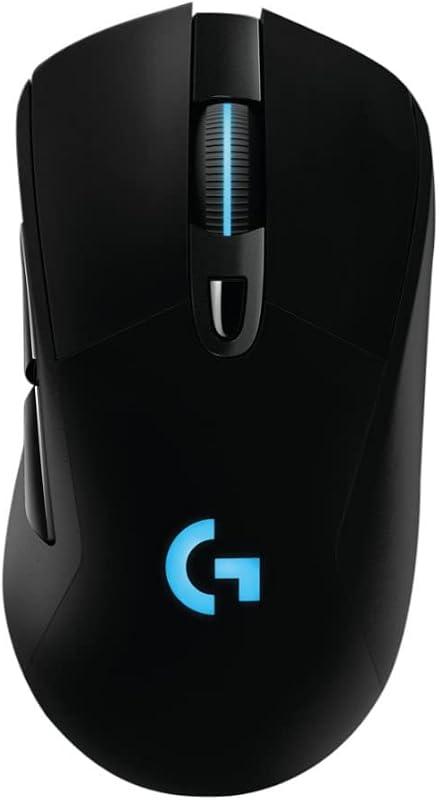
In contrast, the G703 takes a strictly traditional approach with 6 programmable buttons configured via Logitech Gaming Software. Its surface consists of the primary left and right clickers, a single DPI toggle switch centered behind the scroll wheel, a clickable wheel, and two elongated thumb buttons positioned along the left flank. This arrangement keeps the thumb area open and reduces accidental clicks to near zero. For players who do not require extensive macro chains or specialized secondary bindings, the streamlined 6-button configuration offers a familiar, foolproof interface that requires no adjustment period.
Edge: Logitech G502 X because its 13 programmable controls, dual tilt inputs, and modular thumb button offer unmatched control customization.
Ergonomics, Shape, and Grip Style
Ergonomics and chassis geometry dictate how a mouse feels across multi-hour gaming sessions and directly influence fatigue, grip security, and target acquisition. An ergonomic shape that fills the palm provides natural arch support, stabilizing the hand during broad sweeps. Meanwhile, an angular design featuring a thumb shelf supports the digits off the mouse pad, preventing drag while giving the hand a structured platform during prolonged desktop tasks and gaming marathons.
The G703 features a dedicated ergonomic body weighing 107 g that is explicitly contoured to mold to the hand for long-lasting comfort. A key highlight of its physical construction is the inclusion of integrated rubber grips on both the left and right sides, delivering reliable friction and tactile feedback whether lifting the mouse or resetting swipe positions. Its chassis employs an elevated central hump that rests snugly in the palm, making it an exceptional fit for palm and relaxed claw grip players. As seen in comparisons such as the logitech g pro x superlight 2 vs g502 x, overall shell geometry strongly influences handling and control styles across competitive environments.
The G502 X measures 5.17 inches long by 3.12 inches wide and 1.62 inches tall (131.4 x 79.2 x 41.1 mm) with an official weight of 102 g (3.59 oz), utilizing thin-wall molding to shave weight compared to older chassis designs. It incorporates a wide sculpted thumb rest on the left flank that keeps the thumb elevated and supported. Low-friction PTFE feet ensure smooth gliding across mouse mats. However, unlike the G703, the G502 X does not feature integrated rubberized side flanks, relying instead on textured plastic moldings. Gamers with medium-to-large hands who favor a traditional, rounded palm grip will find the G703 naturally accommodating, whereas players who like a locked-in, sculpted rest for their thumb will favor the G502 X.
Edge: Logitech G703 for natural palm comfort due to its natural palm-filling contour and integrated rubber side grips.
Optical Sensor Precision and Tracking
Sensor fidelity remains a core benchmark for any performance gaming mouse. A sensor must translate physical hand movements onto the monitor with zero artificial intervention, meaning it must avoid angle snapping, smoothing, filtering, and hardware acceleration across its operational sensitivity range. When tracking high-speed swipes in tactical shooters or executing fine sub-pixel corrections across ultra-wide monitors, sensor reliability directly preserves muscle memory and aiming precision.
The G502 X is equipped with the advanced HERO 25K optical gaming sensor, providing sensitivity spanning from 100 to 25,600 DPI. Logitech rates this sensor for sub-micron accuracy with zero smoothing, filtering, or acceleration throughout its entire range. This extreme resolution capability gives players infinite latitude to tailor their sensitivity to fractional increments, ensuring pinpoint tracking whether playing at ultra-low competitive eSports sensitivity or high-speed desktop navigation. Evaluating performance across different sensor architectures, much like in our analysis of the logitech g502 x plus vs g703, highlights how modern sensors push the limits of tracking precision.
The G703 utilizes the PMW3366 gaming optical sensor, which has long been regarded by esports professionals and enthusiasts as a gold standard in tracking consistency. The PMW3366 operates across a range of 200 to 12,000 DPI and similarly features zero smoothing, filtering, or acceleration across that entire spectrum. Combined with a 1000 Hz (1ms) USB report rate, the PMW3366 tracks rapid flicks and micro-adjustments flawlessly. In everyday competitive scenarios, both sensors provide flawless 1:1 input reproduction without spinouts or jitter. However, the HERO 25K on the G502 X extends tracking bounds significantly higher while offering sub-micron precision for modern high-resolution setups.
Edge: Logitech G502 X because the HERO 25K sensor delivers a significantly wider 25,600 DPI range and sub-micron tracking resolution.
Switch Technology and Click Actuation
The internal switch architecture under the primary left and right mouse buttons determines click latency, mechanical feedback, and switch longevity. Traditional mechanical switches rely on metal contacts closing an electrical circuit, which requires debounce delay algorithms to filter out contact vibration and prevent accidental double-clicks. Optical and hybrid switches use an infrared light beam to register actuation, delivering instantaneous signal registration while maintaining physical tactile components for user feedback.
Logitech introduced its LIGHTFORCE hybrid optical-mechanical switch technology on the primary left and right buttons of the G502 X. This architecture unites the ultra-fast actuation, low latency, and reliability of optical mechanisms with the crisp, tactile snap of mechanical switches. Because the primary click triggers optically, there is no mechanical contact degradation causing electrical bounce issues, ensuring crisp actuation over prolonged gaming use. The physical actuation remains sharp and defined, providing clear auditory and tactile confirmation on every single trigger pull.
The G703 relies on mechanical switches supported by an advanced button tensioning system. This design utilizes physical metal springs to keep the left and right mouse buttons primed and pre-loaded against the internal switches. By reducing the physical travel and force required to depress each button, the G703 produces an exceptionally light, rapid, and consistent click response. Competitive shooter enthusiasts frequently favor this primed mechanical setup for rapid semi-automatic fire and tap-shooting. Nonetheless, the hybrid optical-mechanical engineering in the G502 X provides superior modern switch technology designed to maintain peak responsiveness over time.
Edge: Logitech G502 X due to hybrid LIGHTFORCE switches that pair optical actuation speed with tactile mechanical feedback.
Battery Life and Power Management
Wireless freedom is only as dependable as the power system backing it up. Gamers investing in high-performance cordless peripherals need assurance that their mouse will not lose charge during competitive matches or demand constant tethering to a charging cable. Power efficiency, charging port standards, and passive charging options dictate how seamless the wireless experience feels in day-to-day use.
The G502 X features an optimized internal lithium polymer battery rated for up to 140 hours of continuous gaming motion. Recharging is handled via a modern USB-C port located on the front of the mouse, allowing users to plug in standard mobile cables or the included cord to top off the battery quickly. The mouse also features an updated LIGHTSPEED wireless protocol that achieves a 68 percent faster response rate than the prior generation while boosting power efficiency. Examining high-end wireless mice, as seen when comparing the logitech g502 x vs mx master 3s, shows that lengthy battery reserves fundamentally elevate user convenience.
The G703 features LIGHTSPEED wireless connectivity with a 1 ms report rate and includes a 1.80 m charging and data cable alongside a USB adapter, enabling seamless transitions between wired and wireless operation. However, the listing does not specify the standalone battery life in hours for this model. Both the G502 X and the G703 are compatible with the Logitech POWERPLAY wireless charging system (sold separately). When paired with a POWERPLAY mouse pad, both mice remain charged continuously while at play and at rest, eliminating the need to plug in charging cables. Still, when relying on standard internal battery reserves away from a charging pad, the G502 X offers clear documentation of its massive 140-hour endurance alongside modern USB-C charging.
Edge: Logitech G502 X because of its verified 140-hour runtime in constant motion and modern USB-C charging port.
Scroll Wheel Mechanics and Aesthetics
While often viewed as secondary features, scroll wheel versatility and visual lighting customization significantly impact daily workflow and setup integration. The scroll wheel serves as an essential tool for inventory navigation, weapon selection, and document reading, while aesthetic lighting lets players harmonize peripheral illumination with their desktop environment.
The G502 X incorporates Logitech’s redesigned dual-mode scroll wheel. A mechanical toggle switch directly behind the wheel allows users to alternate between a precise, tactile ratcheting mode-ideal for cycling weapons or jumping in tactical games-and a friction-free, hyper-fast free-spinning mode that flies through long documents, web pages, and expansive inventory screens. In addition to standard vertical scrolling, the wheel tilts left and right to provide two personalizable controls. In terms of aesthetics, the G502 X listing does not specify RGB illumination, focusing its design instead on thin-wall weight reduction, PTFE feet, and a choice between black and white colorways.
The G703 approaches aesthetics and scrolling from a different angle. It includes a standard ratcheting scroll wheel paired with customizable brilliant RGB lighting. Using Logitech Gaming Software, users can personalize illumination from a palette of up to 16.8 million colors across various brightness levels, matching team colors, personal preferences, or system themes. The G703 enclosure incorporates metal and rubber components, available in black and white styles. Contextualizing desk integration alongside versatile hardware tools, as in our logitech g502 x plus vs mx master 3s evaluation, demonstrates that choosing between mechanical wheel versatility and integrated RGB lighting depends on personal priority.
Edge: Tie because the G502 X offers unmatched dual-mode scroll mechanics while the G703 provides 16.8-million-color RGB illumination.
Pros and Cons
Logitech G502 X

Pros
- 13 programmable controls with tilt wheel
- Up to 140 hours battery life
- HERO 25K sensor with 25,600 DPI
- LIGHTFORCE hybrid optical-mechanical switches
- Dual-mode scroll wheel with hyper-fast spin
Cons
- No RGB lighting specified in listing
- Lacks integrated rubber side grips
View Logitech G502 X on Amazon
Logitech G703
Pros
- Ergonomic body with integrated rubber side grips
- Customizable brilliant 16.8M color RGB
- Advanced metal spring button tensioning
- POWERPLAY wireless charging compatible
Cons
- Only 6 programmable buttons
- Battery runtime hours not listed
Who Should Buy Each One
Choose the Logitech G502 X If
- You play MMOs, battle royales, or complex action titles requiring up to 13 programmable inputs and tilt-wheel bindings.
- You demand multi-week battery endurance with up to 140 hours of continuous motion on a single USB-C charge.
- You frequently switch between hyper-fast free-spinning scrolling and ratcheted wheel steps for navigation and gaming.
- You want LIGHTFORCE optical-mechanical hybrid switches that eliminate bounce delay while maintaining a crisp mechanical click.
Choose the Logitech G703 If
- You favor a traditional, uncluttered ergonomic shape with dedicated rubber side grips designed to mold comfortably into your palm.
- You want full RGB desk lighting synchronization across 16.8 million colors via Logitech Gaming Software.
- You play competitive FPS games and want a simplified 6-button layout free from extra thumb buttons that could cause accidental actuation.
- You prefer light, primed button actuation assisted by an advanced metal spring button tensioning system.
Final Verdict
For the vast majority of PC gamers, the Logitech G502 X represents the superior all-around peripheral. Its modern hardware advancements provide distinct practical advantages across almost every category. With 13 programmable controls, a dual-mode tilt scroll wheel, hybrid optical-mechanical LIGHTFORCE switches, a sub-micron HERO 25K sensor reaching 25,600 DPI, and a tested battery reserve of up to 140 hours over USB-C, the G502 X delivers immense mechanical versatility and reliability for both competitive gaming and complex desktop productivity.
The Logitech G703 remains an outstanding option for players who value ergonomic purity and an uncluttered chassis above extensive macro customization. If your gameplay centers primarily on competitive first-person shooters where accidental button presses must be avoided, the G703’s 6-button layout, natural palm-filling contour, integrated rubber side grips, and spring-tensioned mechanical switches offer an exceptionally comfortable, reliable grip. Add in customizable 16.8-million-color RGB lighting and POWERPLAY wireless charging compatibility, and the G703 stands as a focused, comfortable tool for players who prefer classic ergonomics over button complexity.
FAQ
Which mouse is better for FPS gaming between the G502 X and G703?
Both mice perform exceptionally well in first-person shooters, but they cater to different aiming preferences. The G703 offers a clean, streamlined 6-button layout with rubber side grips that prevents accidental key actuations during rapid mouse sweeps. The G502 X is slightly lighter at 102 g, includes a reversible and removable DPI-shift button for instant sniper sensitivity adjustments, and features the HERO 25K sensor. Players wanting pure simplicity often prefer the G703, while those who use thumb macros and sensitivity toggles lean toward the G502 X.
What are the primary sensor differences between the Logitech G502 X and G703?
The G502 X features the HERO 25K optical sensor, which spans 100 to 25,600 DPI with sub-micron precision and zero smoothing, filtering, or acceleration. The G703 features the PMW3366 optical sensor, which spans 200 to 12,000 DPI with zero smoothing, filtering, or acceleration across its range. While both sensors track flawlessly at a 1000 Hz report rate without hardware distortion, the HERO 25K offers a significantly wider sensitivity range and finer sub-micron accuracy.
Can both mice charge wirelessly while playing?
Yes. Both the Logitech G502 X and the Logitech G703 are compatible with the Logitech POWERPLAY wireless charging system, which is sold separately. When using a POWERPLAY mouse pad, both mice stay continuously charged at rest and during active gameplay without requiring a physical cable connection.
How do the switches differ on the Logitech G502 X and G703?
The G502 X features hybrid optical-mechanical LIGHTFORCE switches for its primary left and right buttons, utilizing an optical light beam for actuation to eliminate debounce delays while keeping mechanical tactile feedback. The G703 uses mechanical switches paired with an advanced metal spring tensioning system, which keeps the buttons pre-primed for click consistency and reduces the physical force needed to actuate.
Does the Logitech G502 X have RGB lighting like the G703?
The product listing for the G502 X does not specify RGB lighting, focusing its engineering instead on lightweight design, PTFE feet, and power efficiency for extended battery life. In contrast, the G703 features customizable brilliant RGB illumination supporting up to 16.8 million colors and brightness levels configured through Logitech Gaming Software.
How does the battery life compare between the G502 X and G703?
The G502 X listing documents up to 140 hours of continuous gaming motion on a single charge and features a modern USB-C charging port. The G703 listing does not specify battery life in hours, though it supports wired play via an included 1.80 m cable and continuous wireless charging via the optional POWERPLAY system.
Is the Logitech G703 worth it compared to newer multi-button mice?
The Logitech G703 remains well worth considering for gamers who prioritize hand comfort, rubber side grips, and a minimal 6-button layout. If you do not need complex macro bindings, tilt-wheel inputs, or ultra-high DPI ceilings, the G703 provides top-tier tracking, spring-tensioned click feedback, and RGB lighting in an ergonomic shell designed to mold naturally to your hand.


