Choosing between the MSI MAG 275QPF E21 and the Acer Nitro XV272U hinges primarily on whether you prioritize higher competitive frame rates or integrated desktop convenience and color precision. Both monitors deliver 2560 x 1440 resolution across standard 27-inch IPS panels, but their performance profiles target distinct gaming priorities. The MAG 275QPF E21 pushes past standard refresh rates with an overclocked 210Hz Rapid IPS display engineered to minimize blur in fast-moving shooters, while the Nitro XV272U balances a dependable 144Hz refresh rate with factory-calibrated color tuning, certified DisplayHDR 400, and an integrated four-port USB 3.0 hub that streamlines peripheral management.
Competitive multiplayer enthusiasts looking to maximize motion clarity and input tracking should pick the MSI MAG 275QPF E21. Gamers who split their screen time between visually rich titles, workstation productivity, and peripheral-heavy setups will find the Acer Nitro XV272U a more versatile daily centerpiece.

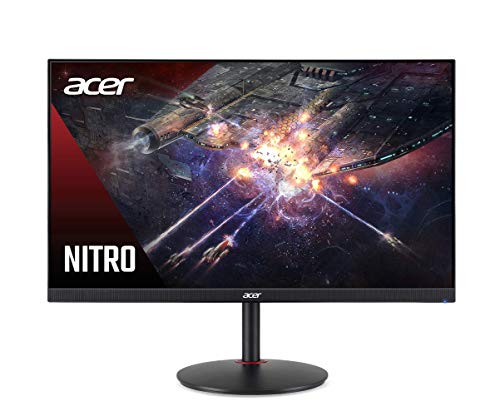
MSI MAG 275QPF E21 vs Acer Nitro XV272U at a Glance
| Attribute | MSI MAG 275QPF E21 | Acer Nitro XV272U |
|---|---|---|
| Screen Size and Resolution | 27 inches, 2560 x 1440 (QHD) | 27 inches, 2560 x 1440 (WQHD) |
| Refresh Rate | 210Hz (OC) | 144Hz |
| Response Time | 0.5ms (GtG, Min.) | 1ms VRB |
| Panel Technology and Surface | Rapid IPS, Matte | IPS, Glossy |
| Color Accuracy and Gamut | AI Vision enhancement | DCI-P3, Delta E < 2, 1.07 Billion colors |
| Peak Brightness and HDR | Not listed | VESA Certified DisplayHDR 400, 400 cd/m² |
| USB Hub Connectivity | Not listed | 4 x USB 3.0 Ports (cable included) |
| Video Inputs | HDMI, DisplayPort | 1 x DisplayPort, 2 x HDMI 2.0 |
| Integrated Audio | Integrated Speaker | 2 Speakers (2 Watts each) |
| Adaptive Sync Technology | AMD FreeSync Premium Pro, G-SYNC Compatible | AMD Radeon FreeSync, G-SYNC Compatible |
| Best For | Fast-paced competitive multiplayer | Color-accurate gaming and multi-device productivity |
Refresh Rate and Motion Clarity
Motion clarity defines how cleanly a display renders rapid target transitions, swift camera pans, and fast-moving visual elements without trailing or smearing. In competitive gaming, high refresh rates translate directly into more frames displayed per second, providing tighter tracking information and reduced perceived input latency. When comparing the MSI MAG 275QPF E21 vs Acer Nitro XV272U specs, refresh rate represents the most decisive technical divergence between the two panels.
The MAG 275QPF E21 delivers an overclocked 210Hz refresh rate paired with a Rapid IPS panel that reaches an ultra-low 0.5ms gray-to-gray minimum response time. This configuration renders 210 individual frame updates every second, cutting frame render intervals down significantly compared to traditional panels. The listing also references AMD FreeSync Premium Pro alongside NVIDIA G-SYNC compatible adaptive sync support, preventing visual tearing during intense gameplay. Readers exploring alternate high-refresh alternatives might also look into the asus tuf vg27aq vs msi mag 275qpf e21 comparison to evaluate how 1440p panels handle competitive frame pacing.
Conversely, the Acer Nitro XV272U refresh rate tops out at 144Hz, paired with a 1ms Visual Response Boost (VRB) rating. While 144Hz remains a reliable benchmark for fluid desktop navigation and smooth PC gaming, it produces 66 fewer frames every second than the 210Hz MSI display. In tactical first-person shooters where swift mouse swipes are frequent, the extra headroom of the MSI MAG 275QPF E21 response time and 210Hz panel creates noticeably crisper silhouette retention and reduced motion blur.
Edge: MSI MAG 275QPF E21 for its significantly higher 210Hz refresh rate and faster 0.5ms gray-to-gray response time.
Color Accuracy and Visual Reproduction
Accurate color rendering and high dynamic range capabilities dictate how immersive and realistic digital environments appear. While competitive gamers focus on motion outlines, players who enjoy open-world role-playing games or creators doing photo and video work require precise tonal gradation and calibrated color fidelity. A thorough Acer Nitro XV272U review reveals a display engineered specifically with broad color space coverage and certified dynamic luminance in mind.
The Nitro XV272U comes equipped with VESA Certified DisplayHDR 400 support, delivering 350 cd/m² native brightness and up to 400 cd/m² peak brightness in HDR mode. Crucially, Acer specifies wide DCI-P3 color gamut reproduction, support for 1.07 billion colors, and a factory-verified color accuracy of Delta E < 2. This sub-two Delta E measurement ensures that colors remain true to life right out of the box without requiring manual hardware calibration. Those interested in how Acer compares to curved high-end alternatives can examine the samsung odyssey g7 27 vs acer nitro xv272u breakdown to see how color saturation scales across modern gaming panels.
On the other hand, the MAG 275QPF E21 listing does not specify native color gamut percentages, HDR certification tiers, or Delta E ratings. Instead, MSI highlights proprietary AI Vision technology, an algorithmic feature engineered to brighten shadow areas, boost overall panel luminance, and saturate colors for competitive visibility. While AI Vision excels at making shadowed opponents stand out inside dark corridors, it prioritizes tactical visual clarity over natural color accuracy. For general media viewing, creative tasks, and authentic scenic depth, the Acer hardware provides measurable color fidelity.
Edge: Acer Nitro XV272U due to its VESA DisplayHDR 400 certification, DCI-P3 gamut, 1.07 billion color depth, and factory-calibrated Delta E < 2 accuracy.
Connectivity and Port Selection
The physical interface array of a gaming monitor dictates its flexibility within a modern desktop environment. Between multi-platform setups, game consoles, external peripherals, and audio accessories, port availability directly impacts cable routing and desktop clutter. Evaluating connectivity helps determine whether the MSI MAG 275QPF E21 or Acer Nitro XV272U for gaming fits better into your existing battle station.
The Nitro XV272U stands out dramatically in this category by integrating a built-in USB hub featuring four dedicated USB 3.0 ports. Acer also includes both an HDMI cable and a USB upstream cable directly in the box, allowing users to connect their mouse, keyboard, external storage, and gaming headsets straight to the display. Alongside the USB hub, the Nitro XV272U provides one DisplayPort connection and two HDMI 2.0 ports, allowing simultaneous connection to a PC and two home consoles. For shoppers looking at competing hub-equipped displays, our analysis of the gigabyte m27q2 vs msi mag 275qpf e21 illustrates how integrated USB hubs influence everyday desktop organization.
In comparison, the MAG 275QPF E21 provides standard DisplayPort and HDMI inputs, but the product listing makes no mention of an onboard USB hub or downstream USB peripheral ports. This means every peripheral device, gaming mouse receiver, or desktop accessory must route directly to your computer case or an external standalone hub. While the video ports on the MAG 275QPF E21 easily handle full-bandwidth 1440p signals at high refresh rates, users seeking a tidy single-station docking environment miss out on the integrated four-port convenience offered by Acer.
Edge: Acer Nitro XV272U for its integrated four-port USB 3.0 hub and dual HDMI 2.0 ports.
Panel Finish and Glare Handling
Ambient lighting conditions drastically alter how an image appears on an IPS panel. Screen coatings control reflections from overhead lighting fixtures and nearby windows, balancing reflection dispersion against raw image sharpness and contrast pop. Deciding whether the is Acer Nitro XV272U worth it or if the MSI alternative is preferable often depends heavily on room lighting.
The MAG 275QPF E21 features a dedicated matte screen surface finish. Matte coatings utilize microscopic diffusion textures to scatter incoming light rays across the panel surface, preventing direct reflections and mirror-like glare in bright daytime rooms. Additionally, MSI equips the monitor with hardware-oriented Less Blue Light technology, which uses software filtering to reduce light emission in the blue-violet spectrum without creating excessive yellow tinting. Gamers who position their desk near sunny windows will appreciate how effectively the matte screen eliminates intrusive environmental reflections. A related comparison can be found in our review of the dell s2725dsm vs msi mag 275qpf e21, highlighting how matte finishes behave in daylight settings.
Conversely, the Nitro XV272U is listed with a glossy screen finish, complemented by Acer ComfyView display tuning, flicker-less technology, and low-dimming capabilities. A glossy finish can enhance perceived contrast depth and color vibrancy by eliminating the slight diffusion haze inherent to matte panels. However, glossy coatings reflect direct light sources more clearly, making proper room light control essential. If your gaming space has uncontrolled backlighting or lamps placed directly behind your chair, reflections will be more noticeable on the Acer panel than on the matte MSI display.
Edge: MSI MAG 275QPF E21 for its reflection-diffusing matte finish and integrated blue light reduction.
Ergonomics, Stand Adjustability, and Integrated Audio
Physical adjustability and integrated audio hardware round out the everyday user experience, ensuring comfortable viewing posture during extended sessions while providing backup sound without requiring external speakers. Proper physical alignment reduces neck strain, while built-in speakers provide immediate audio feedback for system alerts, casual videos, and quick gaming sessions.
The MAG 275QPF E21 listing specifies both tilt and height adjustability alongside VESA wall-mount compatibility, allowing users to easily customize screen elevation to align with their eye line. Built-in speakers are also included on the MSI unit, providing basic onboard sound output without claiming desk space. For users setting up multi-monitor arrays or utilizing third-party monitor arms, the standard VESA mounting points offer versatile physical support. Readers comparing monitor ergonomics across brands can explore our guide on the asus tuf vg27aq vs acer nitro xv272u to see how different mounting stands perform.
The Nitro XV272U also offers robust physical build specifications, measuring 24.2 inches wide, 20.5 inches high, and 9.2 inches deep with its included zero-frame desktop stand, weighing in at 10.8 pounds. The ultra-thin zero-frame bezel profile makes it exceptionally well suited for multi-monitor setups placed side by side. For audio, the Nitro XV272U specifies dual built-in 2-watt speakers, providing true stereo sound separation directly from the monitor chassis. While neither monitor replaces a dedicated gaming headset or premium desktop speakers, the defined dual stereo 2W configuration on the Acer gives it a slight edge for onboard sound clarity.
Edge: Tie. Both monitors feature versatile physical mounting and integrated speakers, with MSI focusing on height adjustability and Acer providing dual stereo sound.
Pros and Cons
MSI MAG 275QPF E21

Pros
- Overclocked 210Hz refresh rate
- Rapid IPS with 0.5ms response time
- Anti-glare matte screen finish
- FreeSync Premium Pro and G-SYNC compatible
Cons
- No integrated USB hub
- HDR certification not listed
View MSI MAG 275QPF E21 on Amazon
Acer Nitro XV272U

Pros
- Built-in four-port USB 3.0 hub
- Factory-calibrated Delta E under 2
- VESA Certified DisplayHDR 400
- Supports 1.07 billion colors
Cons
- Lower 144Hz refresh rate
- Glossy finish more susceptible to reflections
View Acer Nitro XV272U on Amazon
Who Should Buy Each One
Choose the MSI MAG 275QPF E21 If
- You play fast-paced multiplayer titles like first-person shooters that benefit directly from an overclocked 210Hz refresh rate.
- You need the fastest pixel transitions possible and want a 0.5ms minimum gray-to-gray Rapid IPS panel.
- You play in a brightly lit room or near windows where a matte anti-glare screen finish is necessary.
- You want dynamic shadow enhancement features like AI Vision to track opponents hidden in dark corners.
Choose the Acer Nitro XV272U If
- You need an integrated four-port USB 3.0 hub to connect your peripherals directly through the display.
- You perform color-critical photo editing, content creation, or design work requiring factory-calibrated Delta E < 2 accuracy and 1.07 billion colors.
- You want certified dynamic range performance with VESA DisplayHDR 400 and up to 400 cd/m² peak brightness.
- You connect multiple gaming consoles and a PC simultaneously via dual HDMI 2.0 ports and DisplayPort.
Final Verdict
For pure gaming performance, the MSI MAG 275QPF E21 stands out as the superior choice for competitive players who demand high motion fluidness. Its 210Hz overclocked Rapid IPS display and 0.5ms minimum response time provide a significant visual upgrade over traditional 144Hz screens, rendering sharp outlines during high-speed camera motion. Combined with FreeSync Premium Pro, G-SYNC compatibility, and an anti-glare matte panel, it delivers the raw speed required for fast-twitch multiplayer gaming.
However, the Acer Nitro XV272U remains the better all-around workstation and hybrid entertainment display. If you divide your time between gaming, productivity, and media consumption, the Acer monitor offers substantial quality-of-life benefits that the MSI lacks, including a four-port USB 3.0 hub, VESA DisplayHDR 400 certification, DCI-P3 color support, and factory-calibrated Delta E < 2 accuracy. Choosing between them comes down to whether your desk demands maximum frame rate velocity or well-rounded color precision and desktop connectivity.
FAQ
What is the difference between the Acer Nitro XV272U refresh rate and the MSI MAG 275QPF E21?
The MAG 275QPF E21 features an overclocked refresh rate reaching up to 210Hz, whereas the Nitro XV272U tops out at 144Hz. This gives the MSI display a 66-frame-per-second advantage, offering smoother motion and reduced input delay in fast-moving games.
What is the MSI MAG 275QPF E21 response time rating?
The MAG 275QPF E21 features a Rapid IPS panel rated for a 0.5ms minimum gray-to-gray (GtG) response time, which helps eliminate ghosting and motion smearing behind fast-moving objects. The listing title also notes a 0.03ms figure.
Is Acer Nitro XV272U worth it for color-sensitive creative work?
Yes, the Nitro XV272U is well suited for creative tasks because it comes with factory-calibrated color accuracy of Delta E < 2, DCI-P3 color coverage, and support for up to 1.07 billion colors, ensuring true-to-life tones without immediate calibration.
Does either monitor have built-in speakers?
Both monitors include integrated audio hardware. The Nitro XV272U features two built-in speakers rated at 2 watts each for stereo sound, while the MAG 275QPF E21 listing specifies an integrated speaker for basic audio output.
Is MSI MAG 275QPF E21 worth it over 144Hz alternatives for general desktop use?
The MAG 275QPF E21 provides ultra-smooth cursor movement and rapid screen refreshing, but its primary strengths are centered around competitive gaming. If your workflow involves productivity and peripheral docking, monitors with integrated USB hubs like the Nitro XV272U offer more everyday utility.
How do the USB connectivity options compare between these two monitors?
The Nitro XV272U features an integrated USB 3.0 hub with four downstream ports and includes an upstream USB cable in the box. In contrast, the MAG 275QPF E21 listing does not specify any USB hub capabilities, requiring you to plug all peripherals directly into your computer.


