Choosing between the MSI MAG B650 Tomahawk WiFi and the MSI Pro B650-P WiFi comes down to whether your build demands elevated memory frequency ceilings and expanded rear input density or straightforward workplace connectivity. While both motherboards share the AMD B650 chipset and the modern Socket AM5 platform, the MAG B650 Tomahawk WiFi provides memory speeds reaching up to 7600 MHz alongside an 11-port layout, whereas the Pro B650-P WiFi focuses on standard operational configurations with a 5600 MHz memory clock specification and a 9-port layout.
Select the MAG B650 Tomahawk WiFi if you want a gaming-focused motherboard engineered for memory tuning headroom and extensive external peripherals. Choose the Pro B650-P WiFi if you require a dependable, utilitarian AM5 foundation tailored for multi-core productivity and everyday multitasking.


MSI MAG B650 Tomahawk WiFi vs Pro B650-P WiFi at a Glance
| Attribute | MSI MAG B650 Tomahawk WiFi | MSI Pro B650-P WiFi |
|---|---|---|
| Socket and Platform | Socket AM5, Windows 11 | Socket AM5, Windows 11 |
| Chipset | AMD B650 | AMD B650 |
| Supported Processors | AMD Ryzen 9000 / 8000 / 7000 Series | AMD Ryzen 9000 / 8000 / 7000 Series |
| Memory Clock Speed | 7600 MHz (Supports 6400+ OC MHz) | 5600 MHz |
| RAM Technology and Capacity | DDR5, 128 GB Maximum (4 Slots) | DDR5, 128 GB Maximum (4 Slots) |
| Total Port Count | 11 Ports | 9 Ports |
| Networking Hardware | 2.5Gbps LAN, Intel Wi-Fi 6E, Bluetooth 5.3 | 2.5Gbps LAN, Wi-Fi 6E, Bluetooth 5.3 |
| Storage Interfaces | PCIe 4.0 M.2, 6 SATA 6Gb/s Ports | PCIe 4.0 M.2, 6 SATA 6Gb/s Ports |
| Thermal Engineering | Extended Heatsink, M.2 Shield Frozr | Extended Heatsink, 7W/mK MOSFET pads, choke pads, M.2 Shield Frozr |
| Audio Connector | Optical S/PDIF Output | Optical S/PDIF Output |
| Best For | High-speed gaming rigs and memory overclocking | General workstation builds and standard productivity |
Memory Clock Speed and DDR5 Overclocking Headroom
Memory frequency support represents the most prominent operational distinction between these two motherboards. When comparing the MSI B650 Tomahawk vs Pro B650-P RAM speed, the Tomahawk stands out with a listed memory clock speed reaching 7600 MHz, supplemented by feature documentation confirming support for 6400+(OC) MHz modules. In contrast, the Pro B650-P WiFi lists a standard memory clock speed of 5600 MHz across its four dual-channel DDR5 slots. Both motherboards accommodate a maximum memory capacity of 128 GB, giving builders identical room for dense memory kits, but the Tomahawk offers substantially more headroom for enthusiast memory profiles.
For high-refresh gaming, memory speed directly influences frame pacing, minimum framerates, and memory bandwidth stability. Pushing DDR5 memory past standard JEDEC thresholds allows the processor to process complex simulation assets and high-framerate rendering loops with lower latency. The Pro B650-P WiFi incorporates MSI Memory Boost technology, which isolates memory traces to ensure clean data signals, but its certified frequency rating remains capped at 5600 MHz in the technical specifications. If you plan to deploy high-frequency DDR5 kits optimized for AMD EXPO profiles, the higher ceiling of the Tomahawk provides essential architectural breathing room.
Builders weighing the msi mag b650 tomahawk wifi vs asus tuf gaming b650-plus wifi will recognize that the Tomahawk focuses heavily on memory overclocking flexibility. Running faster memory on the Tomahawk unlocks improved performance for bandwidth-hungry gaming scenarios. The Pro-P maintains stability for workstation duties where standard 5600 MHz speeds suffice, but it lacks the ambitious frequency validation found on its gaming-oriented counterpart.
Edge: MSI MAG B650 Tomahawk WiFi due to its higher 7600 MHz memory clock specification and 6400+(OC) MHz profile support.
Rear Panel Connectivity and Peripheral Expansion
The physical port layout on the rear panel determines how smoothly a motherboard integrates into complex setups without requiring external USB hubs. The MSI MAG B650 Tomahawk specs document a total of 11 connectivity ports, providing extensive coverage for input devices, high-speed external storage drives, and dedicated streaming equipment. Meanwhile, the MSI PRO B650-P WiFi specs outline a total of 9 ports. That two-port variance represents a significant functional difference if your desk setup relies on multiple webcams, audio interfaces, and external flight or racing simulation gear.
Both motherboards feature modern standards, including USB 3.2 Gen 2, two legacy USB 2.0 ports, HDMI, DisplayPort, and an optical S/PDIF digital audio output connector. However, having 11 ports on the MAG B650 Tomahawk WiFi allows gamers to keep mice, keyboards, wireless dongles, streaming decks, and VR head-mounted displays connected simultaneously without swapping cables. The Pro B650-P WiFi handles standard workstation peripherals like printers, card readers, and mice comfortably, but power users who keep many dedicated accessories plugged in will exhaust its rear layout much faster.
When looking at the msi mag b650 tomahawk wifi vs gigabyte b650 aorus elite ax, input flexibility frequently emerges as a pivotal factor in motherboard selection. In the comparison between the MSI Pro B650-P WiFi vs MSI MAG B650 Tomahawk WiFi, the extra ports on the Tomahawk give it an unmistakable advantage for modern battlestations that incorporate numerous high-bandwidth accessories.
Edge: MSI MAG B650 Tomahawk WiFi for supplying 11 total ports compared to the 9 ports on the Pro-P.
Power Delivery Architecture and Thermal Design
Heat management and power regulation dictate how effectively an AM5 motherboard sustains continuous multi-threaded performance under sustained loads. In the debate surrounding B650 Tomahawk vs Pro-P VRM cooling, both motherboards feature comprehensive aluminum extended heatsink designs over their voltage regulator modules to prevent thermal throttling. The Pro B650-P WiFi explicitly specifies MOSFET thermal pads rated for 7W/mK, along with additional choke thermal pads, to transfer thermal energy away from sensitive power components into the surrounding heatsinks.
The Pro-P also promotes Core Boost technology, leveraging a digital power design and optimized circuit layout to feed multi-core Ryzen processors consistent current during rendering and data computation tasks. The MAG B650 Tomahawk WiFi advertises an Extended Heatsink Design and M.2 Shield Frozr thermal plates engineered for high-performance systems and non-stop work. However, the listing does not specify the exact phase count, power stage amperage, or specific thermal pad thermal conductivity ratings for the Tomahawk, leaving thermal pad efficiency unquantified on paper.
When builders evaluate high-performance hardware, as seen in the msi mag b650 tomahawk wifi vs asus rog strix b650e-f comparison, sustained voltage stability matters greatly. Because both boards implement extended heatsinks and M.2 thermal armor, and the listings omit specific phase counts or amperage ratings, both motherboards present capable cooling foundations for standard AMD Ryzen 7000 and 8000 series desktop processors.
Edge: Tie, as both motherboards employ extended VRM heatsinks and M.2 Shield Frozr cooling, with neither listing providing complete VRM phase or amperage specifications.
Networking Speed and Wireless Hardware
High-speed networking is essential for downloading massive game packages, transferring gigabytes of raw video files across a local network, and maintaining low-latency ping times in competitive online environments. Both the MAG B650 Tomahawk WiFi and the Pro B650-P WiFi come equipped with an identical networking suite consisting of a 2.5Gbps high-speed Ethernet controller, Intel Wi-Fi 6E, and Bluetooth 5.3. Neither motherboard compromises on network capability, making them equally viable for gigabit and multi-gigabit internet connections.
The integrated Wi-Fi 6E solution on both motherboards supports the 6GHz spectrum, which provides clean wireless channels free from interference generated by older 2.4GHz and 5GHz household devices. This clean frequency band helps reduce packet jitter and maintain stable throughput during competitive gaming sessions or continuous workstation file synchronizations. Furthermore, Bluetooth 5.3 delivers seamless wireless pairing for modern wireless headsets, gamepads, mice, and productivity peripherals, minimizing power draw and signal drops.
For home networks built around dedicated local storage arrays or multi-gigabit switches, the onboard 2.5G LAN port provides substantial throughput over traditional gigabit adapters. Because both the Tomahawk and the Pro-P share this identical networking hardware, neither board gains an edge in connectivity speed or network protocol support.
Edge: Tie, because both motherboards feature identical 2.5Gbps Ethernet, Wi-Fi 6E, and Bluetooth 5.3 hardware.
Internal Expansion and Storage Flexibility
Internal drive accommodation and expansion slot layout are crucial considerations for creators and gamers who accumulate large game libraries or media scratch disks over time. Both boards are built on the ATX form factor and incorporate modern PCI Express interfaces for primary graphics cards, with the Pro-P explicitly noting a PCI-Express x16 slot. Furthermore, both boards feature six SATA 6Gb/s ports, granting substantial capacity for traditional 2.5-inch and 3.5-inch mechanical or solid-state storage drives.
M.2 solid-state storage handling is robust across both designs. The MAG B650 Tomahawk WiFi highlights Lightning M.2 slots running at PCIe Gen 4 to maximize transfer speeds on contemporary NVMe drives, shielded by MSI M.2 Shield Frozr heatsinks to prevent performance degradation from thermal throttling during heavy writes. The Pro B650-P WiFi also incorporates M.2 Shield Frozr cooling and PCIe 4.0 architecture, ensuring that productivity tasks like database scrubbing and video rendering run at full NVMe throughput.
When comparing storage arrangements across platforms, similar to the msi mag b760 tomahawk wifi vs mpg z790 edge analysis, having six SATA ports alongside high-speed M.2 slots is a major asset for users with extensive archive collections. Because both motherboards deliver six SATA 6Gb/s connections, PCIe 4.0 M.2 capability, and M.2 Shield Frozr cooling, they offer equivalent internal storage flexibility.
Edge: Tie, since both platforms deliver six SATA 6Gb/s connections alongside PCIe 4.0 M.2 slots with integrated thermal protection.
Gaming Versatility and Long-Term Ecosystem Value
Deciding between the Tomahawk or Pro-P for gaming requires examining product family philosophy and targeted workloads. The MAG series belongs to the MSI gaming lineup, showcasing military-inspired aesthetic elements designed to convey physical durability and sturdiness. The MAG B650 Tomahawk WiFi embraces this theme with a dark, stealthy aesthetic that integrates naturally into modern gaming PC cases, whereas the Pro B650-P WiFi features clean, utilitarian styling intended for professional office workstations and corporate environments.
Prospective builders asking is MSI Pro B650-P WiFi worth it will find that the board delivers every core AM5 technology needed to run high-end graphics cards and multi-core Ryzen 7000, 8000, and 9000 series desktop processors reliably. However, the Tomahawk delivers tangible benefits for gaming enthusiasts who want to extract maximum performance from their setup. Its 7600 MHz memory frequency ceiling allows gamers to install high-frequency DDR5 kits, and its 11 external ports make it simpler to manage extensive gaming hardware arrays.
Much like the hardware considerations explored in the msi mag b760 tomahawk wifi vs asus tuf gaming b760-plus wifi matchup, the gaming-centric engineering of the Tomahawk makes it more adaptable for future performance upgrades. In an MSI MAG B650 Tomahawk WiFi review context, its elevated memory thresholds and port diversity outweigh the utilitarian, baseline approach outlined in an MSI Pro B650-P WiFi review.
Edge: MSI MAG B650 Tomahawk WiFi due to its gaming-oriented engineering, military-inspired construction, and superior memory frequency capability.
Pros and Cons
MSI MAG B650 Tomahawk WiFi
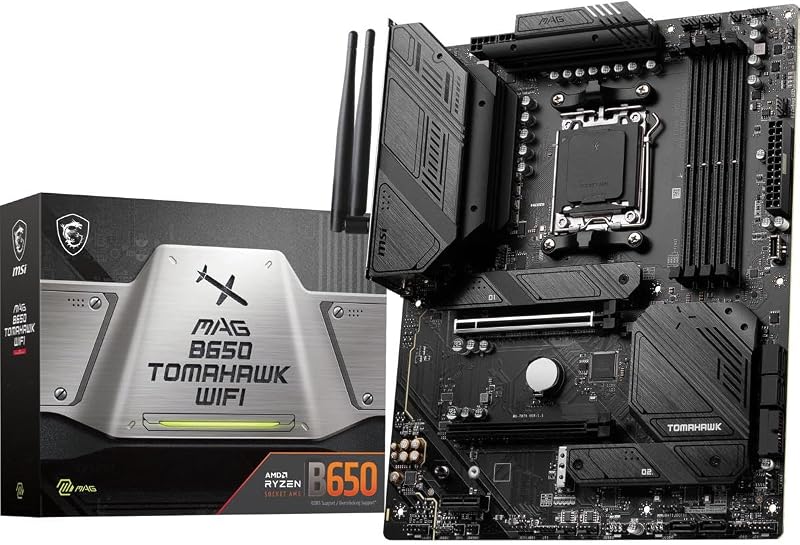
Pros
- Up to 7600 MHz DDR5 support
- Supports 6400+(OC) MHz memory profiles
- 11 external connectivity ports
- Dedicated Lightning PCIe 4.0 M.2
- Integrated Wi-Fi 6E and 2.5G LAN
Cons
- Does not specify choke pad ratings
- Styling focused primarily on gaming aesthetics
View MSI MAG B650 Tomahawk WiFi on Amazon
MSI Pro B650-P WiFi

Pros
- MOSFET thermal pads rated for 7W/mK
- Includes dedicated choke thermal pads
- Core Boost digital power design
- Six SATA 6Gb/s expansion ports
- Integrated Wi-Fi 6E and 2.5G LAN
Cons
- Lower 5600 MHz listed memory speed
- Fewer external ports with 9 total
View MSI Pro B650-P WiFi on Amazon
Who Should Buy Each One
Choose the MSI MAG B650 Tomahawk WiFi If
- You plan to install high-speed DDR5 memory kits reaching up to 7600 MHz or run 6400+(OC) MHz profiles to maximize gaming framerates.
- You operate numerous gaming accessories, stream decks, capture hardware, and external devices requiring an 11-port rear configuration.
- You prefer a military-inspired, stealthy dark aesthetic that complements enthusiast gaming desktop cases.
- You want high-speed Lightning M.2 PCIe Gen 4 storage performance paired with integrated M.2 Shield Frozr thermal armor for continuous heavy workloads.
Choose the MSI Pro B650-P WiFi If
- You are assembling a professional productivity workstation where standard 5600 MHz DDR5 memory speeds cover all your multitasking needs.
- Your peripheral setup fits comfortably within a 9-port layout without requiring external USB hub expansion.
- You value specific thermal pad ratings, including 7W/mK MOSFET pads and dedicated choke pads, for consistent multi-threaded stability.
- You prefer a clean, utilitarian aesthetic designed specifically for corporate and office workspaces.
Final Verdict
For most PC builders and gaming enthusiasts investing in the AMD AM5 platform, the MSI MAG B650 Tomahawk WiFi emerges as the stronger overall choice. Its decisive advantage lies in memory performance headroom, providing memory clock ratings up to 7600 MHz with explicit 6400+(OC) MHz support compared to the 5600 MHz limit listed for the Pro B650-P WiFi. When combined with an 11-port external layout, dedicated Lightning M.2 Gen 4 cooling, and a robust military-inspired chassis, the Tomahawk provides the connectivity and tuning headroom that performance-focused desktop builders demand.
Nevertheless, the MSI Pro B650-P WiFi remains a highly capable and sensible alternative for builders whose priorities lean toward day-to-day office productivity and content creation. By retaining the exact same 2.5Gbps networking, Intel Wi-Fi 6E, Bluetooth 5.3, six SATA 6Gb/s connections, and comprehensive VRM thermal pad coverage, the Pro-P delivers full AM5 functionality for multi-core processors. If you do not plan to push past 5600 MHz memory speeds or require more than 9 rear ports, the Pro B650-P WiFi provides a reliable, no-nonsense platform that handles daily workloads with ease.
FAQ
Does the MSI MAG B650 Tomahawk WiFi support faster RAM than the Pro B650-P WiFi?
Yes. The MSI MAG B650 Tomahawk WiFi lists a memory clock speed of 7600 MHz and explicitly supports 6400+(OC) MHz memory profiles, whereas the MSI Pro B650-P WiFi lists a standard memory clock speed of 5600 MHz.
Can both motherboards run AMD Ryzen 8000 and 7000 processors?
Yes. Both the MSI MAG B650 Tomahawk WiFi and the MSI Pro B650-P WiFi feature Socket AM5 and list compatibility for AMD Ryzen 7000 and 8000 series desktop processors, with listing titles confirming support for Ryzen 9000 series processors as well.
Do both boards include built-in Wi-Fi 6E and Bluetooth?
Yes. Both motherboards include an Intel Wi-Fi 6E wireless module that operates across the 2.4GHz, 5GHz, and 6GHz wireless frequency bands, alongside integrated Bluetooth 5.3 for pairing wireless accessories.
How many SATA drives can you connect to the Tomahawk and Pro-P?
Both motherboards feature six SATA 6Gb/s ports, allowing users to connect up to six traditional 2.5-inch or 3.5-inch SATA solid-state or hard disk drives in addition to high-speed M.2 NVMe storage.
Which board offers more external connectivity ports?
The MSI MAG B650 Tomahawk WiFi provides 11 external connectivity ports on its rear layout, whereas the MSI Pro B650-P WiFi provides 9 ports, giving the Tomahawk two additional connections for peripherals.
Is the MSI Pro B650-P WiFi suitable for gaming?
Yes. The MSI Pro B650-P WiFi features a PCI-Express x16 graphics card slot, Socket AM5 processor support, PCIe 4.0 M.2 storage, and 2.5Gbps LAN, making it capable of driving modern gaming configurations even though its memory frequency is rated at 5600 MHz.


