The deciding factor between the Noctua NF-F12 and the Arctic P12 comes down to package integration versus raw rotational bandwidth: Noctua delivers specialized acoustic dampening accessories, high-grade composite materials, and a directional stator frame, whereas Arctic provides an extended 200 to 1800 RPM speed envelope alongside integrated daisy-chain connectors for clean multi-fan wiring.
Choose the Noctua NF-F12 if you require comprehensive mounting accessories, modular sound dampening cables, and focused static pressure for a dedicated CPU heatsink. Choose the Arctic P12 if you need a zero-RPM idle capability, higher top-end speed, and simplified cabling across liquid cooling radiators or intake banks.


Noctua NF-F12 vs Arctic P12 at a Glance
| Attribute | Noctua NF-F12 | Arctic P12 |
|---|---|---|
| Rotational Speed Range | 300 to 1500 RPM (1200 RPM max with Low-Noise Adaptor) | 200 to 1800 RPM (0 RPM below 5% PWM) |
| Airflow Capacity | 93.4 m³/h | 56.3 CFM (95.7 m³/h) |
| Static Pressure | Not listed | 2.20 mmH₂O |
| Sound Level Specification | 22.4 dB(A) | 0.3 Sone |
| Connector Configuration | 4-pin PWM with detachable Y-cable and extension | 4-pin PWM connector with integrated 4-pin PST socket |
| Frame Construction Material | Fibre-glass reinforced PBT | Not listed |
| Motor and Bearing Architecture | Not listed (MTTF >150,000 hours) | Neodym-Iron-Boron magnet motor with Fluid Dynamic Bearing |
| Power Specifications | 12 volts | 12 volts DC, 1.2 watts, 0.1 amperes |
| Manufacturer Warranty | 6 years | 6 years |
| Best For | Acoustically sensitive heatsinks and single-fan coolers | Multi-fan radiator configurations and wide-range intake airflow |
Rotational Speed Range and PWM Curve
When configuring cooling profiles inside desktop firmware, the operational RPM band defines both idle acoustics and peak thermal dissipation headroom. A broad PWM range allows system builders to throttle fans down during basic productivity tasks to prevent motor whine, while preserving thermal margin when high CPU or GPU workloads demand aggressive airflow. In an in-depth arctic p12 vs noctua nf-f12 comparison, the way each unit maps rotational velocity across pulse-width modulation signals represents a fundamental design difference.
The Arctic P12 operates across a broader speed window of 200 to 1800 RPM, supplemented by a 0 RPM passive mode that engages whenever the PWM duty cycle drops below 5 percent. This allows liquid loops and desktop chassis to maintain total silence under zero-load conditions. In an arctic p12 review, this wide operational band proves especially valuable for users tuning custom fan curves in modern motherboard BIOS utilities. By comparison, the Noctua NF-F12 supports a speed range of 300 to 1500 RPM under standard 4-pin PWM regulation. To alter its operating profile, Noctua supplies a hardware-based Low-Noise Adaptor that caps the maximum rotational speed at 1200 RPM, trading ultimate cooling headroom for a hard acoustic ceiling without requiring firmware intervention.
The operational gain of the P12 is clear: its 1800 RPM peak delivers extra rotational muscle when thermal loads spike, while its sub-5-percent cutoff enables fully passive operation. The NF-F12 counters with fixed physical tuning through its bundled adapter, ensuring the fan cannot spin up into its loudest acoustic register even if software curves fail or motherboard sensors spike. When assessing high-performance 120mm air movers, builders often weigh the noctua nf-a12x25 vs arctic p12 alongside this matchup to understand how flagship impellers scale against broader rotational ranges.
Edge: Arctic P12 provides a wider 200 to 1800 RPM operating window and native zero-RPM mode below 5 percent PWM.
Cable Management and Multi-Fan Connectivity
Cable routing represents an essential element of modern system assembly, particularly when installing multiple fans across thick liquid radiators or front intake arrays. Without proper connectivity solutions, running several 120mm fans quickly depletes available motherboard headers and forces builders to purchase aftermarket hubs. Looking closely at the arctic p12 pwm pst vs noctua nf-f12 layout reveals contrasting approaches to cable management and expansion.
The Arctic P12 addresses multi-fan installations directly through its integrated PWM Sharing Technology (PST). The fan cable features a 400 mm lead terminating in a standard 4-pin female connector alongside a tethered 4-pin male socket. This passthrough socket allows users to daisy-chain multiple fans directly in series off a single motherboard header without external splitters or extra power leads. Operating at a modest 0.1 amperes and 1.2 watts, several P12 units can run safely on a standard 1.0-amp motherboard header. Builders configuring full-chassis cooling arrays frequently evaluate the arctic p12 vs lian li uni fan sl120 to weigh Arctic’s tethered daisy chains against rigid interlocking frame systems.
The Noctua NF-F12 relies on modular cable accessories rather than tethered sockets. Noctua bundles a dedicated 4-pin Y-cable to connect two PWM fans to a single header, alongside a full-length extension cable and the aforementioned Low-Noise Adaptor. While Noctua’s modular approach prevents redundant wiring when only one fan is required on a CPU tower, connecting three or four fans across a radiator creates clutter unless third-party hubs are introduced. Arctic’s integrated PST socket drastically reduces installation time and cable bulk when setting up multi-fan push-pull arrays.
Edge: Arctic P12 streamlines multi-fan installations through its integrated PWM PST daisy-chain sockets and low current draw.
Airflow and Static Pressure Performance
Static pressure measures the force a fan generates against structural resistance, such as dense radiator fin stacks, tightly packed CPU tower heatsinks, and restrictive dust filters. Standard case fans scatter airflow outward in a wide cone, losing velocity when confronting closely spaced aluminum fins. Choosing between the noctua nf-f12 or arctic p12 for radiator applications requires understanding how each manufacturer directs airflow through restricted spaces.
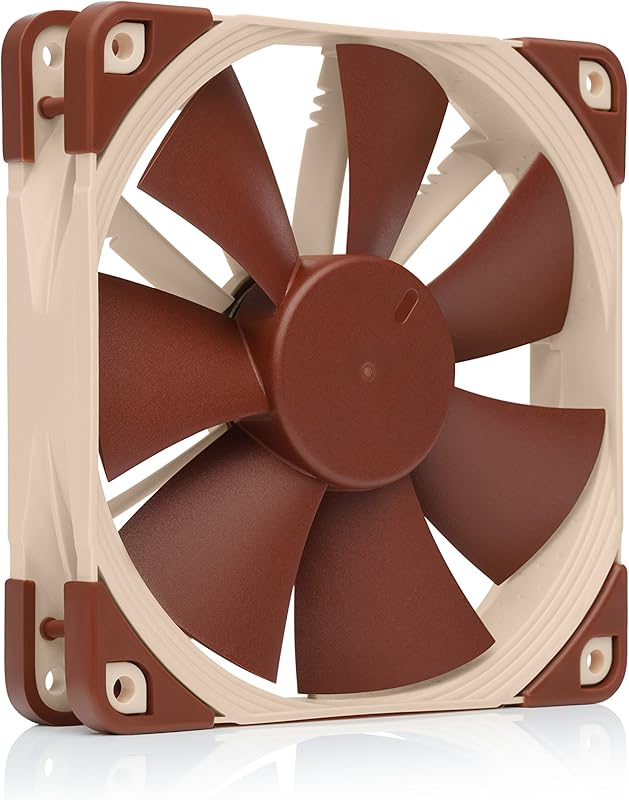
In technical metrics, the Arctic P12 listing specifies a static pressure rating of 2.20 mmH₂O alongside an airflow capacity of 56.3 CFM, which translates to 95.7 cubic meters per hour. Arctic achieves this focused airstream through steep, curved blades engineered to push air forward under pressure. Noctua’s listing takes an architectural approach with its proprietary Focused Flow frame, which places eleven stator guide vanes behind the impeller with alternating angular distances and vortex control notches to straighten the exiting airflow. Noctua specifies an airflow rating of 93.4 m³/h for the NF-F12, while the Amazon product listing does not specify a numerical static pressure figure in millimeters of water.
When deciding between the noctua nf-f12 or arctic p12 for heatsink cooling, physical airflow direction becomes critical. The Focused Flow frame on the NF-F12 channels the air column directly through heatpipe arrays, preventing air from spilling out the sides of single-tower coolers like the Noctua NH-U12 series. However, when examining arctic p12 static pressure vs noctua nf-f12 specs, the Arctic unit’s 1800 RPM capability gives it extra brute force when pushing volume through high-density radiator fins. For larger cooling hardware, comparing the noctua nf-f12 vs arctic p14 highlights how stepping up to 140mm frames shifts the balance of pressure against restrictive water-cooling cores.
Edge: Tie. Arctic P12 provides higher total airflow at 95.7 m³/h and an explicit 2.20 mmH₂O rating, while Noctua NF-F12 delivers directional Focused Flow stator vanes optimized for heatsinks.
Acoustic Profile and Vibration Dampening
Acoustic performance in cooling fans depends on both aerodynamic turbulence and mechanical vibration transmitted into the PC chassis. When fans spin against restrictive barriers, uneven pressure waves can produce distinct hums, while uninsulated hard plastic frames transmit motor pulses directly into metal cases. Analyzing noctua nf-f12 vs arctic p12 noise requires comparing both acoustic ratings and structural dampening mechanisms.
Noctua specifies the NF-F12 at a maximum noise level of 22.4 dB(A), which drops further when using the bundled Low-Noise Adaptor at 1200 RPM. Beyond sound ratings, the NF-F12 includes integrated anti-vibration corner pads and bundles extra silicone anti-vibration mounts alongside traditional fan screws. These elastomeric mounts decouple the fan frame from the case or heatsink bracket, eliminating resonance hums. Those comparing aesthetics and acoustic isolators often contrast the noctua nf-f12 vs lian li uni fan sl120 when deciding between utilitarian frame dampening and decorative lighting fixtures.
The Arctic P12 listing rates its sound output at 0.3 Sone, utilizing a quiet motor powered by a modern Neodym-Iron-Boron magnet ring. Arctic emphasizes smooth motor commutation to keep audible noise low across its speed range. However, the standard P12 frame lacks rubberized corner pads, meaning its rigid housing makes direct contact with mounting surfaces unless third-party washers are used. While the P12 runs quietly at low to moderate speeds, the NF-F12 provides a complete physical isolation system out of the box that prevents mechanical vibrations from transferring into desktop enclosures.
Edge: Noctua NF-F12 includes integrated anti-vibration pads, bundled silicone mounting hardware, and a modular Low-Noise Adaptor.
Build Materials, Motor Engineering, and Packaging
Long-term reliability and physical rigidity are critical for fans intended to run continuously for years inside warm computer cases. Impeller flex under high static pressure can degrade airflow efficiency or lead to frame scraping over time. Examining each product listing highlights substantial differences in raw materials, motor thermal designs, and package contents.
A comprehensive noctua nf-f12 review highlights Noctua’s structural engineering. The NF-F12 frame and impeller are molded from fibre-glass reinforced PBT (polybutylene terephthalate), a premium composite material that resists thermal expansion and mechanical warping. Noctua rates the fan for a mean time to failure (MTTF) exceeding 150,000 hours and covers it with a 6-year manufacturer warranty. The retail package functions as a complete installation kit, containing the fan, four anti-vibration mounts, standard screws, an extension cable, a Y-splitter cable, and the Low-Noise Adaptor. Chassis builders seeking matching intake fans also explore the arctic p12 vs p14 to balance 120mm mount points with larger 140mm alternative sizes across front panels.
Arctic takes an electrical engineering approach with the P12. The motor uses a modern Neodym-Iron-Boron magnet ring that lowers coil operating temperatures by 10 °C compared to previous generations, effectively doubling its service life to a fourfold extension over standard designs. Arctic pairs this motor with a Fluid Dynamic Bearing and matches Noctua with its own 6-year warranty. The P12 listing evaluated here is supplied as a 5-pack bundle, offering multiple cooling units for full chassis layouts, though it lacks the extensive modular cabling and composite material reinforcement found on the Noctua offering.
Edge: Noctua NF-F12 features fibre-glass reinforced PBT construction, a >150,000-hour MTTF, and a complete modular accessory kit.
Pros and Cons
Noctua NF-F12
Pros
- Focused Flow frame for directional static pressure
- Comprehensive modular accessory and adapter bundle
- Fibre-glass reinforced PBT housing construction
- Integrated anti-vibration silicone corner pads
- Over 150,000-hour rated MTTF
Cons
- Lower 1500 RPM maximum rotational ceiling
- No integrated daisy-chain connector socket
Arctic P12

Pros
- Higher 1800 RPM top operating speed
- Integrated PWM PST daisy-chain socket
- Zero RPM passive mode below 5 percent PWM
- Documented 2.20 mmH2O static pressure rating
- Efficient Neodym-Iron-Boron magnet motor
Cons
- Lacks integrated rubber anti-vibration pads
- No bundled low-noise adapter cable
Who Should Buy Each One
Choose the Noctua NF-F12 If
- You are replacing a noisy fan on a single-tower CPU heatsink like the Noctua NH-U12 series and want directional airflow.
- You need bundled anti-vibration mounts and integrated silicone corner pads to eliminate chassis resonance.
- You want hardware-level noise throttling via the supplied Low-Noise Adaptor without managing BIOS fan curves.
- You prioritize fibre-glass reinforced PBT composite construction backed by a rated MTTF exceeding 150,000 hours.
Choose the Arctic P12 If
- You are outfitting a multi-fan liquid cooling radiator and want to daisy-chain connections via integrated PST sockets.
- You need higher peak rotational speeds up to 1800 RPM for demanding thermal spikes.
- You want fully silent operation at idle through a native 0 RPM mode below 5 percent PWM duty cycle.
- You need multiple fans in a single bundle to populate front intake arrays and top exhaust mounts simultaneously.
Final Verdict
For builders asking is arctic p12 worth it, the fan stands out as the practical winner for multi-fan case layouts and liquid cooling radiators. Its 200 to 1800 RPM operational range delivers both passive idle silence and superior high-end rotational power, while the integrated PWM PST daisy-chain sockets eliminate the mess of third-party splitters across 240mm or 360mm radiators. The efficient Neodym-Iron-Boron motor and Fluid Dynamic Bearing ensure smooth operation over its 6-year warranty period.
On the other hand, for enthusiasts asking is noctua nf-f12 worth it for high-end CPU air coolers, the NF-F12 remains the benchmark for precision heatsink cooling. Its Focused Flow stator vanes concentrate the air column directly through heatpipe arrays, and its fibre-glass reinforced PBT structure ensures absolute dimensional stability. With a >150,000-hour MTTF, integrated silicone corner isolation, and a rich accessory kit containing modular adapters, the NF-F12 justifies its spot whenever targeted pressure and acoustic damping matter most.
FAQ
Can the Arctic P12 stop spinning completely during light desktop use?
Yes, the Arctic P12 features a 0 RPM silent mode that engages automatically whenever the motherboard PWM signal drops below 5 percent duty cycle, allowing completely silent operation during idle or light computing.
Does the Noctua NF-F12 come with accessories to connect two fans together?
Yes, the Noctua NF-F12 package includes a 4-pin Y-cable that allows two PWM fans to run off a single motherboard fan header, alongside an extension cable and a Low-Noise Adaptor.
Which fan is better suited for a dense CPU tower heatsink?
The Noctua NF-F12 is specifically optimized for CPU heatsinks due to its Focused Flow frame, which utilizes eleven stator guide vanes to direct the air column straight through cooling fins rather than letting it spread outward.
Can you daisy-chain multiple Arctic P12 fans without an external hub?
Yes, the Arctic P12 PWM PST model features an integrated 4-pin socket tethered to its main connector, enabling builders to link several fans in series directly to one motherboard header.
What is the maximum rotational speed of each fan?
The Noctua NF-F12 reaches a maximum speed of 1500 RPM, which can be limited to 1200 RPM using its included Low-Noise Adaptor. The Arctic P12 reaches a higher maximum rotational speed of 1800 RPM.
What warranty coverage do Noctua and Arctic provide on these models?
Both the Noctua NF-F12 and the Arctic P12 are backed by 6-year manufacturer warranties according to their product specifications.