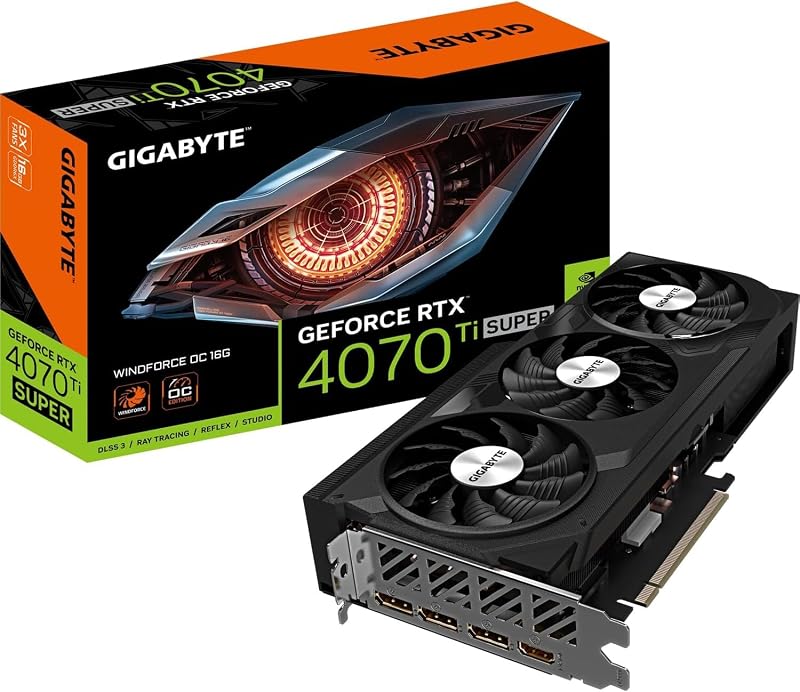
The fundamental dividing line in the Nvidia RTX 3060 Ti vs 3080 Ti matchup comes down to memory bandwidth, physical clearance, and high-resolution rendering headroom: the flagship card delivers 12GB of ultra-fast GDDR6X memory across a massive 2.9-slot cooling profile built for native 4K workloads, whereas the mid-range option relies on 8GB of GDDR6 memory in a nimble dual-slot frame designed for efficient 1440p setups.
Choose the Nvidia RTX 3060 Ti if you need a space-conscious graphics card that easily clears standard mid-tower or compact chassis while operating within a modest 200W power envelope. Choose the Nvidia RTX 3080 Ti if your primary objective is uncompromised graphical fidelity, heavy ray tracing, and sustained frame pacing across multi-monitor or demanding 4K displays.
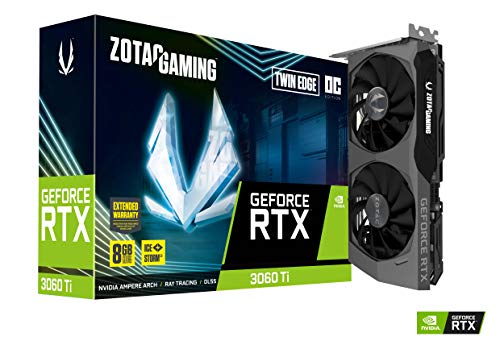

Nvidia RTX 3060 Ti vs Nvidia RTX 3080 Ti at a Glance
| Attribute | Nvidia RTX 3060 Ti | Nvidia RTX 3080 Ti |
|---|---|---|
| Specific Model Evaluated | ZOTAC GAMING Twin Edge OC LHR | ASUS ROG Strix OC Edition |
| VRAM Capacity & Type | 8GB GDDR6 | 12GB GDDR6X |
| Memory Speed & Bus Width | 14 Gbps (256-bit) | 19.5 Gbps (Bus width not listed) |
| Core Clock (Boost) | 1695 MHz | Not listed |
| Physical Dimensions | 8.74″L x 4.55″W | 12.53″L x 5.51″W |
| Form Factor Thickness | Dual Slot | 2.9-Slot |
| Cooling Solution | IceStorm 2.0 (2 Fans) | Axial-tech Design (3 Fans) |
| Rated Power Consumption | 200W | Not listed |
| Display Connectivity | 3x DisplayPort 1.4a, 1x HDMI 2.1 | DisplayPort 1.4a, HDMI 2.1 |
| Best For | High-Frame-Rate 1440p Builds | Enthusiast 4K & Heavy Workstations |
VRAM Capacity and Memory Throughput
Graphics memory functions as the high-speed cache for scene geometry, high-resolution textures, frame buffers, and compute pipelines like real-time ray tracing or machine-learning upscaling. The nvidia rtx 3060 ti vs 3070 conversation frequently revolves around frame buffering, but the RTX 3060 Ti vs 3080 Ti VRAM difference represents a far wider divide in both raw storage and interface throughput. The RTX 3060 Ti carries 8GB of standard GDDR6 running across a 256-bit bus at 14 Gbps (yielding a 14000 MHz effective clock). In contrast, the RTX 3080 Ti steps up to 12GB of cutting-edge GDDR6X memory clocked at a blistering 19.5 Gbps transfer speed.
This technical disparity fundamentally dictates how each card behaves under heavy rendering pipelines. GDDR6X memory features higher signaling rates that dramatically accelerate memory throughput, eliminating pipeline stalling when loading dense open-world asset pools or high-poly models. In an intensive RTX 3080 Ti review, that 12GB memory pool proves pivotal for running uncompressed texture packs, ray-traced reflections, and multi-layer post-processing simultaneously. The 8GB pool on the RTX 3060 Ti remains plenty capable for mainstream production pipelines, but users pushing beyond standard rasterization will encounter memory boundary limitations far sooner.
Choosing the RTX 3060 Ti requires accepting that future high-fidelity titles may demand minor visual compromises, such as lowering shadow map resolutions or dialing back texture presets to avoid saturating the 8GB buffer. The RTX 3080 Ti provides a 50 percent increase in raw VRAM capacity alongside significantly faster throughput, insulating the GPU core against micro-stutters caused by texture streaming bottlenecks over the PCIe bus.
Edge: Nvidia RTX 3080 Ti due to its superior 12GB capacity and ultra-fast 19.5 Gbps GDDR6X memory subsystem.
Resolution Target and Gaming Throughput
Evaluating gaming performance requires balancing the rendering load across display pixel counts, ray tracing engines, and hardware architecture. When evaluating the nvidia rtx 3060 ti vs 3080 tiers, resolution target is the primary separator. Both GPUs share the foundational Ampere architecture, incorporating 2nd Generation Ray Tracing Cores and 3rd Generation Tensor Cores that support structural sparsity and AI algorithms like DLSS. However, the internal scale of those engines differs massively between these two tiers.
When asking whether to choose the RTX 3060 Ti or 3080 Ti for 1440p gaming, the RTX 3060 Ti delivers an outstanding balance of fluid frame rates and high visual fidelity. With its 1695 MHz boost clock on the ZOTAC Twin Edge OC, it handles contemporary rendering pipelines at 2560×1440 with ease. However, when deciding on the RTX 3060 Ti or 3080 Ti for 4k gaming, the scale shifts heavily. The ASUS ROG Strix RTX 3080 Ti features enhanced Ampere Streaming Multiprocessors delivering double the FP32 compute throughput, designed specifically to churn through native 3840×2160 pixels without collapsing under ray tracing burdens.
In any rigorous RTX 3080 Ti vs RTX 3060 Ti benchmark comparison, the flagship card pulls dramatically ahead as display resolutions climb. Rendering at 4K demands four times the pixel computation of standard 1080p, and this is precisely where the expanded compute clusters and concurrent ray tracing capabilities of the RTX 3080 Ti shine. The RTX 3060 Ti can project to an 8K display via its HDMI 2.1 port, but its rasterization muscle is firmly tuned for high-refresh 1080p and competitive 1440p output.
Edge: Nvidia RTX 3080 Ti for its massive FP32 compute scaling and uncompromising 4K rendering capability.
Form Factor and Case Compatibility
Physical card size dictates whether a graphics upgrade fits into an existing desktop chassis or requires purchasing an entirely new enclosure. Builders examining the nvidia rtx 3050 vs 3060 ti transition understand that dimensions matter, but the size delta in this matchup is even more striking. The ZOTAC GAMING RTX 3060 Ti Twin Edge OC measures just 8.74 inches long and 4.55 inches wide, occupying a lean dual-slot profile. This compact footprint allows it to slide into virtually any mini-ITX enclosure or space-constrained Micro-ATX chassis without blocking front radiator fans or storage trays.
On the opposite end of the spectrum, the ASUS ROG Strix RTX 3080 Ti OC Edition is an imposing giant. It extends to an enormous 12.53 inches in length, stands 5.51 inches wide, and claims 2.9 expansion slots. This near three-slot width completely swallows adjacent PCIe slots on your motherboard, preventing the installation of sound cards, capture cards, or dedicated high-speed networking adapters. Furthermore, clearing over 12.5 inches of card length requires an expansive mid-tower or full-tower chassis with ample clearance past front intake fans.
The practical implications are substantial for system builders. With the RTX 3060 Ti, clearance anxiety is virtually nonexistent; the card installs quickly, exerts minimal strain on the PCIe slot, and leaves ample breathing room around other components. The RTX 3080 Ti requires deliberate chassis planning, careful measurement from backplate to front fans, and frequently necessitates a GPU support bracket to prevent mechanical sag caused by its massive footprint.
Edge: Nvidia RTX 3060 Ti due to its versatile dual-slot, 8.74-inch design that fits standard and small-form-factor systems.
Thermal Architecture and Acoustic Engineering
Dissipating heat efficiently is essential to maintaining sustained clock frequencies and quiet operation under load. Readers of an in-depth nvidia rtx 3060 vs 3060 ti analysis will recognize that cooler designs determine long-term acoustic comfort. ZOTAC equips the RTX 3060 Ti with its IceStorm 2.0 Advanced Cooling system, which incorporates dual fans, active fan control, and FREEZE Fan Stop functionality. The freeze stop feature halts the fans entirely when the GPU is idle, providing silent operation during desktop productivity, while the metal backplate helps protect the card and distribute heat.
ASUS counters on the ROG Strix RTX 3080 Ti with an elaborate triple-fan cooling apparatus. Utilizing an advanced Axial-tech fan design, the center fan features a reversed rotational direction relative to the two outer fans. This reverse rotation reduces airflow turbulence, channeling high static pressure directly through the massive heatsink fin stack. The heatsink itself benefits from the expanded 2.9-slot thickness, offering significantly more fin surface area to absorb thermal spikes from the high-performance core and hot-running GDDR6X modules.
Both manufacturers include proprietary software for thermal management: ZOTAC offers its FireStorm Utility, while ASUS incorporates GPU Tweak II for tuning fan curves and system monitoring. While the IceStorm 2.0 system does an admirable job cooling a 200W core, the ROG Strix card’s sheer heatsink volume, triple Axial-tech fans, and turbulent-reducing airflow design provide considerably higher thermal headroom for sustained maximum clock states.
Edge: Nvidia RTX 3080 Ti thanks to its expansive 2.9-slot heatsink volume and reverse-spinning triple Axial-tech fans.
Power Delivery and System Requirements
Power engineering determines the stress placed on your system’s power supply unit, the ambient heat dumped into your room, and the stability of the GPU during transient load spikes. Examining the broader context of cards like the nvidia rtx 3060 vs 3080 shows that flagship Ampere silicon demands serious electrical support. The RTX 3060 Ti listing explicitly states a rated power consumption of 200W, making it manageable for standard power supplies commonly found in pre-built systems and entry-to-mid-tier gaming desktops.
The ASUS ROG Strix RTX 3080 Ti does not list an exact total board wattage in its specification sheet, but its engineering reveals a card built for extreme power throughput. ASUS incorporates Super Alloy Power II componentry, featuring premium alloy chokes, solid polymer capacitors, and a high-current power stage array. This heavy-duty electrical delivery system ensures clean, stable voltage during deep compute workloads, but it inevitably demands a high-capacity power supply and multiple dedicated PCIe 8-pin power cables.
For PC builders assessing RTX 3060 Ti vs 3080 Ti specs, this creates a major divergence in total system complexity. Adopting the RTX 3060 Ti is often a plug-and-play upgrade that functions seamlessly without rewiring your PC or upgrading existing power delivery. Integrating the RTX 3080 Ti requires verifying that your desktop chassis can exhaust large quantities of waste heat and that your power supply possesses the high current capacity needed to manage transient load demands.
Edge: Nvidia RTX 3060 Ti due to its clearly defined, manageable 200W power profile that simplifies system integration.
Pros and Cons
Nvidia RTX 3060 Ti

Pros
- Compact dual-slot footprint under 9 inches
- Modest 200W board power rating
- IceStorm 2.0 cooling with freeze fan stop
- Capable 1440p gaming rasterization
Cons
- Limited to 8GB GDDR6 memory capacity
- Slower 14 Gbps memory throughput
View Nvidia RTX 3060 Ti on Amazon
Nvidia RTX 3080 Ti

Pros
- Expansive 12GB high-speed GDDR6X memory
- Rapid 19.5 Gbps memory transfer rate
- Triple-fan Axial-tech cooling with reversed center
- Robust Super Alloy Power II componentry
Cons
- Bulky 2.9-slot profile requires large chassis
- Heavier cooling shroud risks physical sag
View Nvidia RTX 3080 Ti on Amazon
Who Should Buy Each One
Choose the Nvidia RTX 3060 Ti If
- You play primarily on 1080p or 1440p displays and want fluid performance with modern graphic settings.
- You are building in a mini-ITX, Micro-ATX, or compact mid-tower chassis where graphics card length is limited to under 9 inches.
- You want a dependable plug-and-play upgrade that operates on a modest 200W power envelope without requiring a heavy-duty power supply replacement.
- You prefer a clean, space-saving dual-slot graphics card that leaves other motherboard PCIe expansion slots unblocked.
Choose the Nvidia RTX 3080 Ti If
- You game on a native 4K display, an ultrawide monitor, or a multi-display setup requiring maximum rendering muscle.
- You want 12GB of ultra-fast GDDR6X memory running at 19.5 Gbps to prevent frame stutters in asset-heavy, heavily modded games.
- Your PC chassis has more than 13 inches of clearance and can easily accommodate a wide 2.9-slot heatsink.
- You demand flagship-tier Ampere architecture with doubled FP32 throughput for intensive ray tracing and advanced AI rendering via DLSS.
Final Verdict
For the vast majority of everyday desktop gamers, the Nvidia RTX 3060 Ti stands out as the most sensible, practical hardware selection. Its 200W power draw, 8.74-inch dual-slot length, and dependable 8GB GDDR6 memory configuration make it exceptionally versatile. In an everyday gaming environment, it drives demanding modern games with ease at 1440p while maintaining quiet thermals via ZOTAC’s IceStorm 2.0 dual-fan cooling. It delivers genuine Ampere generation ray tracing and Tensor core capabilities without imposing massive chassis or power supply demands on your setup.
However, when asking is RTX 3080 Ti worth it, the answer is an emphatic yes for enthusiasts targeting native 4K immersion. The ASUS ROG Strix RTX 3080 Ti completely outclasses mid-range hardware with its 12GB GDDR6X memory operating at 19.5 Gbps, industrial-grade Super Alloy Power II componentry, and an enormous 2.9-slot triple-fan cooler engineered to tame heavy thermal loads. If your goal is uncompromising graphical fidelity, heavy ray tracing, and unconstrained 4K visual throughput, the RTX 3080 Ti is the undisputed champion between these two cards.
FAQ
Can the RTX 3060 Ti run games at 4K resolution?
While the RTX 3060 Ti supports output resolutions up to 7680×4320 via HDMI 2.1 and DisplayPort 1.4a, it is fundamentally engineered for 1080p and 1440p gaming. At native 4K, its 8GB GDDR6 memory buffer and 200W compute ceiling can struggle with demanding graphical settings, requiring you to reduce visual quality or lean heavily on DLSS upscaling to maintain fluid frame rates.
How much faster is GDDR6X on the RTX 3080 Ti compared to GDDR6 on the RTX 3060 Ti?
The RTX 3060 Ti uses GDDR6 memory rated at 14 Gbps (with a 14000 MHz memory clock), whereas the RTX 3080 Ti utilizes advanced GDDR6X memory delivering 19.5 Gbps. This higher signaling rate, paired with the 3080 Ti’s wider internal architecture, provides substantially greater data throughput to keep the graphics processor saturated during asset-heavy workloads.
What physical clearance is required for the ASUS ROG Strix RTX 3080 Ti?
The ASUS ROG Strix RTX 3080 Ti measures 12.53 inches in length and 5.51 inches in width, featuring a 2.9-slot profile. You will need a spacious mid-tower or full-tower chassis with at least 13 inches of unobstructed clearance past front fans, along with three unblocked motherboard expansion slots to accommodate its thick heatsink.
What does the LHR designation mean on the ZOTAC RTX 3060 Ti?
The LHR designation stands for Low Hash Rate, which limits the card’s cryptocurrency mining efficiency (specified at an estimated 25 MH/s ETH hash rate in the product listing). This limitation is strictly confined to specific mining algorithms and has zero negative impact on gaming graphics, 3D rendering, or compute performance.
Does either card feature automatic fan-stop technology when idle?
Yes, the ZOTAC GAMING RTX 3060 Ti includes FREEZE Fan Stop technology as part of its IceStorm 2.0 cooling suite, halting the fans during light desktop usage to ensure silent operation. The ASUS ROG Strix RTX 3080 Ti also provides sophisticated thermal controls through its GPU Tweak II software to manage fan behavior and acoustic profiles.
Can I run multiple high-resolution displays on these graphics cards?
Both graphics cards support multi-display configurations and share a maximum digital resolution of 7680×4320 (8K). The ZOTAC RTX 3060 Ti explicitly notes 4-display readiness featuring three DisplayPort 1.4a ports and one HDMI 2.1 port, while the ASUS ROG Strix RTX 3080 Ti also provides both DisplayPort 1.4a and HDMI 2.1 outputs.