The choice between the Razer Blade 14 and the Alienware X16 R2 comes down to a fundamental trade-off between compact mobility and full-sized desktop replacement performance. The Blade 14 packages an eight-core processor and dedicated graphics into a sub-four-pound chassis built for everyday travel, while the X16 R2 uses its substantial footprint to house a larger 16-inch 240Hz screen, an Intel Core Ultra processor, and an RTX 4070 graphics module.
Choose the Razer Blade 14 if you need a sleek, lightweight machine that slips effortlessly into any backpack without compromising on solid frame rates. Choose the Alienware X16 R2 if your priority is an expansive high-refresh display, updated graphics architecture, and an immersive multi-speaker entertainment setup.
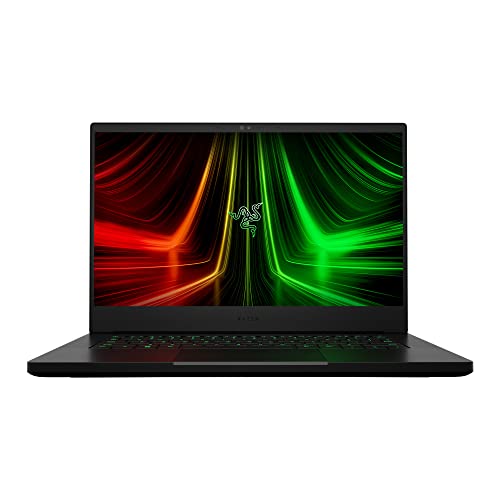

Razer Blade 14 vs Alienware X16 R2 at a Glance
| Feature | Razer Blade 14 | Alienware X16 R2 |
|---|---|---|
| Display Size and Resolution | 14-inch QHD (2560 x 1440) | 16-inch QHD+ |
| Refresh Rate | 165Hz | 240Hz (3ms response time) |
| Processor | AMD Ryzen 9 6900HX (8 cores, up to 4.9GHz) | Intel Core Ultra 7 155H (16 cores, up to 4.8GHz) |
| Graphics Coprocessor | NVIDIA GeForce RTX 3070 Ti (Up to 100W MGP) | NVIDIA GeForce RTX 4070 (8GB GDDR6) |
| System Memory | 16GB DDR5 4800MHz | 16GB LPDDR5x integrated |
| Internal Storage | 1TB PCIe x4 SSD | 1TB Solid State Drive |
| Chassis Dimensions | 12.59″L x 8.66″W x 0.66″Th | Not listed |
| Weight | 3.9 pounds | 6.0 pounds |
| Webcam | Front camera | 1080p at 30fps FHD RGB+IR camera |
| Audio System | Stereo with THX Spatial Audio, 7.1 via HDMI | 6-speaker array (2x 2W tweeters, 4x 3W woofers) |
| Best For | Mobile gamers and frequent travelers | Stationary gamers wanting a bigger, faster screen |
Portability and Chassis Dimensions
Physical footprint defines how a portable computer integrates into your daily workflow. When evaluating the razer blade 14 weight of just 3.9 pounds against the substantial 6-pound mass of the X16 R2, the difference is felt immediately in a shoulder bag or backpack. The Blade 14 features tight dimensions measuring 12.59 inches long, 8.66 inches wide, and an ultra-thin 0.66 inches thick, allowing it to occupy minimal desk space in tight lecture halls, coffee shops, or airplane tray tables. Its CNC aluminum body finished in anodized black feels dense and robust, resisting chassis flex during transport.
The X16 R2 takes a contrasting engineering route with its Lunar Silver clamshell chassis, designed to make a visual statement through a stadium rear shelf and iconic AlienFX lighting boasting 100 micro-LEDs. While the listing does not specify the precise outer dimensions for the Alienware unit, its 6-pound weight reflects its classification as a semi-portable desktop alternative. Users comparing machines across different sizes, such as those weighing the razer blade 16 vs alienware x16 r2, recognize that a 16-inch notebook demands a significantly larger backpack sleeve and sturdy desk support.
For shoppers debating whether to acquire the razer blade 14 or alienware x16 r2 for travel, the compact form factor of the 14-inch machine provides undeniable convenience. Carrying an extra 2.1 pounds of laptop weight alongside larger charging gear alters your packing decisions on long commutes. The Blade 14 gives you the freedom to move unencumbered, whereas the Alienware remains best suited for short trips between dedicated desks.
Edge: Razer Blade 14 provides unmatched portability with its 3.9-pound weight and razor-thin 0.66-inch profile.
Display Size and Visual Performance
The screen serves as the direct interface for every gaming session and creative workload. A deep look at the razer blade 14 vs alienware x16 r2 display reveals distinctly tailored visual experiences. The Blade 14 houses a 14-inch QHD panel refreshing at 165Hz, pairing high pixel density with fluid motion rendering. Its 1440p resolution at this smaller screen diagonal yields sharp character outlines and crisp desktop UI elements, ensuring games appear remarkably detailed without visible pixelation.
Alienware equips the X16 R2 with an expansive 16-inch QHD+ panel running at an ultra-responsive 240Hz with a 3ms response time. Beyond the increased vertical real estate provided by the QHD+ aspect ratio, this panel covers 100% of the DCI-P3 color gamut for rich color saturation. It integrates ComfortView Plus hardware low-blue-light filtering, alongside NVIDIA G-SYNC and Advanced Optimus for seamless graphics switching without screen tearing. Enthusiasts browsing broader compact options like the framework laptop 13 vs razer blade 14 often note that compact displays limit total visual immersion compared to dedicated 16-inch gaming panels.
If your favorite titles rely on split-second reaction times in competitive multiplayer games, the step up from 165Hz to 240Hz on the X16 R2 provides a smoother visual flow. Combined with 100% DCI-P3 color reproduction and hardware-level G-SYNC, the Alienware display presents a richer visual workspace for high-fidelity titles and media consumption.
Edge: Alienware X16 R2 takes the visual category with its larger 16-inch 240Hz panel, faster 3ms response, and full DCI-P3 color coverage.
Graphics Processing and Gaming Output
Visual fidelity depends heavily on GPU capability, and these laptops represent two distinct hardware tiers. In any thorough alienware x16 r2 review, the modern NVIDIA GeForce RTX 4070 graphics coprocessor stands out as a high-efficiency centerpiece. Equipped with 8GB of GDDR6 memory, the RTX 4070 in the Alienware architecture drives demanding modern titles across its high-resolution screen with advanced graphics technologies, maximizing frame pacing across complex gaming environments.
Conversely, examining razer blade 14 rtx 3070 ti gaming performance shows that the previous-generation Ampere silicon remains capable. The listing indicates the RTX 3070 Ti Laptop GPU operates with a Maximum Graphics Power of up to 100W and a boost clock reaching 1200MHz. Razer states this GPU is up to 70% faster than older RTX 2070 SUPER mobile chips and is capable of delivering up to 100 frames per second at native 1440p resolution in supported titles. Readers evaluating mid-sized alternatives like the msi katana 15 vs razer blade 14 often observe that 100W power envelopes strike an intentional balance between heat generation and raw output.
When assessing overall alienware x16 r2 rtx 4070 performance against the Blade 14, the generational upgrade in the Alienware chassis yields higher compute capability for demanding visual settings. While the 100W RTX 3070 Ti handles standard 1440p gameplay admirably, the RTX 4070 in the larger Alienware chassis delivers greater visual stability in modern titles.
Edge: Alienware X16 R2 wins on graphics output through its newer GeForce RTX 4070 processing hardware.
Processor Architecture and Memory
System throughput relies on how CPU architecture coordinates with internal memory. The Alienware X16 R2 relies on an Intel Core Ultra 7 processor 155H, a platform incorporating 16 cores, a 24MB cache, and maximum clock speeds reaching up to 4.8GHz. This hybrid core configuration efficiently divides background tasks from core gaming threads. Backing this CPU is 16GB of integrated LPDDR5x memory, offering rapid access times for loaded game assets and demanding multitasking scenarios.
The Blade 14 features the AMD Ryzen 9 6900HX processor, boasting 8 high-performance physical cores and 16 execution threads capable of boosting up to 4.9GHz. Razer pairs this mobile silicon with 16GB of DDR5 4800MHz memory, which the manufacturer notes is 50% faster than previous-generation memory standards. In comparisons such as the razer blade 14 vs samsung galaxy book4 pro, the Ryzen 9 demonstrates formidable sustained compute efficiency within thermal-limited chassis designs.
Despite the high clock speeds of the Ryzen 9 6900HX, the 16-core configuration and 24MB cache of the Intel Core Ultra 7 155H inside the Alienware afford greater processing overhead for complex multitasking, game streaming, and productivity pipelines. The faster bandwidth of LPDDR5x memory further enhances the Alienware system responsiveness.
Edge: Alienware X16 R2 delivers superior multitasking and computational throughput via its 16-core Intel Core Ultra 7 chip and LPDDR5x memory.
Thermal Management and System Cooling
Thermal control is essential to sustaining high clock speeds inside slim gaming hardware. A critical element of any razer blade 14 review is its bespoke cooling solution. To mitigate heat buildup within a 0.66-inch chassis, Razer implements a Next-Gen Vapor Chamber Cooling system. This design utilizes a sealed liquid chamber paired with upgraded exhaust fins, quieter fans, and an expanded liquid volume to vaporize and dissipate thermal energy across the aluminum frame without excessive acoustic noise.
The Alienware X16 R2 takes advantage of its larger chassis dimensions to create an aggressive airflow path. Its specialized thermal design draws in cooler ambient air through vents located directly above the keyboard deck and expels heated air outward through dedicated ventilation ports on the sides and rear chassis. By avoiding cramped component stacking, the larger internal volume of the X16 R2 facilitates consistent airflow over the motherboard circuitry during extended gameplay.
Both manufacturers demonstrate strong thermal engineering, but their objectives differ. Razer achieves impressive thermal density by containing an eight-core CPU and 100W GPU inside an ultra-slim metal shell using vapor chamber mechanics. Alienware uses ambient surface area to cycle massive volumes of air through independent intake zones. Razer earns the nod here for cramming effective vapor-chamber cooling into such an impossibly tight form factor.
Edge: Razer Blade 14 secures the advantage for packaging an advanced vapor-chamber system inside an ultra-compact frame.
Audio, Webcams, and Peripheral Connectivity
Immersion and day-to-day usability depend on interface ports, audio fidelity, and input sensors. The Alienware X16 R2 separates itself significantly in integrated acoustic performance by including a specialized 6-speaker layout. This audio array features two 2W tweeters paired with four 3W woofers, producing deeper bass resonance and clear vocal staging directly from the chassis. For video calls, the Alienware includes a 1080p full HD RGB+IR camera running at 30fps, allowing clear video quality and Windows Hello facial recognition support.
Razer equips the Blade 14 with built-in stereo speakers featuring THX Spatial Audio processing and 7.1 codec passthrough via HDMI. For peripheral connectivity, the Blade 14 provides an impressive mobile array consisting of a full-sized HDMI 2.1 port, two USB-C ports, two USB-A ports, a 3.5mm audio combo jack, and Wi-Fi 6E wireless networking. The listing notes a front camera for communications, though it lacks the dedicated 1080p IR array found on its larger rival. Buyers who evaluate broad media laptops like the framework laptop 16 vs razer blade 14 often weigh port versatility against built-in speaker hardware.
While the Blade 14 offers extensive physical ports including dual USB-C and dual USB-A connections for mice and external drives, the Alienware X16 R2 dominates multimedia consumption with its six-speaker acoustic hardware and high-definition 1080p webcam.
Edge: Alienware X16 R2 wins due to its superior 6-speaker array and 1080p RGB+IR webcam configuration.
Pros and Cons
Razer Blade 14

Pros
- Smooth 16-inch QHD+ 240Hz 3ms display
- Modern NVIDIA GeForce RTX 4070 graphics
- 16-core Intel Core Ultra 7 processor
- Rich 6-speaker array with four woofers
- Included 1-year Dell onsite hardware service
Cons
- Heavy 6-pound weight limits travel portability
- Significantly larger footprint requires more desk space
- Integrated LPDDR5x memory cannot be upgraded
Who Should Buy Each One
Choose the Razer Blade 14 If
- You travel frequently and demand a machine weighing under four pounds that slides easily into commuter sleeves.
- You prefer a minimalist, CNC-machined aluminum aesthetic finished in anodized black with a low desk profile.
- You want a crisp 14-inch QHD 165Hz screen that maintains high pixel sharpness for everyday work and gaming.
- You value a diverse set of native ports including dual USB-C, dual USB-A, and full-sized HDMI 2.1 without dongles.
Choose the Alienware X16 R2 If

- You want a large 16-inch QHD+ 240Hz display with 100% DCI-P3 coverage and NVIDIA G-SYNC for esports and fast-paced gaming.
- You need the computational capability of an Intel Core Ultra 7 155H with 16 cores and integrated LPDDR5x memory.
- You prioritize laptop audio and want a built-in six-speaker array with four dedicated woofers.
- You appreciate dedicated after-purchase support, including Dell 1-Year Onsite Service where technicians come to your location.
Final Verdict
For gamers and professionals who spend the majority of their time at a home desk or office setup, the Alienware X16 R2 stands out as the overall performance winner. Its newer GeForce RTX 4070 graphics processor, expansive 16-inch 240Hz screen, 16-core Intel Core Ultra processing platform, and rich 6-speaker sound system deliver a superior entertainment experience. Backed by in-home Dell onsite warranty support and vibrant AlienFX chassis illumination, it proves that a larger footprint yields noticeable gains in visual speed and audio immersion.
However, the Razer Blade 14 remains the definitive choice for mobile users who cannot justify hauling a six-pound chassis. By packing an AMD Ryzen 9 6900HX processor and a capable 100W RTX 3070 Ti into a precision-milled aluminum chassis that measures just 0.66 inches thick, Razer delivers desktop-class gaming in a package you can carry anywhere. If daily mobility, compact dimensions, and clean styling are your deciding factors, the Blade 14 remains an exceptional ultraportable powerhouse.
FAQ
How do the refresh rates compare between these two laptops?
The Alienware X16 R2 features a faster 240Hz refresh rate with a 3ms response time on its 16-inch QHD+ panel. The Razer Blade 14 operates with a 165Hz refresh rate on its 14-inch QHD screen. Both provide fluid gameplay, but the 240Hz panel provides smoother motion tracking for competitive gaming.
Can the Alienware X16 R2 be serviced at home if hardware issues arise?
Yes. The Alienware X16 R2 listing includes Dell 1 Year Onsite Service. If a hardware issue covered by the Limited Hardware Warranty cannot be resolved remotely, Dell dispatches a technician directly to your home, office, or location of choice.
What is the weight difference between the Blade 14 and the X16 R2?
The Razer Blade 14 weighs 3.9 pounds, while the Alienware X16 R2 weighs 6.0 pounds. This 2.1-pound difference makes the Blade 14 noticeably easier to carry during daily transit.
Which laptop provides better built-in speakers?
The Alienware X16 R2 offers superior built-in audio thanks to a 6-speaker setup consisting of two 2W tweeters and four 3W woofers. The Razer Blade 14 relies on a traditional stereo speaker layout paired with THX Spatial Audio processing.
Is alienware x16 r2 worth it over the Blade 14 for competitive esports?
For dedicated esports players, the Alienware X16 R2 provides distinct advantages with its 240Hz display, larger 16-inch viewing area, and Advanced Optimus support. These specifications ensure lower input latency and smoother motion compared to the 165Hz screen on the Blade 14.
What display color standard does the Alienware X16 R2 support?
The Alienware X16 R2 listing confirms 100% DCI-P3 color gamut coverage on its QHD+ panel, ensuring vibrant, cinema-grade color reproduction for gaming and digital content creation.