The core distinction that settles the decision between the Samsung 980 Pro and the Samsung 990 EVO Plus comes down to internal architecture versus raw sequential throughput. The 980 Pro remains an established flagship built with a dedicated onboard cache memory of 2 GB for managing sustained write operations, whereas the newer 990 EVO Plus relies on Intelligent TurboWrite 2.0 acceleration to deliver superior peak read and write speeds alongside modern bus flexibility.
Choose the Samsung 980 Pro if your daily workflow involves heavy, continuous file writing, media rendering, or workstation tasks that benefit from hardware DRAM. Choose the Samsung 990 EVO Plus if you want faster game loading, brisk everyday system responsiveness, and modern power efficiency across PCIe 4.0 and PCIe 5.0 interfaces.
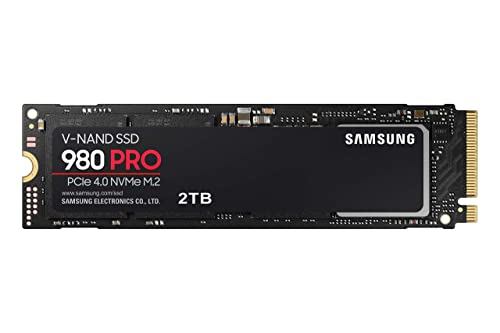

Samsung 980 Pro vs 990 EVO Plus at a Glance
| Feature | Samsung 980 Pro | Samsung 990 EVO Plus |
|---|---|---|
| Peak Sequential Read Speed | Up to 7,000 MB/s | Up to 7,250 MB/s |
| Peak Sequential Write Speed | Up to 5,100 MB/s | Up to 6,300 MB/s |
| Host Interface | PCIe Gen 4×4 (PCIe 3.0 compatible) | PCIe Gen 4×4 and PCIe Gen 5×2 |
| Controller Hardware | Samsung Elpsis controller with nickel coating | Efficiency-boosting nickel-coated controller |
| Installed Cache Memory | 2 GB dedicated cache | Not listed (uses Intelligent TurboWrite 2.0) |
| Thermal Management | Nickel coating and heat spreader label | Nickel coating (73% higher MB/s per Watt) |
| Security & Management | AES 256-Bit Encryption | Samsung Magician Software with extra encryption |
| Console Compatibility | Sony PlayStation 5 | Sony PlayStation 5 |
| Capacity Range in Data | 2 TB | 2 TB (4 TB mentioned) |
| Best For | Sustained writes and professional workloads | Gaming, burst transfers, and power-efficient builds |
Sequential Speed and File Transfer Performance
Sequential transfer rates determine how quickly an internal solid-state drive can read and write large, contiguous blocks of data. When you duplicate a massive video file, export an uncompressed render, or install a modern high-definition software title, maximum throughput dictates your waiting time. In this category, the newer architecture of the Samsung 990 EVO Plus delivers clear advantages on paper. The 990 EVO Plus reaches maximum sequential read speeds of up to 7,250 MB/s and sequential write speeds of up to 6,300 MB/s, outpacing the older generation by a tangible margin.
By comparison, the Samsung 980 Pro tops out at sequential read speeds of up to 7,000 MB/s and sequential write speeds of up to 5,100 MB/s. While a 7,000 MB/s read ceiling easily saturates standard computing needs and easily surpasses older PCIe 3.0 platforms, its 5,100 MB/s write ceiling falls 1,200 MB/s short of what the newer drive achieves. Readers exploring our samsung 970 evo plus vs 980 pro analysis know that the 980 Pro represented a massive leap in its era, but modern NAND flash enables the 990 EVO Plus to push closer to the limits of Gen 4 interfaces during standard file bursts.
This difference in the Samsung 980 Pro vs 990 EVO Plus speed metric means that users moving 50 GB to 100 GB files in everyday bursts will complete transfers faster on the newer model. The 990 EVO Plus utilizes Samsung Intelligent TurboWrite 2.0 technology to maximize these transfers within its operational buffer, making standard desktop tasks feel remarkably swift.
Edge: Samsung 990 EVO Plus, because it achieves 250 MB/s faster read speeds and 1,200 MB/s faster sequential write speeds.
Cache Architecture and Sustained Write Workloads
Peak burst speeds tell only half the story when evaluating storage hardware. When an internal drive is subjected to sustained workloads-such as moving multiple hundreds of gigabytes in a single continuous session-the drive’s internal buffer and caching mechanism dictate whether performance remains high or falls off a cliff. Dedicated physical cache acts as an immediate scratchpad for the drive controller, tracking address mapping tables without drawing on host memory.
The Samsung 980 Pro includes 2 GB of dedicated cache memory installed directly on the 2 TB hardware module. Powered by Samsung’s proprietary Elpsis controller, this hardware cache allows the drive to handle constant, sustained writing without stuttering or exhausting temporary memory buffers. In any rigorous Samsung 980 Pro review, this dedicated cache structure stands out as an enterprise-grade trait designed for heavy-duty computing, data analytics, and intense multimedia editing suites.
Conversely, the product data for the Samsung 990 EVO Plus does not list a dedicated hardware DRAM cache size; instead, it relies on Intelligent TurboWrite 2.0 to maintain write speeds within a specific data transfer envelope. While Intelligent TurboWrite 2.0 is enhanced for large files and even expands up to a 4 TB capacity tier, drives relying on dynamic write buffers can encounter reduced transfer rates once that designated buffer exhausts during massive sustained transfers. Shoppers who study our samsung 980 pro vs 990 evo breakdown will recognize this classic division between dedicated-DRAM hardware and algorithmic burst caching.
Edge: Samsung 980 Pro, because its 2 GB installed dedicated cache maintains reliable stability across heavy, continuous write sessions.
Power Efficiency and Operating Temperatures
Solid-state drives produce noticeable thermal energy under load, and managing that heat is vital to preventing thermal throttling inside compact spaces like gaming laptops, small-form-factor desktop PCs, or console bays. A drive that consumes less electricity per megabyte transferred not only preserves mobile battery runtimes but also operates with lower ambient thermal strain.
Thermal control has been heavily reworked for the newer unit. According to manufacturer specifications, the nickel-coated controller on the 990 EVO Plus increases efficiency by 73% in MB/s per Watt compared to preceding iterations, generating identical performance levels while drawing less operating power. This makes thermal mitigation far easier when the drive is installed in tight, airflow-restricted enclosures. For users questioning is Samsung 990 EVO Plus worth it for ultra-thin laptops, this efficiency jump is a decisive argument.
The Samsung 980 Pro also incorporates sophisticated thermal protection, employing a nickel coating on its Elpsis controller alongside a specialized heat spreader label applied to the NAND chip. However, the 980 Pro belongs to the initial generation of PCIe 4.0 controllers, which draw more continuous power to sustain high throughput and dedicated cache indexing. In discussions of Samsung 980 Pro vs 990 EVO Plus temperature, the 990 EVO Plus runs cooler under mixed everyday workloads due to its significantly improved energy-per-watt profile.
Edge: Samsung 990 EVO Plus, because its controller delivers a 73% improvement in MB/s per Watt for cooler and more power-conscious operation.
Interface Versatility and PCIe Lane Configuration
Motherboard compatibility and bus allocation can dramatically influence storage stability. While both drives function inside standard M.2 2280 slots, how they communicate across peripheral component interconnect express lanes differs fundamentally between generations.
The Samsung 980 Pro is built strictly around the PCIe Gen 4×4 protocol. While it maintains backward compatibility with legacy PCIe 3.0 motherboards, it requires a full complement of four PCIe lanes to achieve its advertised 7,000 MB/s potential. If placed in an environment with restricted lane availability, throughput drops proportionally according to PCIe Gen 4 or Gen 3 lane limits.
The Samsung 990 EVO Plus introduces flexible modern bus switching. The hardware supports both PCIe 4.0 x4 and PCIe 5.0 x2 interface configurations. This allows the drive to achieve its full 7,250 MB/s bandwidth on cutting-edge platforms using only two PCIe 5.0 lanes, freeing up CPU-connected lanes for graphics cards or secondary high-speed devices. As explored in our samsung 990 evo plus vs 990 pro guide, this lane flexibility ensures the drive fits smoothly into evolving motherboard designs without sacrificing read speeds.
Edge: Samsung 990 EVO Plus, because it supports both PCIe 4.0 x4 and PCIe 5.0 x2 lane modes for adaptable system installation.
Gaming and PlayStation 5 Console Performance
Solid-state drives play a critical role in modern gaming platforms, where game assets stream directly from storage to system memory. Both drives are officially listed as compatible with the Sony PlayStation 5 console and fit into desktop gaming rigs, making the question of Samsung 980 Pro or 990 EVO Plus for gaming a central dilemma for enthusiasts.
For console expansion, the Sony PlayStation 5 requires a PCIe 4.0 x4 M.2 NVMe SSD. The Samsung 980 Pro has long been an industry standard for console upgrades, offering 7,000 MB/s read speeds that easily exceed Sony’s 5,500 MB/s recommended baseline. Gamers installing broad game libraries benefit from its thermal label and stable Elpsis controller during lengthy digital game downloads. Similarly, the 990 EVO Plus functions within the PS5, where its 7,250 MB/s read speed ensures immediate level loading and seamless asset streaming during open-world gameplay.
When selecting Samsung 980 Pro or 990 EVO Plus for PS5 duty, the higher sequential read speed of the 990 EVO Plus provides an advantage in initial loading scenarios, while its power-efficient controller prevents excessive thermal build-up inside the console’s enclosed expansion compartment. In typical gaming environments where reads far outnumber sustained writes, the newer drive’s profile is particularly well suited.
Edge: Samsung 990 EVO Plus, because its higher 7,250 MB/s read throughput and cooler running profile benefit game asset streaming.
Drive Management and Long-Term Reliability Features
Long-term data integrity requires responsive management software and hardware-level encryption. Both solid-state drives include enterprise-standard data protection, but they implement management tools slightly differently.
The Samsung 980 Pro relies on proven AES 256-Bit hardware encryption, ensuring that sensitive documents and secure drives remain inaccessible to unauthorized parties without taxing host CPU resources. Its Elpsis controller harmonizes Samsung V-NAND flash components to maintain stability over prolonged operational lifespans, an attribute thoroughly detailed in our samsung 980 vs 990 evo plus overview.
The Samsung 990 EVO Plus places heavy emphasis on continuous optimization via Samsung Magician Software. Magician provides direct firmware updates, drive health monitoring, and supplementary encryption tools to preserve performance over time. While the 980 Pro also works with Samsung management utilities, the 990 EVO Plus highlights automated health tracking and firmware synchronization as core listing features to keep the unit operating smoothly. Readers comparing earlier generations in our samsung 970 evo plus vs 990 evo comparison will find that Samsung has maintained strict software support across both tiers.
Edge: Tie, as both drives deliver AES 256-bit grade encryption support and full compatibility with Samsung Magician software.
Pros and Cons
Samsung 980 Pro

Pros
- 2 GB dedicated cache memory
- Reliable sustained write performance
- Nickel-coated Elpsis controller
- AES 256-bit encryption support
Cons
- Lower peak write speed at 5100 MB/s
- Lower power efficiency than newer models
View Samsung 980 Pro on Amazon
Samsung 990 EVO Plus

Pros
- Up to 7250 MB/s sequential reads
- Up to 6300 MB/s sequential writes
- 73% higher MB/s per Watt efficiency
- PCIe 4.0 x4 and PCIe 5.0 x2 support
Cons
- No dedicated onboard DRAM cache listed
- Relies on Intelligent TurboWrite buffer
View Samsung 990 EVO Plus on Amazon
Who Should Buy Each One
Choose the Samsung 980 Pro If
- You regularly edit uncompressed 4K or 8K video where sustained write stability prevents dropped frames.
- You run continuous data analytics or workstation applications that exhaust temporary dynamic caches.
- You demand a dedicated 2 GB hardware DRAM cache on the drive module for consistent mapping table access.
- You are building a dedicated PC workstation where consistent continuous write speeds outweigh peak burst numbers.
Choose the Samsung 990 EVO Plus If
- You want maximum peak speeds of up to 7,250 MB/s read and 6,300 MB/s write for swift file launches.
- You are upgrading a PlayStation 5 console or gaming PC primarily focused on fast level loading.
- You are installing an M.2 drive into a slim laptop where 73% higher MB/s per Watt keeps thermal levels minimal.
- You want modern motherboard bus adaptability with native support for both PCIe 4.0 x4 and PCIe 5.0 x2.
Final Verdict
For the vast majority of everyday users, PC gamers, and laptop owners, the Samsung 990 EVO Plus emerges as the superior purchase. Its newer NAND memory architecture elevates sequential reads to 7,250 MB/s and writes to 6,300 MB/s, outpacing the older flagship in real-world burst transfers. Coupled with a 73% improvement in MB/s per Watt efficiency and flexible PCIe 4.0 x4 / PCIe 5.0 x2 compatibility, the 990 EVO Plus delivers modern refinements that align perfectly with general computing, gaming load screens, and temperature-sensitive environments.
However, the Samsung 980 Pro retains a critical advantage for creative professionals and high-throughput workstation users. Its 2 GB installed dedicated cache memory guarantees predictable, unwavering write speeds during massive file transfers that overwhelm dynamic software buffers. If your daily computing consists of multi-gigabyte file exports, database compilation, or professional video production, the hardware DRAM on the 980 Pro provides the sustained write consistency you need.
FAQ
Is the Samsung 980 Pro or 990 EVO Plus better for PS5 expansion?
Both drives are compatible with the Sony PlayStation 5 and surpass Sony’s recommended speed thresholds. The Samsung 990 EVO Plus offers a slight advantage for gaming due to its higher 7,250 MB/s sequential read speed and improved thermal efficiency, which helps maintain lower temperatures inside the console’s sealed expansion slot.
Does the Samsung 990 EVO Plus have a dedicated DRAM cache?
The product data for the Samsung 990 EVO Plus does not list a dedicated onboard DRAM cache. Instead, it utilizes Intelligent TurboWrite 2.0 technology to accelerate large file transfers dynamically. By contrast, the Samsung 980 Pro features an installed cache memory size of 2 GB directly on the 2 TB model.
Can the Samsung 990 EVO Plus run in a PCIe 5.0 motherboard slot?
Yes. The Samsung 990 EVO Plus is specifically engineered to support both PCIe 4.0 x4 and PCIe 5.0 x2 lane configurations. When placed in a compatible PCIe 5.0 slot, it achieves full operational bandwidth while utilizing only two interface lanes.
Does the Samsung 980 Pro run hotter than the Samsung 990 EVO Plus?
Under continuous load, the Samsung 980 Pro generally consumes more power, which can lead to higher heat production. The Samsung 990 EVO Plus incorporates a newer nickel-coated controller that improves power efficiency by 73% in MB/s per Watt, allowing it to stay cooler in enclosed systems.
Is the Samsung 990 EVO Plus backward compatible with older PCIe 3.0 systems?
Yes. The listing notes backward compatibility for the Samsung 990 EVO Plus, allowing it to function inside legacy PCIe 3.0 M.2 slots, though maximum transfer speeds will be bounded by the maximum bandwidth of the PCIe 3.0 interface.
How do the sequential write speeds compare between the 980 Pro and 990 EVO Plus?
The Samsung 990 EVO Plus offers a higher peak sequential write speed of up to 6,300 MB/s when Intelligent TurboWrite 2.0 is engaged. The Samsung 980 Pro reaches a maximum sequential write speed of up to 5,100 MB/s, though it sustains write tasks reliably thanks to its onboard dedicated cache.