The single technical difference that decides the choice between a 60Hz monitor and a 144Hz monitor is motion refresh frequency. A 144Hz display draws up to 144 images per second-more than double the 60 frames delivered by a traditional 60Hz panel-resulting in dramatically smoother on-screen transitions, sharper visual tracking during fast pans, and lower input lag.
Choose 60Hz if your priority centers on ultra-lightweight portability, secondary screen utility for office spreadsheets, and simple single-cable USB-C connectivity on the go. Choose 144Hz if you demand fluid frame rendering, competitive gaming responsiveness, and a permanent desktop workstation that keeps fast action crisp and legible.
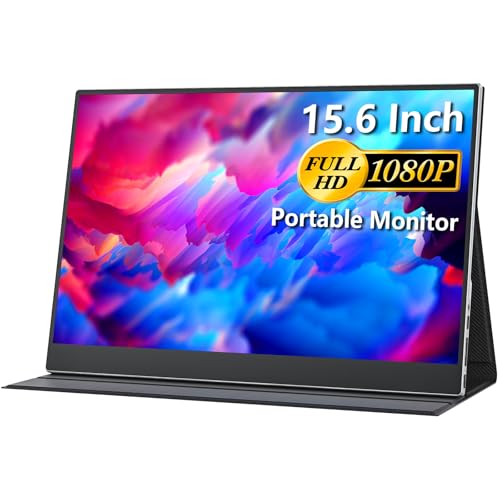



60Hz vs 144Hz at a Glance
| Attribute | 60Hz | 144Hz |
|---|---|---|
| Maximum Refresh Rate | 60Hz | Up to 144Hz |
| Form Factor & Screen Size | Portable secondary displays (15.6 inches) | Desktop monitors (22 to 24 inches) |
| Panel Technology | IPS / LCD | IPS / LCD |
| Native Resolution | 1920×1080 (FHD) | 1920×1080 (FHD) |
| Response Time | 3ms to 4ms (G to G) | 1ms MPRT to 8ms |
| Adaptive Sync Support | AMD FreeSync | AMD FreeSync |
| Primary Video Inputs | USB Type-C (DP Alt-Mode), Mini HDMI | HDMI, DisplayPort |
| Weight | 2.4 lbs to 2.45 lbs (1.1 kg) | 7.4 lbs (with stand) |
| Eye Comfort Features | Low Blue Light | Not listed |
| Best For | Mobile productivity, laptops, travel setups | Desktop gaming, smooth daily computing |
Motion Fluidity and Frame Delivery
Refresh rate measures how many times per second a panel redraws its display buffer. At 60Hz, an image updates every 16.67 milliseconds. When stepping up to 144Hz, that redraw interval drops to roughly 6.94 milliseconds. This fundamental monitor refresh rate difference completely alters how the human eye perceives moving objects across the screen. While reading stationary documents shows negligible variance, moving an application window, scrolling down data-dense web pages, or tracking a cursor highlights an immediate divergence in visual smoothness.
In practice, the high refresh capability of 144Hz screens eliminates the stuttering sensation common to lower refresh panels. When comparing a modern 144Hz display against a standard office screen, cursor tracking feels instantaneous and text remains legible even while rapidly scrolling. Shoppers frequently ask if 144hz vs 240hz yields the same jump in clarity; while higher brackets offer incremental gains, the leap from 60Hz to 144Hz delivers the most noticeable perceptual improvement in modern display technology. Desktop options like the Dell SE2426H leverage this 144Hz refresh rate to ensure that every transition appears clean, fluid, and natural.
By contrast, 60Hz panels are engineered around standard video playback and static document management. Streaming video services, broadcast television, and general office software output content rendered at 24, 30, or 60 frames per second. On travel panels such as the cocopar Portable Monitor, a 60Hz ceiling aligns with standard operating system rendering pipelines without placing heavy strain on laptop graphics hardware or external battery packs. However, any sudden mouse flick or high-speed motion will exhibit noticeable frame stepping compared to high-refresh alternatives.
Edge: 144Hz because updating the panel every 6.94 milliseconds creates substantially smoother motion tracking and reduces perceived visual stutter across all desktop tasks.
Gaming Responsiveness and Tear-Free Performance
Evaluating 60Hz or 144Hz for gaming depends largely on the genres you play and how quickly you need your monitor to reflect control inputs. In fast-paced competitive titles-such as first-person shooters, racing simulators, and action titles-the physical time it takes for your actions to appear on screen directly impacts precision. At 144Hz, the panel refreshes more than twice as frequently, giving players updated target positions sooner and reducing motion smearing during rapid camera pans.
Hardware specifications highlight this performance gap. The Dell SE2426H combines its 144Hz frequency with a 1ms Moving Picture Response Time (MPRT) and AMD FreeSync support, enabling the monitor to synchronize its refresh cycle directly with the graphics card to eliminate screen tearing and ghosting. Similarly, the dell s2725dsm vs msi mag 275qpf e21, panel responsiveness and synchronized frame delivery remain central considerations.
Conversely, 60Hz gaming monitors work well for strategy titles, turn-based games, and casual console gaming where visual speed is secondary to portability. Both the cocopar Portable Monitor (with a 3ms response time) and the Acer PM161Q (featuring a 4ms gray-to-gray response time and AMD FreeSync) can handle gaming consoles like the Nintendo Switch, PlayStation, or Xbox. However, when evaluating 144Hz vs 60Hz response time in dynamic gameplay, 60Hz displays physically cannot show more than 60 frames per second, making fast camera pans feel blurry regardless of pixel response metrics.
Edge: 144Hz because higher refresh rates paired with 1ms MPRT dramatically improve input response, target tracking, and motion clarity in fast games.
Form Factor, Weight, and Portability
Physical size and mobility represent the primary trade-off when choosing between these two display categories. Mainstream 60Hz technology frequently dominates the portable monitor category, allowing manufacturers to build ultra-thin secondary screens intended to fit inside travel bags alongside modern ultrabooks. When deciding on 60Hz or 144Hz for office work, desktop space and mobility needs often dictate the winner long before refresh rate comes into question.
The Acer PM161Q exemplifies this portable design approach, measuring just 0.4 inches deep and weighing 2.45 pounds (1.1 kg) with a 15.6-inch viewing area. Similarly, the cocopar Portable Monitor features an ultra-slim 0.23-inch profile, weighs 2.4 pounds, and includes an integrated magnetic leather smart cover that doubles as a multi-angle kickstand. These panels operate directly from laptop power or a compact 5-volt direct current connection, requiring no bulky desktop stands, external power bricks, or dedicated workstation space.
In contrast, 144Hz monitors are almost universally designed as permanent desktop fixtures. The Dell SE2426H features a 23.8-inch screen, an integrated desktop stand with a 7.04-inch footprint depth, and an assembled weight of 7.4 pounds. The Sceptre E225W-FW144 provides a 22-inch display canvas suited for desk mounts or dual-monitor office arms. While these stationary panels provide broader visual immersion similar to larger setups like the dell s2725dsm vs samsung odyssey g7 27, they cannot be slipped into a backpack for remote work at coffee shops, client sites, or airport terminals.
Edge: 60Hz because 15.6-inch portable displays weigh less than 2.5 pounds and fit into standard laptop bags without requiring desktop mounting space.
Connectivity and Single-Cable Productivity
The interfaces used to drive a 60Hz vs 144Hz monitor reflect their differing operational environments. Modern 60Hz portable monitors prioritize streamlined, low-power integration with laptops, tablets, and handheld devices. Because 1080p video at 60Hz requires modest bandwidth, manufacturers can bundle power delivery and display signal transmission into a single, clutter-free connection.
For example, the cocopar Portable Monitor features dual full-featured USB Type-C ports capable of receiving both display signals and operating power through a single cable from laptops supporting DisplayPort Alternate Mode or Thunderbolt 3. It also provides a standard HDMI port for legacy laptops, gaming consoles, and mini PCs. The Acer PM161Q utilizes a similar single-cable USB Type-C architecture that draws approximately 15 watts of power under load, enabling immediate plug-and-play dual-screen setups during business meetings or remote work sessions.
Desktop 144Hz monitors require higher transmission bandwidth and dedicated alternating-current power cords. The Sceptre E225W-FW144 relies on full-sized DisplayPort and HDMI inputs to deliver its maximum 144Hz refresh rate from dedicated graphics cards. The Dell SE2426H incorporates two HDMI ports to connect PCs and consoles side by side. While these inputs support robust desktop routing and high-bandwidth frame transfers comparable to high-end productivity screens like the samsung odyssey g9 49 vs benq pd2725u, they lack the plug-and-play bus power and Type-C video convenience found on portable 60Hz units.
Edge: 60Hz because dual full-featured USB-C ports allow video and power over a single cable directly from a laptop or mobile workstation.
Visual Fidelity and Color Performance
Resolution, color reproduction, and panel technology dictate visual enjoyment just as much as frame frequency. Both 60Hz and 144Hz screens in this segment primarily utilize Full HD 1080p (1920×1080) native resolution and In-Plane Switching (IPS) panels, which provide consistent color representation and broad 178-degree horizontal and vertical viewing angles without dramatic contrast shifting.
When assessing visual metrics, individual panel specifications show subtle variations. The Dell SE2426H features an IPS panel with 300 cd/m² brightness, a 1000:1 static contrast ratio, 72% color gamut coverage, and a 93 pixel pitch. The Sceptre E225W-FW144 incorporates Blue-Light Shift technology and ultra-thin minimal bezels that make it suitable for multi-monitor desktop configurations.
On the 60Hz side, the cocopar Portable Monitor offers a 1080p IPS A-grade matte panel with 300 cd/m² brightness, a 1000:1 contrast ratio, High Dynamic Range (HDR) support, Low Blue Light filtering, and 85% sRGB color gamut coverage. The Acer PM161Q provides an anti-glare IPS display with an 800:1 contrast ratio, 45% color gamut, 0.18mm pixel pitch, and ergonomic tilt adjustments between 45 and 60 degrees. While performance across wide-gamut monitors like the lg 27gr93u vs gigabyte mo32u24 operates in a higher tier, both 60Hz and 144Hz 1080p screens deliver comparable static color accuracy, contrast balance, and matte anti-glare screen finishes.
Edge: Tie because both sides utilize 1080p IPS panel technology with 1000:1 contrast ratios, wide viewing angles, and specialized eye-care blue light filters.
Pros and Cons
60Hz
Pros
- Low power consumption
- Compact lightweight portable profiles
- Single-cable USB-C power and display
- Sufficient for everyday productivity tasks
Cons
- Noticeable motion blur in fast scenes
- Capped frame rate ceiling
View cocopar Portable Monitor 15.6 Inch 1080P on Amazon
144Hz
Pros
- Fluid 144Hz motion clarity
- Fast 1ms response times
- Reduced screen tearing during fast gameplay
- Larger desktop display sizes
Cons
- Heavier stationary desktop footprint
- Higher power demands
View Sceptre 22-Inch Gaming Monitor FHD on Amazon
Who Should Buy Each One
Choose the 60Hz If

- You travel frequently and need a secondary laptop screen that weighs under 2.5 pounds and fits easily into a messenger bag or backpack.
- You want a clean workstation powered by a single USB-C cable carrying both video and operating electricity directly from your laptop.
- Your computing tasks focus strictly on office applications, document review, spreadsheet analysis, and web research where high framerates provide negligible utility.
- You need an auxiliary display for handheld consoles, meetings, or field diagnostics where traditional desktop monitor stands cannot fit.
Choose the 144Hz If

- You play competitive multiplayer games and need low input latency paired with smooth motion tracking to react quickly to in-game movement.
- You maintain a permanent desktop workstation and prefer a larger 22-inch to 24-inch viewing canvas with integrated tilt-adjustable stands.
- You experience eye fatigue from scrolling through dense text or code repositories and want the fluid visual pacing that 144 redraws per second provides.
- Your desktop graphics card includes DisplayPort or dual HDMI outputs capable of pushing frame rates well beyond standard 60 FPS limits.
Final Verdict
For most stationary desktop users, a 144Hz monitor is the superior investment. The perceptual jump from 60 frames per second to 144 frames per second transforms everyday computing: cursor movement feels tactile and immediate, text scrolling remains sharp without blurring, and fast-paced gaming performance gains essential responsiveness. Panels like the Dell SE2426H and Sceptre E225W-FW144 pair high-refresh panels with 1ms MPRT speeds, AMD FreeSync adaptive synchronization, and comfortable desktop viewing dimensions that elevate daily PC usage.
However, 60Hz remains the definitive choice for mobile professionals, students, and digital nomads who value physical versatility over sheer frame output. When evaluating a 60Hz review against desktop hardware, the convenience of lightweight portable designs like the cocopar Portable Monitor and Acer PM161Q cannot be matched by stationary screens. If your priority is traveling with an efficient dual-screen setup powered over a single USB-C connection, a 15.6-inch 60Hz display provides unmatched utility without cluttering your mobile workspace.
FAQ
Is 144Hz worth it if I do not play video games?
Yes, 144Hz provides visible benefits outside of gaming by smoothing everyday desktop animations, eliminating cursor jitter, and keeping text legible while rapidly scrolling documents or websites. While high refresh rates are essential for competitive gaming, general productivity users still notice less visual stutter and improved operational fluidness.
Can my laptop output 144Hz over a standard HDMI cable?
Most modern laptops equipped with HDMI 1.4b or HDMI 2.0 ports can drive a 1080p monitor at 144Hz, provided the display’s HDMI port supports high refresh inputs. However, older laptops or certain integrated graphics chips may limit external HDMI video output to 60Hz, so checking your laptop graphics specifications is recommended before purchasing.
Does a 60Hz portable monitor cause eye strain during office work?
A 60Hz refresh rate does not inherently cause eye strain for static office tasks like drafting emails, reading PDFs, or managing spreadsheets. Both the cocopar Portable Monitor and Acer PM161Q include matte screen finishes, anti-glare coatings, and low blue light features designed to maintain visual comfort over standard work sessions.
What is the difference between 1ms MPRT and G-to-G response time?
Moving Picture Response Time (MPRT) measures how long a pixel remains visible on screen, directly indicating perceived motion blur, whereas Gray-to-Gray (G-to-G) measures the physical time required for a pixel to shift between two color shades. Displays with a 1ms MPRT rating, such as the Dell SE2426H, effectively reduce trailing behind fast-moving objects compared to panels with standard 4ms G-to-G ratings.
Can I run a 60Hz monitor and a 144Hz monitor together in a dual-screen setup?
Yes, modern operating systems like Windows and macOS support mixed-refresh multi-monitor arrangements. You can run primary tasks or games on a 144Hz desktop display while keeping utility windows, chat applications, or reference material open on an auxiliary 60Hz portable monitor without forcing both screens to share the lower frequency.
Do modern gaming consoles support 144Hz displays?
Current gaming consoles like the PlayStation 5 and Xbox Series X support high refresh rate output up to 120Hz at 1080p resolution. Connecting a console to a 144Hz monitor like the Dell SE2426H or Sceptre E225W-FW144 will allow supported games to run at a smooth 120 FPS, whereas a 60Hz monitor caps console gameplay at 60 FPS.


