The decisive difference between the Intel Core i7-12700K and the Intel Core i7-14700K centers on multi-threaded compute density and clock frequency. While both processors utilize a hybrid performance architecture, the newer fourteenth-generation design integrates eight additional efficiency cores and elevates peak boost frequency by 600 MHz, creating an immediate operational advantage in demanding multi-threaded workflows like media encoding, code compilation, and rendering pipelines.
Choose the Intel Core i7-12700K if you need a balanced 12-core system for standard productivity, office multi-tasking, and dependable everyday business computing. Choose the Intel Core i7-14700K if your daily computing demands require 20 cores, 28 threads, and peak 5.6 GHz clock speeds for resource-heavy content creation and high-refresh gaming.


Intel Core i7-12700K vs Intel Core i7-14700K at a Glance
| Feature | Intel Core i7-12700K | Intel Core i7-14700K |
|---|---|---|
| Total Cores | 12 (8 P-cores + 4 E-cores) | 20 (8 P-cores + 12 E-cores) |
| Total Threads | 20 | 28 |
| Max Boost Clock | Up to 5.0 GHz | Up to 5.6 GHz |
| Cache | 25MB Intel Smart Cache | 33 MB Secondary Cache |
| Processor Base Power | The listing does not specify | 125 Watts |
| Integrated Graphics | Intel UHD Graphics 770 | Intel UHD Graphics 770 |
| Memory Architecture | DDR5 (Up to 5600 MHz listed) | DDR4 and DDR5 |
| Platform Compatibility | Windows 11 Pro desktop tower | Intel 600 and 700 Series Chipsets |
| PCIe Support | PCIe x 4 interface listed | PCIe 5.0 and 4.0 |
| Best For | Standard business computing and balanced multi-tasking | Heavy content creation, intensive rendering, and high-framerate gaming |
Core Architecture and Thread Scaling
Core configuration directly governs how an operating system distributes simultaneous workloads. In evaluating the i7-14700K vs Intel Core i7-12700K, the structural shift in processing blocks defines everyday throughput. The older 12th Gen chip provides 12 physical cores split into eight Performance-cores (P-cores) and four Efficient-cores (E-cores), managing 20 concurrent threads. In contrast, the 14th Gen model expands this arrangement to 20 physical cores, combining eight P-cores with 12 E-cores to drive 28 threads. This noticeable i7-14700K core count difference alters how modern background processes, operating system daemons, and rendering threads behave under load.
When running complex multi-threaded tasks such as parallel 3D rendering, video post-production, or data crunching, those extra eight efficiency cores absorb background operations without interrupting primary foreground tasks. While the i7-12700K handles moderate multitasking seamlessly, having only four efficiency cores means that intensive secondary routines can occasionally contend with high-priority jobs. If you are comparing modern upgrades like the intel core i7-13700k vs i7-14700k, you will notice that the fourteenth-generation i7 stands out specifically because Intel decided to increase the physical E-core cluster rather than only tuning clock frequencies.
For standard desktop utility, document processing, and general enterprise multi-tasking, 12 cores and 20 threads provide more than enough headroom. However, for digital production studios, compiling engines, and heavy virtualization environments, the 28-thread pipeline of the 14700K eliminates computational bottlenecks and finishes batch workloads significantly faster.
Edge: Intel Core i7-14700K provides eight additional efficiency cores and eight more concurrent threads, delivering much greater parallel processing power.
Clock Speeds and Single-Core Gaming Responsiveness
Operating clock speed dictates how rapidly an individual processor core executes instructions, an attribute that strongly influences single-threaded responsiveness and gaming performance. The Core i7-12700K operates with maximum speeds up to 5.0 GHz across its primary compute cores. The Core i7-14700K pushes this ceiling upward to 5.6 GHz, leveraging Intel Turbo Boost Max Technology 3.0 to direct single-threaded workloads to the fastest available silicon cores.
When weighing the i7-12700K or i7-14700K for gaming, this 600 MHz clock frequency delta plays an active role in maintaining high frame rates in CPU-bound competitive games. Titles that rely on high single-thread velocity to drive physics simulations, real-time geometry calculation, and game logic benefit from the immediate responsiveness of 5.6 GHz operation. The i7-12700K remains capable of driving modern games smoothly, but the 14700K provides higher upper limits for gamers pairing their systems with high-refresh display monitors.
The presence of Intel Turbo Boost Max Technology 3.0 on the 14700K ensures that demanding bursts of calculation do not languish across slower core blocks. This dynamic clock scaling delivers Snappy application launches, swift spreadsheet calculations, and reduced hitching during asset-heavy gameplay sessions. In any direct Intel Core i7-14700K review, this elevated boost ceiling regularly highlights the processor as a competitive alternative to higher-tier desktop flagships.
Edge: Intel Core i7-14700K takes the advantage with a 600 MHz higher maximum clock speed and Turbo Boost Max Technology 3.0.
Cache Capacity and Multitasking Efficiency
On-chip cache serves as high-speed temporary storage that sits immediately adjacent to the execution cores, feeding them data without waiting for system RAM. Analyzing the i7-12700K vs i7-14700K specs reveals an expansion in cache infrastructure. The i7-12700K features 25MB of Intel Smart Cache, which acts as a unified pool shared across its 12 cores. The i7-14700K features 33 MB of secondary cache, providing an expanded buffer to support its increased core count.
A larger cache pool reduces the frequency of cache misses, which occur when a core requests data that must then be fetched from comparatively slower system memory. In gaming scenarios with sprawling open worlds or data-heavy simulations, having 33 MB of cache ensures that rendering instructions and asset tables remain instantly accessible. The 25MB cache on the i7-12700K is well-proportioned for 12 cores, but the expanded cache on the 14th Gen model ensures that the additional eight efficiency cores do not starve for data. Readers evaluating processor architectures against alternatives like the intel core i7-12700k vs i7-14700kf will appreciate how unified cache allocations impact consistent frame pacing.
For everyday business tasks, word processing, and web navigation, cache differences are rarely noticeable because instruction sets fit comfortably within standard buffers. However, when rendering video layers, managing high-resolution assets, or juggling complex databases, the 33 MB cache architecture on the 14700K maintains steady throughput under heavy sustained loads.
Edge: Intel Core i7-14700K wins due to its larger 33 MB cache capacity, ensuring smooth data flow across its expanded core array.
Platform Compatibility and Memory Flexibility
Building or upgrading a desktop PC requires strict attention to platform support, motherboard sockets, and memory standards. The standalone i7-14700K processor offers broad motherboard compatibility, operating on both Intel 700-series and Intel 600-series chipset-based motherboards, with older 600-series boards requiring a potential BIOS update. In addition, the 14700K features dual-platform memory support, allowing builders to deploy either DDR4 or DDR5 RAM, alongside support for PCIe 5.0 and PCIe 4.0 lanes. This architectural flexibility helps builders decide whether an intel core i7-12700k vs i7-13700k or modern 14th Gen transition fits their current motherboard infrastructure.
The Core i7-12700K represented in this comparison comes integrated into a Dell business computer tower configured with 32 GB of high-speed DDR5 RAM running at 5600 MHz, expandable up to 64GB, alongside a 1TB PCIe SSD. The tower provides comprehensive connectivity including USB 3.2 Gen 2 Type-C, dual 4K display output via HDMI 2.1 and DisplayPort 1.4a, Wi-Fi, Bluetooth, and enterprise security via a hardware TPM security chip. The listing specifies an LGA 1155 socket, whereas the 14700K listing indicates an LGA 771 socket specification.
The choice between these two approaches depends on your setup preference. The i7-14700K offers component-level versatility, giving custom system builders the freedom to pair the processor with diverse motherboards, PCIe 5.0 components, and either DDR4 or DDR5 memory kits. The i7-12700K desktop package delivers an all-in-one preconfigured platform ready for business operations right out of the box, complete with keyboard, mouse, and Windows 11 Pro pre-installed.
Edge: Intel Core i7-14700K offers superior flexibility for builders through dual DDR4 and DDR5 memory compatibility and support across Intel 600 and 700 series motherboards.
Power Demands and Thermal Considerations
Thermal management and power consumption are critical factors when selecting a high-performance desktop processor. The Core i7-14700K specifies a Processor Base Power of 125 watts. With 20 physical cores running at boost speeds reaching 5.6 GHz, sustained computational loads will draw notable power, necessitating robust system cooling, such as high-performance air coolers or liquid cooling setups, to maintain maximum turbo boost frequencies over extended periods.
The listing for the Dell i7-12700K desktop does not specify an exact standalone processor wattage, but it houses the 12-core processor within an enclosed 13.0 lb tower measuring 11.95 inches high, 3.74 inches wide, and 9.45 inches deep. Because the 12700K manages 12 cores instead of 20 and caps its clock speed at 5.0 GHz, its total thermal dissipation under typical workloads is inherently lower than that of a fully unleashed 20-core processor. For business environments seeking whisper-quiet operation without demanding exotic cooling components, this balanced footprint is a practical advantage.
Buyers asking is i7-14700K worth it must consider these thermal realities. Delivering 28 threads at 5.6 GHz requires adequate chassis ventilation and substantial power delivery. If your setup cannot dissipate heavy thermal loads, the processor may throttle back its frequencies, diminishing the performance advantage over a cooler-running 12-core chip. If you frequently examine top-tier CPUs such as the intel core i7-14700k vs i9-14900k, you will recognize that higher core counts always require careful planning around cooling headroom.
Edge: Intel Core i7-12700K operates with a smaller thermal footprint and lower cooling complexity due to its 12-core architecture.
Pros and Cons
Intel Core i7-12700K
Pros
- Solid 12-core and 20-thread configuration
- Boost clock speeds up to 5.0 GHz
- Integrated Intel UHD Graphics 770
- 25MB Intel Smart Cache
Cons
- Fewer cores and threads than 14700K
- Lower maximum clock speed
- Smaller cache capacity
View Intel Core i7-12700K on Amazon
Intel Core i7-14700K
Pros
- Higher 20-core and 28-thread count
- Fast turbo speeds up to 5.6 GHz
- Expanded 33MB cache
- Supports both DDR4 and DDR5 memory
Cons
- May require BIOS update for 600-series motherboards
- High 125W base power draw
View Intel Core i7-14700K on Amazon
Who Should Buy Each One
Choose the Intel Core i7-12700K If
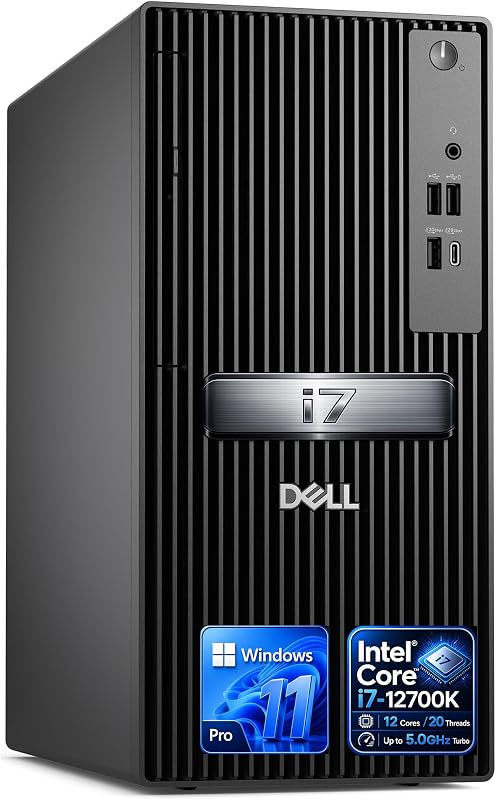
- You need an all-in-one business desktop that is ready for deployment with Windows 11 Pro, keyboard, and mouse out of the box.
- Your primary workflows consist of standard office software, database management, and web-based enterprise applications that do not require more than 20 threads.
- You want built-in business security features, including a dedicated hardware TPM chip and integrated chassis lock loops.
- You value a turnkey system configured with fast 5600 MHz DDR5 memory and multi-monitor display outputs without needing to assemble individual parts.
Choose the Intel Core i7-14700K If

- You render complex 3D animations, export 4K video timelines, or compile large programming codebases that fully utilize 20 cores and 28 threads.
- You are a PC gamer aiming for maximum frame rates and responsive gameplay driven by 5.6 GHz clock speeds and Turbo Boost Max 3.0.
- You already own an Intel 600-series or 700-series motherboard and want a powerful drop-in processor upgrade.
- You want the architectural freedom to choose between DDR4 and DDR5 memory standards alongside PCIe 5.0 peripheral support.
Final Verdict
When looking at the overall comparison, the Intel Core i7-14700K stands as the undisputed winner for performance-oriented users, content creators, and dedicated PC gamers. By integrating eight additional efficiency cores to bring the total to 20 cores and 28 threads, alongside a generous 33 MB cache and a peak boost frequency of 5.6 GHz, it substantially outpaces older chips in multi-threaded productivity and gaming responsiveness. For anyone building a high-performance custom desktop or upgrading an existing socket on an Intel 600 or 700 series motherboard, the 14700K offers modern architectural features that justify the investment.
On the other hand, the Intel Core i7-12700K remains an exceptional choice for standard office workstations, commercial environments, and balanced everyday productivity. In any realistic Intel Core i7-12700K review, 12 cores and 20 threads running up to 5.0 GHz provide abundant speed for multi-tasking, business analytics, and casual creative projects. When delivered as a complete desktop tower with hardware TPM security, DDR5 memory, and dual-display capabilities, it offers an efficient, dependable solution without the cooling and power demands required by higher-core enthusiast silicon like the intel core i7-12700k vs i9-13900k.
FAQ
What is the core count difference between the i7-12700K and i7-14700K?
The Intel Core i7-12700K features 12 cores (8 Performance-cores and 4 Efficient-cores) with 20 threads. The Intel Core i7-14700K expands this configuration to 20 cores (8 Performance-cores and 12 Efficient-cores) with 28 threads, providing eight extra efficiency cores for handling multi-threaded workloads.
Can I upgrade to an Intel Core i7-14700K using an older motherboard?
The Intel Core i7-14700K is compatible with motherboards using Intel 700-series chipsets as well as older Intel 600-series chipsets. If you are installing it on an Intel 600-series motherboard, the listing specifies that a potential BIOS update may be required to enable compatibility.
Do both of these processors feature integrated graphics?
Yes, both the Intel Core i7-12700K and the Intel Core i7-14700K include integrated Intel UHD Graphics 770. This allows users to run displays directly from the motherboard outputs without requiring an immediate discrete graphics card purchase.
Which processor is better for competitive PC gaming?
The Intel Core i7-14700K is the better choice for gaming due to its higher maximum boost clock speed of up to 5.6 GHz powered by Intel Turbo Boost Max Technology 3.0, as well as its larger 33 MB secondary cache, both of which contribute to higher frame rates in CPU-dependent titles.
What memory types do these processors support?
The Intel Core i7-14700K provides dual memory architecture support, allowing builders to run either DDR4 or DDR5 RAM modules depending on their motherboard choice. The Core i7-12700K desktop configuration in this comparison features DDR5 memory running at 5600 MHz.
Is an Intel Core i7-12700K vs i7-14700K upgrade worth it for office productivity?
If your daily workflow consists primarily of standard office software, web browsing, and business applications, the 12 cores and 20 threads on the i7-12700K provide more than enough computing power. The upgrade to the i7-14700K is primarily beneficial if you regularly run compute-heavy tasks like 4K video rendering, heavy multitasking, or code compilation.


