When deciding between the AMD RX 7700 XT and the AMD RX 7900 XTX, the core distinction comes down to target resolution class and architectural scale: 12GB of VRAM across a 192-bit bus built for dedicated 1440p gaming versus 24GB of VRAM across a 384-bit bus engineered to deliver uncompromised 4K performance and heavy computational horsepower.
Choose the RX 7700 XT if you want fluid 1440p gaming in a standard chassis with modest power requirements, or choose the RX 7900 XTX if you demand flagship 4K frame rates, double the video memory, and enthusiast hardware capabilities.


AMD RX 7700 XT vs AMD RX 7900 XTX at a Glance
| Specification | AMD RX 7700 XT | AMD RX 7900 XTX |
|---|---|---|
| GPU Architecture | AMD RDNA 3 | AMD RDNA 3 |
| Compute Units | 54 Compute Units | 96 Compute Units |
| Video Memory | 12GB GDDR6 | 24GB GDDR6 |
| Memory Bus Width | 192-bit | 384-bit |
| AMD Infinity Cache | 48MB | 96MB |
| Boost Clock Speed | Up to 2584 MHz | Up to 2680 MHz |
| Game Clock Speed | 2226 MHz | 2510 MHz |
| Power Connectors | 2 x 8-pin | 3 x 8-pin |
| Cooling Hardware | Dual Striped Ring Fans (0dB Silent) | Triple Taichi 110/100/110mm Fans |
| Form Factor Dimensions | 10.5″L x 5.1″W x 2.0″ | 16.55″L x 9.5″W |
| Best For | High-Refresh 1440p Gaming | Elite 4K Gaming and Heavy Workloads |
Compute Architecture and Core Silicon Scale
The processing core represents the largest hardware divide between these two RDNA 3 graphics cards. The ASRock Challenger RX 7700 XT is built around 54 Compute Units paired with dedicated Ray Tracing and AI Accelerators. This arrangement delivers plenty of shading power for modern rendering pipelines at 1440p, maintaining steady frame delivery across demanding action titles without bogging down the system architecture.
In contrast, the ASRock Taichi RX 7900 XTX nearly doubles that silicon footprint by deploying 96 Compute Units. Each unit incorporates upgraded hardware acceleration for complex ray tracing calculations and machine learning matrices. In any comprehensive amd rx 7700 xt vs 7900 xt analysis, the gap in raw mathematical compute between midrange and top-tier chips shows immediately when geometry counts and shader instructions multiply. The 7700 XT vs 7900 XTX performance split in heavy compute tasks is heavily dictated by this raw 77 percent increase in execution hardware.
Investing in 96 Compute Units gives the flagship card an enormous buffer for future game engines that utilize heavy volumetric lighting and dense particle effects. The 54 CUs on the midrange model handle contemporary games exceptionally well, but the sheer parallel capacity of the flagship silicon operates in an entirely different league.
Edge: AMD RX 7900 XTX dominates raw compute with 96 Compute Units compared to the 54 units on the midrange board.
VRAM Capacity and Memory Subsystem
Memory configuration dictates how each graphics card handles massive texture assets, draw distances, and ultra-high-definition rendering. The RX 7700 XT includes 12GB of GDDR6 memory operating on a 192-bit bus, backed by 48MB of AMD Infinity Cache. This setup gives the card sufficient bandwidth to prevent bottlenecks during high-refresh gameplay at 1440p, allowing players to load detailed texture packages without experiencing memory starvation.
The RX 7900 XTX doubles these figures across the board, providing 24GB of GDDR6 memory on a wide 384-bit bus, complemented by 96MB of AMD Infinity Cache and an effective 20 Gbps memory speed. When examining the amd rx 7800 xt vs 7900 xtx tier shifts, the 7700 XT vs 7900 XTX VRAM difference is striking: double the memory capacity and twice the bus width. High-resolution texture packs, ray-traced reflections, and creative video editing timelines routinely push past 12GB, making the 24GB frame buffer a critical asset for zero-compromise workloads.
The larger 96MB Infinity Cache on the flagship board also reduces trips to the primary VRAM pool, keeping latency minimal during dense gaming scenes. For creators rendering 3D models or gamers running uncompressed texture mods, the massive memory capacity of the Taichi board eliminates the stuttering that can occur when a 12GB pool reaches maximum capacity.
Edge: AMD RX 7900 XTX wins easily by offering double the VRAM pool, double the memory bus width, and twice the Infinity Cache.
Display Outputs and Target Gaming Resolutions
Both graphics cards support modern display standards, featuring three DisplayPort 2.1 connections alongside a single HDMI 2.1 port, supporting resolutions up to 7680 x 4320 pixels. This display engine allows both models to power high-refresh monitor setups and next-generation panels without interface restrictions. However, the resolution each card can realistically drive in demanding gaming environments differs substantially.
When asking whether to choose the RX 7700 XT or 7900 XTX for 1440p, the Challenger model provides an ideal balance. Its 54 Compute Units and 12GB frame buffer keep frame rates high and fluid at 2560 x 1440 without wasting unused horsepower. Gamers who play on standard 1440p high-refresh panels will find that the 7700 XT satisfies competitive and visual demands with ease.
Conversely, evaluating the amd rx 7700 xt vs 7900 gre and top-tier cards makes it clear that the RX 7700 XT or 7900 XTX for 4K question tilts definitively toward the flagship. Rendering four times the pixel count of 1080p requires immense rasterization power and expansive memory bandwidth. The RX 7900 XTX is purpose-built to sustain 4K gaming at high frame rates, whereas the 7700 XT must dial down image quality settings to maintain stability at that resolution.
Edge: AMD RX 7900 XTX takes the win by delivering genuine high-refresh 4K gaming capabilities where the midrange card reaches its limit.
Cooling Hardware and Physical Dimensions
Physical size and thermal management diverge significantly between these two ASRock designs. The ASRock Challenger RX 7700 XT utilizes a dual-fan cooling system equipped with Striped Ring Fans and Ultra-fit Heatpipes. Measuring 10.5 inches long, 5.1 inches wide, and 2.0 inches thick, it features a rigid metal backplate and includes 0dB silent cooling, meaning the fans shut down completely during low-temperature desktop tasks for quiet operation.
The ASRock Taichi RX 7900 XTX is a massive, enthusiast-grade component that requires extensive chassis clearance. It uses the Taichi 3X cooling system featuring three Striped Ring Fans in a 110/100/110mm layout, reinforced by a metal frame and an integrated ARGB backplate with Polychrome SYNC support. The card measures 16.55 inches long and 9.5 inches wide, prompting ASRock to include a dedicated graphics card stand in the box to prevent system sag.
Builders with standard mid-tower or compact enclosures will find the Challenger model far easier to install. The Taichi 7900 XTX requires a very spacious PC case and careful pre-purchase measuring to ensure it clears front-mounted liquid cooling radiators and drive cages.
Edge: AMD RX 7700 XT earns the advantage for everyday PC builds due to its compact 10.5-inch dual-fan footprint that fits standard cases.
Power Delivery and System Infrastructure
Power design highlights the different engineering priorities behind midrange and flagship hardware. The ASRock Challenger RX 7700 XT requires two 8-pin power connectors and relies on standard PCIe 4.0 architecture. Its thermal output and power intake fit comfortably into mainstream desktop power supplies, allowing users to upgrade older systems without replacing their power units, though ASRock notes checking chassis and power specs before installation.
The ASRock Taichi RX 7900 XTX represents an extreme hardware tier. It features an advanced 22 power phase design and requires three 8-pin power connectors. Supplying clean, stable voltage to 96 Compute Units clocked past 2600 MHz generates substantial heat and demands a heavy-duty power supply with three dedicated, un-daisychained PCIe cables.
When considering system overhead in comparisons like the amd rx 7900 xt vs 7900 xtx, the 7900 XTX requires not only dedicated power connections but also ample chassis ventilation to exhaust heat effectively. The 7700 XT simplifies installation by drawing significantly less power and putting minimal strain on standard computer cases.
Edge: AMD RX 7700 XT wins on ease of integration thanks to standard dual 8-pin connectors and lower power requirements.
Clock Speeds and Firmware Versatility
Operating clock frequencies reveal how aggressively each board pushes its silicon out of the box. The ASRock Challenger RX 7700 XT features a factory overclock with a Game Clock of 2226 MHz and a Boost Clock reaching up to 2584 MHz. These frequencies ensure responsive gameplay and stable frame times under continuous graphical loads.
The ASRock Taichi RX 7900 XTX pushes clock speeds higher across the board. It features a rated Game Clock of 2510 MHz and a Boost Clock reaching up to 2680 MHz, paired with a blisteringly fast 20 Gbps memory interface. In our broader examination of enthusiast hardware, including comparisons like the nvidia rtx 4080 super vs amd rx 7900 xtx, clock stability under load is vital for maintaining frame pace.
Beyond raw frequency, the Taichi card includes a physical Dual BIOS switch, allowing users to toggle between Performance and Quiet acoustic profiles on the fly. This firmware flexibility, combined with its 22-phase VRM, provides enthusiast tuning capabilities that the Challenger card does not offer.
Edge: AMD RX 7900 XTX takes the win with higher boost clocks, faster memory speeds, and dual BIOS profile switching.
Pros and Cons
AMD RX 7700 XT

Pros
- Compact 10.5-inch dual-fan design
- 0dB silent cooling technology
- Standard dual 8-pin power setup
- Solid 12GB GDDR6 memory configuration
Cons
- Limited to 54 Compute Units
- Narrower 192-bit memory bus
AMD RX 7900 XTX
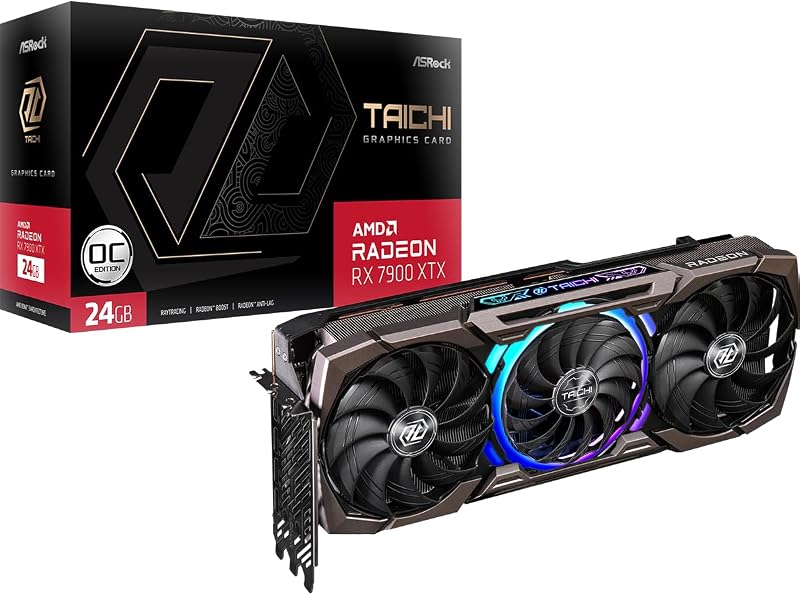
Pros
- Massive 24GB GDDR6 memory buffer
- 96 Compute Units for elite rasterization
- Dual BIOS profile hardware switch
- Wide 384-bit bus with 96MB cache
Cons
- Demands three 8-pin power connectors
- Extremely large 16.55-inch chassis requirement
View AMD RX 7900 XTX on Amazon
Who Should Buy Each One
Choose the AMD RX 7700 XT If
- You target 1440p or 1080p monitors and want fluid gameplay without pushing power draw to extreme levels.
- Your PC case has standard clearance and cannot fit oversized cards exceeding 11 inches in length.
- Your power supply provides two 8-pin PCIe cables and lacks the wiring for a triple 8-pin connection.
- You want silent computing during productivity workloads through 0dB fan-stop technology.
Choose the AMD RX 7900 XTX If
- You game on a native 4K display or high-resolution multi-monitor setup requiring maximum graphical throughput.
- You manage heavy 3D rendering, video production, or compute tasks that saturate large 24GB frame buffers.
- Your case has ample internal clearance to mount a massive 16.55-inch graphics card with an included support bracket.
- You want enthusiast features like Dual BIOS switching, customizable ARGB lighting, and a 22-phase power delivery design.
Final Verdict
For the majority of PC builders playing at 1440p, the AMD RX 7700 XT hits the practical sweet spot in AMD’s current lineup. With 54 Compute Units, 12GB of GDDR6 memory, and a manageable 10.5-inch dual-fan form factor, it delivers high visual settings and smooth frame rates without requiring system-wide hardware upgrades. A thorough AMD RX 7700 XT review confirms that its dual 8-pin connectivity, 0dB cooling, and reliable RDNA 3 architecture make it a sensible, drop-in graphical upgrade for standard gaming rigs.
However, the AMD RX 7900 XTX exists in an entirely different performance tier. As detailed in our AMD RX 7900 XTX review assessments, its 96 Compute Units, 24GB VRAM buffer, and 384-bit memory bus establish it as a true 4K flagship. In the AMD RX 7900 XTX vs 7700 XT matchup, the flagship justifies its footprint whenever high-resolution assets, advanced ray tracing, and uncompromised frame rates are mandatory. If your PC case, power supply, and display setup can support its requirements, the Radeon RX 7700 XT vs 7900 XTX comparison clearly proves that the 7900 XTX offers elite computational longevity.
FAQ
Is the RX 7900 XTX worth it compared to the RX 7700 XT?
The RX 7900 XTX is worth the step up if you game on a 4K display, use ray tracing extensively, or run creative software that requires massive frame buffers. Its 24GB of VRAM and 96 Compute Units provide longevity that a 12GB midrange card cannot match at ultra-high resolutions.
Can the RX 7700 XT handle 4K gaming?
The RX 7700 XT can output 4K resolution via its DisplayPort 2.1 and HDMI 2.1 ports, and it will run lighter titles at 4K. However, in modern graphically demanding games, its 12GB VRAM and 54 Compute Units are optimized for 1440p, meaning 4K gaming will require lowering visual settings to maintain smooth frame rates.
What power supply connectors do both cards require?
The ASRock Challenger RX 7700 XT requires two standard 8-pin PCIe power connectors. The ASRock Taichi RX 7900 XTX requires three separate 8-pin PCIe power connectors to feed its 22 power phase delivery system.
How does the 7700 XT vs 7900 XTX VRAM difference affect modern games?
The 7700 XT features 12GB of VRAM on a 192-bit bus, which is plenty for 1440p gaming. The 7900 XTX features 24GB of VRAM on a 384-bit bus, providing double the memory capacity and twice the memory bus width, preventing stutter in 4K games with heavy texture packs and intensive ray tracing workloads.
Do both graphics cards support DisplayPort 2.1?
Yes, both the ASRock Challenger RX 7700 XT and the ASRock Taichi RX 7900 XTX include three DisplayPort 2.1 outputs and one HDMI 2.1 output, supporting display resolutions up to 7680 x 4320 pixels.
Will the ASRock RX 7900 XTX Taichi fit in a standard PC case?
The ASRock Taichi RX 7900 XTX is an exceptionally large graphics card measuring 16.55 inches in length and 9.5 inches in width. It requires a spacious mid-tower or full-tower chassis with substantial clearance, whereas the RX 7700 XT measures 10.5 inches long and fits easily into standard enclosures.
What is the difference between the cooling systems on these cards?
The RX 7700 XT Challenger uses a dual-fan cooling layout with Striped Ring Fans, heatpipes, and a 0dB idle mode. The RX 7900 XTX Taichi uses a triple-fan Taichi 3X system with 110/100/110mm Striped Ring Fans, a reinforced frame, ARGB lighting, and Dual BIOS functionality.


