The single deciding factor between these two high-performance memory kits comes down to physical clearance versus visual presentation: the G.Skill Trident Z5 Neo RGB integrates a full-length translucent RGB light bar atop an aggressive matte black heatspreader, whereas the G.Skill Flare X5 DDR5 6000 utilizes an ultra-compact, low-profile aluminum shell engineered to clear massive dual-tower CPU air coolers. Underneath those distinct heatspreaders, both kits provide identical underlying performance metrics, delivering a factory-tuned DDR5-6000 speed with ultra-tight CL30-38-38-96 timings at 1.35 volts through AMD EXPO overclocking profiles.
Choose the Trident Z5 Neo RGB if you want vivid, customizable system illumination inside a panoramic tempered glass case paired with an all-in-one liquid cooler. Choose the Flare X5 DDR5 6000 if you need guaranteed vertical clearance beneath a heavy air cooler and prefer an understated, zero-RGB stealth appearance.


G.Skill Trident Z5 Neo RGB vs G.Skill Flare X5 DDR5 6000 at a Glance
| Feature | G.Skill Trident Z5 Neo RGB | G.Skill Flare X5 DDR5 6000 |
|---|---|---|
| Memory Generation | DDR5 | DDR5 |
| Rated Transfer Speed | 6000 MT/s | 6000 MT/s |
| Primary Timings | CL30-38-38-96 | CL30-38-38-96 |
| Operating Voltage | 1.35V | 1.35V |
| Kit Capacity | 32GB (2x16GB) | 32GB (2x16GB) |
| Overclocking Profile | AMD EXPO | AMD EXPO |
| Lighting | Customizable RGB Light Bar | Non-RGB |
| Heatspreader Color | Matte Black | Matte Black |
| Motherboard Platform Support | AMD X870, X670, B850, B840, B650, A620 | AMD X870, X670, B850, B840, B650, A620 |
| Best For | Showcase Glass Rigs and AIO Coolers | Air Cooler Clearance and Stealth Builds |
Physical Dimensions and CPU Cooler Clearance
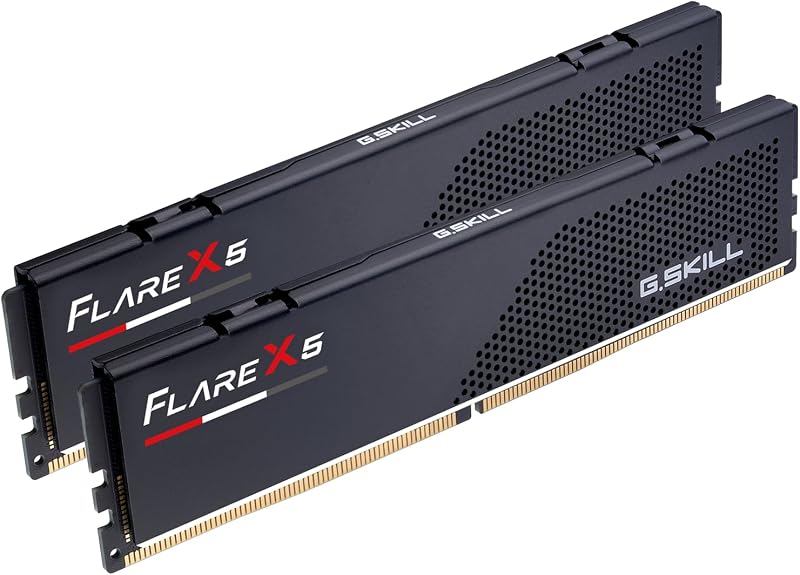
Physical clearance dictates whether your chosen memory modules will fit beneath your cooling hardware or force you into uncomfortable build compromises. While the listing does not specify exact physical millimeter dimensions for either module, the physical architecture of each heatspreader reveals a distinct design intent. The Flare X5 DDR5 6000 features a streamlined, low-profile aluminum heatspreader completely devoid of extra top-mounted hardware. This compact execution ensures that PC builders using wide dual-tower air coolers will not run into mechanical interference over the motherboard DIMM slots. Builders comparing the g.skill trident z5 rgb ddr5 6000 vs flare x5 ddr5 6000 form factors frequently highlight this low-profile advantage when assembling compact systems.
The Trident Z5 Neo RGB adopts a taller, sculpted heatspreader silhouette capped by a frosted acrylic diffusion strip to distribute multi-zone LED lighting. This added overhead structure increases the vertical footprint of the module substantially. In chassis setups utilizing large air coolers, tall heatspreaders often collide with the front cooling fan, forcing builders to raise the fan higher on the cooling fin stack. Doing so can cause the cooler fan to press against the case side panel, preventing the enclosure from closing properly. If you are comparing corsair vengeance ddr5 6000 cl30 vs g.skill flare x5 ddr5 6000 alternatives for a compact enclosure, you will appreciate how the low-profile Flare X5 prevents these vertical fitment complications entirely.
Consequently, your choice of CPU cooling architecture largely resolves the question of Trident Z5 Neo RGB vs Flare X5 height clearance. When using a top-mounted or front-mounted liquid cooling radiator, the taller profile of the Trident Z5 Neo RGB presents zero mechanical challenges because the space directly above the motherboard memory slots remains entirely open. For air-cooled configurations, however, the compact silhouette of the Flare X5 avoids frustrating clearance checks and keeps cooling fans aligned precisely where the manufacturer intended.
Edge: G.Skill Flare X5 DDR5 6000 due to its ultra-compact heatspreader design that eliminates physical clearance conflicts beneath bulky CPU air coolers.
Aesthetic Presentation and Lighting Customization
System aesthetics represent the most noticeable G.Skill Trident Z5 Neo RGB vs Flare X5 difference once your computer is assembled and powered on. The Trident Z5 Neo RGB is designed deliberately as a visual centerpiece for modern PC gaming rigs featuring panoramic tempered glass side panels. Its sleek matte black aluminum heatspreader is bisected by a sharp sweeping fin design and topped with a curved, semi-translucent light bar. When integrated into an open or illuminated desktop environment, the module produces smooth, vibrant lighting transitions that can sync with compatible motherboard software across major ecosystem platforms.
By contrast, the Flare X5 DDR5 6000 focuses entirely on a restrained, utilitarian aesthetic. It features a matte black anodized aluminum surface accented by a subtle racing stripe perforation pattern and a clean geometric logo badge. There are no diodes, no diffusers, and no lighting cables to configure. For content creators, home lab operators, and minimalist gamers seeking an understated workstation, this stealthy presentation blends seamlessly into dark motherboards without producing distracting reflections inside a darkened office or editing bay. Evaluating a g.skill flare x5 ddr5 6000 vs kingston fury renegade ddr5 match-up reveals a similar design philosophy where pure functionality takes precedence over decorative illumination.
Selecting between these visual presentations comes down to personal taste and build theme. The Trident Z5 Neo RGB transforms memory from a background circuit board into a dynamic component that complements custom color palettes, RGB case fans, and liquid cooling blocks. The Flare X5 DDR5 6000 ensures a distraction-free internal appearance that never conflicts with your lighting theme because it produces no illumination whatsoever.
Edge: G.Skill Trident Z5 Neo RGB because of its premium finish and customizable multi-zone RGB light diffuser designed for showcase glass enclosures.
Memory Timings and Latency Specifications
When analyzing performance, examining Trident Z5 Neo vs Flare X5 DDR5 6000 timings demonstrates that both memory kits are built around identical baseline operational parameters. Both models carry an operational transfer rate of 6000 MT/s paired with identical primary timings of CL30-38-38-96. The column address strobe latency of 30 represents an aggressive rating for DDR5 modules, minimizing internal delay between memory requests and data delivery. This level of responsiveness is ideal for latency-sensitive tasks such as gaming and heavy multi-threaded productivity.
Operating voltage specifications are also completely matched across both lineups. Each kit requires 1.35 volts to maintain its advertised 6000 MT/s frequency and tight CL30 timings once the overclock profile is engaged. When installed on a compatible board at default out-of-the-box settings, both kits will initialize at default JEDEC speeds and baseline voltages. Achieving the rated 6000 MT/s CL30 performance on either memory kit requires entering your motherboard BIOS to activate the integrated overclocking profile.
Because the primary timing parameters, data transfer rate, and operating voltage are completely indistinguishable between these two models, neither kit holds an inherent performance advantage over the other at stock factory profile settings. Those reading a g.skill trident z5 neo rgb vs g.skill ripjaws s5 ddr5 comparison will recognize that G.Skill maintains consistent silicon performance tiers across its different exterior heatspreader styles.
Edge: Tie because both memory kits feature identical DDR5-6000 speed ratings, matching CL30-38-38-96 timings, and equal 1.35V operational requirements.
AMD EXPO Integration and AM5 Platform Compatibility
Compatibility across modern processor sockets is paramount when assembling a new desktop platform. Both memory kits come equipped with AMD Extended Profiles for Overclocking (AMD EXPO) technology alongside standard JEDEC default profiles. AMD EXPO provides pre-programmed timing, voltage, and frequency parameters tailored specifically to optimize communication with AMD processors. This built-in profile simplifies the memory tuning process into a single BIOS toggle, allowing the user to bypass tedious manual sub-timing adjustments.
Both product listings confirm direct support across the full spectrum of modern AMD chipset platforms, specifically naming AMD X870, AMD X670, AMD B850, AMD B840, AMD B650, and AMD A620 motherboards. Whether you are building an entry-level productivity rig on an A620 board or a top-tier workstation on an X870 platform, both kits are engineered to interface directly with AMD memory controllers. Furthermore, G.Skill explicitly validates both products on motherboard Qualified Vendor Lists (QVL), giving builders documented assurance that the kits will train properly upon initial boot.
When planning a G.Skill Flare X5 vs Trident Z5 Neo RGB AM5 build, the process of enabling the profile is completely identical. Both kits boot safely at standard JEDEC speeds initially to ensure platform stability during initial setup, operating system installation, and firmware updates. Once in the BIOS, toggling AMD EXPO applies the certified 6000 MT/s CL30 configuration cleanly without requiring secondary adjustments.
Edge: Tie as both memory kits feature certified AMD EXPO overclocking profiles and share identical validated chipset support across the entire AMD platform lineup.
Gaming and Real-World Workload Throughput
Choosing between Trident Z5 Neo RGB or Flare X5 for gaming yields zero performance variance in real-world frame rates or minimum frame percentiles. Modern gaming titles rely heavily on memory bandwidth and low system latency to deliver smooth frame delivery and minimize stuttering during asset streaming. Because both memory kits push data at 6000 MT/s with a tight CAS latency of 30, both kits feed modern graphics cards and processor cores with identical data throughput.
When selecting Trident Z5 Neo RGB or Flare X5 for Ryzen 7000 processors, the 6000 MT/s rating represents an optimal operational threshold. AMD memory controllers typically maintain a unified 1:1 ratio between the memory clock and memory controller clock around this speed, maximizing memory bus efficiency without introducing the latency penalties caused by desynchronized clock dividers. Benchmarks comparing a corsair vengeance ddr5 6000 cl30 vs g.skill trident z5 rgb ddr5 6000 setup confirm that DDR5-6000 CL30 configurations yield peak responsiveness for desktop computing.
The shared 32GB total capacity, distributed across a dual-channel 2x16GB matched kit layout, offers substantial headroom for modern AAA gaming while handling background voice communication, web browsing tabs, and capture utilities simultaneously. In heavy professional tasks such as video rendering, 3D compilation, or large-file compression, the dual-channel bandwidth delivers snappy system behavior regardless of which exterior shell encases the memory modules.
Edge: Tie because both configurations output identical memory throughput, identical bandwidth, and identical latency response under demanding gaming and professional workloads.
Thermal Dissipation and Reliability Architecture
DDR5 memory architecture places the power management integrated circuit (PMIC) directly onto the memory module PCB rather than leaving voltage regulation on the motherboard. Because of this localized power conversion alongside higher clock speeds, effective passive thermal dissipation is critical for long-term system stability. Both modules utilize matte black aluminum heatspreaders designed to wick heat away from the sensitive memory chips and PMIC circuitry into the ambient chassis airflow.
The structural difference between the two heatspreaders does affect thermal dynamics in subtle ways. The Flare X5 utilizes an unbroken, vented aluminum heatspreader without any electronic accessories attached. This means all available surface area is dedicated purely to drawing thermal energy away from the memory components. Additionally, the lack of RGB LEDs eliminates a secondary heat source, as active light-emitting diodes naturally contribute a slight amount of thermal overhead to the module assembly.
The Trident Z5 Neo RGB features an aluminum heatspreader designed to dissipate heat while isolating the RGB LED diodes and diffusion strip running along its upper spine. While G.Skill engineered the Trident heatspreader to maintain full operational stability at its rated 1.35V, the Flare X5 operates with a slightly simpler passive thermal profile under sustained heavy access workloads. Both kits strictly caution users against mixing different memory sets, as both are sold as matched dual-channel kits factory-verified to maintain operational reliability together.
Edge: G.Skill Flare X5 DDR5 6000 due to its pure aluminum passive heat dissipation structure that operates free from the thermal overhead of internal RGB diodes.
Pros and Cons
G.Skill Trident Z5 Neo RGB

Pros
- Vibrant customizable RGB lighting bar
- Optimized AMD EXPO DDR5-6000 CL30 profile
- Aggressive matte black aluminum heatspreader
- Broad support across AMD AM5 platforms
Cons
- Taller profile may interfere with air coolers
- Listing does not specify exact module height
- Generates slight additional heat from LEDs
View G.Skill Trident Z5 Neo RGB on Amazon
G.Skill Flare X5 DDR5 6000
Pros
- Low-profile design clears large air coolers
- Optimized AMD EXPO DDR5-6000 CL30 profile
- Matte black stealth finish without LED distraction
- Pure passive aluminum thermal dissipation
Cons
- No integrated RGB illumination
- Listing does not specify exact module height
View G.Skill Flare X5 DDR5 6000 on Amazon
Who Should Buy Each One
Choose the G.Skill Trident Z5 Neo RGB If
- You are building a custom gaming PC inside a tempered glass showcase chassis where internal illumination is a top priority.
- Your processor cooling solution is an all-in-one liquid cooler or a custom water loop that leaves the motherboard memory area completely open.
- You want memory lighting that synchronizes seamlessly with your motherboard lighting software and peripheral ecosystem.
- You prefer aggressive, stylized heatspreader geometry that serves as an eye-catching focal point in your build.
Choose the G.Skill Flare X5 DDR5 6000 If
- You are using a massive dual-tower CPU air cooler that extends across the RAM slots and demands low-profile module clearance.
- You are assembling a professional workstation, home server, or stealth gaming rig with a closed side panel or zero-RGB aesthetic.
- You want a purely passive memory module design without the minor thermal overhead or software complexity of RGB lighting.
- You need plug-and-play AMD EXPO DDR5-6000 CL30 performance focused entirely on hardware compatibility and function.
Final Verdict
When comparing G.Skill Flare X5 DDR5 6000 vs G.Skill Trident Z5 Neo RGB, the primary takeaway is that choosing between them is a question of physical packaging rather than computing power. Both models leverage matched 32GB dual-channel configurations running at an impressive 6000 MT/s with identical CL30-38-38-96 primary timings at 1.35 volts. Both kits feature fully certified AMD EXPO overclocking profiles that simplify BIOS optimization across AMD X870, X670, B850, B840, B650, and A620 platforms. Whether you are launching intense gaming sessions or crunching demanding production files, your system will receive the exact same high-speed memory throughput from either kit.
For the majority of builders using traditional tower air coolers or prioritizing an understated, functional aesthetic, the Flare X5 DDR5 6000 is the most practical choice due to its compact form factor and zero-clearance friction. However, if your system configuration incorporates liquid cooling or an expansive panoramic case where customizable visual flair is paramount, the Trident Z5 Neo RGB justifies its taller profile by delivering a striking lighting show that enhances the entire presentation of your build.
FAQ
Do both memory kits work out of the box at 6000 MT/s?
No, neither kit operates at 6000 MT/s automatically upon first installation. Both memory kits are engineered to boot initially at standard JEDEC default SPD speeds to guarantee broad hardware compatibility and system stability. To achieve the advertised 6000 MT/s speed and CL30-38-38-96 timings, you must enter your motherboard BIOS and activate the integrated AMD EXPO profile.
Is G.Skill Flare X5 DDR5 6000 worth it over the Trident Z5 Neo RGB for gaming?
When assessing if is G.Skill Flare X5 DDR5 6000 worth it, it provides identical in-game performance, frame rates, and responsiveness compared to the Trident Z5 Neo RGB. Because both models utilize the exact same DDR5-6000 transfer speed and CL30 latency, the Flare X5 provides optimal gaming throughput while offering superior clearance under large CPU air coolers.
Can I control the lighting on the Trident Z5 Neo RGB with third-party software?
Yes, the Trident Z5 Neo RGB is designed to interface with major motherboard RGB management utilities. This allows you to configure lighting patterns, adjust brightness levels, and synchronize colors across your motherboard, graphics card, and chassis illumination without hardware conflicts.
Will the Trident Z5 Neo RGB fit underneath a large dual-tower air cooler?
The listing does not specify exact physical millimeter dimensions, but the Trident Z5 Neo RGB features a raised heatspreader topped with an acrylic light diffuser that makes it noticeably taller than standard low-profile memory. While it may fit under some air coolers, larger dual-tower coolers frequently require raising the front intake fan, which can cause clearance issues with narrow PC cases.
Can I combine two separate 32GB kits to make a 64GB array?
Both product listings explicitly warn users against mixing memory kits. Memory kits are sold in matched pairs that are factory-tested to operate reliably together at their advertised AMD EXPO speeds. Combining two separate kits, even of the identical model and speed, can lead to severe memory training failures, system instability, or boot errors.
Does either kit require special BIOS adjustments beyond enabling AMD EXPO?
Under normal circumstances on validated motherboards listed on the G.Skill QVL, no extra adjustments are required beyond enabling the AMD EXPO profile in your BIOS. However, achieving maximum speed and system stability depends on your overall system components, specifically the quality of your CPU integrated memory controller and the installed motherboard firmware version.