The defining technical divide between the Crucial T705 and the TeamGroup MP44 centers on generational bus architecture, peak throughput capabilities, and distinct thermal handling demands. Crucial pushes the absolute frontier of modern solid-state storage with a PCIe 5.0 interface delivering sequential read speeds up to 13,600MB/s, whereas TeamGroup capitalizes on mature PCIe 4.0 architecture to supply an immense 4TB storage footprint that operates without demanding specialized cooling hardware.
Enthusiasts assembling bleeding-edge Intel 13th/14th Gen or AMD Ryzen 7000 desktop workstations should choose the Crucial SSD for rapid uncompressed media transfers and peak sequential bandwidth. PC gamers, PlayStation 5 owners, and laptop users seeking voluminous, efficient storage that stays cool under everyday gaming loads should choose the TeamGroup drive instead.


Crucial T705 vs TeamGroup MP44 at a Glance
| Feature | Crucial T705 | TeamGroup MP44 |
|---|---|---|
| PCIe Bus Generation | PCIe 5.0 x4 NVMe | PCIe 4.0 x4 NVMe |
| Listed Storage Capacity | 1 TB | 4 TB |
| Peak Sequential Read Speed | Up to 13,600 MB/s | Up to 7,400 MB/s |
| Peak Sequential Write Speed | Up to 10,200 MB/s | Up to 7,000 MB/s |
| NAND Flash Architecture | Micron TLC NAND | NAND Flash with SLC Cache |
| Thermal Solution Included | Bare drive (requires heatsink) | Graphene heat dissipating label |
| Hardware Encryption | Supported | Not listed |
| Bundled Software | Acronis True Image, Adobe Creative Cloud 1-Mo | Patented SSD monitoring |
| Platform Compatibility | Desktop, Workstation, Gaming Console | Desktop, Laptop, Sony PlayStation 5 |
| Best For | Enthusiast Gen5 workstations and high-speed editing | Massive game libraries, laptops, and PS5 upgrades |
Sequential Transfer Speeds and Interface Throughput
When evaluating a PCIe 5.0 vs PCIe 4.0 SSD, sequential read and write speeds represent the most stark technical contrast. The T705 operates on four lanes of PCIe Gen5 bandwidth, unlocking sequential read rates reaching up to 13,600MB/s and sequential write capabilities up to 10,200MB/s. In contrast, the MP44 saturates the PCIe Gen4 interface, registering peak read speeds of up to 7,400MB/s and write speeds reaching 7,000MB/s. Running a side-by-side Crucial T705 vs TeamGroup MP44 speed test reveals that the Crucial unit transfers continuous data streams nearly twice as fast as the TeamGroup alternative.
These colossal bandwidth differences yield noticeable benefits during specific sequential operations, such as transferring uncompressed 8K raw video files, streaming multi-gigabyte production datasets, or moving extensive system image archives. For high-bandwidth creators moving hundreds of gigabytes between high-speed arrays, the Crucial SSD slashes wait times significantly. For similar bandwidth comparisons in the Gen4 space, exploring the samsung 990 pro vs crucial t705 demonstrates how high-tier Gen4 competitors still plateau around the 7,450MB/s ceiling while the T705 doubles that ceiling.
However, peak sequential numbers tell only part of the operational story. Most general computing tasks, application launches, and operating system boots do not saturate a Gen4 bus, let alone Gen5 lanes. The MP44 delivers top-tier Gen4 metrics that easily handle sustained file writes via its dynamic SLC cache structure. Unless your daily computing cycle involves relentless processing of multi-gigabyte files or complex rendering pipelines, the sequential gap between 7,400MB/s and 13,600MB/s remains largely untapped in ordinary desktop environments.
Edge: Crucial T705. The drive doubles the sequential read and write throughput of its rival by utilizing the PCIe 5.0 standard.
Thermal Management and Physical Clearance
Gen5 solid-state drives generate substantial heat when operating at double-digit gigabyte speeds, making thermal management a fundamental purchasing consideration. The T705 specifications explicitly state that it must be installed with a motherboard integrated heatsink or an aftermarket thermal solution alongside proper chassis airflow to prevent thermal throttling. At 0.15 inches thick without an attached heatsink, the bare drive requires a substantial thermal block to pull heat away from its controller and Micron TLC NAND flash during sustained operations.
Conversely, TeamGroup engineered the MP44 with a specialized heat dissipating graphene label that acts as a low-profile thermal interface. This design eliminates clearance conflicts entirely. The ultra-thin graphene material transfers heat effectively toward ambient air or an existing motherboard plate without inflating physical dimensions. Buyers inquiring about a TeamGroup MP44 PS5 heatsink find that the drive easily fits inside restrictive console bays, ultra-slim notebooks, and cramped mini-ITX cases where bulky passive coolers cannot physically fit.
Attempting to run a Gen5 SSD without a substantial heatsink invites aggressive thermal throttling, which rapidly degrades sequential throughput down to standard SATA or base Gen3 speeds to safeguard the silicon. This factor becomes critical when assessing Crucial T705 PS5 compatibility, as the console bay provides tight spatial tolerances and limited ambient airflow that are ill-suited for the demanding thermal profile of Gen5 drives. The MP44 offers superior versatility across compact form factors by remaining cool and functional under a basic graphene interface, as explored in thermal comparisons like the crucial t705 vs lexar nm790.
Edge: TeamGroup MP44. The ultra-thin graphene dissipation label ensures easy installation across laptops, compact PCs, and consoles without requiring bulky heatsinks.
Storage Capacity and Everyday Gaming Value
Storage density plays a massive role when deciding whether to select the Crucial T705 or TeamGroup MP44 for gaming. Modern high-budget video games routinely demand well over 100GB of storage space each, quickly exhausting smaller solid-state configurations. The MP44 listing provides a gargantuan 4TB capacity on an M.2 2280 stick, giving gamers the freedom to store dozens of modern titles, recorded game captures, and utility software without having to manage drive space or uninstall favorite titles.
By comparison, the Crucial T705 reviewed here provides 1TB of digital storage capacity. While 1TB accommodates an operating system and a modest rotation of primary games, it requires strict storage discipline as updates, patch files, and expanding game libraries accumulate over time. Although the T705 integrates Microsoft DirectStorage optimization to minimize texture decompression latency and lower CPU utilization, real-world gaming load times between PCIe 4.0 and PCIe 5.0 drives differ by mere fractions of a second because game engines are bottlenecked by software processing rather than the NVMe bus.
When gamers ask is Crucial T705 worth it purely for game storage, the metrics indicate that doubling sequential bandwidth does not translate into twice the gaming performance. For modern gaming systems, is TeamGroup MP44 worth it becomes a clear yes due to the vast advantage of having 4TB of high-speed Gen4 space. High-capacity performance comparisons like the wd black sn7100 vs crucial t705 confirm that four times the capacity delivers far more tangible day-to-day utility to gaming enthusiasts than bleeding-edge sequential burst speeds on a 1TB drive.
Edge: TeamGroup MP44. Providing four times the storage capacity on a single slot offers dramatically better practical value for modern gaming installations.
Platform Compatibility and System Integration
System integration requirements diverge sharply between these two solid-state drives. The Crucial drive is engineered specifically for modern desktop motherboards equipped with native M.2 Gen5 slots, specifically platforms supporting Intel 13th/14th Gen and AMD Ryzen 7000 series processors. While PCIe is backward compatible, installing the T705 into a PCIe 4.0 or PCIe 3.0 slot throttles its operational bandwidth to the maximum limit of that older standard, nullifying the primary reason for purchasing a Gen5 SSD.
The TeamGroup drive offers seamless, plug-and-play operation across an exceptionally broad array of consumer hardware. The listing highlights full compatibility with desktop PCs, portable laptops, and the Sony PlayStation 5 gaming console. Because the drive conforms to standard M.2 2280 dimensions and uses a flat graphene label, it slots effortlessly into notebook chassis where motherboard components are tightly stacked, as well as the internal expansion bay of the PlayStation 5, which demands PCIe 4.0 x4 connectivity.
In any thorough Crucial T705 review, hardware dependencies stand out as the primary hurdle. Placing a Gen5 drive in a build that lacks dedicated Gen5 lanes or adequate slot spacing can cause the drive to share lanes with the primary graphics card slot, dropping the GPU from x16 down to x8 lanes on certain consumer motherboards. The TeamGroup MP44 avoids these complex platform trade-offs entirely by running within standard Gen4 constraints, matching the easy deployment patterns seen in analyses like the crucial t705 vs kingston fury renegade ssd.
Edge: TeamGroup MP44. Broad operational support across desktop PCs, laptops, and PlayStation 5 consoles makes it vastly more versatile.
NAND Architecture, Security, and Software Ecosystem
Under the hood, the two drives rely on distinct memory implementations and bundled value propositions. Crucial equips the T705 with premium Micron TLC NAND flash, designed to withstand intense enthusiast read and write operations. The T705 also incorporates integrated hardware encryption, providing enterprise-grade security for proprietary data, business documents, and creative IP. Crucial backs the drive with a comprehensive 5-year limited warranty, reflecting high manufacturing confidence in Micron’s silicon reliability.
Furthermore, the Crucial drive delivers immediate out-of-the-box utility by bundling Acronis True Image cloning software and a one-month subscription to Adobe Creative Cloud All-Apps. The Acronis tool simplifies system migrations, operating system cloning, and full-disk backups, while the Adobe suite lets video editors, 3D artists, and photographers immediately leverage the drive’s 13,600MB/s throughput across applications like Premiere Pro and Photoshop. To see how Crucial builds out its complete enthusiast hardware portfolio, check out the crucial pro ddr5 vs teamgroup t-force delta rgb ddr5 memory guide.
A comprehensive TeamGroup MP44 review reveals a more utilitarian software approach. TeamGroup incorporates dynamic SLC caching to maintain high burst write velocities, patented SSD health monitoring features, and eco-friendly recyclable packaging. However, the MP44 listing does not specify hardware-level encryption support or third-party backup software bundles. For users who prioritize bundled maintenance utilities, professional creative software access, and hardware encryption, Crucial delivers a more well-rounded ecosystem.
Edge: Crucial T705. The inclusion of hardware encryption, Acronis cloning tools, a one-month Adobe Creative Cloud pass, and Micron TLC NAND provides a superior software and security bundle.
Pros and Cons
Crucial T705

Pros
- Up to 13,600MB/s sequential read speed
- Native PCIe Gen5 x4 interface
- Integrated hardware encryption support
- Includes Acronis cloning software and Adobe pass
- Premium Micron TLC NAND flash
Cons
- Demands heavy heatsink cooling and airflow
- Limited to 1TB in this configuration
TeamGroup MP44
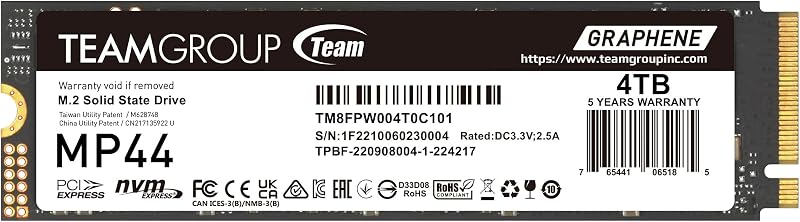
Pros
- Massive 4TB storage capacity
- Fast 7,400MB/s PCIe Gen4 read speeds
- Ultra-thin graphene heat dissipating label
- Direct compatibility with PlayStation 5 and laptops
- Dynamic SLC cache structure
Cons
- Half the sequential throughput of Gen5 drives
- No bundled cloning software or hardware encryption
Who Should Buy Each One
Choose the Crucial T705 If
- You run an Intel 13th/14th Gen or AMD Ryzen 7000 desktop equipped with native PCIe Gen5 M.2 slots and beefy heatsinks.
- Your workflow demands maximum continuous transfer speeds for editing uncompressed 8K video footage or moving massive raw datasets.
- You need integrated hardware encryption to safeguard business data, proprietary software, or commercial creative assets.
- You want bundled disk imaging software like Acronis True Image alongside Adobe Creative Cloud access for your creative workstation.
Choose the TeamGroup MP44 If
- You want 4TB of high-density storage to hold an extensive library of AAA games without constantly deleting titles.
- You are upgrading the internal storage of a Sony PlayStation 5 or a slim laptop that cannot accommodate thick heatsinks.
- You prefer an energy-efficient drive with an ultra-thin graphene label that stays cool inside standard PC chassis.
- You want fast 7,400MB/s Gen4 read speeds that completely fulfill modern operating system and gaming requirements without requiring Gen5 hardware.
Final Verdict
For the vast majority of PC builders, gamers, and console owners, the TeamGroup MP44 is the smarter, more practical solid-state drive to install. Delivering a massive 4TB storage footprint alongside read speeds exceeding 7,000MB/s, it completely saturates the bandwidth requirements of modern gaming engines and daily multitasking. Its ultra-slim graphene heat dissipating label allows seamless deployment into PlayStation 5 consoles, laptops, and standard desktop slots without demanding oversized heatsinks or specialized airflow setups.
The Crucial T705 stands as the definitive choice for hardware enthusiasts, professional creators, and workstation operators who demand extreme sequential throughput. Boasting read speeds up to 13,600MB/s, advanced Micron TLC NAND, hardware encryption, and bundled Acronis cloning software, it extracts the maximum performance from cutting-edge Intel and AMD platforms. If your motherboard has a robust Gen5 M.2 heatsink and your daily workloads actively move multi-gigabyte production files, the T705 offers bleeding-edge speed that PCIe Gen4 drives simply cannot match.
FAQ
Can the Crucial T705 be installed in a PlayStation 5?
While the Crucial T705 uses a standard M.2 2280 form factor, the PlayStation 5 operates on a PCIe 4.0 interface and features an enclosed expansion bay. Installing the T705 inside a PS5 limits its transfer rate to Gen4 levels, and the lack of aggressive chassis airflow can cause the drive to throttle quickly because it requires substantial heatsink cooling. For console upgrades, Gen4 drives like the TeamGroup MP44 are far better suited.
Does the TeamGroup MP44 require a separate heatsink for regular operation?
The TeamGroup MP44 comes factory-equipped with a specialized graphene heat dissipating label that conducts heat away from the controller and NAND flash. In typical desktop builds, laptops, and PlayStation 5 consoles with integrated bay covers, this graphene interface provides effective thermal transfer without the need to purchase a bulky third-party heatsink.
Can the Crucial T705 run without a heatsink in a desktop PC?
No, the Crucial T705 should never be operated without a heatsink. Crucial’s official product documentation explicitly notes that the drive must be installed with a motherboard-integrated heatsink or an aftermarket thermal solution, supported by adequate chassis airflow. Because PCIe Gen5 controllers run hot under sustained loads, running the drive bare will trigger severe thermal throttling and risk performance drops.
Will a PCIe 5.0 SSD make games load noticeably faster than a PCIe 4.0 SSD?
In current gaming environments, the real-world load time difference between a 13,600MB/s Gen5 drive and a 7,400MB/s Gen4 drive is minimal, often measuring only fractions of a second. Modern game engines and Microsoft DirectStorage implementations are generally constrained by CPU decompression and engine assets rather than the raw sequential throughput ceiling of PCIe 4.0 lanes.
What cloning software is included with these solid-state drives?
The Crucial T705 includes a software license for Acronis True Image, which allows users to clone their existing operating system, migrate partition data, and schedule automated system backups. The TeamGroup MP44 listing highlights patented SSD monitoring tools for tracking drive health but does not mention an included commercial cloning software license.
Does the TeamGroup MP44 work inside gaming laptops?
Yes, the TeamGroup MP44 is well suited for laptop installations. Because it relies on an ultra-thin graphene label rather than an elevated metal heatsink, it easily complies with the tight vertical clearances found in modern gaming and productivity notebook drive bays.
What hardware encryption features are supported by the Crucial T705?
The Crucial T705 includes integrated hardware encryption capabilities directly on the drive controller, allowing users to secure their stored files, operating system partitions, and enterprise data against unauthorized access without sacrificing system responsiveness.


