The single difference that decides the choice between the Samsung T7 and the Samsung T9 is the interface bandwidth, which doubles maximum throughput on compatible systems. The older drive operates on standard USB 3.2 Gen 2 to reach sequential speeds up to 1,050 MB/s, while the newer model utilizes USB 3.2 Gen 2×2 architecture to hit sustained read and write rates up to 2,000 MB/s.
Choose the Samsung T7 if you need a lightweight, dependable drive for everyday file backups, office tasks, and general storage. Choose the Samsung T9 if you manage high-bandwidth video files and require sustained high-speed transfers with advanced thermal hardware.


Samsung T7 vs Samsung T9 at a Glance
| Feature | Samsung T7 | Samsung T9 |
|---|---|---|
| Interface | USB 3.2 Gen 2 (10 Gbps) | USB 3.2 Gen 2×2 (20 Gbps) |
| Max Sequential Read Speed | Up to 1,050 MB/s | Up to 2,000 MB/s |
| Max Sequential Write Speed | Up to 1,000 MB/s | Up to 2,000 MB/s |
| Thermal Management | Aluminum unibody dissipation | Dynamic Thermal Guard |
| Drop Resistance | Up to 6 feet | Up to 9.8 feet |
| Hardware Encryption | Not listed | AES 256-bit hardware encryption |
| Included Cables | USB Type-C to C, Type-C to A | Included SSD cable (specific terminations not listed) |
| Drive Weight | 2.08 ounces | Not listed |
| Internal Storage Capacities | Up to 4TB (1TB specified) | Up to 4TB (4TB specified) |
| Best For | Everyday backups, light production, portable office use | Sustained data movement, 4K workflows, intensive creation |
Transfer Speeds and Interface Performance
Data throughput defines how quickly an external drive handles massive directory transfers, system image creation, and project folder loading. When evaluating a Samsung T7 vs T9 speed comparison, the technical divergence begins at the physical controller level. The T7 utilizes a PCIe NVMe internal design connected over a 10 Gbps USB 3.2 Gen 2 pipeline. This yields practical ceiling rates of up to 1,050 MB/s for read operations and 1,000 MB/s for write operations, which represents roughly double the speed of previous-generation SATA-based portable drives.
The T9 upgrades this hardware link to a USB 3.2 Gen 2×2 setup, unlocking a theoretical ceiling of 20 Gbps. Under proper host configurations with UASP mode enabled, the Samsung T9 read write speed doubles the output of its predecessor, reaching sequential numbers up to 2,000 MB/s in both directions. In real-world transfers, moving an entire working directory or copying hundreds of gigabytes of raw files takes roughly half the time when the host machine supports the necessary dual-lane bus. Comparing external options like the samsung t9 vs crucial x10 pro highlights how critical these multi-lane protocols are for creative professionals moving massive media assets.
It is important to remember that the T9 requires a compatible USB 3.2 Gen 2×2 port to achieve its top tier of performance. When connected to a standard 10 Gbps port, the Samsung T9 transfer speeds drop back down to match the baseline ceiling of the T7. If your computer hardware only features standard USB 3.2 Gen 2, the additional hardware potential of the newer drive remains dormant during file movements.
Edge: Samsung T9, because its USB 3.2 Gen 2×2 interface delivers double the sequential read and write speeds of the older drive when plugged into a supported system.
Thermal Management and Sustained Workloads
High-speed solid state media generates significant heat during prolonged write operations, which can lead to thermal throttling and suddenly degraded transfer rates. The T7 relies on its solid aluminum unibody construction to passively radiate warmth away from internal components. Under standard usage, such as transferring office documents, moving image libraries, or writing a single large video file, this aluminum shell manages heat effectively while remaining relatively compact.
The T9 introduces Samsung’s Dynamic Thermal Guard technology to maintain drive health and steady speed across extended data transfers. The product specifications confirm that this system is engineered to keep surface skin temperatures below 140 degrees Fahrenheit in controlled testing environments, adhering to the international IEC 62368-1 safety standard. By regulating thermal output dynamically, the drive prevents sharp write speed drop-offs during continuous operations, maintaining its 2,000 MB/s potential over longer operational windows. A broader overview like a samsung t7 vs t7 shield review illustrates how specialized thermal dissipation separates standard drives from ruggedized or pro-tier hardware.
For users who frequently push sustained data transfers of 200GB or more in a single queue, heat management directly dictates completion time. While the standard metal case of the T7 can heat up and reduce speed to preserve component integrity during long transfers, the T9 is built to withstand and control heat during heavy creative jobs.
Edge: Samsung T9, due to its integrated Dynamic Thermal Guard system that actively manages temperatures to IEC standards during long data transfers.
Video Production and Creative Workflows
Selecting the Samsung T7 or T9 for video editing depends entirely on file resolution, bitrate, and recording setups. Both drives officially support external capture for mobile cinematography, including Apple ProRes 4K video recording at 60 frames per second straight from an iPhone 15 Pro. This capability allows videographers to shoot uncompressed footage directly onto external media, bypassing phone storage constraints during location shoots.
Where the two units diverge is inside the post-production suite. Modern multi-camera editing, uncompressed 4K scrub timelines, and rendering pipelines demand sustained data access that taxes external storage buses. The T7 provides sufficient headroom for compressed 4K editing and general photo asset management. However, when working with complex timelines or multi-stream 4K footage, the 1,000 MB/s write ceiling can introduce occasional frame drops during direct timeline rendering.
The T9 offers sustained read and write rates up to 2,000 MB/s, doubling data throughput for creative rendering and timeline scrubbing. For editors moving multiple terabytes of B-roll daily, the time saved during morning file offloads and evening project exports makes the drive a more capable production companion. Evaluating whether the upgrade is Samsung T9 worth it ultimately hinges on how much high-bitrate video footage moves across your desktop editing bay every week.
Edge: Samsung T9, because its 2,000 MB/s continuous throughput provides substantially better headroom for multi-camera video rendering and direct timeline editing.
Gaming Console and Desktop Storage Expansion
External solid state drives have become staple accessories for gaming consoles, offering external libraries for game archiving and backward-compatible title execution. Deciding between the Samsung T7 or T9 for gaming requires examining the exact USB interface limitations on modern consoles. Both drives feature listed hardware compatibility with the Sony PlayStation 5 as well as Microsoft Xbox Series X and Xbox Series S consoles.
Current gaming consoles utilize 10 Gbps USB ports on their exterior panels. Because modern consoles do not support the USB 3.2 Gen 2×2 protocol, the T9 cannot operate at its maximum 2,000 MB/s speed when plugged into an Xbox or PlayStation. Instead, the drive negotiates down to 10 Gbps, operating at roughly 1,000 MB/s. In contrast, the T7 natively targets this 10 Gbps speed tier, maximizing the throughput allowed by the console hardware.
Game load times, installation speeds, and backup processes on external drives are effectively identical across both units when connected to these consoles. The extra theoretical bandwidth of the T9 sits idle on console USB ports, meaning gaming enthusiasts gain zero speed benefit from the newer model. Looking across comparisons such as the samsung t7 shield vs t9 demonstrates that console interface limits frequently equalize external drive performance regardless of their top-end PC ratings.
Edge: Samsung T7, as it completely saturates the 10 Gbps USB ports available on modern consoles without leaving high-speed protocol capabilities unused.
Operating System Compatibility and Mac Workflows
Cross-platform functionality is essential for external drives that move between desktop workstations, laptops, and mobile devices. Both models support Windows PC, Android, and Mac systems out of the box. However, evaluating the Samsung T7 vs T9 for Mac environments brings specific interface nuances that impact speed expectations.
Modern Mac hardware equipped with Thunderbolt 3, Thunderbolt 4, or modern USB4 ports historically lacks support for the dual-lane USB 3.2 Gen 2×2 protocol. When connected to a Mac Thunderbolt port, a Gen 2×2 drive typically operates over a single 10 Gbps lane, reducing the transfer ceiling to approximately 1,050 MB/s. Because of this architectural design, Mac users generally see identical speeds from both models during standard file transfers. When researching storage choices alongside internal PC upgrades like the samsung 970 evo plus vs 980, aligning drive connection standards with host controller capabilities is vital.
Beyond raw bus speeds, security and utility software remain points of differentiation. The T9 features listed AES 256-bit hardware encryption along with direct support from Samsung Magician Software for drive health monitoring, encryption management, and firmware maintenance. The T7 provides cross-platform usability and includes both USB Type-C to C and Type-C to A cables in the retail packaging, ensuring plug-and-play access for older Mac and PC hardware without buying extra adapters.
Edge: Tie, because Mac systems generally limit the T9 to 10 Gbps transfer speeds matching the T7, though the T9 provides added AES 256-bit encryption and Magician Software integration.
Durability, Drop Protection, and Physical Design
External drives must survive accidental desk slips, bag drops, and travel hazards without compromising internal memory integrity. The T7 features a sleek aluminum unibody build that gives the drive structural rigidity while maintaining a remarkably low weight of just 2.08 ounces. According to official product specifications, the unibody chassis delivers shock resistance capable of surviving falls from up to 6 feet onto hard surfaces.
The T9 upgrades physical durability significantly, listing rugged drop protection engineered to endure impacts from heights up to 9.8 feet. This extra drop tolerance provides an added safety cushion for field professionals who work on ladders, film sets, or active location shoots. The listing specifications note the T9 has a 2.4-inch form factor, but enclosure material and product weight are not specified in the manufacturer documentation.
While the T7 provides documented ultra-lightweight specs at barely over two ounces, the T9 provides substantially higher rated drop defense. For mobile users whose drives frequently travel outside the office, the jump from 6-foot to nearly 10-foot drop survival offers greater drop security for vital data assets.
Edge: Samsung T9, due to its certified 9.8-foot drop protection rating compared to the 6-foot limit of the lighter unibody unit.
Pros and Cons
Samsung T7

Pros
- Up to 1,050 MB/s read speed
- Lightweight at 2.08 ounces
- Solid aluminum unibody build
- Includes Type-C and Type-A cables
Cons
- Lower 10 Gbps transfer ceiling
- Drop protection limited to 6 feet
Samsung T9
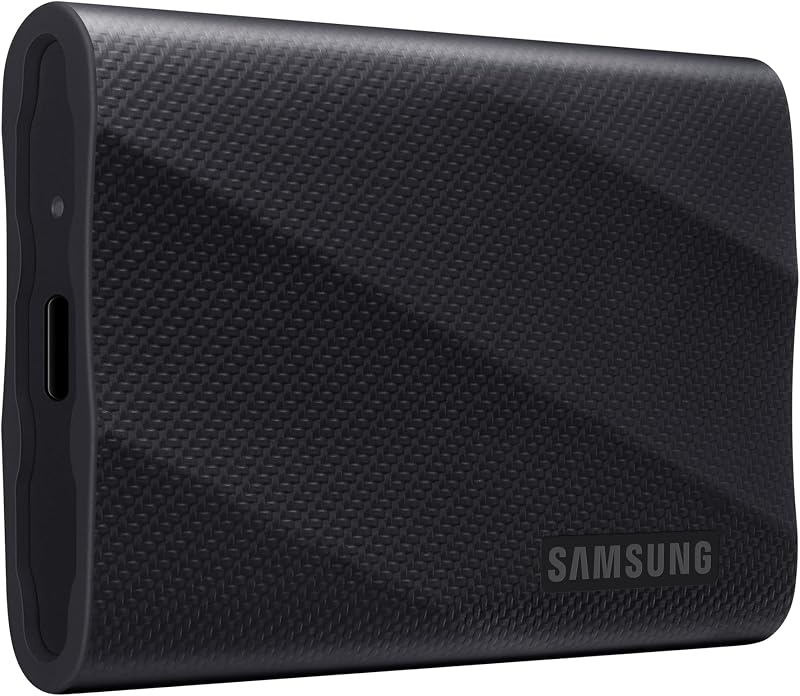
Pros
- Up to 2,000 MB/s transfer speeds
- Dynamic Thermal Guard heat management
- Rugged 9.8-foot drop resistance
- AES 256-bit hardware encryption
Cons
- Requires USB 3.2 Gen 2×2 for full speed
- Weight and dimensions not listed
Who Should Buy Each One
Choose the Samsung T7 If
- You primarily use Mac computers or gaming consoles that max out at 10 Gbps USB transfer bandwidth.
- You want a verified lightweight storage drive that weighs just 2.08 ounces for everyday pocket carry.
- You need both USB Type-C to C and Type-C to A connection cables included in the box.
- Your storage needs focus on standard document backups, photo albums, and office media libraries.
Choose the Samsung T9 If
- Your desktop or laptop features an active USB 3.2 Gen 2×2 port capable of 20 Gbps data transfers.
- You edit high-bitrate video projects and require continuous sustained read and write speeds up to 2,000 MB/s.
- You require integrated Dynamic Thermal Guard heat management to avoid thermal throttling during multi-hundred-gigabyte file queues.
- You want hardware AES 256-bit encryption and increased drop protection rated up to 9.8 feet.
Final Verdict
For the majority of everyday computer users, students, and console gamers, the Samsung T7 represents the sensible external storage choice. It reliably delivers transfer rates up to 1,050 MB/s over widespread USB 3.2 Gen 2 connections, comes in an ultra-lightweight 2.08-ounce aluminum shell, and includes both modern USB-C and legacy USB-A cables. Because modern gaming consoles and standard Mac computers do not support 20 Gbps USB 3.2 Gen 2×2 speeds, the older drive matches the real-world operational speeds of faster alternatives across those widespread hardware platforms.
The Samsung T9 is the clear victor for dedicated creative professionals, video editors, and PC power users whose hardware supports the full 20 Gbps bus. Its 2,000 MB/s sustained sequential performance cuts transfer times in half, while its Dynamic Thermal Guard ensures the drive maintains steady speed during prolonged write cycles. Paired with enhanced 9.8-foot drop protection and AES 256-bit hardware encryption, the newer unit is built for demanding production environments where high-speed throughput is required.
FAQ
Can the Samsung T7 record ProRes 4K footage directly from an iPhone 15?
Yes, the product specifications verify that the drive supports recording Ultra High Resolution (4K 60fps) videos directly onto the drive, including Apple ProRes 4K at 60fps when paired with an iPhone 15 Pro or compatible mobile device.
Does the Samsung T9 hit 2,000 MB/s on an Apple Mac?
Generally, no. Most Mac systems feature Thunderbolt and USB4 ports that do not support the specific USB 3.2 Gen 2×2 dual-lane configuration required for 2,000 MB/s. On a standard Mac port, the drive typically reverts to standard 10 Gbps speeds, maxing out near 1,050 MB/s.
What cables are included inside the box for both drives?
The T7 includes both a USB Type-C to C cable and a USB Type-C to A cable. The T9 listing confirms an included SSD cable recommended for operations like iPhone ProRes recording, though specific cable terminations are not detailed in the listing data.
Can I use both external drives on a PlayStation 5 or Xbox Series X?
Yes, both models list official compatibility with PlayStation 5, Xbox Series X, and Xbox Series S consoles for storing and playing backward-compatible games or archiving current-generation console titles.
Does the Samsung T9 have better drop protection than the Samsung T7?
Yes. The T7 features shock resistance and drop protection rated for falls up to 6 feet, whereas the T9 listing specifies rugged durability capable of enduring drops up to 9.8 feet.
Is the Samsung T7 lighter than the Samsung T9?
The T7 listing confirms an exact weight of 2.08 ounces. While the T9 listing does not specify exact physical weight, the T7 is specifically documented as an ultra-compact lightweight drive.
Do both drives use in-house Samsung memory components?
Yes. Samsung manufactures all internal firmware and components in-house for both lines, including their DRAM and NAND flash memory architecture.


