The decisive contrast between these two high-speed portable solid state drives centers on thermal resilience versus environmental sealing. The Samsung T9 emphasizes prolonged thermal stability through proprietary internal thermal throttling safeguards designed for intensive continuous writes, whereas the Crucial X10 Pro focuses on rugged outdoor survivability with official IP55-rated protection against moisture and dust intrusion.
Choose the Samsung T9 if your creative workflow requires continuous multi-gigabyte exports, high-bitrate video capture, and integrated drive management software for sustained desktop sessions. Choose the Crucial X10 Pro if you need an ultra-compact, weather-resistant storage companion built to handle on-location production shoots and adverse field conditions.
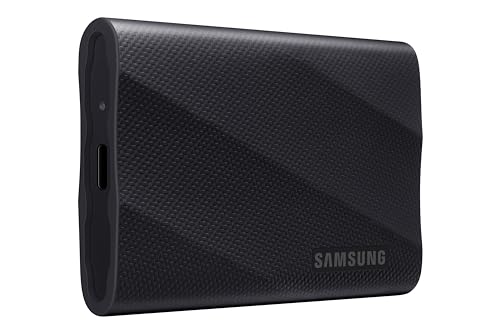
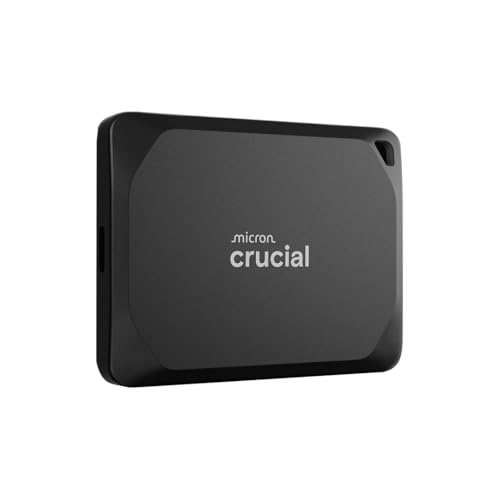
Samsung T9 vs Crucial X10 Pro at a Glance
| Feature | Samsung T9 | Crucial X10 Pro |
|---|---|---|
| Claimed Sequential Read Speed | Up to 2,000 MB/s | Up to 2,100 MB/s |
| Claimed Sequential Write Speed | Up to 2,000 MB/s | Up to 2,000 MB/s |
| Hardware Interface | USB 3.2 Gen 2×2 (USB 3.0 compatible) | USB 3.2 Gen 2×2 (USB-C) |
| Ingress Protection (Water / Dust) | The listing does not specify | IP55 water and dust resistance |
| Drop Protection Height | Up to 9.8 feet (drop resistance) | Up to 7.5 feet (2 meters) |
| Enclosure Material | Information Not Available | Anodized aluminum |
| Thermal Solution | Dynamic Thermal Guard | The listing does not specify |
| Hardware Security | AES 256-bit hardware encryption | SSD password protection |
| Direct Mobile Video Recording | iPhone 15 ProRes 4K at 60fps | The listing does not specify |
| Bundled Software | Samsung Magician Software | 3 months Mylio Photos+ and Acronis True Image |
| Form Factor Size | 2.4 inches | 2.5 inches |
| Best For | Heavy studio desktop exports and ProRes capture | Rugged outdoor shoots and compact travel kits |
Transfer Speeds and Thermal Management
Solid-state drives built on the USB 3.2 Gen 2×2 interface rely on dual-lane bus operation to deliver maximum bandwidth reaching upwards of 2,000 MB/s. When moving multi-gigabyte libraries or editing timeline renders, top-line burst numbers mean little if internal controllers overheat and throttle processing throughput. Any thorough Samsung T9 review must address how an external drive sustains its rated numbers under intense, unbroken queue depths. The T9 delivers sequential read and write figures up to 2,000 MB/s over supported 20 Gbps connections, relying on its Dynamic Thermal Guard to keep surface temperatures strictly below 140 degrees Fahrenheit in accordance with IEC 62368-1 safety standards.
The Crucial drive presents an equally impressive performance baseline on paper. In a head-to-head evaluation of Crucial X10 Pro transfer speed metrics, the unit posts maximum sequential read speeds up to 2,100 MB/s alongside write rates up to 2,000 MB/s. These metrics give the X10 Pro a slight 100 MB/s theoretical advantage during sequential read tasks such as file ingestion and large archive verification. Crucial integrates an anodized aluminum shell that naturally assists with heat dissipation. However, the manufacturer listing does not specify an active or automated thermal governing system equivalent to Samsung’s proprietary thermal guard to regulate sustained high-volume dumps.
For creators whose primary concern is Samsung T9 sustained write speeds during massive data transfers, the deliberate inclusion of the Dynamic Thermal Guard prevents drastic performance cliffs during lengthy rendering sessions. While the X10 Pro yields marginally faster raw read figures, pushing drive hardware through hundreds of contiguous gigabytes requires consistent thermal stabilization to avert sudden interface drop-offs. If you frequently weigh multi-drive options across broader portfolios, reviewing comparisons like the crucial x10 pro vs wd my passport ssd demonstrates how controller thermal regulation dictates tangible daily usability.
Edge: Samsung T9 because its integrated Dynamic Thermal Guard actively regulates surface and component heat to preserve stability throughout heavy sequential transfers.
Durability and Environmental Protection
Portable storage units designed for mobile creators must withstand harsh outdoor conditions, drops onto concrete, and accidental moisture exposure. The Crucial X10 Pro IP55 rating certifies that the unit provides meaningful protection against localized dust deposits and low-pressure water jets from any direction. Crafted with an anodized aluminum exterior and featuring an integrated lanyard loop, the X10 Pro is engineered explicitly for field deployment where rain, dust storms, and outdoor elements could compromise unprotected electronics.
Samsung addresses physical durability through drop protection, asserting impact resistance from elevations reaching up to 9.8 feet. However, a rigorous Samsung T9 drop test assessment reveals a notable omission: the product listing provides no certified IP rating for water or dust resistance, and lists the enclosure material as Information Not Available. While the rubberized outer design provides substantial shock dampening against accidental slips from standing desk heights, it lacks certified sealing against moisture ingress, wet weather, or fine grit.
Between the two designs, the Crucial model offers balanced field protection by pairing 7.5-foot drop resistance with sealed weatherproofing. When choosing field hardware, external drive comparisons such as the sandisk extreme pro portable vs crucial x10 pro highlight why verifiable ingress protection remains a critical factor for location shooters. Samsung offers greater drop altitude tolerance, but Crucial delivers all-weather assurance for travel photographers and videographers working outdoors.
Edge: Crucial X10 Pro because its IP55 water and dust resistance certification provides complete environmental protection that the T9 lacks.
Video Production and Content Creation Workflows
When assessing the Samsung T9 or Crucial X10 Pro for video editing, the interface demands of modern production pipelines dictate which drive fits your gear bag. High-resolution raw footage, multi-stream 4K timelines, and direct camera offloading require reliable uninterrupted throughput. Samsung explicitly advertises the T9 for use with modern mobile camera hardware, documenting native support for iPhone 15 ProRes 4K recording at 60 frames per second using the recommended included cable. With available capacities spanning up to 4TB, the T9 serves as a continuous capture drive that mounts directly to camera rigs.
Crucial focuses the X10 Pro on direct real-time timeline editing. Crucial’s technical documentation states that the unit allows creative professionals to edit 4K and 8K video files directly from the SSD without encountering lag, functioning as a seamless active scratch drive. The X10 Pro listing also highlights broad application for managing high-resolution photo catalogs and large production project bins. However, the manufacturer listing does not specify explicit certification for external iPhone ProRes 4K 60fps recording modes, even though its high bandwidth capabilities match the protocol requirements.
Workstation synergy also hinges on host connectivity. To achieve 2,000 MB/s speeds on either drive, your host computer must feature a dedicated USB 3.2 Gen 2×2 port. Pairing these high-speed drives with powerful creator laptops, such as those evaluated in our msi stealth 16 vs samsung galaxy book4 pro analysis, reveals that system bus architecture determines whether you achieve full interface speeds. While both drives handle 4K scrubbing smoothly, Samsung’s guaranteed direct-to-drive ProRes recording certification and larger 4TB capacity tier give it an advantage for dedicated video capture rigs.
Edge: Samsung T9 because it explicitly supports iPhone 15 ProRes 4K at 60fps external recording and offers higher maximum capacity configurations up to 4TB.
System Compatibility and Mac Integration
Deciding between the Samsung T9 or Crucial X10 Pro for Mac environments brings specific interface limitations to light. Modern Apple Mac systems equipped with Thunderbolt 3, Thunderbolt 4, or USB4 ports do not natively support the USB 3.2 Gen 2×2 (20 Gbps) transfer standard. When connected to standard Mac ports, both the T9 and the X10 Pro drop down to single-lane USB 3.2 Gen 2 operation, capping actual read and write throughput at approximately 1,050 MB/s. Both drives remain functional across macOS systems, but neither will reach 2,000 MB/s without a specialized third-party Gen 2×2 PCIe host card on a compatible desktop.
Outside of macOS, the Crucial X10 Pro documentation demonstrates broad operating system and platform support. Crucial certifies plug-and-play connectivity across Windows, Mac, iPad Pro, Android, Linux, Chromebooks, and gaming consoles including PlayStation 4, PlayStation 5, Xbox, and Sony PlayStation Vita via USB-C and USB-A interfaces. This broad multi-platform certification ensures smooth file exchange when bouncing between distinct operating environments in mixed studio configurations.
The T9 provides full cross-platform compatibility across PC, Mac, Android tablets, iPhones, and modern gaming consoles such as the PlayStation 5, Xbox Series X, and Xbox Series S. Samsung manufactures its DRAM, NAND flash, and controller firmware entirely in-house, which ensures tight internal integration across major consumer platforms. Crucial, however, documents broader legacy and niche support out of the box, including verified compatibility with Linux workstations, Chromebooks, and previous-generation PlayStation consoles.
Edge: Crucial X10 Pro because its verified platform compatibility covers a wider range of operating systems, including Linux, Chromebooks, and legacy consoles.
Software Utilities and Security
Long-term drive health and security protocols are essential considerations when archiving valuable client deliverables. Samsung integrates its comprehensive Magician Software suite with the T9. Magician serves as an all-in-one management portal that handles firmware updates, monitors real-time drive health, checks performance benchmarks, and manages hardware-based AES 256-bit encryption. Storing sensitive commercial files behind AES 256-bit hardware protection ensures data confidentiality without imposing processing overhead on the host computer’s operating system.
The Crucial X10 Pro listing specifies integrated SSD password protection alongside an exterior activity light to confirm active drive read/write cycles. Instead of a dedicated proprietary drive management suite, Crucial includes complimentary access to commercial software tools: a three-month subscription to Mylio Photos+ for intelligent media organization and Acronis True Image for automated full-system backups. These software bundles provide immediate productivity value for creative photographers organizing distributed raw catalogs.
Choosing between these toolkits depends on whether you prioritize ongoing drive diagnostics or supplemental productivity software. Samsung Magician provides vital ongoing firmware maintenance that keeps internal memory controllers stable over years of operation. Creators assembling high-speed systems, who often monitor component synergy as detailed in hardware guides like the kingston fury beast ddr5 vs crucial pro ddr5 overview, appreciate the granular telemetry and direct drive diagnostic checks that Samsung delivers.
Edge: Samsung T9 because its Magician software and robust AES 256-bit hardware encryption provide dedicated lifecycle management and superior hardware security.
Pros and Cons
Samsung T9
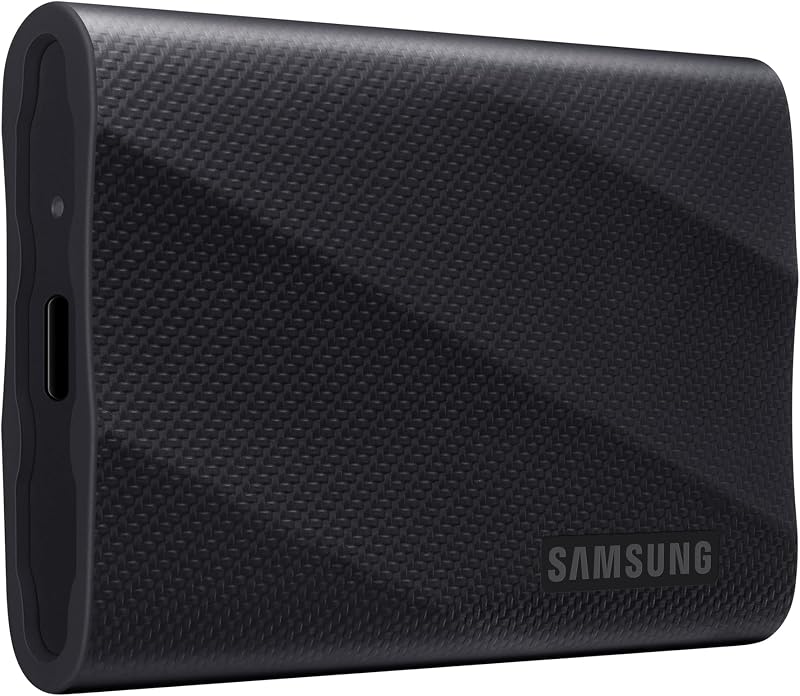
Pros
- Up to 2,000 MB/s read and write speeds
- Dynamic Thermal Guard heat regulation
- Drop resistance up to 9.8 feet
- Direct iPhone 15 ProRes 4K recording
- AES 256-bit hardware encryption
Cons
- No official IP water or dust rating
- Enclosure material is not listed
Crucial X10 Pro

Pros
- Up to 2,100 MB/s read speed
- IP55 water and dust resistance
- Durable anodized aluminum body
- Integrated lanyard loop and activity light
- Bundled Mylio Photos and Acronis backup
Cons
- Lower 7.5-foot drop resistance rating
- No dedicated automated thermal guard specified
View Crucial X10 Pro on Amazon
Who Should Buy Each One
Choose the Samsung T9 If
- You need continuous, high-volume data transfers with active Dynamic Thermal Guard cooling to prevent throttling.
- You record ProRes 4K 60fps footage directly from an iPhone 15 Pro or compatible cinema camera rig.
- You require high-capacity external storage options reaching up to 4TB for sprawling project archives.
- You prefer comprehensive in-house drive diagnostics, health telemetry, and firmware maintenance via Samsung Magician.
Choose the Crucial X10 Pro If
- You shoot in unpredictable outdoor environments requiring certified IP55 water and dust ingress resistance.
- You want a compact drive with an anodized aluminum shell, an integrated lanyard loop, and an activity indicator light.
- You work across diverse operating environments including Linux systems, Chromebooks, and gaming consoles.
- You value bundled third-party photo management and backup utilities like Mylio Photos+ and Acronis True Image.
Final Verdict
Selecting the winner between the Samsung T9 and Crucial X10 Pro comes down to whether your typical day of production takes place at an editing desk or out in the elements. For the majority of desktop creatives, studio editors, and video producers, the Samsung T9 is the superior overall performer. Its Dynamic Thermal Guard prevents performance degradation during lengthy file writes, its available 4TB tier provides massive capacity, and its native support for 4K ProRes 60fps direct recording makes it an exceptional tool for demanding studio setups.
Conversely, the Crucial X10 Pro wins decisively for traveling photographers, documentary filmmakers, and field technicians. Its certified IP55 weather resistance, anodized aluminum chassis, and lanyard-friendly form factor ensure your data survives wet weather, dust exposure, and physical transit. When working in unpredictable field conditions where hardware exposure is a certainty, the X10 Pro delivers the durability needed to protect your work.
FAQ
Which drive is faster: Crucial X10 Pro vs Samsung T9?
The Crucial X10 Pro holds a slight theoretical advantage in maximum sequential read speed at up to 2,100 MB/s, compared to the Samsung T9 at up to 2,000 MB/s. Both drives share an identical maximum sequential write specification of up to 2,000 MB/s over supported USB 3.2 Gen 2×2 interfaces.
Is Crucial X10 Pro worth it for outdoor field recording?
Yes, the Crucial X10 Pro is particularly well suited for outdoor environments due to its official IP55 rating for water and dust resistance, durable anodized aluminum body, and 7.5-foot drop protection. These protections safeguard stored assets in conditions where unsealed drives risk physical exposure.
Can I use the Samsung T9 or Crucial X10 Pro for Mac workflows?
Both drives operate smoothly on Apple Mac computers via standard USB-C ports. However, because standard Mac Thunderbolt and USB4 ports do not support the dual-lane USB 3.2 Gen 2×2 protocol, transfer speeds on both drives will be limited to single-lane USB 3.2 Gen 2 speeds of roughly 1,050 MB/s.
How does the Crucial X10 Pro IP55 rating protect against liquids?
The IP55 rating certifies that the Crucial X10 Pro is shielded against limited dust ingress and resists low-pressure water sprays from any direction. While it cannot be fully submerged underwater, it easily withstands rain showers, splashes, and damp outdoor shooting environments.
What happens during a Samsung T9 drop test from extreme heights?
The manufacturer listing states that the Samsung T9 offers drop resistance from heights up to 9.8 feet, outperforming the Crucial X10 Pro’s 7.5-foot rating. Its rugged exterior structure dampens shock and vibration to preserve internal SSD memory components during accidental falls.
Do both drives maintain top transfer rates without thermal throttling?
The Samsung T9 features proprietary Dynamic Thermal Guard technology engineered to maintain surface temperatures below 140 degrees Fahrenheit, ensuring sustained write stability during prolonged exports. The Crucial X10 Pro listing does not specify an automated thermal management system, relying instead on its anodized aluminum enclosure for heat dissipation.


