The defining difference between the Noctua NH-D15 and the Noctua NH-L9i is absolute physical scale and thermal dissipation capacity. The NH-D15 is an extra-wide dual-tower flagship cooler built with dual 140mm fans to tame demanding enthusiast processors inside standard desktop towers, whereas the NH-L9i is a miniature low-profile cooler standing just 37mm tall to fit ultra-compact small-form-factor builds and slim home-theater enclosures.
Builders putting together an enthusiast desktop or workstation who have ample chassis space and want maximum overclocking headroom should choose the NH-D15. Those assembling a space-constrained mini-ITX enclosure or compact media PC with moderate processing requirements should opt for the NH-L9i.

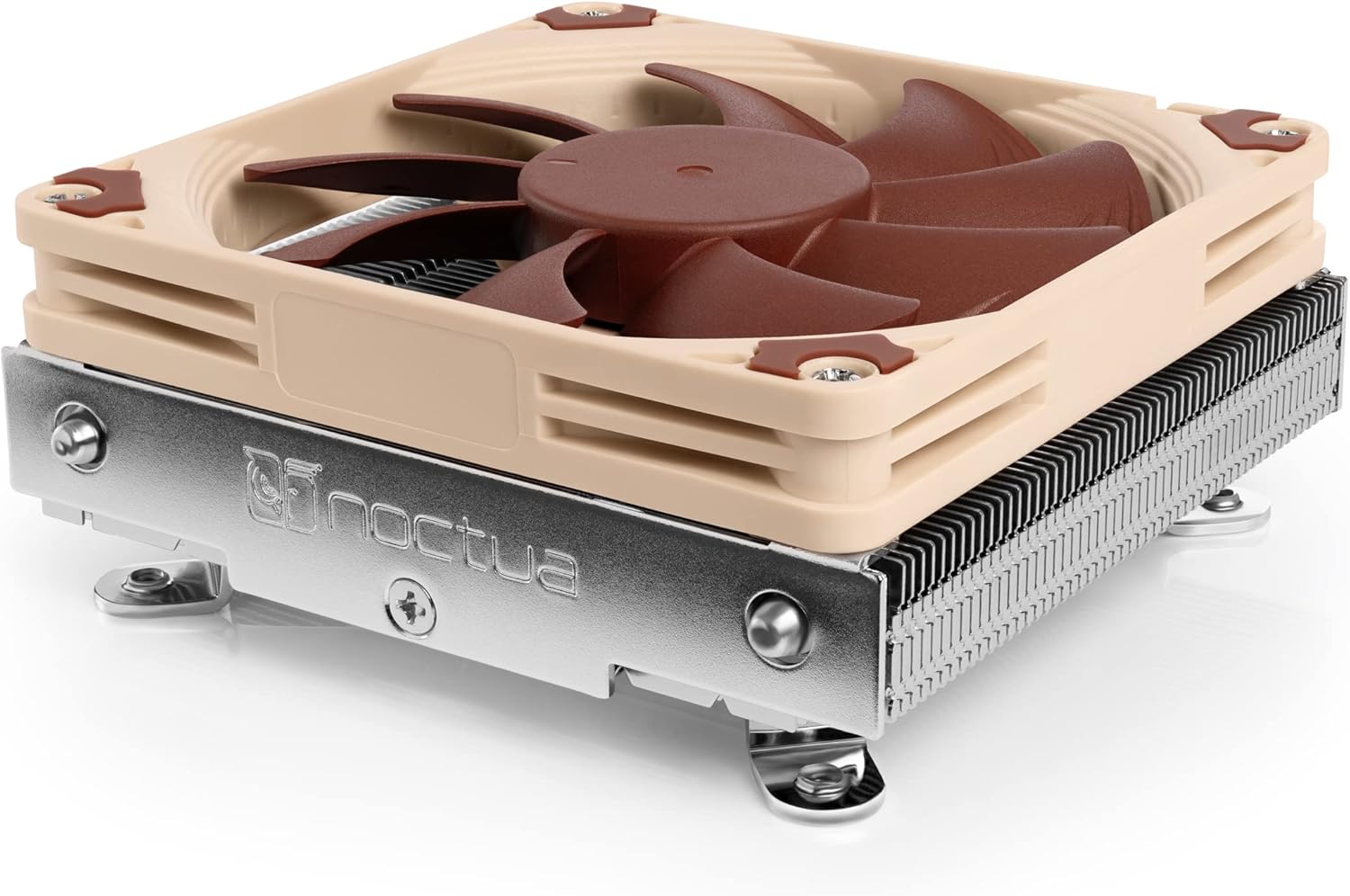
Noctua NH-D15 vs NH-L9i at a Glance
| Feature | Noctua NH-D15 | Noctua NH-L9i |
|---|---|---|
| Heatsink Design | Dual-tower heatsink with 6 heatpipes | Ultra-compact low-profile heatsink |
| Total Height | 168mm | 37mm |
| Overall Dimensions (L x W x H) | 6.49″L x 5.91″W x 6.34″H | 3.74″L x 3.74″W x 1.46″H |
| Fan Configuration | Dual NF-A15 140mm PWM fans | Single NF-A9x14 slim 92mm PWM fan |
| Maximum Rotational Speed | 1500 RPM | 2500 RPM |
| Air Flow Capacity | 140.2 m³/h | 57.5 m³/h |
| Noise Level | 24.6 dB | 23.6 dB |
| Motherboard Footprint | Broad dual-tower profile (RAM/PCIe overhang) | 95x95mm (100% RAM and PCIe clearance) |
| Socket Compatibility | Intel LGA1851, LGA1700, LGA1200, LGA115x; AMD AM5, AM4 | Intel LGA1200, LGA1156, LGA1155, LGA1151, LGA1150 |
| Best For | High-wattage desktop CPUs and heavy workloads | Mini-ITX, HTPC, and ultra-compact small-form-factor cases |
Cooling Capacity and Thermal Headroom
Thermal dissipation performance is determined largely by fin surface area, heatpipe count, and airflow throughput. The NH-D15 employs an extra-wide 140mm dual-tower layout equipped with six heatpipes and two NF-A15 140mm fans. This arrangement generates an airflow volume of 140.2 m³/h, enabling the cooler to absorb and disperse massive thermal bursts from high-wattage desktop silicon. It is tailored for heavy multi-threaded processing, sustained gaming sessions, and overclocking on unlocked chips like the Intel Core Ultra 285K or AMD Ryzen 9 9950X, delivering thermal headroom comparable to liquid setups.
In contrast, the NH-L9i uses an ultra-slim aluminum fin stack with integrated copper heatpipes tailored specifically for space-saving efficiency. Its 92mm slim fan delivers an airflow capacity of 57.5 m³/h, which is less than half that of the dual-tower giant. Noctua specifies that the NH-L9i is meant for Intel Core i7, i5, or i3 processors with moderate heat loads, citing specific desktop chips such as the Core i9-11900, i7-11700, or i5-11600 under controlled power profiles rather than aggressive unlocked overclocks. Comparing the thermal capacity of the noctua nh-d15 vs thermalright peerless assassin 120 shows how large dual towers dominate heavy thermal benchmarks, and the gap widens further when pitted against low-profile hardware.
Evaluating Noctua NH-D15 vs NH-L9i cooling performance comes down to the wattage of your build. The NH-D15 keeps hot enthusiast processors from thermal throttling during intensive production tasks, whereas the NH-L9i handles everyday computing and lightweight gaming inside builds where thermal management is balanced against strict enclosure constraints.
Edge: Noctua NH-D15, because its 140.2 m³/h airflow and 6-pipe dual-tower construction dissipate high thermal loads that overwhelm compact low-profile coolers.
Form Factor and Case Clearance
Chassis clearance is the strict filter that dictates whether a CPU cooler can physically fit inside a system. The NH-D15 stands at an imposing height of 168mm, measuring 6.49 inches long and 5.91 inches wide. This massive scale requires a spacious mid-tower or full-tower desktop chassis with generous side-panel clearance. Attempting to force the dual-tower model into narrow enclosures results in side panels failing to close, making Noctua NH-D15 height clearance an essential specification to verify prior to assembly.
The NH-L9i approaches case installation from the complete opposite extreme, standing at an ultra-low total height of only 37mm (1.46 inches) with its fan installed. Its outer dimensions span a concise 3.74 inches long by 3.74 inches wide. This miniscule footprint allows it to slip effortlessly into small-form-factor (SFF) desktop cases, low-profile home-theater PC (HTPC) enclosures, and compact server racks where clearance is measured in millimeters. Those examining modern compact cooling setups in the noctua nh-d15 g2 vs nh-l9i comparison will note that the standard L9i remains a benchmark for ultra-slim case clearance.
When asking whether to pick the Noctua NH-D15 or NH-L9i for ITX setups, case volume settles the question immediately. The NH-D15 dominates full desktop cases with limitless space, but the NH-L9i makes high-efficiency cooling possible in boutique micro-chassis where larger coolers cannot physically sit.
Edge: Noctua NH-L9i, thanks to its 37mm low-profile stature that fits virtually any ultra-compact or mini-ITX enclosure.
Fan Configuration and Acoustic Noise Levels
Acoustic performance in air cooling depends on fan size, blade geometry, and rotational speed. The NH-D15 relies on two large NF-A15 140mm PWM fans that achieve their full 140.2 m³/h airflow throughput at a modest maximum rotational speed of 1500 RPM. These large blades move heavy air volume without needing to spin at high speeds, maintaining an acoustic output of 24.6 dB under peak load. Noctua also includes two NA-RC7 Low-Noise Adaptors (L.N.A) and an NA-YC1 4-pin PWM splitter to dampen acoustic levels further during idle and standard desktop operations.
The NH-L9i relies on a single NF-A9x14 slim 92mm PWM fan that spins up to 2500 RPM to push 57.5 m³/h through its dense, compact fin stack. Despite spinning 1000 RPM faster than the dual 140mm fans on the D15, the slim fan is rated at an official noise level of 23.6 dB. It also ships with an NA-RC7 Low-Noise Adaptor for builders seeking a quieter fan curve. Examining the acoustics of the noctua nh-d15 vs nh-u12a highlights Noctua’s approach to acoustic engineering across diverse fan profiles, an expertise shared by both of these models.
When comparing Noctua NH-D15 vs NH-L9i noise levels, both register quiet operational figures on paper. However, the NH-D15 achieves its quiet output while displacing vastly more heat, preventing fan speeds from spiking under moderate workloads, whereas the NH-L9i fan must ramp up to higher RPM levels more quickly when subjected to rapid thermal increases.
Edge: Noctua NH-D15, because its dual 140mm fans push significantly higher air volume at lower rotational speeds to maintain stable acoustics under load.
Motherboard Layout and Memory Clearance
Component layout around the CPU socket poses distinct physical challenges for both coolers. The NH-L9i features a compact 95x95mm footprint tailored specifically to avoid interference. This tailored sizing delivers 100% RAM and PCIe compatibility on standard motherboard layouts, guaranteeing that the heatsink will not overhang the memory slots or block the primary expansion slot. Builders can install tall memory modules with oversized heat spreaders and easily access nearby motherboard connectors without removing the heatsink.
The NH-D15, by contrast, is an expansive dual-tower assembly that frequently overhangs memory slots on standard motherboards. While the lower cooling fins feature cutouts designed to accommodate standard-height memory modules, using tall RAM sticks often forces builders to mount the front 140mm fan higher up on the heatsink stack. Raising the front fan increases the cooler’s required vertical clearance beyond the standard 168mm, which can interfere with chassis side panels. A detailed Noctua NH-D15 review often emphasizes pre-measuring memory dimensions to avoid these spatial conflicts.
For builders asking if the Noctua NH-L9i is worth it for crowded mini-ITX layouts, the answer lies in its complete absence of clearance headaches. While the NH-D15 provides massive cooling capacity, it requires careful planning regarding memory module heights and motherboard layout.
Edge: Noctua NH-L9i, due to its 95x95mm footprint that guarantees zero overhang over memory modules and PCIe expansion slots.
Socket Compatibility and Platform Support
Processor platform compatibility determines which motherboards can host each cooler straight out of the box. The NH-D15 includes Noctua’s comprehensive SecuFirm2 mounting system designed for broad modern socket support. The hardware package covers Intel sockets LGA1851, LGA1700, LGA1200, and LGA115x, alongside AMD sockets AM5 and AM4. It also features an offset mounting option for AMD platforms to optimize heat extraction directly above the core compute dies, making it a flexible investment across modern system upgrades.
The NH-L9i listing details dedicated compatibility for Intel platforms, specifically covering LGA1200, LGA1150, LGA1151, LGA1155, and LGA1156. It does not include out-of-the-box hardware for AMD sockets AM4 or AM5, nor does its listing specify base support for Intel LGA1700 or LGA1851 sockets without supplemental bracket hardware. When reviewing Noctua NH-L9i CPU compatibility, builders must confirm their specific socket generation before committing to this dedicated Intel variant.
Platform builders looking at long-term hardware flexibility will find the NH-D15 far more versatile across diverse desktop generations. Evaluating modern heatsink mountings such as the noctua nh-d15 g2 vs nh-u12a and noctua nh-d15 g2 vs thermalright phantom spirit 120 underscores the value of wide socket adaptability right out of the box.
Edge: Noctua NH-D15, as it supports both modern Intel and AMD platforms including LGA1851, LGA1700, AM5, and AM4 without needing extra mounting gear.
Pros and Cons
Noctua NH-D15

Pros
- Massive 140.2 m³/h dual-fan airflow
- Six heatpipes for heavy thermal loads
- Supports both modern Intel and AMD sockets
- Low 1500 RPM maximum fan speed
Cons
- Tall 168mm height restricts case options
- Overhangs memory slots on standard motherboards
Noctua NH-L9i

Pros
- Ultra-compact 37mm total cooler height
- Zero RAM and PCIe slot overhang
- Includes screws for 25mm thick fans
- Whisper-quiet 23.6 dB sound profile
Cons
- Lower 57.5 m³/h airflow capacity
- No out-of-the-box AMD socket mounting
Who Should Buy Each One
Choose the Noctua NH-D15 If
- You are running high-wattage Intel Core Ultra or AMD Ryzen 9 processors that require maximum air cooling capacity.
- Your desktop chassis provides at least 168mm of vertical CPU cooler clearance.
- You plan to overclock your CPU or place it under continuous, sustained rendering and editing loads.
- You need out-of-the-box mounting support for AMD AM5/AM4 as well as modern Intel desktop sockets.
Choose the Noctua NH-L9i If
- You are assembling an ultra-compact small-form-factor (SFF) or mini-ITX PC where total cooler height cannot exceed 37mm.
- You are building a quiet home-theater PC (HTPC) or compact media server using a moderate-wattage Intel processor.
- You require guaranteed 100% clearance for memory modules and primary PCIe expansion cards without physical overhang.
- You want a lightweight heatsink designed specifically for Intel LGA1200 and LGA115x motherboards.
Final Verdict
For most desktop PC builders assembling standard mid-tower or full-tower enclosures, the Noctua NH-D15 is the superior choice. Its massive dual-tower heatsink, six heatpipes, and dual 140mm fans generate 140.2 m³/h of airflow, delivering unmatched air-cooling headroom that easily manages high-wattage desktop processors like the Intel Core Ultra 285K and AMD Ryzen 9 9950X. Backed by broader modern socket compatibility across both Intel and AMD platforms, it offers the cooling authority necessary for heavy workloads and gaming without thermal bottlenecks.
The Noctua NH-L9i wins decisively when spatial constraints define the build. Standing at a tiny 37mm in height with a 95x95mm footprint, it solves clearance challenges that the NH-D15 simply cannot fit into. If your project involves a shoebox-sized mini-ITX chassis, a slim media console, or an HTPC utilizing a moderate-wattage Intel processor, the NH-L9i provides whisper-quiet operation and zero component overhang in places where larger coolers cannot go.
FAQ
Can the Noctua NH-D15 fit inside a mini-ITX computer case?
The NH-D15 stands 168mm tall and measures 150mm wide, which prevents it from fitting into standard ultra-compact mini-ITX chassis. It can only be installed in select oversized mini-ITX cases that specifically offer clearance dimensions equivalent to a full mid-tower enclosure.
Is the Noctua NH-L9i sufficient for high-end CPU gaming loads?
The NH-L9i is designed for processors with moderate thermal output, such as 65W Intel Core i3, i5, or power-limited i7 chips. While it can handle gaming on processors within its listed thermal parameters, high-wattage unlocked CPUs will quickly exceed its 37mm dissipation capacity and may experience thermal throttling under heavy loads.
Does the Noctua NH-L9i overhang RAM or PCIe slots on mini-ITX motherboards?
No, the NH-L9i features a compact 95x95mm footprint designed specifically to conform to the Intel socket keep-out zone. This guarantees 100% clearance for both memory sticks and primary PCIe graphics card slots, regardless of RAM heatsink height.
Can I use the Noctua NH-L9i on an AMD AM4 or AM5 motherboard?
The standard NH-L9i package includes SecuFirm2 mounting hardware tailored specifically for Intel LGA1200 and LGA115x sockets. It does not include mounting hardware for AMD AM4 or AM5 platforms in the box.
Does the Noctua NH-D15 include thermal compound and fan splitters?
Yes, the NH-D15 ships with a complete accessory package that includes a tube of NT-H1 high-grade thermal paste, two NA-RC7 Low-Noise Adaptors, an NA-YC1 4-pin PWM y-cable, and the SecuFirm2 multi-socket mounting kit.
Can you swap thicker fans onto the Noctua NH-L9i heatsink?
Yes, the NH-L9i package includes dedicated mounting screws designed to install standard 92x92x25mm fans if your chassis has enough vertical room to accommodate the additional 11mm of height beyond the stock 92x92x14mm fan.



