When selecting a high-end dual-tower heatsink, the critical deciding factor between these two options comes down to prioritizing whisper-quiet acoustic refinement through massive 140mm fans or opting for high-speed rotational airflow paired with real-time visual hardware telemetry on an integrated display. The Noctua NH-D15 focuses purely on low-noise air displacement and long-term mechanical reliability, whereas the Thermalright Peerless Assassin 120 integrates modern digital monitoring and compact twin-stack fin arrays directly into your desktop setup.
Choose the Noctua NH-D15 if your priority is whisper-quiet operation under heavy desktop loads backed by proven engineering and a six-year manufacturer warranty. Choose the Thermalright Peerless Assassin 120 if you want an eye-catching 5-inch IPS LCD screen for live component metrics alongside high-velocity cooling performance.


Noctua NH-D15 vs Thermalright Peerless Assassin 120 at a Glance
| Feature | Noctua NH-D15 | Thermalright Peerless Assassin 120 |
|---|---|---|
| Fan Configuration | Dual NF-A15 140mm PWM fans | Dual 120mm PWM fans |
| Maximum Rotational Speed | 1500 RPM | 2150 RPM (±10%) |
| Noise Level Rating | 24.6 dB | ≤27 dB(A) |
| Airflow Capacity | 140.2 m³/h | 69 CFM |
| Heatpipe Architecture | 6 copper heatpipes | 6 pure copper heatpipes (AGHP Gen 5.0) |
| Integrated Display | Not listed | 5-inch IPS LCD (480×854 resolution) |
| Total Cooler Height | 168mm | 164mm |
| Heatsink Footprint (LxW) | 6.49″ x 5.91″ (165 x 150 mm) | 4.92″ x 5.31″ (125 x 135 mm) |
| RGB Lighting | Not listed | 5V 3-pin ARGB |
| Manufacturer Warranty | 6 years | Not listed |
| Best For | Acoustic-focused silent workstation and gaming builds | Display-oriented setups needing compact twin-tower airflow |
Acoustic Performance and Operating Noise Levels
Acoustics represent one of the most noticeable differences when comparing twin-tower air coolers inside a desktop chassis. The Noctua NH-D15 is engineered around acoustic suppression, pairing low-vibration engineering with two large NF-A15 140mm fans. These fans top out at an operating speed of 1500 RPM, producing a rated sound profile of just 24.6 dB. Noctua also packages two NA-RC7 Low-Noise Adaptors directly in the box, which further throttle fan revolutions to keep sound pressure minimal even during prolonged rendering or sustained gaming sessions. For builders looking for the quietest possible profile, evaluating thermalright peerless assassin 120 vs be quiet! dark rock pro 5 reveals how crucial low-RPM fan profiles are for sensitive desk environments.
The Thermalright Peerless Assassin 120 takes an alternate path by utilizing aggressive 120mm fans that spin up to 2150 RPM (±10%). While this increased rotational ceiling aids in quickly pushing heat out of dense fin stacks, it drives sound output up to a listed threshold of ≤27 dB(A). The smaller 120mm blades must cycle substantially faster to rival the raw volume displaced by Noctua’s 140mm impellers, leading to a more noticeable acoustic footprint inside your chassis. Examining Noctua NH-D15 vs Thermalright Peerless Assassin 120 noise levels highlights that the Peerless Assassin trades silence for raw rotational velocity.
When analyzing Noctua NH-D15 acoustics vs Peerless Assassin 120, the difference between 24.6 dB and 27 dB represents a perceptible shift in frequency and tone. Noctua achieves lower sound pressure naturally by utilizing a wider swept blade area that requires fewer rotations per minute to move air, while Thermalright leans on high-speed fan cycles that create higher wind turbulence. Builders who prioritize low desktop ambient noise will notice the Noctua’s quieter acoustic floor under high processing loads.
Edge: Noctua NH-D15 provides a measurably lower 24.6 dB acoustic output supported by low-noise inline adapters and slower-spinning 140mm fans.
Hardware Telemetry and Display Integration
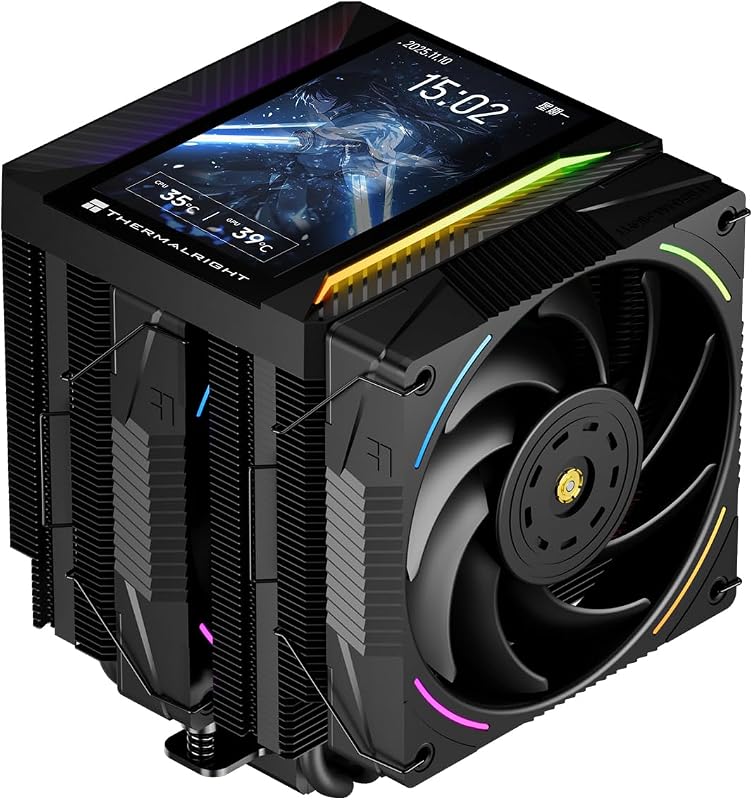
Visual system monitoring has become a defining component of modern PC interior aesthetics, and this is where the Thermalright Peerless Assassin 120 breaks away from conventional heatsink design. The cooler integrates a 5-inch IPS LCD display into its magnetic top cover, delivering a crisp resolution of 480×854. Communicating through an internal 9-pin USB motherboard header, the screen links directly to Thermalright’s TRCC control software. This allows users to track real-time temperatures, clock speeds, and hardware utilization directly above the CPU socket, while also supporting custom dynamic themes, static imagery, and video playback.
In contrast, any detailed Noctua NH-D15 review reveals a completely screen-free, purely functional design. Noctua relies on traditional industrial styling with its chromax.black matte coating, soldered fin stacks, and branded fan hubs. There is no USB data connectivity, no software overhead, and no visual readouts provided on the heatsink structure. The cooler is built strictly as a mechanical heat exchanger without secondary electronic sub-assemblies. Builders researching whether noctua nh-d15 g2 vs thermalright peerless assassin 120 fits their setup often look specifically at whether this lack of telemetry is a worthwhile trade-off for simplicity.
If you are deciding whether is Thermalright Peerless Assassin 120 worth it for your personal aesthetic, the built-in display provides functionality normally reserved for expensive liquid all-in-one coolers. The magnetic cover snaps cleanly onto the dual radiator towers, concealing heatpipe termination points while feeding live diagnostics right through a tempered glass side panel. Noctua provides none of this functionality, dedicating all internal chassis space solely to heatsink fins and airflow paths.
Edge: Thermalright Peerless Assassin 120 wins definitively by integrating a 5-inch 480×854 IPS screen with dedicated TRCC software monitoring.
Fan Speed, Airflow Dynamics, and Cooling Capacity
Thermal regulation depends on moving air through twin fin stacks quickly and efficiently. The Thermalright Peerless Assassin 120 specs emphasize rapid thermal clearance via its 2150 RPM dual-fan array, generating a manufacturer-rated 69 CFM of airflow. These 120x120x25mm fans generate focused static pressure to drive air through the cooling towers, utilizing standard 4-pin PWM control alongside a 5V 3-pin ARGB interface for illuminated customization. This high-speed capability allows the cooler to react rapidly to sudden spikes in core package wattage.
The Noctua NH-D15 takes an alternative physical approach by utilizing oversized NF-A15 140mm fans. Despite spinning at a lower peak velocity of 1500 RPM, the larger surface area of the blades achieves a massive airflow capacity rating of 140.2 cubic meters per hour (approximately 82.5 CFM). Because the 140mm fans overhang the heatsink towers, they simultaneously move air across the surrounding motherboard power stages and memory modules. Readers comparing thermalright peerless assassin 120 vs phantom spirit 120 will recognize that fan size fundamentally shifts how heat dissipation is balanced against rotational speed.
When assessing Noctua NH-D15 vs Peerless Assassin 120 thermals, the two models approach heat dissipation through divergent methods: Thermalright relies on high rotational velocity and directional fin velocity, while Noctua leverages a greater volumetric air displacement from larger fan blades running at moderate speeds. While both coolers easily handle modern high-draw multi-core processors, Thermalright offers greater immediate RPM responsiveness, whereas Noctua moves more total cubic volume over time without straining fan bearings.
Edge: Thermalright Peerless Assassin 120 for its higher 2150 RPM ceiling and rapid thermal responsiveness, while Noctua leads on raw volume displacement per revolution.
Chassis Clearance and Heatsink Dimensions
Case compatibility dictates whether a dual-tower cooler will physically mount inside your system without blocking side panels or PCIe expansion cards. The Thermalright Peerless Assassin 120 measures 125mm in length, 135mm in width, and 164mm in height (4.92″L x 5.31″W x 6.46″H). Standing at 164mm tall, it fits comfortably inside mainstream mid-tower ATX enclosures, leaving sufficient breathing room between the magnetic LCD top plate and the chassis side window. Its narrower 135mm width also limits interference with tall motherboard VRM heatsinks.
Conversely, the Noctua NH-D15 is an extra-wide behemoth. It measures 6.49 inches long, 5.91 inches wide, and stands at an item-highlighted height of 168mm (with dimensions listed as 6.49″L x 5.91″W x 6.34″H). That 168mm overall clearance requirement makes the NH-D15 incompatible with several compact mid-tower cases that cap CPU cooler heights at 160mm or 165mm. Furthermore, its 150mm heatsink width and protruding 140mm fans frequently hang directly over desktop RAM modules, requiring builders with tall memory spreaders to mount the front fan higher up on the tower, which further increases total clearance requirements. Builders struggling with these space constraints often compare the noctua nh-u12a vs thermalright peerless assassin 120 to find a smaller footprint.
For builders working inside standard enclosures, the Peerless Assassin provides a much simpler installation experience. Its 164mm profile adheres closer to mainstream case specifications, and its 120mm fans do not project outwards as aggressively as Noctua’s 140mm units. When building a compact or mid-sized desktop, Thermalright saves valuable millimeters along every physical dimension.
Edge: Thermalright Peerless Assassin 120 fits more standard enclosures with its lower 164mm vertical height and more compact footprint.
Heatpipe Architecture and Manufacturing Quality
Heatsink longevity and heat transfer efficiency rely directly on internal heatpipe construction. The Thermalright Peerless Assassin 120 features six 6mm pure copper heatpipes integrated with AGHP (Anti-Gravity Heat Pipe) Gen 5.0 technology. This design prevents capillary flow degradation when the heatsink is mounted horizontally or vertically inside a chassis. These heatpipes are joined to an aluminum cooling fin stack via reflow soldering, terminating at a nickel-plated micro-engraved copper base plate that ensures direct thermal contact across the CPU integrated heat spreader.
The Noctua NH-D15 similarly deploys six copper heatpipes running through dual cooling towers, but it elevates manufacturing standards through soldered joints throughout the entire fin stack. Many budget coolers press fins onto heatpipes, which can loosen over thermal expansion cycles; Noctua solders every aluminum cooling fin directly to the nickel-plated copper heatpipes to guarantee lasting heat conduction over years of operation. The entire assembly, including the solid copper base plate, features complete nickel plating for anti-corrosion protection. Anyone reading a comprehensive Thermalright Peerless Assassin 120 review will notice that while both use six heatpipes, Noctua’s soldered fin construction is an industry hallmark.
Thermalright also incorporates modern socket support across Intel LGA1851, LGA1700, LGA1200, LGA115x, and AMD AM4/AM5 sockets. Noctua mirrors this extensive compatibility across the exact same Intel and AMD platforms, but adds an offset mounting option for AM5 processors. This offset mounting shifts the cooler base directly over the hottest core compute dies on modern AMD chips, optimizing heat extraction efficiency right at the source.
Edge: Noctua NH-D15 due to completely soldered fin joints and included offset mounting brackets for modern processors.
Accessory Bundle, Mounting Systems, and Long-Term Value
The included mounting gear and accessories heavily influence the overall installation process and lifespan of a CPU cooler. Noctua equips the NH-D15 with its renowned SecuFirm2 mounting kit, widely praised by PC builders for its reliable, tension-calibrated spring screws and rigid metal brackets. Noctua also bundles a full tube of NT-H1 high-grade thermal compound, an NA-YC1 4-pin PWM splitter cable, two NA-RC7 Low-Noise Adaptors, a metal case badge, and guarantees a six-year manufacturer warranty with a committed six-year spare parts availability in the EU. This robust warranty protects the cooler through multiple PC upgrade cycles.
The Thermalright Peerless Assassin 120 includes mounting brackets for both AMD AM4/AM5 and Intel LGA1851/1700/1200/115x motherboards, with AMD installations utilizing the factory motherboard backplate. It also integrates a 5V 3-pin ARGB header cable and internal USB cabling to operate the 5-inch display. However, the Amazon listing does not specify the warranty length for the Peerless Assassin 120. When assessing the thermalright peerless assassin 120 vs scythe fuma 3, this lack of stated warranty coverage stands out as a clear consideration for builders who want decades of hardware support.
Comparing Thermalright Peerless Assassin 120 vs Noctua NH-D15 on bundled value shows two different philosophies. Thermalright provides high-tech hardware additions directly on the cooler via its screen and ARGB lighting, but Noctua delivers unmatched mechanical reassurance with premium thermal paste, noise dampening cables, and industry-leading warranty support.
Edge: Noctua NH-D15 wins for its proven SecuFirm2 hardware, NT-H1 paste bundle, and six-year manufacturer warranty backing.
Pros and Cons
Noctua NH-D15

Pros
- Quiet 24.6 dB acoustic rating
- Large 140mm dual-fan airflow
- Six-year manufacturer warranty
- Includes NT-H1 thermal compound
- Soldered fin stack construction
Cons
- Tall 168mm clearance requirement
- Lacks integrated telemetry screen
Thermalright Peerless Assassin 120
Pros
- 5-inch 480×854 IPS display
- High 2150 RPM fan speed
- Compact 164mm cooler height
- Integrated 5V ARGB lighting
- AGHP Gen 5.0 heatpipes
Cons
- Higher 27 dB noise level
- Warranty duration not listed
View Thermalright Peerless Assassin 120 on Amazon
Who Should Buy Each One
Choose the Noctua NH-D15 If
- You want a whisper-quiet computing environment governed by 24.6 dB noise limits and 140mm fans.
- You intend to keep the cooler across multiple system rebuilds supported by a 6-year manufacturer warranty.
- Your chassis provides ample clearance for a large 168mm tall, extra-wide dual-tower heatsink.
- You run AMD AM5 processors and want the benefit of dedicated offset mounting brackets for hotspot extraction.
Choose the Thermalright Peerless Assassin 120 If
- You want real-time hardware telemetry and custom visuals displayed on a 5-inch 480×854 IPS screen.
- Your desktop enclosure has a strict clearance threshold that requires a cooler height of 164mm or less.
- You prefer aggressive cooling bursts supported by high-speed 2150 RPM fans and integrated ARGB lighting.
- You want an all-in-one visual monitoring package without installing liquid cooling pumps or radiators.
Final Verdict
For the majority of PC builders evaluating the Noctua NH-D15 or Thermalright Peerless Assassin 120 for gaming and heavy productivity, the Noctua NH-D15 remains the superior choice for acoustic refinement and lasting mechanical dependability. Its massive 140mm dual-fan array displaces 140.2 m³/h of air while generating a remarkably quiet 24.6 dB sound profile. Supported by fully soldered cooling fins, proven SecuFirm2 mounting, bundled NT-H1 thermal paste, and an expansive six-year warranty, it delivers unmatched build confidence for enthusiasts who want silent, worry-free air cooling.
However, the Thermalright Peerless Assassin 120 claims a clear victory for builders who desire modern aesthetics, digital system monitoring, and a more compact chassis fit. Its integrated 5-inch IPS display delivers vital system telemetry and custom visual flair right above the motherboard, matching modern tempered glass case trends without the complexity of liquid cooling loops. If you have a standard mid-tower case with 164mm clearance and want live hardware stats alongside fast 2150 RPM cooling power, the Peerless Assassin 120 delivers exceptional modern utility.
FAQ
Can the Noctua NH-D15 fit inside standard mid-tower computer cases?
The Noctua NH-D15 stands 168mm tall and features an extra-wide footprint of 6.49 by 5.91 inches. While it fits in many enthusiast ATX cases, it will conflict with compact mid-tower enclosures that limit cooler height to 160mm or 165mm, particularly if front fan adjustment is required to clear tall system memory.
How does the 5-inch IPS display on the Thermalright Peerless Assassin 120 receive power and data?
The 5-inch screen built into the magnetic top cover connects to the desktop system using a standard 9-pin internal USB interface on the motherboard. This connection provides both the necessary power and data transmission to display real-time telemetry and custom media via Thermalright’s TRCC software.
Which CPU cooler runs quieter under maximum load?
The Noctua NH-D15 is noticeably quieter, operating at a maximum listed sound rating of 24.6 dB at 1500 RPM, and it includes two NA-RC7 Low-Noise Adaptors to reduce noise even further. The Thermalright Peerless Assassin 120 runs up to 2150 RPM and produces an operating sound level of up to 27 dB(A).
Does the Thermalright Peerless Assassin 120 require proprietary software for its screen?
Yes, the 5-inch 480×854 IPS display relies on the Thermalright TRCC control center software to monitor system parameters in real time and configure custom themes, dynamic backgrounds, or video playback.
Are both coolers compatible with the newest Intel LGA1851 and AMD AM5 sockets?
Yes, both models provide mounting hardware compatible with Intel LGA1851, LGA1700, and LGA1200 sockets, as well as AMD AM4 and AM5 platforms. Noctua also includes an offset mounting configuration specifically for AM4 and AM5 processors to align the heatsink base with CPU hotspots.
What thermal compound comes included with each dual-tower heatsink?
The Noctua NH-D15 includes a tube of high-end NT-H1 thermal compound inside the accessory kit. The Thermalright Peerless Assassin 120 listing confirms included heatsink mounting hardware, but it does not specify the exact model or brand of thermal paste supplied in the package.