The primary factor determining whether you should buy the Noctua NF-F12 or the Arctic P14 comes down to frame size compatibility and speed control architecture: the Noctua is a dedicated 120mm fan engineered with a 4-pin pulse-width modulation connector for dynamic motherboard regulation, whereas this Arctic bundle supplies larger 140mm fans utilizing a 3-pin fixed-speed interface designed to displace bulk air across broader mounting points.
Builders needing precision thermal response and concentrated static pressure on standard 120mm heatsinks or radiator brackets should select the Noctua NF-F12. Users building inside a spacious chassis with native 140mm fan locations who want to populate every intake and exhaust vent at once should choose the Arctic P14.


Noctua NF-F12 vs Arctic P14 at a Glance
| Feature | Noctua NF-F12 | Arctic P14 |
|---|---|---|
| Frame Dimensions | 120 x 120 x 25 mm | 140 x 140 x 27 mm |
| Connector Type | 4-Pin PWM | 3-Pin |
| Maximum Rotational Speed | 1500 RPM (1200 RPM with L.N.A.) | 1700 RPM |
| Airflow Capacity | 93.4 m³/h | 72.8 CFM (123.76 m³/h) |
| Static Pressure | High (numeric mmH₂O not listed) | 2.40 mmH₂O |
| Acoustic Rating | 22.4 dB(A) | 0.3 Sone |
| Bearing Technology | Not listed | Fluid Dynamic Bearing |
| Included Package Quantity | 1 Fan | 5 Fans |
| Manufacturer Warranty | 6 Years | 6 Years |
| Best For | 120mm CPU heatsinks and targeted cooling | 140mm chassis ventilation arrays |
Mounting Dimensions and Chassis Fitment
A cooling fan cannot perform if it physically clashes with adjacent hardware or misses mounting hole patterns. The physical frame determines whether an installation proceeds smoothly or halts completely. Standard desktop cases provide either 120mm or 140mm bracket spacings, and forcing an incompatible frame size without dedicated conversion brackets creates air gaps and mechanical strain that harm thermal efficiency.
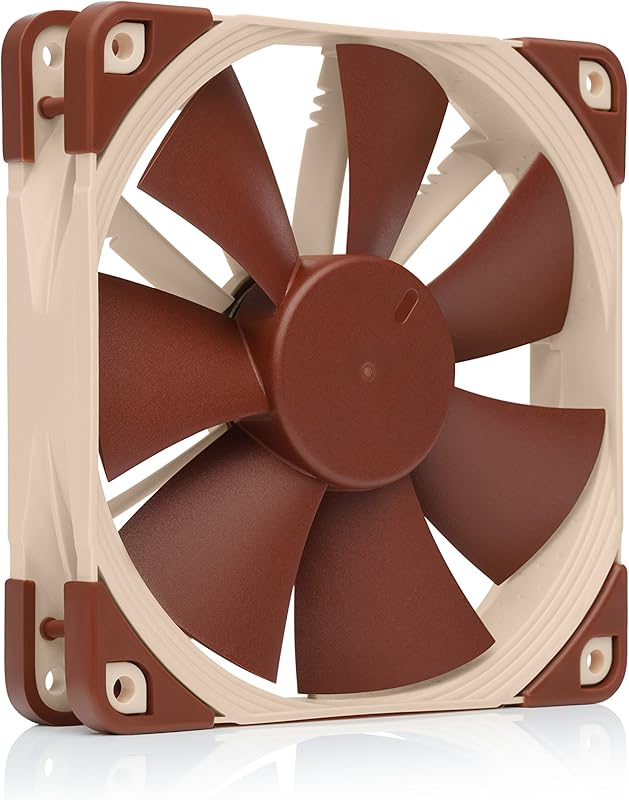
The Noctua NF-F12 arrives in a standard 120mm square footprint measuring 120 x 120 x 25 mm (4.72 x 0.98 x 4.72 inches). This standard footprint matches virtually every air-cooling tower, closed-loop liquid cooler, and modern chassis vent produced over the past decade. If you are comparing standard 120mm options, our noctua nf-f12 vs arctic p12 analysis explores how this frame performs against direct same-size alternatives. In contrast, the Arctic P14 measures 140 x 140 x 27 mm (5.51 x 5.51 x 1.06 inches). While the extra 20mm of width and length provides room for larger sweeping blades, it requires dedicated 140mm mounting rails. Users examining cross-category upgrades often look at the noctua nf-a12x25 vs arctic p14 to understand how different impeller profiles fit these distinct mounting brackets.
Choosing the incorrect frame size prevents installation entirely. The NF-F12 mounts onto 120mm radiator faces, compact mini-ITX cases, and air heatsinks without interference. The P14 demands larger chassis cutouts and radiator frames. Attempting to fit a 140mm frame onto a 120mm tower cooler will fail because the screw spacing does not align. Builders must measure internal chassis clearances and verify bracket spacing prior to selecting either model.
Edge: Noctua NF-F12 because its standard 120mm dimensions deliver universal compatibility across air heatsinks, radiators, and compact cases.
Airflow Volume and Radiator Static Pressure Delivery
Cooling performance relies on moving sufficient air volume while generating enough force to overcome aerodynamic obstacles. High static pressure is mandatory when pushing air through densely packed aluminum fins on a liquid cooling radiator or CPU tower. Broad airflow volume matters most when flushing hot air out of an open chassis interior. In an Arctic P14 vs Noctua NF-F12 assessment, this balance determines where each model functions best.
The Arctic P14 produces an airflow rating of 72.8 CFM, corresponding to 123.76 m³/h, driven by a top rotational speed of 1700 RPM and a static pressure rating of 2.40 mmH₂O. Its wide blade surface sweeps large volumes of air smoothly through intake filters and unrestricted chassis vents. Readers interested in smaller 140mm configurations can examine our arctic p12 vs p14 comparison to see how volume scales between frame tiers. The Noctua NF-F12 delivers 93.4 m³/h at its maximum speed of 1500 RPM. While the listing does not specify a numerical static pressure figure in mmH₂O, it incorporates Noctua’s Focused Flow frame-a series of stator guide vanes designed to direct and straighten airflow into a tight, focused beam for high-resistance heatsink cooling.
When deciding on the Noctua NF-F12 or Arctic P14 for radiator configurations, the underlying radiator size dictates performance. On a 280mm or 420mm radiator, the P14 pushes 123.76 m³/h through the fin stack using its 2.40 mmH₂O rating. On a 120mm, 240mm, or 360mm radiator, the NF-F12 focuses its 93.4 m³/h output directly through the fin channels without peripheral air spill. If your system relies on 120mm mounts, the NF-F12 generates the directional thrust necessary to lower component temperatures, whereas the P14 provides superior total cubic volume whenever larger mounting brackets exist.
Edge: Arctic P14 because its 140mm diameter delivers a higher maximum airflow volume of 123.76 m³/h alongside a verified 2.40 mmH₂O static pressure rating.
Speed Control and Connector Architecture
Fan headers on a motherboard govern how fans react when the CPU or graphics card heats up. The connector interface dictates whether a fan can scale its RPM dynamically through sophisticated software curves or if it must run at a fixed rotational speed governed by direct DC voltage adjustments. The operational contrast between Noctua NF-F12 PWM vs Arctic P14 3-pin fan headers is a significant technical dividing line between these two products.
The NF-F12 features a 4-pin PWM connector that allows modern motherboards to transmit high-frequency pulse signals. This architecture supports a broad operating range between 300 RPM and 1500 RPM. When the computer sits idle, the fan spins down to 300 RPM to preserve near-silent operation. As thermal loads climb, the motherboard increases duty cycles to match component demands smoothly. Noctua also supplies a Low-Noise Adaptor (L.N.A.) that caps maximum speed at 1200 RPM directly in hardware. In contrast, this specific Arctic P14 model features a 3-pin connector with a control type designated as fixed speed. It operates at 1700 RPM on standard 12V DC power, requiring motherboard DC voltage regulation (operating from a starting voltage of 2.1V up to 12V) if you wish to adjust rotational velocity.
Relying on a 3-pin fixed-speed fan means the P14 will spin at full output unless your motherboard fan header explicitly supports DC voltage modulation. While spinning at full speed maximizes air movement, it prevents the precision step-by-step curve adjustments provided by 4-pin PWM designs. The NF-F12 integrates seamlessly with modern automatic fan-tuning software, guaranteeing that cooling force responds in real time to CPU temperature fluctuations.
Edge: Noctua NF-F12 because its 4-pin PWM interface allows automatic speed scaling from 300 to 1500 RPM.
Acoustic Profiles and Noise Metrics
System noise directly influences daily computing comfort. Motor hum, bearing whine, and airflow turbulence contribute to perceived sound output. When evaluating Noctua NF-F12 vs Arctic P14 noise, buyers must interpret differing acoustic measurement standards: the Noctua listing uses decibels (dB(A)), while the Arctic listing utilizes Sones.
The NF-F12 documents a maximum noise output of 22.4 dB(A) at 1500 RPM. When connected via the included Low-Noise Adaptor, the operational acoustic ceiling drops further as maximum speed settles at 1200 RPM. Noctua constructs the frame using fibre-glass reinforced PBT and equips the corners with integrated anti-vibration rubber pads to prevent the transfer of mechanical vibrations to metal chassis panels. The Arctic P14 lists an acoustic output of 0.3 Sone at 1700 RPM. Sone measurements evaluate perceived loudness linearly, where 0.3 Sone represents a remarkably low operational sound footprint for a large 140mm fan. You can also review the arctic p14 vs be quiet! silent wings 4 to see how Arctic stacks up against other quiet-focused alternatives.
Because decibels follow a logarithmic scale and Sones follow a linear scale based on human psychoacoustics, direct mathematical conversions are not standardized in the specifications. In practical operation, the Arctic P14 relies on an innovative impeller shape and a quiet motor to reduce turbulence across its 140mm frame. However, because it lacks integrated corner vibration pads and operates at 1700 RPM out of the box via its 3-pin fixed connection, it transmits more mechanical vibration to the chassis than the Noctua NF-F12. The NF-F12 maintains acoustic control through its vibration-dampening mounts, lower maximum RPM, and broad 300 RPM minimum threshold.
Edge: Noctua NF-F12 because its integrated anti-vibration mounts and wide PWM speed range provide superior operational acoustic dampening.
Packaging Bundle and Included Accessories
The components included inside the box dictate how quickly an installation finishes and whether you need to buy extra hardware. Cable extensions, splitters, and mounting pins simplify system routing, particularly inside complex cases with distant headers.
The NF-F12 comes as a single-fan package accompanied by a comprehensive accessory bundle. Inside the packaging, Noctua supplies four standard fan screws alongside four silicone anti-vibration mounts that decouple the fan from metal frames. It also includes the Low-Noise Adaptor, a 30cm extension cable to reach motherboard headers across large cases, and a 4-pin y-cable that allows users to power and control two PWM fans from a single motherboard header. For alternative high-end 120mm options that focus on connectivity, see our noctua nf-f12 vs lian li uni fan sl120 overview. The Arctic P14 package provides five individual 140mm fans in a single multi-pack box. Arctic equips each fan with a 400mm attached cable, but the listing specifies no extension cables, y-splitters, low-noise adaptors, or anti-vibration pads.
The difference in package philosophy serves distinct needs. If you are upgrading a dual-fan CPU cooler or need extra cable reach, Noctua eliminates the need for third-party accessories. If your goal is to populate an entire computer case with fresh intake and exhaust units in one purchase, Arctic’s multi-pack supplies five complete fans ready to mount.
Edge: Noctua NF-F12 because its accessory kit includes vibration mounts, an extension lead, a y-cable, and a low-noise adaptor.
Bearing Construction and Mechanical Longevity
Fan bearings determine how reliably a cooling unit spins over years of daily operation. Bearing friction contributes to heat buildup, motor wear, and audible degradation over time. Both manufacturers invest heavily in bearing design to prevent lubricant loss and ensure extended service lifespans under sustained desktop workloads.
The Arctic P14 utilizes a Fluid Dynamic Bearing featuring an alloy and lubricant combination developed in Germany. This mechanism contains an oil capsule that prevents lubricant leakage, achieving the quiet rotation of a sleeve bearing with significantly higher service life. The motor consumes 1.8 watts with an operating current of 0.15A at 12V DC, maintaining stable rotation within temperatures from 0 to 40 degrees Celsius. Noctua builds the NF-F12 using fibre-glass reinforced PBT to resist thermal deformation and lists a mean time to failure (MTTF) exceeding 150,000 hours. The listing does not specify the precise internal bearing brand name for the NF-F12, but the structural materials and construction support heavy duty use.
Both products provide an identical 6-year manufacturer warranty. This extensive warranty coverage reflects exceptional confidence from both brands regarding mechanical durability. Arctic solves bearing longevity through its German-engineered fluid capsule, while Noctua leverages reinforced structural plastics and an industrial 150,000-hour MTTF rating.
Edge: Tie because both manufacturers back their mechanical designs with identical 6-year warranties and proven long-life bearing systems.
Pros and Cons
Noctua NF-F12
Pros
- 4-pin PWM automatic speed control
- Focused Flow frame for radiators
- Rich bundled accessory package
- Vibration-dampening rubber corner pads
- Over 150,000 hours MTTF rating
Cons
- Smaller 93.4 m³/h maximum airflow
- Only one fan included per pack
Arctic P14

Pros
- High 72.8 CFM airflow capacity
- Supplied in a complete 5-pack
- Strong 2.40 mmH₂O static pressure
- German-developed fluid dynamic bearing
- 6-year manufacturer warranty coverage
Cons
- Requires 140mm case mounting brackets
- 3-pin fixed speed connector type
Who Should Buy Each One
Choose the Noctua NF-F12 If:
- You need a dedicated 120mm fan for a CPU heatsink or a 120mm/240mm/360mm liquid cooling radiator.
- You demand automated thermal control via a 4-pin PWM header with a 300 to 1500 RPM operating range.
- You want bundled accessories like silicone vibration mounts, a y-splitter cable, and an extension lead in the box.
- Your installation requires an industrial-grade fibre-glass reinforced PBT frame rated for over 150,000 hours MTTF.
Choose the Arctic P14 If:
- Your PC chassis provides native 140mm mounting rails on the front, top, or rear panels.
- You need to populate multiple chassis fan slots simultaneously using a practical 5-pack bundle.
- You want high airflow volume reaching 72.8 CFM (123.76 m³/h) paired with a 2.40 mmH₂O pressure rating.
- You prefer a German-developed Fluid Dynamic Bearing with an oil capsule design to avoid lubricant leakage.
Final Verdict
For PC builders focused on targeted thermal control, heatsink cooling, and component precision, the Noctua NF-F12 is the definitive pick. Its standardized 120mm frame fits virtually all standard desktop cooling hardware, while the 4-pin PWM connector allows your motherboard to fine-tune rotation from a whisper-quiet 300 RPM up to 1500 RPM. Backed by anti-vibration hardware, focused airflow vanes, and a comprehensive cable kit, the NF-F12 delivers the exact features demanded by dense heatsinks and radiator assemblies.
The Arctic P14 claims victory whenever high-volume chassis ventilation takes priority. Moving 72.8 CFM per unit across standard 140mm fan brackets, this 5-pack allows builders to outfit an entire gaming enclosure with dedicated intake and exhaust fans in a single purchase. If your case accommodates 140mm mounts and you want extensive ventilation backed by a 6-year warranty, the Arctic P14 multi-pack provides an unmatched volume-cooling solution.
FAQ
Can the Arctic P14 be mounted onto a 120mm CPU heatsink?
No, the Arctic P14 measures 140 x 140 mm and requires 140mm mounting hole spacing. Standard 120mm air heatsinks use 105mm hole spacing designed exclusively for 120mm fans like the Noctua NF-F12.
Does the Noctua NF-F12 include mounting screws in the box?
Yes, the Noctua NF-F12 includes standard fan screws as well as four silicone anti-vibration mounts, an extension cable, a y-cable, and a Low-Noise Adaptor.
Can I control the speed of the Arctic P14 with a 3-pin connector?
The Arctic P14 listed here uses a 3-pin connector designated as fixed speed. It operates at 1700 RPM on standard 12V connections, though motherboard headers supporting DC voltage regulation can lower its operational speed by reducing voltage between 12V and its 2.1V starting threshold.
How do the warranties compare between the NF-F12 and P14?
Both Noctua and Arctic offer identical 6-year manufacturer warranties, ensuring long-term hardware protection for both models.
What is the minimum speed of the Noctua NF-F12?
The Noctua NF-F12 has an operational PWM speed range spanning from 300 RPM up to 1500 RPM, allowing it to spin down significantly under light desktop workloads.
How much airflow does the Arctic P14 deliver at full speed?
At its maximum rotational speed of 1700 RPM, the Arctic P14 moves 72.8 CFM, which equals 123.76 cubic meters per hour (m³/h).


