The fundamental difference between the Asus ROG Swift PG32UQX and the LG 27UP850 centers on panel illumination and refresh rate capability: Asus deploys an elite 144Hz Mini-LED backlight system boasting 1,152 independent local dimming zones capable of 1400 nits peak brightness, whereas LG provides an office-oriented 60Hz 4K IPS display anchored by 96W USB-C single-cable connectivity.
Choose the Asus ROG Swift PG32UQX if you demand reference-grade HDR gaming visuals, fluid motion clarity, and quantum-dot color accuracy on an expansive 32-inch screen. Choose the LG 27UP850 if you want a clutter-free, ergonomic 27-inch productivity hub that powers your laptop while displaying crisp UHD desktop workspace.


Asus ROG Swift PG32UQX vs LG 27UP850 at a Glance
| Feature | Asus ROG Swift PG32UQX | LG 27UP850 |
|---|---|---|
| Screen Size | 32 inches | 27 inches |
| Native Resolution | 3840 x 2160 (4K UHD) | 3840 x 2160 (4K UHD) |
| Backlight Architecture | Mini-LED (1,152 FALD zones) | Not listed |
| Refresh Rate | 144 Hz | 60 Hz |
| Peak Brightness | 1400 nits (DisplayHDR 1400) | 400 cd/m² (DisplayHDR 400) |
| Color Gamut | DCI-P3 98% | DCI-P3 95% |
| Variable Refresh Sync | NVIDIA G-SYNC ULTIMATE | AMD FreeSync |
| USB-C Power Delivery | Not listed | 96W |
| Hardware Weight | 24 pounds | 13 pounds |
| Best For | High-end HDR gaming and visual mastering | Single-cable laptop productivity and general office use |
High Dynamic Range and Backlight Architecture
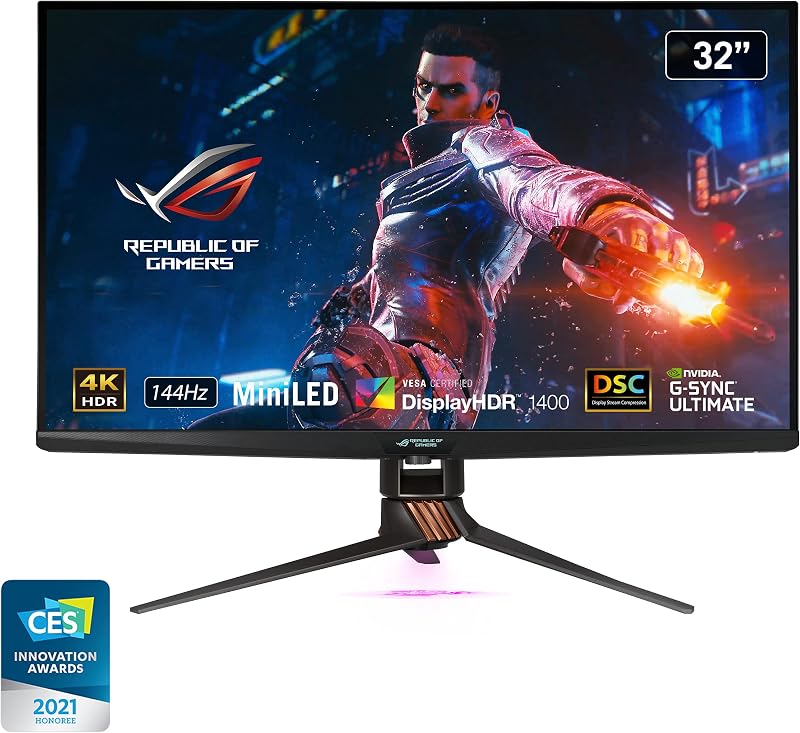
High Dynamic Range performance defines the biggest operational divergence between these two screens. The Asus PG32UQX features Full Array Local Dimming driven by a dense Mini-LED matrix of 1,152 individual lighting zones. Because the LEDs sit directly behind the quantum-dot LCD layer and adjust brightness autonomously across micro-regions, the monitor achieves true specular highlights right next to inky, deep shadows. Certified for VESA DisplayHDR 1400, this panel reaches an intense peak luminance of 1400 nits, allowing realistic sunlight, explosions, and metallic reflections in modern games without washing out adjacent dark areas. Comparing backlight density highlights differences similar to those observed in the asus rog swift pg32uqx vs samsung odyssey neo g7 32 breakdown.
In contrast, the LG 27UP850 carries a entry-level VESA DisplayHDR 400 certification with a typical brightness rating of 400 cd/m² and a standard 1200:1 contrast ratio. The listing does not specify any local dimming zones, meaning the entire screen relies on global illumination. When an HDR signal calls for a bright object on a dark background, the LG unit raises the brightness of the entire panel, which turns deep blacks into dark gray. While this luminance level is more than sufficient for brightly lit office cubicles, it does not produce the transformative visual impact found in dedicated HDR mastering monitors.
When assessing PG32UQX vs LG 27UP850 HDR capabilities, the technical gulf is immense. The ROG Swift delivers true hardware-driven dynamic range suitable for dark-room cinema and cinematic gaming, whereas the LG display merely accepts an HDR metadata signal without the physical illumination hardware necessary to render high-contrast scenes convincingly.
Edge: Asus ROG Swift PG32UQX because its 1,152 Mini-LED zones and 1400-nit luminance produce legitimate, high-contrast HDR reproduction that outclasses standard edge-lit panels.
Refresh Rate and Motion Performance
A monitor’s refresh rate dictates how smoothly moving objects track across the screen and how promptly user inputs register during competitive play. When evaluating the PG32UQX vs 27UP850 refresh rate, the difference represents two separate categories of computing. The PG32UQX operates natively at a swift 144Hz using DisplayPort 1.4 with Display Stream Compression. Motion at 144Hz appears fluid, reducing perceived blurring in fast camera pans and enabling quick target tracking in first-person shooters or racing simulators. Serious gamers pairing high-refresh monitors with performance gaming rigs, as explored when reviewing the asus rog strix scar 16 vs acer swift go 14, will immediately notice the benefit of high-frequency frame delivery.
The LG 27UP850 caps its panel refresh rate at standard 60Hz. While 60 frames per second is perfectly adequate for word processing, spreadsheets, web development, and 4K video playback, it introduces noticeable motion blur and higher input latency during gaming sessions. Dragging desktop windows or scrolling through dense documents feels functional on the LG, but it lacks the butter-smooth tracking responsiveness that 144Hz brings to everyday cursor interactions.
Variable refresh rate integration also sets these displays apart. The Asus PG32UQX integrates a dedicated hardware NVIDIA G-SYNC ULTIMATE processor, ensuring tear-free rendering, ultra-low latency, and full variable refresh rate operation across the entire frame range even under intense HDR workloads. The LG 27UP850 includes AMD FreeSync, which reliably prevents screen tearing on compatible graphics cards within its 60Hz envelope, but cannot match the fluid motion ceiling of a 144Hz panel. For shoppers deciding between the Asus ROG Swift PG32UQX or LG 27UP850 for gaming, the Asus monitor operates in an entirely different league.
Edge: Asus ROG Swift PG32UQX because its 144Hz refresh rate and G-SYNC ULTIMATE hardware eliminate frame tearing and provide vastly superior motion sharpness.
Color Accuracy and Creative Workflows
Both monitors offer professional-grade color coverage, but they approach visual production through different panel chemistries. The ROG Swift PG32UQX incorporates quantum-dot display technology paired with true 10-bit color depth, delivering over one billion distinct shades. It spans 98% of the wide DCI-P3 color space, backed by an included factory color calibration report inside the box to verify factory delta values. Furthermore, Asus includes a complimentary 3-month Adobe Creative Cloud subscription with purchase, signaling its intent as a production tool for content creators who assemble high-end rigs around boards like the asus rog strix z790-a vs msi mpg z790 edge.
The LG 27UP850 is no slouch in static color presentation, advertising 95% coverage of the DCI-P3 color gamut alongside an IPS panel that maintains uniform color reproduction across wide 178-degree viewing angles. Its 1200:1 contrast ratio is slightly above the baseline 1000:1 typical of standard IPS office monitors, ensuring clean graphic design rendering, crisp font contrast, and pleasing digital photography previews for standard dynamic range publishing.
Choosing the Asus ROG Swift PG32UQX or LG 27UP850 for photo editing depends largely on the distribution medium of your work. The LG 27UP850 delivers reliable 4K clarity across 27 inches, giving it a dense pixel pitch that renders typography and fine photograph details with exceptional sharpness for print and web design. However, if your grading pipeline involves HDR mastering, high-nit video correction, or wide-gamut digital cinema master exports, the PG32UQX provides wider 98% DCI-P3 coverage, authentic 10-bit color gradations, and localized black levels that the LG panel cannot simulate.
Edge: Asus ROG Swift PG32UQX because its quantum-dot film, 98% DCI-P3 coverage, factory calibration documentation, and 10-bit color engine provide deeper precision for advanced creative suites.
Connectivity and Desk Setup Versatility
I/O options highlight the disparate design philosophies behind these two displays. The LG 27UP850 serves as a master hub for modern laptop-based workstations thanks to its versatile USB-C port equipped with 96W Power Delivery. With a single USB-C cable running from a compatible notebook, the 27UP850 accepts 4K display signal, passes USB data back and forth, and pumps 96 watts of charging power into the host computer. Users who dock ultrabooks, such as those evaluated in our look at the asus zenbook 14 oled vs acer swift go 14, can declutter their workspace by eliminating bulky proprietary power bricks entirely. The LG also provides two standard HDMI ports for auxiliary devices.
The Asus PG32UQX takes an entirely different path geared toward enthusiast desktop towers. It features DisplayPort 1.4 with DSC to push uncompressed 4K visuals at 144Hz with full 10-bit HDR color over a single wire. It also includes three HDMI 2.0 ports, two USB 3.2 Gen 1 Type-A ports, a USB 2.0 port, and a USB-B upstream port for desktop peripheral connection. Notably absent from the Asus spec sheet is any USB-C port or laptop charging delivery, which means mobile users must run separate charging adapters and video cables.
For gamers and desktop power users, the extra HDMI ports on the PG32UQX allow multiple consoles or secondary desktop inputs to remain wired simultaneously. Yet, for general office professionals, students, and laptop dockers, the 96W USB-C functionality on the LG 27UP850 offers daily operational convenience that the gaming-focused Asus simply does not provide.
Edge: LG 27UP850 because its 96W USB-C connection streamlines laptop docking by delivering video, data, and device charging over a single cable.
Stand Ergonomics and Physical Footprint
Physical desktop accommodation can make or break a monitor purchase. The LG 27UP850 is a compact, highly versatile hardware package weighing just 13 pounds. Its stand supports height, pivot, and tilt adjustments, allowing users to effortlessly spin the display into portrait orientation. This vertical pivot mode is a massive asset for programmers reviewing long scripts, writers editing manuscripts, and financial analysts scanning multi-column ledger sheets. Furthermore, LG’s 3-side virtually borderless bezel design keeps the visual profile slim and unobtrusive on small or crowded desks.
The Asus PG32UQX is a commanding desktop centerpiece. Sized at 32 inches and weighing a hefty 24 pounds, this monitor requires a deep, sturdy desk surface to comfortably handle its 19.84-inch operating depth and 28.62-inch width. To support enthusiast content creators, Asus incorporates specialized hardware elements: a LiveDash OLED display built into the front bottom deco bar that reports real-time system diagnostics such as CPU or GPU temperatures, a top-mounted tripod thread screw for mounting webcams or DSLR streaming cameras, and replaceable ambient light covers.
While the PG32UQX includes extensive hardware extras-including wall mount screws, a ROG pouch, and a tripod screw-its immense physical mass limits placement options. Shoppers weighing hardware investments, much like balancing the utility found in the asus tuf gaming a15 vs acer swift go 14 comparison, must consider real-world workspace limits. The LG 27UP850 fits onto virtually any desk, swivels vertically, and adjusts without demanding specialized furniture.
Edge: LG 27UP850 because its lightweight 13-pound chassis, vertical pivot functionality, and minimal footprint make it significantly easier to position in everyday workspaces.
Pros and Cons
Asus ROG Swift PG32UQX
Pros
- 1152-zone Mini-LED local dimming
- Blistering 1400 nits peak brightness
- Fluid 144Hz refresh rate with G-SYNC
- Wide 98% DCI-P3 quantum-dot color
- Integrated LiveDash OLED hardware monitor
Cons
- Heavy 24-pound desk footprint
- Lacks USB-C power delivery
- HDMI ports limited to version 2.0
View Asus ROG Swift PG32UQX on Amazon
LG 27UP850

Pros
- Single-cable 96W USB-C power delivery
- Lightweight 13-pound chassis
- Full height, pivot, and tilt stand
- 3-side virtually borderless design
Cons
- Capped at 60Hz refresh rate
- Basic DisplayHDR 400 peak luminance
- No local dimming zones
Who Should Buy Each One
Choose the Asus ROG Swift PG32UQX If
- You play high-fidelity PC games that demand 144Hz fluid motion, uncompromised frame delivery, and G-SYNC ULTIMATE hardware synchronization.
- You want genuine HDR rendering powered by 1,152 Mini-LED local dimming zones and an eye-searing 1400 nits peak brightness.
- You edit color-critical photography or video projects that require true 10-bit depth, 98% DCI-P3 coverage, and bundled Adobe Creative Cloud access.
- You utilize desktop streaming accessories and system diagnostic tools like the built-in LiveDash OLED display and top tripod mounting screw.
Choose the LG 27UP850 If
- You work primarily from a USB-C laptop and want single-cord 96W power delivery, data transfer, and 4K video display.
- Your computing tasks focus on productivity, spreadsheet editing, document authoring, and web navigation capped at 60Hz.
- You require a display that pivots into portrait orientation for reading code, viewing legal briefs, or processing vertical graphics.
- You have a smaller or shallow desk space that benefits from a lightweight 13-pound build and a 3-side borderless bezel design.
Final Verdict
Evaluating the LG 27UP850 vs Asus ROG Swift PG32UQX reveals that these two 4K displays target completely divergent user profiles. For everyday office workers, software developers, and remote professionals who drive their setups from a modern notebook, the LG 27UP850 is the smarter, more practical solution. Its integrated 96W USB-C power delivery slashes desk clutter, its 27-inch 4K IPS panel produces pin-sharp text, and its versatile pivot stand adapts instantly to vertical reading workflows. In evaluating whether the LG 27UP850 is worth it, the answer is a clear yes for anyone needing a clean, dependable productivity workhorse.
Conversely, for visual purists and dedicated PC gamers, the Asus ROG Swift PG32UQX represents an uncompromising pinnacle of display engineering. Its combination of 144Hz motion clarity, dedicated G-SYNC ULTIMATE processing, 98% DCI-P3 quantum-dot color, and a 1,152-zone Mini-LED backlight pushing 1400 nits creates an HDR visual spectacle that basic 60Hz panels cannot match. If your priority is peak graphical fidelity, cinematic illumination, and high-framerate PC gaming, the Asus ROG Swift PG32UQX is easily worth it as the definitive enthusiast centerpiece.
FAQ
What is the primary difference between DisplayHDR 1400 on the PG32UQX and DisplayHDR 400 on the 27UP850?
DisplayHDR 1400 on the Asus PG32UQX requires the monitor to achieve a peak brightness of at least 1400 nits, driven by 1,152 Mini-LED local dimming zones that control illumination in localized screen clusters. DisplayHDR 400 on the LG 27UP850 requires only 400 cd/m² of peak brightness without any requirement for local dimming, meaning the LG screen brightens globally rather than highlighting pinpoint bright objects independently.
Can the LG 27UP850 charge a connected laptop?
Yes. The LG 27UP850 features a versatile USB-C port that supports up to 96W Power Delivery. This allows compatible laptops to receive continuous battery charging while simultaneously sending 4K display signals and communicating with downstream USB peripherals through the monitor.
Does the Asus ROG Swift PG32UQX include built-in system monitoring?
Yes. The PG32UQX incorporates a LiveDash OLED display on its front deco bar. Users can configure this utility to display custom icon graphics or live PC system diagnostics such as CPU temperatures, GPU statistics, and fan speeds directly on the monitor bezel.
Can the LG 27UP850 be rotated into portrait mode?
Yes. The stand included with the LG 27UP850 features height, tilt, and pivot adjustments. You can rotate the entire 27-inch panel 90 degrees into a vertical orientation, which is beneficial for writing code, viewing documents, or reading long web pages.
What display inputs are available on the Asus ROG Swift PG32UQX?
The Asus PG32UQX provides one DisplayPort 1.4 connection with Display Stream Compression (DSC) support, alongside three HDMI 2.0 ports. It also houses two USB 3.2 Gen 1 Type-A ports, a USB 2.0 port, and a USB-B upstream port for connecting PC accessories.
Which monitor is better suited for color-critical photo editing?
The Asus ROG Swift PG32UQX offers superior technical specifications for professional color grading, featuring true 10-bit color depth, a wider 98% DCI-P3 color gamut, factory calibration documentation in the box, and full Mini-LED dynamic range. However, the LG 27UP850 also delivers dependable 95% DCI-P3 coverage and 4K clarity, making it a viable option for standard sRGB and web-based photo editing workflows.


