The deciding difference between the Dell U3423WE and the BenQ PD2725U is the fundamental choice between expansive curved ultrawide geometry with elevated contrast and ultra-dense 4K pixel precision with factory-certified color calibration. The U3423WE centers its identity on a 34.1-inch curved 21:9 WQHD canvas powered by IPS Black technology, while the PD2725U is a 27-inch 16:9 flat 4K UHD monitor engineered around Thunderbolt 3 connectivity and dedicated Mac design workflows.
Productivity enthusiasts managing expansive audio-video timelines, sprawling financial models, or multi-window setups should choose the Dell U3423WE for uninterrupted peripheral immersion. Visual creators, photo editors, and graphic designers requiring strict color accuracy and razor-sharp type rendering should select the BenQ PD2725U for its verified Pantone credentials and native 3840 x 2160 resolution.


Dell U3423WE vs BenQ PD2725U at a Glance
| Attribute | Dell U3423WE | BenQ PD2725U |
|---|---|---|
| Screen Size and Shape | 34.1 inches, Curved | 27 inches, Flat |
| Native Resolution | 3440 x 1440 (WQHD) | 3840 x 2160 (4K UHD) |
| Aspect Ratio | 21:9 | 16:9 |
| Panel Technology & Finish | IPS Black LCD, Glossy | IPS LCD (AQCOLOR), Matte |
| Static Contrast Ratio | 2,000:1 | 1,200:1 |
| Color Gamut Coverage | 98% DCI-P3, 100% sRGB | 95% P3, 100% sRGB, Rec.709 |
| Refresh Rate & Response | 80 Hz, 5 ms GTG | 60 Hz, Not listed |
| Primary Video & Data | USB Type-C, HDMI | Thunderbolt 3 (65W PD), HDMI, DisplayPort |
| Integrated Audio | Dual 5W integrated speakers | Headphone jack (speakers not listed) |
| Best For | Multi-Window Productivity & Ultrawide Immersion | Color-Accurate Graphic Design & Mac Creation |
Resolution, Sharpness, and Display Geometry
Screen resolution and display geometry determine how information is structured across your physical workspace. The U3423WE features a 3440 x 1440 WQHD resolution arranged across an expansive 21:9 aspect ratio. This CinemaScope format presents roughly one-third more horizontal viewing space than a standard widescreen display. When assessing Dell U3423WE vs BenQ PD2725U resolution, the Dell prioritizes panoramic width, allowing three standard browser windows or document panes to sit adjacent to one another without horizontal scrollbars. This layout proves particularly efficient when tracking broad project management dashboards or long video editing timelines.
In contrast, the PD2725U implements a 3840 x 2160 4K UHD resolution across a 27-inch panel using a classic 16:9 aspect ratio. The listing indicates a tight pixel pitch of 0.16 on the BenQ, producing exceptionally crisp icon rendering, vector line definition, and typographical clarity. Users comparing a dell u3423we vs u2723qe setup often find that 4K at 27 inches provides superior sharpness for high-DPI scaling on modern desktop operating systems. The U3423WE lists a pixel pitch of 9.1, meaning pixel density is distributed across a wider physical area, resulting in larger native interface elements at standard scaling.
The operational trade-off between these two approaches depends entirely on visual priorities. The U3423WE grants superior panoramic context, yet it cannot display full 4K video assets at native resolution because its vertical boundary is capped at 1440 pixels. The PD2725U displays uncompressed 4K media with zero scaling artifacts, making it an essential platform for proofing high-resolution photographs and mastered video streams. However, its 27-inch 16:9 boundary feels constrained when attempting to tile three full windows side by side without overlapping.
Edge: BenQ PD2725U provides superior pixel density and native 4K UHD resolution for critical visual inspection.
Contrast Ratio and Black Level Reproduction
Contrast performance defines the depth of dark tones, the separation of dark greys, and the overall three-dimensional punch of on-screen imagery. The U3423WE is built with IPS Black technology, an enhancement that allows it to achieve a static contrast ratio of 2,000:1. Standard IPS monitors historically struggle with dark scene reproduction, often showing a hazy grey luminescence when displaying black backgrounds in low ambient light. The IPS Black panel on the Dell preserves deep black tones and clear shadow delineation across wide 178-degree viewing angles, which is a standout feature noted in any comprehensive Dell U3423WE review.
By comparison, the PD2725U relies on traditional IPS panel construction, delivering a specified contrast ratio of 1,200:1. While a 1,200:1 contrast ratio represents a respectable tier for conventional IPS displays, it does not achieve the dark floor depth offered by the IPS Black array. When evaluating whether the lg 34wn80c vs dell u3423we comparison favors Dell, the 2,000:1 contrast performance consistently emerges as a core strength. The PD2725U maintains accurate grey scales for color evaluation, but dark film scenes and nocturnal interface themes appear noticeably lighter than they do on the Dell.
The panel backlighting also shapes everyday visibility. The Dell listing outlines a brightness rating of 300 nits (alongside a secondary listing figure of 1027.8) paired with a glossy screen finish that enhances perceived contrast and color saturation. The PD2725U specifies a brightness of 250 nits with a matte panel finish designed to disperse overhead lighting. When working in dimmed office spaces or grading media with dark gradients, the superior contrast ratio of the U3423WE delivers more dynamic range and visual separation. For users questioning is Dell U3423WE worth it for contrast-heavy work, the 2,000:1 ratio provides a decisive visual upgrade over standard IPS screens.
Edge: Dell U3423WE delivers double the contrast ratio with IPS Black technology for noticeably deeper blacks and shadow detail.
Color Accuracy and Graphic Design Capabilities
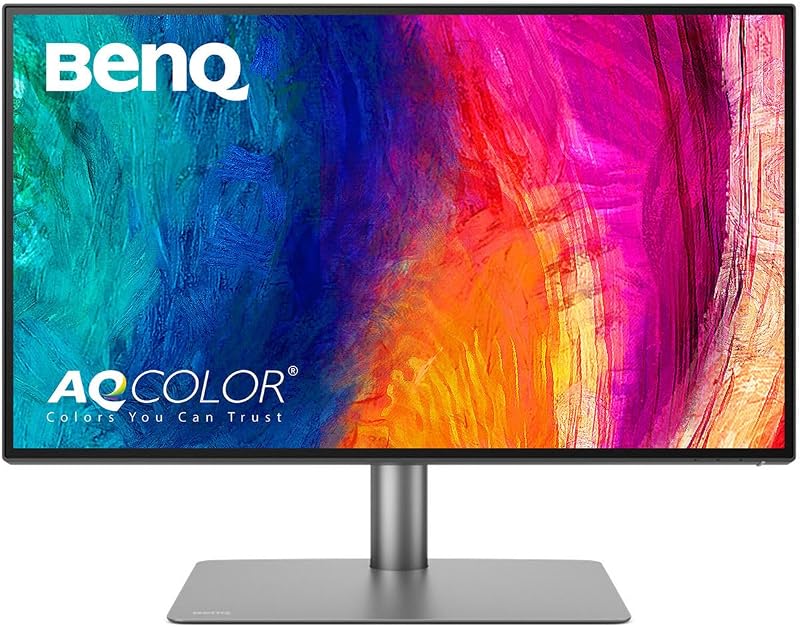
For creative professionals, a monitor must serve as a trustworthy reference standard where colors remain predictable from digital creation to final delivery. When evaluating the Dell U3423WE or BenQ PD2725U for graphic design, the PD2725U was engineered directly around the requirements of production artists and illustrators. It features BenQ AQCOLOR technology, factory calibration delivering Delta E 3 accuracy, and official Pantone validation. The listing specifies 100 percent coverage of sRGB and Rec.709 color spaces alongside 95 percent P3 wide gamut coverage. It also includes BenQ ICCsync, which synchronizes color profiles within one second through the Display Pilot software.
The U3423WE also provides extensive color capabilities, featuring a wide color depth of 1.07 billion colors and wide color coverage spanning 98 percent of the DCI-P3 color space. The monitor includes integrated ComfortView Plus hardware low-blue-light filtering to reduce eye fatigue without degrading color fidelity across its 178-degree viewing angles. A user cross-referencing the dell u2723qe vs benq pd2725u will observe that Dell matches broad gamut percentages, but the U3423WE focuses on general broad-gamut presentation rather than dedicated studio certification.
The trade-off lies in verification and workflow automation. While the U3423WE offers a wider nominal percentage of the DCI-P3 space at 98 percent compared to BenQ’s 95 percent P3 coverage, the PD2725U provides out-of-the-box factory calibration reports, verified Delta E performance, and Rec.709 compliance for broadcast video. As highlighted in many a BenQ PD2725U review, graphic designers and pre-press specialists require the accountability of Pantone validation and automated ICC synchronization over raw gamut volume alone.
Edge: BenQ PD2725U provides certified factory calibration, Pantone validation, and dedicated color management software tools.
Thunderbolt 3 Connectivity and macOS Workflow
Port selection and bus bandwidth determine how seamlessly a display integrates into a broader workstation ecosystem. In the BenQ PD2725U vs Dell U3423WE matchup, the PD2725U is built from the ground up for high-bandwidth computing, especially within Apple hardware environments. It incorporates dual Thunderbolt 3 ports with 40 Gb/s transfer speeds and 65W power delivery. This high-speed pipeline supports full Thunderbolt daisy-chaining, permitting users to run two 4K displays from a single cable connection to their host laptop. The BenQ also integrates two HDMI ports, one DisplayPort, a three-port USB hub, a built-in KVM switch, and the external Hotkey Puck G2 controller for rapid setting changes.
The U3423WE incorporates USB Type-C connectivity for video, data, and power transfer, supported by an HDMI interface to link secondary PCs, gaming consoles, and media hardware. The listing also details integrated dual 5W stereo speakers, providing standalone audio playback without requiring desktop speakers. Shoppers considering the samsung odyssey g9 49 vs benq pd2725u or assessing the Dell U3423WE or BenQ PD2725U for Mac will find that while standard USB-C handles single-display output effortlessly, it lacks the 40 Gb/s throughput required for true Thunderbolt daisy-chaining.
The practical difference is most acute on multi-device desks. The BenQ Hotkey Puck G2 lets users switch inputs, toggle color modes, and navigate on-screen menus via a dedicated desktop dial, bypassing awkward rear-mounted joystick buttons. Furthermore, its Display P3 synchronization aligns monitor colors to MacBook Retina screens via Display Pilot. For shoppers asking is BenQ PD2725U worth it for Mac-based setups, the inclusion of 40 Gb/s Thunderbolt 3 daisy-chaining and custom macOS calibration utilities provides an unmatched peripheral experience.
Edge: BenQ PD2725U delivers superior high-speed Thunderbolt 3 connectivity, dual-monitor daisy-chaining, and hardware Hotkey Puck navigation.
Ergonomics, Screen Finish, and Physical Comfort
Long working sessions require physical adjustments that keep the display aligned with proper posture while managing ambient reflections. When choosing between the Dell U3423WE or BenQ PD2725U for productivity, the physical design choices directly impact daily comfort. The U3423WE features a 34.1-inch curved display engineered to improve peripheral field of view and create near-uniform visual focus from the center to the outer edges. The curved panel reduces neck rotation because the outer corners angle naturally toward the viewer. The listing specifies dimensions of 2.3 inches deep, 32 inches wide, and 14.1 inches high, alongside a hefty weight of 29 pounds, reflecting its substantial build and integrated dual 5W speakers.
The PD2725U utilizes a flat 27-inch panel mounted to an ergonomic stand featuring height adjustment, tilt, swivel, and full 90-degree pivot capabilities into portrait orientation. At 18.3 pounds and measuring 10.8 inches deep by 24.2 inches wide by 17.7 inches high, the BenQ requires significantly less desk width than the 32-inch Dell. Readers exploring the dell u3423we vs samsung viewfinity s9 market know that portrait orientation is invaluable for mobile app UI design, long code compilation, and reading full-page documents, a physical adjustment that the wide, curved Dell cannot execute.
Screen coating and refresh rates further distinguish daily comfort. The Dell features a glossy finish that emphasizes contrast and vibrant imagery, backed by an 80 Hz refresh rate and a 5 ms GTG fast response time that keeps window dragging and scrolling smooth. The BenQ uses a matte finish that disperses harsh office glare and ambient window reflections, operating at a standard 60 Hz refresh rate. If your workstation suffers from strong overhead illumination, the BenQ matte finish controls reflections more predictably; however, for fluid movement and panoramic immersion, the curved 80 Hz Dell excels.
Edge: Dell U3423WE provides superior panoramic field-of-view immersion and a smoother 80 Hz refresh rate for long productivity sessions.
Pros and Cons
Dell U3423WE

Pros
- Expansive 34.1-inch 21:9 curved ultrawide panel
- Deep 2,000:1 contrast ratio with IPS Black
- Smooth 80 Hz refresh rate
- Integrated dual 5W stereo speakers
- 98% DCI-P3 wide color coverage
Cons
- Lower pixel density than 4K displays
- Heavy 29-pound chassis
- Glossy screen finish increases ambient reflections
BenQ PD2725U
Pros
- Native 4K UHD 3840 x 2160 resolution
- Dual Thunderbolt 3 ports with daisy chaining
- Factory-calibrated Delta E 3 accuracy and Pantone validation
- Full ergonomic adjustment including 90-degree pivot
- Hotkey Puck G2 for rapid input switching
Cons
- Standard 1,200:1 contrast ratio
- Modest 250-nit maximum brightness
- Limited to standard 60 Hz refresh rate
Who Should Buy Each One
Choose the Dell U3423WE If
- You manage multiple windows, browser tabs, and documents side by side and want to eliminate multi-monitor bezel seams.
- You prioritize rich black levels and high contrast for working in dark rooms, powered by 2,000:1 IPS Black technology.
- You edit audio or video along wide horizontal timelines and benefit from an expansive 21:9 curved aspect ratio.
- You want built-in desktop audio with integrated dual 5W stereo speakers and smoother 80 Hz scrolling.
Choose the BenQ PD2725U If
- You produce graphic design, print media, or commercial photography demanding factory calibration, Delta E 3 accuracy, and Pantone validation.
- You work primarily on Apple Mac computers and require dual 40 Gb/s Thunderbolt 3 ports with daisy-chaining and Display P3 synchronization.
- You need native 4K UHD 3840 x 2160 resolution for 1:1 video editing and sharp, high-density typographical proofing.
- You require an ergonomic stand that pivots 90 degrees into portrait orientation with a matte anti-glare display finish.
Final Verdict
For most creative professionals, Mac power users, and graphic designers, the BenQ PD2725U emerges as the stronger technical instrument. Its combination of native 3840 x 2160 4K UHD resolution, certified Delta E 3 factory calibration, Pantone validation, and 40 Gb/s Thunderbolt 3 daisy-chaining delivers a tightly integrated creative setup. It produces pristine typography, razor-sharp vector artwork, and dependable color accuracy that directly translates across production workflows, while its Hotkey Puck G2 and matte screen finish simplify daily studio operations.
However, the Dell U3423WE is the clear winner for multitasking knowledge workers, financial analysts, and media editors who value continuous visual real estate over absolute pixel density. With its 34.1-inch curved 21:9 panel, double the static contrast ratio at 2,000:1 via IPS Black, an 80 Hz refresh rate, and integrated dual 5W speakers, the Dell creates an exceptionally comfortable and immersive environment for multi-window management. If your priority is panoramic workflow efficiency and deep black levels rather than print-certified color reproduction, the U3423WE provides the superior workspace solution.
FAQ
Can the BenQ PD2725U daisy-chain a second 4K monitor?
Yes, the BenQ PD2725U features dual Thunderbolt 3 ports with 40 Gb/s bandwidth and 65W power delivery, allowing you to daisy-chain up to two 4K displays from a single host computer cable.
Does the Dell U3423WE have built-in speakers?
Yes, the Dell U3423WE includes integrated dual 5W speakers capable of delivering standalone desktop stereo sound without requiring external audio hardware.
What is the difference between IPS Black on the Dell and standard IPS on the BenQ?
The Dell U3423WE uses IPS Black technology to achieve a 2,000:1 static contrast ratio, which deepens dark tones and improves grey level consistency. The BenQ PD2725U uses standard IPS technology with a 1,200:1 contrast ratio, which delivers accurate color tracking but lighter black reproduction in dim lighting.
Can the Dell U3423WE rotate into portrait orientation?
No, the Dell U3423WE features a wide 34.1-inch curved ultrawide form factor that does not support 90-degree portrait pivot. If portrait orientation is essential for your workflow, the BenQ PD2725U includes full pivot flexibility on its ergonomic stand.
Which monitor has a higher refresh rate?
The Dell U3423WE specifies an 80 Hz refresh rate with a 5 ms fast response time, providing smoother window movement and scrolling compared to the standard 60 Hz refresh rate on the BenQ PD2725U.
Does the BenQ PD2725U support Mac color profiles automatically?
Yes, the BenQ PD2725U includes BenQ ICCsync technology compatible with Display P3, enabling one-second color profile synchronization between the display and connected Mac computers through the BenQ Display Pilot utility.


