Choosing between the Samsung Odyssey G9 49 and the BenQ PD2725U comes down to whether your primary computing focus demands extreme panoramic immersion or calibrated, compact color precision. The Odyssey G9 uses an expansive 49-inch curved form factor engineered around a rapid 240Hz refresh rate for simulation and wide-angle gaming, whereas the PD2725U centers on a flat 27-inch 4K IPS panel built with factory-calibrated accuracy and streamlined Mac connectivity.
Gamers, flight-sim enthusiasts, and power users who need seamless multi-window screen area without a center bezel should choose the Samsung display. Visual designers, photo editors, and studio professionals who rely on exact color reproduction and single-cable Thunderbolt integration should select the BenQ monitor.


Samsung Odyssey G9 49 vs BenQ PD2725U at a Glance
| Attribute | Samsung Odyssey G9 49 | BenQ PD2725U |
|---|---|---|
| Screen Size and Shape | 49 inches, 1000R curved | 27 inches, flat |
| Aspect Ratio | 32:9 | 16:9 |
| Panel Technology | VA LCD | IPS LCD |
| Native Resolution | Dual QHD (5120 x 1440) | 4K UHD (3840 x 2160) |
| Pixel Pitch | 0.23 mm | 0.16 mm |
| Refresh Rate | 240Hz | 60Hz |
| Response Time | 1ms (GtG) | Not listed |
| Peak Brightness | 1000 cd (DisplayHDR 1000) | 250 cd |
| Color Gamut and Accuracy | 92 Color Gamut | 100% sRGB / Rec.709, 95% P3, Delta E ≤ 3 |
| Connectivity | Auto Source Switch+ (ports not fully detailed) | Thunderbolt 3 (65W PD), 2x HDMI, DisplayPort, USB-C, USB Hub |
| Best For | Immersive gaming and multi-window multitasking | Color-critical design, video editing, and Mac workflows |
Display Form Factor and Resolution
The screen geometry and pixel arrangement represent the starkest physical difference between these two units. The Samsung Odyssey G9 features a massive 49-inch panel with an ultra-wide 32:9 aspect ratio and an aggressive 1000R curve designed to match the natural peripheral arc of human vision. With a Dual QHD resolution of 5120 x 1440, it supplies the horizontal pixel count of two standard 27-inch 1440p displays joined seamlessly without a middle frame. This panoramic field provides an unmatched field of view in driving simulators and expansive horizontal timelines for productivity.
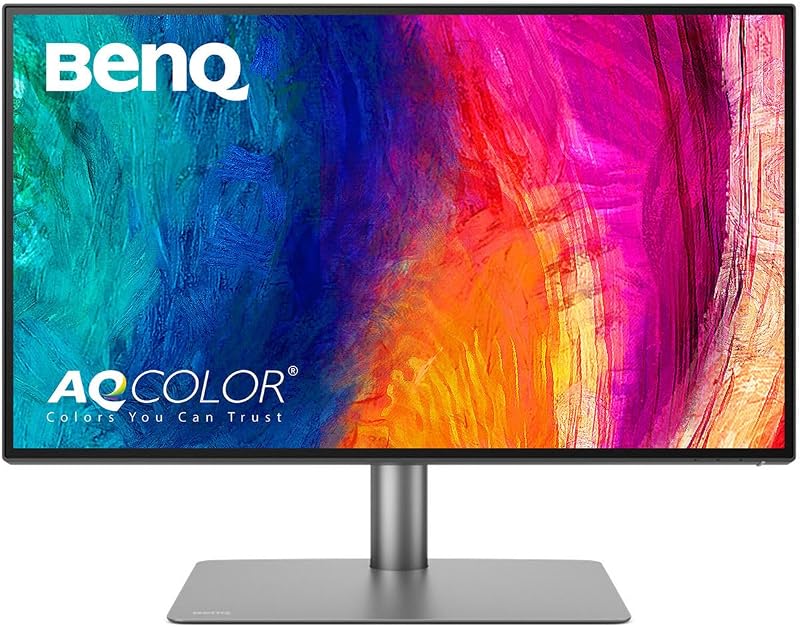
The BenQ PD2725U takes a traditional 16:9 approach on a flat 27-inch matte display. While it offers significantly less physical width than the Samsung, it packs a full 4K UHD resolution of 3840 x 2160 pixels into that smaller frame. Comparing the Dell U2723QE vs Samsung Odyssey G9 49 reveals how dramatic the pixel density divide can be across screen formats: the PD2725U achieves a tight 0.16 mm pixel pitch, whereas the Odyssey G9 sits at 0.23 mm. Text, vector lines, and high-resolution photographs appear noticeably sharper on the BenQ panel because more pixels occupy every square inch.
Choosing between samsung odyssey g9 dqhd vs benq pd2725u 4k comes down to screen area versus pixel density. The Odyssey G9 gives you vast real estate to position three or four application windows side by side without scaling down fonts. Conversely, the PD2725U offers the high pixel density required to evaluate 4K video frame by frame at 1:1 scale or inspect fine typography without rendering artifacts. The BenQ screen also consumes far less vertical field of view, making it easier to see the entire canvas without turning your head.
Edge: Tie. The Odyssey G9 wins on panoramic screen area, while the PD2725U wins on absolute pixel density and text clarity.
Color Accuracy and Visual Fidelity
Color presentation highlights the divergent target audiences of these monitors. The BenQ PD2725U uses an IPS panel engineered specifically for design precision and consistent viewing angles. It arrives factory-calibrated with an accuracy rating of Delta E ≤ 3, Pantone validation, and AQCOLOR technology. It covers 100% of the sRGB and Rec.709 color spaces alongside 95% of the Display P3 gamut. For designers debating if the benq pd2725u is worth it, this level of verified precision eliminates guesswork when preparing media for print or high-end digital mastering.
The Samsung Odyssey G9 relies on a VA LCD panel designed around contrast and high-dynamic-range impact. The listing specifies a 92 color gamut rating and an expansive 1,000,000:1 contrast ratio supported by VESA DisplayHDR 1000 certification. In high-contrast sequences, the Odyssey G9 reaches up to 1000 cd of peak brightness, delivering blinding highlights and deep shadow tones that the BenQ cannot match. An integrated sensor also drives Adaptive Picture, automatically adjusting screen luminance based on room lighting conditions.
When evaluating the samsung odyssey g9 49 or benq pd2725u for creative work, the decision hinges on fidelity versus dynamic punch. As seen in studio analyses like our Samsung ViewFinity S9 vs BenQ PD2725U comparison, professional video colorists and print artists need uniform chromatic accuracy and calibrated P3 coverage rather than dramatic HDR bursts. The BenQ screen has a native brightness of 250 cd and a 1200:1 contrast ratio, which provides a balanced, realistic baseline for studio lighting. The Odyssey G9 excels at delivering dazzling sensory entertainment, but its curved VA panel and uncertified calibration make it less dependable for strict studio mastering.
Edge: BenQ PD2725U. Its factory calibration, Delta E certification, and Pantone validation deliver dependable accuracy for visual professionals.
Motion Handling and Gaming Performance
In motion rendering, the gulf between these displays is absolute. The Odyssey G9 is built from the ground up as an elite performance gaming display. It features a blistering 240Hz refresh rate combined with a 1ms gray-to-gray response time, which the manufacturer notes falls within an average range of 1.00ms to 1.99ms. Fast camera pans remain crisp, and motion blur is reduced to an absolute minimum. To prevent image tearing and stuttering during hardware frame dips, Samsung equips the display with AMD FreeSync Premium Pro.
The BenQ PD2725U operates at a standard 60Hz refresh rate. BenQ designed this monitor for desktop publishing, layout creation, and video editing rather than high-velocity gaming. The listing does not specify a millisecond response time rating or variable refresh rate support such as FreeSync or G-Sync. While a 60Hz signal is entirely adequate for general creative workflows, audio editing, and video playback up to 60 frames per second, it feels noticeably less fluid when dragging windows, scrolling documents, or running modern interactive 3D applications.
Comparing odyssey g9 240hz vs benq pd2725u 60hz shows four times the frame throughput on the Samsung display. Beyond pure motion metrics, the Odyssey G9 enhances gaming engagement using integrated CoreSync and Core Lighting+ rear lighting, which projects game colors onto the wall behind the monitor. Similar to findings in our Samsung Odyssey G9 49 vs ViewFinity S9 overview, the G9 dominates interactive entertainment and motion clarity across the board.
Edge: Samsung Odyssey G9 49. Its 240Hz refresh rate, 1ms response time, and AMD FreeSync Premium Pro deliver unmatched motion performance.
Connectivity and Workflow Integration
Connectivity options determine how smoothly a monitor slots into your existing hardware ecosystem. The BenQ PD2725U is heavily optimized for Apple and modern laptop ecosystems through dual Thunderbolt 3 ports. With 40 Gb/s bandwidth and 65W power delivery, a creative professional can connect a compatible laptop using a single cable to handle video transmission, data transfer, and battery charging simultaneously. Furthermore, the Thunderbolt 3 output allows users to daisy-chain a secondary 4K display directly from the monitor without running extra cables back to the host computer.
The PD2725U also incorporates a comprehensive productivity hub. It includes two HDMI ports, one DisplayPort, a 3-port USB hub, a headphone jack, an integrated KVM switch, and the external Hotkey Puck G2 controller. Through the BenQ Display Pilot utility, the monitor supports ICCsync, synchronizing Display P3 color profiles between a Mac and the display in one second. Analyzing benq pd2725u mac vs samsung odyssey g9 setups demonstrates that the BenQ monitor serves as an all-in-one docking station tailored to portable creative machines.
The Samsung Odyssey G9 focuses its multitasking features on multi-source screen partitioning rather than high-bandwidth laptop docking. It includes Picture-by-Picture (PBP) to view two video inputs simultaneously in their native resolution, alongside Picture-in-Picture (PIP) to float a second source covering up to 25% of the screen. It also features Auto Source Switch+ to instantly detect and switch to newly powered devices. However, the listing does not detail dedicated Thunderbolt connectivity, power delivery wattage, or integrated KVM switching hardware, requiring desktop graphics connections to achieve its maximum resolution and refresh rate.
Edge: BenQ PD2725U. Dual Thunderbolt 3 ports with 65W charging, daisy-chaining, ICCsync, and an integrated KVM provide superior workstation flexibility.
Ergonomics, Physical Footprint, and Desk Setup
Physical requirements and workspace constraints create a significant distinction between these products. The Samsung Odyssey G9 is a massive piece of hardware measuring 45.2 inches wide, 16.6 inches deep, and 22.4 inches high, weighing a substantial 34.4 pounds. It requires an extraordinarily deep and sturdy desk to accommodate its expansive Hexa stand and deep 1000R curve without encroaching on keyboard and mouse space. Samsung equips the stand with swivel, tilt, and height adjustments, and the chassis is compatible with standard VESA monitor mounting brackets.
The BenQ PD2725U is considerably more compact, measuring 24.2 inches wide, 10.8 inches deep, and 17.7 inches high, with a total weight of 18.3 pounds. Its smaller desktop footprint makes it easy to integrate into standard workstations, shared studio bays, or smaller home offices. For comparisons involving large ultrawide footprints against traditional units, our guide on the Dell U3423WE vs Samsung Odyssey G9 49 illustrates how desktop depth can dictate hardware choices.
Ergonomically, the BenQ offers one critical capability that the curved Samsung cannot provide: 90-degree pivot orientation. The PD2725U stand allows full tilt, swivel, height adjustment, and vertical rotation into portrait mode, which is essential for coding, reading long documents, and editing vertical mobile video. Power consumption also reflects the size gap: the Odyssey G9 consumes 120 watts during operation, while the PD2725U draws just 37 watts. Users with limited desk depth or those who prioritize vertical orientation will find the BenQ far easier to place.
Edge: BenQ PD2725U. Its smaller footprint, 90-degree pivot capability, and low power consumption make it substantially more adaptable to various workspaces.
Pros and Cons
Samsung Odyssey G9 49

Pros
- Massive 49-inch 1000R curved Dual QHD screen
- Ultra-fast 240Hz refresh rate and 1ms response
- 1000 nit peak brightness with DisplayHDR 1000
- AMD FreeSync Premium Pro tear-free gaming
- Built-in PBP and PIP multitasking
Cons
- Heavy 34.4-pound frame requires deep desk
- Higher 120W power consumption
- No portrait pivot adjustment
View Samsung Odyssey G9 49 on Amazon
BenQ PD2725U
Pros
- Sharp 4K UHD resolution with 0.16 pixel pitch
- Factory calibrated with Delta E under 3
- Dual Thunderbolt 3 ports with 65W charging
- Full pivot support for portrait mode
- Integrated KVM switch and Hotkey Puck G2
Cons
- Standard 60Hz refresh rate
- Modest 250 cd brightness rating
- No variable refresh rate gaming support
Who Should Buy Each One
Choose the Samsung Odyssey G9 49 If
- You want complete visual immersion in racing titles, flight simulators, or cinematic action games with a panoramic 32:9 field of view.
- You require a competitive 240Hz refresh rate, 1ms response times, and AMD FreeSync Premium Pro to prevent tearing during fast gameplay.
- You want to eliminate the bezel gap of a dual-monitor desk setup by combining two 1440p displays into a single seamless panel.
- You need robust Picture-by-Picture multitasking to monitor two distinct video sources side by side on one screen.
Choose the BenQ PD2725U If
- You are a professional graphic designer, video editor, or photographer who needs factory-calibrated colors, Pantone validation, and Delta E ≤ 3 precision.
- You use a Mac laptop and want single-cable Thunderbolt 3 video, data transmission, and 65W device charging.
- You need the versatility of portrait orientation through a 90-degree pivoting ergonomic stand.
- You have limited desktop surface area or prefer high-density 4K pixel sharpness over an expansive ultrawide curve.
Final Verdict
When deciding whether to choose the samsung odyssey g9 49 or benq pd2725u for productivity, your choice must align with the nature of your daily workload. The Samsung Odyssey G9 delivers an extraordinary 49-inch panoramic canvas, unmatched 240Hz speed, and bright HDR highlights, making it the undisputed winner for gaming, simulation setups, and horizontal multi-window spreadsheets. If your workspace has the physical depth to support its 34.4-pound frame, it transforms the desktop into an uninterrupted command center.
For creative professionals, digital artists, and studio environments, the BenQ PD2725U stands out as the correct tool. Its factory-verified color accuracy, sharp 4K pixel pitch, Thunderbolt 3 daisy-chaining, and flexible portrait pivot solve the exact challenges encountered in visual production workflows. While it lacks the high refresh rate and sweeping width of the Odyssey G9, its dependable color rendering and clean workstation integration make it the superior choice for media creation.
FAQ
Can the BenQ PD2725U match the gaming performance of the Odyssey G9
No, the BenQ PD2725U is limited to a 60Hz refresh rate and is engineered primarily for static image precision and video production. The Samsung Odyssey G9 features a 240Hz refresh rate, 1ms response time, and AMD FreeSync Premium Pro, making it vastly superior for gaming motion clarity.
How does the pixel density compare between the Samsung Odyssey G9 DQHD and BenQ PD2725U 4K
The BenQ PD2725U delivers a higher pixel density due to its 0.16 mm pixel pitch across a 27-inch 4K screen, producing very sharp text and fine graphic details. The Samsung Odyssey G9 has a 0.23 mm pixel pitch across its 49-inch Dual QHD surface, offering massive horizontal real estate rather than ultra-dense pixels, similar to what we discussed in the LG 34WN80C vs Samsung Odyssey G9 49 comparison.
Does the Samsung Odyssey G9 support single-cable Thunderbolt 3 charging for Mac laptops
No, the listing does not specify Thunderbolt 3 connectivity or USB-C power delivery on this Odyssey G9 model. In contrast, the BenQ PD2725U includes dual Thunderbolt 3 ports with 65W power delivery to transmit video, data, and power over a single connection.
Can the Samsung Odyssey G9 rotate into portrait mode like the BenQ PD2725U
No, the Odyssey G9 stand supports height adjustment, tilt, and swivel, but its massive 45.2-inch curved frame cannot pivot into portrait mode. The BenQ PD2725U includes a fully versatile ergonomic stand that supports a 90-degree pivot for vertical viewing.
Does the BenQ PD2725U support dual-computer control with a single keyboard and mouse
Yes, the BenQ PD2725U features an integrated KVM switch along with its Hotkey Puck G2, allowing you to control two different host systems using one set of input peripherals. The Odyssey G9 supports PBP and PIP viewing modes alongside Auto Source Switch+, but does not include a hardware KVM switch in its listing specifications.
How much more power does the Samsung Odyssey G9 consume compared to the BenQ PD2725U
The Samsung Odyssey G9 has a rated power consumption of 120 watts, which powers its massive 49-inch curved backlight and 1000 cd peak brightness. The BenQ PD2725U is substantially more energy-efficient, drawing only 37 watts during standard operation.


