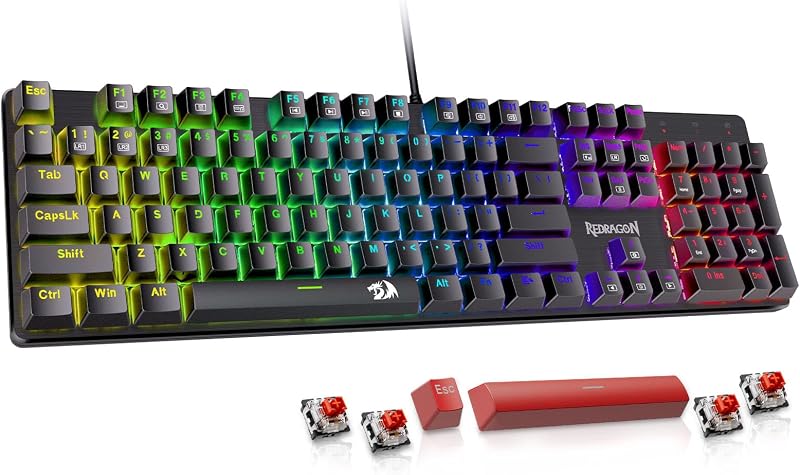
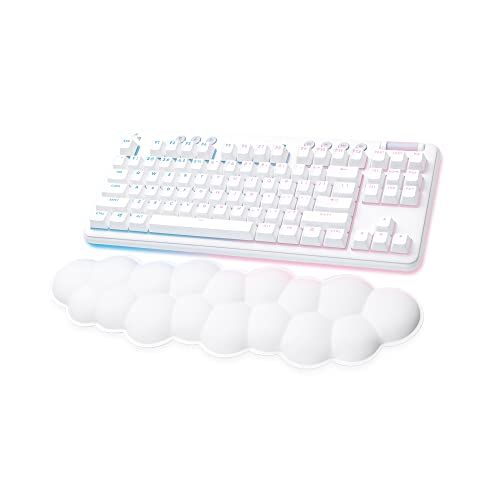
The decisive contrast between these two mechanical boards centers on desk layout and cable management: the Logitech G413 provides a full-size, permanently wired deck complete with a numeric keypad and an integrated USB passthrough port, while the Logitech G715 delivers a compact tenkeyless wireless design equipped with multi-device connectivity and a cloud-shaped wrist rest.
Choose the Logitech G413 if you work with spreadsheets or complex keybinds and need an uninterrupted wired link with a built-in peripheral port. Pick the Logitech G715 if you want a clutter-free desk surface, larger mouse-swiping clearance for gaming, and plush wrist support right out of the box.

Logitech G413 vs Logitech G715 at a Glance
| Feature | Logitech G413 | Logitech G715 |
|---|---|---|
| Form Factor | Full-size (104 keys, 4 sections) | Tenkeyless / TKL (87 keys, 1 section) |
| Connectivity Technology | Wired USB (with dedicated relay cable) | Lightspeed wireless, Bluetooth, Wired USB-C |
| Mechanical Switch Type | Romer-G Tactile | GX Brown Tactile |
| Chassis Construction | 5052 aluminum alloy top plate | White Mist body with swappable top plate |
| Wrist Rest Included | No | Yes (Cloud-shaped palm rest) |
| Power / Battery Life | Continuous bus power (no battery) | Rechargeable (25 to 30 gaming hours) |
| Backlighting System | Lightsync RGB / precise key backlighting | Per-key and perimeter Lightsync RGB |
| USB Relay / Passthrough | 1 x USB 2.0 port | None |
| Platform Compatibility | Windows (compatible with PC, laptop, phone) | Windows, macOS, ChromeOS, gaming consoles |
| Best For | Stationary battlestations and data entry | Low-clutter desks and ergonomic gaming |
Form Factor and Desk Ergonomics
Physical footprint is the most immediate factor shaping how you interact with a gaming keyboard. The full-size footprint of the G413 encompasses 104 keys across four separate sections, retaining a dedicated 10-key numeric keypad, arrow cluster, and standard navigation row. While this layout supports complex macro mapping and rapid numeric input, it occupies significant desk width. In practice, a 104-key board forces your mouse hand further outward, widening your shoulder posture during intense gaming sessions. When comparing desktop space solutions like those in our logitech g413 vs mx mechanical analysis, wide boards inherently restrict rapid, low-sensitivity mouse tracking.
In contrast, the G715 uses a tenkeyless format featuring 87 keys across a single condensed section. By omitting the numeric pad, the G715 liberates crucial desk real estate on the right side of the deck. This allows gamers to place their mouse closer to the keyboard center, keeping shoulders squared and arms in a natural, fatigue-reducing alignment. When weighing the Logitech G413 vs G715 difference in layout, the G715 clearly favors players who prioritize sweeping mouse movements in competitive first-person shooters or who maintain smaller work surfaces.
The compact footprint of the G715 also translates directly into mobility. While neither model is primarily an ultra-compact travel peripheral, the wireless TKL frame packs neatly into bags without the risk of snagging an attached cable. The G413 is distinctly designed for stationary battlestations where the board stays locked in place, leaving the G715 as the far more agile desktop companion.
Edge: Logitech G715 for freeing up mouse sweeping area and fostering an ergonomic shoulder posture.
Connectivity, Battery Life, and Passthrough Ports
The method used to communicate with your host computer creates stark operational trade-offs between continuous power and wireless flexibility. The G413 is an exclusively wired peripheral that utilizes a thick, dual-connector USB cable. One plug powers the keyboard, while the second routes data through to an integrated USB 2.0 passthrough port positioned directly on the rear edge. This built-in relay allows users to plug in a gaming mouse, flash drive, or headset without bending behind their desktop tower, ensuring an unbroken connection that never demands battery checks or charging pauses.
Conversely, the G715 is engineered around complete cable detachment, supporting both proprietary 2.4 GHz Lightspeed wireless and multi-device Bluetooth connectivity. In addition, the listing indicates that you can dual sync this keyboard alongside a compatible G705 wireless mouse using a single Lightspeed USB receiver, preserving open ports on your PC. As examined in our logitech g715 vs mx mechanical overview, modern wireless connections deliver ultra-responsive input performance that rivals wired links.
Untethered freedom does introduce battery management. The Logitech G715 wireless battery life delivers between 25 and 30 gaming hours on a single charge with all RGB illumination active, recharging via an included USB-C to USB-A cable. While you can continue typing while plugged in, the G413 avoids all battery degradation, pairing rituals, and charging cycles by maintaining a permanent, continuous connection. However, the multi-platform pairing of the G715 makes it vastly easier to alternate between a primary gaming PC, a laptop, or a console.
Edge: Logitech G715 for versatile multi-device wireless freedom and single-receiver mouse pairing.
Mechanical Switches and Actuation Feel
Keystroke tactile feedback and physical key mechanics dictate both typing accuracy and in-game reaction times. The Logitech G413 switch type is the proprietary Romer-G tactile mechanical switch. Built for responsiveness and durability, Romer-G switches feature a subtle physical actuation bump that lets competitive players confirm registered keystrokes without bottoming out the key. Furthermore, the G413 package includes 12 faceted gaming keycaps designed to help players locate and grip essential gameplay keys through tactile memory alone. In any comprehensive Logitech G413 review, this focused gaming switch layout stands out for raw competitive action.
On the other side of the matchup, the G715 relies on standard GX Brown tactile switches. GX Browns provide a familiar tactile mechanical key travel with a noticeable tactile bump halfway through the keystroke. The feel is crisp, predictable, and exceptionally well-suited for mixed workflows where typing balance matters just as much as gaming reaction times. When evaluating options in guides like the logitech g413 vs mx keys s comparison, a responsive tactile switch provides a tangible advantage over non-mechanical alternatives.
When deciding between the Logitech G413 or G715 for gaming, the choice comes down to actuation preference and keycap design. The Logitech G413 Romer-G tactile switches prioritize rapid esports inputs and feature purpose-built faceted keycap replacements. The GX Brown switches on the G715 deliver a classic mechanical feel with wide aftermarket stem compatibility, ensuring versatile everyday operation.
Edge: Logitech G413 for its dedicated Romer-G tactile speed and included set of 12 faceted gaming keycaps.
Chassis Build Quality and Wrist Comfort
Chassis materials dictate physical longevity, structural rigidity, and daily typing comfort. The G413 is constructed with a top case forged from 5052 aluminum-magnesium alloy. This brushed metal finish gives the keyboard a slim, blade-like aesthetic while keeping the frame rigid and completely flex-free. Underneath, the G413 features height-adjustable feet with rubber stabilizers, dedicated cable management channels for routing mouse and headset cords, and a water-resistant design that protects internal electronics from accidental spills.
The G715 approaches hardware construction with an emphasis on soft luxury and aesthetic flexibility. As part of Logitech’s Aurora Collection, it features a distinctive White Mist finish and ships with a custom, cloud-shaped keyboard palm rest. This plush wrist support cushions hands at the correct angle, alleviating wrist extension and joint tension during prolonged gaming or typing sessions. As explored in our logitech g715 vs mx keys s analysis, having an ergonomically sculpted rest included in the box saves your wrists from repetitive strain.
Furthermore, the G715 embraces visual customization. Its top plate is completely detachable, allowing users to personalize the deck with swappable faceplates and keycaps in distinct colorways such as Pink Dawn and Green Flash (sold separately). If you question whether the physical package makes the Logitech G715 worth it, the combination of cloud cushioning and customization options stands in sharp contrast to the utilitarian, heavy-duty metal build of the G413.
Edge: Logitech G715 for including a plush cloud wrist rest and offering swappable top plate customization.
Backlighting, Media Controls, and Platform Compatibility
Lighting presentation, audio shortcuts, and operating system versatility separate basic input devices from refined control centers. The G413 delivers precise key backlighting designed for night-time clarity. Because the illumination is channeled cleanly through the Romer-G stems, light bleed around the aluminum surface is minimized, providing sharp legibility. However, media adjustments and volume changes on the G413 require awkward two-handed function key combinations, and its platform focus is geared firmly toward Windows computers.
The G715 expands lighting capabilities into a visual centerpiece. The Logitech G715 mechanical keyboard specs highlight both per-key illumination and a 360-degree perimeter underglow strip powered by Lightsync RGB. The keyboard ships with preloaded Play Mood animations capable of displaying 16.8 million colors, fully customizable via Logitech G HUB software. Crucially, the G715 incorporates dedicated physical media buttons alongside an analog volume roller on the top edge, giving you immediate control over audio levels without tabbing out of an active game. When evaluating aesthetic setups against minimalist devices in our logitech g715 vs logitech pebble keys 2 k380s overview, the G715 provides top-tier ambient glow.
Platform compatibility also tilts significantly toward the G715. While the G413 listing designates Windows support, the G715 offers native operation across Windows 10, macOS, and ChromeOS (version 134 and higher), along with connectivity for gaming consoles and compatible tablets like the AAUB P30. This cross-platform utility makes the G715 far more adaptable if you switch between work MacBooks and gaming rigs.
Edge: Logitech G715 for dedicated media controls, 360-degree perimeter lighting, and broad operating system support.
Pros and Cons
Logitech G413

Pros
- Integrated USB 2.0 passthrough relay port
- Rigid 5052 aluminum alloy top plate
- Full 104-key layout with numeric keypad
- Includes 12 faceted gaming keycaps
- Spill-resistant chassis design
Cons
- Exclusively wired tether with thick cable
- No included wrist or palm rest
- Lacks dedicated audio volume roller
Logitech G715

Pros
- Lag-free Lightspeed wireless and Bluetooth
- Space-saving tenkeyless layout
- Includes cloud-shaped ergonomic palm rest
- Per-key and perimeter Lightsync RGB lighting
- Dedicated media buttons and volume roller
Cons
- Requires recharging after 25 to 30 hours
- Lacks dedicated numeric keypad
- No integrated USB passthrough port
Who Should Buy Each One
Choose the Logitech G413 If
- You need a dedicated 10-key numeric keypad for productivity, spreadsheeting, or entering account credentials.
- You want a convenient USB 2.0 relay passthrough port to connect a wired gaming mouse directly to your keyboard.
- You prefer a zero-maintenance wired connection that never runs out of power or requires battery recharging.
- You appreciate a rigid, brushed 5052 aluminum alloy chassis equipped with water-resistant spill protection.
Choose the Logitech G715 If
- You want a compact tenkeyless footprint that leaves generous desk clearance for wide mouse sweeps.
- You switch between multiple machines and require Lightspeed wireless and Bluetooth connectivity for Windows, Mac, or ChromeOS.
- You suffer from typing fatigue and want a plush, cloud-shaped palm rest bundled directly in the box.
- You prefer dedicated hardware volume rollers, multimedia controls, and expressive perimeter RGB lighting.
Final Verdict
In a direct matchup between the Logitech G715 vs G413, the Logitech G715 wins the recommendation for most modern gamers. Its space-saving tenkeyless layout instantly improves your ergonomic posture by aligning your mouse arm naturally, while its dual wireless connections eliminate desktop cable clutter. Adding dedicated media controls, cross-platform compatibility for Windows and Mac, vibrant perimeter lighting, and an exceptionally comfortable cloud palm rest makes the G715 a versatile, complete gaming deck.
Nevertheless, the Logitech G413 remains the definitive choice for desktop users who cannot compromise on layout utility. Its full 104-key configuration ensures rapid numerical entry, while the integrated USB passthrough port simplifies mouse cable routing. Wrapped in an aircraft-grade 5052 aluminum shell with water-resistant engineering and rapid Romer-G tactile switches, the G413 is an unyielding, reliable workhorse for stationary gaming rigs.
FAQ
Does the Logitech G413 have wireless connectivity?
No, the Logitech G413 is an exclusively wired USB mechanical keyboard. It uses a heavy-duty cable with two standard USB plugs-one to power the keyboard itself and one to operate the built-in USB 2.0 relay passthrough port.
How long does the Logitech G715 wireless battery life last?
According to the product data, the internal rechargeable battery on the Logitech G715 provides between 25 and 30 gaming hours of continuous use with full RGB backlighting enabled. It recharges via an included USB-C to USB-A cable.
Can the Logitech G715 be used while charging?
Yes, the Logitech G715 supports both wireless and wired play. Connecting the included USB-C cable directly to your computer charges the internal battery while allowing you to continue typing and gaming without interruption.
What switch types do the Logitech G413 and G715 use?
The Logitech G413 features Logitech’s proprietary Romer-G tactile switches and includes 12 faceted replacement gaming keycaps. The Logitech G715 comes equipped with GX Brown tactile switches, delivering traditional tactile mechanical feedback.
Does the Logitech G413 come with a wrist rest?
No, the Logitech G413 does not include a wrist rest in the box, relying instead on underside height-adjustable tilt legs with rubber stabilizers. In contrast, the Logitech G715 includes a specialized cloud-shaped palm rest designed for ergonomic comfort.
What devices and operating systems work with each keyboard?
The Logitech G413 listing specifies Windows operating system compatibility across PCs, laptops, and mobile devices. The Logitech G715 supports Windows 10, macOS, ChromeOS (version 134 or higher), gaming consoles, and tablet computers like the AAUB P30.
How does the USB relay port work on the Logitech G413?
The Logitech G413 features a dedicated USB 2.0 passthrough port on the back edge of its aluminum frame. Connecting the keyboard’s secondary USB cable to your computer supplies direct power and data throughput to the port, allowing you to plug in a mouse or flash drive easily.