The defining technical difference between a hot swappable keyboard and a soldered keyboard is switch connection architecture: hot-swappable boards use specialized PCB sockets that allow mechanical switches to be removed and replaced by hand in seconds, while soldered keyboards anchor each switch to the circuit board with molten solder alloy. This physical distinction transforms how you maintain, customize, and repair your keyboard over its operational lifespan.
Choose a hot-swappable keyboard if you want the freedom to try different switch weights, swap failing switches instantly, and customize your board without buying specialized electronics tools. Choose a soldered keyboard if you want absolute physical connection permanence, long-term solder joint stability under rigorous conditions, and the freedom to build atypical custom layouts on compatible enthusiast PCBs.


Hot Swappable vs Soldered Keyboard at a Glance
| Feature | Hot Swappable Keyboard | Soldered Keyboard |
|---|---|---|
| Switch Mounting Method | Friction-fit mechanical sockets (3-pin or 5-pin) | Through-hole electrical solder joints |
| Switch Replacement Process | Tool-free puller removal in seconds | Desoldering and resoldering required |
| Specialized Tools Needed | Keycap and switch puller | Soldering iron, desoldering pump, solder wire, flux |
| Risk of PCB Heat Damage | None during switch changes | Moderate risk of lifted pads during desoldering |
| Component Lifespan Factor | Socket leaf tension cycles | Solder joint integrity |
| Layout Modularity | Fixed to predefined socket locations | Can support split spacebars or multi-layout pinholes |
| On-the-Fly Customization | High (swap switches anytime) | None (requires complete board tear-down) |
| Best For | Tinkerers, gamers, and easy maintenance | Layout purists and permanent assembly enthusiasts |
Switch Replacement Hot Swap vs Soldered Modding Flexibility
Switch replacement represents the most noticeable operational contrast between these two keyboard architectures. On a hot-swappable keyboard, each switch slot features a pre-installed socket beneath the printed circuit board. Changing a switch requires nothing more than popping off the keycap with a wire puller and grasping the top and bottom clips of the switch housing with a switch extraction tool. You pull the switch upward, align the metallic pins of a fresh switch with the socket holes, and press down until it snaps flush into the plate. As seen on versatile options like the AULA F75, modern hot-swap boards accommodate both 3-pin and 5-pin switches, enabling you to test tactile, clicky, or linear options in minutes without unplugging the unit.
In contrast, a soldered keyboard demands an involved workshop procedure for every switch change. To replace a single faulty switch on a soldered board, you must disassemble the case, extract the internal assembly, heat up a soldering iron, apply flux, and melt the connection points on the underside of the PCB while vacuuming away molten solder with a desoldering pump. Once both switch pins are freed from their solder pads, the switch can be pulled from the mounting plate. Installing the replacement requires aligning the switch, holding it flat against the plate, and feeding fresh solder wire into the heated joint. Performing this across a full-sized 104-key board can take several hours of tedious manual labor.
This modding disparity fundamentally changes how users interact with their hardware. If you enjoy testing different switch stems, swapping out spring weights, or applying grease to switch housings, a hot-swappable board removes friction from the hobby. The flexibility is comparable to the hardware freedom explored in our analysis of soldered vs upgradable laptop ram, where modular components grant immediate control over component lifecycles. With a soldered board, any desire to alter switch feel requires an extensive time investment and adequate electronics repair proficiency.
Edge: Hot swappable keyboard, providing effortless, tool-free switch swaps in seconds compared to the laborious desoldering process required on soldered boards.
Hot Swappable PCB vs Soldered PCB Durability and Lifespan
When assessing long-term mechanical reliability, the physical junction between switch and circuit board tells two very different stories. A hot-swappable PCB relies on mechanical leaf springs inside each socket to squeeze the thin metal switch pins. While convenient, these sockets experience mechanical wear whenever switches are removed and inserted. If a user inserts a switch with bent pins or pushes at an incorrect angle, the socket can be pushed off the underside of the PCB traces, breaking the electrical connection. Sockets also possess finite rating cycles, meaning repeated insertion and removal over many years can eventually loosen the tension leaves, causing intermittent key chatter or registration failures.
A soldered PCB establishes a permanent metallurgical bond between the switch pin and the copper barrel of the through-hole pad. Because there are no moving internal contact leaves under the board, soldered connections are impervious to the mechanical loosening that can affect hot-swap sockets. Solder joints resist vibrational stress, withstand heavy mechanical typing without loosening, and hold the switch firmly against the PCB substrate. For users who value long-term connection permanence without wanting to service socket contacts, this rigidity is a notable engineering advantage.
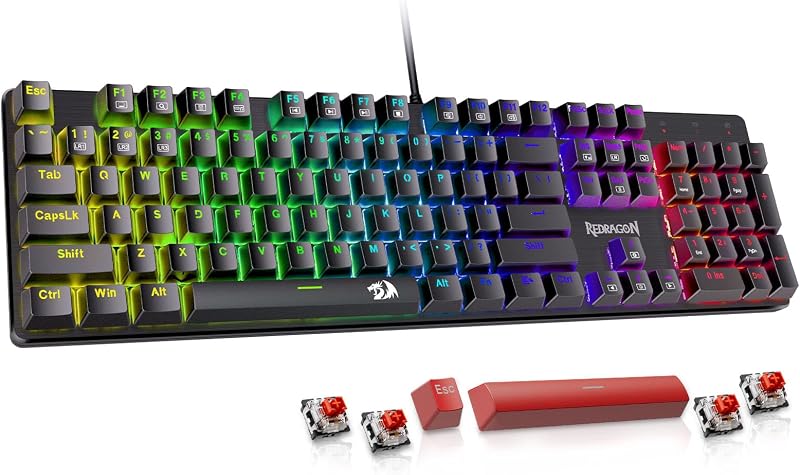
However, soldered switch durability vs hot swap dynamics shift dramatically when an individual switch actually fails. On a commercial board like the Redragon Mechanical Gaming Keyboard, which includes four spare switches and linear red switches out of the box, a broken switch is resolved in thirty seconds by dropping in a replacement. On a soldered board, repairing that single switch exposes the PCB to thermal stress. Desoldering irons can overheat delicate copper traces, potentially lifting the solder pad entirely and permanently severing the electrical circuit if handled without care.
Edge: Tie, because soldered boards offer superior physical joint permanence, while hot-swappable boards prevent heat-related PCB damage during repairs.
Hot Swappable or Soldered Keyboard for Gaming
Competitive players often look closely at latency, key responsiveness, and repair turnarounds when selecting hardware. In terms of raw signal response, both connection styles perform identically when the switch pins make solid contact with the electrical circuit. Electrical current travels through hot-swap socket leaves at the same functional speed as it does through a solid solder joint. The true performance distinction in gaming environments comes down to key tailoring and rapid maintenance under heavy use.
Gamers frequently wear out their high-frequency keys, such as WASD, spacebars, and shift keys, long before the rest of the board degrades. With a hot-swappable design, you can swap a malfunctioning key switch right before a competitive match without missing a beat. Furthermore, hot-swap flexibility lets gamers configure hybrid layouts: you can insert ultra-light linear switches on your movement cluster for rapid actuation while retaining heavier tactile switches on macro keys to prevent accidental presses. Modern designs such as the AULA F75 pair this socket adaptability with high-performance features like 16.8-million color RGB lighting, pre-lubed mechanical switches, and multi-mode 2.4GHz wireless connectivity.
Soldered keyboards remain common in fixed tournament environments where organizers prioritize rock-solid structural stability and eliminate any chance of a switch being yanked out during an aggressive keycap adjustment. However, if a soldered switch develops chatter or stops registering mid-season, the board must be benched until someone can desolder the fault. Comparing high-end gaming hardware often reveals similar trade-offs, as observed in our head-to-head match between the gmmk 3 vs ducky one 3, where instant maintenance often trumps legacy assembly methods for fast-paced play.
Edge: Hot swappable keyboard, allowing competitive players to repair failing movement keys instantly and mix switch types across key clusters.
Hot Swappable or Soldered Keyboard for Typing Acoustics and Feel
Typing feel and sound signature are dictated by how vibrations disperse through the switch, plate, PCB, and casing. Soldered keyboards have long been favored by traditional custom mechanical keyboard builders due to the absolute rigidity of the assembly. When every switch pin is soldered directly to the PCB, the switch housing, plate, and circuit board form a single continuous, rigid sandwich. This unified construction produces an exceptionally consistent acoustic profile across the entire key cluster, minimizing erratic rattles and ensuring uniform key bottom-out resistance.
Hot-swappable keyboards introduce tiny mechanical tolerances into the mounting structure. Because switch pins slide into friction sockets rather than fusing solid, there can be subtle variations in how individual switches seat against the mounting plate. In early hot-swap designs, this could lead to minor acoustic inconsistencies or slight switch wobble. Modern engineering has largely solved these acoustic discrepancies through structural innovations. The AULA F75, for instance, incorporates PCB single-key slotting, an integrated silicone pad, and five layers of sound-dampening filling to yield a deep, thocky acoustic profile that rivals premium custom soldered assemblies.
Typing comfort also hinges on switch maintenance. The ability to pull switches out to lubricate their stems and springs significantly enhances keystroke smoothness, reducing finger fatigue during long writing sessions. Understanding the shift from standard office typing toward mechanical precision is explored in our guide to mechanical vs membrane keyboard options. Because lubricating a soldered board requires desoldering all keys or injecting lubricants sloppily from the top, hot-swappable designs make achieving an optimal, smooth typing feel vastly more attainable for ordinary typists.
Edge: Hot swappable keyboard, making comprehensive switch lubrication and sound-dampening tuning accessible to anyone seeking optimal typing comfort.
PCB Layout Options and Hardware Versatility
While hot-swappable PCBs excel in component modularity, they suffer from an inherent physical constraint: fixed layout geometry. A hot-swap socket occupies a specific physical footprint on the back of the circuit board. Because of this footprint, manufacturers must drill socket holes in predetermined locations. Consequently, a hot-swappable keyboard usually locks you into a standard bottom row, a fixed backspace configuration, and an unalterable spacebar size. The Redragon Mechanical Gaming Keyboard, for example, delivers a locked standard 104-key 3-section layout, while compact variants like the AULA F75 provide an 80-to-81-key 75-percent arrangement with dedicated arrow keys and a multi-function knob.
Soldered printed circuit boards provide superior flexibility for custom layout planning. Because solder pads occupy far less PCB surface area than bulky mechanical hot-swap sockets, designers can punch multi-layout pinholes into a single PCB. A single soldered board can often support standard ANSI enter keys, ISO European layouts, stepped caps lock configurations, split backspace keys, and split spacebars simply by soldering the switch pins into alternative sets of through-holes. Enthusiasts building custom keyboards from the ground up often prefer soldered boards for this exact geometric freedom.
If you prefer standard layouts and desire rapid layout changes between formats, comparing distinct physical sizes is often more practical than rewiring switches. You can explore how standard layouts differ in our breakdown of 60% vs tkl keyboard designs, or compare full productivity form factors in our look at the keychron k2 vs k10 pro. Unless you plan to build an exotic, non-standard layout requiring split keys, the standardized layout of a hot-swap board will easily satisfy standard typing and gaming needs.
Edge: Soldered keyboard, offering support for multi-layout PCB options like split spacebars and stepped caps lock configurations.
Setup and Tooling Requirements
The upfront friction of owning and maintaining each keyboard type comes down to required tools and workspace safety. A hot-swappable keyboard is completely ready for maintenance right out of the box. Keyboards like the Redragon Mechanical Gaming Keyboard ship as complete wired packages featuring double-shot keycaps, anti-ghosting technology, and replacement switches. All you need to service the board is a basic hand puller. You can safely swap switches at your office desk, in a living room, or during a gaming event without preparing a dedicated workstation or worrying about ventilation.
Maintaining a soldered keyboard demands dedicated equipment and safety precautions. To assemble or rework a soldered board, you must purchase a temperature-controlled soldering iron, rosin-core electrical solder, a desoldering pump or copper wick, and liquid or paste flux. You also need a well-ventilated workspace to avoid breathing toxic rosin fumes, along with heat-resistant mats to protect your furniture. For beginners, the risk of accidental burns, scorched PCB traces, or cold solder joints adds significant friction to what should be an enjoyable hobby.
When asking whether a soldered keyboard is worth it, buyers must weigh whether they want to learn electronics assembly as a separate pastime. For those who enjoy hardware crafting, soldering a keyboard provides a rewarding, hands-on construction experience. For everyone else, the zero-tool requirement of hot-swappable hardware eliminates unnecessary hassle and secondary tool costs.
Edge: Hot swappable keyboard, requiring only an inexpensive hand puller rather than an entire electronics workstation and soldering iron.
Pros and Cons
Hot Swappable
Pros
- Tool-free switch replacement in seconds
- Supports mixed switch types across clusters
- Zero desoldering needed for switch repairs
- Extensive dampening and layout variations available
Cons
- Sockets wear down after repeated insertions
- PCB layouts restricted to fixed socket positions
View Redragon Mechanical Gaming Keyboard Wired 11 on Amazon
Soldered Keyboard
Pros
- Permanent, rigid metal solder joints
- Supports multi-layout PCB pinhole options
- No socket contact leaves to loosen over time
Cons
- Requires soldering iron and desoldering tools
- High risk of lifted PCB pads during repairs
- Labor-intensive switch replacement process
Who Should Buy Each One
Choose the Hot Swappable Keyboard If
- You want to test different tactile, clicky, and linear mechanical switches without buying multiple separate keyboards.
- You need the ability to fix a dead or chattering switch in under a minute without using electrical soldering tools.
- You want to pull switches easily to lubricate stems and modify sound dampening for a quieter, smoother typing experience.
- You prefer an out-of-the-box solution that comes with spare parts, keycap pullers, and standard gaming layouts.
Choose the Soldered Keyboard If
- You want absolute joint permanence and zero risk of mechanical socket wear from repeated switch installations.
- You are building a custom DIY keyboard project that requires an exotic layout, such as a split spacebar or stepped caps lock.
- You already own soldering gear and genuinely enjoy the hands-on craft of assembling through-hole electronics.
- You want a fixed assembly where switches can never accidentally dislodge when pulling tight-fitting artisan keycaps.
Final Verdict
For the vast majority of typists, programmers, and gamers, the hot-swappable keyboard is the superior choice. The ability to pull out a switch with a hand tool, drop in a replacement, and resume typing removes the single greatest point of failure in mechanical keyboards. Whether you choose a full-sized wired model like the Redragon Mechanical Gaming Keyboard or a feature-packed 75-percent wireless board like the AULA F75, hot-swappable architecture lets you tune keystroke feel, perform preventative maintenance, and extend your hardware lifespan without learning electronics repair.
A soldered keyboard remains a worthwhile option for dedicated hobbyists who treat keyboard building as an electronics craft. If your goal is to build an unusual ergonomic layout with split spacebars, or if you demand the structural permanence that only a direct metallurgical solder joint provides, a soldered PCB fulfills those niche requirements. However, unless you specifically need multi-layout pinholes or love working with a soldering iron, hot swappable keyboards offer vastly better everyday versatility, repairability, and modding potential.
FAQ
Can any mechanical switch fit into a hot swappable keyboard?
Most hot-swappable keyboards accept standard mechanical switches, but pin compatibility matters. Keyboards with 5-pin sockets, like the AULA F75, can accept both 3-pin and 5-pin switches directly. Keyboards equipped with 3-pin sockets require you to clip off the two plastic side-mounting pins on 5-pin switches before inserting them. Additionally, optical switches and Hall effect magnetic switches are not cross-compatible with standard mechanical hot-swap sockets.
Is a hot swappable keyboard worth it over a soldered one?
Yes, a hot-swappable keyboard is worth it for almost every buyer because it eliminates the need for soldering tools while making key repairs nearly instantaneous. If a switch begins double-typing or fails completely, you can pop it out and slide in a spare in seconds, avoiding the need to replace the entire board or desolder internal components.
Do hot swappable sockets wear out over time?
Hot swappable sockets use metal tension leaves that are rated for a finite number of insertions, typically between 50 and 100 swaps per socket. If you only change switches occasionally, the sockets will easily last for many years of regular use. Damage is most likely to occur if a switch is forced into the socket with bent pins, which can loosen the leaves or dislodge the socket from the circuit board.
Is a soldered keyboard more durable than a hot swappable keyboard?
A soldered keyboard is structurally more durable at the circuit joint because the switches are bonded directly to the PCB with solder alloy. This eliminates the risk of socket detachment or loose contact leaves. However, if a switch fails internally, repairing a soldered board carries the risk of damaging PCB pads with excessive heat during desoldering, making hot-swappable boards easier to keep operational long-term.
Can you convert a soldered keyboard into a hot swappable keyboard?
Yes, you can convert a soldered keyboard into a hot-swappable board by desoldering all factory switches and installing specialized aftermarket hollow metal eyelets, commonly known as Mill-Max sockets, into the through-holes. This process requires significant soldering proficiency and patience, as each switch requires two miniature sockets soldered flush to the PCB.
Does a hot swappable keyboard feel different to type on than a soldered keyboard?
Most typists cannot tell the difference in blind tests between well-built modern boards of either type. While soldered boards are slightly more uniform because every switch is fused rigid to the PCB, modern hot-swap keyboards counteract this with sophisticated multi-layer dampening foam, silicone pads, and slotted PCBs that deliver exceptional tactile feedback and deep acoustic profiles.



