The single deciding factor between these two flagship wireless mice is the trade-off between featherlight agility and feature density. Choosing between them comes down to whether you need a stripped-back, 63-gram ergonomic chassis optimized strictly for rapid low-friction sweeps in competitive shooters, or a full-featured ergonomic powerhouse built with eleven programmable inputs, multi-mode scrolling, and customizable lighting.
Gamers who prioritize twitch reflexes and pure competitive performance should pick the Razer DeathAdder V3 Pro, while players who demand deep macro customization, multi-device connectivity, and dynamic desk immersion should choose the Razer Basilisk V3 Pro.


Razer DeathAdder V3 Pro vs Basilisk V3 Pro at a Glance
| Feature | Razer DeathAdder V3 Pro | Razer Basilisk V3 Pro |
|---|---|---|
| Weight | 63 grams | Not listed |
| Sensor | Focus Pro 30K Optical Sensor | Focus Pro 30K Optical Sensor |
| Max Sensitivity | 30,000 DPI | 30,000 DPI |
| Switches | Optical Mouse Switches Gen-3 (90M clicks) | Optical Mouse Switches Gen-3 (90M clicks) |
| Programmable Buttons | 6 | 11 (10+1 configuration) |
| Scroll Wheel Type | Standard tactile scroll wheel | HyperScroll Tilt Wheel (free-spin and tactile) |
| Lighting | Logo embellishment (no Chroma RGB) | 13-zone Chroma lighting with full underglow |
| Connectivity | HyperSpeed Wireless, USB | HyperSpeed Wireless, Bluetooth, USB |
| Max Battery Life | Up to 90 hours | Up to 150 hours (Bluetooth), up to 110 hours (HyperSpeed) |
| Best For | Competitive FPS and pure esports performance | Multi-genre gaming, hotkey heavy titles, and everyday versatility |
Weight and Competitive Maneuverability
In high-stakes tactical shooters, mouse inertia directly impacts how quickly you can start a flick, change direction, and stop your crosshair on a target. When comparing the deathadder v3 pro vs basilisk v3 pro weight, the design philosophy behind each chassis becomes instantly obvious. The DeathAdder V3 Pro cuts total mass down to an ultra-lightweight 63 grams, making it over 25 percent lighter than previous iterations in the lineage. By trimming away extra hardware, decorative light bars, and complex wheel assemblies, it delivers an airy, uninhibited glide that reduces wrist strain during extended practice sessions.
The Basilisk V3 Pro approaches chassis design from the opposite perspective, prioritizing internal hardware, extra switch assemblies, and motorized scroll mechanics over pure mass reduction. While the product listing does not specify the exact total gram count for the Basilisk, its inclusion of a 13-zone lighting apparatus, an internal lithium-ion power pack, and an intricate tilt wheel inevitably produces a more substantial, anchored feel on the mousepad. For players browsing a razer deathadder v3 pro vs viper v2 pro style of featherweight competition, excessive mass acts as physical resistance during quick micro-adjustments.
Deciding between the deathadder v3 pro or basilisk v3 pro for fps titles hinges entirely on your aiming technique. Low-sensitivity arm aimers who sweep across oversized pads will benefit enormously from the minimal inertia of the DeathAdder, as lifting and resetting a 63-gram mouse requires almost zero physical effort. Conversely, high-sensitivity wrist aimers who prefer an anchored, stable base may appreciate the grounded posture of the Basilisk, though it remains noticeably less nimble when executing sharp target switches.
Edge: Razer DeathAdder V3 Pro because its 63-gram ultra-lightweight frame drastically reduces physical inertia for fast, effortless competitive aiming.
Programmable Buttons and Control Layout
Input flexibility determines how much control you can offload from your keyboard directly onto your gaming hand. The DeathAdder V3 Pro maintains a traditional, disciplined esports layout featuring 6 programmable buttons. This minimalist setup consists of the primary left and right clicks, a clickable scroll wheel, two standard side thumb buttons, and a dedicated profile or power control. This layout is designed specifically to prevent accidental misclicks during chaotic firefights, ensuring your thumb always rests in a secure, stable grip.
In stark contrast, the Basilisk V3 Pro provides an expansive command array boasting 11 programmable buttons in a 10+1 configuration. In addition to primary and secondary inputs, the mouse includes accessible thumb buttons, extra index-accessible controls, and multi-directional scroll inputs. Gamers who play MMOs, battle royales, action RPGs, or strategy games can bind essential abilities, inventory slots, voice channels, and item pickups directly to the mouse body without shifting their fingers off the movement keys on the keyboard.
This massive gap in input density represents the fundamental divide between an esports pointer and a hybrid workstation tool. Through the Razer Synapse App, Basilisk users can create complex macro sequences, remap secondary layers, and execute full loadout rotations with single-finger presses. If your library spans multiple genres that require dense keymaps, the extra five inputs on the Basilisk completely outclass the lean, esports-focused layout of the DeathAdder.
Edge: Razer Basilisk V3 Pro due to its versatile 11-button layout that accommodates complex macros and secondary gaming binds.
Scroll Wheel Mechanics and Everyday Versatility
The scroll wheel is often an overlooked component during hardware comparisons, but the architectural differences between these two models heavily influence both gaming and general desktop use. The DeathAdder V3 Pro features a conventional, fixed-step gaming wheel tuned for distinct tactile notches. In tactical shooters where the scroll wheel is frequently bound to weapon swapping or jump commands, distinct step resistance is mandatory to avoid accidental inputs during fast-paced movement sequences.
The Basilisk V3 Pro elevates wheel utility by incorporating the Razer HyperScroll Tilt Wheel. This advanced hardware mechanism allows users to toggle between distinct tactile notched scrolling for precise gaming inventory management and a friction-free spinning mode that speeds through lengthy web pages, massive documents, and expansive spreadsheets. Additionally, the wheel supports left and right horizontal tilt inputs, expanding its utility with two more immediately reachable programmable actions.
This mechanical flexibility makes the Basilisk an exceptional hybrid mouse for users who transition between intense evening gaming and daytime productivity workflows. While the simpler assembly on the DeathAdder V3 Pro successfully shaves off critical weight to benefit pure competitive play, it lacks the multi-axis tilt inputs and rapid-scroll utility found on the Basilisk. Readers who have examined comparisons like the razer deathadder v3 vs basilisk v3 will recognize this proprietary wheel mechanism as one of the Basilisk line’s primary functional differentiators.
Edge: Razer Basilisk V3 Pro thanks to its versatile HyperScroll Tilt Wheel that supports horizontal tilting, tactile notches, and free-spinning modes.
Sensor Performance and Optical Switch Technology
Tracking accuracy and click responsiveness are fundamental to the performance of any flagship pointer, and both mice share Razer’s most capable tracking and actuation hardware. At the core of each unit is the Razer Focus Pro 30K Optical Sensor, capable of reaching a maximum sensitivity of 30,000 DPI. This optical sensor provides flawless tracking performance across a wide array of surfaces, including transparent glass, while utilizing intelligent tracking functions to maintain consistent crosshair placement regardless of pad texture.
Click actuation is equally uniform across both models, as each mouse is built with Razer Optical Mouse Switches Gen-3. These switches achieve a blisteringly fast 0.2-millisecond actuation speed without any debounce delay, eliminating the mechanical contact points responsible for accidental double-clicking issues. Rated for an improved 90-million click lifecycle, both models offer elite mechanical durability and instantaneous shot registration, ensuring that neither hardware platform holds an advantage in sensor precision or switch reliability.
Because the core internal electronics are effectively identical, real-world tracking differences stem from weight and mousepad friction rather than hardware capability. Whether analyzing a razer deathadder v3 pro vs viper v3 pro matchup or evaluating this head-to-head, your crosshair tracking and click response will be virtually identical on both units. Both mice also support optimization through the Razer Synapse App alongside disabling pointer precision in Windows mouse settings to ensure raw, unadulterated tracking output.
Edge: Tie. Both models share the identical Focus Pro 30K Optical Sensor and Gen-3 optical switches rated for 90 million clicks.
Connectivity, Polling Rates, and Battery Longevity
Wireless endurance and data transmission speeds dictate how reliably a peripheral performs during long sessions. In analyzing deathadder v3 pro vs basilisk v3 pro battery life, the two mice cater to different endurance needs. The DeathAdder V3 Pro features an efficient, lightweight battery pack engineered to minimize mass, providing up to 90 hours of continuous competitive play on a single charge via USB Type-C. It connects via low-latency Razer HyperSpeed Wireless, which is 25 percent faster than conventional wireless protocols, operating smoothly within a 10-meter range.
The Basilisk V3 Pro features a broader array of connectivity options paired with extended endurance figures. The listing highlights up to 150 hours of operation over Bluetooth, up to 110 hours on Razer HyperSpeed Wireless at standard 1000 Hz polling, and up to 32 hours if upgraded to true 8000 Hz constant motion polling. The inclusion of Bluetooth makes the Basilisk far easier to pair with secondary laptops, tablets, or work machines without having to migrate the USB receiver.
Furthermore, the Basilisk V3 Pro supports advanced polling upgrades out of the box, allowing users to reach a true 8KHz polling rate when paired with the Razer Mouse Dock Pro or HyperPolling Wireless Dongle (both sold separately). While the DeathAdder V3 Pro style name notes 1000 Hz polling and lacks Bluetooth, the Basilisk provides tri-mode connectivity alongside significantly greater maximum runtime when utilizing its power-saving Bluetooth mode.
Edge: Razer Basilisk V3 Pro because it includes Bluetooth support, longer overall battery life, and an upgrade path to 8KHz wireless polling.
Chroma RGB Lighting and Desk Aesthetics
Visual presentation is another area where these two mice diverge completely. The DeathAdder V3 Pro intentionally strips away decorative illumination to maximize battery longevity and achieve its 63-gram weight target. Aside from a clean, understated logo embellishment on the top shell, the mouse completely lacks RGB LEDs. For esports purists, this clean, non-distracting look is ideal, keeping focus locked entirely on the screen without unnecessary peripheral lighting.
The Basilisk V3 Pro embraces visual customization with its elaborate 13-zone Razer Chroma lighting system featuring full underglow illumination. Each individual lighting zone can be customized through the software suite with over 16.8 million colors and diverse lighting patterns. Beyond ambient desk glow, the system dynamically reacts with over 150 Chroma-integrated games, changing lighting cues based on in-game health pools, environmental effects, and cooldown timers.
For buyers who enjoy a coordinated desktop aesthetic with dynamic lighting, the Basilisk transforms your mousepad into an expressive visual centerpiece. Conversely, those examining the deathadder v3 pro vs basilisk v3 pro balance who prefer understated hardware will view the RGB setup as superfluous weight. Gamers considering options like the razer viper v3 pro vs basilisk v3 pro will find that the Basilisk remains one of the few flagship wireless options retaining full RGB immersion.
Edge: Razer Basilisk V3 Pro thanks to its vibrant 13-zone Chroma lighting array with full underglow and dynamic game integration.
Pros and Cons
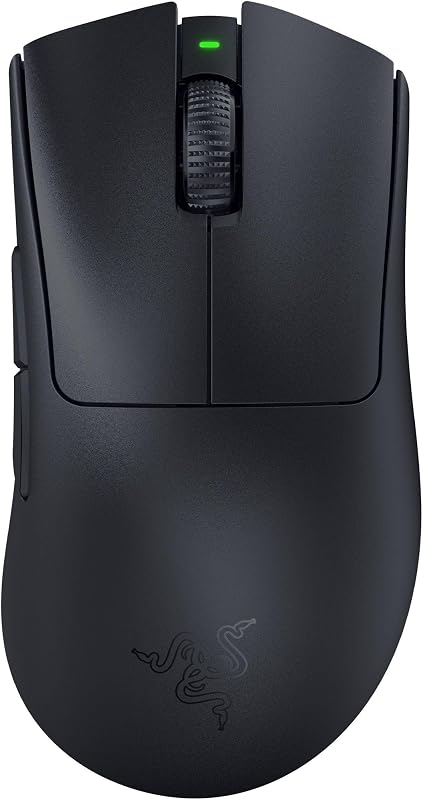
Razer DeathAdder V3 Pro
Pros
- Ultralight 63g ergonomic chassis
- Focus Pro 30K optical sensor tracks on glass
- Fast Gen-3 switches with 90M click lifecycle
- Up to 90 hours continuous battery life
Cons
- Only 6 programmable buttons
- No Chroma RGB lighting
- Lacks Bluetooth connectivity
View Razer DeathAdder V3 Pro on Amazon
Razer Basilisk V3 Pro

Pros
- 11 programmable buttons for custom macros
- HyperScroll tilt wheel with free-spin mode
- 13-zone Chroma lighting with underglow
- Up to 150 hours on Bluetooth
Cons
- Noticeably heavier than the DeathAdder V3 Pro
- 8KHz polling requires separately sold accessories
View Razer Basilisk V3 Pro on Amazon
Who Should Buy Each One
Choose the Razer DeathAdder V3 Pro If
- You primarily play fast-paced competitive FPS titles where rapid target switching and low physical inertia are paramount.
- You want an ultralight 63-gram ergonomic shape that minimizes wrist and forearm fatigue during intense, multi-hour sessions.
- You prefer a simple, clutter-free 6-button layout that prevents accidental misclicks during tense firefights.
- You dislike distracting RGB lighting on your mouse and prefer maximum battery life dedicated entirely to raw tracking performance.
Choose the Razer Basilisk V3 Pro If
- You play a wide variety of gaming genres such as MMOs, RPGs, and battle royales that benefit from 11 programmable controls.
- You need the versatility of the HyperScroll Tilt Wheel for rapid free-spinning document navigation and extra horizontal inputs.
- You switch regularly between a primary gaming PC and secondary devices using convenient multi-device Bluetooth connectivity.
- You want a rich 13-zone Chroma RGB setup with underglow that syncs dynamically with your favorite game titles.
Final Verdict
When weighing the Razer DeathAdder V3 Pro against the Razer Basilisk V3 Pro, the superior pointer is defined entirely by your genre preferences and workflow demands. For pure, uncompromised competitive play, the DeathAdder V3 Pro is the definitive victor. By pairing the flawless Focus Pro 30K sensor and Gen-3 optical switches with an ultra-lightweight 63-gram frame, it provides the low-friction glide and instantaneous handling demanded by top-tier tactical shooter players. It strips away all non-essential hardware to deliver an elite, distraction-free aiming experience.
However, for gamers seeking an all-purpose desktop command center, the Basilisk V3 Pro easily justifies its place on the desk. Its 11 programmable buttons, versatile HyperScroll Tilt Wheel, robust tri-mode connectivity featuring Bluetooth, and stunning 13-zone Chroma underglow make it a vastly more versatile device for general gaming and daily PC use. If competitive FPS rankings are your singular focus, buy the DeathAdder; for everything else, the Basilisk offers unrivaled feature depth and control.
FAQ
Is the DeathAdder V3 Pro or Basilisk V3 Pro better for competitive FPS gaming?
The DeathAdder V3 Pro is significantly better suited for competitive FPS titles. At just 63 grams, its ultra-lightweight chassis dramatically reduces physical inertia, allowing for faster crosshair flicks, easier micro-adjustments, and less fatigue when making wide arm sweeps across your mousepad.
How does the battery life compare between both models?
The DeathAdder V3 Pro provides up to 90 hours of continuous play over its low-latency 2.4GHz HyperSpeed connection. The Basilisk V3 Pro offers up to 110 hours on HyperSpeed wireless at 1000 Hz, up to 150 hours when using Bluetooth, and up to 32 hours if configured with an optional 8000 Hz polling setup.
Can both mice track on glass surfaces?
Yes. Both the DeathAdder V3 Pro and the Basilisk V3 Pro are equipped with the Razer Focus Pro 30K Optical Sensor, which features intelligent surface tracking that functions flawlessly on a wide variety of surfaces, including transparent glass desks and pads.
Are the optical switches on these mice prone to double-clicking?
No. Both models feature Razer Optical Mouse Switches Gen-3. Because these switches actuate via light beams rather than physical mechanical contacts, they operate with a 0.2-millisecond actuation time, eliminate debounce delay entirely, and have zero risk of developing mechanical double-clicking issues over their 90-million click lifespan.
Does the DeathAdder V3 Pro support Bluetooth?
No. The DeathAdder V3 Pro is built specifically for competitive low-latency gaming and connects via Razer HyperSpeed Wireless or a wired USB connection. If you require multi-device Bluetooth connectivity for laptops or tablets, the Basilisk V3 Pro provides dedicated Bluetooth support.
Is the Basilisk V3 Pro worth it over the DeathAdder V3 Pro for general daily use?
Yes. If your daily routine involves web browsing, office productivity, and multi-genre gaming, the Basilisk V3 Pro is well worth it due to its free-spinning HyperScroll Tilt Wheel, 11 programmable macro buttons, and flexible Bluetooth switching between multiple computers.