Deciding between the HyperX Cloud II and the Razer BlackShark V2 Pro comes down to whether you prioritize the bulletproof reliability of a wired aluminum headset or the cord-free mobility and broadcast-grade microphone clarity of modern wireless esports gear.
Choose the HyperX Cloud II if you want a dependable plug-and-play headset with a rugged metal frame that never needs recharging, or pick the Razer BlackShark V2 Pro if you want low-latency wireless freedom, Bluetooth versatility, and pro-tuned competitive audio profiles.


HyperX Cloud II vs Razer BlackShark V2 Pro at a Glance
| Feature | HyperX Cloud II | Razer BlackShark V2 Pro |
|---|---|---|
| Connectivity | Wired (USB audio control box, 3.5mm) | Wireless (2.4GHz HyperSpeed USB-C, Bluetooth 5.2) |
| Driver Size and Type | 53mm dynamic drivers | 50mm TriForce Titanium drivers |
| Microphone | Detachable noise-cancelling (TeamSpeak & Discord certified) | Detachable HyperClear Super Wideband |
| Audio Processing | Hardware-driven virtual 7.1 surround sound | On-headset pro-tuned FPS audio profiles |
| Ear Cushion Material | Memory foam with padded leatherette | Ultra-soft memory foam with breathable fabric |
| Frame Construction | Solid aluminum frame | Not listed |
| Weight | 11.29 ounces | Not listed |
| Analog Headphone Jack | Yes (via USB control box connection) | No jack |
| Included Accessories | USB control box, mesh bag, airplane adapter | Black carrying case, USB-C wireless dongle |
| Best For | Stationary gamers wanting durable wired simplicity | Esports players wanting wireless voice clarity |
Connectivity and Wireless Freedom
The foundational difference when evaluating the Razer BlackShark V2 Pro wireless vs wired Cloud II is how each headset links to your gaming rig. The Cloud II relies on a physical connection anchored by its USB sound card audio control box. Being tethered by a cord means you never have to worry about battery discharge, connection interference, or pairing procedures. You simply plug into your machine and receive an immediate, uninterrupted signal. However, that physical wire keeps you pinned to your desk, creates cable drag across your mousepad, and limits your physical movement between tournament matches or long sessions.
By contrast, the BlackShark V2 Pro eliminates desktop clutter using Razer HyperSpeed 2.4GHz wireless technology via a USB Type-C dongle. This protocol delivers low-latency transmission engineered specifically for high-stakes competitive play, keeping audio perfectly synchronized with on-screen action. In addition to its low-latency gaming channel, the headset includes Bluetooth 5.2 with an operating range of up to 10 meters. This dual-wireless configuration lets you alternate between your gaming setup and mobile devices seamlessly. If you are examining how modern flagships compare in the wireless space, our breakdown of the logitech g pro x 2 vs razer blackshark v2 pro illustrates how vital high-speed dongles have become for high-tier play.
The cost of going wireless is the reality of battery management and the omission of an analog 3.5mm backup port, as the BlackShark V2 Pro listing specifies no headphone jack. If the battery runs flat, you cannot quickly run a standard auxiliary cable to finish a round. With the Cloud II, the wired protocol is perpetually ready without power overhead. Nevertheless, for active gamers who value standing up, stretching, or navigating their space without shedding their headset, the wireless stability of Razer provides an unmatched operational upgrade.
Edge: Razer BlackShark V2 Pro for its high-performance 2.4GHz wireless sync and additional Bluetooth 5.2 connectivity.
Audio Architecture and Competitive Acoustic Tuning
Speaker engineering determines how effectively you can pinpoint critical sound cues during chaotic gameplay. The Cloud II utilizes oversized 53mm dynamic drivers paired with a hardware-driven USB audio control box that processes virtual 7.1 surround sound. This sound card amplifies audio and speech while generating expanded acoustic depth and distance, allowing you to isolate audio details such as footsteps shuffling nearby or distant movement in vents. The broader 15Hz to 25,000Hz frequency response span listed for the Cloud II provides a full acoustic foundation with punchy low-end impact suitable for explosive set pieces.
The BlackShark V2 Pro counters with proprietary 50mm TriForce Titanium drivers that employ a specialized tripartite architecture. By dividing the driver into three distinct zones for separate tuning of highs, mids, and lows, the titanium-coated diaphragms produce brighter highs, transparent mid-tones, and defined low frequencies without acoustic muddiness. To complement this physical driver design, the BlackShark V2 Pro features on-headset pro-tuned FPS audio profiles developed in collaboration with top esports athletes. These profiles emphasize positional frequencies, giving competitive gamers immediate situational awareness without requiring complex software adjustments on PC.
When weighing the HyperX Cloud II or Razer BlackShark V2 Pro for gaming, particularly in fast-paced shooters, audio separation matters far more than simple bass resonance. The virtual 7.1 sound of the Cloud II creates an immersive atmospheric field, but virtual surround algorithms can sometimes smear directional clarity in competitive titles. The individual acoustic chambers of the TriForce Titanium drivers, combined with onboard competitive profiles, deliver cleaner positional data when determining the exact vector of enemy fire. For broader comparisons of gaming driver execution, see how these concepts match up in our hyperx cloud iii vs razer blackshark v2 pro analysis.
Edge: Razer BlackShark V2 Pro for its TriForce Titanium acoustic separation and dedicated on-headset FPS audio profiles.
Microphone Quality and Voice Communications
Clear communication is non-negotiable in team-oriented gaming, making any HyperX Cloud II vs Razer BlackShark V2 Pro mic test an essential consideration. The Cloud II utilizes a detachable, noise-cancelling microphone that holds official certifications from both TeamSpeak and Discord. Its microphone capsule filters out ambient household chatter and isolates your voice for team callouts. The physical USB audio control box includes dedicated volume buttons that let you adjust voice input levels independently from game audio, giving you direct control over your chat balance without alt-tabbing out of your game.
The BlackShark V2 Pro features the Razer HyperClear Super Wideband microphone. Unlike conventional gaming headset mics that operate within narrow vocal frequencies, this next-generation detachable boom captures a significantly wider acoustic spectrum. The result is a richer, more natural vocal presentation that retains low and high harmonics, eliminating the thin, nasal broadcast typical of standard gaming microphones. Whether issuing urgent shotcalls in competitive lobbies or chatting casually with friends, vocal timbre comes through with noticeable depth and studio-like clarity.
While the noise-cancelling microphone on the Cloud II is thoroughly proven for routine multiplayer voice channels, it operates on older acoustic bandwidth limits. The HyperClear Super Wideband mic on the BlackShark V2 Pro represents a major generational jump in wireless vocal fidelity. Gamers who prioritize stream voice quality or competitive shotcall authority will find that Razer provides superior vocal nuance without demanding an external desktop condenser microphone.
Edge: Razer BlackShark V2 Pro for its wideband microphone frequency capture and superior vocal clarity.
Build Durability and Long-Session Comfort
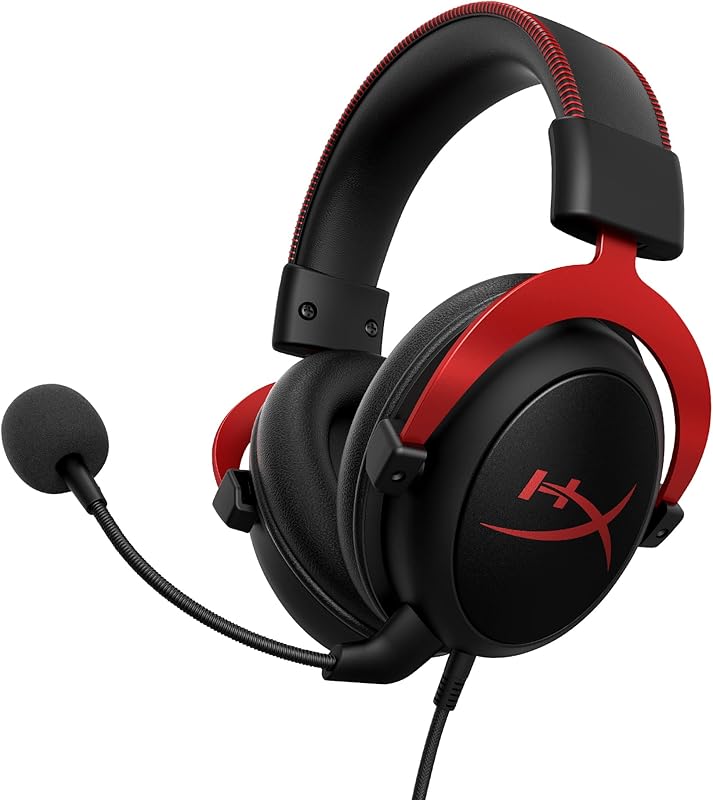
Physical longevity and wear fatigue determine whether a headset remains comfortable across multi-hour gaming sessions. Any thorough HyperX Cloud II review must highlight the model’s signature durability: a solid aluminum frame engineered to endure years of twisting, drops, and daily desk abuse. Weighing 11.29 ounces, the headset balances sturdiness with moderate mass, distributing weight through a thickly padded leatherette headband. The closed earcups are packed with dense memory foam that molds to your head, creating a strong acoustic seal that passively shuts out environmental background noise.
The BlackShark V2 Pro takes a different approach focused on competitive heat reduction and ergonomics. Its closed, noise-isolating earcups also utilize ultra-soft memory foam to conform securely against your skull, but they are wrapped in a plush, breathable fabric rather than traditional leatherette. This woven fabric lining allows heat and sweat to dissipate much faster during high-stress tournament situations, preventing the clammy buildup common to sealed pleather surfaces. The earcups exert targeted clamping force to ensure external distractions are muffled effectively without pinching around glasses or sensitive jawlines.
Choosing between these two comfort profiles involves a tradeoff between structural resilience and thermal regulation. The solid aluminum chassis of the Cloud II is virtually indestructible under normal household conditions, making it an exceptional investment for players prone to wear and tear. On the other hand, the breathable fabric weave of the BlackShark V2 Pro offers superior heat dissipation for players residing in warm climates or engaging in prolonged competitive marathons. If you are curious how other wireless contenders approach chassis comfort and battery balance, read our review of the hyperx cloud alpha wireless vs razer blackshark v2 pro.
Edge: HyperX Cloud II for its robust, time-tested aluminum frame construction.
Platform Compatibility and Setup Complexity
Hardware interoperability dictates how smoothly a headset integrates into your existing entertainment ecosystem. The Cloud II is a versatile multi-platform wired device designed for wide hardware support. Its USB sound card control box delivers hardware-driven virtual 7.1 surround sound natively on PC, Mac, and PS4. When disconnected from the USB dongle, the headset operates as a standard analog stereo headset, connecting cleanly to Xbox One controllers, Nintendo Switch, and mobile devices equipped with audio ports. Furthermore, the package includes an airplane headphone adapter and a protective mesh bag for travel convenience.
The BlackShark V2 Pro examined here is an officially licensed PlayStation edition finished in black, engineered primarily for seamless operation across Sony consoles and personal computers. The bundled low-latency wireless connection relies on a compact USB Type-C HyperSpeed dongle, matching the modern port standards found on current-generation hardware. When you need to move beyond your gaming console, onboard Bluetooth 5.2 enables immediate synchronization with phones, tablets, and handheld devices. However, because it lacks a 3.5mm analog jack entirely, it cannot connect to wired legacy ports or older gaming controllers lacking USB or Bluetooth support.
For multi-system households featuring older platforms alongside PCs, the analog flexibility of the Cloud II provides straightforward utility without protocol barriers. You never run into Bluetooth codec mismatches or USB-C driver restrictions. The BlackShark V2 Pro delivers high wireless convenience across modern hardware, but its total reliance on digital wireless interfaces limits its universal plug-and-play adaptability with legacy equipment. For readers comparing console-first premium headsets, our guide on the razer blackshark v2 pro vs astro a50 x covers multi-system switching in greater depth.
Edge: HyperX Cloud II for its universal 3.5mm analog fallback and multi-platform versatility.
Included Accessories and Practical Value
The accessories bundled in the retail box influence the immediate out-of-box convenience and overall ownership experience. HyperX packages the Cloud II with an extensive practical bundle: the primary headset, the detachable boom mic, the inline USB audio control box with integrated volume and 7.1 toggles, an airplane headphone adapter, alternate ear cushions, and a travel-ready mesh bag. This complete loadout ensures that whether you are traveling, playing on a desktop, or swapping ear pads, you have everything needed without buying third-party add-ons.
The BlackShark V2 Pro focuses its accessories on wireless execution and tournament transit. It comes equipped with the detachable HyperClear Super Wideband microphone, the USB Type-C HyperSpeed wireless dongle, and a dedicated black carrying case. The inclusion of a structured carrying case provides solid travel protection for the headset and its wireless accessories, shielding the plastic housings and mic boom from crush damage inside backpacks or gear bags during transit to competitive events.
Both manufacturers provide a standard 2-year manufacturer warranty, ensuring peace of mind against manufacturing defects. HyperX leans into legacy modularity with interchangeable cushions and analog adapters, while Razer equips players with modern wireless dongles and travel storage. If you want an open-back wired alternative with premium inclusions, consider examining the razer blackshark v2 pro vs corsair virtuoso pro comparison.
Edge: Tie. HyperX provides useful spare cushions and analog adapters, while Razer includes a protective carrying case and modern USB-C wireless transmitter.
Pros and Cons
HyperX Cloud II
Pros
- Solid aluminum frame construction
- Hardware USB audio control box
- Large 53mm dynamic drivers
- Never requires battery charging
Cons
- Tethered wired connection only
- No Bluetooth connectivity
- Lacks on-headset FPS tuning profiles
View HyperX Cloud II on Amazon
Razer BlackShark V2 Pro

Pros
- Dual 2.4GHz and Bluetooth 5.2 wireless
- HyperClear Super Wideband microphone
- TriForce Titanium 50mm driver design
- On-headset pro-tuned FPS profiles
Cons
- No analog 3.5mm audio jack
- Requires periodic battery charging
View Razer BlackShark V2 Pro on Amazon
Who Should Buy Each One
Choose the HyperX Cloud II If
- You want a zero-maintenance wired connection that never requires recharging or battery monitoring.
- You demand the structural durability of a solid, proven aluminum frame that withstands heavy handling.
- You frequently switch between PC, older consoles, and analog audio jacks without wireless pairing hassles.
- You prefer an inline physical USB control box with hardware toggles for volume, mic mute, and 7.1 sound.
Choose the Razer BlackShark V2 Pro If
- You want complete freedom from desktop cables via ultra-low-latency 2.4GHz wireless and Bluetooth 5.2.
- You play competitive tactical shooters and want pro-tuned on-headset FPS audio profiles for heightened acoustic cues.
- You require broadcast-level voice communication for Discord or streaming via a wideband microphone.
- You prefer breathable fabric ear cushions that stay cool during intense, high-sweat competitive gaming sessions.
Final Verdict
For most competitive and modern gamers, the Razer BlackShark V2 Pro emerges as the superior performing headset. Its high-speed 2.4GHz HyperSpeed wireless link removes desk cable friction without introducing perceptible audio delay, while the HyperClear Super Wideband microphone sets a benchmark for wireless vocal fidelity that traditional noise-cancelling mics cannot match. Combined with the TriForce Titanium 50mm driver architecture and onboard FPS acoustic profiles, it is tailored specifically to provide a tangible tactical edge in modern esports environments.
Nevertheless, the HyperX Cloud II remains an enduring benchmark for stationary desktop players seeking uncompromised durability and simplicity. With its industrial aluminum frame, plush leatherette memory foam, hardware-driven USB surround sound card, and universal analog versatility, it avoids the battery degradation and wireless troubleshooting that inevitably accompany cordless peripherals. If you value an indestructible, plug-and-play wired audio workhorse that delivers balanced sound year after year, the Cloud II retains its position as an exceptional wired classic.
FAQ
Can the HyperX Cloud II be used wirelessly?
No. The HyperX Cloud II featured here is strictly a wired headset that connects via its included USB audio control box or directly through a 3.5mm analog connection.
Does the Razer BlackShark V2 Pro have a 3.5mm headphone jack?
No. The listing specifications confirm that the Razer BlackShark V2 Pro has no headphone jack, relying entirely on its 2.4GHz USB Type-C wireless transmitter and Bluetooth 5.2 for audio connectivity.
How does the virtual 7.1 surround sound work on the HyperX Cloud II?
The Cloud II uses a dedicated, hardware-driven USB sound card control box to generate virtual 7.1 surround sound. It does not require complex PC driver installations; you simply toggle the center 7.1 button on the physical control module.
Can you connect the Razer BlackShark V2 Pro to a smartphone?
Yes. The BlackShark V2 Pro features Bluetooth 5.2 with a range of up to 10 meters, allowing you to pair the headset directly with smartphones, tablets, and other Bluetooth-compatible media devices.
Are the microphones on both headsets detachable?
Yes. Both the noise-cancelling microphone on the Cloud II and the HyperClear Super Wideband microphone on the BlackShark V2 Pro can be detached when you only want to listen to audio.
Which headset has better passive noise cancellation?
Both headsets feature closed-earcup designs with memory foam padding to passively isolate background noise. The Cloud II utilizes leatherette ear cushions for a tight, dense seal, while the BlackShark V2 Pro pairs its noise-isolating earcups with breathable fabric to balance acoustic isolation with heat dissipation.
What platforms support 7.1 surround sound on the HyperX Cloud II?
According to the product specifications, hardware virtual 7.1 surround sound via the USB sound card works on PC, Mac, and PS4. Other platforms like Xbox One, Nintendo Switch, and mobile devices operate in stereo mode.


