The single difference that decides the choice between the Dell XPS 15 and the Dell XPS 16 is display technology paired with graphics capability: the XPS 15 offers a non-touch, anti-glare FHD+ IPS panel driven by a 4GB NVIDIA GeForce RTX 3050, whereas the XPS 16 provides an expansive 16.3-inch 4K OLED touchscreen with a fluid 120Hz refresh rate and a newer 8GB NVIDIA GeForce RTX 5060 GPU.
Choose the Dell XPS 15 if you prioritize glare-free productivity, traditional DDR5 memory architecture, and a dedicated business workstation for coding and document editing. Choose the Dell XPS 16 if your creative workflow requires high-fidelity color grading, heavy 3D rendering, and the speed of modern Intel Core Ultra processing.


Dell XPS 15 vs Dell XPS 16 at a Glance
| Feature | Dell XPS 15 | Dell XPS 16 |
|---|---|---|
| Processor | Intel Core i7-12700H (14 cores, up to 4.7GHz) | Intel Core Ultra 9-285H (16 cores, up to 5.4GHz) |
| Dedicated Graphics | NVIDIA GeForce RTX 3050 (4GB GDDR6) | NVIDIA GeForce RTX 5060 (8GB GDDR7) |
| Display Size & Type | 15.6-inch FHD+ (1920 x 1200) IPS Anti-Glare | 16.3-inch 4K (3840 x 2400) OLED Touchscreen |
| Refresh Rate | 60Hz | 120Hz |
| Memory | 32GB DDR5 4800MHz | 32GB LPDDR5X onboard |
| Internal Storage | 1TB PCIe NVMe M.2 SSD | 1TB PCIe NVMe SSD |
| Thunderbolt Ports | 2 x Thunderbolt 4 / USB4 | 3 x Thunderbolt 4 |
| Wireless Connectivity | Wi-Fi 6 (AX211) + Bluetooth 5.2 | Wi-Fi 7 (802.11be) + Bluetooth 5.4 |
| Battery & Charging | Not listed (Type-C compatible) | 6-cell 99Whr battery, 130W Type-C adapter |
| Best For | Office productivity, programming, anti-glare use | High-end content creation, video rendering, 4K media |
Display Quality and Visual Workspace
Screen real estate and panel characteristics define how comfortable a laptop remains over eight-hour work shifts. When analyzing the Dell XPS 15 vs 16 display specifications, the baseline contrast in technology stands out immediately. The XPS 15 features a 15.6-inch FHD+ panel operating at a resolution of 1920 x 1200 pixels with a standard 60Hz refresh rate. Dell integrates a matte, anti-glare coating over an IPS matrix that hits 500 nits of peak brightness while delivering 100% Adobe RGB coverage. This setup ensures that overhead office lights and direct sunlight do not cause distracting reflections, making long text-based tasks easier on the eyes.
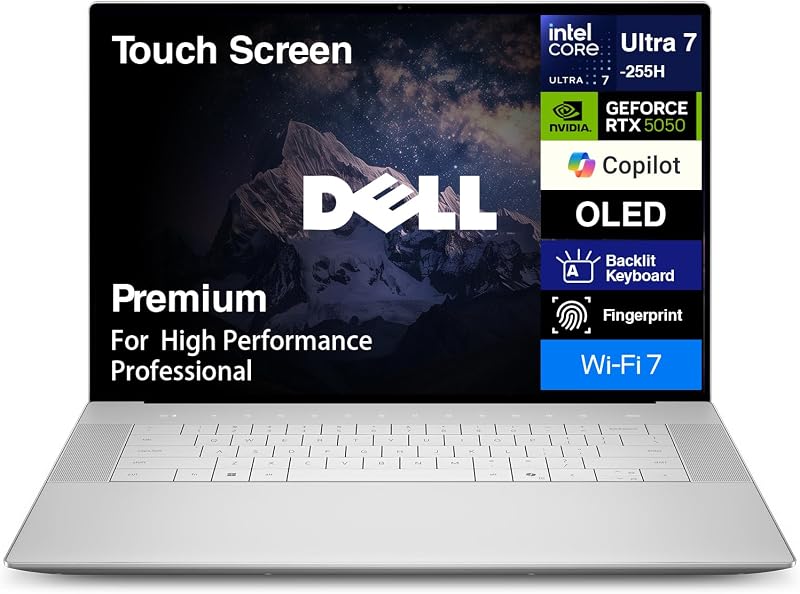
By contrast, the XPS 16 moves to an ultra-dense 16.3-inch 4K OLED touchscreen boasting a resolution of 3840 x 2400 pixels and an adaptive 120Hz refresh rate. In a side-by-side Dell XPS 16 OLED vs XPS 15 IPS evaluation, the OLED panel provides virtually infinite contrast ratios, deep black levels, and saturated colors that make digital media pop. The 120Hz refresh rate doubles the frame pacing of the XPS 15, yielding noticeably smoother cursor tracking, window dragging, and timeline scrubbing. However, the OLED screen is a glossy touch surface, which inevitably picks up ambient reflections more readily than the matte IPS panel on the 15-inch model. Readers weighing different premium chassis sizes can also examine our dell xps 14 vs 16 comparison to see how Dell balances display dimensions across the modern lineup.
The practical trade-off is clear: the XPS 15 excels at sustained text reading in challenging lighting environments without glare, while the XPS 16 delivers an uncompromised visual playground for photo editing, color grading, and high-resolution video previewing. The sheer pixel density of 3840 x 2400 lets you inspect 4K camera footage at native scaling, freeing you from downsampling artifacts.
Edge: Dell XPS 16 due to its razor-sharp 4K resolution, 120Hz motion clarity, and ink-like OLED black levels.
Processing and Graphics Performance
Raw computation power dictates how smoothly a machine handles demanding background tasks, complex multi-threaded compiles, and real-time timeline playback. Evaluating Dell XPS 15 vs Dell XPS 16 performance requires looking at two distinct architectural generations. The XPS 15 relies on Intel’s 12th Gen Alder Lake Core i7-12700H, which carries 14 cores, 20 threads, a 2.3GHz base clock, and boost speeds up to 4.7GHz across a 24MB cache. Dell backs this processor with 32GB of DDR5 4800MHz system RAM and an NVIDIA GeForce RTX 3050 discrete graphics processor with 4GB of GDDR6 memory. This hardware configuration effortlessly crunches local developer stacks, standard multimedia editing, and office multitasking.
The XPS 16 represents a massive generational leap by incorporating Intel’s 15th Gen Core Ultra 9-285H processor, featuring 16 cores, 16 threads, 6 dedicated performance cores, and maximum boost speeds up to 5.4GHz alongside 24MB of cache. Graphics capabilities jump substantially thanks to the NVIDIA GeForce RTX 5060, which brings 8GB of next-generation GDDR7 video memory. When deciding between the Dell XPS 15 or 16 for video editing, the GPU upgrade becomes the pivotal factor. Video suites like DaVinci Resolve and Adobe Premiere Pro rely heavily on dedicated video RAM; the 4GB buffer on the RTX 3050 restricts complex 4K timeline effects, whereas the 8GB GDDR7 buffer on the RTX 5060 handles multi-stream 4K timelines, GPU accelerated noise reduction, and modern 3D rendering with ease. Those looking at alternate multimedia options can also read our dell xps 15 vs hp envy x360 15 analysis for additional context on mid-range creative machines.
Memory configuration also differs between these two powerhouses. The XPS 15 utilizes 32GB of DDR5 memory running at 4800MHz, while the XPS 16 employs 32GB of fast onboard LPDDR5X memory. While onboard RAM cannot be swapped down the road, its elevated bandwidth provides a wider pipeline for the Core Ultra 9 and RTX 5060 to exchange asset data quickly during sustained creative rendering workloads.
Edge: Dell XPS 16 thanks to its 16-core Intel Core Ultra 9 processor and an 8GB GDDR7 RTX 5060 graphics unit.
Battery Capacity and Power Architecture
Workstation performance means little if a machine cannot survive away from an outlet when traveling between meetings or field shoots. In examining Dell XPS 15 vs 16 battery life, the hardware components reveal very different energy consumption profiles. The XPS 16 includes explicit power specifications: a high-capacity 6-cell 99Whr battery, which pushes right up against the legal limit for commercial airline carry-on luggage. Dell pairs this substantial cell with a 130W Type-C power adapter to feed its high-wattage Core Ultra 9 and RTX 5060 hardware under heavy system strain.
For the XPS 15, the official listing does not specify the exact milliamp-hour or watt-hour capacity of the battery pack. However, its overall power draw profile is intrinsically lower due to its display. The 15.6-inch FHD+ IPS panel runs at 1920 x 1200 at 60Hz without touch digitizers, consuming significantly less baseline power than an illuminated 4K OLED matrix refreshing at 120Hz. OLED panels illuminate every individual subpixel, meaning that viewing bright white web pages and office documents on the XPS 16 pulls considerable energy from its 99Whr cell. Those exploring alternate ultraportable designs might also look at our dell xps 13 vs 16 breakdown to see how Dell handles endurance on smaller platforms.
Despite the high draw of the XPS 16 display, having a confirmed 99Whr battery provides a massive buffer for mixed workloads. Dell also notes that the XPS 16 features a modern internal architecture engineered to sustain cooler operating temperatures and smoother power distribution across its high-performance silicon, keeping thermal throttling at bay during intensive battery and plugged-in use.
Edge: Dell XPS 16 for its verified 99Whr battery capacity and 130W fast-charging power delivery system.
Port Selection and Wireless Connectivity
High-end laptops must connect cleanly to high-speed external storage arrays, dual monitor docks, and professional audio interfaces without a rat’s nest of dongles. The XPS 15 delivers a flexible layout consisting of two Thunderbolt 4 / USB4 40Gbps ports, one USB 3.2 Gen 2 Type-C port, a full-size SD card reader, and a 3.5mm headphone/microphone audio jack. Having a dedicated USB 3.2 Gen 2 Type-C port alongside dual Thunderbolt ports ensures reliable backwards compatibility with standard accessories, while the integrated SD slot allows photographers to ingest camera cards directly.
The XPS 16 takes connectivity a step further by upgrading all three of its primary data interfaces to full-specification Thunderbolt 4 ports. Each of these ports supports external video output, high-speed bidirectional 40Gbps data transfers, and Type-C power input. Like its predecessor, the XPS 16 retains the essential full-size SD card slot and 3.5mm combo audio jack, ensuring creative professionals lose nothing in terms of legacy analog audio or photographic workflows.
Wireless standards also separate the Dell XPS 16 vs 15. The XPS 15 features an Intel Killer Wi-Fi 6 AX211 wireless card paired with Bluetooth 5.2, providing reliable gigabit-tier local connectivity. The XPS 16 incorporates modern Wi-Fi 7 (802.11be) and Bluetooth 5.4. Wi-Fi 7 enables wider channel bandwidths and reduced latency over supported network hardware, facilitating rapid local network transfers of multi-gigabyte video files directly to network-attached storage.
Edge: Dell XPS 16 for providing three full-bandwidth Thunderbolt 4 connections alongside future-ready Wi-Fi 7 and Bluetooth 5.4.
Chassis Design, Keyboard, and Daily Usability
Ergonomics make a profound difference when spending hours writing code, compiling applications, or handling daily communications. When considering the Dell XPS 15 or 16 for programming, the input hardware and chassis form factor take center stage. The XPS 15 sports a classic Platinum Silver clamshell body equipped with a backlit keyboard, a responsive multi-touch glass trackpad, and a biometric fingerprint reader integrated for Windows Hello authentication. The keyboard deck provides tactile key travel that programmers rely on for rapid syntax input, while the anti-glare screen minimizes eyestrain across prolonged terminal sessions.
The XPS 16 measures 14.15 inches in length, 9.5 inches in width, and 0.75 inches in thickness in a sleek Platinum finish. It integrates a backlit standard keyboard, an integrated webcam, and a biometric fingerprint reader. While the XPS 16 gives programmers extra vertical screen space with its 16:10 3840 x 2400 resolution, allowing more lines of code on screen simultaneously, its glossy touch glass will reflect back ambient office fixtures. In our dell xps 15 vs hp spectre x360 14 review, we noted how critical matte displays are for pure software workflows where visual contrast on text matters more than saturated color.
Both machines ship with Windows 11 Pro preinstalled, giving enterprise users and independent software developers BitLocker encryption, Remote Desktop hosting, and advanced virtualization capabilities out of the box. The XPS 15 listing specifically notes that the machine has been resealed by Issaquah Highlands Tech to configure its 32GB DDR5 memory and 1TB SSD, backed by a three-year upgraded component warranty alongside Dell’s one-year manufacturer warranty. The XPS 16 utilizes integrated onboard LPDDR5X memory within its redesigned chassis.
Edge: Dell XPS 15 for typing-intensive coding and business tasks, aided by its non-reflective matte display and dedicated DDR5 architecture.
Pros and Cons
Dell XPS 15

Pros
- 500-nit anti-glare IPS display
- 100% Adobe RGB color coverage
- Dual Thunderbolt 4 plus Type-C port
- Dedicated full-size SD card slot
Cons
- Limited to 60Hz refresh rate
- Modest 4GB RTX 3050 graphics
- Battery capacity not listed in specs
Dell XPS 16
Pros
- 3-inch 4K OLED 120Hz touchscreen
- NVIDIA RTX 5060 with 8GB GDDR7
- Massive 6-cell 99Whr battery
- Three high-speed Thunderbolt 4 ports
- Next-gen Wi-Fi 7 and Bluetooth 5.4
Cons
- Reflective glossy OLED glass panel
- Soldered onboard LPDDR5X memory
- Slightly thicker 0.75-inch chassis
Who Should Buy Each One
Choose the Dell XPS 15 If
- You primarily focus on programming, spreadsheets, or business management where an anti-glare, non-reflective IPS display prevents eye fatigue.
- You want a dependable workstation with standard DDR5 4800MHz memory paired with a 14-core Intel Core i7 processor.
- You prefer a lighter profile that balances two Thunderbolt 4 ports with a dedicated USB 3.2 Gen 2 Type-C port.
- You work in color-managed print or standard design that relies specifically on 100% Adobe RGB color space validation.
Choose the Dell XPS 16 If
- You produce high-end video, 3D graphics, or animations that require the horsepower of an 8GB GDDR7 NVIDIA GeForce RTX 5060 GPU.
- You demand absolute visual fidelity, deep OLED contrast, touch capability, and 120Hz motion smoothness on a 16.3-inch 4K panel.
- You require cutting-edge wireless throughput with Wi-Fi 7 and three dedicated Thunderbolt 4 interfaces for high-bandwidth docks.
- You want guaranteed extended runtime from a verified, maximum-capacity 6-cell 99Whr battery pack.
Final Verdict
For demanding digital creatives, visual designers, and video editors, the Dell XPS 16 is the clear superior machine. Between its breathtaking 16.3-inch 4K OLED 120Hz touchscreen, its 16-core Intel Core Ultra 9-285H processor, and the massive generational upgrade to an 8GB GDDR7 RTX 5060 graphics card, the XPS 16 provides the computational muscle needed for modern content pipelines. Factor in the massive 99Whr battery, triple Thunderbolt 4 ports, and future-proof Wi-Fi 7 connectivity, and anyone asking is Dell XPS 16 worth it will find the answer is an emphatic yes for heavy creative workflows. Those shopping between enterprise flagships may also want to browse our dell xps 15 vs inspiron 14 plus comparison to see where budget enterprise hardware fits into this landscape.
On the other hand, the Dell XPS 15 remains a phenomenal, highly focused workstation for programmers, business executives, and students. Its 500-nit anti-glare FHD+ IPS panel completely eliminates reflections under harsh fluorescent office lights, allowing you to code or read text for entire workdays without visual strain. With a capable 14-core Core i7 processor, 32GB of DDR5 RAM, and a capable RTX 3050 GPU, the XPS 15 delivers reliable day-to-day speed without the thermal demands of a 4K OLED panel.
FAQ
Which laptop is better for video editing, the Dell XPS 15 or Dell XPS 16?
The Dell XPS 16 is substantially better for video editing. It includes an NVIDIA GeForce RTX 5060 GPU with 8GB of modern GDDR7 memory, doubling the video memory found on the XPS 15’s 4GB RTX 3050. This extra VRAM, combined with a 16-core Intel Core Ultra 9 processor and a color-rich 4K OLED panel, allows the XPS 16 to handle 4K video playback, rendering, and color grading far more efficiently.
What are the primary differences between the Dell XPS 15 IPS and Dell XPS 16 OLED screens?
The Dell XPS 15 features a 15.6-inch FHD+ (1920 x 1200) non-touch IPS screen with a 60Hz refresh rate and an anti-glare matte coating that reaches 500 nits. The Dell XPS 16 features a 16.3-inch 4K (3840 x 2400) glossy OLED touchscreen with a 120Hz refresh rate. The XPS 16 delivers richer contrast, deeper blacks, and smoother animations, while the XPS 15 eliminates ambient reflections in bright offices.
Can you upgrade the RAM in the Dell XPS 15 and Dell XPS 16?
The Dell XPS 15 listing features 32GB of DDR5 4800MHz memory that has been upgraded and resealed, supported by a 3-year warranty for upgraded components. The Dell XPS 16 listing specifies 32GB of onboard LPDDR5X RAM, which is soldered directly to the motherboard and cannot be upgraded after purchase.
Does the Dell XPS 16 have better battery capacity than the Dell XPS 15?
The Dell XPS 16 explicitly includes a large 6-cell 99Whr battery supported by a 130W Type-C power adapter. The Dell XPS 15 listing does not specify its battery capacity. While the XPS 16 has a verified 99Whr battery, its 4K OLED 120Hz display consumes more energy than the 60Hz FHD+ IPS screen on the XPS 15.
What ports are included on both laptops?
The Dell XPS 15 provides two Thunderbolt 4 / USB4 ports, one USB 3.2 Gen 2 Type-C port, a full-size SD card reader, and a 3.5mm headphone/microphone jack. The Dell XPS 16 upgrades its interface layout to three full-speed Thunderbolt 4 ports, while retaining the full-size SD card reader and 3.5mm combo jack.
Does the Dell XPS 16 support Wi-Fi 7?
Yes, the Dell XPS 16 includes integrated Wi-Fi 7 (802.11be) and Bluetooth 5.4, delivering faster wireless speeds and lower latency when connected to compatible routers. The Dell XPS 15 includes Intel Killer Wi-Fi 6 (AX211) and Bluetooth 5.2.