Choosing between the Dell XPS 16 and the HP Spectre x360 14 comes down to a fundamental choice between heavy graphical workstation capability and ultraportable convertible flexibility. The XPS 16 centers on a sprawling 16.3-inch workspace paired with dedicated graphics processing to tackle demanding creative software, whereas the Spectre x360 14 provides an adaptable 2-in-1 design engineered for light travel, versatile presentation modes, and efficient everyday multitasking.
Creative professionals and power users who need dedicated hardware acceleration and maximum screen estate should invest in the Dell XPS 16. Mobile executives, digital note-takers, and frequent travelers seeking a featherweight convertible laptop with touchscreen versatility should choose the HP Spectre x360 14.


Dell XPS 16 vs HP Spectre x360 14 at a Glance
| Feature | Dell XPS 16 | HP Spectre x360 14 |
|---|---|---|
| Form Factor | Standard Clamshell | 2-in-1 Convertible |
| Processor | Intel Core Ultra 9-285H (16 Cores, up to 5.4GHz) | Intel Core Ultra 7-256V (8 Cores, up to 4.8GHz) |
| Graphics | NVIDIA GeForce RTX 5060 (8GB GDDR7 Dedicated) | Intel Arc Integrated Graphics |
| Display | 16.3-inch 4K (3840×2400) OLED Touch, 120Hz | 14.0-inch 2.8K (2880×1800) OLED Touch, 120Hz |
| System Memory | 32GB LPDDR5X | 16GB LPDDR5X |
| Solid-State Storage | 1TB PCIe NVMe SSD | 1TB PCIe NVMe SSD |
| Battery & Charger | 6-Cell 99Whr Battery, 130W Type-C PSU | 4-Cell 64Whr Battery, 65W Type-C PSU |
| Dimensions & Weight | 14.15 x 9.5 x 0.75 inches, weight not listed | 12.4 x 8.5 x 0.75 inches, 2.9 pounds |
| Port Selection | 3x Thunderbolt 4, SD Card Reader, Audio Jack | 2x Thunderbolt 4, 1x USB 3.2 Type-C, Audio Jack |
| Operating System | Windows 11 Pro | Windows 11 Home |
| Best For | Video Editors, 3D Artists, Studio Workstations | Mobile Professionals, Hybrid Commuters, Note-Takers |
Computing and Graphical Performance
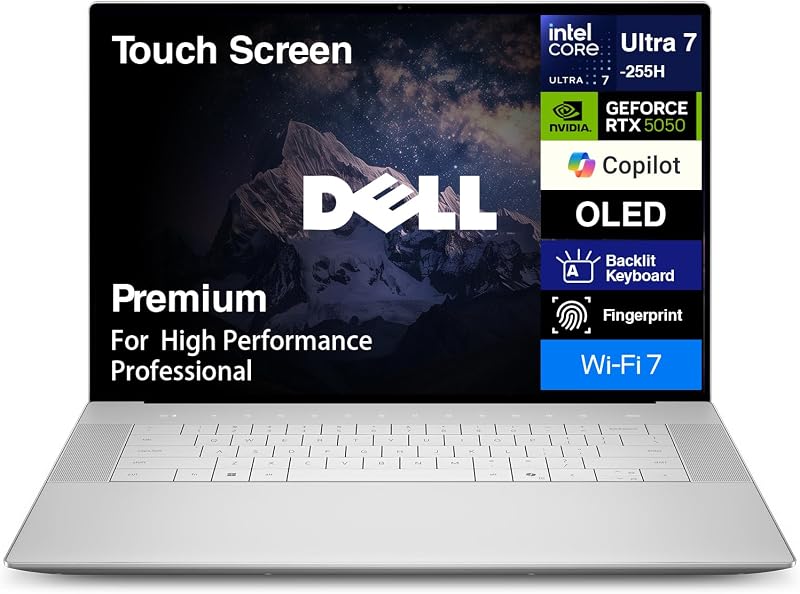
Under the hood, processing architecture defines the primary functional contrast in the HP Spectre x360 14 vs Dell XPS 16 match-up. The XPS 16 packs a flagship 15th Generation Intel Core Ultra 9-285H processor configured with 16 physical cores, 16 threads, 6 performance cores, and 24MB of cache, pushing turbo frequencies up to 5.4GHz. To back this raw processing muscle, Dell incorporates a dedicated NVIDIA GeForce RTX 5060 GPU with 8GB of modern GDDR7 video memory alongside integrated silicon. This dual-graphics pipeline ensures hardware acceleration for ray tracing, rendering passes, visual effects pipelines, and machine learning models.
In contrast, the Spectre x360 14 relies on the 15th Generation Intel Core Ultra 7-256V processor, which operates with 8 cores, 8 threads, 4 performance cores, 12MB of cache, and boost speeds up to 4.8GHz. Graphical output on the HP relies entirely on integrated Intel Arc graphics. While this integrated configuration effortlessly decodes high-resolution streaming media, drives multi-monitor setups, and handles general business workloads, it lacks the dedicated tensor cores and discrete video RAM necessary for intensive 3D assets or complex timelines. Buyers comparing form factors often consider how a machine handles sustained exports, as detailed in our analysis of the dell xps 15 vs hp spectre x360 14.
The practical result of these component choices appears immediately during heavy computational lifting. The Dell XPS 16 RTX 5060 performance provides a dedicated render buffer that offloads strenuous visual calculations from the central processor, keeping background tasks responsive. For complex workloads like rendering 4K media with Lumetri color grades, running real-time architectural walk-throughs, or running local AI inferencing, the XPS 16 acts as a genuine desktop replacement. The Spectre x360 14 targets energy-conscious, sustained office output where silence and thermal efficiency take precedence over brute rendering speed.
Edge: Dell XPS 16, thanks to its 16-core Ultra 9 chip and dedicated 8GB RTX 5060 GPU that dramatically outpace integrated graphics in creative workloads.
Form Factor, Portability, and Versatility
A laptop’s chassis layout fundamentally alters where and how you can work comfortably. The HP Spectre x360 14 2-in-1 convertible utilizes a geared 360-degree hinge system that lets you swing the display completely backward. This mechanical mobility enables traditional clamshell computing, an angled tent orientation for hands-free presentations, an inverted stand mode for media viewing, or a flat tablet profile for natural stylus operation. Measuring 12.4 x 8.5 x 0.75 inches and tipping the scales at a portable 2.9 pounds, the Spectre slides effortlessly into slim messenger bags, airline seatback pockets, and compact backpacks.
The XPS 16 maintains a traditional clamshell construction built within a solid Platinum-colored chassis measuring 14.15 x 9.5 x 0.75 inches. While the listing does not specify the exact weight of the XPS 16, a 16.3-inch frame paired with a large cooling assembly and dual silicon components inherently demands more physical footprint on a desk or lap. It functions primarily as an anchored workstation that you carry from office to studio rather than an agile companion you flip open on a crowded train. Those interested in a smaller Dell alternative often study the dell xps 14 vs hp spectre x360 14 to gauge intermediate sizing options.
For shoppers balancing dynamic workday requirements, this physical divergence matters just as much as internal processor specs. The Spectre x360 14 transitions seamlessly between taking handwritten notes in meetings, reviewing digital blueprints in tablet orientation, and typing extensive project outlines. The XPS 16 prioritizes stability and desk presence, providing a stable, wide wrist rest and spacious deck optimized for stationary production sessions.
Edge: HP Spectre x360 14, providing true 2-in-1 adaptability across four physical orientations in a lightweight 2.9-pound frame.
Display Quality and Visual Workspace
Screen real estate and panel fidelity directly determine how many windows you can arrange side by side and how accurately you can evaluate digital media. The Dell XPS 16 4K OLED display delivers an expansive 16.3-inch diagonal viewing area at a native resolution of 3840×2400 pixels. This high-density panel features a fluid 120Hz refresh rate and responsive touch interaction. The sheer vertical canvas provided by the 16:10 aspect ratio allows video editors to maintain extensive audio and video timelines while keeping preview monitors and tool panels open simultaneously.
The Spectre x360 14 counters with a brilliant 14.0-inch OLED touchscreen sporting a 2.8K resolution of 2880×1800 pixels. Like the XPS, it supports a smooth 120Hz refresh rate that sharpens text scrolling and reduces visual latency during fast interface animations. While the 2.8K resolution looks exceptionally sharp on a compact 14-inch screen, the overall surface area is noticeably smaller. Multitasking side-by-side with two large spreadsheets or floating utility pallets feels tighter, requiring you to switch between application windows more frequently than you would on a 16-inch panel.
Both laptops deliver the deep, infinite contrast and per-pixel lighting control that make OLED technology superior to traditional LCDs for media consumption. However, the larger screen on the XPS 16 gives visual creators the physical room needed for critical pixel inspection and color correction without constantly hooking into external desktop monitors. For readers evaluating different screen sizes across premium lineups, examining the dell xps 16 vs hp envy x360 15 shows similar scaling considerations in everyday productivity tasks.
Edge: Dell XPS 16, offering higher 4K resolution and significantly more physical visual area on its 16.3-inch 120Hz OLED screen.
Memory, Storage, and System Expansion
System memory dictates how smoothly a machine handles aggressive browser multitasking, heavy virtual machines, and massive asset files. The Dell XPS 16 comes standard with 32GB of high-speed onboard LPDDR5X RAM. Having 32GB available provides substantial headroom for users running Adobe Premiere Pro, DaVinci Resolve, or memory-heavy coding environments alongside dozen-tab research sessions without swapping to disk. The Spectre x360 14 includes 16GB of onboard LPDDR5X memory, which is ample for general office productivity, moderate graphic design, and extensive web work, but leaves less buffer for high-resolution video caches.
Both machines provide 1TB PCIe NVMe solid-state drives for internal system storage, delivering rapid application loading times and fast boot routines. However, physical input and output ports reveal different engineering philosophies. The Dell XPS 16 equips users with three Thunderbolt 4 ports, a built-in full-size SD card reader, and a 3.5mm headphone/microphone audio jack. The inclusion of an integrated SD slot is a substantial workflow convenience for photographers and videographers who need to offload camera footage directly without carrying loose dongles.
HP takes a versatile approach with port selection on the Spectre x360 14, supplying two Thunderbolt 4 ports, one USB 3.2 Type-C port, and a headphone/microphone combo jack. To address connectivity needs out of the box, HP also bundles an Authorized Dockztorm portable USB data hub offering speeds up to 5Gbps. While the accessory hub extends peripheral options for standard USB accessories, having three native Thunderbolt 4 channels and a built-in SD card reader inside the XPS 16 chassis streamlines high-bandwidth studio setups. Shoppers considering connectivity options across similar form factors can also explore our comparison of the dell inspiron 14 plus vs hp spectre x360 14.
Edge: Dell XPS 16, thanks to double the memory capacity (32GB vs 16GB), three Thunderbolt 4 ports, and an integrated SD card reader.
Battery Capacity and Power Requirements
Managing power draw and battery capacity is essential for anyone who frequently unplugs from desk power. The Dell XPS 16 integrates a massive 6-cell 99Whr battery, landing right against the maximum threshold permitted on commercial flights. To replenish this expansive cell and support the high wattage demands of an Intel Core Ultra 9 chip and an RTX 5060 discrete GPU, Dell pairs the machine with a substantial 130W Type-C power delivery adapter. The modern internal architecture is designed to support cooler and smoother system operation, but high-performance components naturally demand substantial energy under load.
The HP Spectre x360 14 incorporates a 4-cell 64Whr battery recharged via a compact 65W Type-C power supply. While 64Whr is physically smaller than the 99Whr reservoir in the Dell, the Spectre does not have to feed a power-hungry dedicated graphics card or drive a giant 4K display. The 8-core Core Ultra 7 processor and Intel Arc graphics operate at significantly lower power envelopes, allowing the Spectre x360 14 battery life to stretch efficiently across mobile workdays when performing standard document editing, video conferencing, and web browsing.
When assessing portable longevity, total runtime depends heavily on workload intensity. If you run heavy 3D rendering scripts on the XPS 16, that 99Whr battery depletes rapidly to sustain high clock speeds. Conversely, the Spectre x360 14 carries a lighter, smaller power brick in your bag, making the entire charging setup much more commuter-friendly. Those weighing power systems against medium-sized alternatives often reference the hp spectre x360 14 vs envy x360 15 to evaluate battery runtime trade-offs.
Edge: HP Spectre x360 14, delivering better mobile energy balance through low-draw components and a lightweight 65W travel charger.
Operating System and Security Ecosystem
The software environment and user authentication tools shape daily administration and enterprise security. The Dell XPS 16 arrives preloaded with Windows 11 Pro-64. This professional edition includes advanced management utilities, remote desktop hosting, client Hyper-V virtualization, and BitLocker device encryption-crucial features for corporate domains and data security compliance. The Spectre x360 14 ships with Windows 11 Home-64, which is well-suited for everyday personal tasks, educational pursuits, and standard mobile operations, though it omits native enterprise management policies.
Both laptops feature modern wireless standards and hardware biometric login. Each model includes cutting-edge Wi-Fi 7 (802.11be) and Bluetooth 5.4 wireless radios, ensuring rapid local networking speeds, reduced channel latency, and dependable peripheral pairing. Each device also integrates an onboard webcam and a built-in fingerprint reader directly integrated into the chassis for fast, password-free Windows Hello authentication.
The standard backlit keyboards on both systems allow for comfortable typing in dim lecture halls or evening studio settings. The XPS 16 stands out in administrative utility due to its Pro operating system license, which saves business buyers and independent contractors the hassle of upgrading their operating system after purchase.
Edge: Dell XPS 16, providing Windows 11 Pro out of the box with enhanced security and enterprise virtualization features.
Pros and Cons
Dell XPS 16
Pros
- Dedicated GeForce RTX 5060 graphics
- Spacious 16.3-inch 4K OLED display
- High-performance 16-core Ultra 9 CPU
- Generous 32GB LPDDR5X memory
- Integrated full-size SD card reader
Cons
- Fixed clamshell design without tablet mode
- Larger footprint requires more desk space
- Requires heavy 130W power delivery
HP Spectre x360 14

Pros
- Lightweight 2.9-pound convertible chassis
- Versatile 360-degree 2-in-1 hinge
- Vibrant 2.8K 120Hz OLED touchscreen
- Includes portable multi-port USB hub
- Energy-efficient Core Ultra 7 processor
Cons
- Integrated Intel Arc graphics only
- Limited to 16GB onboard memory
- No integrated SD card reader
View HP Spectre x360 14 on Amazon
Who Should Buy Each One
Choose the Dell XPS 16 If
- You edit high-bitrate 4K video, render 3D scenes, or require dedicated NVIDIA GeForce RTX 5060 acceleration.
- You need an expansive 16.3-inch 4K OLED workspace to view complex application timelines and spreadsheets side by side.
- You run memory-heavy development pipelines, virtual machines, or intensive creative suites that demand 32GB of RAM.
- You rely on a built-in SD card reader to transfer photo and video media directly from physical camera cards.
Choose the HP Spectre x360 14 If
- You want a lightweight 2.9-pound convertible chassis that transitions effortlessly between laptop, tent, stand, and tablet modes.
- You travel frequently or commute between classes and need a compact 14-inch footprint that fits easily on tray tables.
- You prioritize general productivity, digital sketching, and web tasks driven by an efficient 8-core processor and integrated Arc graphics.
- You appreciate having a bundled multi-port USB data hub for legacy device connectivity on the go.
Final Verdict
When assessing a comprehensive Dell XPS 16 review against an HP Spectre x360 14 review, the winner depends entirely on whether your workload demands workstation-grade muscle or everyday mobile adaptability. The Dell XPS 16 is the clear pick for creators, power users, and engineers who need uncompromised processing strength. Its 16-core Intel Core Ultra 9 processor, 32GB of high-speed memory, dedicated RTX 5060 graphics, and magnificent 16.3-inch 4K OLED screen combine to create an uncompromising portable studio that chews through heavy rendering tasks with ease.
On the other hand, the HP Spectre x360 14 claims victory for students, corporate commuters, and mobile professionals seeking maximum ergonomics. If you do not require discrete GPU acceleration or an enormous display deck, the Spectre’s 2.9-pound frame, vibrant 2.8K 120Hz OLED panel, and flexible 360-degree convertible hinge deliver versatility that a standard clamshell cannot match. It remains an agile, comfortable companion for daily computing wherever you set it up.
FAQ
Is the HP Spectre x360 14 worth it for digital artists and note-takers?
Yes, the HP Spectre x360 14 is exceptionally well-suited for sketching, marking documents, and digital note-taking. Its 360-degree convertible hinge allows the screen to fold flat against the chassis, transforming the machine into an intuitive slate with a crisp 2.8K OLED touchscreen and fluid 120Hz refresh rate.
Can the Dell XPS 16 handle professional 4K video editing?
Yes, the Dell XPS 16 is built precisely for demanding media production. The combination of an Intel Core Ultra 9-285H processor, 32GB of LPDDR5X RAM, and a dedicated NVIDIA GeForce RTX 5060 GPU with 8GB of GDDR7 memory provides ample computational power to edit, color grade, and export complex 4K video timelines.
Which laptop is more practical for college students?
For most college students, the HP Spectre x360 14 is the more practical option. Its compact 14.0-inch frame, 2.9-pound carry weight, tablet orientation for lecture notes, and versatile 2-in-1 hinge make it significantly easier to maneuver around campus, carry in small bags, and use on small lecture hall desks.
Can I connect multiple external monitors to both laptops?
Yes, both laptops support external display setups via high-speed Thunderbolt 4 ports. The Dell XPS 16 features three Thunderbolt 4 connections, while the HP Spectre x360 14 offers two Thunderbolt 4 ports along with a USB 3.2 Type-C port and an included external USB data hub.
How do the screens compare on the Dell XPS 16 and HP Spectre x360 14?
Both laptops feature gorgeous 120Hz OLED touchscreens, but they cater to different needs. The Dell XPS 16 provides a massive 16.3-inch display with ultra-sharp 4K (3840×2400) resolution for sprawling visual workflows, whereas the HP Spectre x360 14 uses a 14.0-inch panel with a 2.8K (2880×1800) resolution tailored for compact portability.
Does either laptop offer an integrated full-size SD card slot?
The Dell XPS 16 includes an integrated full-size SD card reader directly on its chassis, making camera media transfers effortless. The HP Spectre x360 14 does not feature an onboard SD card slot, relying instead on its USB ports and the bundled external data hub for card adapters.
