The single difference that determines whether you should buy the Asus ROG Zephyrus G14 or the Asus ROG Zephyrus G16 is the balance between top-tier graphics horsepower in an ultra-portable chassis and high-speed motion clarity on a larger visual canvas. Buyers comparing these machines must decide whether their everyday workloads demand the raw rendering capabilities of a flagship NVIDIA GeForce RTX 5080 Laptop GPU within a compact 14-inch footprint, or if their priorities lean toward the expansive 16-inch 240Hz OLED display accompanied by an RTX 5070 graphics processor.
Creative professionals, traveling power users, and enthusiasts who need uncompromising GPU compute and local AI acceleration should choose the Asus ROG Zephyrus G14. Competitive esports players and desktop-bound gamers who want maximum motion fluidity and a larger screen should choose the Asus ROG Zephyrus G16.
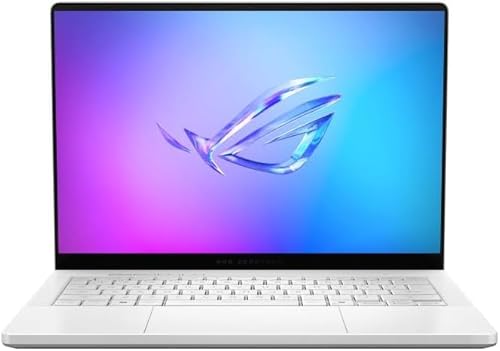

Asus ROG Zephyrus G14 vs Asus ROG Zephyrus G16 at a Glance
| Attribute | Asus ROG Zephyrus G14 | Asus ROG Zephyrus G16 |
|---|---|---|
| Screen Size and Resolution | 14 inches, 3K (2880 x 1800) | 16 inches, WQXGA (2560 x 1600) |
| Display Panel and Refresh Rate | ROG Nebula OLED, 120Hz, 0.2ms, 500 nits | OLED, 240Hz, 0.2ms, 500 nits, 100% DCI-P3 |
| Processor Model | AMD Ryzen AI 9 HX 370 (12 cores, 24 threads) | Intel Core Ultra 9 285H (16 cores, 16 threads) |
| AI Processing (NPU) | Up to 50 TOPS (Copilot+ PC certified) | Up to 13 TOPS (Intel AI Boost) |
| Graphics Coprocessor | NVIDIA GeForce RTX 5080 (8GB GDDR7) | NVIDIA GeForce RTX 5070 (8GB GDDR7) |
| System Memory (RAM) | 32GB LPDDR5X (up to 8000MHz) | 16GB DDR5 |
| Storage Capacity | 2TB PCIe 4.0 NVMe SSD | 512GB SSD (upgrade options listed) |
| Dimensions and Weight | 12.26 x 8.66 x 0.63 inches, 9 pounds listed | 13.94 x 9.69 x 0.65 inches, 4.1 pounds |
| Color and Build | Platinum White CNC Aluminum | Eclipse Gray |
| Best For | Portable high-end GPU workflows and local AI tasks | High-refresh competitive gaming and expansive multitasking |
Graphics Processing and Gaming Performance
Graphics hardware is the single most critical component in any performance laptop, dictating real-time frame rates, texture detail, ray tracing capability, and overall visual fidelity. In modern titles and heavy graphical simulations, the GPU determines whether a machine can sustain high settings at native resolutions or whether settings must be dialed back to maintain playable performance. When looking at the graphics hardware powering these two laptops, there is an unmistakable distinction in performance tiers despite both using modern dedicated silicon. If you have explored our comparison of the asus rog zephyrus g14 vs tuf gaming a15, you know that packing high-wattage GPUs into compact chassis designs requires exceptional engineering, and Asus has made distinct graphical tier choices for each size category here.
The Zephyrus G14 is outfitted with an NVIDIA GeForce RTX 5080 Laptop GPU containing 8GB of next-generation GDDR7 memory. The manufacturer listing notes support for cutting-edge DLSS 4 and ray tracing technologies that simulate physical sunlight and complex ambient reflections in virtual worlds. In contrast, the Zephyrus G16 is equipped with an NVIDIA GeForce RTX 5070 Laptop GPU, also utilizing 8GB of GDDR7 memory. In the broader scope of graphics architecture, the RTX 5080 is positioned significantly above the RTX 5070, featuring a greater number of shader execution units, ray tracing cores, and tensor hardware. This technical difference allows the smaller laptop to drive complex graphical calculations with far greater ease.
For shoppers deciding whether to select the zephyrus g14 or g16 for gaming, this tier gap defines what kind of gaming experience to expect. When analyzing a zephyrus g14 vs g16 rtx 5080 configuration matchup, the RTX 5080 inside the G14 delivers noticeably higher raw rendering output, meaning players can crank up settings to ultra presets at high resolutions while maintaining stable frame pacing. The RTX 5070 in the G16 remains a very capable GPU for standard 1440p gaming, but it cannot match the raw throughput or rendering longevity of the 5080 when running path-traced graphics or demanding open-world games with DLSS enabled.
Edge: Asus ROG Zephyrus G14 because its dedicated NVIDIA GeForce RTX 5080 provides a higher class of visual computing power than the RTX 5070.
Display Quality and Motion Clarity
The display serves as the direct window to your games, creative software, and everyday productivity. While panel technology such as OLED guarantees incredible contrast and true blacks across the board, display decisions largely hinge on the trade-off between pixel density and refresh rate. A panel with a higher resolution delivers sharper typography, clearer fine details, and more visual fidelity in creative photo and video work. Conversely, a high refresh rate provides visual smoothness, instantaneous tracking of moving targets, and significantly reduced motion blur during fast-paced competitive gameplay.
Examining the asus zephyrus g14 vs g16 display specifications reveals two distinct approaches to visual delivery. The G14 features a 14-inch 3K OLED screen running at a resolution of 2880 x 1800 with a 120Hz refresh rate, a rapid 0.2ms response time, 500 nits of peak brightness, and certification under Asus’s ROG Nebula Display standards alongside NVIDIA G-SYNC support. In contrast, the G16 boasts a 16-inch WQXGA OLED panel with a resolution of 2560 x 1600, an ultra-fast 240Hz refresh rate, a 0.2ms response time, 500 nits of brightness, 100% DCI-P3 color gamut coverage, and NVIDIA G-SYNC compatibility. Readers familiar with our look at the asus rog zephyrus g16 vs zenbook 14 oled will recognize that Asus consistently delivers industry-leading color reproduction on its OLED panels, but these two gaming displays are optimized for entirely different priorities.
While both machines share the instantaneous 0.2ms pixel response of OLED technology and identical 500-nit luminance ratings, the G16 holds an overwhelming advantage in motion clarity with its 240Hz refresh rate. In competitive multiplayer games where fractions of a second matter, 240Hz draws twice as many frames per second as a 120Hz screen, translating into vastly cleaner image tracking during rapid camera sweeps. The G14 counters with a higher pixel density, cramming 2880 x 1800 pixels into a compact 14-inch diagonal, making images appear exceptionally crisp. However, for sheer gaming fluidity and comfortable screen size, the 16-inch 240Hz panel provides a more commanding gaming surface.
Edge: Asus ROG Zephyrus G16 because its 240Hz OLED display doubles the refresh rate of the G14 for superior motion smoothness in fast-paced titles.
Processor Architecture and AI Acceleration
The central processing unit manages background system processes, calculations, physics engines, and productivity applications, while dedicated Neural Processing Units (NPUs) increasingly handle localized artificial intelligence workloads. In comparing the asus rog zephyrus g16 vs g14, buyers encounter two fundamentally different platform architectures: AMD’s newest Zen-based mobile platform versus Intel’s hybrid architecture. The architectural design of each chip influences not just raw calculation speeds, but how many execution threads can operate simultaneously and how efficiently AI tasks are computed without burdening the primary GPU.
Inside the Zephyrus G14 sits the AMD Ryzen AI 9 HX 370 processor, which is constructed with 12 cores and 24 threads. AMD pairs this processor with an integrated NPU capable of delivering up to 50 TOPS (trillion operations per second) of AI performance, qualifying the laptop as a certified Windows Copilot+ PC. Across the aisle, the Zephyrus G16 is powered by an Intel Core Ultra 9 285H processor featuring 16 physical cores, 16 threads, 24MB of Intel Smart Cache, and maximum turbo frequencies reaching up to 5.4GHz. The Intel processor includes an integrated Intel AI Boost NPU that provides up to 13 TOPS of localized AI computing capability. Those who have read our breakdown of the asus rog zephyrus g14 vs zenbook 14 oled will appreciate how rapidly AMD has advanced its integrated neural processing capabilities in recent generations.
When measuring day-to-day computing impact, Intel brings a higher raw core count (16 cores versus 12 cores) and snappy single-core frequencies reaching 5.4GHz, making it strong in multi-threaded productivity and gaming logic. However, AMD’s architecture provides 24 simultaneous threads compared to Intel’s 16 threads on this specific chip, allowing the G14 to process high-concurrency workloads effectively. The more dramatic division lies in local AI processing: the G14’s NPU delivers nearly four times the TOPS output (50 TOPS versus 13 TOPS), easily clearing Microsoft’s 40 TOPS threshold for Copilot+ AI acceleration, real-time image generation, and background enhancements without calling on the dedicated graphics card.
Edge: Asus ROG Zephyrus G14 because its 24-thread processor and 50 TOPS NPU provide superior multi-threaded capacity and true Copilot+ AI readiness.
Memory, Storage Capacity, and Configuration
System memory and solid-state storage define how many simultaneous applications your machine can keep active without performance bottlenecks, as well as how many modern game installations and media libraries you can store locally. As modern games regularly exceed 100 gigabytes and digital creative suites demand enormous RAM buffers for high-resolution timeline scrubbing, buying a system with adequate memory and storage out of the box prevents immediate operational friction. In this category, the factory specifications of these two listings show significant divergence.
The Zephyrus G14 arrives fully loaded with 32GB of LPDDR5X RAM operating at speeds up to 8000MHz. It also features a massive 2TB PCIe 4.0 NVMe SSD, providing extensive high-speed storage for large game libraries, project caches, and operating system overhead. Conversely, the specific Zephyrus G16 listing provided details a Delca customized machine configured with 16GB of DDR5 RAM and a 512GB SSD in its baseline specification. The listing notes that the computer has been resealed by Delca Electronics to upgrade the memory and hard drive, with options extending to 1TB, 2TB, or 4TB SSDs backed by a one-year warranty on those upgraded components and a manufacturer warranty on the remaining parts.
For buyers asking is zephyrus g16 worth it in this configuration, the difference in factory readiness is stark. The G14 gives you 32GB of ultra-fast memory and 2TB of fast solid-state storage immediately, requiring zero upgrades or third-party modifications to handle heavy workloads. In contrast, 16GB of system memory on the G16, while sufficient for casual gaming, can quickly become a bottleneck during modern multitasking or intensive 3D rendering. Furthermore, a 512GB base drive fills up quickly after installing only a few modern game titles, meaning users of the G16 will likely need to opt for one of the resealed upgrade variants or perform storage expansion down the road.
Edge: Asus ROG Zephyrus G14 because it includes 32GB of ultra-fast 8000MHz RAM and a 2TB NVMe SSD straight out of the box.
Portability, Connectivity, and Everyday Usability
A gaming laptop must balance physical transportability with the external connectivity required to drive external displays, storage drives, and gaming peripherals. A smaller chassis slips easily into standard bags and requires less desk space, but smaller bodies sometimes sacrifice physical port options. Conversely, larger chassis profiles offer more physical room for legacy and high-speed connections, but add bulk that can become noticeable during daily commutes. Evaluating how these machines fit into your lifestyle requires looking at both chassis dimensions and connectivity interfaces. Those who have analyzed our comparison of the asus rog zephyrus g16 vs rog strix scar 16 understand that form factor decisions fundamentally alter how you interact with a gaming laptop every single day.
When looking at the zephyrus g14 or g16 for travel, physical footprint is an obvious differentiator. The G14 features a premium aluminum CNC chassis finished in Platinum White, measuring 12.26 inches long, 8.66 inches wide, and a svelte 0.63 inches thick. The listing indicates an item weight of 9 pounds (typically reflecting gross shipping package weight for the unit and its accessories). In contrast, the G16 measures 13.94 inches long, 9.69 inches wide, and 0.65 inches thick in Eclipse Gray, with a listed item weight of 4.1 pounds. When it comes to zephyrus g14 vs g16 battery life, neither listing specifies the exact battery capacity in watt-hours or milliamp-hours, but the ultra-portable G14 paired with an AMD Ryzen AI processor is built from the ground up to optimize power consumption during mobile sessions.
Where the G16 establishes a distinct advantage is in its comprehensive, clearly specified connectivity suite. The G16 listing explicitly confirms a rich selection of ports: one Thunderbolt 4 port with DisplayPort and power delivery, one USB-C 3.2 port with DisplayPort, power delivery, and G-SYNC support, two USB-A 3.2 ports, an HDMI 2.1 video output, a 3.5mm combo audio jack, and a full-size SD card reader. It also incorporates modern Wi-Fi 7, Bluetooth 5.4, a 1080P FHD IR webcam, and Dolby Atmos audio with Smart Amp technology. The G14 listing confirms HDMI video output and Windows 11 Home, but the listing does not specify its full breakdown of USB ports, card readers, or wireless standards. For users needing guaranteed high-bandwidth Thunderbolt 4 and an integrated SD slot for creative media ingestion, the G16 offers an exceptionally well-rounded physical layout.
Edge: Tie because the G14 provides a significantly more compact chassis footprint for on-the-go travel, while the G16 delivers a complete, verified port selection featuring Thunderbolt 4 and a full-size SD card slot.
Pros and Cons
Asus ROG Zephyrus G14

Pros
- NVIDIA GeForce RTX 5080 GPU
- AMD Ryzen AI with 50 TOPS NPU
- 32GB fast 8000MHz LPDDR5X RAM
- Crisp 3K 120Hz OLED screen
- Generous 2TB PCIe 4.0 SSD
Cons
- Display refresh capped at 120Hz
- Port options not fully specified
View Asus ROG Zephyrus G14 on Amazon
Asus ROG Zephyrus G16

Pros
- Ultra-smooth 240Hz OLED gaming display
- Intel Core Ultra 9 16-core processor
- Thunderbolt 4 and SD card reader
- Expansive 16-inch WQXGA screen size
- High-speed Wi-Fi 7 connectivity
Cons
- Lower-tier RTX 5070 graphics processor
- Base configuration limited to 16GB RAM
- NPU rated at 13 TOPS
View Asus ROG Zephyrus G16 on Amazon
Who Should Buy Each One
Choose the Asus ROG Zephyrus G14 If
- You want the highest graphics rendering tier available in this class, powered by the dedicated NVIDIA GeForce RTX 5080 Laptop GPU.
- You require advanced on-device artificial intelligence capabilities and want a certified Copilot+ PC with a 50 TOPS NPU.
- You need high-capacity memory and storage out of the box, with 32GB of 8000MHz LPDDR5X RAM and a 2TB PCIe 4.0 SSD included.
- You travel frequently and prefer a compact 14-inch aluminum CNC chassis with a razor-sharp 3K 120Hz OLED display.
Choose the Asus ROG Zephyrus G16 If
- You are an avid competitive esports player who benefits from the extreme motion smoothness of a 240Hz refresh rate.
- You prefer an expansive 16-inch OLED screen with a 16:10 aspect ratio and 100% DCI-P3 color gamut coverage for larger gaming immersion.
- You require verified high-speed connectivity including a Thunderbolt 4 port and a dedicated full-size SD card reader.
- You favor Intel architecture featuring 16 physical cores, 24MB Smart Cache, and clock frequencies scaling up to 5.4GHz.
Final Verdict
When conducting an in-depth asus rog zephyrus g14 review against an asus rog zephyrus g16 review, the Asus ROG Zephyrus G14 emerges as the superior all-around machine for the majority of power users, creators, and serious gamers. Packing an NVIDIA GeForce RTX 5080 into an ultra-portable 14-inch aluminum chassis represents a technical feat that yields remarkable graphics performance and visual headroom. Combined with AMD’s 12-core, 24-thread Ryzen AI 9 processor delivering 50 TOPS of dedicated NPU compute, 32GB of high-speed memory, and a generous 2TB NVMe SSD, the G14 delivers a premium, future-ready computing experience right out of the box without requiring aftermarket upgrades.
On the other hand, the Asus ROG Zephyrus G16 remains an outstanding option for a specific subset of PC gamers and creators who prioritize visual real estate and motion clarity. In any head-to-head comparison of the asus rog zephyrus g14 vs zephyrus g16, the G16’s defining asset is its 16-inch 240Hz OLED display, which offers double the refresh rate of the G14 for lightning-fast competitive gameplay. When combined with certified Thunderbolt 4 connectivity, an integrated full-size SD card slot, and a capable RTX 5070 graphics processor, the G16 serves as an excellent semi-permanent desktop alternative for users who want maximum screen space and high-frame-rate fluidity.
FAQ
Which laptop is better for high-end gaming between the Zephyrus G14 and G16?
The Asus ROG Zephyrus G14 delivers better overall graphical performance because it features an NVIDIA GeForce RTX 5080 Laptop GPU, which sits a tier above the RTX 5070 found in the Zephyrus G16. While both GPUs feature 8GB of GDDR7 memory, the RTX 5080 provides higher graphical compute density, making it better suited for running demanding games at maximum settings and higher resolutions with ray tracing enabled.
What is the difference in refresh rate between the Asus Zephyrus G14 and G16 displays?
The Zephyrus G14 features a 120Hz refresh rate on its 14-inch 3K OLED panel, whereas the Zephyrus G16 features a 240Hz refresh rate on its 16-inch WQXGA OLED panel. Both displays feature a rapid 0.2ms response time and NVIDIA G-SYNC support, but the G16 refreshes twice as fast, giving it a noticeable advantage in fast-motion clarity for competitive multiplayer games.
Does the Asus ROG Zephyrus G14 support Windows Copilot+ AI features?
Yes, the Zephyrus G14 is certified as a Windows Copilot+ PC. Its AMD Ryzen AI 9 HX 370 processor includes an integrated Neural Processing Unit capable of delivering up to 50 TOPS of AI performance, which exceeds Microsoft’s minimum requirement for local Copilot+ acceleration. In comparison, the Intel processor on the G16 delivers up to 13 TOPS via Intel AI Boost.
Can the storage and memory be upgraded on the Asus ROG Zephyrus G16?
The listing for the Zephyrus G16 specifies that it is a customized unit by Delca Electronics that has been resealed to upgrade the memory and hard drive. Delca provides options ranging from 512GB up to 4TB SSDs, accompanied by a one-year warranty on the upgraded memory and storage components, with the remaining laptop components backed by the standard manufacturer warranty.
What external ports and connections are available on the Zephyrus G16?
The Zephyrus G16 includes one Thunderbolt 4 port supporting DisplayPort and power delivery, one USB-C 3.2 port supporting DisplayPort, power delivery, and G-SYNC, two USB-A 3.2 ports, an HDMI 2.1 video output, a 3.5mm combo audio jack, and an SD card reader. It also features modern Wi-Fi 7 and Bluetooth 5.4 wireless connectivity.
How do the dimensions and form factors compare between the G14 and G16?
The Zephyrus G14 is an ultra-portable laptop measuring 12.26 inches in length, 8.66 inches in width, and 0.63 inches in thickness with a 14-inch display. The Zephyrus G16 has a larger desktop-replacement footprint, measuring 13.94 inches in length, 9.69 inches in width, and 0.65 inches in thickness, housing a 16-inch display with an item weight of 4.1 pounds.
Does either laptop include an optical drive?
Neither laptop includes an internal optical storage drive. The Zephyrus G14 listing explicitly states no optical storage device is included, and modern slim gaming chassis designs like the G14 and G16 omit disc drives to maintain their sleek, thin profiles.


