The core distinction separating the Asus ROG Zephyrus G16 and the Asus TUF Gaming A15 comes down to the balance between high-end visual fidelity with next-generation processing power on one side, and rugged, drop-tested physical durability for baseline 1080p gaming on the other. While the Zephyrus G16 is engineered as an ultra-slim power station featuring a 240Hz OLED screen and dedicated artificial intelligence hardware, the TUF Gaming A15 serves as a reinforced, spill-resistant clamshell built for dependable daily play.
Competitive players, video editors, and mobile professionals needing top-tier frame rates and vivid color accuracy should choose the Zephyrus G16. Gamers seeking an uncompromisingly sturdy machine built to endure daily bumps, backpack transit, and accidental spills should opt for the TUF Gaming A15.


Asus ROG Zephyrus G16 vs TUF Gaming A15 at a Glance
| Feature | Asus ROG Zephyrus G16 | Asus TUF Gaming A15 |
|---|---|---|
| Processor | Intel Core Ultra 9 285H (16 Cores, 16 Threads, up to 5.4GHz, 13 TOPS NPU) | AMD Ryzen 5 7535HS |
| Graphics Processing Unit | NVIDIA GeForce RTX 5070 (8GB GDDR7) | NVIDIA GeForce RTX 3050 (4GB DDR5, up to 70W TGP) |
| Display Specification | 16-inch WQXGA (2560 x 1600) OLED, 240Hz, 0.2ms, 500 nits, 100% DCI-P3 | 15.6-inch FHD (1920 x 1080), 144Hz, Anti-Glare |
| Variable Refresh Tech | NVIDIA G-SYNC | Adaptive-Sync |
| System Memory | 16GB DDR5 | 8GB DDR5-5600MHz |
| Storage Capacity | 512GB SSD (Delca upgrades up to 4TB) | 512GB PCIe 4.0 NVMe SSD |
| Wireless Networking | Wi-Fi 7 + Bluetooth 5.4 | Wi-Fi 6 |
| Weight and Thickness | 4.1 lbs, 0.65 inches thick | 7.0 lbs, thickness not listed |
| Durability Rating | Not listed | MIL-STD-810H military-grade certified, spill-resistant |
| Best For | High-framerate gaming, content creation, and mobile productivity | Durable everyday gaming and rigorous travel environments |
Graphics and Processing Performance
Raw computing performance dictates how smoothly a gaming laptop renders complex 3D titles, encodes high-resolution video timelines, and executes heavy multitasking workloads. When evaluating the asus rog zephyrus g16 vs rog strix scar 16 or lower-tier gaming models, processing architecture establishes the true longevity of the hardware. The Zephyrus G16 runs on an Intel Core Ultra 9 285H processor paired with an NVIDIA GeForce RTX 5070 GPU featuring 8GB of GDDR7 video memory. The Intel processor features 16 cores, 16 threads, 24 MB of Intel Smart Cache, and boost clock speeds reaching up to 5.4GHz. It also incorporates a dedicated Intel AI Boost NPU capable of delivering up to 13 TOPS of local neural processing power, assisting with on-device background blur, audio cleanup, and machine-learning rendering tasks.
In direct contrast, the TUF Gaming A15 features an AMD Ryzen 5 7535HS processor and an NVIDIA GeForce RTX 3050 Laptop GPU equipped with 4GB of DDR5 video memory. The graphics chip on the TUF operates at up to 70W Total Graphics Power with Dynamic Boost. While the Ryzen 5 provides dependable quad-pipe processing for entry-level tasks, the RTX 3050 is constrained by its 4GB memory buffer, which quickly becomes saturated when running modern games at higher visual presets or when handling complex render passes. In the direct matchup of Zephyrus G16 RTX 5070 vs TUF A15 RTX 3050, the generational gap is massive: the RTX 5070 utilizes faster GDDR7 bandwidth and twice the video memory, allowing the Zephyrus to run modern games at native WQXGA resolution with full visual effects active, whereas the TUF A15 must lower settings to maintain steady frames at 1080p.
For shoppers deciding between the Asus ROG Zephyrus G16 or TUF Gaming A15 for gaming, this performance gap influences every session. The Zephyrus G16 delivers consistent frame output that saturates its high-refresh panel, while the TUF Gaming A15 is optimized for esports titles like Counter-Strike 2 or League of Legends where an entry-level GPU suffices. The Core Ultra 9 and RTX 5070 combination inside the Zephyrus also handles generative AI prompts, 3D modeling, and 4K footage compilation without breaking a sweat, giving it a vast technological advantage over the modest Ryzen 5 and RTX 3050 pairing.
Edge: Asus ROG Zephyrus G16. Its 16-core Intel Core Ultra 9 processor, 13 TOPS NPU, and 8GB GDDR7 RTX 5070 graphics vastly outperform the 4GB RTX 3050 and Ryzen 5 architecture across all workloads.
Display Quality and Visual Clarity
A laptop display determines how immersive gaming feels and how reliably digital media can be graded for commercial output. When comparing the Zephyrus G16 vs TUF A15 display technology, the difference in panel composition creates two entirely divergent viewing experiences. The Zephyrus G16 is equipped with a 16-inch WQXGA OLED screen operating at a razor-sharp 2560 x 1600 resolution with a 16:10 aspect ratio. Because each OLED pixel emits its own light, the screen achieves near-infinite contrast ratios, true inky blacks, and an ultra-rapid 0.2ms gray-to-gray response time that eliminates motion blur. Furthermore, it boasts 500 nits of peak brightness, 100% DCI-P3 cinematic color coverage, and full NVIDIA G-SYNC integration to prevent visual tearing during intense gameplay. Readers exploring the asus rog zephyrus g16 vs zenbook 14 oled will notice a similar standard of creative-grade panel engineering on display here.
By comparison, the TUF Gaming A15 utilizes a 15.6-inch Full HD (1920 x 1080) display with a 144Hz refresh rate, a standard 16:9 widescreen format, and an anti-glare matte coating. It features Adaptive-Sync technology, which synchronizes the display’s refresh rate with the output of the RTX 3050 GPU to minimize stuttering and visual artifacts. While a 144Hz refresh rate provides smooth tracking for fast-paced shooters, the panel does not offer the wide DCI-P3 color gamut, extreme 500-nit luminance, or per-pixel local dimming present on the Zephyrus. The anti-glare finish on the TUF A15 helps diffuse reflections under harsh fluorescent lighting, but colors appear muted next to an OLED panel.
In real-world use, the 240Hz refresh rate and 0.2ms pixel response of the Zephyrus G16 provide competitive players with near-instantaneous target acquisition and motion clarity that standard LCD panels cannot match. For creators working in video editing software or graphic suites, the 100% DCI-P3 coverage ensures color accuracy straight out of the box, whereas the TUF A15 is strictly an sRGB-focused display built for basic gaming and web browsing. The extra vertical real estate of the 16:10 aspect ratio on the Zephyrus also displays more lines of code, timeline tracks, and text documents without constant scrolling.
Edge: Asus ROG Zephyrus G16. The 16-inch 240Hz WQXGA OLED panel dominates with 500 nits of brightness, 100% DCI-P3 coverage, true blacks, and an instantaneous 0.2ms response time.
Chassis Toughness and Environmental Durability
A gaming laptop’s physical construction determines how well it withstands the rigors of travel, workplace accidents, and demanding physical environments. In this arena, the TUF Gaming A15 stands out by prioritizing ruggedized industrial design over sleek minimalist aesthetics. To earn the TUF moniker, the chassis undergoes rigorous MIL-STD-810H military-standard reliability testing. The manufacturer explicitly tests the laptop against physical drops, heavy vibrations, high humidity, and extreme operating temperatures. In addition to its impact-resistant exterior, the TUF Gaming A15 includes a spill-resistant keyboard designed to survive accidental beverage splashes during intense gaming sessions or late-night study routines.
The Zephyrus G16, by comparison, adopts a refined, luxury-focused approach with its Eclipse Gray finish and ultra-slim profile. While it features rigid construction that feels premium to the touch, the listing does not specify any MIL-STD-810H environmental testing or liquid resistance for the keyboard. Precision-milled slim notebooks are inherently more susceptible to chassis flex or surface damage if subjected to severe physical shocks or backpack compression. When looking across the brand lineup, such as in the asus rog strix scar 16 vs tuf gaming a15 comparison, the TUF chassis consistently prioritizes structural resilience above exterior luxury.
For users asking is TUF Gaming A15 worth it for rugged daily use, the military-grade certification provides tangible peace of mind. If you frequently toss your laptop into an overstuffed gym bag, travel on public transit, or use your computer around crowded dorm desks where spilled liquids are an ever-present hazard, the TUF Gaming A15 is purposefully built to survive. The Zephyrus G16 requires careful handling, dedicated padded sleeves, and clean environments to preserve its pristine chassis and delicate glass-covered OLED panel.
Edge: Asus TUF Gaming A15. Military-grade MIL-STD-810H testing against drops, vibration, and extreme conditions alongside a spill-resistant keyboard make it far tougher in hostile environments.
Portability and Everyday Travel
The dimensions and carry weight of a gaming laptop dictate whether it functions as a true on-the-go companion or a desk-bound workstation. The Zephyrus G16 measures 13.94 inches long, 9.69 inches wide, and an astonishingly thin 0.65 inches thick, while weighing just 4.1 pounds. Despite housing a 16-inch display, its slim bezels and compact engineering allow it to slide effortlessly into standard commuter backpacks and messenger bags without creating excessive bulk or neck fatigue during long walking commutes.
On the other side of the scale, the TUF Gaming A15 weighs a substantial 7.0 pounds in a traditional clamshell form factor, though the listing does not specify its precise external dimensions. Carrying a 7-pound chassis alongside its power brick represents a noticeable physical burden for mobile users. For students deciding between the Asus ROG Zephyrus G16 or TUF Gaming A15 for college, this weight difference of nearly three pounds fundamentally shapes the campus experience. Walking between lecture halls with the Zephyrus in your bag feels like carrying an everyday ultrabook, whereas the TUF Gaming A15 demands a sturdy backpack and noticeable effort.
Furthermore, the 0.65-inch profile of the Zephyrus G16 allows it to fit onto cramped lecture hall desks, airplane tray tables, and coffee shop counters where bulkier clamshells struggle for space. Evaluating the asus rog zephyrus g14 vs tuf gaming a15 showcases how Asus differentiates its lightweight Zephyrus line from its heavy-duty utility machines. If mobility and effortless daily transport are primary concerns, the Zephyrus G16 is dramatically easier to live with on the move.
Edge: Asus ROG Zephyrus G16. At only 4.1 pounds and 0.65 inches thick, it delivers superior mobility compared to the bulky 7-pound chassis of the TUF Gaming A15.
Memory, Storage, and System Configurations
System memory and solid-state storage govern how quickly games launch, how smoothly applications multitask, and whether you run out of disk space after installing modern titles. The Zephyrus G16 comes equipped with 16GB of high-speed DDR5 RAM and a 512GB solid-state drive in its base configuration. The listing also highlights that this Delca-customized machine is resealed to allow expanded configurations up to 1TB, 2TB, or 4TB of solid-state storage. Under this configuration, Delca Electronics provides a dedicated one-year warranty on the upgraded memory and hard drive, while the original manufacturer warranty covers all remaining components for one year.
The TUF Gaming A15 includes 8GB of DDR5 memory clocked at 5600MHz and a 512GB PCIe Gen4 NVMe SSD with a PCIe x8 interface. Having 8GB of system memory is a notable bottleneck in today’s computing landscape. Modern titles frequently consume more than 8GB of system RAM on their own, meaning the operating system must constantly swap data to the SSD, creating micro-stutters during gameplay. While the TUF’s PCIe 4.0 storage provides swift transfer speeds and rapid boot times under Windows 11 Home, the 512GB capacity fills rapidly once you install two or three large modern game titles.
The 16GB memory baseline of the Zephyrus G16 ensures smooth multitasking out of the box, allowing you to run communication apps, multiple browser tabs, and a high-fidelity game simultaneously without paging slowdowns. For power users and video creators, having pre-configured storage options up to 4TB backed by Delca’s warranty saves the hassle of opening the machine post-purchase. While both laptops provide modern DDR5 memory and solid-state responsiveness, the Zephyrus G16 provides double the baseline RAM and vastly superior factory-upgraded storage ceilings.
Edge: Asus ROG Zephyrus G16. It ships with 16GB of DDR5 RAM out of the box and offers certified upgrade options up to 4TB SSD, avoiding the 8GB memory bottleneck found on the TUF.
Cooling, Connectivity, and Hardware Features
Peripherals, audio hardware, and networking standards dictate how versatile a laptop is when plugged into an external workstation or taken on the road. In an in-depth TUF Gaming A15 vs Asus ROG Zephyrus G16 comparison, connectivity reveals another major divide. The Zephyrus G16 features modern Wi-Fi 7 and Bluetooth 5.4 wireless technology, ensuring ultra-low latency and maximum bandwidth on compatible networks. Its physical port layout includes a versatile Thunderbolt 4 port supporting DisplayPort and Power Delivery, a USB-C 3.2 port with DisplayPort, Power Delivery, and G-SYNC support, two USB-A 3.2 ports, an HDMI 2.1 port, a full-sized SD card reader, and a 3.5mm combo audio jack. This wide variety lets creators offload camera media directly through the SD card slot and output video to multiple high-refresh external monitors.
Thermal dissipation and acoustic controls also differ based on chassis design. The TUF Gaming A15 is equipped with a dedicated pair of 84-blade Arc Flow Fans engineered to channel air across its high-power components and keep internal temperatures stable without excessive acoustic noise. For user inputs, the TUF includes a TrackPoint navigation nub alongside its trackpad and features a front-facing camera, HD Audio, and Wi-Fi 6 wireless connectivity. While the listing notes compatibility with 240-volt power standards and a PCIe x8 drive interface, it does not specify the complete breakdown of external USB and display ports. Comparing the chassis against broader lineup options like the asus rog zephyrus g14 vs g16 highlights the luxury audio-visual features Asus reserves for its premium ROG tiers.
The Zephyrus G16 elevates multimedia and collaboration with a 1080P Full HD IR camera supporting facial recognition login, Dolby Atmos certified audio, Hi-Res audio output, Smart Amp technology, and AI-driven two-way noise cancellation. When writing an Asus ROG Zephyrus G16 review, the audio and webcam fidelity stand out as top-tier, making video calls and headphone-free media consumption remarkably crisp. An Asus TUF Gaming A15 review must acknowledge that while its 84-blade Arc Flow Fans provide robust cooling for long gaming marathons, the laptop relies on baseline Wi-Fi 6 and basic front camera hardware. For buyers wondering is Asus ROG Zephyrus G16 worth it, the integration of Thunderbolt 4, an SD card reader, Wi-Fi 7, and premium speakers provides immense day-to-day value.
Edge: Asus ROG Zephyrus G16. Wi-Fi 7, Thunderbolt 4, an SD card reader, a 1080P IR camera, and Dolby Atmos audio outclass the TUF’s Wi-Fi 6 and basic front camera setup.
Pros and Cons
Asus ROG Zephyrus G16

Pros
- GeForce RTX 5070 8GB GDDR7 graphics
- 16-inch 240Hz 0.2ms WQXGA OLED display
- Intel Core Ultra 9 285H processor
- Slim 0.65-inch 4.1-pound aluminum chassis
- Wi-Fi 7 and Thunderbolt 4 connectivity
Cons
- Resealed packaging for memory and storage upgrades
- Lacks military-grade drop durability certification
View Asus ROG Zephyrus G16 on Amazon
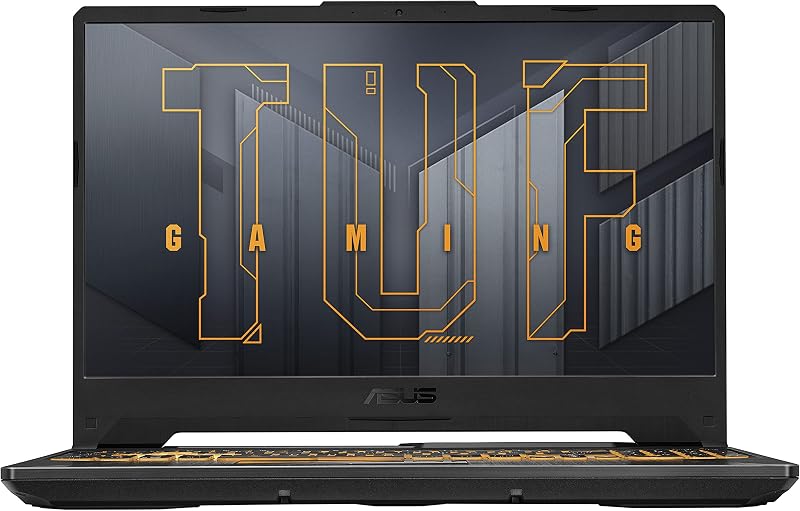
Asus TUF Gaming A15
Pros
- MIL-STD-810H military-grade drop and vibration toughness
- Spill-resistant keyboard construction
- Dual 84-blade Arc Flow cooling fans
- 144Hz FHD Adaptive-Sync gaming panel
Cons
- Heavier 7-pound chassis weight
- Limited 8GB baseline DDR5 system memory
- Entry-level 4GB RTX 3050 graphics
View Asus TUF Gaming A15 on Amazon
Who Should Buy Each One
Choose the Asus ROG Zephyrus G16 If
- You want an extraordinary 240Hz WQXGA OLED panel with 100% DCI-P3 color reproduction for color grading and fluid gaming.
- You require high-end graphics performance powered by the NVIDIA GeForce RTX 5070 with 8GB of fast GDDR7 memory.
- You commute frequently and need a slim 0.65-inch laptop that weighs only 4.1 pounds with modern Wi-Fi 7 connectivity.
- You edit video footage and need integrated Thunderbolt 4, a dedicated SD card reader, and up to 4TB of storage options.
Choose the Asus TUF Gaming A15 If
- You need an exceptionally durable laptop certified under MIL-STD-810H tests against drops, shocks, and harsh environments.
- You frequently game around drinks or snacks and want the security of a spill-resistant keyboard construction.
- You primarily play esports titles at 1080p where a 144Hz Adaptive-Sync display and an RTX 3050 GPU provide ample speed.
- You want a robust clamshell cooling setup driven by dual 84-blade Arc Flow Fans to keep internal hardware stable.
Final Verdict
For the vast majority of gamers, content creators, and students seeking a capable modern computer, the Asus ROG Zephyrus G16 is the clear superior choice. It represents a dramatic leap forward in overall hardware refinement, pairing a groundbreaking 16-core Intel Core Ultra 9 processor and RTX 5070 graphics with an unmatched 240Hz WQXGA OLED display. In addition to delivering class-leading visual clarity and esports responsiveness, its 4.1-pound weight, 0.65-inch thickness, Wi-Fi 7 capabilities, and Thunderbolt 4 support make it a versatile powerhouse that fits seamlessly into everyday mobile life.
However, the Asus TUF Gaming A15 wins out in specific environments where structural resilience and heavy physical abuse are the primary purchasing criteria. If you work on rugged job sites, travel under punishing weather conditions, or need a machine that can survive accidental tabletop spills and repeated backpack bumps, the TUF A15’s MIL-STD-810H military certification and spill-resistant keyboard offer protective qualities that the delicate Zephyrus simply cannot match. For pure performance and visual fidelity, choose the Zephyrus G16; for durable physical endurance on a straightforward clamshell frame, pick the TUF Gaming A15.
FAQ
Which laptop is better for competitive gaming frame rates?
The Asus ROG Zephyrus G16 is vastly better for competitive gaming because it combines an NVIDIA GeForce RTX 5070 with 8GB of GDDR7 memory and an ultra-fast 240Hz OLED display with a 0.2ms response time. The Asus TUF Gaming A15 features an entry-level RTX 3050 with 4GB of DDR5 memory and a 144Hz display, making it suitable only for less demanding esports titles at lower visual settings.
How does the display quality compare between the Zephyrus G16 and TUF A15?
The Zephyrus G16 features a 16-inch WQXGA (2560 x 1600) OLED display with 500 nits of brightness, 100% DCI-P3 color coverage, and a 0.2ms response time. In contrast, the TUF Gaming A15 utilizes a standard 15.6-inch Full HD (1920 x 1080) anti-glare screen running at 144Hz. The Zephyrus delivers significantly deeper contrast, higher resolution, richer colors, and smoother motion clarity.
Is the Asus TUF Gaming A15 physically tougher than the Zephyrus G16?
Yes, the TUF Gaming A15 is specifically built to meet MIL-STD-810H military reliability standards, surviving rigorous tests against physical drops, vibration, humidity, and extreme temperatures. It also includes a spill-resistant keyboard. The Zephyrus G16 is a slim, premium notebook that does not advertise military drop testing or spill protection in its product specifications.
Can the Zephyrus G16 be used for professional creative work?
Yes, the Zephyrus G16 is ideally suited for photo and video editing thanks to its 100% DCI-P3 color coverage, dedicated SD card reader, Thunderbolt 4 port, 16GB of DDR5 memory, and Intel AI Boost NPU with up to 13 TOPS of processing power. The TUF Gaming A15 has an 8GB memory configuration and standard 1080p display that are less suited for high-end color grading or timeline editing.
Why does the Zephyrus G16 listing mention Delca warranty terms?
The Zephyrus G16 listing describes a customized configuration where Delca Electronics has resealed the brand-new computer to upgrade the system memory and hard drive. Delca provides its own one-year warranty covering the upgraded RAM and SSD, while the remaining factory components remain covered under the one-year manufacturer warranty.
Which laptop is more portable for daily carrying?
The Zephyrus G16 is dramatically more portable, weighing only 4.1 pounds and measuring 0.65 inches in thickness. By comparison, the TUF Gaming A15 weighs 7.0 pounds in a thicker traditional clamshell form factor, making the Zephyrus significantly more comfortable for daily commuting and college travel.
Does either laptop support Wi-Fi 7 wireless connectivity?
Yes, the Asus ROG Zephyrus G16 comes equipped with modern Wi-Fi 7 and Bluetooth 5.4 wireless technology. The Asus TUF Gaming A15 features standard Wi-Fi 6 connectivity, which provides reliable networking but lacks the bandwidth and lower latency potential of Wi-Fi 7 routers.