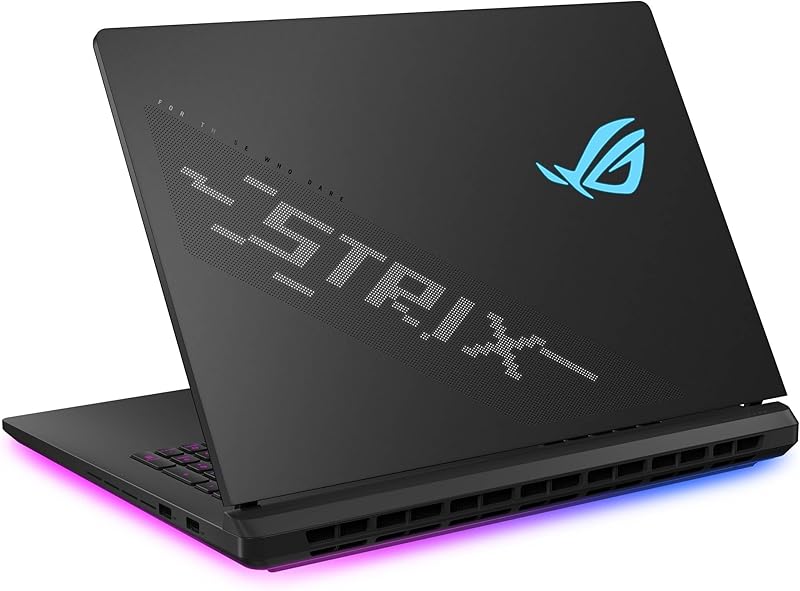
Choosing between the Asus ROG Zephyrus G16 and the Asus ProArt P16 comes down to a fundamental fork in hardware priorities: blazing 240Hz motion clarity paired with an RTX 5070 graphics chip versus ultra-dense 4K touch fidelity powered by a flagship 24GB RTX 5090 GPU.
Gamers seeking blistering frame rates, G-SYNC responsiveness, and cutting-edge Wi-Fi 7 networking should lean toward the Zephyrus G16, while digital creators and studio professionals who need immense video memory, expansive multi-terabyte storage, and precise stylus or finger interaction will find their match in the ProArt P16.

![HIDevolution [2025] ASUS ProArt P16 H7606WX Black 16" 4K 120Hz OLED Touch, 2.0 GHz Ryzen AI 9 HX 370, RTX 5090, 64 GB LPDDR5X RAM, 4 TB PCIe SSD, Windows 11 Pro](https://m.media-amazon.com/images/I/41BUZNaAIUL._SL500_.jpg "HIDevolution [2025] ASUS ProArt P16 H7606WX Black 16\" 4K 120Hz OLED Touch, 2.0 GHz Ryzen AI 9 HX 370, RTX 5090, 64 GB LPDDR5X RAM, 4 TB PCIe SSD, Windows 11 Pro")
Asus ROG Zephyrus G16 vs ProArt P16 at a Glance
| Attribute | Asus ROG Zephyrus G16 | Asus ProArt P16 |
|---|---|---|
| Processor | Intel Core Ultra 9 285H (16 cores, up to 5.4GHz) | AMD Ryzen AI 9 HX 370 (12 cores, up to 5.1GHz) |
| Graphics Coprocessor | NVIDIA GeForce RTX 5070 (8GB GDDR7) | NVIDIA GeForce RTX 5090 (24GB GDDR7) |
| Display Panel | 16″ WQXGA (2560 x 1600) 240Hz OLED Non-Touch | 16″ 4K (3840 x 2400) 120Hz OLED Touchscreen |
| System Memory | 16GB DDR5 | 64GB LPDDR5X |
| Storage Drive | 512GB PCIe SSD | 4TB (2 x 2TB) PCIe 4.0 NVMe SSD |
| Operating System | Windows 11 Home | Windows 11 Pro |
| Wireless Networking | Wi-Fi 7 + Bluetooth 5.4 | Wi-Fi 6E |
| Chassis Dimensions | 13.94″L x 9.69″W x 0.65″Th | 13.97″L x 9.72″W x 0.68″Th |
| Unit Weight | 4.1 pounds | 4.1 pounds |
| Best For | High-FPS competitive esports and mobile gaming | Heavy 3D production, 4K video editing, and studio tasks |
Graphics and Compute Performance
Raw computing and graphical rendering power set these two premium portables apart faster than any other single metric. In comparing the Zephyrus G16 RTX 5070 vs ProArt P16 RTX 5090, the graphical disparity represents two entirely different tiers of GPU architecture. The Zephyrus G16 features an NVIDIA GeForce RTX 5070 equipped with 8GB of high-speed GDDR7 memory. This GPU configuration delivers phenomenal rasterization muscle and ray tracing performance for modern gaming at 1440p and native 1600p resolutions. When assessing the wider landscape in our asus rog zephyrus g16 vs rog strix scar 16 comparison, the slimline G16 chassis balances thermal limits against high clock speeds with remarkable efficiency.
On the opposite end, the ProArt P16 steps into workstation territory with NVIDIA’s flagship GeForce RTX 5090 graphics card, boasting a staggering 24GB of GDDR7 video memory. That triple-sized VRAM buffer is critical for production pipelines where running out of memory causes outright application crashes. When handling massive 8K timeline scrubs in DaVinci Resolve, training complex machine learning models locally, or building geometry-dense scenes in Blender, 8GB can hit an operational wall that the 24GB frame buffer bypasses effortlessly. On the central processor side, the Zephyrus features an Intel Core Ultra 9 285H with 16 cores and 16 threads scaling up to 5.4GHz alongside an Intel AI Boost NPU capable of up to 13TOPS, whereas the ProArt P16 uses AMD’s Ryzen AI 9 HX 370 processor with 12 cores, 24 threads, a 36MB Smart Cache, and up to 5.1GHz clock frequencies.
In actual computing workflows, the Intel chip inside the Zephyrus edges out higher maximum single-core turbo frequencies, which directly benefits gaming frame rates and snappier reactive workloads. However, the AMD chip inside the ProArt provides 24 concurrent processing threads, giving it superior multi-threaded endurance when compiling code or exporting software timelines. Furthermore, this specific ProArt P16 configuration arrives upgraded by HIDevolution with Thermal Grizzly Conductonaut liquid metal on the CPU and Gelid GC Extreme thermal compound on the GPU, helping the RTX 5090 operate steadily within a chassis measuring less than seven-tenths of an inch thick.
Edge: Asus ProArt P16 delivers dramatically superior compute and rendering capability thanks to its 24GB RTX 5090 and 24-thread Ryzen AI 9 processor.
Display Resolution, Refresh Rate, and Interaction
The screen represents your daily window into your work and entertainment, and these two notebooks express fundamentally opposing design philosophies for visual presentation. The Zephyrus G16 240Hz OLED display uses a 16-inch WQXGA resolution of 2560 x 1600 pixels. With an ultra-fast 0.2ms response time, 500 nits of peak brightness, 100% DCI-P3 color gamut coverage, and native NVIDIA G-SYNC support, this screen is an esports marvel. Fast-moving targets stay tack-sharp without ghosting, and variable refresh rate synchronization completely eliminates screen tearing during turbulent gameplay sessions.
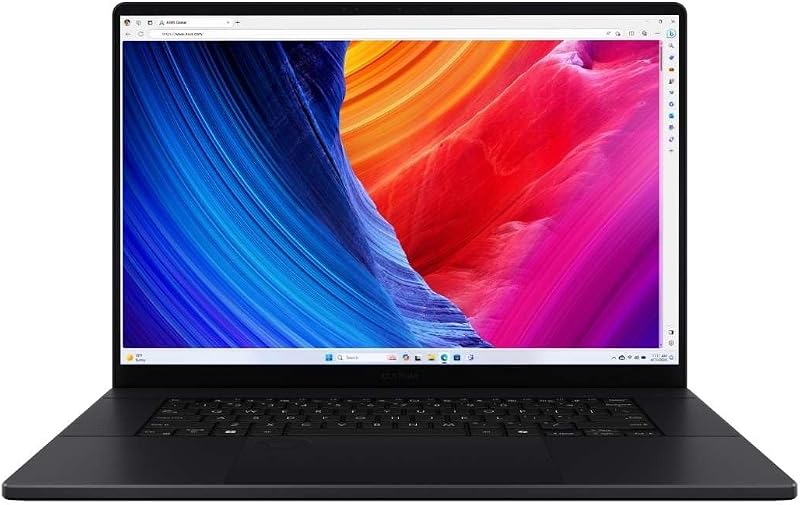
Conversely, our Asus ProArt P16 4K OLED review highlights a panel designed specifically for precision mastering and tactile input. It offers a 16-inch 4K resolution of 3840 x 2400 pixels at a 120Hz refresh rate, complemented by active touch capability. The pixel density on the ProArt panel is significantly higher, rendering vector typography, high-resolution photography, and digital brushstrokes with virtually invisible pixel grids. The inclusion of touch interaction transforms how digital illustrators and visual designers interact with their timelines and tool palettes, offering an immediate, hands-on input method that the non-touch Zephyrus completely lacks. Buyers evaluating smaller alternatives like the asus rog zephyrus g14 vs g16 often find this 16-inch form factor the sweet spot for expansive 4K workspace utility.
The trade-off hinges strictly on your primary application. While 120Hz on the ProArt is fluid enough for general navigation and casual gaming, it cannot match the motion clarity of a 240Hz refresh cycle during fast-paced first-person shooters. Conversely, while the Zephyrus panel exhibits gorgeous OLED contrast and full DCI-P3 color saturation, it sacrifices the extra visual canvas and tactile input of the ProArt panel. Gamers will prefer the speed of the 240Hz panel, whereas visual creators will inevitably gravitate toward the razor-sharp 4K touchscreen.
Edge: Tie. The Zephyrus G16 dominates fast-motion gaming at 240Hz, while the ProArt P16 wins for visual density and creative touch support at 4K.
Memory and Storage Architecture
System memory and solid-state storage often determine a computer’s true longevity and its ability to handle demanding modern multitasking. In this head-to-head, the Zephyrus G16 vs ProArt P16 specs reveal a monumental gulf in onboard memory and internal storage capacity straight out of the box. The Zephyrus G16 configuration here provides 16GB of DDR5 memory and a 512GB solid-state drive, upgraded and warrantied through Delca. While 16GB is sufficient for running contemporary AAA games and everyday productivity software, it quickly fills up when handling multi-layer digital composites, virtual machines, or heavy software development stacks.
The ProArt P16, by contrast, arrives pre-configured with a massive 64GB of onboard LPDDR5X system memory alongside 4TB of high-speed PCIe 4.0 storage arranged across two 2TB NVMe drives. If you are wondering is Asus ProArt P16 worth it for creative production, this memory allocation is often the deciding factor. Editing multi-cam 4K ProRes footage or rendering uncompressed visual effects scenes requires vast memory pools to prevent scratch-disk paging. Having 64GB of fast LPDDR5X RAM guarantees that your background applications, heavy browser tabs, and memory-hungry rendering queues will not choke system stability.
Storage space tells a similar story. Modern game installations frequently consume over 100GB apiece, meaning the 512GB drive on the Zephyrus G16 will fill up after just a handful of major game downloads. In contrast, the 4TB capacity on the ProArt P16 provides sufficient local storage to maintain large working media libraries, sound libraries, raw camera archives, and major production projects without needing an external drive tethered to your desk. For power users comparing workstation platforms in our asus rog strix scar 16 vs proart p16 analysis, built-in storage headroom is an enormous practical advantage.
Edge: Asus ProArt P16 wins decisively with four times the system memory (64GB) and eight times the factory SSD capacity (4TB).
Chassis Design, Port Selection, and Connectivity
Both laptops deliver astonishing engineering prowess by packing heavy-duty hardware into slim aluminum frames. Surprisingly, they share virtually identical dimensions and identical weights. The Zephyrus G16 measures 13.94 inches long, 9.69 inches wide, and 0.65 inches thick, weighing in at 4.1 pounds in an Eclipse Gray finish. The ProArt P16 measures 13.97 inches long, 9.72 inches wide, and 0.68 inches thick, also registering exactly 4.1 pounds. Carrying either machine in a standard laptop sleeve feels practically indistinguishable, which is remarkable given the immense thermal hardware housed inside.
Connectivity standards, however, favor the Zephyrus G16 for high-speed peripheral expansion and future-proof wireless networking. Any thorough Asus ROG Zephyrus G16 review must highlight its inclusion of modern Wi-Fi 7 and Bluetooth 5.4, compared to the Wi-Fi 6E architecture listed for the ProArt P16. Wi-Fi 7 enables wider channel widths and lower latency when paired with compatible routers. The Zephyrus also boasts a comprehensive port array including one Thunderbolt 4 port with DisplayPort and power delivery, one USB-C 3.2 port with G-SYNC and power delivery, two USB-A 3.2 ports, an HDMI 2.1 video output, a 3.5mm combo audio jack, and a full-size SD card reader. The ProArt P16 listing confirms external display connectivity via HDMI and rigorous factory port validation, but its wireless standard remains anchored to the Wi-Fi 6E generation.
Ergonomics and multimedia features also showcase minor divergences. The Zephyrus includes a 1-Zone RGB backlit keyboard, an integrated 1080p FHD IR camera with Windows Hello support, and an advanced audio suite featuring Dolby Atmos, Hi-Res audio certification, Smart Amp technology, and AI noise cancellation. The ProArt P16 features a backlit keyboard and a clamshell chassis in black, preloaded with Windows 11 Pro for enhanced enterprise management and domain joining, compared to Windows 11 Home on the Zephyrus. Those assessing ultrabook portability against thin gaming machines in our asus rog zephyrus g16 vs zenbook 14 oled comparison will appreciate that both laptops manage to preserve standard port arrays without requiring dongles.
Edge: Asus ROG Zephyrus G16 holds a slight advantage with modern Wi-Fi 7 networking, Bluetooth 5.4, and dedicated Thunderbolt 4 integration.
Gaming vs Video Editing Workflows
When deciding between the Asus ROG Zephyrus G16 or ProArt P16 for gaming, the Zephyrus G16 establishes clear superiority in frame response and input latency. Its 240Hz refresh rate combined with a blistering 0.2ms OLED response time ensures that competitive shooters like Counter-Strike 2, Apex Legends, and Valorant remain free from motion blur. NVIDIA G-SYNC eliminates visual artifacts, and the Intel Core Ultra 9 chip pushes ultra-high single-core burst frequencies. While its RTX 5070 GPU has a lower ceiling than the RTX 5090, it is well balanced for competitive titles running at high refresh rates on a 2.5K panel.
Turn the tables to content creation, however, and the question of the Asus ROG Zephyrus G16 or ProArt P16 for video editing reveals the ProArt as the ultimate studio production machine. Video editing pipelines thrive on massive video memory and high CPU thread counts. The RTX 5090 with 24GB of GDDR7 memory allows video editors to handle multiple streams of uncompressed raw video, complex color grades, and dynamic noise reduction plugins without dropping frames or triggering out-of-memory errors. The 64GB of system memory ensures smooth timeline scrubbing, while the 4K OLED touch display lets editors inspect fine detail and grade color with surgical precision.
Operating systems also tailor these laptops to their target users. The ProArt comes configured with Windows 11 Pro, which provides BitLocker encryption, Remote Desktop capabilities, and hypervisor support valuable to technical creatives and production studios. The Zephyrus G16 runs Windows 11 Home, focusing on low-overhead gaming delivery and personal use. While evaluating mobile power in guides like our asus rog zephyrus g14 vs tuf gaming a15 breakdown highlights how form factors dictate performance, here the software and GPU configurations draw a razor-sharp boundary between studio work and competitive play.
Edge: Tie. The Zephyrus G16 is the clear victor for esports gaming, while the ProArt P16 is vastly superior for professional video editing and 3D rendering.
Pros and Cons
Asus ROG Zephyrus G16

Pros
- Ultra-smooth 240Hz OLED gaming display
- Fast 0.2ms response time with G-SYNC
- Modern Wi-Fi 7 and Bluetooth 5.4
- Thunderbolt 4 expansion support
Cons
- Limited to 8GB GPU memory
- Smaller 512GB factory SSD storage
- Non-touch display panel
View Asus ROG Zephyrus G16 on Amazon
Asus ProArt P16
Pros
- Monstrous 24GB RTX 5090 graphics
- Sharp 4K OLED touch display
- Massive 64GB LPDDR5X system memory
- Huge 4TB PCIe NVMe SSD storage
- Pre-applied liquid metal CPU cooling
Cons
- Refresh rate capped at 120Hz
- Older Wi-Fi 6E wireless standard
View Asus ProArt P16 on Amazon
Who Should Buy Each One
Choose the Asus ROG Zephyrus G16 If
- You prioritize esports performance, ultra-fast 240Hz refresh rates, and 0.2ms panel response times.
- You want native NVIDIA G-SYNC hardware variable refresh rate support for tear-free gaming.
- You need cutting-edge wireless throughput via Wi-Fi 7 and Bluetooth 5.4 protocols.
- You prefer a dedicated gaming keyboard layout featuring 1-Zone RGB illumination.
Choose the Asus ProArt P16 If
- You execute demanding creative projects that require an expansive 24GB VRAM buffer on the RTX 5090 GPU.
- You need the pixel density and fine detail of a 16-inch 4K OLED display with touchscreen functionality.
- You run memory-intensive rendering applications that benefit from 64GB of onboard LPDDR5X RAM.
- You require multi-terabyte internal storage capacity (4TB SSD) and the advanced security features of Windows 11 Pro.
Final Verdict
The Asus ProArt P16 vs ROG Zephyrus G16 matchup highlights how two machines sharing identical chassis weights (4.1 pounds) and ultra-thin profiles can target completely different users. For the dedicated gamer and mobile esports enthusiast, the Zephyrus G16 is the smarter, more agile device. Its 240Hz WQXGA OLED panel, snappy Intel Core Ultra 9 processor, Wi-Fi 7 networking, and G-SYNC integration create an exceptionally fluid gaming experience that makes full use of its capable RTX 5070 graphics processor.
However, for digital creators, 3D artists, and professional studio editors, the ProArt P16 operates on an entirely higher level of computational capability. Packing a monstrous 24GB RTX 5090 GPU, 64GB of fast LPDDR5X memory, a 4TB solid-state storage array, and a gorgeous 4K OLED touchscreen, it functions as a comprehensive mobile workstation that eliminates production bottlenecks. If your primary goal is high-refresh competitive gaming, take the Zephyrus G16; if your machine generates your income through creative and rendering workflows, the ProArt P16 is unequivocally the superior tool.
FAQ
Can the Asus ProArt P16 handle high-end PC gaming?
Yes, the ProArt P16 can handle any modern PC game with ease due to its flagship NVIDIA GeForce RTX 5090 graphics card with 24GB of GDDR7 memory. Its display runs at a smooth 120Hz refresh rate at 4K resolution, although it does not feature the 240Hz refresh rate or dedicated G-SYNC motion synchronization found on the gaming-focused Zephyrus G16.
Does the Asus ROG Zephyrus G16 have a touchscreen display?
No, the Zephyrus G16 listing features a non-touch 16-inch WQXGA (2560 x 1600) OLED display. Asus optimized this panel for maximum speed and motion clarity, equipping it with a 240Hz refresh rate, a 0.2ms response time, and NVIDIA G-SYNC support rather than touch digitizer layers.
How do the cooling systems differ between these two customized laptops?
The Zephyrus G16 uses standard high-performance thermal cooling designed for thin gaming laptops. The ProArt P16 in this comparison has been custom-upgraded by HIDevolution with Thermal Grizzly Conductonaut liquid metal on the AMD CPU and Gelid GC Extreme thermal compound on the RTX 5090 GPU to manage heat during prolonged rendering workloads.
Which laptop offers better networking connectivity for modern routers?
The Zephyrus G16 includes modern Wi-Fi 7 and Bluetooth 5.4 connectivity, offering access to higher channel bandwidths and lower wireless latency. The ProArt P16 listing specifies Wi-Fi 6E compatibility, which provides excellent high-speed connectivity but lacks the newest Wi-Fi 7 protocol standards.
Is 16GB of RAM on the Zephyrus G16 enough for modern AAA games?
Yes, 16GB of DDR5 RAM is sufficient to run the vast majority of modern AAA titles and everyday multitasking smoothly. However, if you plan to edit complex 4K video timelines or compile heavy 3D assets, the 64GB memory configuration on the ProArt P16 offers far greater headroom.
What operating system comes pre-installed on each machine?
The Zephyrus G16 arrives with Windows 11 Home, which is tailored for general consumer use and PC gaming. The ProArt P16 includes Windows 11 Pro, which adds advanced management features such as BitLocker drive encryption, client Hyper-V virtualization, and remote management tools suited for enterprise environments.