The choice between the Lenovo ThinkPad T14 and the MSI Katana 15 hinges entirely on whether your daily workflow demands ultra-portable corporate endurance or high-wattage gaming and rendering horsepower. Lenovo built the ThinkPad T14 as a lean enterprise workstation focused on power efficiency, system security, and go-anywhere productivity, whereas MSI engineered the Katana 15 HX as a desktop-replacement platform equipped with heavy-duty thermal hardware and dedicated graphics.
Corporate professionals, frequent travelers, and office managers should select the ThinkPad T14 for its lightweight chassis, hardware-level ThinkShield security, and versatile Thunderbolt 4 docking capabilities. Software developers, digital creators, and competitive gamers should opt for the Katana 15 to harness its 24-core processing architecture and cutting-edge NVIDIA Blackwell discrete graphics.


Lenovo ThinkPad T14 vs MSI Katana 15 at a Glance
| Feature | Lenovo ThinkPad T14 | MSI Katana 15 |
|---|---|---|
| Processor | Intel Core Ultra 7 155U (Up to 22 TOPS AI) | Intel Core i9-14900HX (24-Core Hybrid Architecture) |
| Graphics Coprocessor | Integrated Intel Graphics | NVIDIA GeForce RTX 5070 Laptop GPU (8GB GDDR7) |
| System Memory | 32GB DDR5 | 32GB DDR5 |
| Storage Capacity | 512GB SSD | 1TB NVMe SSD |
| Display Specifications | 14-inch WUXGA (1920×1200) IPS, 400 nits, Anti-glare | 15.6-inch QHD (2560×1440 class) 165Hz, 100% DCI-P3 |
| Operating System | Windows 11 Pro | Windows 11 Home |
| Webcam | 5MP RGB Camera with Physical Privacy Shutter | Front-Facing HD Camera |
| Biometrics & Security | Match-on-Chip Fingerprint Reader, ThinkShield, vPro | Firmware Security (Fingerprint reader not listed) |
| Chassis Dimensions | 12.44″ L x 8.81″ W x 0.70″ Th | 14.13″ L x 10.31″ W x 0.99″ Th |
| Carry Weight | Not listed | 5.0 lbs |
| Best For | Business travel, executive productivity, and enterprise management | AAA gaming, 3D rendering, simulation, and software development |
Processing Muscle and Graphics Performance
The processing divide between these two machines represents two fundamentally different computing philosophies. The Lenovo ThinkPad T14 Intel Core Ultra 7 155U processor is engineered specifically around energy efficiency and modern edge computing. With integrated AI acceleration delivering up to 22 TOPS of aggregate performance across the CPU, GPU, and dedicated NPU, the ThinkPad effortlessly accelerates local background tasks, video framing, and voice isolation without taxing system responsiveness. Because it relies on integrated Intel Graphics with shared system memory, it easily powers multi-monitor office productivity, administrative suites, and data manipulation tools, but it is not built for sustained 3D polygon manipulation or high-frame-rate rendering.
By contrast, looking at the MSI Katana 15 RTX 5070 specs reveals a workstation built for brute calculation. The Katana 15 incorporates Intel’s top-tier Core i9-14900HX processor, featuring a massive 24-core hybrid architecture built to process multithreaded compilation, physical simulation, and video rendering tasks. Backing that CPU is NVIDIA’s next-generation GeForce RTX 5070 discrete graphics chip, equipped with 8GB of ultra-fast GDDR7 dedicated memory and Blackwell architecture. With native hardware support for advanced ray tracing and DLSS 4 frame generation, the Katana 15 operates in a different performance tier, crushing intensive 3D applications, compute pipelines, and modern visual workloads that an integrated graphics solution cannot execute. Buyers evaluating the lenovo thinkpad t14 vs razer blade 14 often encounter a similar performance gulf when comparing lightweight mobile chips to discrete gaming silicon.
When running raw compute-heavy software, the ThinkPad T14 vs Katana 15 performance comparison is overwhelmingly one-sided. The Katana 15 provides an extra 512GB of base solid-state storage (1TB NVMe SSD versus the ThinkPad’s 512GB SSD) alongside its immense graphical leap, ensuring heavy project assets load instantaneously. While the ThinkPad excels at efficient daily responsiveness, the Katana is built to finish dense rendering jobs in a fraction of the time.
Edge: MSI Katana 15, owing to its 24-core Intel Core i9-14900HX processor and dedicated NVIDIA GeForce RTX 5070 graphics card.
Display Quality and Visual Fidelity
Display characteristics define how comfortably you interact with your machine during long workdays. The Lenovo ThinkPad T14 features a 14-inch WUXGA panel with a resolution of 1920×1200. This 16:10 aspect ratio provides vertical screen real estate that reduces scrolling across sprawling spreadsheets, coding terminals, and text documents. Rated at 400 nits of brightness with a dedicated anti-glare finish, the ThinkPad display minimizes reflections and remains clear when working near sunlit windows or under aggressive overhead fluorescent lights in corporate environments.
The MSI Katana 15 opts for visual immersion and high-speed motion clarity. Its 15.6-inch QHD display features a rapid 165Hz refresh rate that renders fluid motion whether you are tracking fast-moving gaming targets or navigating complex timelines. Furthermore, the panel covers 100% of the DCI-P3 cinematic color space, reproducing deeper saturation, broader hue separation, and greater color accuracy than standard sRGB enterprise panels. This makes the Katana an enticing option for media editors who require rich color profiling alongside high refresh rates, a distinction often analyzed when looking at the lenovo thinkpad t14 vs msi stealth 16.
While the Katana 15 delivers superior color reproduction, higher resolution, and faster frame rendering, the ThinkPad T14 provides a higher brightness rating (400 nits) tailored for mobile office visibility. However, for sheer visual precision, pixel density, and animation smoothness, the Katana 15 panel is superior for creative workflows and high-fidelity gaming.
Edge: MSI Katana 15, thanks to its sharper QHD resolution, fluid 165Hz refresh rate, and 100% DCI-P3 color gamut.
Portability, Chassis Dimensions, and Thermal Engineering
Portability represents the starkest everyday trade-off between these two machines. The Lenovo ThinkPad T14 is engineered for frictionless mobility, measuring 12.44 inches long, 8.81 inches wide, and only 0.70 inches thick. It slips neatly into slim messenger bags and compact backpack sleeves, making it painless to haul through airport security or between meeting rooms. Its advanced thermal design is tuned for quiet composure, keeping the internal Core Ultra chip stable without aggressive fan whine during conference calls or heavy browser multitasking.
On the other hand, the MSI Katana 15 is a substantially larger machine. Its chassis measures 14.13 inches long, 10.31 inches wide, and nearly an inch thick at 0.99 inches, weighing in at a noticeable 5.0 pounds. To cool both a 24-core CPU and an RTX 5070 GPU, MSI installed its Cooler Boost 5 system, which employs dual high-flow cooling fans and five shared heat pipes. While this heavy-duty cooling apparatus successfully maintains system stability and prevents thermal throttling during marathon gaming or compiling sessions, it generates audible fan noise under load and requires a considerably larger footprint on your desk. Comparing the form factor trade-offs of the lenovo thinkpad t14 vs dell 16 plus illustrates how full-size laptops demand much more dedicated carry space.
Thermal engineering also informs overall power draw. Considering ThinkPad T14 battery life vs Katana 15 operational endurance, the low-voltage U-series platform inside the ThinkPad is built to sip energy during document editing and communications. The Katana 15, burdened by high-wattage silicon and a 165Hz QHD screen, consumes power at an accelerated rate, requiring its bulky AC adapter for uninterrupted peak performance.
Edge: Lenovo ThinkPad T14, due to its compact 0.70-inch slim chassis and travel-friendly form factor.
Enterprise Security, Operating System, and Professional Workflows
When deciding on the Lenovo ThinkPad T14 or MSI Katana 15 for work, operational infrastructure and corporate compliance take center stage. The ThinkPad T14 arrives with Windows 11 Pro preinstalled, granting access to essential enterprise features like BitLocker encryption, Group Policy management, and Windows Information Protection. Lenovo integrates its proprietary ThinkShield security suite alongside Intel vPro technology, enabling hardware-based authentication and secure out-of-band remote manageability for enterprise IT departments. A physical match-on-chip fingerprint reader provides instant biometric sign-in, while the high-resolution 5MP RGB front camera features a mechanical privacy shutter to guarantee that your lens remains blocked when meetings conclude.
The MSI Katana 15 ships with Windows 11 Home and is geared toward end users, individual students, and software developers rather than managed corporate fleets. Although it includes listed Microsoft Office software for backup, it lacks the hardware-enforced remote management and granular enterprise policy controls found in Windows 11 Pro. Biometric security is also absent from its primary specifications, meaning users rely entirely on standard PIN or password access.
Video collaboration is another area where the business-focused ThinkPad stands out. The ThinkPad T14 carries a crisp 5MP webcam, delivering substantially better image resolution for virtual boardroom presentations than standard front-facing laptop webcams. For business professionals managing confidential data or interacting with strict organizational IT policies, the ThinkPad provides an uncompromising enterprise environment.
Edge: Lenovo ThinkPad T14, courtesy of Windows 11 Pro, Intel vPro manageability, ThinkShield security, and a 5MP webcam with physical privacy shutter.
Port Selection, Docking, and Peripheral Ecosystems
Connecting external hardware reveals distinct engineering priorities. The ThinkPad T14 functions as a versatile mobile workstation that effortlessly interfaces with office docks. It includes two USB-C ports with Thunderbolt 4 support delivering bidirectional speeds up to 40Gbps, enabling rapid file transfers, dual external display output, and single-cable power delivery. Lenovo supplements this with two USB-A 5Gbps ports (including one always-on port for charging phones while the laptop sleeps), an HDMI 2.1 port capable of driving 4K monitors at 60Hz, a 3.5mm combo audio jack, and an included 7-in-1 USB-C hub bundle that dramatically expands peripheral flexibility right out of the box.
The MSI Katana 15 builds out its connectivity for gaming rigs, external high-resolution monitors, and low-latency network play. It features a USB-C Gen 2 port, multiple USB-A ports, a 3.5mm audio jack with Hi-Res Audio support, and a high-bandwidth HDMI port supporting video signals up to 8K resolution. Most crucially for online gaming and direct developer server transfers, the Katana 15 integrates a dedicated RJ45 Gigabit Ethernet port, ensuring reliable hardwired network connectivity without needing external dongles. Those comparing high-end gaming options like the lenovo thinkpad t14s vs legion slim 5 will recognize how important integrated Ethernet remains for competitive gaming and local builds.
Both laptops provide modern Wi-Fi 6E connectivity, but they cater to different peripheral setups. The Katana 15 provides native hardwired LAN and 8K display output, but the ThinkPad T14 takes the connectivity lead by offering dual high-bandwidth Thunderbolt 4 ports alongside a bundled multi-port expansion hub.
Edge: Lenovo ThinkPad T14, due to its dual 40Gbps Thunderbolt 4 ports and bundled 7-in-1 USB-C hub.
Keyboard Usability and Workspace Ergonomics
Typing comfort and input precision directly influence productivity during long typing stints. The ThinkPad T14 features Lenovo’s legendary ergonomic backlit keyboard. Renowned for its tactile key switches, sculpted keycaps, and optimal travel depth, the ThinkPad keyboard allows writers, researchers, and coders to type for hours with minimal finger fatigue. The chassis also houses a discrete fingerprint sensor integrated into the deck for frictionless authentication.
The Katana 15 approaches the user interface through a distinct gaming lens. It is equipped with a 4-zone RGB backlit keyboard that allows users to personalize color schemes across different sectors of the deck. MSI also highlights the primary WASD keys with transparent keycaps, facilitating immediate hand placement during intense gaming sessions. While the larger 15.6-inch footprint gives the Katana plenty of room across the deck, the aesthetic leans heavily into gamer styling, featuring aggressive keyboard font and multi-colored backlighting.
For conservative corporate boardrooms, client meetings, and distraction-free typing, the ThinkPad T14 presents a dignified, quiet, and ergonomically refined profile. Gamers and evening workstation users will appreciate the Katana’s RGB flair, but for pure day-in, day-out typing ergonomics, Lenovo retains an industry-standard advantage.
Edge: Lenovo ThinkPad T14, thanks to its world-class ergonomic typing deck and professional aesthetic.
Pros and Cons
Lenovo ThinkPad T14
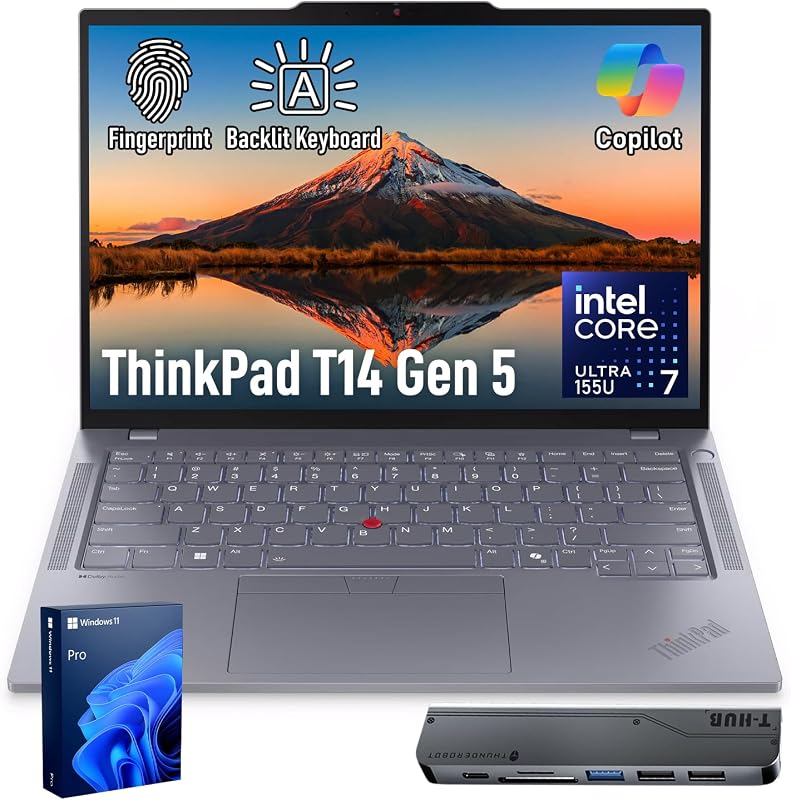
Pros
- Lightweight 0.70-inch slim chassis
- Sharp 5MP webcam with physical privacy shutter
- Two 40Gbps Thunderbolt 4 ports
- Enterprise Windows 11 Pro and ThinkShield
- Bright 400-nit anti-glare display
Cons
- Integrated graphics lacks 3D gaming power
- Smaller 512GB base solid-state drive
View Lenovo ThinkPad T14 on Amazon
MSI Katana 15

Pros
- NVIDIA GeForce RTX 5070 8GB GDDR7 graphics
- 24-core Intel Core i9-14900HX processor
- Fluid 15.6-inch QHD 165Hz display
- 100% DCI-P3 wide color gamut
- Generous 1TB NVMe solid-state storage
Cons
- Heavy 5.0-pound chassis build
- No hardware fingerprint reader listed
Who Should Buy Each One
Choose the Lenovo ThinkPad T14 If
- You need a lightweight, travel-friendly chassis measuring just 0.70 inches thick for regular commuting and business travel.
- Your organization requires Windows 11 Pro, Intel vPro manageability, and hardware-level ThinkShield data protection.
- You attend frequent video conferences and need a high-clarity 5MP webcam with an integrated physical privacy slider.
- You utilize high-speed Thunderbolt 4 docking stations to run single-cable desktop monitor and peripheral setups.
Choose the MSI Katana 15 If
- You play modern AAA games and require an NVIDIA GeForce RTX 5070 with Blackwell architecture, DLSS 4, and ray tracing.
- You run demanding 3D rendering, simulation, or compilation tasks that fully leverage a 24-core Intel Core i9-14900HX processor.
- You demand a 15.6-inch QHD display featuring a 165Hz refresh rate and 100% DCI-P3 color gamut for editing and fast gameplay.
- You require a built-in RJ45 Ethernet port for lag-free gaming and maximum local network transfer stability.
Final Verdict
For the vast majority of professionals, hybrid workers, and enterprise employees, the Lenovo ThinkPad T14 is the smarter, more practical machine. It excels in the areas that matter most for daily business operations: all-day thermal quietness, compact dimensions, enterprise-grade biometrics, a bright 400-nit anti-glare screen, and dual 40Gbps Thunderbolt 4 ports. With its Intel Core Ultra 7 processor and integrated AI engine, it tackles business productivity without burdening you with excess weight, loud cooling fans, or battery-draining components.
However, when raw computational muscle and 3D rendering capabilities are non-negotiable, the MSI Katana 15 completely outclasses the ThinkPad. Backed by its 24-core Intel Core i9-14900HX CPU, 1TB NVMe SSD, and dedicated NVIDIA GeForce RTX 5070 graphics with GDDR7 memory, the Katana 15 is built for users whose work or recreation includes heavy creative pipelines, software compiling, or high-FPS gaming. If you need a true desktop replacement that can dominate modern gaming titles and heavy multi-threaded workloads, the Katana 15 is worth every ounce of its 5.0-pound frame.
FAQ
Can the Lenovo ThinkPad T14 play modern AAA games?
The ThinkPad T14 relies on integrated Intel Graphics rather than a discrete GPU. While it easily handles casual games, browser titles, and lightweight indie games, it lacks the dedicated video memory and processing architecture required to smoothly render modern AAA titles at high settings.
Is MSI Katana 15 worth it for business and office productivity?
The Katana 15 can easily handle standard office productivity due to its fast 24-core i9 processor and 32GB of DDR5 memory. However, its 5-pound weight, 0.99-inch thickness, gamer-focused RGB keyboard, shorter battery endurance, and Windows 11 Home operating system make it less practical for corporate settings than the ThinkPad T14.
Does the Lenovo ThinkPad T14 feature an Ethernet port?
The ThinkPad T14 chassis features two Thunderbolt 4 ports, two USB-A ports, and HDMI, but it does not include an onboard RJ45 Ethernet jack. However, it comes bundled with a 7-in-1 USB-C hub that expands connectivity when you need a hardwired connection.
What are the primary differences between the screens on these laptops?
The ThinkPad T14 has a 14-inch WUXGA (1920×1200) anti-glare screen with 400 nits of brightness and a productivity-friendly 16:10 aspect ratio. The Katana 15 features a 15.6-inch QHD (2560×1440 class) panel with a fast 165Hz refresh rate and wide 100% DCI-P3 color gamut, making it vastly superior for motion smoothness and color grading.
Can you connect external 4K monitors to both laptops?
Yes. The ThinkPad T14 supports external 4K displays through its HDMI 2.1 port (up to 4K at 60Hz) as well as its two high-speed Thunderbolt 4 ports. The MSI Katana 15 features a full-size HDMI port capable of outputting resolutions up to 8K, alongside its USB-C port.
Which laptop provides better webcam quality for remote meetings?
The Lenovo ThinkPad T14 provides superior video quality thanks to its 5MP RGB camera, delivering sharper detail and better clarity than standard laptop cameras. It also includes an integrated physical webcam privacy shutter for enhanced security between calls.


