The decisive difference between these two laptops comes down to enterprise mobility versus desktop-grade graphical power. The Lenovo ThinkPad T14 is engineered for corporate travel, remote collaboration, and fleet management with hardware-level security, whereas the MSI Stealth 16 is built to deliver massive graphical compute, high-refresh visuals, and heavy rendering capabilities.
Professionals who prioritize compact dimensions, all-day carrying ease, physical privacy controls, and native corporate domain management should choose the Lenovo ThinkPad T14, while software developers, 3D artists, and gamers who need an expansive OLED panel and dedicated ray-tracing power will prefer the MSI Stealth 16.


Lenovo ThinkPad T14 vs MSI Stealth 16 at a Glance
| Feature | Lenovo ThinkPad T14 | MSI Stealth 16 |
|---|---|---|
| Form Factor | Ultra-Portable (14-inch) | Gaming Notebook (16-inch) |
| Processor | Intel Core Ultra 7 155U (up to 22 TOPS AI) | Intel Core Ultra 9 386H |
| Graphics Coprocessor | Intel Graphics (Integrated, Shared RAM) | NVIDIA GeForce RTX 5070 Ti (16GB GDDR7) |
| Display Panel | 14″ WUXGA (1920×1200) Anti-Glare IPS, 400 nits | 16″ QHD+ OLED, 240Hz Refresh Rate |
| System Memory | 32GB DDR5 | 32GB DDR5 |
| Internal Storage | 512GB SSD | 1TB NVMe SSD |
| Biometric Security | Match-on-Chip Fingerprint Reader | Face Recognition |
| Wireless Connectivity | Wi-Fi 6E + Bluetooth | Wi-Fi 7 + Bluetooth |
| Operating System | Windows 11 Pro | Windows 11 Home |
| Dimensions & Weight | 12.44″ x 8.81″ x 0.70″ | Weight not listed | 13.94″ x 9.96″ x 0.79″ | 4.4 pounds |
| Best For | Business travel, virtual meetings, enterprise security | Demanding creative production, 3D modeling, high-FPS gaming |
Processing Power and Graphics Performance
Compute capabilities diverge sharply between these two systems, defining how they handle sustained computing loads. The Lenovo ThinkPad T14 Intel Core Ultra 7 155U processor leverages an energy-conscious architecture with up to 22 TOPS of AI performance across its combined CPU, GPU, and NPU design. It is specifically tailored to manage multi-threaded office applications, data analysis, and unified business tasks while running cool and silent under continuous use. Because it relies on integrated Intel Graphics with shared system memory, the ThinkPad T14 handles document processing, web-based software, and 4K external display output cleanly, but it is not intended for compute-heavy graphical simulations.
In contrast, the MSI Stealth 16 RTX 5070 Ti performance profile operates on an entirely different level of capability. Equipped with the Intel Core Ultra 9 386H processor and a standalone NVIDIA GeForce RTX 5070 Ti graphics processor backed by 16GB of dedicated GDDR7 VRAM, the Stealth 16 is constructed for high-throughput tasks. It supports advanced features like DLSS 4 visual acceleration and full VR-Ready workloads, allowing it to chew through complex rendering pipelines, local AI training sets, and demanding modern video games. When looking at pure raw throughput, comparing these machines echoes the architectural divide seen in our lenovo thinkpad t14 vs msi katana 15 analysis, where dedicated silicon completely outclasses shared integrated chips for intensive computing.
Both laptops provide a generous 32GB of modern DDR5 RAM, meaning neither machine will choke on extensive browser tabs, massive spreadsheets, or multi-container virtualization setups. However, the ThinkPad T14 pairs this memory pool with a 512GB solid state drive, whereas the Stealth 16 provides a 1TB NVMe SSD straight out of the box. Users executing heavy multimedia tasks or installing massive software development environments will fill the ThinkPad storage far faster, necessitating external drive management or storage expansion down the line.
Edge: MSI Stealth 16 delivers vastly superior processing throughput, specialized AI rendering features, and dedicated RTX graphical muscle backed by double the internal solid-state capacity.
Display Quality and Visual Immersion
The visual experience reflects the divergent operational environments these laptops target. The ThinkPad T14 features a 14-inch WUXGA display with a 1920×1200 resolution and a 16:10 aspect ratio. Its anti-glare IPS coating and 400 nits of brightness make it exceptionally practical for fluctuating office lighting, conference rooms, and outdoor work areas. The taller vertical dimension shows more rows of code and text per scroll, mitigating eye fatigue during prolonged document sessions. The listing specifies no high refresh rate, indicating a standard panel tuned strictly for static productivity and battery conservation.
The Stealth 16, by comparison, carries a 16-inch QHD+ OLED display running at an ultra-smooth 240Hz refresh rate. The OLED panel technology provides pixel-level illumination, which yields perfect black levels, expansive dynamic range, and vibrant color representation for digital media creators. At 240Hz, fast visual transitions and frame pacing are rendered with fluid precision, eliminating motion blur during both high-speed gaming and rapid scrubbing through video timelines. Shoppers weighing screen real estate against portability will find parallels in our lenovo thinkpad t14 vs dell 16 plus comparison, where a 16-inch screen dramatically increases working comfort on stationary desks.
The trade-off is clarity of function. The ThinkPad screen is an anti-reflective workhorse that resists harsh glare from overhead office fluorescents, making it easy to read all day long. The Stealth 16 panel is a high-end visual showcase designed to deliver maximum sensory immersion and color precision, making it clearly superior for graphic designers, video editors, and gamers who demand fluid high-resolution visuals.
Edge: MSI Stealth 16 dominates display capability with a larger, sharper QHD+ OLED screen and an exceptionally responsive 240Hz refresh rate.
Portability, Form Factor, and Daily Travel
A machine’s footprint dictates whether it lives permanently anchored to a desk or travels comfortably tucked under an arm. The ThinkPad T14 is classified under an Ultra-Portable form factor, measuring 12.44 inches long, 8.81 inches wide, and just 0.70 inches thick. This compact profile allows it to slide effortlessly into compact messenger bags, backpack sleeves, and airplane seatback pockets. While the product listing does not specify the exact weight of the ThinkPad T14, its 14-inch dimensions and slim profile are clearly engineered for frequent travelers who navigate airports and corporate campuses.
The MSI Stealth 16 vs Lenovo ThinkPad T14 size confrontation highlights the physical toll of housing higher-tier cooling and a 16-inch display. The Stealth 16 measures 13.94 inches long, 9.96 inches wide, 0.79 inches thick, and weighs in at a definite 4.4 pounds. While 4.4 pounds is comparatively trim for a high-performance gaming notebook carrying an RTX 5070 Ti, it represents a noticeable load when carried across an entire day on foot. Travelers who have weighed similar ultra-compact form factors against gaming designs, such as in our lenovo thinkpad t14 vs razer blade 14 review, know that every fraction of an inch and pound matters when commuting.
Thermal handling also influences daily handling. Lenovo incorporates an advanced thermal design tuned to keep the system whisper-quiet and cool beneath your hands during consecutive video calls and data crunching. The Stealth 16 must displace thermal energy generated by an Ultra 9 processor and a discrete NVIDIA GPU. While its chassis remains manageable for its class, users will feel more warmth and hear active fan curves when pushing the system compared to the low-profile operation of the ThinkPad.
Edge: Lenovo ThinkPad T14 takes the lead in daily mobility due to its noticeably smaller 14-inch footprint and slim 0.70-inch profile.
Enterprise Security, Operating System, and IT Management
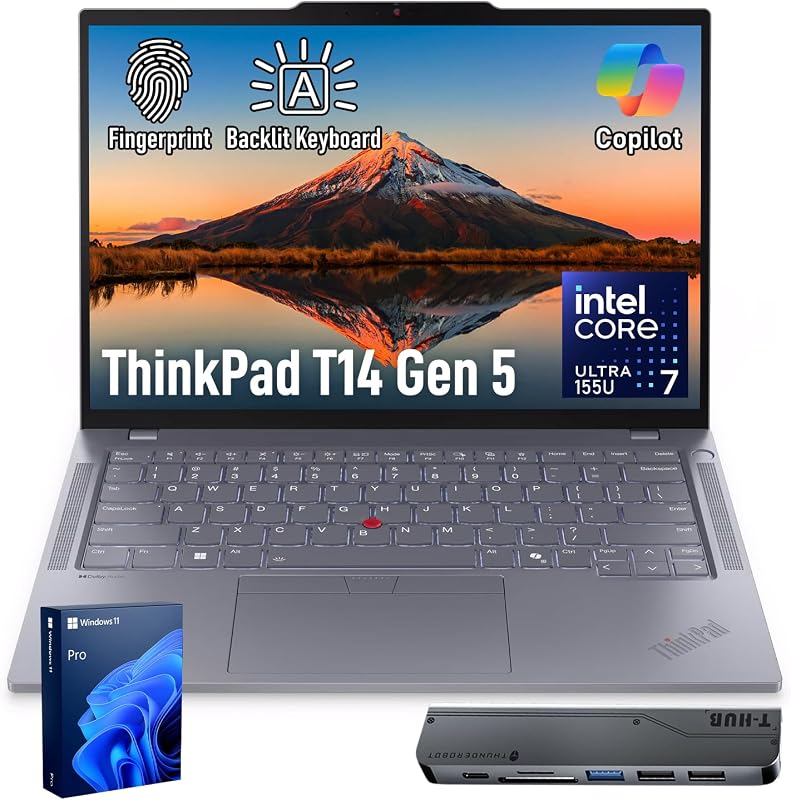
Corporate deployment and digital identity defense represent a major point of divergence. The Lenovo ThinkPad T14 is purpose-built around enterprise-grade security. It incorporates the ThinkShield hardware-software security framework, an integrated match-on-chip fingerprint reader, and Intel vPro hardware manageability. The inclusion of Intel vPro allows enterprise IT departments to provision, diagnose, and remotely repair devices over the corporate network, even when the operating system is unresponsive. Furthermore, the ThinkPad ships natively with Windows 11 Pro, granting immediate access to BitLocker drive encryption, Windows Information Protection, and Active Directory domain joining.
The Stealth 16 approaches security and software from an enthusiast perspective. It includes biometric Face Recognition for quick, password-free logins via Windows Hello, which is seamless and convenient for individual users. However, it ships with Windows 11 Home. In fact, MSI explicitly notes in the product data that it recommends Windows 11 Pro for business use. An organization choosing the Stealth 16 must factor in operating system upgrade steps if enterprise domain policies, group policy management, and advanced remote security tools are strict prerequisites.
Physical privacy also leans toward the ThinkPad. Lenovo outfits the T14 with a physical webcam shutter directly integrated into its 5MP front-facing camera housing. This provides absolute, hardware-level certainty that the optical lens is blinded between virtual calls. The Stealth 16 provides front-facing facial authentication but omits a listed physical lens shutter. For users handling privileged financial information, sensitive corporate databases, or strictly regulated client files, the ThinkPad provides the end-to-end protective assurance required by modern compliance standards.
Edge: Lenovo ThinkPad T14 easily wins for organizational deployments thanks to Windows 11 Pro, Intel vPro, ThinkShield, a match-on-chip fingerprint scanner, and a physical webcam shutter.
Connectivity, Ports, and Peripheral Support
External device integration is essential for productivity desks and gaming battlestations alike. The ThinkPad T14 is comprehensively outfitted for contemporary docking setups. It features two USB-C ports with Thunderbolt 4 support delivering up to 40Gbps bandwidth, two USB-A ports running at 5Gbps (including one always-on port for charging accessories), an HDMI 2.1 port capable of handling displays up to 4K at 60Hz, and a headphone/microphone combo jack. To further extend compatibility, this specific listing includes a 7-in-1 USB-C Hub Bundle, allowing direct hookups for external displays, storage arrays, printers, mice, and keyboards without purchasing extra dongles.
The Stealth 16 takes a massive generational leap in network performance by implementing Wi-Fi 7 wireless connectivity. Wi-Fi 7 provides substantially wider channel widths and multi-link operation, allowing you to download enormous files, stream dense video feeds, and reduce wireless latency to absolute minimums on compatible routers. The ThinkPad T14 features Wi-Fi 6E, which remains fast and stable in congested modern office environments, but it cannot match the peak ceiling and data bandwidth offered by Wi-Fi 7 standards.
On physical expansion, the Stealth 16 product data specifies an HDMI video port, Bluetooth, and wireless peripheral compatibility, alongside generic external display and keyboard connectivity, but the listing does not specify the precise breakdown of its physical USB ports. For enterprise workers seeking guaranteed dual Thunderbolt 4 docking simplicity and bundled multi-port hubs, the ThinkPad T14 presents an open and fully documented layout. If your workflow relies strictly on bleeding-edge wireless networking speeds, the Stealth 16 stands out.
Edge: Tie. The ThinkPad T14 offers superior verified wired docking flexibility with dual Thunderbolt 4 ports and a bundled hub, while the Stealth 16 features cutting-edge Wi-Fi 7 wireless speeds.
Remote Collaboration and Input Ergonomics
Daily computing comfort relies heavily on webcam fidelity, microphone integration, and tactile feedback. The ThinkPad T14 excels in virtual boardrooms with its high-definition 5MP RGB front-facing webcam. The higher resolution ensures sharp, lifelike detail during Zoom, Teams, and Webex calls, preventing the pixelated, washed-out look typical of lower-resolution laptop webcams. Paired with its physical privacy slider and an advanced cooling platform that suppresses fan noise during intensive video processing, the ThinkPad acts as a pristine communication hub.
The Stealth 16 handles collaboration through its front-facing camera with biometric face recognition support, though the listing does not specify its exact optical sensor resolution. The primary appeal of the Stealth 16 input deck lies in its expansive format. Thanks to the wider 16-inch chassis, typing feels spacious, and the backlit keyboard provides clear key visibility across dark gaming rooms and dimly lit editing suites. For similar reflections on how lifestyle and productivity form factors interact, check out our lenovo thinkpad t14s vs yoga 9i analysis.
Both laptops include backlit keyboards that ensure smooth typing in low-light environments. The ThinkPad lineup is legendary for its sculpted, deep-travel key switches that maintain comfort across long days of coding and writing, while the Stealth 16 provides an uncluttered, modern gaming notebook layout. For purely professional meetings where sharp visual presentation and acoustic silence are top priorities, the ThinkPad holds a tangible advantage.
Edge: Lenovo ThinkPad T14 wins collaboration due to its crisp 5MP front camera and integrated mechanical privacy shutter.
Work and Programming Suitability
Evaluating the Lenovo ThinkPad T14 or MSI Stealth 16 for work depends entirely on the nature of your software stack. If you are comparing the ThinkPad T14 or MSI Stealth 16 for programming, the ThinkPad T14 is exceptionally well-suited for web development, backend microservices, system administration, and enterprise scripting. Its 16:10 aspect ratio shows extensive lines of code per window, its 32GB DDR5 RAM effortlessly hosts Docker containers and virtual machines, and its lightweight frame means you can bring your local coding environment anywhere. Many engineers looking at productivity machines also inspect our lenovo thinkpad t14s vs legion slim 5 guide to evaluate productivity ergonomics against gaming architectures.
Conversely, if your development work touches game development (Unreal Engine or Unity), CUDA acceleration, 3D computer graphics, or localized deep learning model execution, the ThinkPad simply cannot compete. The MSI Stealth 16 provides an Intel Core Ultra 9 processor combined with the GeForce RTX 5070 Ti and 16GB of GDDR7 VRAM. This hardware executes graphics shader compilation, ray-tracing calculations, and local neural network tasks that an integrated GPU cannot realistically run. Furthermore, the 1TB NVMe drive accommodates heavy SDK installations, game assets, and virtual environment snapshots without constant disk cleanup.
Any balanced Lenovo ThinkPad T14 review must recognize that the T14 is optimized for administrative efficiency, data security, and mobility. Conversely, any realistic MSI Stealth 16 review must highlight that while the machine is capable of business tasks, it shines brightest when brute hardware power is required. If your work consists of office suites, database queries, and remote calls, the Stealth 16 is an overbuilt, heavier device with features you will never fully utilize. But for creative engineering and computational heavy lifting, the MSI hardware provides capabilities the ThinkPad cannot match.
Edge: MSI Stealth 16 takes the edge for technical workloads involving 3D rendering, machine learning, and graphics development, while the ThinkPad T14 remains the superior choice for administrative and traditional coding pipelines.
Pros and Cons
Lenovo ThinkPad T14
Pros
- Lightweight 0.70-inch slim ultra-portable chassis
- Intel Core Ultra 7 with vPro security
- Anti-glare 400-nit WUXGA display
- Sharp 5MP webcam with physical privacy shutter
- Native Windows 11 Pro operating system
Cons
- Integrated Intel graphics with shared memory
- Smaller 512GB solid state drive
- Standard 60Hz display refresh rate
View Lenovo ThinkPad T14 on Amazon
MSI Stealth 16

Pros
- NVIDIA GeForce RTX 5070 Ti dedicated graphics
- Vibrant 16-inch 240Hz QHD+ OLED display
- Cutting-edge Wi-Fi 7 wireless connectivity
- Spacious 1TB NVMe solid state drive
- Top-tier Intel Core Ultra 9 processor
Cons
- Heavier 4.4-pound overall carry weight
- Ships with Windows 11 Home edition
- No physical webcam privacy shutter listed
Who Should Buy Each One
Choose the Lenovo ThinkPad T14 If
- You travel frequently and need an ultra-portable 14-inch laptop with a slim 0.70-inch profile.
- Your workplace relies on Windows 11 Pro, Intel vPro remote management, and ThinkShield hardware security.
- You conduct frequent video calls and require a sharp 5MP webcam with a physical privacy shutter.
- You work in brightly lit offices and need an anti-glare 400-nit IPS screen that reduces eye strain.
Choose the MSI Stealth 16 If
- You need the dedicated rendering power of an NVIDIA GeForce RTX 5070 Ti with 16GB of GDDR7 VRAM.
- You want a rich 16-inch QHD+ OLED display with an ultra-fast 240Hz refresh rate for gaming and design.
- You transfer massive datasets or stream high-bandwidth content over next-generation Wi-Fi 7 networks.
- You require a high-capacity 1TB NVMe solid state drive out of the box alongside an Intel Core Ultra 9 processor.
Final Verdict
For the majority of business professionals, traveling consultants, and corporate employees, the Lenovo ThinkPad T14 is the smarter, more practical laptop. It delivers the precise toolkit needed for modern office productivity: an agile 14-inch footprint, an anti-reflective 400-nit display, a dedicated physical privacy shutter over a sharp 5MP camera, dual Thunderbolt 4 ports, and native Windows 11 Pro security backed by Intel vPro. It runs cool and quiet, handles full workdays without unnecessary bulk, and integrates into corporate fleets seamlessly.
However, when asking is MSI Stealth 16 worth it, the answer is an undeniable yes if your daily responsibilities demand high-end computing performance. For digital artists, game developers, 3D animators, and gamers who need an extraordinary 240Hz QHD+ OLED display and the raw computing power of an RTX 5070 Ti, the Stealth 16 justifies its larger 4.4-pound frame. While the ThinkPad T14 wins the battle for daily business utility, the MSI Stealth 16 remains the definitive victor for heavy graphical compute and immersion.
FAQ
Does the Lenovo ThinkPad T14 support gaming?
The ThinkPad T14 relies on integrated Intel Graphics with shared memory rather than a dedicated graphics card. While it can handle casual, web-based, or light indie games, it is not engineered for graphically intensive modern titles or high-refresh gameplay, unlike the RTX-equipped MSI Stealth 16.
Can the MSI Stealth 16 be used for corporate office work?
Yes, the Stealth 16 handles traditional business software effortlessly thanks to its Core Ultra 9 processor and 32GB of DDR5 RAM. However, it ships with Windows 11 Home, so organizations requiring Active Directory domain join, BitLocker encryption, or advanced group policies will need to upgrade it to Windows 11 Pro, which MSI explicitly recommends for business use.
How do the displays compare for outdoor or bright office use?
The ThinkPad T14 features an anti-glare matte coating on its 400-nit IPS panel, making it exceptionally effective at diffusing harsh overhead lights and sunlight. The Stealth 16 features a vibrant QHD+ OLED panel that produces superior contrast and colors, but glossy OLED surfaces generally reflect more direct ambient light than matte business panels.
What biometric login options are available on each laptop?
The ThinkPad T14 features a match-on-chip fingerprint reader for biometric authentication, allowing you to log in securely with a touch. The MSI Stealth 16 utilizes Face Recognition technology via Windows Hello to authenticate users quickly through its front-facing sensor array.
Which laptop provides better wireless connectivity?
The MSI Stealth 16 has the technical advantage in wireless networking because it includes Wi-Fi 7 hardware, offering broader frequency channels and higher maximum theoretical speeds. The ThinkPad T14 features Wi-Fi 6E, which is exceptionally reliable and fast for enterprise networks, but one generation behind Wi-Fi 7 standards.
Does the MSI Stealth 16 come with a physical webcam privacy cover?
No, the product listing for the MSI Stealth 16 does not specify a physical webcam shutter. In contrast, the Lenovo ThinkPad T14 explicitly includes a physical privacy shutter built over its 5MP webcam, giving users mechanical control over camera access.
Can both laptops connect to external 4K monitors?
Yes, both systems can power external high-resolution displays. The ThinkPad T14 includes an HDMI 2.1 port supporting up to 4K at 60Hz alongside two Thunderbolt 4 ports (up to 40Gbps) and a 7-in-1 USB-C Hub bundle. The MSI Stealth 16 lists external display compatibility via its dedicated HDMI output and accessory ports.


