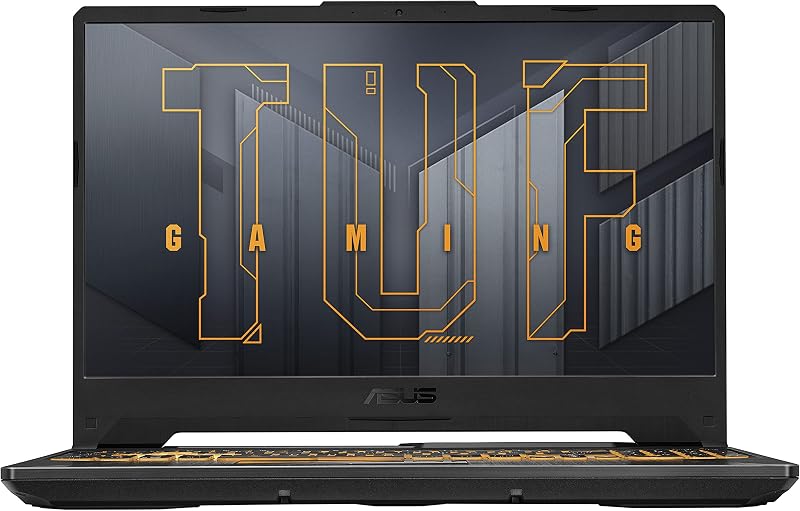
Choosing between the MSI Stealth 16 and the Razer Blade 14 comes down to a decisive trade-off between modern graphics power paired with a spacious OLED panel versus extreme physical compactness enclosed in a rigid unibody frame. While MSI stretches into a full 16-inch footprint powered by cutting-edge graphics architecture and high-capacity system memory, Razer maximizes mobility by condensing eight-core processing and high-tier graphics into an ultra-slim 14-inch metal chassis.
Select the MSI Stealth 16 if you want an expansive 240Hz OLED workspace with high-end processing headroom for stationary gaming and media creation. Pick the Razer Blade 14 if your routine demands an ultra-portable CNC aluminum machine that easily slips into any bag without sacrificing fluid gaming performance.

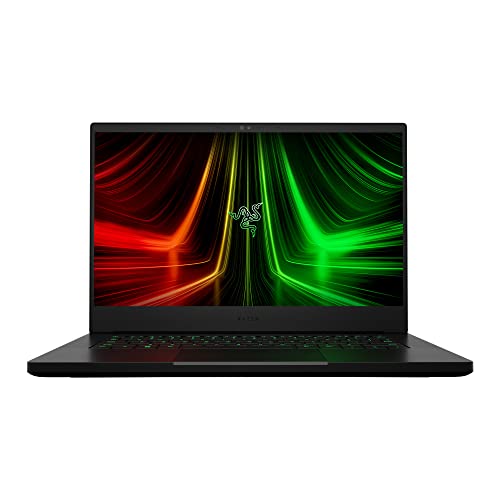
MSI Stealth 16 vs Razer Blade 14 at a Glance
| Feature | MSI Stealth 16 | Razer Blade 14 |
|---|---|---|
| Display Size and Panel | 16-inch QHD+ OLED | 14-inch QHD |
| Refresh Rate | 240Hz | 165Hz |
| Processor | Intel Core Ultra 9 386H | AMD Ryzen 9 6900HX (8 cores, up to 4.9GHz) |
| Graphics Processor | NVIDIA GeForce RTX 5070 Ti | NVIDIA GeForce RTX 3070 Ti (Up to 100W TGP) |
| Graphics Memory | 16GB GDDR7 | 16GB DDR5 SDRAM |
| System Memory | 32GB DDR5 | 16GB DDR5 (4800MHz) |
| Storage Drive | 1TB NVMe SSD | 1TB PCIe x4 SSD |
| Wireless Standard | Wi-Fi 7 | Wi-Fi 6E |
| Chassis Material & Color | Charcoal Black | CNC Aluminum, Anodized Black |
| Dimensions | 13.94″L x 9.96″W x 0.79″Th | 12.59″L x 8.66″W x 0.66″Th |
| Weight | 4.4 pounds | 3.9 pounds |
| Biometric Security | Face Recognition | Not listed |
| Best For | High-framerate gaming and creative production | Travelers wanting compact gaming power |
Graphics Performance and Architecture
Dedicated graphics hardware determines how smoothly a gaming notebook renders complex environments and whether it can handle modern artificial intelligence workloads without stuttering. In a direct hardware evaluation, the MSI Stealth 16 introduces NVIDIA GeForce RTX 5070 Ti graphics built with 16GB of GDDR7 video memory. This graphics coprocessor leverages advanced visual features like DLSS 4 and comprehensive virtual reality capabilities to render fluid frame rates across intensive titles. The inclusion of GDDR7 memory provides immense memory bandwidth, allowing the laptop to maintain high frame rates even when rendering at native resolutions.
By contrast, the Razer Blade 14 features an NVIDIA GeForce RTX 3070 Ti Laptop GPU equipped with 16GB of video memory, engineered to run at up to 100W of Maximum Graphics Power with a boost clock reaching up to 1200MHz. According to manufacturer specifications, this configuration runs up to 70 percent faster than older RTX 2070 SUPER mobile configurations and can deliver up to 100 frames per second at 1440p resolution. While this setup provides substantial gaming muscle for modern software, it belongs to an older graphics hardware generation compared to the RTX 5070 Ti found in the Stealth. If you evaluate how the broader market is shifting in comparisons like the msi stealth 16 vs razer blade 16, graphics generational improvements deliver higher architectural efficiency and advanced feature sets.
When weighing the MSI Stealth 16 or Razer Blade 14 for gaming, the graphics disparity is the single biggest performance differentiator. The GDDR7 VRAM and newer rendering pipeline in the Stealth 16 grant a definitive advantage in visual fidelity and future-proof graphics workloads, while the Blade 14 relies on a proven but older 100W implementation.
Edge: MSI Stealth 16 because its newer NVIDIA GeForce RTX 5070 Ti graphics and high-speed GDDR7 video memory deliver superior modern graphics horsepower.
Display Quality and Visual Fidelity
The screen is your primary interface for every task, dictating contrast, visual sharpness, and competitive gaming motion clarity. The MSI Stealth 16 OLED display utilizes a 16-inch QHD+ OLED panel running at a blistering 240Hz refresh rate. OLED panels feature self-lit pixels that achieve authentic black levels and virtually infinite contrast ratios, transforming both dark cinematic scenes and brightly colored virtual landscapes. Running at 240Hz, the panel refreshes fast enough to keep up with competitive multiplayer titles where split-second reaction times dictate outcomes.
The Razer Blade 14 opts for a 14-inch QHD screen operating at a 165Hz refresh rate. This configuration provides a sharp pixel density on a smaller screen diagonal, giving games a crisp, fluid presentation without straining the graphics subsystem. For fast action and general productivity, 165Hz offers great fluidity, although the listing does not specify an OLED panel technology. Similar display considerations emerge when comparing the msi stealth 16 vs samsung galaxy book4 pro, where OLED panels fundamentally redefine visual depth compared to traditional laptop screens.
Choosing the display that suits your workflow comes down to screen size and panel tech. The 16-inch 240Hz OLED on the Stealth provides an expansive canvas with deep contrast, while the 14-inch 165Hz screen on the Blade 14 keeps the machine small while maintaining high resolution. For pure visual immersion and refresh rate speed, the MSI machine holds a distinct technical advantage.
Edge: MSI Stealth 16 because its 16-inch 240Hz QHD+ OLED display offers higher refresh speeds and deeper contrast than the smaller 165Hz display.
Portability, Dimensions, and Build Quality
Chassis design dictates how convenient a notebook is to carry during daily commutes or international travel. Razer Blade 14 portability centers around a precision-engineered CNC aluminum enclosure finished in anodized black with a backlit green Razer logo. Measuring 12.59 inches long, 8.66 inches wide, and just 0.66 inches thick, the Blade 14 weighs only 3.9 pounds. This thin profile enables it to fit comfortably into tight messenger bags and compact backpack sleeves without weighing you down during extended travel.
The MSI Stealth 16 adopts a larger form factor to accommodate its 16-inch display, measuring 13.94 inches in length, 9.96 inches in width, and 0.79 inches in thickness. Tipping the scales at 4.4 pounds, the Stealth 16 remains remarkably slim for a 16-inch gaming notebook, yet it is visibly larger and roughly half a pound heavier than the Blade. When examining lighter alternatives such as the framework laptop 13 vs msi stealth 16, smaller machines consistently offer superior day-to-day mobility.
If you regularly work from coffee shops, airplane tray tables, or small lecture desks, the Razer Blade 14 review specifications demonstrate clear physical advantages. Its unibody aluminum build provides structural rigidity while reducing desk clutter, whereas the Stealth 16 demands a wider work surface and a larger backpack compartment.
Edge: Razer Blade 14 because its 3.9-pound weight, 0.66-inch thickness, and CNC aluminum chassis make it significantly easier to carry.
Processor Capabilities and System Memory
Sustained computing power relies on the underlying CPU architecture and how much system memory the machine provides for multitasking. The MSI Stealth 16 features an Intel Core Ultra 9 386H processor, engineered with AI-powered performance to handle multi-threaded computational workloads. Backing this processor is 32GB of DDR5 memory, giving the machine ample capacity to run heavy background applications, complex video editing timelines, and virtual machines without exhausting physical RAM.
The Razer Blade 14 is driven by an AMD Ryzen 9 6900HX 8-core CPU capable of reaching up to 4.9GHz of Max Boost speed. This processor handles demanding processing tasks efficiently, but the system is equipped with 16GB of DDR5 memory clocked at 4800MHz. Razer notes this DDR5 memory is 50 percent faster than previous-generation memory types, ensuring responsive application loading and game performance. However, having half the total RAM capacity of the MSI Stealth 16 limits its headroom for heavy creative multitasking. Similar memory scaling considerations arise in the framework laptop 16 vs msi stealth 16 matchup, where larger configurations support heavier multitasking.
Evaluating the MSI Stealth 16 or Razer Blade 14 for creators reveals a noticeable performance gap in resource-heavy environments. The Intel Core Ultra 9 paired with 32GB of memory in the Stealth allows for effortless switching between intensive programs, whereas the 16GB on the Blade 14 requires more conservative multitasking habits.
Edge: MSI Stealth 16 because its Intel Core Ultra 9 processor and 32GB of DDR5 memory double the multitasking headroom of the Blade.
Connectivity, Ports, and Wireless Standards
Peripheral expandability and networking throughput dictate how easily a laptop integrates into an existing desk setup or connects to modern networks. The MSI Stealth 16 comes equipped with the latest Wi-Fi 7 wireless networking standard, enabling ultra-fast wireless file transfers, reduced network latency, and high-quality video streaming on compatible routers. For peripheral connections, the listing confirms compatibility with external displays, keyboards, mice, storage drives, and printers via HDMI, Bluetooth, or Wi-Fi, along with Windows Hello face recognition for biometric logins.
The Razer Blade 14 features a well-rounded mobile port selection. Its chassis includes a built-in HDMI 2.1 port, two USB-C ports, two USB-A ports, and a 3.5mm headphone and microphone combo port. For wireless connectivity, the Blade incorporates Wi-Fi 6E. Having dual USB-A ports alongside two USB-C ports means you can connect standard flash drives, mice, and modern accessories simultaneously without packing external adapters. In portable matchups like the msi katana 15 vs razer blade 14, having dedicated full-sized ports built into a compact chassis remains a core strength.
MSI takes the lead in wireless networking technology with Wi-Fi 7, while Razer provides a clearly specified physical port array featuring dedicated HDMI 2.1 and multiple USB options. Because the MSI brings faster next-gen wireless standards while the Razer offers verified, versatile physical port variety, both configurations provide distinct real-world strengths.
Edge: Tie because the MSI Stealth 16 leads in wireless networking with Wi-Fi 7, while the Razer Blade 14 guarantees a versatile physical port layout with HDMI 2.1 and multiple USB options.
Thermals, Audio, and Daily Usability
Thermal regulation and ergonomic hardware shape how enjoyable a laptop is to use across extended gaming sessions. The Razer Blade 14 features Next-Gen Vapor Chamber Cooling, engineered with a larger liquid capacity, quiet fans, and expanded exhaust fin arrays to keep the internal hardware within stable operating temperatures. For audio, the Blade 14 packs built-in stereo speakers enhanced by THX Spatial Audio and 7.1 Codec support via HDMI, giving gamers precise spatial cues. It also features Razer Chroma RGB lighting for custom keyboard aesthetics.
The MSI Stealth 16 focuses its usability features on daily productivity and security. It includes a front-facing camera with facial recognition biometrics, allowing you to bypass manual passwords quickly. It also provides a backlit keyboard inside a minimalist Charcoal Black chassis. While the listing does not detail the exact cooling mechanism or speaker layout for the Stealth 16, its larger 16-inch chassis inherently offers more internal volume than a 14-inch notebook.
Razer provides precise details regarding its thermal engineering and spatial audio implementation, demonstrating deliberate optimizations for its compact frame. MSI emphasizes biometric convenience and a full-sized design suitable for business, gaming, and student environments.
Edge: Razer Blade 14 because of its documented vapor chamber cooling system and integrated THX Spatial Audio implementation.
Pros and Cons
MSI Stealth 16

Pros
- NVIDIA GeForce RTX 5070 Ti with GDDR7
- 16-inch 240Hz QHD+ OLED display
- Generous 32GB DDR5 system memory
- Intel Core Ultra 9 processor
- High-speed Wi-Fi 7 wireless connectivity
Cons
- Heavier 4.4-pound overall weight
- Larger footprint requires more desk space
Razer Blade 14

Pros
- Compact 3.9-pound CNC aluminum chassis
- Vapor chamber cooling with quiet fans
- Fast 14-inch QHD 165Hz display
- Dedicated HDMI 2.1 and dual USB-C ports
Cons
- Limited to 16GB DDR5 memory
- Previous generation RTX 3070 Ti graphics
Who Should Buy Each One
Choose the MSI Stealth 16 If
- You want a fast 240Hz QHD+ OLED display with vibrant colors and deep black levels.
- You require 32GB of system RAM to handle demanding content creation and heavy multitasking.
- You want next-generation graphics with the NVIDIA GeForce RTX 5070 Ti and GDDR7 memory.
- You prefer biometric logins using facial recognition on a dedicated front camera.
Choose the Razer Blade 14 If
- You prioritize a lightweight 3.9-pound machine that easily packs into small bags.
- You appreciate premium CNC aluminum unibody build quality with customizable Chroma RGB.
- You want a balanced 14-inch QHD 165Hz screen for portable gaming.
- You require a diverse port layout with built-in HDMI 2.1, dual USB-C, and dual USB-A connections.
Final Verdict
For the majority of users seeking maximum performance, visual immersion, and longevity, the MSI Stealth 16 is the superior system. Its inclusion of an Intel Core Ultra 9 processor, NVIDIA GeForce RTX 5070 Ti graphics with 16GB of GDDR7 memory, and 32GB of DDR5 RAM gives it a commanding technical lead. Adding an exceptional 16-inch 240Hz QHD+ OLED display makes it a complete desktop alternative that effortlessly manages modern gaming titles and demanding professional workflows.
However, the Razer Blade 14 remains the clear winner for frequent travelers and users who prioritize ultra-compact craftsmanship. Its 3.9-pound CNC aluminum frame, responsive 165Hz QHD display, 100W RTX 3070 Ti graphics, and vapor chamber cooling deliver reliable performance inside one of the thinnest chassis designs available. If pure portability and solid metal durability outweigh a larger OLED workspace, the Blade 14 is well worth choosing.
FAQ
Is the MSI Stealth 16 OLED display suitable for creative tasks?
Yes. The MSI Stealth 16 features a 16-inch QHD+ OLED screen running at 240Hz. OLED technology provides deep blacks and high contrast ratios, which benefit video editing, graphic design, and color-critical workflows.
Is Razer Blade 14 worth it for frequent travelers?
The Razer Blade 14 is specifically engineered for mobility. Weighing only 3.9 pounds with a slim 0.66-inch profile and a durable CNC aluminum chassis, it fits easily into standard laptop compartments and travel bags.
Can the Razer Blade 14 run games at 1440p resolution?
Yes. The Razer Blade 14 is equipped with an NVIDIA GeForce RTX 3070 Ti Laptop GPU running at up to 100W, which manufacturer testing notes can deliver up to 100 frames per second at 1440p resolution.
How much system memory do both laptops include out of the box?
The MSI Stealth 16 includes 32GB of DDR5 system memory, while the Razer Blade 14 comes configured with 16GB of DDR5 memory running at 4800MHz.
Which wireless networking standards are supported on these machines?
The MSI Stealth 16 features the newer Wi-Fi 7 networking standard for high-bandwidth file transfers, while the Razer Blade 14 supports Wi-Fi 6E connectivity.
Does the MSI Stealth 16 include biometric authentication?
Yes. The MSI Stealth 16 listing specifies built-in facial recognition supported by its front-facing camera, allowing for secure and quick biometric logins.
What physical video outputs are available on the Razer Blade 14?
The Razer Blade 14 includes a built-in HDMI 2.1 port capable of outputting video to external monitors, alongside two USB-C ports and two USB-A ports for peripheral expansion.