Choosing between the Eero 6+ and the Netgear Orbi RBK752 comes down to a fundamental network design choice: whether you need dedicated tri-band throughput to blanket a sprawling multi-story residence or a streamlined dual-band system that integrates smart home automation directly into your Wi-Fi architecture.
Select the Eero 6+ if you manage a compact home or apartment filled with smart peripherals that benefit from an internal Zigbee radio. Choose the Netgear Orbi RBK752 if you have a sprawling floor plan, demanding multi-gigabit internet service, and an array of hardware requiring dedicated wired Ethernet ports.


Eero 6+ vs Netgear Orbi RBK752 at a Glance
| Feature | Eero 6+ | Netgear Orbi RBK752 |
|---|---|---|
| Wi-Fi Generation | WiFi 6 | WiFi 6 |
| Frequency Band Class | Not listed | Tri-Band |
| Rated Wireless Speed | Supports plans up to 900 Mbps | AX4200 (Up to 4.2 Gbps) |
| Square Footage Coverage | Up to 1,500 sq. ft. | Up to 5,000 sq. ft. |
| Connected Device Capacity | 75+ devices | Up to 40 devices |
| Hardware Configuration | Standalone router (1-pack) | Router plus 1 satellite extender |
| Ethernet Ports | The listing does not specify | 3 Gigabit (Router), 2 Gigabit (Satellite) |
| Smart Home Radio | Built-in Zigbee hub with Alexa | Not listed |
| Maximum ISP Service Tier | 900 Mbps | Up to 2 Gbps |
| Embedded Security Platform | Automatic software updates | NETGEAR Armor (30-day trial included) |
| Best For | Dense smart home device networks | Wide-area high-speed multi-room coverage |
Coverage Area and Physical Property Layout
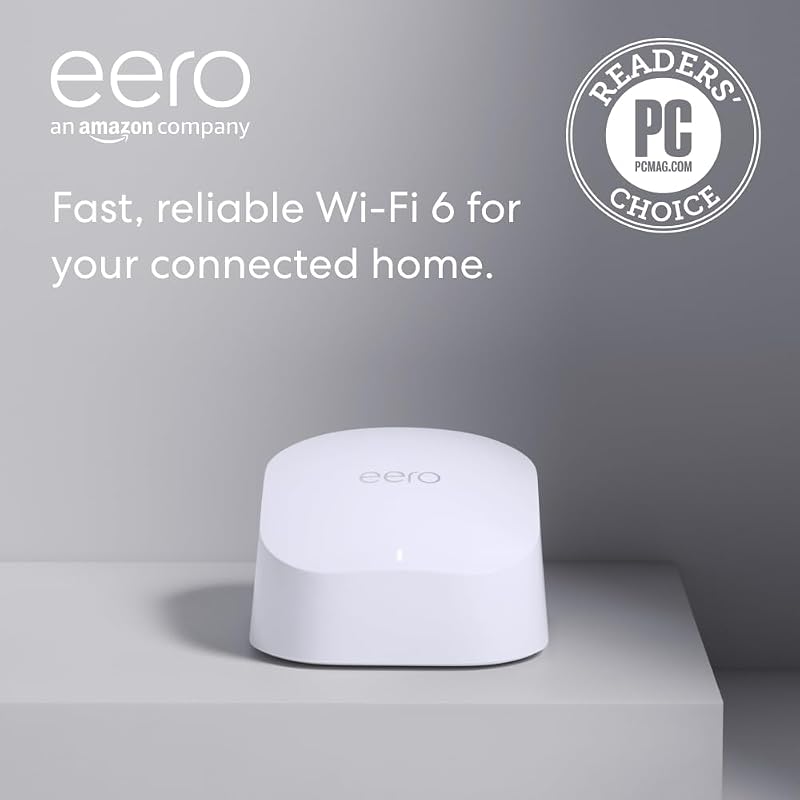
Physical coverage determines how effectively a mesh networking setup eliminates dead spots across living rooms, basements, and exterior patios. The Eero 6+ is sold in this configuration as a single-node router engineered to broadcast across living spaces up to 1,500 square feet, operating within an estimated 22-foot broadcast radius. This footprint is tailored for suburban ranches, condos, and apartments where network traffic originates from a centralized location without substantial wall interference.
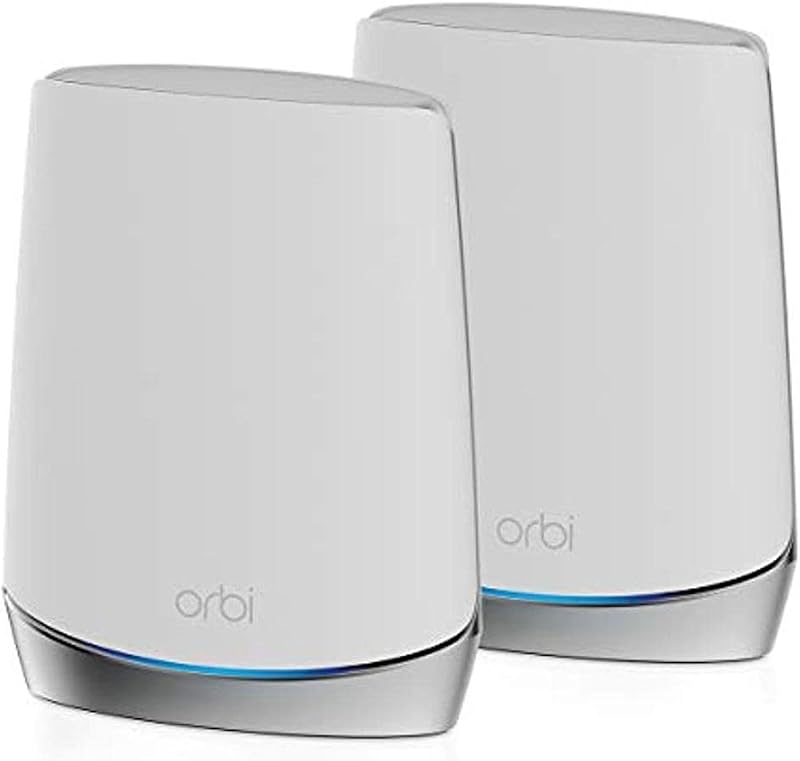
The Netgear Orbi RBK752 operates on an entirely different scale, combining a primary router unit with a dedicated satellite extender out of the box. This dual-unit system blankets up to 5,000 square feet with wireless signal, and Netgear allows property owners to add extra satellites to gain an additional 2,500 square feet of coverage per unit. Readers evaluating the netgear orbi rbk752 vs google nest wifi pro will note how Orbi utilizes six internal antennas per unit to project reliable signal across structural obstructions, stairwells, and exterior perimeter walls.
When selecting the Eero 6+ or Netgear Orbi RBK752 for large home layouts, the hardware configuration defines the user experience. The Orbi system resolves coverage problems across expansive multi-floor homes immediately upon unboxing, whereas the single Eero unit requires you to purchase separate add-on nodes through its cross-compatible ecosystem to match that square footage footprint.
Edge: Netgear Orbi RBK752 covers more than triple the square footage out of the box with an included satellite and six internal antennas.
Throughput, Bandwidth Allocation, and Gaming Latency
Throughput capacity dictates how well a wireless system handles high-definition media consumption and competitive online gaming without packet congestion. The Netgear Orbi RBK752 features an AX4200 specification that delivers total combined bandwidth up to 4.2 Gbps across a tri-band frequency class. Because the Orbi utilizes three discrete wireless bands, it can reserve an entire frequency channel strictly for backhaul communication between the router and satellite, preserving front-facing channels for client traffic.
By contrast, the Eero 6+ listing specifies support for internet plans up to 900 Mbps. It relies on proprietary TrueMesh technology, which dynamically routes data packets to circumvent interference and mitigate latency spikes during 4K video playback, video conferencing, and online multiplayer matches. However, the listing does not specify a tri-band frequency structure for this Eero model, meaning client traffic and node-to-node communications share wireless capacity under heavier multi-user loads.
Evaluating the Eero 6+ or Netgear Orbi RBK752 for gaming shows that raw pipeline headroom makes a demonstrable difference during high-load periods. The Netgear Orbi RBK752 tri-band speed framework connects to multi-gigabit broadband providers up to 2 Gbps and provides an upstream data transfer ceiling of 2100 Mbps. For households that frequently download massive game patches while running multiple high-bitrate video streams, the Orbi maintains greater overhead before introducing queue latency.
Edge: Netgear Orbi RBK752 delivers higher rated speeds up to 4.2 Gbps and tri-band routing that avoids data bottlenecking.
Smart Home Integration and Concurrent Device Loads
Modern residential networks must juggle dozens of background devices, including smart plugs, light bulbs, thermostats, and surveillance cameras. The Eero 6+ stands out in smart automation environments by incorporating an integrated Zigbee smart home hub directly inside the router chassis. This native hardware radio connects compatible Zigbee gear to Amazon Alexa without requiring homeowners to install separate proprietary bridge hubs for each brand.
The Eero 6+ is officially rated to handle 75 or more connected devices simultaneously using Wi-Fi 6 traffic management standards. This dense connection threshold ensures that numerous low-bandwidth smart home accessories do not choke router responsiveness or disrupt prioritized tasks like video conferencing. Users seeking compact automation control will find this internal architecture cleaner than stringing third-party bridges to their router.
The Netgear Orbi RBK752 takes a different architectural approach, focusing on heavy throughput across up to 40 connected devices. While the Orbi listing highlights seamless support for smart televisions, gaming consoles, mobile devices, tablets, and smart lighting, it lacks an integrated Zigbee radio. Smart home enthusiasts running extensive sensor networks may find the 40-device specification on the Orbi limiting if every single household accessory connects directly over Wi-Fi.
Edge: Eero 6+ supports over 75 simultaneous devices and integrates an onboard Zigbee smart home hub for Alexa environments.
Physical Ethernet Connectivity and Wired Backhaul Options
Wired Ethernet connectivity remains critical for workstations, local storage, media streaming boxes, and gaming rigs that demand absolute connection stability. The Netgear Orbi RBK752 provides extensive hardwired versatility by distributing physical ports across both pieces of hardware. The primary Orbi router includes three Gigabit Ethernet LAN ports, while the satellite extender adds another two Gigabit Ethernet ports, resulting in five usable Gigabit client jacks throughout the residence.
This physical port distribution allows users to plug high-priority equipment directly into the mesh satellite in a remote office or media center without running long cables back to the primary modem. Netgear lists six total ports across the system infrastructure, giving users substantial flexibility for local area networking, network switches, or wired inter-node connections.
For the Eero 6+, the Amazon product listing does not specify the exact number or configuration of onboard physical Ethernet ports. While the hardware features cross-compatible modular expandability across the Eero product line, buyers who require guaranteed multi-port wired switching out of the box will face uncertainty based on the official product data provided for this single unit.
Edge: Netgear Orbi RBK752 provides five dedicated Gigabit Ethernet client ports distributed between the primary router and satellite extender.
Security Ecosystem, Setup Experience, and Ongoing Maintenance
Network security and software reliability determine how much effort homeowners must invest into maintenance once the system is active. The Eero 6+ utilizes automated background software updates to deliver performance patches and security protocols continuously. Initial configuration and ongoing network management run through the Eero mobile app, which allows users to monitor active devices and adjust settings remotely. Additionally, the manufacturer provides free US customer service seven days a week via phone and email support.
The Netgear Orbi RBK752 approaches security through a specialized hardware and software pairing. Operating on a proprietary Netgear Linux-based operating system, the system deploys an advanced firewall and standard WPA2-PSK encryption protocols. It also includes an integrated NETGEAR Armor cybersecurity suite with an included 30-day trial, delivering real-time defense against digital intrusions alongside built-in VPN privacy for mobile and desktop hardware.
Shoppers comparing the netgear orbi rbk752 vs tp-link deco xe75 will recognize that Netgear relies on dedicated software defenses to protect unmanaged IoT hardware. While Netgear Armor requires an ongoing subscription renewal after the trial period ends, its comprehensive vulnerability scanning offers an active security layer. Meanwhile, Eero focuses on seamless operational maintenance through silent automated firmware deployments.
Edge: Tie. Eero delivers free seven-day direct phone support and automated updates, while Netgear includes dedicated NETGEAR Armor firewall protection.
Network Expansion and Hardware Ecosystems
Expanding a network as residential needs evolve is an important consideration for long-term satisfaction. The Eero 6+ features cross-compatible hardware architecture, allowing users to pair this node with other devices across the broader Eero product catalog. If your living space expands or you encounter a dead spot down an exterior corridor, you can incorporate additional nodes seamlessly using TrueMesh routing to extend coverage.
The Netgear Orbi RBK752 expands by incorporating dedicated Orbi satellites, each contributing an additional 2,500 square feet of coverage to the existing 5,000 square-foot envelope. Those who have analyzed the eero pro 6e vs netgear orbi rbk752 understand that Orbi satellites use proprietary wireless backhaul synchronization to maintain high-throughput speeds even as the overall perimeter widens.
However, Orbi satellites must remain within the compatible Orbi ecosystem, and satellite add-ons are substantial standalone pieces of hardware. Eero hardware nodes are smaller, less intrusive in living spaces, and offer broader backward and forward compatibility across the brand’s product tiers. Users seeking incremental, low-profile coverage additions will find Eero’s integration straightforward to scale.
Edge: Eero 6+ provides broader cross-generational hardware compatibility and a compact physical footprint for incremental node expansion.
Pros and Cons
Eero 6+
Pros
- Built-in Zigbee smart home hub
- Supports 75+ connected devices
- Compact single-node footprint
- Free 7-day customer support
Cons
- Covers only 1,500 sq. ft
- Limited to 900 Mbps internet plans
- Ethernet port count not specified
Netgear Orbi RBK752
Pros
- Covers up to 5,000 sq. ft
- Tri-band AX4200 throughput
- Five total Gigabit Ethernet ports
- Supports internet tiers up to 2 Gbps
Cons
- Supports up to 40 devices
- No integrated Zigbee hub radio
- Larger physical hardware footprint
View Netgear Orbi RBK752 on Amazon
Who Should Buy Each One
Choose the Eero 6+ If
- You live in an apartment, condominium, or small home up to 1,500 square feet.
- You manage a smart home ecosystem with numerous Alexa-enabled Zigbee accessories.
- Your network connects more than 40 individual devices, such as smart plugs and sensors.
- You prefer a compact router that updates automatically without requiring hands-on firewall management.
Choose the Netgear Orbi RBK752 If
- You need to blanket a large residence up to 5,000 square feet right out of the box.
- Your home broadband plan delivers gigabit or multi-gigabit speeds up to 2 Gbps.
- You require multiple Gigabit Ethernet ports on both the primary router and remote satellite.
- You regularly stream 4K or 8K content while running latency-sensitive gaming sessions across separate rooms.
Final Verdict
When assessing whether the Netgear Orbi RBK752 vs Eero 6+ matchup fits your property, the primary deciding factor is square footage alongside broadband subscription tiers. For readers questioning is Netgear Orbi RBK752 worth it, the system proves its value for large estates, multi-level homes, and households utilizing high-tier broadband packages. Its tri-band AX4200 architecture, 5,000 square feet of baseline coverage, six internal antennas, and five physical Gigabit LAN ports make it an uncompromising networking foundation for data-heavy environments. Comparing alternatives like the netgear orbi rbk752 vs tp-link deco be85 demonstrates how resilient the RBK752 platform remains for widespread coverage.
Conversely, those asking is Eero 6+ worth it will find their answer in automation density and spatial efficiency. If you are conducting an Eero 6+ review for an apartment, smaller dwelling, or gadget-heavy smart space, the built-in Zigbee hub and 75-device handling capacity deliver an unmatched, clutter-free setup. The Orbi RBK752 wins our general recommendation for whole-home throughput and extensive coverage, while the Eero 6+ remains the smarter choice for compact living spaces prioritizing smart home integration.
FAQ
Does the Eero 6+ require an extra bridge to control Zigbee smart bulbs?
No, the Eero 6+ features an integrated Zigbee smart home hub. It allows you to connect compatible smart home devices directly to your network and control them via Amazon Alexa without purchasing standalone manufacturer hubs.
Can the Netgear Orbi RBK752 handle internet plans faster than 1 Gbps?
Yes, the Netgear Orbi RBK752 is compatible with internet service provider plans up to 2 Gbps across fiber, cable, satellite, and DSL connections, providing sufficient bandwidth overhead for multi-gigabit broadband tiers.
How many wired devices can I plug into the Netgear Orbi RBK752 system?
The system provides a total of five Gigabit Ethernet ports for client devices: three ports are located on the main router unit and two additional ports are built into the satellite extender.
How many devices can connect simultaneously to the Eero 6+?
The Eero 6+ listing specifies support for 75 or more connected devices, utilizing Wi-Fi 6 technology to distribute bandwidth across active smartphones, streaming units, and smart home appliances.
How much additional coverage does an extra Orbi satellite provide?
Each additional Netgear Orbi satellite extender expands the wireless coverage footprint by up to 2,500 square feet, allowing property owners to scale past the base 5,000 square-foot system capacity.
Does the Netgear Orbi RBK752 include security protection against malware?
Yes, the Netgear Orbi RBK752 comes with NETGEAR Armor cybersecurity software, which includes a 30-day trial that provides automatic real-time hacker protection, network vulnerability scanning, and VPN data privacy.
Can I add other Eero models to expand the Eero 6+ in the future?
Yes, Eero builds its hardware with cross-compatible architecture, allowing you to incorporate other Eero mesh units into your existing network as your coverage requirements expand.