The single deciding difference between the Netgear Orbi RBK752 and the Google Nest WiFi Pro is how they allocate their wireless bands: the Orbi RBK752 reserves a high-throughput 5 GHz wireless band specifically for communication between nodes, while the Nest WiFi Pro opens up the newer, low-congestion 6 GHz wireless spectrum for client devices.
Choose the Netgear Orbi RBK752 if your priority is consistent raw throughput across a two-node layout with heavy local wired connections and dedicated node-to-node backhaul. Choose the Google Nest WiFi Pro if you own newer Wi-Fi 6E client devices and prefer automated, self-healing network management spread across three points of coverage.


Netgear Orbi RBK752 vs Google Nest WiFi Pro at a Glance
| Feature | Netgear Orbi RBK752 | Google Nest WiFi Pro |
|---|---|---|
| Wi-Fi Generation | Wi-Fi 6 (802.11ax) | Wi-Fi 6E (802.11ax) |
| Frequency Band Class | Tri-Band | Tri-Band (2.4 GHz, 5 GHz, 6 GHz) |
| Rated Speed / Data Transfer Rate | AX4200 (Up to 4.2 Gbps) | 1 Gbps (Up to 2x faster than Wi-Fi 6 on 160 MHz) |
| Maximum Upstream Rate | 2100 Mbps | Not listed |
| Total Coverage Area | Up to 5,000 sq. ft. (2-pack) | Up to 6,600 sq. ft. (3-pack) |
| Device Capacity | Up to 40 devices | Not listed |
| Ethernet Ports | 3 LAN on router, 2 LAN on satellite (6 total) | 4 ports total |
| Internal Antennas | 6 internal antennas | 2 internal antennas |
| Security Protocol | WPA2-PSK | WPA3 |
| Built-In Operating System | Netgear Proprietary Linux-Based OS | Google’s Nest OS |
| Best For | Wired devices and dedicated backhaul stability | Multi-room coverage with modern 6 GHz devices |
Wireless Generation and Frequency Spectrum
The frequency architecture represents a fundamental split in engineering philosophy between these two mesh systems. The Google Nest WiFi Pro operates on Wi-Fi 6E, incorporating the newer 6 GHz band alongside conventional 2.4 GHz and 5 GHz channels. Access to the Nest WiFi Pro 6GHz band gives compatible phones, laptops, and tablets a dedicated spectrum that is free from legacy wireless interference. Because earlier Wi-Fi 4 and Wi-Fi 5 hardware cannot access the 6 GHz spectrum, compatible client devices enjoy clean transmission channels that avoid the digital traffic common in dense neighborhoods. The listing specifies that the 6E standard on the Nest WiFi Pro delivers speeds up to twice as fast as an 80 MHz Wi-Fi 6 router when connected to client devices operating on 160 MHz channels.
In contrast, any rigorous Netgear Orbi RBK752 review must highlight that the system is built on standard Wi-Fi 6 (802.11ax) across legacy 2.4 GHz and 5 GHz frequencies. It does not possess a 6 GHz transceiver. Instead of using a third band for 6E client communication, the Orbi RBK752 implements a tri-band system where one 5 GHz band is reserved to handle traffic between the router and the satellite extender. Devices connecting to the Orbi are limited to standard Wi-Fi 6 channels, which means you cannot tap into the uncongested 6 GHz airwaves even if your smartphones or personal computers support Wi-Fi 6E. For buyers interested in seeing how older high-tier Orbi models compare against modern standards, our netgear orbi rbk752 vs 970 breakdown explains the evolution of these frequency tiers in detail.
Choosing between these two approaches depends heavily on your hardware inventory. If you already own phones, tablets, or motherboards equipped with Wi-Fi 6E chips, the Google system unlocks a broadcast frequency that the Orbi hardware physically lacks. However, if your home is populated primarily by Wi-Fi 5 and standard Wi-Fi 6 devices, the Nest Pro’s 6 GHz band cannot communicate directly with those clients. In that situation, the 6 GHz band functions behind the scenes rather than serving as an open highway for your existing gear.
Edge: Google Nest WiFi Pro, because its Wi-Fi 6E radio incorporates the pristine 6 GHz frequency band for compatible modern clients.
Throughput Architecture and Backhaul Performance
Speed ratings and throughput distribution highlight the practical differences in how these systems handle busy networks. When comparing Orbi RBK752 vs Nest WiFi Pro speed capabilities, the Orbi RBK752 advertises an AX4200 rating capable of handling cumulative data transfer rates up to 4.2 Gbps, alongside a maximum upstream rate of 2100 Mbps. The backbone of this performance is the Orbi RBK752 backhaul, which keeps communications between nodes off the main client bands. By isolating node synchronization on its own lane, the Orbi ensures that heavy data transfers between the router and satellite do not degrade the wireless bandwidth available to local devices streaming 4K or 8K content.
The Google Nest WiFi Pro listing reports a baseline data transfer rate of 1 Gbps, relying on intelligent dynamic switching across its three bands (2.4 GHz, 5 GHz, and 6 GHz). Unlike systems with a dedicated, locked wireless pipeline between towers, the Nest system dynamically optimizes network traffic and performance based on real-time demands. While this design allows flexible channel management, sharing bands between client devices and mesh backhaul can introduce throughput throttling at the distant nodes if environmental obstructions disrupt the node-to-node wireless link. Those evaluating Wi-Fi 6E alternatives with different backhaul topologies can read our netgear orbi rbk752 vs tp-link deco xe75 analysis for another perspective on band allocation.
When assessing Orbi RBK752 vs Nest WiFi Pro for gaming, this architectural separation becomes critical. Online games demand low packet jitter and minimal ping spikes over sustained sessions. The dedicated wireless backhaul of the Orbi RBK752 isolates gaming traffic from competing household activity more predictably than a shared dynamic band. The Nest WiFi Pro addresses this through software by automatically prioritizing video calls and active web sessions, but the raw hardware headroom and dedicated transmission channel of the Orbi system provide a more stable foundation for heavy local file transfers and competitive multiplayer sessions.
Edge: Netgear Orbi RBK752, due to its AX4200 speed rating and dedicated wireless backhaul band that shields node traffic from client interference.
Coverage Footprint and Multi-Node Distribution
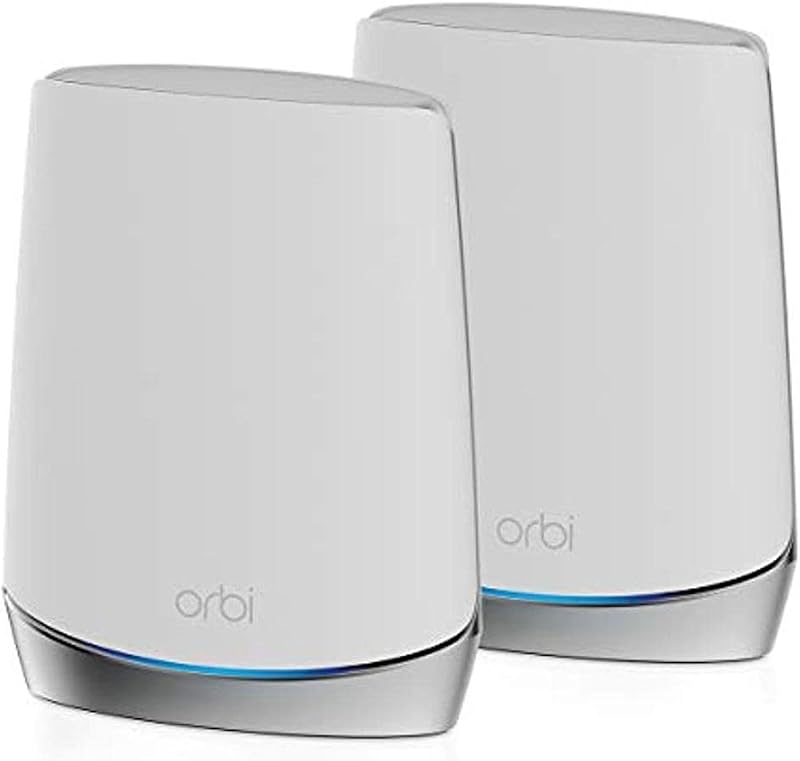
The total square footage and node counts provided in the box determine how effectively each package eliminates dead spots. In the Netgear Orbi RBK752 or Google Nest WiFi Pro for large home debate, the physical distribution of hardware plays a massive role. The standard RBK752 package includes two physical units: one central mesh router and one satellite extender. Together, this two-pack is rated to cover properties up to 5,000 square feet, with the option to expand coverage by up to 2,500 square feet for each additional satellite purchased separately. Because each Orbi unit houses a high-power internal array of 6 antennas, a single satellite pushes signal through floors and exterior walls across broad physical spans.
The Google Nest WiFi Pro package featured here includes three separate router nodes, delivering a combined coverage rating of up to 6,600 square feet. Google notes that each individual router provides up to 2,200 square feet of coverage. Having three separate physical nodes gives you significantly more flexibility when designing your home network layout. In multi-story buildings, L-shaped floor plans, or homes with heavy interior framing, placing three decentralized nodes often proves more effective at routing signals around physical obstacles than relying on two larger, centralized towers. For shoppers cross-shopping other multi-pack designs, our google nest wifi pro vs asus zenwifi xt9 comparison highlights how node density impacts whole-home layout strategies.
The trade-off between these two approaches comes down to power per node versus node distribution. A two-pack Orbi configuration places dense transmission clusters at two specific locations, which excels in wide-open floor plans or two-story homes with clear line of sight. The three-pack Nest WiFi Pro configuration distributes three lower-profile access points across your living space, making it easier to ensure that bedrooms, basements, and detached home offices sit in close proximity to an active mesh unit.
Edge: Google Nest WiFi Pro, thanks to its 3-pack configuration offering 6,600 square feet of customizable multi-room coverage.
Wired Connectivity and Local Ethernet Ports
Local Ethernet ports are essential for homeowners running physical cables to smart TVs, desktop workstations, network storage drives, and gaming consoles. The Netgear Orbi RBK752 stands out significantly in this department. The RBK752 system includes 3 Gigabit Ethernet ports on the router and 2 Gigabit Ethernet ports on the satellite, providing 5 usable downstream Gigabit LAN ports across the two units, with the listing citing 6 total ports when including the WAN interface. This generous port allotment allows users to hardwire high-bandwidth devices directly into the mesh node in multiple rooms without purchasing auxiliary unmanaged network switches.
The Google Nest WiFi Pro provides fewer physical connection points. The listing indicates a total of 4 ports across the entire three-pack system, while noting a LAN port bandwidth specification of greater than or equal to 2.4 Gbps. Because each standalone Nest WiFi Pro node serves as an interchangeable router unit, the physical chassis carries minimal Ethernet real estate. Once the primary node uses an Ethernet port to connect to your internet service provider’s modem or optical terminal, the remaining wired ports across the network are limited. If you plan to wire gaming systems, media players, and desktop PCs directly to your mesh points, the Nest hardware will require external switch hardware to accommodate multiple cables.
The presence of 2 dedicated Gigabit ports on the Orbi satellite makes it particularly useful for home office spaces and entertainment centers. You can position the satellite near a media center and immediately plug in an Apple TV, PlayStation, or local desktop, bypassing wireless latency altogether. With the Nest WiFi Pro, your ability to integrate wired hardware in multiple rooms is constrained by the limited physical port count on each individual node. For users requiring extreme wired speeds alongside newer wireless standards, comparing high-end alternatives like the netgear orbi rbk752 vs tp-link deco be85 illustrates where wired mesh capabilities are heading.
Edge: Netgear Orbi RBK752, which provides 3 Gigabit LAN ports on the router and 2 Gigabit LAN ports on the satellite.
Hardware Design and Antenna Array Engineering
Internal hardware configurations influence how a mesh node manages multiple streams of wireless data simultaneously. The Netgear Orbi RBK752 is engineered with 6 internal antennas per unit, supporting robust beamforming and spatial streaming capabilities across connected equipment. The listing confirms support for up to 40 connected devices under its AX4200 umbrella. These 6 antennas allow the Orbi to sustain high-density wireless environments, making it capable of handling multiple 4K and 8K UHD video streams, continuous security camera uploads, and background audio streaming simultaneously without dropping connections.
The Google Nest WiFi Pro takes a much more compact approach to its physical hardware. The listing indicates 2 internal antennas per node. While modern beamforming algorithms allow 2 antennas to manage standard consumer traffic efficiently, a dual-antenna configuration provides fewer spatial paths than a 6-antenna array. This difference explains why Google leans heavily on distributing three physical units throughout the home: smaller, less complex antenna arrays perform best when the client device is geographically closer to the node. Those considering ultra-premium mesh hardware can observe similar engineering contrasts in our netgear orbi 970 vs google nest wifi pro hardware overview.
The physical footprint also mirrors these antenna counts. The Orbi RBK752 uses substantial vertical towers designed to dissipate heat from its internal amplifiers and complex antenna array. The Nest WiFi Pro utilizes a compact, smooth gloss shell that blends into home decor. If you have limited shelf space and want unobtrusive nodes, the Nest hardware is easier to hide. If your objective is raw antenna diversity to cut through dense walls and maintain long-distance connection stability, the Orbi’s 6-antenna construction offers greater physical hardware capacity.
Edge: Netgear Orbi RBK752, backed by 6 internal antennas designed for high-density multi-device environments.
Software Automation, Operating Systems, and Security Protocols
The management interface and underlying security frameworks on these systems reflect contrasting user experiences. A comprehensive Google Nest WiFi Pro review must focus on Google’s software integration. Running Google’s Nest OS, the system operates with exceptional autonomy. It monitors itself constantly, diagnoses internal network issues, and automatically resolves common connection errors without requiring manual reboots. The software also automatically adjusts traffic performance by prioritizing video conferencing and active browsing sessions. Furthermore, security is modernized with native WPA3 protocol support, secure booting, and automated software updates that prevent unauthorized firmware execution.
The Netgear Orbi RBK752 runs on Netgear’s proprietary Linux-based operating system and is managed through the Orbi mobile application. Security encryption is anchored by the WPA2-PSK protocol, accompanied by an advanced router firewall. For broader digital protection, Netgear includes NETGEAR Armor software, which acts as an automatic shield against hackers and provides VPN privacy features for connected devices. However, the listing notes that NETGEAR Armor is supplied as a 30-day trial, after which ongoing network security features require an active software subscription to maintain that specific layer of defense.
For smart home automation and hands-off operation, the Nest WiFi Pro holds a distinct advantage. Google’s Nest OS gives you straightforward tools to view all connected devices, create dedicated guest networks with distinct passwords, and instantly pause internet access for unknown hardware. Its built-in diagnostic and self-healing tools remove the frustration of troubleshooting routine network hiccups. While the Orbi gives tech-oriented users a familiar Linux-based platform with robust baseline controls, the automated maintenance routines and standard WPA3 encryption on the Nest WiFi Pro provide a more seamless software experience.
Edge: Google Nest WiFi Pro, due to native WPA3 security, automated issue resolution, and hands-free network optimization.
Pros and Cons
Netgear Orbi RBK752
Pros
- Dedicated tri-band wireless backhaul
- AX4200 speed rating up to 4.2 Gbps
- Five usable Gigabit LAN ports across nodes
- Six internal antennas for dense coverage
- Compatible with internet plans up to 2 Gbps
Cons
- Lacks the newer 6 GHz Wi-Fi 6E band
- Security features require subscription after 30-day trial
- Two-pack covers less area than three-pack Nest
View Netgear Orbi RBK752 on Amazon
Google Nest WiFi Pro

Pros
- Wi-Fi 6E support with clean 6 GHz band
- Three-pack covers up to 6,600 square feet
- Modern WPA3 encryption and secure boot
- Automated self-monitoring and issue resolution
- Automatic traffic prioritization for video calls
Cons
- Incompatible with older Google Wifi systems
- Only four total Ethernet ports across three nodes
- Fewer internal antennas per unit
View Google Nest WiFi Pro on Amazon
Who Should Buy Each One
Choose the Netgear Orbi RBK752 If
- You need multiple Gigabit Ethernet LAN ports on both the main router and remote satellite to wire PCs, consoles, and media gear
- Your home relies primarily on Wi-Fi 5 and Wi-Fi 6 devices that benefit directly from a dedicated 5 GHz backhaul channel
- You stream high-bitrate 4K or 8K content while running latency-sensitive competitive multiplayer games across several rooms
- You prefer large-format mesh towers equipped with 6 internal antennas for penetrating thick internal walls
Choose the Google Nest WiFi Pro If
- You own modern smartphones, tablets, or laptops equipped with Wi-Fi 6E chips that can utilize the 6 GHz wireless band
- You have a sprawling or irregular home layout up to 6,600 square feet that benefits from distributing 3 separate physical nodes
- You want automated self-monitoring software that diagnoses and resolves routine network issues without manual reboots
- You demand native WPA3 security protocols and secure boot protections straight out of the box
Final Verdict
When weighing the Google Nest WiFi Pro vs Netgear Orbi RBK752, the right choice hinges on whether your home values raw local throughput architecture or modern spectrum versatility. For the majority of households running demanding wired entertainment centers, competitive gaming setups, and multi-device streaming, the Netgear Orbi RBK752 remains the superior throughput workhorse. Its dedicated tri-band backhaul shields inter-node data from congestion, its 6 internal antennas maintain robust connections across 5,000 square feet, and its generous supply of 5 total Gigabit LAN ports eliminates the need for extra network switches in your home office or living room.
On the other hand, the Google Nest WiFi Pro wins if your priority is future-proofing for Wi-Fi 6E hardware and covering expansive, irregular floor plans. With three physical nodes delivering up to 6,600 square feet of coverage, access to the clean 6 GHz frequency band, and intelligent self-healing software managed by Google’s Nest OS, it provides a low-maintenance, aesthetically discreet mesh solution. If your household already features 6 GHz compatible devices and you want a network that optimizes itself automatically, the Google Nest WiFi Pro is the ideal match.
FAQ
Is Netgear Orbi RBK752 worth it for homes without Wi-Fi 6E devices?
Yes, the Netgear Orbi RBK752 is particularly well suited for homes using standard Wi-Fi 6 and Wi-Fi 5 gear. Because it uses its tri-band system to reserve a full 5 GHz wireless band solely for dedicated node-to-node backhaul, your existing devices receive steady wireless speeds without competing against network management traffic.
Is Google Nest WiFi Pro worth it if I already have older Google Wifi nodes?
The Google Nest WiFi Pro uses Wi-Fi 6E technology and is explicitly not backward compatible with previous generations of Google Wifi or Nest Wifi systems. If you purchase the Nest WiFi Pro, you must deploy it as an entirely independent mesh system rather than adding it to an older Google mesh setup.
Can I add more satellites to the Netgear Orbi RBK752 system?
Yes, the Netgear Orbi RBK752 can be expanded. The listing confirms that you can extend coverage by up to 2,500 square feet with each additional satellite, which are sold separately, allowing you to scale the system if your coverage needs grow.
How does the Orbi RBK752 backhaul operate compared to the Nest WiFi Pro?
The Orbi RBK752 utilizes a dedicated wireless backhaul band within its AX4200 tri-band architecture, ensuring communication between the router and satellite remains completely separate from client devices. The Nest WiFi Pro dynamically balances communication across its 2.4 GHz, 5 GHz, and 6 GHz bands using automated software management.
Does the Google Nest WiFi Pro support parental controls and guest networks?
Yes, the Google Nest WiFi Pro includes parental controls and guest network functionality built into its management software. You can pause internet access for specific devices, manage network permissions, and establish a distinct guest network with its own password so visitors do not need access to your primary network credentials.
Which system provides more wired Ethernet ports for gaming consoles and computers?
The Netgear Orbi RBK752 provides significantly more wired connectivity. It features 3 Gigabit Ethernet LAN ports on the primary router and 2 Gigabit Ethernet LAN ports on the satellite, whereas the Google Nest WiFi Pro package provides a total of only 4 ports across all three nodes combined.